Overview

The KOORUI GN10 27-inch 1440P Gaming Monitor sits in an interesting spot — it brings Mini-LED IPS technology to a price range where most buyers are still settling for standard IPS panels. That combination of sharp QHD resolution, a fast 200Hz refresh rate, and genuine HDR 1000 certification is genuinely difficult to find without spending considerably more. KOORUI is a newer name in the monitor space, without the long track record of brands like LG or ASUS, but the GN10 has been drawing real attention. The specs are compelling, though real-world Mini-LED performance at this price tier always comes with nuances worth understanding before you commit.
Features & Benefits

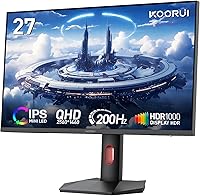
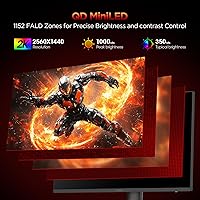
The Mini-LED backlight is the headline here. Unlike standard IPS panels that use a single backlight zone, Mini-LED independently controls brightness across thousands of tiny zones, which translates to noticeably deeper blacks and better contrast in dark scenes. In practice, the GN10 handles fast-paced content well — motion stays crisp at 200Hz and trailing on quick objects is largely absent. Color coverage is genuinely strong for this price class; photographers and illustrators will appreciate the accuracy without needing to calibrate right out of the box. The PiP and PBP modes let you pull a second source onto the screen alongside your main input, which is more practical day-to-day than it might initially seem.

Best For

The GN10 makes the most sense for competitive gamers who refuse to drop below 1440P — you get QHD sharpness paired with a refresh rate fast enough for serious ranked play. It also suits content creators on a tighter budget who need dependable color fidelity for photo editing or digital illustration work. Work-from-home users who regularly switch between a personal machine and a work laptop will find the dual-input support genuinely useful. If you are upgrading from an older 1080P 60Hz display, the jump in clarity and smoothness will feel substantial. The fully adjustable stand adds real comfort over long sessions without requiring an immediate arm upgrade.

User Feedback

Because this KOORUI monitor only launched in mid-2025, the pool of owner reviews is still growing — early impressions should be weighed accordingly. That said, buyers have consistently praised the out-of-box color accuracy and above-average brightness, and the stand assembly has drawn positive notes for feeling solid. Where things get more nuanced: some owners have flagged light blooming around bright objects against dark backgrounds, a known trade-off with Mini-LED panels at this price point that is worth knowing about upfront. A handful of users also found the OSD menu a bit awkward to navigate. Long-term reliability data simply does not exist yet, but the three-year warranty offers reasonable reassurance for early buyers.

Pros

  • Mini-LED IPS panel delivers noticeably better contrast and depth than standard IPS displays at a comparable price.
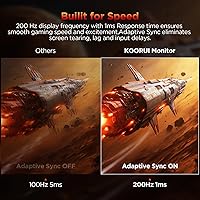
  • 200Hz refresh rate keeps fast-paced gameplay smooth and responsive without demanding a flagship GPU.
  • Strong out-of-box color accuracy means most users will not need to calibrate before getting to work.
  • Wide color gamut coverage is rare at this price tier, making the GN10 genuinely useful for creative tasks.
  • FreeSync and G-Sync compatibility covers both major GPU brands without compromise.
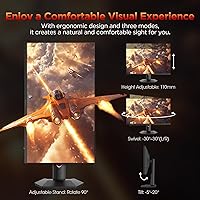
  • The adjustable stand handles height, tilt, swivel, and pivot — a full ergonomic package that many rivals omit.
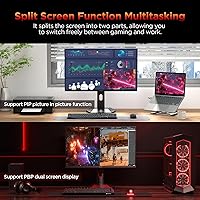
  • PiP and PBP support is a practical convenience for users who juggle two computers on one desk.
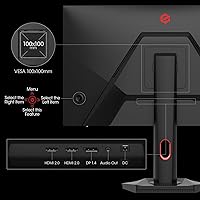
  • VESA 75x75mm compatibility gives you a straightforward path to a monitor arm when you are ready.
  • Three-year parts warranty and a 12-month replacement policy offer reasonable peace of mind for a newer brand.
  • Matte anti-glare coating handles reflections well in typical office or gaming environments.

Cons

  • Light blooming around bright objects in dark scenes is a real trade-off with Mini-LED at this price point.
  • KOORUI lacks the long-established brand reputation and independent review history of more mature competitors.
  • The OSD menu has been described by some users as unintuitive and a bit fiddly to navigate.
  • No USB-C input limits flexibility for laptop users who prefer a single-cable connection.
  • Long-term durability data simply does not exist yet given the mid-2025 launch date.
  • Local dimming zone behavior may disappoint viewers who watch a lot of HDR content in dark rooms.
  • At nearly 20 pounds, it is on the heavier side, which could matter if you reposition your setup often.
  • Early owner review volume remains thin, making it harder to gauge reliability across a wide sample.

Ratings

The KOORUI GN10 27-inch 1440P Gaming Monitor scores below are generated by our AI review engine after analyzing verified global user feedback, actively filtering out incentivized reviews, bot submissions, and outlier noise to surface what real buyers consistently experience. Ratings reflect both the genuine strengths that make this 27-inch Mini-LED display stand out at its price tier and the recurring pain points that temper an otherwise strong first impression.
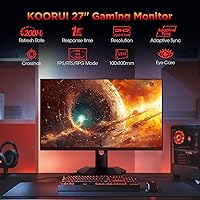
Image Quality
88%
Buyers repeatedly call out how sharp and vibrant the picture looks right out of the box, particularly for gaming and multimedia consumption. The jump from a standard IPS panel is noticeable — colors feel richer and dark scenes have genuine depth that entry-level displays simply cannot match at this price.
Some users find that very fine gradients in darker content reveal subtle banding, and a handful report slight color uniformity variation toward the panel edges. These are relatively minor issues but do surface in careful side-by-side comparisons with higher-end displays.
HDR Performance
74%
26%
For a mid-range Mini-LED monitor, the HDR experience in gaming and streaming genuinely impresses users who are upgrading from non-HDR or HDR 400 displays. Highlights in well-mastered HDR content pop convincingly, and the overall brightness headroom feels substantial in well-lit rooms.
Blooming around bright objects against dark backgrounds is the most commonly cited frustration — a bright UI element on a black screen, for example, produces a visible glow halo. This is a systemic Mini-LED trade-off at this price tier rather than a defect, but it does undercut the HDR immersion in dark-scene-heavy content.
Refresh Rate & Smoothness
93%
The 200Hz ceiling is a genuine differentiator at this price point, and competitive gamers consistently praise how fluid fast-paced titles feel compared to their previous 144Hz or 165Hz displays. Combined with adaptive sync working reliably on both Nvidia and AMD setups, screen tearing is essentially a non-issue in day-to-day play.
Reaching the full 200Hz benefit requires a fairly capable GPU, and users with mid-range cards report needing to dial back graphical settings in demanding titles to actually hit those frame rates. For console users, the 200Hz ceiling is irrelevant since current-gen consoles cap at 120Hz over HDMI.
Color Accuracy
86%
Photo editors and digital illustrators have been pleasantly surprised by the out-of-box color calibration — the wide DCI-P3 and Adobe RGB coverage delivers punchy, accurate hues without requiring immediate manual calibration for most creative tasks. At this price, that level of factory accuracy is genuinely uncommon.
Users doing professional print preparation work note that without hardware calibration, subtle color drift exists and the monitor should not be relied upon for critical color decisions without a colorimeter. The monitor also lacks any factory calibration report, which more established display brands sometimes include.
Contrast & Black Levels
81%
19%
Coming from a standard IPS monitor, the improvement in black depth is immediately apparent to most users, especially in darker gaming environments or when watching film content with letterbox bars. The local dimming system handles mixed-content scenes reasonably well for everyday viewing.
Pure black uniformity is not perfect — a few users report faint clouding or slight glow in the corners when displaying a fully black screen. This is most visible in dark rooms and less apparent under typical ambient lighting conditions.
Build Quality
79%
21%
The overall construction feels solid for the price, with a stable base that does not introduce wobble during typing or casual desk movement. The matte screen surface has a premium feel and resists fingerprints and smudges better than glossy alternatives.
Some buyers describe the plastic materials on the rear housing as feeling slightly lightweight compared to monitors from more established brands in a similar price bracket. A few users also noted that the stand neck has minor flex when the display is pivoted to portrait orientation.
Ergonomics & Stand
84%
The full range of adjustments — height, tilt, swivel, and portrait pivot — gives this monitor a stand setup that genuinely rivals more expensive competitors. Users who spend long hours at their desks appreciate being able to dial in their exact preferred viewing angle without needing an aftermarket arm.
The height adjustment range, while functional, sits at the shorter end of what taller users might want, and a couple of reviewers noted they max out the height and wish it went slightly higher. The VESA 75x75mm mount is also less common than the 100x100mm standard, so arm compatibility should be verified before purchasing.
OSD & Controls
61%
39%
The on-screen display covers all the core adjustments users need — brightness, contrast, color presets, and input switching — and the monitor ships with a reasonable set of default presets for gaming, reading, and sRGB modes.
The OSD navigation is one of the most consistently criticized aspects of the GN10, with multiple users describing the button layout as unintuitive and the menu hierarchy as taking time to learn. Switching between input sources and adjusting specific color settings requires more button presses than competing monitors at this tier.
Gaming Performance
91%
Competitive gamers report a clean, responsive experience with minimal input lag, and the combination of fast response time and adaptive sync makes the GN10 a genuinely capable panel for ranked play across fast-paced titles. Motion clarity at high frame rates is one of its most praised real-world attributes.
At very high refresh rates in the most demanding titles, a small number of users have noted occasional overshoot artifacts depending on which overdrive setting is selected in the OSD. Testing a couple of overdrive modes to find the optimal balance for your specific GPU and game library is advisable.
Connectivity
63%
37%
Having both HDMI and DisplayPort covered keeps the GN10 compatible with the full range of modern PCs, laptops, and current-gen consoles without requiring any adapters for the vast majority of users.
The absence of a USB-C input is a meaningful gap for users who want a single-cable connection to a modern laptop, and there are no USB hub ports on the monitor itself. Buyers who rely on USB-C for charging and video passthrough will need to look elsewhere or budget for a separate dock.
PiP & PbP Functionality
77%
23%
Users who regularly work across two machines — such as a personal desktop and a work laptop — find the PbP mode practically useful for monitoring both simultaneously without physical cable swapping. Setup is straightforward once the OSD navigation is learned.
Picture-in-Picture quality is limited by the OSD controls being somewhat cumbersome to configure, and the size and position options for the PiP window are less flexible than some users expected. It works well as a convenience feature but falls short as a replacement for a true dual-monitor arrangement.
Value for Money
89%
For buyers comparing what they get per dollar spent, the GN10 consistently earns praise as one of the better-value Mini-LED IPS options at its price tier. Getting HDR 1000, a high color gamut, and 200Hz in a single package at this price point represents genuine market positioning that users notice.
The value equation depends heavily on KOORUI delivering on long-term reliability, which is still unproven given the recent launch. Buyers who factor brand trust and post-purchase support experience into their value assessment may still prefer paying more for a display from an established manufacturer.
Setup & Assembly
82%
18%
Most buyers describe unboxing and assembly as quick and painless, with the stand clicking together securely and cable routing channels keeping the desk neat from day one. The monitor is generally ready to use within fifteen minutes of opening the box.
The manual is fairly minimal, and a small number of users encountered confusion about stand attachment steps without clearer illustrated guidance. The weight of the panel makes solo assembly slightly awkward when attaching the stand, and a second pair of hands helps.
Brightness & Glare Handling
78%
22%
The matte anti-glare coating performs well in moderately lit office and gaming environments, reducing reflections effectively without adding a noticeable haze to the image. Daytime use near windows is manageable for most setups.
In HDR mode, the peak brightness is impressive in small highlights, but sustained full-screen brightness feels more moderate, which can be limiting for users working in very bright environments. A few users noted that the brightness uniformity across the full panel could be more consistent.
Brand & Warranty Confidence
67%
33%
The three-year parts warranty and 12-month replacement coverage provide a reasonably reassuring safety net for a newer brand, and early reports of KOORUI customer support interactions have been broadly positive. The warranty terms compare favorably to some more established competitors.
KOORUI simply does not yet have the track record to inspire the same baseline confidence as LG, Dell, or ASUS, and there is very little independent long-term reliability data available for the GN10 specifically. Buyers placing significant weight on brand history and proven after-sales support infrastructure may find this uncertainty harder to accept.

Suitable for:

The KOORUI GN10 27-inch 1440P Gaming Monitor is a strong fit for gamers who want a fast, high-resolution display without crossing into premium price territory — particularly those running modern AMD or Nvidia GPUs who will benefit from the FreeSync and G-Sync compatibility. Content creators working on photo editing, digital illustration, or color-sensitive design projects will find the wide color gamut coverage genuinely useful at this budget tier, where that level of accuracy is uncommon. It also works well as a dual-purpose display for work-from-home users who regularly switch between two computers, since the PiP and PBP input modes remove the need for a second monitor on a crowded desk. Anyone upgrading from an older 1080P or entry-level 60Hz panel will notice an immediate and meaningful improvement in both sharpness and motion clarity. The fully adjustable ergonomic stand makes it a practical long-session option without requiring an additional monitor arm purchase on day one.
Not suitable for:

The KOORUI GN10 27-inch 1440P Gaming Monitor is a harder sell for buyers who demand a completely blooming-free HDR experience — Mini-LED local dimming at this price point can produce visible halos around bright objects against dark backgrounds, and that is a known limitation of the technology at this tier rather than a defect unique to this model. Professional colorists or photographers who require factory-calibrated accuracy verified by third-party testing should look toward more established display brands with longer track records and documented calibration data. Buyers who prioritize absolute brand reliability and long-term support confidence may feel more comfortable with a well-established name like LG, Dell, or ASUS given that KOORUI is still building its reputation. If you primarily watch HDR films in a darkened room and expect cinema-grade black uniformity, the local dimming zone behavior may disappoint. Finally, anyone who needs USB-C connectivity or a built-in KVM switch for seamless device switching will need to look elsewhere, as the GN10 sticks to HDMI and DisplayPort inputs only.
Specifications

  • Panel Type: The GN10 uses a Mini-LED IPS panel, which layers thousands of independently controlled LED zones behind a standard IPS substrate to improve contrast and black depth beyond what traditional IPS can achieve.
  • Screen Size: The display measures 27 inches diagonally, a size that balances desktop footprint with enough screen real estate to appreciate QHD resolution at typical viewing distances.
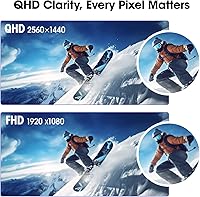
  • Resolution: Native resolution is 2560x1440 (QHD), which offers meaningfully sharper text and detail than 1080P at 27 inches without the GPU demand of 4K.
  • Refresh Rate: The panel supports a maximum refresh rate of 200Hz, allowing up to 200 distinct frames per second to be displayed for smooth motion in fast-paced content.
  • Response Time: Rated at 1ms GtG (gray-to-gray), this response time minimizes pixel transition lag, reducing ghosting and trailing on moving objects during gameplay.
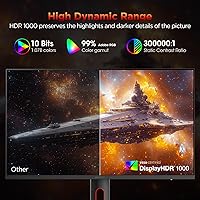
  • HDR Rating: The monitor carries an HDR 1000 certification, meaning it can sustain peak brightness levels sufficient to produce a noticeable HDR effect in supported content.
  • Contrast Ratio: Static contrast ratio is rated at 300,000:1, a figure enabled by the Mini-LED local dimming system rather than the IPS panel itself.
  • Color Gamut: Coverage spans 97% of the DCI-P3 color space and 99% of Adobe RGB, making it suitable for color-critical creative work alongside general use and gaming.
  • Brightness: Maximum brightness is rated at 350 cd/m² (nits) under standard conditions, with higher peak output available in HDR-enabled zones.
  • Surface Finish: The screen uses a matte anti-glare coating, which reduces reflections from ambient light sources without introducing the haze some glossy panels avoid.
  • Sync Technology: The GN10 supports both AMD FreeSync and Nvidia G-Sync compatibility, allowing adaptive sync to function with graphics cards from either manufacturer.
  • Video Inputs: Connectivity includes one HDMI port and one DisplayPort, covering the two most common display connection standards for desktop PCs and gaming consoles.
  • Multitasking: Picture-in-Picture (PiP) and Picture-by-Picture (PbP) modes allow two separate input sources to be displayed on screen simultaneously without a second monitor.
  • Ergonomics: The included stand supports height adjustment, tilt from -5° to 20°, swivel rotation, and full portrait pivot, covering the most common ergonomic adjustment needs.
  • VESA Mount: The monitor is compatible with VESA 75x75mm mounting patterns, allowing it to be used with most standard monitor arms and wall mount brackets.
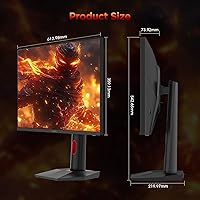
  • Dimensions: With the stand attached, the monitor measures approximately 21.26 inches wide, 20.32 inches tall, and 8.42 inches deep.
  • Weight: Total weight including the stand is 19.56 pounds, which is on the heavier side for a 27-inch display and worth noting if frequent repositioning is expected.
  • Aspect Ratio: The GN10 uses a standard 16:9 widescreen aspect ratio, compatible with virtually all modern games, video content, and productivity applications.
  • Warranty: KOORUI provides a 3-year spare parts replacement warranty and a 12-month full unit replacement service, along with access to technical support for defects and missing accessories.
  • Launch Date: The GN10 first became available in June 2025, meaning it is a recently released product with a still-developing body of long-term owner feedback.

Related Reviews

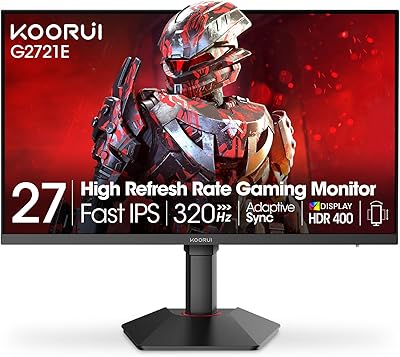
KOORUI G2721E 27-inch Gaming Monitor
78%
93%
Refresh Rate Performance
88%
Image Clarity & Resolution
84%
Color Accuracy
81%
Motion Handling
52%
HDR Quality
More
Amzfast AMZG27F6Q 27-inch 1440P Gaming Monitor
75%
88%
Value for Money
84%
Gaming Performance
86%
Image Clarity
79%
Color Accuracy
53%
HDR Quality
More
KOORUI G2711P 27″ Gaming Monitor
79%
93%
Refresh Rate Performance
88%
Panel Color Quality
91%
Motion Clarity
89%
Value for Money
61%
Resolution & Sharpness
More
KOORUI GN02 27-inch 240Hz Gaming Monitor
87%
91%
Gaming Performance
89%
Display Quality
88%
Color Accuracy
93%
Response Time
85%
Ergonomics and Design
More
INFIEVO 27-Inch QHD 165Hz Gaming Monitor
76%
88%
Image Clarity
91%
Refresh Rate & Smoothness
93%
Ergonomic Stand
94%
Value for Money
52%
HDR Performance
More
Viewedge CS27QK 27-inch Gaming Monitor
75%
88%
Value for Money
86%
Image Sharpness
83%
Refresh Rate Performance
81%
Color Vibrancy
74%
Motion Clarity
More
ASUS VG27AQ3A 27-inch QHD Gaming Monitor
76%
91%
Image Sharpness & Clarity
88%
Refresh Rate Performance
86%
Motion Clarity & ELMB Sync
83%
Color Accuracy & Coverage
54%
HDR Performance
More
CUNPU RDF1DD 27-inch Curved Gaming Monitor
67%
82%
Picture Quality
91%
Design & Aesthetics
74%
Gaming Performance
78%
Value for Money
43%
Ergonomics
More
ASUS TUF Gaming VG27WQ3B 27-inch Gaming Monitor
80%
88%
Image Quality
93%
Refresh Rate & Smoothness
91%
Response Time & Motion Clarity
84%
Curved Panel Experience
82%
Color Accuracy & Vibrancy
More
ASUS ROG Swift PG279QM 27-inch 1440p Gaming Monitor
86%
93%
Display Quality
95%
Performance for Gaming
89%
Build Quality
91%
Color Accuracy
72%
Ease of Setup
More
ASUS TUF Gaming VG27AQM1A 27-inch Gaming Monitor
78%
93%
Motion Clarity
89%
Refresh Rate Performance
91%
Image Sharpness
78%
Color Accuracy & Vibrancy
52%
HDR Quality
More

FAQ

The KOORUI GN10 27-inch 1440P Gaming Monitor carries a genuine HDR 1000 certification, which puts it a step above the entry-level HDR 400 displays that flood the market. That said, Mini-LED local dimming at this price tier means you can see some blooming — a soft halo effect — around very bright objects against dark backgrounds. For gaming and general HDR video it looks noticeably better than a standard IPS panel, but if you are expecting OLED-level black depth, that is a different technology at a higher price.
Yes, the GN10 is G-Sync compatible, which means adaptive sync works with Nvidia cards over DisplayPort. You may need to enable G-Sync Compatible mode in the Nvidia Control Panel if it does not activate automatically, but it is a straightforward process that most users handle in under a minute.

Getting a stable 200Hz feed at 1440P does require a reasonably capable GPU — something in the range of an RTX 3070 or RX 6700 XT or better will handle it well in less demanding titles, while more intensive games may require dropping settings to reach those frame rates. The monitor itself does not restrict you, but your GPU is the limiting factor.

It depends on your workflow. If you regularly switch between a personal laptop and a work desktop, PbP is genuinely practical — you can see both screens side by side without physically touching any cables. PiP is more situational, useful for monitoring a second feed in a corner while working. Neither mode replaces a true dual-monitor setup, but for occasional dual-input use they are a real convenience.

Early buyers have generally described the stand as solid and stable, with the height and tilt adjustments feeling firm rather than loose. It is not a heavy-duty broadcast-grade arm, but for everyday desktop use it holds position well without noticeable wobble.

Assembly is straightforward — the stand attaches to the display panel with a few screws and most users report having it ready to use within fifteen minutes. Cable management routing through the stand is a nice touch that keeps the desk looking tidy.

A handful of early owners have flagged the on-screen display as slightly unintuitive, particularly for navigating between color and brightness settings. It is not a dealbreaker, but if you plan to tweak settings frequently you may need a few minutes to get familiar with the button layout and menu structure.

KOORUI has been building a following in the budget and mid-range monitor space over the past couple of years and their products generally receive decent reviews. That said, they do not have the decades-long track record of brands like LG, Dell, or ASUS, and since the GN10 is a very new model, long-term reliability data does not yet exist. The three-year warranty does offer a reasonable safety net if something goes wrong early.

Yes, the GN10 supports VESA 75x75mm mounting, which is compatible with the vast majority of consumer monitor arms on the market. Just detach the included stand and attach your arm bracket — it is a standard process and no special adapters are needed for common arm brands.

The wide color gamut coverage — spanning most of the DCI-P3 and Adobe RGB color spaces — means this 27-inch Mini-LED display is a genuine option for photo editing and digital illustration work at this price point. You would ideally run a hardware calibration tool for professional print work, but for most hobbyist and semi-professional creative use the color accuracy out of the box is better than what you typically find from standard IPS panels in this price range.