Overview

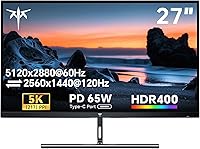
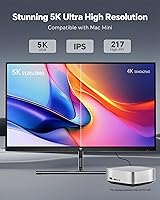
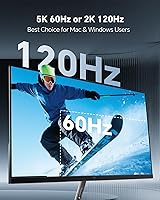
The KTC H27P3 27-inch 5K Monitor lands in an unusual spot in the market: a panel sharp enough to rival displays costing twice as much, without the matching price tag. At its core sits a 27-inch IPS panel running 5120x2880, which works out to 217 PPI, dense enough that text and fine details stay crisp even up close. What makes this 5K display more flexible than most is its dual-mode setup, letting you run native 5K at 60Hz or drop to 2K at 120Hz when you want smoother motion instead of pure sharpness. A matte, anti-glare finish rounds things out, and the whole package is clearly built with Mac mini owners in mind, riding a growing wave of budget-friendly 5K alternatives to pricier name brands.

Features & Benefits

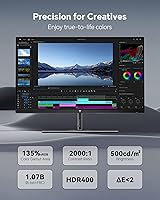
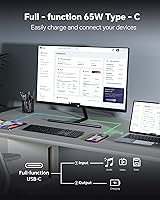
Spend a few hours with this KTC monitor and a handful of features start to stand out. HDR400 isn't the flashiest spec on paper, but it genuinely adds depth to contrast and color in photos and video rather than just looking punchier on a spec sheet. The 65W USB-C port is a quiet convenience win, since it pushes power, video, and data through one cable, cutting down on desk clutter. Color work benefits from a 135% sRGB gamut with full 100% coverage, which is plenty for most creative tasks. Adaptive Sync keeps motion smoother during gaming, while DisplayPort 1.4 and HDMI 2.0 cover console and desktop needs, and the flicker-free backlight makes long sessions easier on tired eyes.

Best For

This Mac-friendly screen makes the most sense for a specific kind of buyer rather than everyone shopping for a monitor. Mac mini owners looking to pair their compact desktop with a display that actually matches its resolution ambitions are the obvious audience, since most affordable monitors simply don't go this sharp. Photo and video editors who want dependable color accuracy without paying premium-display prices will also find a lot to like here. It's equally suited to hybrid users who split time between detail-heavy editing work and faster-paced gaming, thanks to the dual refresh modes. And for home offices where cable management and desk space matter, the single-cable USB-C setup is a genuine practical advantage.

User Feedback

Real-world impressions of this 5K display tend to be fairly consistent on the big stuff and split on the smaller details. Most owners comment on just how crisp text and images look at this pixel density, often describing it as a noticeable step up from standard 4K. The switch between 5K and 2K modes draws mixed reactions, though, since it involves a brief mode change rather than an instant toggle, which catches some buyers off guard initially. A few mention occasional quirks getting perfect color behavior out of Mac systems at native resolution, though most found it close enough for everyday work. Build quality and the adjustable stand earn frequent praise, even as some wish for a bit more height range.

Pros

  • Text and images look noticeably crisper than standard 4K thanks to the high pixel density
  • Wide color coverage makes it genuinely useful for photo and video editing work
  • Single USB-C cable handles power, video, and data, cutting down on desk clutter
  • Dual refresh modes let you prioritize sharpness or smoothness depending on the task
  • HDR400 adds real depth to contrast and color rather than just a marketing checkbox
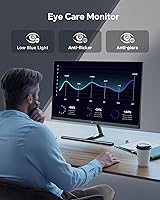
  • Flicker-free backlight and blue light reduction make long work sessions easier on the eyes
  • Build quality and stand adjustability draw frequent praise from real owners
  • The KTC H27P3 27-inch 5K Monitor offers this resolution at a notably lower price than comparable displays

Cons

  • Switching between 5K and 2K modes takes a brief moment rather than being instant
  • Mac color behavior at native resolution can show occasional inconsistencies
  • Stand height adjustment range feels limited for taller users or varied desk setups
  • You cannot run full 5K resolution and the 120Hz refresh mode at the same time
  • Some buyers report a learning curve getting used to the dual-mode workflow
  • Matte coating, while glare-reducing, slightly mutes color punch compared to glossy panels
  • Initial setup may require extra steps for Mac users chasing precise color calibration
  • Three-year warranty support depends on contacting the manufacturer directly rather than local repair options

Ratings

Our scorecard for the KTC H27P3 27-inch 5K Monitor is generated by AI after analyzing verified user reviews from buyers worldwide, with spam, bots, and incentivized feedback filtered out before scoring. The goal is a transparent picture that reflects both what owners genuinely love and where the experience falls short. Scores below are weighted toward real daily usage, not marketing claims.

Sharpness & Pixel Density
92%
Owners consistently describe text and fine detail as noticeably crisper than standard 4K, especially during long document or code sessions. The 217 PPI density makes a real difference for anyone who spends hours reading small text up close.
A few buyers needed to adjust macOS or Windows scaling settings before the sharpness translated into a comfortable everyday experience. Without that tweak, some initially found UI elements oddly sized.
Color Accuracy
81%
19%
Photo and video editors on tighter budgets appreciate the wide sRGB coverage, which holds up well for casual color grading and photo retouching work. Several reviewers note it gets close to pricier displays without the matching cost.
Some Mac users report minor inconsistencies at native 5K resolution that keep it from feeling fully calibrated out of the box. It is not positioned as a certified reference monitor for professional color work.
Dual-Mode Flexibility
85%
Users who split time between editing and gaming like having the option to drop to 2K at 120Hz when responsiveness matters more than sharpness. It effectively gives two displays in one panel depending on the task at hand.
Several reviewers mention a learning curve adjusting to the mode-switching process, since it involves a brief change rather than an instant toggle. This can be mildly annoying mid-session.
Mac Mini Compatibility
77%
23%
Many Mac mini owners specifically chose this display because few affordable monitors actually match its 5K output, calling it a long-overdue pairing option. Daily use for browsing, writing, and editing feels smooth for most.
Mixed feedback centers on occasional native-resolution quirks with macOS, where color or scaling behaves slightly differently than expected. It works well but isn't a flawless plug-and-play match.
Build Quality
88%
Reviewers frequently praise the overall solidity of the chassis and stand, noting it feels sturdier than other monitors in this price range. The matte coating also holds up well against fingerprints and glare in bright rooms.
A small number of owners mention the plastic used on certain panels feels slightly less premium than the screen itself. It is sturdy but not luxury-tier in materials.
Stand Adjustability
68%
32%
The tilt function gets consistent approval for everyday ergonomic adjustments during long desk sessions. It is functional enough for most basic positioning needs without extra hardware.
A recurring complaint is the limited height adjustment range, which forces some users toward risers or third-party VESA mounts. Taller users especially find this a noticeable limitation.
Connectivity
89%
The single-cable USB-C setup pushing power, video, and data is a frequent highlight, especially for laptop users tired of cable clutter. DisplayPort and HDMI inputs round things out for desktops and consoles alike.
A few reviewers wished for an additional USB-C or USB-A port for peripherals, since the current setup covers video and power but limited extra connectivity.
HDR Performance
79%
21%
Users editing photos or watching HDR content note a real improvement in contrast and color depth compared to non-HDR panels at this price. It adds noticeable richness without feeling artificial.
Some point out that HDR400 is an entry-level certification, so the effect, while real, doesn't match higher-end HDR tiers in peak brightness or local dimming.
Eye Comfort
84%
The flicker-free backlight and blue light reduction get regular mentions from users doing long work sessions, with several saying eye fatigue noticeably decreased compared to older monitors. It suits all-day desk use well.
A handful of users still recommend periodic breaks regardless, since extended close-range use at high pixel density can tire eyes over very long stretches.
Gaming Performance
73%
27%
Adaptive Sync combined with the 120Hz 2K mode gives casual and mid-level gamers smoother motion with less tearing than fixed 60Hz panels typically offer. It works well for varied game genres.
Competitive gamers chasing top refresh rates at full 5K resolution simultaneously won't get that here, since the modes trade off rather than combine.
Value for Money
86%
Many buyers frame this as a genuinely affordable entry point into 5K resolution, especially compared to pricier name-brand alternatives aimed at similar use cases. The feature set feels generous for the cost.
A few reviewers note that while it is affordable relative to competitors, it is still a meaningful investment for buyers who simply want a basic monitor.
Customer Support
71%
29%
KTC's three-year warranty and stated 12-hour response window reassure buyers who are wary of lesser-known monitor brands. Several reviewers mention smooth resolution of minor setup questions.
Some users note that response times can vary, and resolving more complex hardware issues sometimes takes longer than the initial response window suggests.

Suitable for:

The KTC H27P3 27-inch 5K Monitor is a strong match for Mac mini owners who want a display that actually keeps pace with their machine's output, rather than settling for a mismatched 1440p panel. Photo and video editors on a tighter budget will appreciate the wide color coverage without paying premium-display prices for it. People who split their time between detailed editing work and faster-paced gaming benefit from the dual-mode switching, since they can drop to 2K at 120Hz when sharpness matters less than responsiveness. It also suits home office setups where minimizing cable clutter is a priority, thanks to the single-cable USB-C power and video delivery. Anyone who spends long hours staring at a screen will likely notice the difference from the flicker-free backlight and reduced blue light output.

Not suitable for:

Buyers expecting flawless, certified Mac color accuracy out of the box should manage their expectations, since real-world feedback points to occasional quirks at native 5K resolution rather than a perfect plug-and-play experience. Anyone who wants instant, seamless switching between resolutions will be mildly frustrated, because moving between 5K and 2K on the KTC H27P3 27-inch 5K Monitor involves a brief mode change, not an instant toggle. Competitive gamers chasing the highest possible refresh rates at full 5K resolution simultaneously won't get that combination here, since the higher refresh mode requires stepping down to 2K. People who want extensive ergonomic adjustability, particularly more height range, may find the stand a bit limiting. And buyers on a strict entry-level budget might still find even this relatively affordable 5K option pricier than they'd like.

Specifications

  • Screen Size: The display measures 27 inches diagonally, sized for a desk-bound monitor rather than ultrawide setups.
  • Resolution: Native resolution is 5120 x 2880, with a secondary 2560 x 1440 mode available for the higher refresh option.
  • Pixel Density: At native resolution, pixel density works out to 217 PPI, which keeps text and fine detail sharp up close.
  • Panel Type: An IPS panel is used, which generally favors wider viewing angles and more consistent color over other panel types.
  • Refresh Rate: The panel runs at 60Hz in 5K mode and up to 120Hz when switched to 2K mode.
  • HDR Support: HDR400 certification is supported, improving contrast and color depth in compatible content.
  • Color Gamut: The panel covers 135% sRGB gamut area with 100% sRGB coverage for accurate color reproduction.
  • Brightness: Maximum brightness is rated at 500 cd/m2, which is bright enough for most indoor lighting conditions.
  • Contrast Ratio: The static contrast ratio is rated at 2000:1.
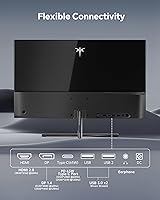
  • Connectivity: Inputs include one 65W USB-C port with full function support, one DisplayPort 1.4, and one HDMI 2.0 port.
  • Adaptive Sync: Adaptive Sync technology is supported to reduce screen tearing and stutter during motion.
  • Screen Coating: The screen surface uses a matte, anti-glare finish to reduce reflections in bright rooms.
  • Eye Care: The backlight is flicker-free and includes blue light reduction to ease eye strain during long sessions.
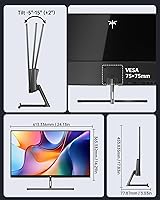
  • Mount Compatibility: The monitor supports VESA 75x75mm mounting for use with compatible monitor arms or stands.
  • Dimensions: The monitor measures 3.06 x 24.13 x 17.83 inches as listed by the manufacturer.
  • Weight: The unit weighs 8.27 pounds.
  • Power Input: The monitor operates on a 24-volt power input.
  • Warranty: KTC provides a three-year warranty along with customer support that aims to respond within 12 hours.

Related Reviews
KTC H27T13 27-inch QHD IPS Monitor
75%
88%
Image Clarity & Sharpness
83%
Color Accuracy & Vibrancy
91%
Value for Money
79%
Eye Comfort & Anti-Blue Light
74%
Refresh Rate & Smoothness
More
KTC H27E6 27-inch Gaming Monitor
78%
88%
Image Sharpness & Clarity
86%
Refresh Rate Performance
73%
Color Accuracy
61%
Build Quality & Stand
84%
Value for Money
More
KTC H27E22P 27-inch 280Hz Gaming Monitor
76%
91%
Refresh Rate Performance
88%
Contrast & Black Depth
84%
Color Accuracy & Vibrancy
71%
Motion Clarity & Response
53%
HDR Experience
More
KTC MegPad 27-Inch Portable Smart TV
72%
83%
Mobility & Design
78%
Display Quality
88%
Smart TV Platform
71%
Performance & Speed
62%
Battery Life
More
KTC M27T6 27-inch Mini LED Gaming Monitor
76%
84%
HDR Performance
88%
Contrast & Black Levels
86%
Peak Brightness
57%
Color Accuracy
71%
Motion Handling
More
Dell S2725QC 27-inch 4K USB-C Monitor
81%
93%
Image Clarity
88%
Color Accuracy
91%
USB-C Connectivity
86%
Refresh Rate & Smoothness
89%
Build Quality & Design
More
ASUS VA27EQSB 27-inch Monitor
85%
85%
Overall Performance
90%
Display Quality
88%
Ergonomics & Comfort
83%
Connectivity Options
75%
Gaming Experience
More
Gigastone LM-27FF51 27-Inch IPS Monitor
74%
82%
Image Clarity
54%
Brightness & Glare
76%
Color Accuracy
78%
Refresh Rate & Motion
71%
Build Quality
More
ZZA 27-inch Curved Monitor
86%
89%
Display Quality
92%
Color Accuracy
85%
Ergonomics
88%
Build Quality
90%
Ease of Setup
More
Westinghouse 27 Inch Computer Monitor
83%
91%
Value for Money
88%
Display Quality
85%
Ease of Setup
84%
Build Quality
90%
Color Accuracy
More

FAQ

It is designed with Mac mini compatibility in mind, and the high pixel density pairs nicely with macOS scaling. That said, some buyers have noticed minor color quirks at native 5K resolution, so don't expect studio-certified color accuracy out of the box. For general use, photo editing, and everyday productivity, most Mac users find it works just fine.

You switch modes through the monitor's on-screen menu or input settings, and it involves a brief mode change rather than an instant toggle. Think of it more like changing a display profile than flipping a switch. Once you're used to the process, it becomes second nature, but it's worth knowing upfront.

No, the higher 120Hz refresh rate is only available in the 2K mode. If you want full 5K sharpness, you're working at 60Hz. It's a tradeoff between resolution and refresh rate rather than getting both simultaneously.

Yes, the 65W USB-C port can carry video, data, and power delivery through one cable, which is great for cutting down clutter on a desk. It's particularly handy for laptops that support USB-C charging, since you can power the laptop and drive the display at once.

It holds up well for that kind of work, mainly because of its wide 135% sRGB gamut and full 100% sRGB coverage. The high pixel density also makes fine detail in images much easier to judge. It's not a professional reference monitor, but for the price, it's a solid option for serious hobbyists and working editors.

It supports tilt adjustment and VESA 75x75mm mounting if you want to use a third-party arm. Some users have mentioned wanting more height adjustment range built into the stand itself, so if that's a priority for you, a mount might be worth considering.

The flicker-free backlight and blue light reduction features are specifically meant to ease that kind of fatigue during extended use. Most buyers report it's comfortable for long stretches of work or reading. As always, taking regular breaks still helps regardless of the display.

Yes, the KTC H27P3 27-inch 5K Monitor includes HDR400 support, which adds noticeable depth to contrast and color in compatible content. It's not the highest tier of HDR certification, but it does make a visible difference compared to non-HDR displays.

You get one 65W USB-C port with full function support, one DisplayPort 1.4 port, and one HDMI 2.0 port. That combination covers most desktops, laptops, and even gaming consoles.

KTC backs this monitor with a three-year warranty and states they aim to respond to support inquiries within 12 hours. It's worth keeping your purchase confirmation handy in case you need to reach out for service.