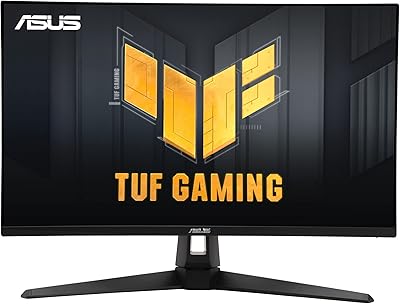
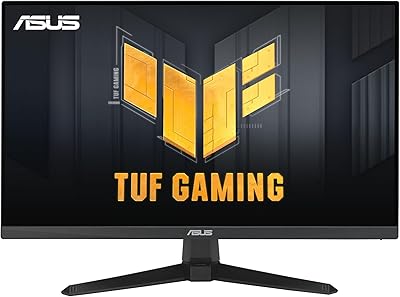
Overview

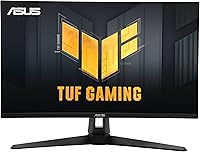
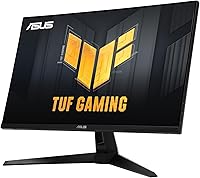
The ASUS TUF Gaming VG27AQM1A 27-inch Gaming Monitor landed in late 2023 and quickly carved out a strong position in the QHD gaming space, sitting at #121 in Computer Monitors on Amazon with thousands of ratings behind it. What separates it from cheaper alternatives at this tier is the Fast IPS panel — you get wide viewing angles and solid color reproduction that TN panels simply cannot match, without the sluggish pixel response of standard IPS or VA displays. It can overclock to 260Hz, which translates to noticeably fluid motion in fast-paced games. One honest caveat worth flagging upfront: the DisplayHDR 400 certification is entry-level, so do not expect HDR to impress the way an OLED or full-array local dimming panel would.
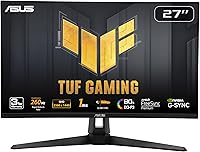
Features & Benefits

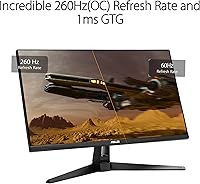
The headlining spec is the 260Hz refresh rate, which requires enabling the overclock in the monitor OSD — a simple toggle, not a hidden workaround. At default settings it runs at 240Hz, already well above what most 144Hz or 165Hz owners are used to, but that extra ceiling matters in titles like Valorant or CS2 where every frame is real. ASUS ELMB Sync is genuinely useful: it lets backlight strobing for motion blur reduction run alongside variable refresh rate at the same time, something most monitors force you to choose between. Dual VRR support means both AMD and NVIDIA GPU owners are covered without any configuration headaches. At 27 inches, QHD resolution hits a sharp pixel density that looks great without demanding a flagship GPU to sustain high frame rates.

Best For

This TUF Gaming monitor is most obviously aimed at competitive FPS players — the kind who prioritize buttery-smooth motion at high frame rates over color gamut coverage. That said, it is not exclusively an esports tool. Anyone stepping up from a 1080p 144Hz setup will notice a real, tangible difference in both sharpness and fluidity from day one. You will want a solid GPU to get full value here; an RTX 3070, RX 6700 XT, or better is the practical sweet spot for pushing 1440p well above 144Hz consistently. Households running both AMD and NVIDIA cards across different PCs will appreciate the dual VRR compatibility. There is also a 3-month Adobe Creative Cloud subscription bundled in — a quiet bonus for occasional editing work, though it is hardly the reason to choose this panel.

User Feedback

Across more than 5,000 ratings, the VG27AQM1A holds a 4.5-star average — a meaningful score at that sample size. Consistent praise centers on motion clarity and color quality that outperforms what most buyers expect from a gaming-focused panel in this class. Build quality earns favorable mentions too, with owners describing the monitor as feeling solid on the desk. On the critical side, some users report mild backlight bleed in dark scenes, which is fairly common at this panel tier. The stand draws occasional complaints around adjustability range. HDR is a recurring underwhelmer — buyers hoping for a dramatic visual shift are often let down, which honestly aligns with what DisplayHDR 400 delivers. The 3-year warranty comes up repeatedly as a meaningful confidence factor for long-term ownership.

Pros

  • Fast IPS panel delivers wide viewing angles and strong color vibrancy compared to TN alternatives at this price.
  • ELMB Sync lets motion blur reduction and variable refresh rate run at the same time — a rare and practical combination.
  • Dual VRR support covers both AMD FreeSync Premium and NVIDIA G-SYNC Compatible setups without any extra configuration.
  • The 260Hz overclock ceiling gives competitive players a real frame rate advantage in fast-paced titles.
  • QHD resolution on a 27-inch screen hits a sharp pixel density that genuinely improves clarity over 1080p.
  • Matte screen surface handles ambient light well and avoids the glare that plagues glossy gaming panels.
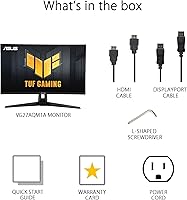
  • Comes fully loaded in the box with DisplayPort, HDMI, and USB cables plus an L-shaped screwdriver for easy stand assembly.
  • The 3-year ASUS warranty provides solid long-term peace of mind for a display at this investment level.
  • Strong sales rank and a 4.5-star average across thousands of verified ratings signal consistent real-world satisfaction.
  • Bundled 3-month Adobe Creative Cloud access adds light value for users who occasionally do creative work.

Cons

  • DisplayHDR 400 is entry-level HDR — do not expect the dramatic contrast improvement seen on OLED or high-end VA panels.
  • Hitting 260Hz requires manually enabling the overclock in the OSD; it does not run at that rate out of the box.
  • Some owners report noticeable backlight bleed in dark scenes, which is a panel lottery risk worth being aware of.
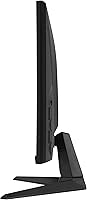
  • The stand has a limited adjustability range and feels less sturdy than what higher-end monitor stands offer.
  • Pushing QHD resolution above 200Hz consistently demands a powerful GPU — mid-range cards will bottleneck the high refresh rate.
  • OSD navigation is functional but not intuitive, and some users find the menu layout slower to work through than expected.
  • No built-in speakers, which is a minor but real inconvenience for users without a separate audio setup.
  • At 11 pounds, the VG27AQM1A is not especially lightweight, and the stand footprint is fairly wide for compact desk setups.

Ratings

The scores below for the ASUS TUF Gaming VG27AQM1A 27-inch Gaming Monitor were generated by our AI system after analyzing thousands of verified global user reviews, with spam, incentivized, and bot-flagged submissions actively filtered out. The ratings reflect a balanced picture of where this panel genuinely excels and where real buyers have run into friction. Both the standout strengths and the recurring frustrations are weighted transparently into every score.
Motion Clarity
93%
This is the category where the VG27AQM1A earns its strongest endorsement from users. Competitive FPS players consistently describe targets as staying sharp and readable during fast pans and strafe movements, which is exactly what the Fast IPS panel and 1ms MPRT combination is designed to deliver. ELMB Sync in particular draws praise for visibly reducing trailing without sacrificing adaptive sync.
A small segment of users — particularly those coming from high-end OLED monitors — note that the backlight strobing from ELMB Sync can introduce slight flickering perceptible in peripheral vision during extended sessions. It is not a widespread complaint, but sensitive users should be aware the strobing approach has that tradeoff.
Refresh Rate Performance
89%
Running at 240Hz out of the box already puts this panel well above the 144Hz standard most buyers are upgrading from, and the smoothness improvement in games like Valorant and Apex Legends is immediately noticeable. Users who take the extra step to enable the 260Hz overclock through the OSD report stable performance with no crashes or signal dropouts in the vast majority of cases.
The 260Hz figure requires a manual overclock activation, which catches some buyers off guard who assumed it would be the default. A handful of users also report their GPU driver occasionally resetting to a lower refresh rate after sleep or restart, requiring them to reconfirm the setting — a minor but recurring annoyance.
Image Sharpness
91%
QHD resolution on a 27-inch screen hits a pixel density that makes a real, visible difference over 1080p — text is crisper on the desktop, in-game details like foliage edges and distant textures are more defined, and the overall image feels cleaner without requiring you to scale the UI. Users upgrading from 1080p panels consistently rate this as one of the most satisfying parts of the switch.
Users with older or mid-range GPUs sometimes report needing to drop resolution or graphical settings significantly to maintain high frame rates at QHD, which partially undermines the sharpness benefit. The monitor itself is not at fault, but it is a system-level reality that a portion of buyers only discover after purchase.
Color Accuracy & Vibrancy
78%
22%
For a monitor primarily sold on its gaming performance credentials, color output on the VG27AQM1A is better than many buyers expect. Greens and blues in open-world games pop with a saturation level that IPS panels generally do well, and the matte coating preserves color integrity without washing things out the way glossy surfaces can.
Buyers coming from wide color gamut displays or professional monitors will find the color coverage adequate but not impressive — it is not factory calibrated to a rigorous standard, and some units show a slight warmth or coolness variation out of the box. Graphic designers or video editors looking for accurate color reproduction would be better served by a dedicated display.
HDR Quality
52%
48%
HDR10 signal compatibility means this 27-inch ASUS panel will accept and display HDR content from consoles, PCs, and streaming services without requiring a format conversion. In brightly lit outdoor game scenes, some buyers do notice a modest improvement in highlight rendering compared to SDR mode.
DisplayHDR 400 is widely considered the floor of meaningful HDR certification, and user feedback reflects that reality plainly — the majority of reviewers who comment on HDR describe the difference as subtle to negligible. There is no local dimming, peak brightness is limited, and dark scenes do not benefit noticeably. Buyers hoping for a rich HDR experience will be let down.
VRR & Adaptive Sync
88%
The dual VRR support is one of the VG27AQM1A's quietly practical strengths — households with both AMD and NVIDIA GPUs across different machines do not need to think twice about compatibility. FreeSync Premium activates automatically on AMD systems, and G-SYNC Compatible mode works reliably on NVIDIA setups without needing manual driver overrides in most cases.
A small number of NVIDIA users report needing to toggle G-SYNC Compatible mode manually in the NVIDIA control panel to get it working reliably, particularly after driver updates. The variable refresh rate range is not the widest available at this tier, which can be noticeable when frame rates dip significantly below the lower VRR threshold during GPU-intensive scenes.
Build Quality
82%
18%
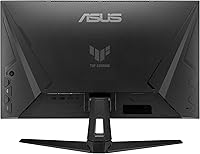
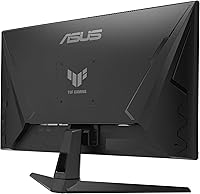
The chassis and back panel of this TUF Gaming monitor feel solid and well-assembled for a mid-range gaming display — there is minimal flex in the bezel when handled, and the overall finish looks clean and professional without being ostentatious. Most buyers describe it as feeling like a quality product that matches its positioning.
The stand is the most frequently criticized structural component, with users noting it feels noticeably less robust than the panel itself. The adjustability range is narrower than competing stands at this tier, and there is some reported wobble during desk vibrations — a notable issue for anyone who types or moves their setup frequently.
Stand & Ergonomics
63%
37%
The stand does cover tilt adjustment and basic height range, which is sufficient for users who set their monitor once and leave it. Assembly is quick, and the included L-shaped screwdriver means most buyers can complete the full setup without hunting for tools.
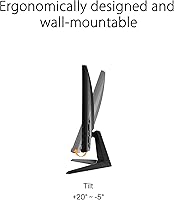
No swivel adjustment and a limited tilt range mean users who need precise ergonomic positioning will likely want to invest in a third-party VESA arm fairly quickly. The stand footprint is also wider than average, which is a real inconvenience on compact or cluttered desks where horizontal real estate is limited.
Connectivity & Ports
81%
19%
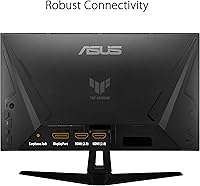
The port selection covers the practical bases well — a DisplayPort and HDMI input handle the primary display connections, and the USB hub with both 2.0 and 3.0 outputs is a genuinely useful convenience for plugging in peripherals like a headset dongle or keyboard receiver directly at the monitor. All key cables are included in the box.
Only having a single HDMI input limits multi-device users who want to switch between a PC and a console without swapping cables. The USB hub is also modest in size — two ports is functional but feels sparse compared to monitors at similar price points that offer three or four downstream USB slots.
OSD & Setup Experience
67%
33%
Initial physical setup is straightforward — the bundled hardware and included guide mean most users are running within 15 to 20 minutes of unboxing. The OSD covers all the key settings including the 260Hz overclock toggle, ELMB Sync, and VRR options without requiring deep menu navigation to locate them.
The OSD navigation itself is a common frustration point in user feedback — button placement is awkward and the menu logic is not intuitive enough for quick adjustments during a gaming session. Users who want to switch between presets or tweak settings regularly find the process slower and less polished than it should be at this price level.
Backlight Uniformity
66%
34%
For the majority of buyers, backlight uniformity is acceptable in typical gaming and desktop use scenarios. Bright and mid-tone content — which covers most gameplay — looks even across the panel without obvious hot spots or banding that distracts during normal use.
Dark-scene content exposes IPS glow and corner bleed that a meaningful subset of users describe as noticeable in atmospheric games or films watched in a dim room. Because this is a panel lottery issue with unit-to-unit variation, some buyers get panels with minimal bleed while others end up with corners that glow visibly — there is no way to predict this before purchase.
Value for Money
84%
When buyers weigh up what is being offered — Fast IPS at QHD, high refresh rate with overclocking headroom, ELMB Sync, dual VRR, a 3-year warranty, and a full cable bundle — the overall package holds up well against the asking price. The strong sales rank and high volume of positive reviews suggest the market broadly agrees with that assessment.
A few buyers who expected the HDR or stand quality to match the panel performance feel the value proposition is diluted in those areas. There are competitors at a similar price point with better ergonomic stands or slightly wider color gamut coverage, so buyers who weight those factors heavily may find the value calculus less favorable.
Long-term Reliability
79%
21%
The 3-year ASUS warranty is a meaningful differentiator that gives buyers real confidence in the long-term ownership proposition. User reports from owners who have had the panel for a year or more are broadly positive, with no widespread pattern of premature failures or degradation emerging in the review pool.
Some users report early backlight bleed worsening slightly over time, and a small number describe brightness inconsistency developing after extended daily use. ASUS warranty claim experience also varies noticeably by region, with some users reporting a smooth RMA process and others facing longer response timelines than expected.

Suitable for:

The ASUS TUF Gaming VG27AQM1A 27-inch Gaming Monitor is purpose-built for PC gamers who want a meaningful upgrade without stepping into premium display territory. It makes the most sense for competitive FPS and esports players — anyone running titles like Valorant, Apex Legends, or CS2 where fluid motion and sharp target clarity matter more than cinematic color depth. You will get the best value out of it pairing a mid-to-high-end GPU like an RTX 3070 or RX 6700 XT, which can realistically sustain high frame rates at QHD resolution. It is also a smart pick for anyone coming off a 1080p 144Hz monitor who wants a genuine double upgrade in both sharpness and speed. The dual VRR support makes it a practical choice for households that run both AMD and NVIDIA hardware across different machines.
Not suitable for:

The ASUS TUF Gaming VG27AQM1A 27-inch Gaming Monitor is not the right call for buyers who prioritize color-accurate work or a rich HDR experience. Graphic designers, photographers, or video editors who need wide color gamut coverage and precise calibration will find this panel limiting compared to dedicated professional or content creation displays. The DisplayHDR 400 certification is entry-level — if you are buying this expecting HDR to visually transform your games or movies, you will likely be underwhelmed. Gamers with mid-range or older GPUs that struggle to push QHD above 100Hz consistently will also be leaving most of what this monitor offers on the table. Finally, buyers sensitive to backlight bleed in dark or near-black content may want to check unit lottery risks before committing.

Specifications

  • Screen Size: The panel measures 27 inches diagonally, offering a practical desktop footprint without requiring a wide viewing distance.
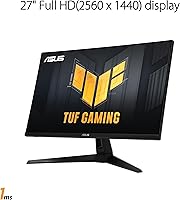
  • Resolution: Native resolution is 2560x1440 (QHD), delivering a pixel density noticeably sharper than 1080p on the same screen size.
  • Panel Type: Uses a Fast IPS panel, which combines the color accuracy and wide viewing angles of standard IPS with improved pixel response times.
  • Refresh Rate: Runs at 240Hz natively and can be overclocked to 260Hz via the on-screen display settings.
  • Response Time: Rated at 1ms MPRT (Moving Picture Response Time), minimizing ghosting and trail artifacts during fast motion.
  • HDR Support: Certified to DisplayHDR 400 and supports the HDR10 format, representing entry-level HDR capability rather than a premium HDR experience.
  • VRR Support: Compatible with both AMD FreeSync Premium and NVIDIA G-SYNC, enabling variable refresh rate on either GPU platform without additional setup.
  • Motion Blur Tech: ELMB Sync (Extreme Low Motion Blur Sync) allows backlight strobing and variable refresh rate to operate simultaneously, which is uncommon at this tier.
  • Aspect Ratio: Standard 16:9 widescreen aspect ratio, compatible with all modern gaming resolutions and content formats.
  • Screen Surface: Matte anti-glare coating reduces reflections from ambient light sources, making it practical for use in lit environments.
  • Connectivity: Includes one DisplayPort 1.2 port, one HDMI 2.0 port, one USB 3.2 upstream port, one USB 2.0 downstream port, and one USB 3.0 downstream port.
  • Bundled Cables: Ships with a DisplayPort cable, HDMI cable, USB 3.2 cable, power cord, L-shaped screwdriver, and a quick start guide.
  • Dimensions: Assembled monitor (with stand) measures 24.2 x 8.4 x 17.9 inches (L x W x H).
  • Weight: The complete unit including stand weighs approximately 11 pounds.
  • Warranty: Covered by a 3-year ASUS manufacturer warranty from the date of purchase.
  • Release Date: The VG27AQM1A first became available in December 2023.
  • HDR Format: Supports HDR10 signal input for compatible games and media content.
  • Bonus Bundle: Includes a complimentary 3-month Adobe Creative Cloud subscription, valid through August 31, 2026.

Related Reviews

ASUS VG27AQ3A 27-inch QHD Gaming Monitor
76%
91%
Image Sharpness & Clarity
88%
Refresh Rate Performance
86%
Motion Clarity & ELMB Sync
83%
Color Accuracy & Coverage
54%
HDR Performance
More
ASUS TUF Gaming VG277Q1A 27″ Gaming Monitor
78%
93%
Refresh Rate Performance
88%
Motion Clarity & Response Time
91%
Adaptive Sync & Tear-Free Gaming
74%
Out-of-Box Color Quality
82%
Shadow Boost & Dark Scene Visibility
More
ASUS VG27VH1B 27-inch Curved Gaming Monitor
78%
93%
Refresh Rate Performance
88%
Motion Clarity & Response Time
91%
Adaptive Sync & Tear-Free Output
67%
Image Sharpness & Resolution
62%
Color Accuracy & Calibration
More
ASUS TUF Gaming VG279Q3R 27-inch 1080p Monitor
84%
91%
Gaming Performance
88%
Visual Quality
83%
Ergonomics & Comfort
87%
Color Accuracy
82%
Build Quality
More
ASUS TUF Gaming VG279QM1A 27-inch 1080P HDR Monitor
86%
91%
Display Quality
94%
Refresh Rate Performance
89%
Color Accuracy
90%
G-SYNC/FreeSync Compatibility
84%
Build Quality
More
ASUS TUF Gaming VG27WQ3B 27-inch Gaming Monitor

80%
88%
Image Quality
93%
Refresh Rate & Smoothness
91%
Response Time & Motion Clarity
84%
Curved Panel Experience
82%
Color Accuracy & Vibrancy
More
ASUS VZ279QG1R 27-inch 1080P Gaming Monitor
83%
88%
Gaming Performance
91%
Smooth Visuals (Motion Blur Reduction)
93%
Value for Money
80%
Build Quality
85%
Display Quality (Color Accuracy, Brightness)
More
ASUS TUF Gaming VG32UQA1A 32-inch Gaming Monitor
74%
88%
Image Clarity
83%
Refresh Rate Performance
91%
Console Compatibility
54%
HDR Quality
84%
Motion Handling
More
ASUS VG249QE5A 24-inch Gaming Monitor
76%
88%
Image Quality
91%
Refresh Rate Performance
86%
Motion Clarity
93%
Value for Money
47%
Ergonomics & Stand
More
ASUS TUF Gaming VG28UQL1A 28-inch Gaming Monitor
78%
91%
Image Clarity
88%
Motion Performance
93%
Console Compatibility
83%
Color Accuracy
58%
HDR Performance
More

FAQ

The monitor runs at 240Hz by default. To reach 260Hz, you need to go into the OSD (on-screen display) menu and enable the overclock option manually. It is a straightforward toggle — nothing complicated — but it will not activate on its own just by setting 260Hz in your GPU driver.

It works with both. The VG27AQM1A supports FreeSync Premium for AMD GPUs and is also G-SYNC Compatible for NVIDIA cards. Variable refresh rate will function properly on either platform without needing to buy anything extra.

Honestly, DisplayHDR 400 is the lowest tier of VESA HDR certification, and the difference in HDR games or movies is subtle at best. If you are buying this monitor specifically hoping for a dramatic HDR visual improvement, you will likely be disappointed. It is better to think of the HDR support here as a baseline compatibility feature rather than a standout strength.

To make meaningful use of the high refresh rate at QHD resolution, you realistically want something in the range of an RTX 3070, RTX 4060, RX 6700 XT, or better. Mid-range cards can still run the monitor fine, but you may only hit 100–144Hz in demanding titles, which means you are not using the panel to its potential.

ELMB Sync lets the monitor reduce motion blur through backlight strobing while simultaneously running variable refresh rate. Most monitors make you choose one or the other because they conflict technically. Having both active at the same time means you get sharper motion in fast-paced games without giving up adaptive sync, which is a genuinely useful combination for competitive gaming.

Some owners report noticeable backlight bleed in the corners when displaying dark or black content. This is a known characteristic of IPS panels in general, and it comes down to unit-to-unit variation. Most buyers do not find it disruptive during normal gaming, but if you watch a lot of dark movies or play atmospheric games in a dark room, it is worth being aware of before purchasing.

The included stand offers tilt adjustment and some height range, but user feedback suggests the adjustability is more limited than competing stands at this price point and it feels less solid than premium options. If ergonomics are a priority, the monitor is VESA-compatible, so swapping to a third-party arm or mount is a straightforward upgrade.

The jump is noticeable on both fronts. QHD at 27 inches looks significantly sharper than 1080p — text, fine details in games, and general desktop use all benefit. The smoothness improvement going from 144Hz to 240Hz+ is more subtle than the resolution jump, but still visible in fast motion. For most people upgrading from that class of monitor, the difference feels like a meaningful step up overall.

No, there are no built-in speakers. You will need headphones, a headset, or external speakers for audio. This is fairly standard for gaming monitors aimed at performance buyers, but worth knowing if you were hoping to avoid a separate audio setup.

The monitor comes with a 3-year warranty from ASUS, which is longer than the 1–2 years offered by many competitors at this tier. General user experience with ASUS TUF warranty claims tends to be straightforward for clear hardware defects, though response times can vary depending on region. The 3-year coverage is a meaningful confidence factor for a panel you expect to use daily for several years.

Where to Buy