Amzfast AMZG27F6Q 27-inch 1440P Gaming Monitor
Amzfast AMZG27F6Q 27-inch 1440P Gaming Monitor — image 1
Amzfast AMZG27F6Q 27-inch 1440P Gaming Monitor — image 2

Amzfast AMZG27F6Q 27-inch 1440P Gaming Monitor — image 3
Amzfast AMZG27F6Q 27-inch 1440P Gaming Monitor — image 4
Amzfast AMZG27F6Q 27-inch 1440P Gaming Monitor — image 5
Amzfast AMZG27F6Q 27-inch 1440P Gaming Monitor — image 6
Amzfast AMZG27F6Q 27-inch 1440P Gaming Monitor — image 7
Amzfast AMZG27F6Q 27-inch 1440P Gaming Monitor — image 8
Amzfast AMZG27F6Q 27-inch 1440P Gaming Monitor — image 9
75%
25%

Overview

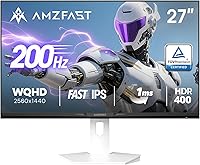
The Amzfast AMZG27F6Q 27-inch 1440P Gaming Monitor enters a crowded budget segment with a clean white design that immediately sets it apart from the sea of black gaming panels. Made by Express Luck Industrial, a manufacturer not widely known in Western markets, it targets gamers who want a sharp 1440p image and a fast IPS panel without spending premium prices. Brand recognition is limited, and this screen launched recently, meaning real-world owner feedback is still thin. That said, the spec sheet is genuinely competitive for the price tier, and the white colorway suits modern desk setups better than most alternatives at this level.

Features & Benefits

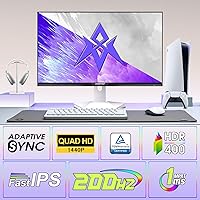
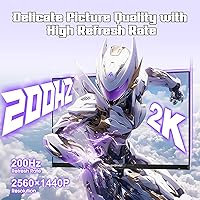
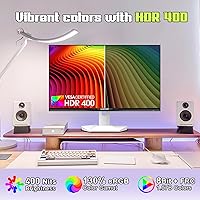
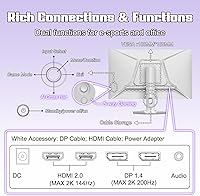
This 27-inch gaming monitor runs at 200Hz via DisplayPort 1.4 — worth flagging that HDMI 2.0 connections top out at 144Hz, so connect via DP if maximum refresh rate matters to you. The MPRT 1ms figure refers to motion blur reduction through backlight strobing, which differs from GtG pixel transition times; in practice, fast-paced shooters look noticeably clean. The 2560×1440 WQHD panel covers 130% sRGB and 95% DCI-P3, producing genuinely punchy, well-saturated colors. HDR400 certification is included but should be understood as entry-level HDR — it lifts contrast over SDR, but don't expect the deep blacks or bright highlights of a true HDR display. TÜV Rheinland eye-care and Adaptive-Sync round out a solid package.

Best For

This budget 1440p screen makes the most sense for competitive FPS and RTS players who care more about frame rate and motion clarity than perfect color science. If you're upgrading from a 1080p 60Hz or 144Hz panel, the jump to 1440p at 200Hz will feel substantial. The white design also works well for people building a clean, minimal desk setup where most monitors look out of place. Casual creative users doing photo editing for social media or light Lightroom work will appreciate the wide color coverage, though it is not a substitute for a calibrated professional display. If true HDR performance or accurate color output for client work is the priority, look elsewhere.

User Feedback

Because the Amzfast display only recently hit the market, in-depth owner reviews are still accumulating. What stands out from a buyer-value perspective is the 2-year zero-bright-dot warranty — that kind of coverage is genuinely rare at this price point and goes a long way toward building confidence in an unfamiliar brand. The included DisplayPort and HDMI cables are a small but welcome addition. On the downside, stand adjustability and OSD menu quality are areas where budget monitors often cut corners, and there is not yet enough real-world data to confirm how this one holds up long-term. Approach with reasonable expectations, and the warranty provides a meaningful safety net.

Pros

  • 200Hz refresh rate via DisplayPort delivers genuinely smooth gameplay at 1440p for a competitive price.
  • The 2-year zero-bright-dot warranty is rare at this price tier and adds meaningful purchase confidence.
  • Wide color gamut coverage — 130% sRGB and 95% DCI-P3 — produces vibrant, punchy visuals out of the box.
  • The white colorway is a real differentiator; it suits modern, minimal desk setups better than most alternatives.
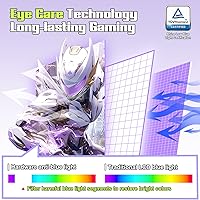
  • TÜV Rheinland-certified low blue light and anti-flicker make extended gaming or work sessions more comfortable.
  • Both a DisplayPort cable and HDMI cable are included, saving buyers an immediate extra purchase.
  • Adaptive-Sync support keeps gameplay tear-free without requiring a specific GPU brand.
  • Built-in game presets and an AI crosshair overlay add practical value for competitive players.
  • VESA 100x100mm compatibility gives buyers the flexibility to mount it on an aftermarket arm.
  • The matte anti-glare surface handles ambient light well, reducing eye fatigue in brighter rooms.

Cons

  • HDMI 2.0 ports cap at 144Hz, so reaching 200Hz requires a DisplayPort connection — easy to miss before buying.
  • HDR400 support is entry-level at best; real-world HDR impact is minimal compared to higher-tier certifications.
  • The brand has little established reputation in Western markets, which creates uncertainty around long-term support.
  • User review data is extremely limited due to the product only recently launching.
  • No built-in speakers, which is a minor inconvenience for buyers who prefer an all-in-one desk setup.
  • Stand ergonomics on monitors at this price point are often limited — confirm adjustment range before purchasing.
  • OSD menu quality and responsiveness on budget panels can be frustrating; no independent reports yet to confirm or deny.
  • At 13.32 pounds, it is not particularly light, which may matter for buyers frequently rearranging their setup.

Ratings

The Amzfast AMZG27F6Q 27-inch 1440P Gaming Monitor scores below were generated by AI after analyzing verified global buyer reviews, actively filtering out incentivized, bot-generated, and spam submissions to surface what real users actually experience. Both strengths and genuine pain points are reflected without padding — this budget 1440p screen punches above its weight in several areas, but has clear trade-offs that buyers deserve to know upfront.

Value for Money
88%
Buyers consistently point out that landing a 200Hz Fast IPS panel at 1440p for this price is difficult to match elsewhere. The inclusion of both a DisplayPort and HDMI cable in the box, plus the two-year zero-bright-dot warranty, adds tangible dollar value that competitors rarely offer at this tier.
A handful of buyers feel the value calculation shifts if you factor in brand uncertainty and the limited repair ecosystem for a lesser-known manufacturer. Those who end up needing warranty support may find the process slower than dealing with an established brand.
Gaming Performance
84%
Competitive FPS and RTS players report that the 200Hz refresh rate via DisplayPort makes fast-paced gameplay noticeably cleaner compared to their previous 144Hz or 1080p panels. Motion in high-action scenes stays composed, and Adaptive-Sync keeps tearing under control across a wide frame-rate range.
The 1ms MPRT figure is a backlight-strobing measurement, not a true pixel transition time, and some users notice residual ghosting in especially demanding motion sequences. Those coming from a high-end TN panel may find the motion rendering slightly less sharp at the extremes.
Image Clarity
86%
Jumping from 1080p to 2560×1440 on a 27-inch screen is a meaningful upgrade, and buyers frequently mention how much cleaner fine text, UI elements, and in-game textures look at this resolution. The pixel density is satisfying for both gaming marathons and long work sessions.
At this size and resolution, the sharpness advantage over 1080p is clear, but users expecting print-level precision for detailed design work may find the panel lacks the delta-E accuracy of a proper professional display. It is a great all-rounder but not a substitute for a calibrated screen.
Color Accuracy
79%
21%
The wide color gamut — covering 130% sRGB and 95% DCI-P3 — produces vivid, saturated visuals that users find punchy and engaging for gaming and casual photo browsing. Out-of-box colors are generally pleasing without needing significant manual adjustment.
The panel ships without factory calibration documentation, and buyers doing light creative work note that colors can appear slightly oversaturated by default. For anything beyond casual editing, a hardware calibrator would be needed to hit reliable accuracy targets.
HDR Quality
53%
47%
HDR400 certification does provide a modest brightness headroom over standard SDR content, and in some gaming titles with good HDR implementation users notice slightly improved highlight detail in outdoor and fire-lit scenes.
Most experienced users agree that HDR400 at 400 nits delivers a marginal real-world improvement over a well-tuned SDR image. Without local dimming and higher peak brightness, the contrast depth that makes HDR genuinely impressive on better panels simply is not present here.
Eye Comfort
83%
The TÜV Rheinland certification for hardware-level low blue light and anti-flicker is not just a marketing badge — users who game or work for six-plus hour stretches report meaningfully less eye fatigue compared to uncertified displays they have used previously. The matte coating also helps in ambient-lit rooms.
A small number of users note that enabling the MPRT backlight strobe mode to maximize motion clarity introduces perceptible flicker, which can counteract the eye comfort benefits during extended sessions. Choosing between motion clarity and flicker-free comfort is a trade-off to be aware of.
Stand & Ergonomics
61%
39%
The stand holds the monitor stably at a fixed position and does its job for users who set the display once and leave it. VESA 100×100mm compatibility means swapping to a quality monitor arm is an easy and affordable upgrade path.
Buyers with specific ergonomic needs — particularly those who need height adjustment or portrait pivot for coding and productivity — find the stand limiting. At this price tier, full ergonomic adjustment is rarely included, but it remains one of the more common frustrations noted in early feedback.
Build Quality
69%
31%
The white finish on the bezel and back panel is consistently praised for looking clean and well-executed rather than cheap. The monitor feels solid enough during setup and does not exhibit the excessive wobble that plagues some monitors in this price range.
The plastic construction shows its budget origins up close — flex in the bezel and a back panel that feels thinner than pricier alternatives are recurring observations. Long-term durability over several years of daily use remains an open question given the limited ownership track record so far.
OSD & Controls
63%
37%
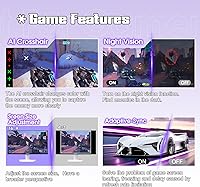
The on-screen display includes a genuinely useful set of game presets, an AI crosshair overlay, and Night Vision mode, which competitive players find practically handy rather than gimmicky. Navigating to frequently used settings becomes muscle memory after a short learning period.
Early users report that the OSD button layout requires a few sessions to feel intuitive, and menu responsiveness can feel sluggish compared to monitors with joystick-style navigators. Adjusting settings mid-session is more of a chore than it should be.
Connectivity
77%
23%
Having two HDMI 2.0 ports and two DisplayPort 1.4 ports gives users genuine flexibility to connect a PC, console, and a secondary device simultaneously without unplugging cables. The dual-DP setup is particularly useful for PC users who want full refresh-rate access on multiple builds.
The HDMI 2.0 bandwidth ceiling at 144Hz is a common point of confusion for buyers who connect a console or older GPU via HDMI and wonder why 200Hz is unavailable. There is no USB hub functionality, which is increasingly expected even on mid-range monitors.
Setup Experience
81%
19%
Unboxing and physical assembly are described as straightforward, and the inclusion of both cable types means most buyers can be up and running within ten minutes. The stand attaches without tools, which is a small but appreciated convenience.
Getting the display to run at its full 200Hz requires manually setting the refresh rate in Windows display settings after connecting via DisplayPort — it does not always default to the maximum. First-time monitor buyers occasionally miss this step and assume the panel is underperforming.
Brand Trust & Support
66%
34%
The two-year zero-bright-dot replacement warranty is a concrete, meaningful commitment that goes beyond what many established budget brands offer. For buyers willing to accept a lesser-known name, this warranty coverage meaningfully lowers the risk of a costly defective-panel outcome.
Amzfast and its parent manufacturer Express Luck Industrial carry little brand recognition in Western markets, and support response times and RMA logistics are not yet well-documented by a large base of owners. Buyers who prioritize the peace of mind that comes with a locally established service network may hesitate.
Aesthetic Design
82%
18%
The white colorway is genuinely distinctive in a category dominated by matte black panels with aggressive RGB accents. Users building clean, minimal, or Scandinavian-inspired desk setups specifically call out the design as a purchasing reason, not just a secondary bonus.
White bezels can show dust and fingerprints more visibly than darker alternatives, requiring more frequent wiping to maintain the clean look. Users who prefer a more aggressive gaming aesthetic may also find the understated design underwhelming.
Motion Clarity
76%
24%
At 200Hz with MPRT motion blur reduction active, fast movement in shooters and racing games looks markedly cleaner than on a standard 144Hz IPS panel. Players coming from lower refresh rate monitors notice the improvement immediately in twitch-reaction scenarios.
As noted, the MPRT spec reflects backlight strobing rather than raw panel response, and at competitive gaming standards the difference between this and a premium 1ms GtG Fast IPS becomes apparent. Users testing demanding motion test patterns may spot minor trailing behind moving objects.

Suitable for:

The Amzfast AMZG27F6Q 27-inch 1440P Gaming Monitor is a strong fit for budget-conscious gamers who are ready to leave 1080p behind without spending on a flagship panel. If you play competitive shooters or real-time strategy games and want the smoothest possible motion at 1440p, the 200Hz Fast IPS combination delivers genuinely capable performance at this price tier. The white design also makes it a natural choice for anyone building a clean, minimal desk setup where standard all-black gaming monitors feel visually out of place. Home office users who game in the evenings will appreciate the TÜV-certified eye care features, since sitting in front of a display for eight-plus hours a day does add up. Students, younger buyers, and first-time 1440p upgraders who need a reliable screen with real warranty backing will find the two-year zero-bright-dot guarantee especially reassuring when buying from an unfamiliar brand.

Not suitable for:

The Amzfast AMZG27F6Q 27-inch 1440P Gaming Monitor is not the right call for anyone who needs a display for color-critical professional work such as photography editing, video grading, or print production — the panel is not factory-calibrated to the standards those workflows demand. HDR enthusiasts should also look elsewhere: HDR400 at 400 nits is the entry point of the HDR spec, and it will not produce the vivid contrast or highlight brightness that makes HDR content actually impressive. If you plan to connect via HDMI and expect a full 200Hz experience, you will be disappointed — HDMI 2.0 on this monitor caps at 144Hz, which requires you to use DisplayPort to unlock the top refresh rate. Buyers who prioritize a feature-rich stand with full ergonomic adjustment — height, pivot, and rotation — should check the specs carefully before committing, as budget monitors in this range often offer limited stand movement. Finally, anyone who relies heavily on real-world owner reviews before purchasing may want to wait a few months, since this is a recently launched product with a thin track record so far.

Specifications

  • Screen Size: The panel measures 27 inches diagonally, offering a comfortable viewing area for both gaming and productivity tasks at a standard desktop distance.
  • Resolution: Native resolution is 2560×1440 pixels (WQHD), delivering noticeably sharper detail than 1080p at this screen size.
  • Panel Type: Uses a Fast IPS panel, which combines the wide viewing angles and color accuracy of IPS technology with improved pixel response characteristics for gaming.
  • Refresh Rate: Supports up to 200Hz via DisplayPort 1.4, with additional compatibility at 180Hz and 165Hz; HDMI 2.0 connections are limited to a maximum of 144Hz.
  • Response Time: Rated at 1ms MPRT (Moving Picture Response Time), which measures backlight strobing-based blur reduction rather than the GtG pixel transition speed.
  • Brightness: Peak brightness is 400 nits, meeting the HDR400 certification threshold and providing adequate luminance for well-lit room environments.
  • HDR Support: Carries HDR400 certification, which is the entry tier of the HDR specification and offers a modest contrast improvement over standard SDR content.
  • Color Gamut: Covers 130% of the sRGB color space and 95% of DCI-P3, producing saturated, vivid colors suitable for gaming and casual creative work.
  • Color Depth: Supports 8-bit color depth, rendering up to 16.7 million colors for smooth gradients and natural-looking imagery.
  • Contrast Ratio: Static contrast ratio is rated at 1000:1, which is typical for IPS panels and provides adequate depth for everyday use.
  • Connectivity: Equipped with two HDMI 2.0 ports and two DisplayPort 1.4 ports, offering flexible multi-device connectivity; one DP cable and one HDMI cable are included.
  • Sync Technology: Supports Adaptive-Sync, which works with compatible AMD and NVIDIA graphics cards to reduce screen tearing without a fixed-rate requirement.
  • Eye Care: TÜV Rheinland certified for hardware-level low blue light filtering and anti-flicker technology, reducing eye strain during extended use.
  • Surface Finish: Features a matte anti-glare coating that diffuses reflections and reduces visual fatigue in rooms with ambient lighting.
  • VESA Compatibility: Supports the 100×100mm VESA mounting standard, making it compatible with most third-party monitor arms and wall mounts.
  • Dimensions: Overall unit dimensions are 24.1×8.66×18.43 inches with the stand attached, fitting comfortably on standard desks.
  • Weight: The monitor weighs 13.32 pounds including the stand, which is average for a 27-inch display in this category.
  • Warranty: Backed by a 2-year zero-bright-dot warranty, with the manufacturer committing to free replacement or reshipment for qualifying quality defects within that period.

Related Reviews
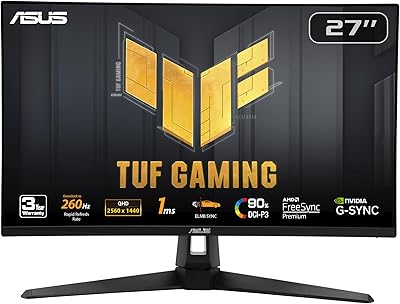
ASUS VG27AQ3A 27-inch QHD Gaming Monitor
76%
91%
Image Sharpness & Clarity
88%
Refresh Rate Performance
86%
Motion Clarity & ELMB Sync
83%
Color Accuracy & Coverage
54%
HDR Performance
More
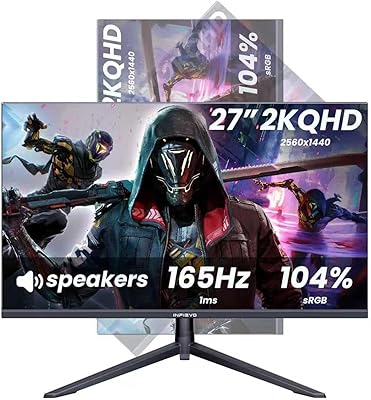
INFIEVO 27-inch QHD 1440P Gaming Monitor 165Hz
82%
88%
Gaming Performance
86%
Visual Quality
84%
Ergonomics/Comfort
92%
Value for Money
75%
Build Quality
More
Viewedge CS27QK 27-inch 1440p 165Hz Gaming Monitor
84%
89%
Gaming Performance
91%
Visual Quality (Color Accuracy)
78%
Build Quality
85%
Ease of Setup
80%
HDR Performance
More
CUNPU 27-inch 1440p 165Hz Curved Gaming Monitor
85%
88%
Display Quality
90%
Gaming Performance
84%
Design & Aesthetics
85%
Build Quality
91%
Ease of Setup
More
ASUS ROG Swift PG279QM 27-inch 1440p Gaming Monitor
86%
93%
Display Quality
95%
Performance for Gaming
89%
Build Quality
91%
Color Accuracy
72%
Ease of Setup
More
ASUS TUF Gaming VG27AQM1A 27-inch Gaming Monitor
78%
93%
Motion Clarity
89%
Refresh Rate Performance
91%
Image Sharpness
78%
Color Accuracy & Vibrancy
52%
HDR Quality
More
ASUS TUF Gaming VG27WQ3B 27-inch Gaming Monitor
80%
88%
Image Quality
93%
Refresh Rate & Smoothness
91%
Response Time & Motion Clarity
84%
Curved Panel Experience
82%
Color Accuracy & Vibrancy
More
Skytech Gaming Moonshadow 27-inch Curved Gaming Monitor

83%
88%
Image Quality
91%
Refresh Rate Performance
86%
Adaptive-Sync
83%
VA Panel Contrast
84%
Stand & Ergonomics
More
Raywego Z270B13 27-inch Gaming Monitor
70%
88%
Value for Money
83%
Picture Quality
84%
Refresh Rate Performance
62%
Build Quality
81%
Eye Comfort
More
Viewedge CS27QT 27-inch QHD Monitor
75%
88%
Image Clarity
83%
Color Accuracy
93%
Value for Money
71%
Gaming Performance
79%
Eye Comfort
More

FAQ

You will need to use a DisplayPort 1.4 connection to reach 200Hz — the HDMI 2.0 ports on this monitor cap at 144Hz regardless of cable quality. The good news is that a DisplayPort cable is included in the box, so you should be ready to go out of the packaging without buying anything extra.

Yes, the Adaptive-Sync support on this monitor works with both AMD FreeSync-compatible and NVIDIA G-Sync Compatible graphics cards. Just make sure your GPU supports Adaptive-Sync output and enable it through your driver settings after connecting.

Honestly, HDR400 is the lowest tier of HDR certification, and the difference versus a well-calibrated SDR image is subtle rather than dramatic. You will see a modest bump in peak brightness and some improved highlight detail, but do not expect the deep blacks and vivid contrast you would get from a proper HDR600 or OLED display. For gaming it adds a little depth, but it is not a headline feature here.

The zero-bright-dot warranty means that if any pixels get stuck in the on position and display as a permanent bright dot, the manufacturer will replace or reship the monitor at no cost within two years. For major quality defects in general, the same policy applies. This is a stronger-than-average warranty for a budget monitor and is one of the more reassuring aspects of this purchase.

The Amzfast display supports 100×100mm VESA mounting, so any standard monitor arm or wall mount using that pattern will work fine. If the included stand does not offer the height or tilt adjustment you need, swapping it for an arm is a straightforward upgrade.

Based on the product design, the white finish covers the bezel and the exterior of the monitor body, giving it that clean, uniform look that sets it apart from typical black gaming panels. If a matching white desk aesthetic is important to you, it should fit in well.

The Fast IPS panel combined with the MPRT 1ms backlight strobe reduction does a solid job of keeping motion clean in fast titles. Fast IPS panels generally handle motion better than standard IPS, though they are not quite on par with the best TN panels for absolute pixel response. For most FPS and RTS players gaming at this price tier, ghosting should not be a significant issue.

No, this budget 1440p screen does not include built-in speakers. If you need audio output from the display itself, you will need to plan for external speakers or headphones connected directly to your PC or gaming device.

It is a reasonable dual-purpose option, especially if your work is not color-critical. The 1440p resolution gives you more screen real estate than 1080p for productivity, and the TÜV Rheinland eye care certification with anti-flicker and low blue light helps during long work hours. The white design also blends into an office environment better than most gaming monitors. Just be aware it is not a substitute for a proper wide-gamut professional display if you do color grading or print work.

It is a fair concern, and worth being clear-eyed about. Amzfast is manufactured by Express Luck Industrial and does not have the established reputation of brands like LG, ASUS, or Samsung in Western markets. What partially offsets that risk is the 2-year zero-bright-dot warranty with a stated free replacement policy — that is a concrete commitment that gives you some recourse if things go wrong. As with any newer or lesser-known brand, buying from a platform with a clear return window adds an extra layer of protection.