Overview

The CUNPU RDF1DD 27-inch Curved Gaming Monitor stands out in a market full of black rectangular slabs by sporting cat-ear accents that make it look like nothing else on a desk. CUNPU is a newer brand with a limited track record, so buyer trust rests almost entirely on the hardware itself — and for the price, the spec sheet holds up reasonably well. You get a 27-inch QHD panel running at 165Hz, which is a solid combination for mid-range gaming. The VA panel delivers genuinely deep contrast, but it comes with the classic caveat: fast-paced scenes can show trailing artifacts that an IPS display would handle more cleanly.
Features & Benefits

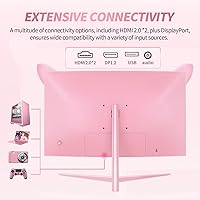
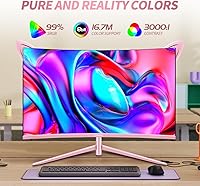
The 1500R curved screen wraps noticeably at 27 inches — not an ultra-wide, but the curvature does add a sense of depth during longer sessions. With a 3000:1 contrast ratio, dark game environments look rich rather than washed out, and 99% sRGB coverage is more than adequate for casual photo work alongside gaming. The 165Hz refresh rate pairs well with AMD FreeSync, though G-Sync users should know compatibility only runs through DisplayPort. Connectivity is straightforward — HDMI 2.0, DisplayPort 1.2, and one USB port handle the basics but leave no room for expansion. The built-in speaker exists, though audio quality is expectedly thin and better treated as a last resort.

Best For

This kawaii gaming monitor makes the most sense for players who think about how their setup looks as much as how it performs. Pairing it with a mid-tier GPU like an RTX 3060 or RX 6600 is the sweet spot — those cards can realistically push 1440p at high frame rates across most titles. Console gamers connecting via HDMI who want a larger, sharper screen without overspending will also find it a natural fit. Bedroom and dorm setups benefit from the pink colorway doubling as room decor. Competitive FPS players chasing the lowest possible input lag, though, would be better served by a fast IPS panel than this VA-based display.

User Feedback

Buyers consistently point to visual appeal as the main draw — the design lands in real life much as it does in photos, and color vibrancy earns genuine praise. Where feedback turns critical is the stand: tilt-only adjustment with no height or swivel leaves users wanting more ergonomic flexibility. The OSD menu is frequently described as clunky to navigate, a minor but recurring frustration. A handful of buyers flagged slight backlight inconsistency across units, hinting at some quality control variance. The built-in speaker confirms what most expected — it functions, barely. On balance, the CUNPU curved display is seen as strong visual value, with ergonomic limitations being the most commonly cited letdown.

Pros

  • The cat-ear design is genuinely distinctive — there is nothing else on the market that looks quite like it.
  • QHD 1440p resolution at 27 inches hits a practical sweet spot: noticeably sharper than 1080p without demanding a top-tier GPU.
  • The 3000:1 contrast ratio produces deep, rich blacks that make dark game environments and cinematic scenes look compelling.
  • AMD FreeSync support eliminates screen tearing for a wide range of mid-range AMD and compatible GPU setups.
  • 99% sRGB color coverage means colors are vibrant and accurate enough for casual creative work beyond gaming.
  • The thin bezel design keeps the screen feeling open and helps the cat-ear profile stand out visually.
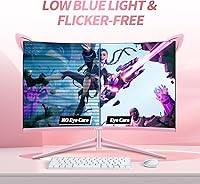
  • Flicker-free and low blue light modes are a practical addition for anyone prone to eye fatigue during extended sessions.
  • HDMI 2.0 input makes it straightforward to connect a current-gen console for an immediate resolution and size upgrade.
  • The 1500R curve adds a noticeable sense of depth and wrap at 27 inches without feeling gimmicky.

Cons

  • The stand only tilts — no height adjustment or swivel means ergonomic flexibility is essentially off the table.
  • Response time is not officially specified, which is a red flag for buyers trying to compare motion clarity against competitors.
  • VA panel ghosting on fast-moving objects is a real trade-off that will bother competitive or reflex-focused gamers.
  • The OSD menu navigation is clunky and takes more effort than it should to adjust basic settings.
  • The built-in speaker is barely serviceable — treat it as absent and budget for external audio from the start.
  • CUNPU is a newer, lesser-known brand with limited after-sales history, making warranty reliability harder to predict.
  • Some buyers have reported backlight uniformity inconsistencies across units, suggesting quality control is not fully locked in.
  • A single USB port is the extent of the hub functionality — not practical for users with multiple peripherals.
  • At 250 cd/m² peak brightness, this cat-ear monitor can look dim in brightly lit rooms or near windows.
  • G-Sync compatibility is restricted to DisplayPort only, which may inconvenience NVIDIA users who default to HDMI.

Ratings

Our AI rating engine has analyzed verified global buyer reviews for the CUNPU RDF1DD 27-inch Curved Gaming Monitor, applying active filters to remove spam, bot activity, and incentivized feedback before calculating any score. The result is an honest, data-backed snapshot of what real owners consistently praise and what genuinely frustrates them in daily use. Every score below reflects both the strengths and the real pain points of ownership without softening the trade-offs.

Picture Quality
82%
18%
The VA panel's 3000:1 contrast ratio genuinely impresses in darker gaming environments — dungeon crawls, night-time open worlds, and horror titles all benefit from blacks that feel properly dark rather than muddy grey. The 99% sRGB coverage keeps skin tones and landscape colors feeling vivid and natural without needing manual calibration out of the box.
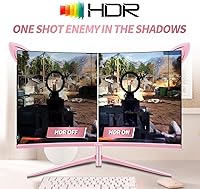
Peak brightness at 250 cd/m² holds the image back in well-lit rooms, and HDR content, while technically supported, lacks the luminance headroom to feel meaningfully different from standard SDR. A handful of buyers also noted slightly uneven backlight uniformity in corners, suggesting some unit-to-unit variance in panel quality.
Design & Aesthetics
91%
The cat-ear silhouette is genuinely unlike anything else in the monitor market, and buyers consistently report that it looks even better on the desk than in product photos. The soft pink colorway reads as tasteful rather than garish, integrating naturally into themed bedroom and dorm setups without overwhelming the space around it.
The design is polarizing by nature — buyers expecting a neutral monitor that fades into the background will find this the wrong purchase entirely. A small number of owners noted that the plastic finish on the ear accents feels light-grade up close, which can slightly undercut the premium visual impression at closer inspection distances.
Gaming Performance
74%
26%
For mid-range GPU owners pushing 1440p at over 100 frames per second, the 165Hz refresh rate with FreeSync delivers noticeably fluid gameplay where tearing is effectively eliminated. RPGs, open-world games, and story-driven titles benefit especially from the combination of high refresh rate and the strong contrast that makes darker scenes feel richly detailed.
Competitive and fast-twitch players will encounter VA panel ghosting — moving objects in FPS games can leave faint trailing artifacts that become distracting once noticed. CUNPU does not publish a GTG response time, making objective comparison difficult, and that omission alone is reason enough for serious ranked players to look at faster IPS alternatives.
Value for Money
78%
22%
Getting QHD resolution, 165Hz, a curved VA panel, and a genuinely distinctive design in one package at this price tier is a difficult combination to argue against. Buyers comparing it against flat 1080p monitors in the same budget range consistently felt they received meaningfully more screen capability for their investment.
The value equation weakens when factoring in the tilt-only stand, single USB port, and undisclosed response time — areas where established brands at comparable price points tend to deliver more. CUNPU's limited market history also means accepting a degree of brand uncertainty and after-sales unpredictability that a more established name would not carry.
Ergonomics
43%
57%
Assembly out of the box is quick and uncomplicated, and the tilt mechanism operates smoothly without wobble during adjustment. For users whose desk and chair already put them at the correct eye level, the included stand is perfectly functional for casual day-to-day positioning without any immediate need to modify it.
The tilt-only stand is the single most cited frustration among buyers — no height adjustment, no swivel, and no pivot makes comfortable long-session positioning genuinely difficult for anyone outside a narrow average. Extended gaming and work sessions become physically taxing, and a monitor arm becomes a near-mandatory additional purchase rather than an optional upgrade.
Color Accuracy
83%
With 99% sRGB coverage, the CUNPU curved display handles color-sensitive tasks like photo editing and digital illustration more competently than most gaming monitors at this segment. Buyers who dabble in casual creative work alongside gaming noted that colors look consistent and true without requiring manual profile adjustments straight out of the box.
Wide-gamut spaces like DCI-P3 or Adobe RGB are not meaningfully covered, making it unsuitable for professional color grading or commercial photography work. Factory calibration also shows mild unit-to-unit variation, meaning some buyers received a panel that needed minor tweaking before colors felt fully accurate for critical viewing.
Motion Handling
56%
44%
At typical gaming refresh rates with FreeSync active, everyday game movement feels fluid and tear-free across most genres. Slower-paced titles — strategy games, walking sims, and narrative RPGs — rarely stress the panel enough to surface its motion limitations in any observable way.
VA ghosting is a real and observable issue in fast, high-contrast motion scenarios — dark objects moving against bright backgrounds and rapidly panning cameras can produce trailing artifacts that are hard to unsee once noticed. The absence of a published response time spec makes it impossible to evaluate overdrive settings objectively or compare fairly against competing displays.
Build Quality
71%
29%
The monitor arrives well-packaged with no commonly reported missing components, and the thin-bezel frame feels structurally solid during routine handling. At this price point, the overall construction is consistent enough that most buyers describe the physical build as meeting rather than falling short of expectations.
Up close, the plastic used on the stand base and cat-ear accents reads as budget-grade, and a few buyers mentioned faint creaking when repeatedly adjusting the tilt. Nothing feels dangerously flimsy, but the material quality does not fully match the visual ambition of the design for buyers expecting premium tactile feedback.
Connectivity
58%
42%
HDMI 2.0 and DisplayPort 1.2 cover the essential input needs for both PC and current-gen console users without requiring any adapters in a standard single-device setup. Most casual users connecting one system at a time will find the port selection completely workable for their everyday routine.
Two video inputs and a single USB port leave almost no room for multi-device or multi-peripheral users — anyone running a PC alongside a console, or needing to connect more than one USB device, will reach for a separate hub almost immediately. The port selection feels more budget than the overall price suggests.
Eye Comfort
81%
19%
Flicker-free backlight technology combined with a low blue light mode makes a noticeable difference during extended sessions — buyers who game for several hours report meaningfully less eye fatigue than with previous monitors. The matte screen surface also handles ambient glare effectively without introducing a visible texture over fine image detail.
At 250 cd/m², the display needs to be pushed toward higher brightness settings in normally lit rooms, which partially offsets the eye comfort benefits during daytime use. The blue light mode, while genuinely useful in the evenings, shifts color temperature in ways that some buyers find too warm for accurate image viewing.
Audio Quality
31%
69%
The built-in speaker technically produces audible sound, which is more practical than nothing for quick video calls, brief audio checks, or emergency situations where headphones are temporarily unavailable. It functions as a last-resort option rather than a complete absence of audio output.
The speaker output is thin, low in volume, and almost entirely devoid of bass — nearly every buyer who tested it as a primary source abandoned it within days. This cat-ear monitor's built-in audio is one of the weaker implementations at this price tier, and factoring external speakers into the budget is essentially non-optional.
OSD & Controls
47%
53%
The OSD menu does cover the expected range of adjustments — brightness, contrast, color presets, FPS crosshair overlays, and FreeSync toggles are all present and accessible. Buyers who configure the display once at setup and rarely revisit settings report no ongoing frustrations in regular use.
The navigation experience is clunky and counterintuitive — button placement requires memorization rather than intuition, and reaching a specific setting takes more menu steps than competing monitors at this price. This becomes especially friction-heavy during initial calibration, where frequent menu access is necessary before the display is dialed in.
Immersion & Curvature
79%
21%
The 1500R curvature adds a genuine sense of depth at 27 inches — open-world landscapes, cockpit perspectives, and first-person environments all feel more enveloping than on a flat panel of the same size. Buyers transitioning from flat monitors consistently describe the curve as a noticeable and welcome change rather than a gimmick.
At 27 inches, the curvature effect is more subtle than it would be on a wider ultra-wide panel, and buyers used to tighter curvatures like 1000R may find it underwhelming. Multi-monitor setups can also introduce visible angle inconsistencies when pairing this curved screen with a flat secondary display.
Brightness & HDR
61%
39%
In dim or controlled lighting environments — evening gaming sessions, darkened bedrooms, or home theater-style setups — the 250 cd/m² output is entirely sufficient, and the strong VA contrast ratio helps the image punch well above what the brightness ceiling alone would suggest.
HDR support exists on paper but delivers little practical benefit at this luminance level — true HDR impact requires significantly higher peak output to render highlights with meaningful separation. In brightly lit rooms, the modest brightness ceiling makes the display feel noticeably underpowered compared to alternatives with higher nit ratings at similar price points.
Setup & Installation
76%
24%
Assembly is quick and tool-free — the stand attaches in minutes, cable routing is manageable, and buyers consistently describe the unboxing experience as clean and well-organized with no missing components reported at scale. First-time monitor buyers in particular found the setup process approachable and stress-free.
The tilt-only stand means ergonomic positioning requires additional desk management workarounds for most users who are not at exactly the right chair height. Buyers planning to use a monitor arm should independently verify VESA compatibility before purchasing, as this specification is not clearly confirmed in the available product documentation.

Suitable for:

The CUNPU RDF1DD 27-inch Curved Gaming Monitor is a strong pick for anyone who wants their desk setup to look as deliberate as it performs — particularly gamers who treat their workspace as part of their personal aesthetic. If you're running a mid-tier GPU like an RTX 3060 or RX 6600, you're in the sweet spot for driving 1440p at frame rates that actually take advantage of that 165Hz panel. The 1500R curve and high contrast ratio make it especially rewarding for RPGs, story-driven games, and open-world titles where deep blacks and immersive visuals matter more than raw speed. Console players connecting over HDMI will also find it a meaningful upgrade from a 1080p screen, without needing to spend significantly more. Anyone putting together a themed bedroom or dorm setup — pink, pastel, or otherwise — will appreciate that this monitor contributes to the room's look rather than clashing with it.
Not suitable for:

Competitive or pro-level FPS players should look elsewhere — the CUNPU RDF1DD 27-inch Curved Gaming Monitor uses a VA panel with an unspecified response time, and in fast, twitch-reflex scenarios, ghosting and trailing on moving objects can become a real distraction compared to a fast IPS alternative. If ergonomics are a priority, the tilt-only stand will frustrate users who need height adjustment or swivel to get a comfortable working position during long sessions. Those who rely on a monitor's built-in audio as a daily driver should also reconsider, since the speaker output is barely functional. Buyers who want brand assurance, an established warranty track record, or proven after-sales support may find CUNPU's limited market history harder to accept — especially at a price point where more established names offer competitive options. Professional color work requiring wide-gamut coverage beyond sRGB is also outside what this display is built for.

Specifications

  • Screen Size: The panel measures 27 inches diagonally, providing generous screen area for both gaming and everyday desktop use at typical sitting distances.
  • Resolution: Native resolution is 2560x1440 (QHD), which delivers noticeably sharper detail than a standard 1080p display at this screen size.
  • Panel Type: Uses a VA (Vertical Alignment) panel, which excels at contrast and color depth but can exhibit motion trailing in fast-paced content.
  • Refresh Rate: Supports up to 165Hz natively, with backward compatibility for 144Hz signals from older GPUs and current-generation consoles.
  • Curvature: The screen uses a 1500R curvature radius, bending the panel slightly toward the viewer to add perceived depth and wrap at 27 inches.
  • Contrast Ratio: Static contrast is rated at 3000:1, producing noticeably deeper blacks and brighter highlights than most IPS panels at a comparable price point.
  • Color Gamut: Covers 99% of the sRGB color space with 16.7 million displayable colors, sufficient for gaming and casual creative tasks requiring accurate color reproduction.
  • Brightness: Typical brightness is rated at 250 cd/m², which performs adequately in controlled indoor environments but may appear dim near bright windows.
  • Response Time: The manufacturer does not publish an official GTG response time figure, making direct comparisons against competing monitors harder to assess.
  • Sync Technology: Supports AMD FreeSync for variable refresh rate; G-Sync compatibility with NVIDIA GPUs is available only over DisplayPort, not HDMI.
  • Video Inputs: Equipped with one HDMI 2.0 port and one DisplayPort 1.2 port, covering connections for PCs, gaming laptops, and current-generation consoles.
  • USB Ports: Includes a single USB port, which provides basic peripheral connectivity but is insufficient for users who rely on a monitor as a multi-device hub.
  • Built-in Speaker: An integrated speaker is included, delivering minimal audio output suited only as a fallback rather than a primary listening option.
  • Aspect Ratio: Standard 16:9 widescreen format, compatible with all major games, streaming services, and operating systems without cropping or letterboxing.
  • Bezel Width: The bezel measures approximately 0.09 inches on three sides, reducing visual distraction and contributing to a wider-feeling screen area.
  • Stand Adjustment: The bundled stand supports tilt adjustment only; height, swivel, and pivot repositioning require a separately purchased VESA-compatible monitor arm.
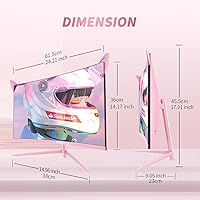
  • Item Weight: The complete unit including stand weighs 12.18 pounds, making it manageable to position during setup without requiring two people.
  • Pixel Density: Pixel density sits at approximately 108 PPI, producing sharp, detailed imagery at standard 27-inch desktop viewing distances.
  • HDR Support: HDR is listed as supported, though the 250 cd/m² peak brightness limits the practical impact compared to monitors purpose-built for HDR content.
  • Display Colors: Renders 16.7 million colors across the full standard color space, covering the range needed for gaming, video streaming, and general computing use.

Related Reviews

Skytech Gaming Moonshadow 27-inch Curved Gaming Monitor
83%
88%
Image Quality
91%
Refresh Rate Performance
86%
Adaptive-Sync
83%
VA Panel Contrast
84%
Stand & Ergonomics
More
Sealan 27-inch Curved Gaming Monitor
82%
85%
Display Quality
90%
Ease of Setup
91%
Value for Money
87%
Performance in Gaming
83%
Color Accuracy
More
Great Voell 27-Inch Curved Gaming Monitor
86%
91%
Value for Money
89%
Display Quality
87%
Gaming Performance
84%
Eye Comfort
80%
Build Quality
More
GAMEPOWER F20 27-inch Curved Gaming Monitor
61%
83%
Value for Money
74%
Image Quality
69%
Gaming Performance
78%
Curve & Immersion
58%
Build Quality
More
FYHXele 27-inch Curved Gaming Monitor
73%
84%
Gaming Performance
71%
Image Quality
88%
Value for Money
83%
Design & Aesthetics
62%
Build Quality
More
DJiEX Q27P28 27-inch Curved Gaming Monitor
72%
88%
Value for Money
81%
Image Quality
86%
Gaming Performance
91%
Aesthetic Design
47%
Stand & Ergonomics
More
CRUA CR270C 27″ Curved Gaming Monitor
71%
83%
Value for Money
78%
Image Quality
81%
Refresh Rate Performance
86%
Panel Contrast & Blacks
67%
Build Quality
More
GreBear BM27QA 27-inch Curved Gaming Monitor
65%
83%
Image Quality
78%
Gaming Performance
74%
Refresh Rate Value
61%
Build Quality
44%
Ergonomics & Adjustability
More
Samsung S39C 27-Inch Curved Gaming Monitor
75%
83%
Picture Quality & Color Accuracy
88%
Curvature & Immersion
61%
Refresh Rate & Gaming Performance
86%
Eye Comfort & Long-Session Usability
79%
Build Quality & Aesthetics
More
Viewedge 27-inch Curved Gaming Monitor CS27FHUS
84%
92%
Gaming Performance
89%
Display Quality
82%
Build Quality
91%
Ease of Setup
88%
Immersion & Comfort
More

FAQ

Yes, the CUNPU RDF1DD 27-inch Curved Gaming Monitor connects to both consoles via HDMI 2.0. Xbox Series X supports native 1440p output, so it pairs cleanly. PS5 currently outputs at either 1080p or 4K, meaning you will get an upscaled or downscaled image — fully functional, but Xbox users will get more out of the pairing.
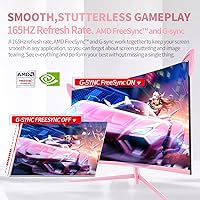
It can, but use DisplayPort rather than HDMI to give yourself the best chance. NVIDIA has supported FreeSync displays through its G-Sync Compatible program for several years, but adaptive sync behavior over HDMI with NVIDIA cards is inconsistent. Results also vary depending on your specific GPU model and driver version, so check forums for your card before assuming it will work out of the box.

Most buyers say it matches fairly accurately — it reads as a warm, soft pink rather than a loud neon tone. The cat-ear accents feel like a genuine part of the construction rather than a cheap add-on, and the overall look tends to land well in aesthetic desk setups.

No, the included stand only tilts. Height, swivel, and pivot adjustments are not available with the stock hardware, which is a recurring complaint from buyers who spend long hours at their desks. If ergonomics matter to you, a third-party monitor arm is a worthwhile addition — just confirm VESA mounting compatibility in the current product listing before purchasing one.

Probably not if raw competitive performance is the priority. VA panels can ghost on fast-moving objects, and the absence of a published response time spec makes it harder to trust for reflex-heavy play. Players chasing the sharpest possible motion clarity would be better served by a fast IPS panel. For casual or mid-tier competitive play at 1440p, it is still capable — just not the specialist tool that a serious ranked grind demands.

Thin and lacking in volume — that is the consistent verdict from buyers who tried it. It technically produces sound, but there is no real bass and the output level is low. Treat it as an emergency fallback, not a daily driver. Budget for headphones or a small desktop speaker alongside this monitor.

CUNPU does not publish an official GTG (gray-to-gray) figure, which is a real gap in the spec sheet. Based on the VA panel technology used, similar products in this category typically land between 4ms and 8ms GTG, but that is an educated estimate based on panel type rather than a confirmed measurement. If precise response time matters to your use case, this missing spec should factor into your decision.

It is actually one of the stronger use cases for this display. The 3000:1 contrast ratio makes dark scenes in films look genuinely rich, and the 1500R curve adds a subtle sense of immersion at typical desk distances. Colors are vibrant enough that streaming video looks lively rather than dull. It is a better movie monitor than many flat IPS alternatives at a similar price.

The matte screen surface handles glare well and avoids the distracting reflections common to glossy panels. The weak point is brightness — at 250 cd/m², the image can look washed out when competing with strong natural light. Positioning it away from direct sunlight or in a moderately lit room will get the most out of it.

The marketing language skews toward a female gamer audience, but the hardware performs for anyone who sits in front of it. The cat-ear profile and pink colorway simply make it a natural fit for anyone building an aesthetic desk setup, regardless of gender. If the look appeals to you and the specs match your use case, there is no reason to look elsewhere on those grounds alone.