


Overview

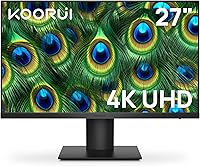
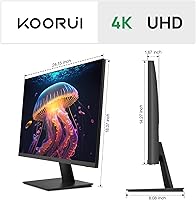
The KOORUI N07 27-inch 4K IPS Monitor is one of the more quietly impressive budget entries to land in the 4K display space in recent years. KOORUI has been building a real following among value-focused buyers, and this panel — out since mid-2023 — has accumulated enough honest, real-world feedback to be taken seriously. At 27 inches, the screen hits a practical sweet spot for most desk setups: large enough to genuinely appreciate 4K resolution without dominating a standard workspace. Color performance is a clear strength. The one thing to calibrate expectations around upfront is ergonomics — the stand adjustability is limited, and that trade-off is worth knowing before you buy.

Features & Benefits

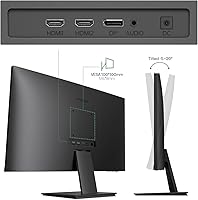
The IPS panel delivers what you want at this resolution: sharp images and consistent, accurate color from virtually any viewing angle. With 99% sRGB and 95% DCI-P3 gamut coverage, this IPS display is broad enough for entry-level photo editing and media work — colors look vivid without tipping into oversaturation. Ten-bit color depth means gradients render cleanly, something you notice in skies, skin tones, and anywhere subtle transitions appear. Flicker-free technology paired with a Low Blue Light mode makes long working days easier on the eyes. The panel is Adaptive-Sync compatible for tear-free casual gaming, and the dual HDMI ports alongside a single DisplayPort give you flexible device connectivity without hassle.

Best For

This 4K monitor makes the most sense for people chasing a meaningful visual upgrade without the premium price tag that usually comes with it. Home office workers will notice immediately how much easier sustained reading and detailed work become at 4K on a 27-inch screen — it is a tangible step up from 1080p. Hobbyist photographers and editors will find the wide color gamut genuinely useful, even if this is not a professional color-grading setup. Students building out a dual-monitor desk arrangement will appreciate the VESA mount compatibility. Casual gamers can enjoy it too, provided high-framerate competitive play is not the main goal.

User Feedback

Across a substantial pool of reviews, the sentiment is clearly positive — color vibrancy and image sharpness come up repeatedly as the standout reasons buyers are happy, and that tracks with what the specs actually promise. The pixel density at this screen size looks genuinely crisp in practice. The recurring criticisms are consistent and worth passing along: the stand only tilts, offering no height or swivel movement, which adds up over long sessions. There are no built-in speakers, so plan for a separate audio setup. Competitive gamers will also want to note the 60Hz ceiling, which puts this behind alternatives at a similar price. Overall, the rating hovers near 4.4 stars — honest value with a few known compromises.

Pros

  • True 4K resolution at 27 inches produces noticeably sharp, detailed images that are a real step up from 1080p.
  • Wide color gamut coverage makes this IPS display a capable choice for hobbyist photo editing and color-sensitive media work.
  • The IPS panel holds consistent color and brightness across wide viewing angles, useful for side-by-side work or shared viewing.
  • Flicker-free technology and a Low Blue Light mode make extended work sessions easier on the eyes.
  • Adaptive-Sync compatibility reduces screen tearing during casual gaming without requiring a premium GPU.
  • Dual HDMI ports plus a DisplayPort input offer enough connectivity for most multi-device desk setups.
  • VESA 100×100mm compatibility gives buyers the freedom to use a monitor arm or wall mount.
  • Out-of-the-box color vibrancy consistently earns praise from real buyers across a large review base.
  • The matte screen surface cuts down on reflections in typical office or home lighting conditions.
  • Strong value at this price tier — few 27-inch 4K IPS panels compete at this level of color performance for the cost.

Cons

  • The stand only tilts; no height adjustment or swivel means ergonomic flexibility is genuinely limited.
  • No built-in speakers require buyers to budget separately for a soundbar, headphones, or external audio solution.
  • The 60Hz refresh rate is a real limitation for anyone considering fast-paced or competitive gaming.
  • Buyers who need precise ergonomic positioning will likely need to purchase a monitor arm as an added expense.
  • At 300 cd/m² brightness, the panel can struggle in very bright or sunlit room environments.
  • HDR10 support is present on paper but the brightness ceiling limits how impactful HDR content actually looks in practice.
  • The brand lacks the long-term reliability track record of established display manufacturers, which may concern some buyers.
  • Cable management options on the stand are minimal, which can lead to a messier desk setup.

Ratings

The scores below reflect AI-driven analysis of verified global buyer reviews for the KOORUI N07 27-inch 4K IPS Monitor, with spam, bot-generated, and incentivized feedback actively filtered out to ensure the results represent genuine ownership experiences. Both the standout strengths and the real frustrations that real buyers encountered are transparently reflected in each category score. This gives you an honest, ground-level picture of what living with this display actually looks like day to day.

Image Sharpness
93%
At 27 inches with a full 4K resolution, the pixel density is high enough that text, fine details, and UI elements look genuinely crisp — something buyers upgrading from 1080p panels notice immediately. Reviewers working with spreadsheets, detailed documents, or high-resolution photography repeatedly highlight this as the display's most satisfying quality.
A small number of users noted that sharpness is only fully appreciated when the source content is actually 4K — lower-resolution content upscaled to this panel can look slightly soft compared to a native lower-res display, which is a limitation of the resolution rather than the panel itself.
Color Accuracy
89%
The wide gamut coverage — 99% sRGB and 95% DCI-P3 — translates into genuinely vibrant, well-saturated colors that buyers notice immediately out of the box, often without any manual calibration. Hobbyist photographers and casual editors found the color rendering reliable enough for practical creative work at this price tier.
Professional colorists or print-focused designers may find the factory calibration slightly warm or inconsistent at the edges of the gamut, and without hardware calibration tools this display is not positioned for critical color-grading workflows where absolute accuracy is required.
Color Gamut Coverage
88%
Covering 95% of DCI-P3 puts this IPS display comfortably ahead of many competing budget panels that only cover sRGB, making it a genuinely useful screen for streaming HDR content or working with wide-gamut media files. Buyers who stream 4K content from platforms that support wide color noted that skies, foliage, and skin tones look noticeably richer than on their previous displays.
The HDR10 support exists on paper, but the 300 cd/m² brightness ceiling means the actual HDR experience falls well short of what a true HDR display delivers — highlights do not punch nearly as hard, so buyers expecting dramatic HDR contrast will be underwhelmed.
Value for Money
91%
Few displays at this price point offer a genuine 4K IPS panel with this level of color gamut coverage, and buyers across multiple review sources consistently describe this as one of the better purchasing decisions they have made for their desk setup. The combination of resolution, color performance, and connectivity at this cost is difficult to match in the current market.
The value proposition softens slightly for buyers who need ergonomic flexibility or a higher refresh rate, since addressing those gaps means spending additional money on a monitor arm or ultimately purchasing a different display — factors that narrow the real-world savings.
Eye Comfort
82%
18%
Flicker-free backlighting and a dedicated Low Blue Light mode make a noticeable difference during long work sessions, and buyers who use this display for eight-plus hour stretches report less end-of-day eye fatigue compared to older or cheaper panels. The matte coating also cuts down on glare from overhead office lighting, which adds to long-session comfort.
At 300 cd/m² the panel is not the brightest available, and in rooms with significant ambient light some users found themselves pushing brightness to the upper range of its capability, which can partially offset the benefit of the flicker-free backlight over extended use.
Refresh Rate & Smoothness
61%
39%
For everyday desktop use, productivity work, and casual gaming, 60Hz is perfectly functional, and the Adaptive-Sync support keeps frame delivery smooth even when the GPU is running below the cap. Buyers using this display for non-gaming tasks or slower-paced games reported no complaints with motion handling.
The 60Hz ceiling is a genuine limitation that draws consistent criticism from buyers who intended to use this display for competitive or fast-paced multiplayer gaming — at this refresh rate, motion clarity during high-action sequences is noticeably behind 144Hz or 165Hz alternatives, and no firmware or setting can change that hardware constraint.
Connectivity
84%
Having two HDMI inputs alongside a DisplayPort is a practical setup for users who want to switch between a laptop, desktop, and a console without constantly swapping cables. Buyers setting up work-from-home stations with multiple source devices found the port layout genuinely convenient rather than an afterthought.
There is no USB hub functionality built into the display, which buyers with cluttered desks or multiple peripherals flagged as a missed convenience at this price point. A USB-C input is also absent, meaning MacBook and modern laptop users will always need an adapter in the chain.
Stand & Ergonomics
52%
48%
The stand holds the panel securely and the tilt range of -5° to +20° covers the basic adjustments most users make once during initial setup. For buyers who plan to use a VESA monitor arm from day one, the stand's limitations become largely irrelevant.
The lack of height adjustment, swivel, and pivot is the most frequently mentioned frustration across buyer reviews, and it is a real trade-off — users who share a monitor with someone of a different height, or who need portrait mode for coding or reading, will find the stock stand actively limiting rather than merely basic.
Build Quality
76%
24%
The panel feels solidly constructed for its price category, with no widespread reports of structural issues, wobbly connections, or premature hardware failure in the review base accumulated since its mid-2023 launch. Buyers generally describe the build as appropriately sturdy given the market tier it occupies.
The plastic used in the stand and rear housing feels utilitarian rather than premium, and buyers coming from higher-end displays will notice the difference in material quality immediately. The slim bezel looks clean but flexes slightly under pressure, which some users found less reassuring during handling and setup.
Audio
38%
62%
The included 3.5mm audio output jack means buyers can connect headphones or a powered speaker directly from the monitor rather than routing audio elsewhere, which is a convenient fallback for simple setups. The jack functions reliably with no reported interference or signal quality issues.
There are no built-in speakers whatsoever, which is an omission that draws consistent negative mentions in buyer reviews — users who assumed basic audio would be included were caught off guard. For a display marketed toward home office and productivity use, the absence of even low-power speakers requires buyers to budget for and arrange a separate audio solution from day one.
HDR Performance
57%
43%
HDR10 support means the display can accept and process HDR signals from consoles, PCs, and streaming devices without requiring any workaround, and some buyers report a visible improvement in color depth when HDR content is played on compatible platforms.
The honest reality is that 300 cd/m² is simply too dim for HDR to deliver its intended impact — the bright highlights and deep shadow contrast that define a compelling HDR experience require significantly higher peak brightness than this panel provides, leaving HDR feeling like a checkbox feature rather than a genuine upgrade.
Glare & Reflection Control
81%
19%
The matte anti-glare coating handles reflections well under typical office, home, and mixed lighting conditions, and buyers working near windows or under overhead fluorescents consistently noted that the screen remains usable without repositioning or dimming the room. This is a practical daily-use advantage over glossy panels.
In extremely bright environments or direct sunlight, the 300 cd/m² brightness limit means the matte coating alone cannot fully compensate — the image can wash out, and the display works best in controlled or moderate lighting conditions rather than in naturally bright spaces.
Setup & Assembly
86%
Assembly is straightforward with minimal parts, and buyers report having the display up and running in under ten minutes without needing tools. The plug-and-play behavior on both Windows and macOS means drivers and configuration headaches are essentially non-existent for standard use cases.
The included documentation is minimal, and buyers who are less familiar with display settings reported some initial confusion around enabling the correct resolution and refresh rate in their OS display settings — a more thorough quick-start guide would reduce the small number of setup-related complaints in the review pool.
Viewing Angles
85%
IPS technology delivers on its core promise here — color and brightness hold up well when viewed from off-center angles, making this a comfortable display for side-by-side use or for sharing a screen during calls or collaborative work. Buyers who use their monitor for presentations or shared viewing praised this aspect specifically.
While IPS glow is expected at this price point, a subset of buyers working in dark environments reported noticeable glow in the corners when viewing dark content, which is a characteristic of the panel technology rather than a defect but still influences the experience in low-light conditions.

Suitable for:

The KOORUI N07 27-inch 4K IPS Monitor is a strong fit for home office workers and remote professionals who spend long hours in front of a screen and want noticeably sharper text and detail without paying a premium price. At 27 inches and true 4K resolution, the pixel density is high enough that documents, spreadsheets, and fine UI elements look genuinely cleaner than on a 1080p display of the same size. Hobbyist photographers and entry-level content creators will find the wide color gamut — covering 99% sRGB and 95% DCI-P3 — more than adequate for casual editing and color-accurate work. Students setting up a productive desk environment will benefit from the VESA mount support, which makes multi-monitor or arm-mounted configurations straightforward. Casual gamers who care more about image fidelity than frame rates will also get solid mileage here, and the Adaptive-Sync support keeps things smooth during everyday gaming sessions.

Not suitable for:

Buyers with specific ergonomic needs should think carefully before committing, because the KOORUI N07 27-inch 4K IPS Monitor offers tilt adjustment only — there is no height, swivel, or pivot movement in the stock stand. Anyone who relies on precise monitor positioning for posture or accessibility reasons may find this frustrating over time, and will need a third-party monitor arm to compensate. Competitive or esports-oriented gamers should look elsewhere entirely: the 60Hz refresh rate is a hard ceiling that puts it well behind monitors designed for fast-paced play. If your setup relies on built-in audio, this panel will leave you short — there are no speakers, so a separate solution is a requirement rather than an option. Professional colorists or photographers who need display-calibrated accuracy at a studio level will also want a purpose-built color-critical monitor instead.

Specifications

  • Screen Size: The display measures 27 inches diagonally, offering a spacious viewing area well-suited to productivity and media consumption on standard desks.
  • Resolution: The panel runs at 3840×2160 pixels (4K UHD), delivering a pixel density sharp enough that individual pixels are essentially invisible at normal viewing distances.
  • Panel Type: An IPS (In-Plane Switching) panel is used, which provides consistent color reproduction and wide viewing angles compared to TN or VA alternatives.
  • Refresh Rate: The display runs at a maximum of 60Hz, which is standard for productivity-focused 4K monitors in this price range.
  • Color Gamut: The panel covers 99% of the sRGB color space and 95% of the DCI-P3 color space, making it viable for color-sensitive creative and editing tasks.
  • Color Depth: Ten-bit color depth enables the display to render approximately 1.07 billion colors, producing smooth gradients with minimal banding.
  • Brightness: Peak brightness is rated at 300 cd/m², which is adequate for typical indoor environments but may fall short in very bright or sunlit rooms.
  • HDR Support: The monitor supports HDR10 content, though the practical HDR impact is moderate given the 300 cd/m² brightness ceiling.
  • Adaptive Sync: The panel is compatible with both AMD FreeSync and NVIDIA G-Sync, reducing screen tearing during gaming at variable frame rates.
  • Ports: Connectivity includes one DisplayPort 1.2 input and two HDMI inputs, providing enough options for most single or dual-source desk setups.
  • Audio Out: A 3.5mm headphone or audio output jack is included, though the monitor has no built-in speakers.
  • VESA Mount: The display is VESA 100×100mm compatible, allowing it to be mounted on a third-party monitor arm or wall bracket.
  • Tilt Adjustment: The included stand supports tilt adjustment from -5° to +20°, but offers no height, swivel, or pivot movement.
  • Surface Finish: The screen uses a matte anti-glare coating, which reduces reflections and improves usability in mixed or ambient lighting conditions.
  • Eye Care: Flicker-free backlight technology and a Low Blue Light mode are both included to reduce eye fatigue during extended use.
  • Dimensions: The monitor measures approximately 24.15″ wide, 14.27″ tall, and 1.68″ deep, not including the stand.
  • Weight: The unit weighs 12.1 pounds including the stand, making it manageable for a single person to set up or reposition.
  • Power Input: The monitor operates at 19 volts DC and ships with an external power adapter rather than an internal power supply.
  • Screen Surface: The panel face is matte-finished, which helps diffuse overhead and ambient light without introducing significant clarity loss.
  • Release Date: This display was first made available in June 2023 and has since built a substantial review base on major retail platforms.

Related Reviews

ViewSonic VG2756-4K 27-Inch 4K Docking Monitor
80%
91%
USB-C Docking Performance
88%
Display Clarity
74%
Connectivity & Port Selection
86%
Ergonomics & Stand Quality
71%
Color Accuracy
More
YEYIAN ODRAZ 27-inch 4K UHD IPS Gaming Monitor
86%
89%
Picture Quality
91%
Gaming Performance
85%
Color Accuracy
83%
Build Quality
88%
Ease of Setup
More
LG 27UP850K-W 27-inch 4K IPS Monitor

76%
88%
Image Quality
91%
Color Accuracy
93%
USB-C Connectivity & Power Delivery
86%
Ergonomics & Stand
84%
Build Quality & Design
More
ViewSonic VP2768a-4K 27-Inch 4K Monitor

86%
94%
Color Accuracy
88%
Ergonomics & Comfort
91%
Value for Money
89%
Build Quality
85%
Ease of Setup
More
ViewSonic VA2756-4K-MHD 27-Inch 4K Monitor
84%
92%
Display Quality
90%
Color Accuracy
88%
Design & Build Quality
85%
Ease of Setup
89%
Connectivity Options
More
ViewSonic VX2776-4K-MHDU 27-inch 4K IPS Monitor

75%
91%
Image Clarity
93%
USB-C Convenience
78%
Color Accuracy
54%
HDR Performance
46%
Stand & Ergonomics
More
ViewSonic VP3268A-4K 32-inch 4K UHD IPS Monitor
86%
94%
Color Accuracy
88%
Ergonomics/Comfort
91%
Build Quality
83%
HDR Performance
85%
Connectivity Options
More
Dell S2725QC 27-inch 4K USB-C Monitor

81%
93%
Image Clarity
88%
Color Accuracy
91%
USB-C Connectivity
86%
Refresh Rate & Smoothness
89%
Build Quality & Design
More
Gigastone 27-inch IPS Monitor
84%
91%
Display Quality
88%
Ergonomics and Adjustability
92%
Value for Money
85%
Connectivity Options
89%
Setup and Installation
More
LXZ 27-inch 4K Monitor
82%
92%
Value for Money
88%
Display Quality
91%
Ease of Setup
85%
Connectivity Options
76%
Build Quality
More

FAQ

Yes, it is compatible with Apple computers. If your Mac has a USB-C or Thunderbolt port, you will need a USB-C to DisplayPort or USB-C to HDMI adapter, since the monitor only has DisplayPort and HDMI inputs. Once connected properly, macOS will recognize it as a 4K display without any special drivers.

Absolutely. The back of the display has a standard VESA 100×100mm mounting pattern, so any compatible monitor arm or wall mount will work. Many buyers actually prefer this route since the stock stand only tilts and offers no height or swivel adjustment.

It depends on the type of gaming. For casual play, open-world titles, or anything where image quality matters more than frame rate, it performs well and the Adaptive-Sync support keeps things smooth. For competitive multiplayer gaming where you need 144Hz or higher, this 60Hz panel is not the right tool — you would want a display built specifically for high refresh rates.

For smooth 4K gaming, yes — a capable dedicated GPU is recommended. For everyday desktop use, web browsing, or video streaming, most modern integrated graphics can handle 4K output at 60Hz without any issues over DisplayPort or HDMI 2.0.

No, this IPS display does not include built-in speakers. It does have a 3.5mm audio output jack, so you can connect headphones or a powered speaker directly. If desktop audio is important to your setup, factor in a soundbar or speaker system when budgeting.

It looks genuinely impressive. Streaming 4K content on this panel — whether from a laptop, streaming stick, or console — takes full advantage of the resolution and wide color gamut. Colors are vivid and well-saturated, and the matte finish keeps reflections from being distracting during movie sessions.

Unfortunately, no. The stand only supports tilt, ranging from -5° to +20°. There is no height adjustment, swivel, or portrait pivot. If you need more flexibility in positioning, a third-party VESA-compatible monitor arm is the practical solution.

KOORUI typically includes an HDMI cable in the box, along with the power adapter. A DisplayPort cable is generally not included, so if you plan to use that connection, have one on hand before setup.

Yes, and it works well in that role. With two HDMI ports and a DisplayPort input, connecting a second device simultaneously is straightforward. The VESA compatibility also makes it easy to mount on an arm alongside another display for a cleaner dual-monitor setup.

Some degree of IPS glow is typical for panels at this price point and is not specific to this display. Most buyers report acceptable uniformity for everyday use, but if you work in a very dark environment and are particularly sensitive to glow, it is worth reading recent buyer feedback to calibrate your expectations.

Where to Buy