
Overview

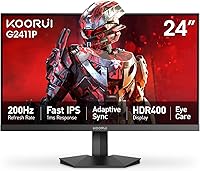
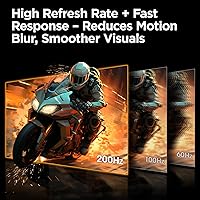
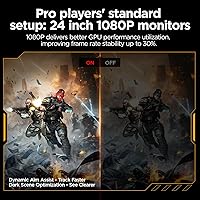
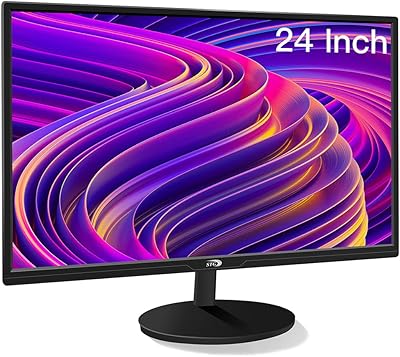
The KOORUI G2411P 24″ Gaming Monitor enters the budget IPS gaming space offering a combination of speed and color quality that most displays at this price tier simply don't provide. KOORUI is a relatively new name in the monitor market, but the brand has been quietly building a reputation among value-conscious buyers. This 24-inch gaming display runs at FHD 1080p — not QHD or 4K — which is actually a deliberate strength: at 1080p, even mid-range GPUs can push frames well beyond 144Hz, making the 200Hz refresh rate genuinely usable rather than aspirational. Slim bezels and a straightforward setup make it especially appealing to first-time monitor buyers building their initial desk.

Features & Benefits

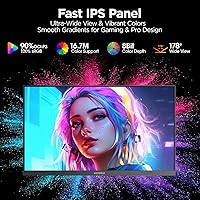
The panel technology here is what separates this KOORUI monitor from cheaper TN-based alternatives. Fast IPS panels carry a clear color quality advantage over TN, and the 90% DCI-P3 color gamut on the G2411P shows it, producing noticeably warmer reds and deeper greens than you'd expect at this price. The 1ms response time minimizes trailing on fast-moving objects without the washed-out look TN panels often produce. Adaptive Sync keeps frame pacing stable whether you're on an AMD or NVIDIA card, though this isn't a certified G-Sync or FreeSync Premium display. Connectivity is practical: HDMI 2.0 and DisplayPort 1.4 cover most devices, and the tilt-adjustable stand with VESA compatibility rounds out a thoughtfully equipped package.

Best For

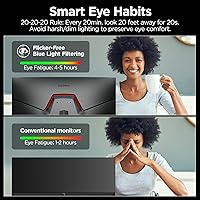
The G2411P is an easy recommendation for competitive gamers on a budget — especially those playing fast-paced FPS or battle royale titles where frame rate matters more than pixel density. Students and remote workers who also game will find the color accuracy genuinely useful for photo editing or casual content work, and the Blue Light Filter is a practical touch for long desk sessions. Console players hooking up an Xbox or PS5 will appreciate having both input options available. One honest caveat: if you plan to upgrade to a high-end GPU soon and want to push QHD or higher, this 24-inch gaming display may feel like a short-term solution rather than a lasting investment.

User Feedback

Buyers tend to walk away impressed with the out-of-box color quality, which consistently exceeds expectations for a display in this range. The stand assembly gets praised for being quick and tool-free, and the joystick-based OSD navigation is noticeably easier than the button arrays found on many competitors. That said, not every experience is glowing. A portion of users report that the stand wobbles more than expected under desk vibration — a fair concern if your setup sees frequent movement. Some longer-term reviewers have flagged that 1080p feels limiting as their desk real estate grows. On the upside, KOORUI's warranty coverage — parts for three years and full unit replacement for the first twelve months — gets cited as a genuine confidence booster for a lesser-known brand.

Pros

  • 200Hz refresh rate on a Fast IPS panel is genuinely rare at this price point — most competitors offer one or the other, not both.
  • Out-of-box color accuracy impresses most buyers, with the 90% DCI-P3 gamut producing noticeably richer tones than TN-based rivals.
  • Adaptive Sync works across AMD and NVIDIA cards, so you are not locked into a specific GPU brand.
  • Both HDMI 2.0 and DisplayPort 1.4 are included, making it easy to switch between a PC and a console without adapters.
  • Stand assembly is quick and tool-free, which first-time buyers consistently flag as a welcome experience.
  • The joystick-based OSD control is more intuitive than the button arrays found on many budget displays.
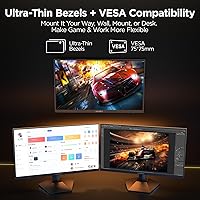
  • Ultra-slim bezels keep the desk aesthetic clean and work well in dual-monitor arrangements.
  • VESA compatibility gives you the option to wall-mount or use a third-party arm, freeing up valuable desk space.
  • A three-year parts warranty and twelve-month replacement policy offer meaningful protection for a newer brand.
  • Blue Light Filter and Flicker-Free tech make this a practical pick for people who log long hours at the desk.

Cons

  • FHD 1080p resolution will feel limiting to users who upgrade their GPU and want to push higher pixel densities.
  • The stand base has a wobble under sustained desk vibration, which can be distracting in shared or busy workspaces.
  • No USB hub is included, which is a common omission that still stings when managing multiple peripherals.
  • Adaptive Sync lacks premium G-Sync or FreeSync Premium certification, so performance at the edges of the variable refresh range may be inconsistent.
  • HDR400 support is functional but not impactful — do not expect the dramatic HDR contrast you would get from a dedicated HDR display.
  • KOORUI is still a relatively unknown brand, which may give pause to buyers who prioritize established service networks.
  • The tilt range of -5° to 20° is usable but offers no height adjustment or pivot, limiting ergonomic flexibility for taller users.
  • At 350 cd/m² brightness, the display can struggle in very brightly lit rooms or setups with direct sunlight exposure.

Ratings

The scores below for the KOORUI G2411P 24″ Gaming Monitor were generated by our AI engine after analyzing thousands of verified purchase reviews from global buyers, with spam, bot-generated, and incentivized feedback actively filtered out. This KOORUI monitor lands in a competitive segment where buyer expectations vary widely, so both its genuine strengths and its real-world limitations are reflected honestly in each category score.

Refresh Rate Performance
93%
At 200Hz on a Fast IPS panel, this display delivers some of the smoothest motion in its price bracket. Gamers playing fast-paced FPS titles consistently report that enemy tracking and scene transitions feel noticeably cleaner compared to their previous 60Hz or 144Hz displays.
Reaching the full 200Hz requires a DisplayPort 1.4 connection — HDMI 2.0 caps out lower, which catches some buyers off guard during first setup. Users with older GPUs may also struggle to push enough frames to fully utilize the ceiling.
Color Accuracy
88%
The 90% DCI-P3 gamut produces richer, more saturated colors than most TN-based competitors at this price, and buyers frequently note that the display looks excellent straight out of the box without manual calibration. Reds and greens in particular stand out during both gaming and casual media consumption.
The out-of-box calibration, while praised by most, is not factory-certified, so color-critical work like print design or professional video grading will reveal inaccuracies that a properly calibrated display would avoid. HDR400 support adds limited real-world impact on color depth in practice.
Response Time & Motion Clarity
86%
The 1ms GtG response time on this Fast IPS panel keeps ghosting and trailing well under control, which is a tangible upgrade over IPS panels of previous generations. Players who switch from VA panels specifically appreciate the absence of the dark smearing that plagued their previous setups.
Some users with highly trained eyes notice minor overshoot artifacts at the highest overdrive settings, which is common across budget Fast IPS displays. Reducing overdrive to a moderate setting resolves this but slightly softens the motion clarity advantage.
Value for Money
91%
Combining a 200Hz refresh rate, Fast IPS panel technology, and 90% DCI-P3 color coverage at this price tier is genuinely uncommon, and buyers across the board recognize it. First-time PC builders and students working within a tight budget repeatedly describe this as one of the best purchases in their entire setup.
The value calculation becomes less clear for buyers who plan to upgrade their GPU soon — at that point, the 1080p resolution ceiling starts to feel like a constraint rather than an asset. Those expecting QHD or higher pixel density at a similar price point will need to spend considerably more elsewhere.
Build Quality & Design
74%
26%
The ultra-slim bezels and clean matte finish give this 24-inch gaming display a modern aesthetic that looks more expensive than its price suggests. Most buyers find the overall physical build to be solid enough for everyday desk use without any flex or creaking from the panel itself.
The stand is the weakest link in the build — multiple reviewers flag noticeable wobble under desk vibration, which becomes particularly distracting in shared workspaces or on surfaces that transmit movement. The plastic construction of the stand base feels noticeably less premium than the panel housing.
Stand & Ergonomics
61%
39%
The tilt range of -5° to +20° covers the adjustment most users need for a straight-on viewing angle, and stand assembly completes in minutes without tools. Buyers who set it and leave it tend to find the ergonomics adequate for standard desk heights.
The absence of height adjustment, swivel, or pivot is a real limitation for taller users or those who want portrait mode functionality. Anyone spending long hours at a desk will likely feel the ergonomic gap compared to monitors with full adjustment ranges, making a VESA arm a near-essential accessory for serious setups.
Connectivity
83%
Having both HDMI 2.0 and DisplayPort 1.4 on a single budget monitor makes it straightforward to run a PC and a console simultaneously without swapping cables. The dual-input setup is particularly appreciated by buyers who use this display as a shared screen between a gaming rig and a PlayStation or Xbox.
The lack of a USB hub is a recurring complaint from buyers who expected at least one downstream USB port for peripherals. There is no audio output jack either, which limits options for users who want to route sound through desktop speakers connected to the monitor.
Setup & Ease of Use
89%
Stand assembly is one of the most consistently praised aspects across all buyer feedback — it clicks together confidently without any tools in under five minutes. The joystick-based OSD navigation is a meaningful upgrade from the button-only interfaces common on competing budget monitors.
The default settings menu can be slightly unintuitive on first use, and the power button doubles as the OSD toggle in a way that confuses some new users until they read the manual. A few buyers also report that the monitor defaults to a lower refresh rate on first connection, requiring a manual adjustment in display settings.
Eye Comfort
81%
19%
The combination of Blue Light Filter and Flicker-Free backlighting makes extended sessions noticeably more comfortable for users who spend four to eight hours daily at their desk, whether studying, working, or gaming. Buyers with a history of eye strain from budget monitors specifically call out the improvement.
Enabling the Blue Light Filter introduces a warm color shift that some users find too pronounced in a well-lit room. The filter is not adjustable in granular intensity levels, which means users have to choose between full activation or none at all.
HDR Quality
47%
53%
HDR400 compliance means the display technically supports HDR content, and some buyers notice a marginal improvement in bright highlights when watching HDR-tagged streaming content. The certification adds some legitimacy to the display spec sheet at this price.
In practice, HDR400 delivers a very modest real-world improvement and falls well short of the vivid HDR contrast most buyers imagine when they hear the term. Users coming from OLED or higher-tier HDR displays will find the effect nearly imperceptible, and enabling HDR can sometimes flatten overall picture quality.
Resolution Adequacy
69%
31%
At 24 inches, 1080p sits at a pixel density that looks clean and sharp at normal desk viewing distances of two to three feet. For competitive gaming, the lower resolution actually helps by being easier to drive at high frame rates, even on mid-range hardware.
A meaningful subset of long-term owners report that 1080p starts to feel visually limiting as their desk setup grows or as they spend more time with productivity tasks involving text and spreadsheets. Buyers who anticipate upgrading to a more powerful GPU within a year or two will likely want to reconsider the resolution ceiling before purchasing.
Brightness & Glare Handling
72%
28%
At 350 cd/m², the display is bright enough for most indoor environments and handles moderate ambient light comfortably. The matte screen surface does a reasonable job of diffusing reflections from overhead lighting without introducing significant haze.
In rooms with direct sunlight or very bright overhead lighting, the peak brightness can feel insufficient, washing out darker content. Buyers who work near windows during daylight hours have flagged this as a recurrent frustration, particularly in the afternoon when sun angles are most direct.
Brand Trust & Warranty
77%
23%
KOORUI backs this display with a 3-year parts replacement and 12-month full unit replacement policy, which is a meaningful commitment for a newer brand. Buyers who have actually gone through the warranty process describe the support team as responsive and genuinely helpful.
KOORUI remains a relatively unfamiliar name in mainstream monitor retail, which creates some initial hesitation for buyers used to established brands with wider service networks. Those who prefer walk-in service centers or well-documented repair ecosystems will find the brand infrastructure less mature than they might expect.

Suitable for:

The KOORUI G2411P 24″ Gaming Monitor is a strong fit for anyone who wants a meaningful upgrade from a standard 60Hz or 75Hz display without spending heavily. Competitive gamers playing fast-paced titles like FPS or battle royale games will feel the difference a 200Hz Fast IPS panel makes in motion clarity almost immediately. Students and remote workers who also game in their downtime get genuine dual-purpose value here — the color accuracy is solid enough for everyday content work, and the Blue Light Filter makes long sessions more bearable. Console players with an Xbox or PS5 looking for a high-refresh secondary screen will find the dual HDMI and DisplayPort inputs convenient. Those building their first PC desk setup will appreciate the slim bezels, clean aesthetic, and hassle-free stand assembly that gets everything running quickly.

Not suitable for:

Buyers with a long-term investment mindset may find that the KOORUI G2411P 24″ Gaming Monitor starts to feel constrained as their setup matures. If you are planning to pair this display with a high-end GPU capable of driving QHD or 4K content, the 1080p resolution will be a bottleneck — not a feature. Creative professionals who rely on precise color output for print or video production work should look toward displays with more rigorous factory calibration and higher color space coverage. The stand, while functional, has received feedback about wobbling under desk vibration, which could frustrate users who work in a shared or high-traffic space. Those who prioritize brand heritage or established after-sales networks may also feel hesitant, as KOORUI is still building its reputation outside of value-focused buyer communities.

Specifications

  • Panel Type: The display uses a Fast IPS panel, which provides wider viewing angles and better color reproduction than TN panels while maintaining the low response times needed for competitive gaming.
  • Screen Size: The physical display measures 23.8 inches diagonally, though it is marketed and commonly referenced as a 24″ monitor.
  • Resolution: Native resolution is 1920x1080 pixels (Full HD), with a 16:9 aspect ratio suited for standard gaming and productivity workloads.
  • Refresh Rate: Supports a maximum refresh rate of 200Hz, allowing up to 200 frames to be displayed per second for smoother motion in fast-paced content.
  • Response Time: Rated at 1ms response time (GtG), which minimizes ghosting and trailing behind fast-moving objects during gameplay.
  • Color Gamut: Covers 90% of the DCI-P3 color space, delivering over 16.7 million colors with noticeably richer saturation than standard sRGB-only panels.
  • HDR Support: Compliant with HDR400, offering basic high dynamic range support with a peak brightness of 350 cd/m².
  • Brightness: Maximum brightness is rated at 350 cd/m², which is adequate for most indoor environments but may fall short in very brightly lit rooms.
  • Sync Technology: Equipped with Adaptive Sync, compatible with both AMD and NVIDIA graphics cards to reduce screen tearing without requiring premium certification.
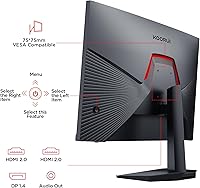
  • Connectivity: Includes one HDMI 2.0 port and one DisplayPort 1.4 port, supporting connections to gaming PCs, laptops, and modern consoles simultaneously.
  • Ergonomics: The stand supports tilt adjustment from -5° to +20°, though it does not offer height adjustment, swivel, or pivot functionality.
  • VESA Mounting: VESA mount compatible, allowing the display to be attached to third-party monitor arms or wall mounts for flexible desk or room placement.
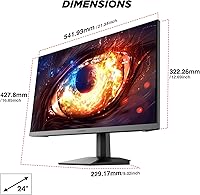
  • Dimensions: With the stand attached, the monitor measures 21.34 inches wide, 17.23 inches tall, and 8.42 inches deep.
  • Weight: Total weight with stand is 9.38 pounds, making it manageable for single-person setup and repositioning.
  • Eye Care: Built-in Blue Light Filter and Flicker-Free technology are included to reduce eye strain during extended gaming or work sessions.
  • OSD Control: On-screen display settings are navigated using a 5-way joystick, which allows faster and more intuitive menu control than traditional button-based systems.
  • Warranty: Backed by a 3-year spare parts replacement warranty and a 12-month full unit replacement policy, with technical support available by phone.

Related Reviews
KOORUI 24″ Gaming Monitor G2421V
84%
91%
Display Quality
88%
Refresh Rate & Responsiveness
79%
Build Quality
85%
Ergonomics & Comfort
92%
Color Accuracy
More
KOORUI 24-inch Gaming Monitor E2411K
84%
88%
Gaming Performance
90%
Display Quality (Color Accuracy)
85%
Ease of Setup
80%
Build Quality
92%
Eye-Care Features
More
KOORUI G2511E 24.5-inch Gaming Monitor
83%
92%
Display Quality
94%
Gaming Performance
88%
Color Accuracy
75%
Build Quality
84%
Ergonomics
More
ASUS VG248QG 24″ Gaming Monitor

85%
92%
Performance
89%
Display Quality
95%
Response Time
88%
Value for Money
91%
Eye Care Features
More
GTek F2465P 24″ Gaming Monitor
88%
94%
Display Quality
92%
Response Time
91%
Refresh Rate Performance
88%
Color Accuracy
85%
Connectivity Options
More
Sealan 24-Inch Curved Gaming Monitor
86%
92%
Gaming Performance
88%
Visual Quality
91%
Refresh Rate Smoothness
85%
Design & Build
87%
Eye Care Features
More
Viewedge USC2412FDA-P 24-inch FHD 144Hz Gaming Monitor

71%
83%
Value for Money
79%
Gaming Performance
76%
Image Quality
81%
Eye Comfort
63%
Build Quality
More
KTC 24-inch 190Hz Gaming Monitor
86%
92%
Performance
89%
Display Quality
85%
Ease of Setup
91%
Gaming Experience
87%
Color Accuracy
More
CUNPU 24-inch 240Hz Gaming Monitor
83%
88%
Gaming Performance
90%
Visual Quality
92%
Response Time
65%
Build Quality
89%
Color Accuracy
More
AOC G2490VXS 24-inch Gaming Monitor
86%
92%
Value for Money
89%
Gaming Performance
87%
Display Quality
91%
Color Accuracy
85%
Design and Build
More

FAQ

Yes, the G2411P connects to both the PS5 and Xbox Series X via its HDMI 2.0 port. Keep in mind that current-gen consoles cap output at 120fps at 1080p in supported titles, so you will not hit 200Hz through a console — but you will still get a noticeably smoother experience than a standard 60Hz display.

Yes, Adaptive Sync works with both AMD and NVIDIA graphics cards on this display. That said, it is not certified as G-Sync Compatible, so NVIDIA users may need to enable it manually through the NVIDIA Control Panel, and performance at very low or very high frame rate ranges may not be as consistent as it would be on a certified display.

It genuinely supports 200Hz, but you need to connect via DisplayPort 1.4 to achieve it — HDMI 2.0 is limited to 144Hz at 1080p in most configurations. Make sure you select 200Hz in your display settings after connecting, as it may default to a lower refresh rate on first setup.

The 90% DCI-P3 coverage means colors are richer and more accurate than what you get from a typical TN budget panel. It is a solid choice for casual photo editing or content consumption. However, if you need factory-calibrated accuracy for professional color work, a more specialized display with a documented delta-E rating would be a better fit.

The stand is functional and gets the job done for most users, but a number of buyers have noted that it wobbles noticeably under desk vibration — so if you have a standing desk that shifts or share a workspace with a lot of movement, a VESA-compatible monitor arm is worth considering. The good news is that VESA mounting is supported out of the box.

KOORUI typically includes a DisplayPort cable and a power cable in the box, though included accessories can vary by production batch. It is worth checking your specific shipment, as an HDMI cable may not always be included — having a spare HDMI 2.0 cable on hand is a safe move if you plan to connect a console.

Assembly is one of the highlights buyers frequently mention. The stand clicks together without tools in a matter of minutes, which makes it a genuinely low-friction experience for anyone setting up their first monitor.

It does reduce the warmer end of the light spectrum, which many users find helpful during late-night sessions. Like most software or hardware blue light filters, it will subtly shift white tones slightly warmer when enabled — but the difference is minor and easy to adjust to.

At 24 inches, 1080p sits at roughly 92 pixels per inch, which is comfortable for standard viewing distances of 2 to 3 feet. It will not look as crisp as a QHD or 4K panel at the same size, but most people do not find it distracting in day-to-day gaming or work use.

KOORUI offers a 12-month full replacement policy for defective or damaged units and extends parts coverage to three years. Buyers who have dealt with the support process describe it as responsive, which is reassuring given that KOORUI is a newer brand without the same service footprint as more established monitor manufacturers. Keeping your purchase receipt and order details accessible will speed things up if you ever need to make a claim.

Where to Buy

Microless.com
In stock $101.10