Overview

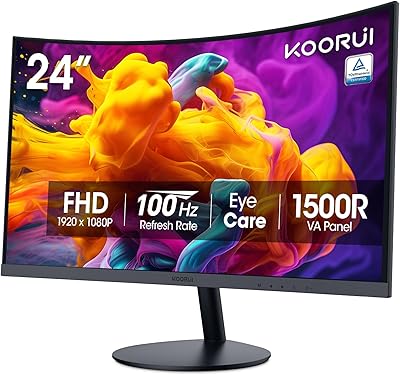
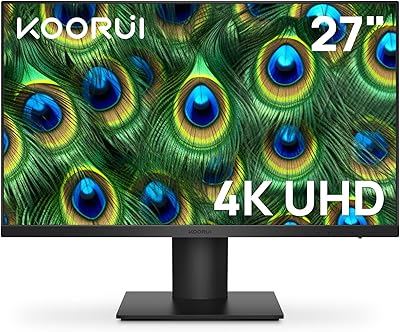
The KOORUI E2412F 24-inch Monitor entered the market in early 2022 as a straightforward, no-frills display built for everyday use — and it has quietly become one of Amazon's best-selling monitors since. KOORUI isn't a household name yet, but the brand has earned real traction by competing directly with established names like AOC, Acer, and ViewSonic at a similar or lower price point. What stands out at first glance is the three-sided slim bezel design, which gives this KOORUI display a cleaner, more polished look than you'd typically expect at this tier. It's a practical screen that doesn't try to be something it isn't.

Features & Benefits

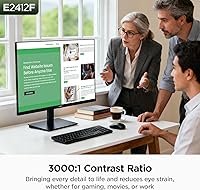
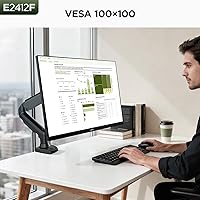
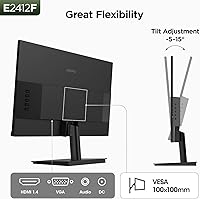
The VA panel is where this budget monitor genuinely earns its keep. With a 3000:1 contrast ratio, blacks look noticeably deeper than what most IPS panels at this size produce — useful whether you're watching a film or working with a dark-mode interface. Colors cover 99% of sRGB, which is respectable for casual photo browsing or light creative work. The 100Hz refresh rate keeps motion smooth, but it's worth knowing upfront: that speed only applies through HDMI. Plug in via VGA and you're capped at 60Hz. Flicker-free technology and a built-in blue light filter add real comfort for long sessions, and VESA 100x100mm support lets you mount it on an arm without adapters.

Best For

The E2412F makes the most sense for students, remote workers, and anyone upgrading from an older 60Hz or lower-resolution screen. If you're assembling a home office setup on a budget, this KOORUI display covers the essentials without cutting corners where it matters. Casual gamers will appreciate the 100Hz smoothness for everyday titles, but this isn't built for competitive esports players chasing sub-5ms response times. The compact footprint and slim bezels work especially well on smaller desks or in dual-monitor arrangements. VESA compatibility is a genuine bonus for anyone who prefers a monitor arm — a feature that often costs extra at comparable price points.

User Feedback

With over 15,000 ratings averaging 4.5 stars, this budget monitor has clearly resonated with a wide audience. Buyers consistently point to image quality and contrast as standout strengths for the price. The out-of-box experience also earns frequent praise, with tidy packaging and straightforward setup. On the flip side, the tilt-only stand frustrates users expecting height or swivel adjustments — it's a real limitation for anyone comparing ergonomic options. A smaller group finds the 250 cd/m² brightness underwhelming in bright, sun-lit rooms. The VGA refresh rate cap also catches some buyers off guard. These are honest trade-offs, not deal-breakers, for the audience this screen is clearly aimed at.

Pros

  • VA panel contrast produces noticeably richer blacks than most IPS monitors at a comparable price.
  • The 100Hz refresh rate via HDMI makes everyday use and casual gaming feel genuinely smoother.
  • Slim three-sided bezels give the E2412F a cleaner, more premium look than its price suggests.
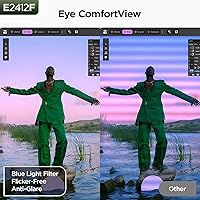
  • Built-in flicker-free technology and blue light filter reduce eye fatigue during all-day sessions.
  • VESA 100x100mm compatibility lets you mount it on any standard monitor arm without adapters.
  • 99% sRGB coverage is solid for photo browsing, light editing, and general color-sensitive tasks.
  • Dual HDMI and VGA ports cover a wide range of devices, from gaming consoles to older desktops.
  • An audio output jack adds practical value for users who want to connect external speakers easily.
  • Over 15,000 verified ratings averaging 4.5 stars reflects consistent real-world satisfaction across many buyer types.
  • Out-of-box experience is well-organized, with most users up and running in under ten minutes.

Cons

  • The stand offers tilt only — no height, swivel, or pivot adjustment for ergonomic flexibility.
  • VGA port is capped at 60Hz, which surprises buyers expecting full 100Hz performance on all inputs.
  • At 250 cd/m², brightness struggles in sun-lit rooms or near large windows during daytime hours.
  • Response time is not officially specified, and community testing confirms visible ghosting in fast-motion content.
  • The OSD button layout on the rear edge is unintuitive and takes time to navigate confidently.
  • No DisplayPort or USB-C connectivity limits compatibility with newer thin-and-light laptops.
  • The plastic stand base feels noticeably less solid than the display itself, with minor flex when tilting.
  • Switching between the blue light filter and accurate color mode requires navigating a clunky on-screen menu.
  • Only two input ports makes switching regularly between multiple source devices inconvenient.
  • The user manual does not explain the port-specific refresh rate difference, causing recurring post-purchase confusion.

Ratings

The KOORUI E2412F 24-inch Monitor has been scored by our AI engine after processing thousands of verified global buyer reviews, with spam, bot-submitted, and incentivized feedback actively filtered out. The result is a balanced scorecard that captures what real users genuinely love about this display — and where it falls short compared to rivals in the same price bracket. Both the strengths and the honest trade-offs are reflected transparently in every category below.
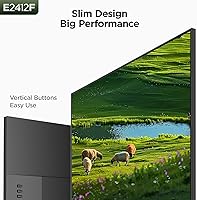
Image Quality & Contrast
86%
The VA panel's 3000:1 contrast ratio is the headline achievement here. Users consistently report that dark scenes in films and games look noticeably richer than what similarly priced IPS monitors deliver, with blacks that hold their depth even at wider viewing angles.
While contrast is strong, some users working in bright, naturally lit rooms feel the images lose a little punch due to the modest 250 cd/m² brightness ceiling. It's not a dealbreaker, but it's noticeable side-by-side with brighter panels.
Color Accuracy
81%
19%
Covering 99% of sRGB, this KOORUI display handles everyday color work — photo browsing, web design proofing, casual video editing — with enough accuracy to satisfy non-professional users. Colors appear vibrant without looking oversaturated or artificially boosted.
It won't satisfy anyone doing serious print or professional color grading work. The 10-bit color depth (via dithering) is appreciated, but the lack of DCI-P3 or Adobe RGB coverage limits its appeal for creative professionals who need wider gamut support.
Refresh Rate & Motion Smoothness
83%
At 100Hz via HDMI, day-to-day scrolling, video playback, and casual gaming feel noticeably smoother than the 60Hz screens most buyers are upgrading from. For everyday titles and fast-paced browser use, the improvement is immediately perceptible.
The critical caveat is that the VGA port is capped at 60Hz — a fact that catches buyers off guard more than almost any other spec. Users connecting older laptops or desktops via VGA won't get the 100Hz experience without switching cables and ports.
Brightness
62%
38%
For dimly lit home offices, bedrooms, or evening use, 250 cd/m² is perfectly adequate. Users in controlled lighting environments rarely flag brightness as an issue, and the matte anti-glare coating helps reduce reflections from overhead lights.
In sun-drenched rooms or near large windows, the screen can feel washed out and fatiguing to read. A meaningful portion of reviewers specifically called out this limitation, and it's worth considering if your workspace gets strong natural daylight.
Ergonomics & Adjustability
54%
46%
The tilt range of -5° to +15° covers the basics for most seated viewing positions. Out of the box, most users can find a comfortable angle without tools or complex setup, which is appreciated in a monitor at this price.
There is no height adjustment, swivel, or pivot — and this is the most consistent frustration in user reviews. Anyone comparing this to mid-range monitors with full ergonomic stands will find the E2412F lacking, especially for tall users or multi-hour work sessions.
Build Quality & Design
78%
22%
The three-sided slim bezel punches noticeably above its price tier visually. Users frequently comment that the monitor looks more expensive than it is, and the overall plastic build feels sturdy enough for daily home or office use without flex or wobble.
The stand base is functional but utilitarian — it lacks the premium feel of the display itself. A few users noted minor creaking when adjusting the tilt, and the all-plastic construction, while solid, doesn't inspire the same confidence as metal-framed competitors.
Value for Money
93%
This is where the E2412F genuinely shines. Buyers repeatedly note that the combination of VA contrast, 100Hz refresh, slim bezels, and VESA support at this price point is hard to beat. The perceived value relative to cost is the single most praised aspect across thousands of reviews.
The value calculus shifts slightly if you need strong ergonomics or regularly work in bright rooms — in those cases, spending a bit more on a monitor with a height-adjustable stand or higher brightness might save frustration in the long run.
Connectivity & Port Selection
71%
29%
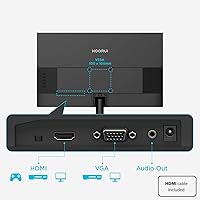
Having both HDMI and VGA means the E2412F can connect to a wide range of devices — from modern laptops to older desktop towers that lack HDMI outputs. The included audio output jack adds a useful bonus for users wanting to connect external speakers.
Two ports is workable but limiting if you regularly switch between a laptop and a desktop. The absence of DisplayPort or USB-C connectivity narrows options for newer setups, and the VGA 60Hz ceiling remains an ongoing point of confusion for buyers.
Eye Comfort & Long-Session Use
84%
Flicker-free backlighting and a built-in blue light filter make a real difference for users logging long hours in front of the screen. Students and remote workers in particular praised how comfortable the display is for all-day document reading and video calls.
The blue light filter does slightly warm the color tone, which some users find distracting when doing color-sensitive work. It can be toggled, but navigating the OSD menu to do so is a minor friction point that a few buyers mentioned.
VESA Mount Compatibility
88%
Standard 100x100mm VESA support is a genuine differentiator at this price. Users who invested in a monitor arm reported that the E2412F mounted cleanly and held position well, instantly improving their desk space and posture options.
The stock stand must be removed first, which requires basic tools and takes a few minutes. Nothing unusual, but buyers who have never mounted a monitor before occasionally expressed surprise — a heads-up in the box would reduce confusion.
Setup & Out-of-Box Experience
89%
Reviewers across multiple markets consistently praised the packaging and unboxing experience as tidy and well-organized for a budget product. Assembly is straightforward — typically under ten minutes — and the included cables mean most buyers can get started immediately.
The manual is minimal and does not clearly explain the port-specific refresh rate differences, which contributes to the recurring VGA confusion in reviews. A clearer quick-start guide would reduce a common source of post-purchase frustration.
OSD Menu & Controls
66%
34%
The on-screen display covers the essential adjustments — brightness, contrast, color temperature, and blue light filter — without being buried in unnecessary complexity. For users who set it once and leave it, the controls are rarely revisited after initial setup.
The physical button layout on the back edge is not intuitive, and several users reported a learning curve when trying to navigate between menus. Compared to monitors with joystick-style OSD navigation, this feels dated and slightly fiddly.
Viewing Angles
77%
23%
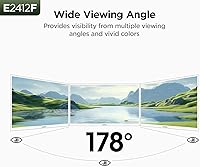
The 178° wide viewing angle spec holds up reasonably well in practice. Users sharing the screen during presentations or watching content with others seated to the side report that colors and contrast hold up acceptably across most off-axis positions.
VA panels can exhibit some color shift at extreme horizontal angles, and this display is no exception. It's subtle but visible if you're seated far to one side — not a concern for solo use, but worth knowing for collaborative setups.
Gaming Performance
72%
28%
For casual gaming — platformers, RPGs, strategy titles, indie games — the 100Hz refresh rate and deep VA contrast make for an enjoyable experience. Dark environments in games render convincingly, and the smooth motion is a clear step up from 60Hz budget alternatives.
This is not a panel for competitive or fast-paced multiplayer gaming. Response time is not officially specified, and real-world testing from the community suggests ghosting on fast-moving objects. Esports players or anyone sensitive to motion blur should look elsewhere.
Compatibility & Device Range
82%
18%
The combination of HDMI and VGA covers an impressively wide range of source devices — gaming consoles, desktops, older laptops, and streaming boxes. Users appreciated being able to connect an Xbox or a decade-old desktop without needing adapters.
Modern thin-and-light laptops that rely solely on USB-C or Thunderbolt outputs will require a separate adapter or dock to connect, which adds minor cost and complexity. This is a product-wide limitation, not unique to this model, but worth flagging for newer device owners.

Suitable for:

The KOORUI E2412F 24-inch Monitor is a strong match for students, remote workers, and anyone setting up a functional home workspace without stretching their budget. If you're coming from an older 60Hz screen or a lower-resolution display, the step up in smoothness and image clarity will feel immediately meaningful. Casual gamers who play story-driven titles, RPGs, or slower-paced multiplayer games will appreciate the 100Hz refresh rate and deep VA contrast without needing to invest in a premium gaming panel. The slim three-sided bezels make it a natural fit for compact desks or dual-monitor arrangements where visual clutter matters. Users who want monitor arm flexibility will find the built-in VESA 100x100mm support a genuine practical bonus — something that often gets dropped at this price tier. It also suits buyers connecting a mix of devices, from a modern laptop via HDMI to an older desktop tower via VGA, thanks to its broad port compatibility.

Not suitable for:

The KOORUI E2412F 24-inch Monitor is not the right pick for buyers who spend long hours at a desk and need a fully ergonomic setup — the tilt-only stand offers no height, swivel, or pivot adjustment, which becomes a real comfort issue for taller users or anyone prone to neck strain. Competitive or fast-paced online gamers should look elsewhere; the response time is not officially rated, and the panel shows visible ghosting on fast-moving objects that would frustrate anyone playing at a high level. If your workspace gets strong direct sunlight or you work near large windows, the 250 cd/m² brightness ceiling will likely leave you squinting or angling the screen awkwardly. Creative professionals who need accurate color beyond the sRGB gamut — such as video editors working in DCI-P3 or photographers calibrating for print — will find this display too limited for reliable color decisions. Users who rely solely on USB-C or Thunderbolt outputs from a modern thin laptop will also need an adapter or dock, adding friction that some buyers don't anticipate until after purchase.
Specifications

  • Panel Type: Uses a VA (Vertical Alignment) panel, which delivers stronger contrast and deeper blacks compared to IPS panels at a similar price point.
  • Screen Size: 24-inch diagonal display with a 16:9 aspect ratio and a compact overall footprint suited to smaller desks.
  • Resolution: Native resolution of 1920x1080 pixels (Full HD 1080p), providing clear and sharp visuals for everyday productivity and casual gaming.
  • Refresh Rate: Supports 100Hz via HDMI input and 60Hz via VGA input; the higher refresh rate requires an HDMI connection to activate.
  • Contrast Ratio: Rated at 3000:1 static contrast ratio, enabling noticeably richer shadow detail and more defined dark scenes than typical budget IPS alternatives.
  • Color Gamut: Covers 99% of the sRGB color space, making it suitable for casual photo viewing, light image editing, and general multimedia use.
  • Color Depth: Supports 10-bit color processing (via dithering), capable of rendering over 16.7 million colors for smoother gradients and reduced banding.
  • Brightness: Peak brightness is rated at 250 cd/m², which is adequate for dim to moderately lit environments but may feel underwhelming in bright or sun-lit rooms.
  • Screen Surface: Matte anti-glare coating reduces reflections from ambient light sources, helping maintain image visibility in mixed-lighting conditions.
  • Viewing Angle: Rated at 178° horizontal and vertical viewing angles, allowing acceptable color and contrast retention when viewed from off-center positions.
  • Connectivity: Equipped with one HDMI port, one VGA port, and one 3.5mm audio output jack for connecting external speakers or headphones.
  • VESA Mount: Supports standard VESA 100x100mm mounting, allowing the monitor to be fitted to most third-party monitor arms or wall mount brackets.
  • Tilt Adjustment: The stand supports tilt adjustment ranging from -5° forward to +15° backward; no height, swivel, or pivot adjustment is available.
  • Bezel Design: Features a three-sided slim bezel design on the top and both sides, reducing visual borders and maximizing the usable screen area.
  • Response Time: An official response time figure is not published by the manufacturer; community testing suggests typical VA panel performance in the 4–8ms range.
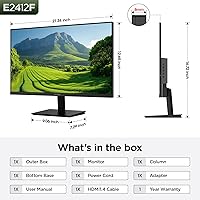
  • Weight: The monitor weighs 6.06 pounds including the stand, making it easy to reposition or mount without requiring assistance.
  • Eye Care: Incorporates flicker-free backlight technology and a built-in blue light filter mode to reduce eye strain during extended viewing sessions.
  • Power Input: Rated for 240V input voltage, and the monitor is compatible with standard power outlets across most regions with an appropriate cable or adapter.

Related Reviews

KOORUI 24-inch Gaming Monitor E2411K
84%
88%
Gaming Performance
90%
Display Quality (Color Accuracy)
85%
Ease of Setup
80%
Build Quality
92%
Eye-Care Features
More
KOORUI G2511E 24.5-inch Gaming Monitor
83%
92%
Display Quality
94%
Gaming Performance
88%
Color Accuracy
75%
Build Quality
84%
Ergonomics
More
KOORUI 24N5CA 24-inch Curved Monitor
72%
91%
Value for Money
78%
Image Quality
74%
Curvature & Immersion
86%
Eye Comfort
67%
Refresh Rate & Gaming Performance
More
CRUA 24-Inch Curved Monitor
84%
88%
Display Quality
91%
Value for Money
84%
Ease of Setup
80%
Gaming Performance
79%
Build Quality
More
ViewSonic VG2456A 24-Inch Monitor
85%
92%
Build Quality
91%
Display Clarity
88%
Ergonomics & Comfort
85%
Connectivity Options
83%
Ease of Setup
More
BenQ GW2490 24-inch IPS Monitor
81%
93%
Eye Care Performance
88%
Color Accuracy
82%
Refresh Rate & Motion Clarity
96%
Value for Money
54%
Ergonomics & Stand
More
ASUS VA24DQSB 24-inch IPS Monitor
78%
93%
Ergonomic Adjustability
88%
IPS Panel Color Accuracy
61%
Brightness & Glare Handling
91%
Eye Comfort & Fatigue
84%
Build Quality & Stability
More
Dell P2425 24-inch Monitor
87%
94%
Display Quality
90%
Ergonomics and Adjustability
92%
Color Accuracy
89%
Connectivity Options
85%
Blue Light Technology (ComfortView Plus)
More
KOORUI G2411P 24″ Gaming Monitor
78%
93%
Refresh Rate Performance
88%
Color Accuracy
86%
Response Time & Motion Clarity
91%
Value for Money
74%
Build Quality & Design
More
ViewSonic VG2455 24-inch Monitor
83%
91%
Ergonomic Comfort
88%
Display Quality
94%
USB-C Connectivity
89%
Eye Care Features
75%
Build Quality
More

FAQ

You only get 100Hz when connected via HDMI — that part is important and easy to miss. If you plug in using the VGA port, the monitor caps at 60Hz regardless of what your graphics card supports. So make sure you are using an HDMI cable and that your source device is set to output at 100Hz in the display settings.

Yes, both PlayStation and Xbox consoles connect via HDMI, so the physical connection is straightforward. The monitor will run at up to 1080p and 100Hz, which is within the output range of most current consoles. Just keep in mind this is a Full HD panel, so it won't display 4K content natively.

The stock stand is functional for basic use — it tilts forward and backward, and it holds the screen steady. But it offers no height adjustment, swivel, or pivot, which is a real limitation if you sit at an unusual height or share the screen. A VESA monitor arm is a worthwhile upgrade if ergonomics matter to you, and the KOORUI E2412F 24-inch Monitor supports standard 100x100mm VESA mounting, so installation is simple.
The matte anti-glare coating does a decent job of diffusing reflections, so harsh overhead lighting is generally manageable. That said, the 250 cd/m² brightness limit means that in rooms with strong direct sunlight coming through windows, the image can look a bit washed out. If your desk faces a bright window, it might be worth repositioning or using blinds during peak daylight hours.

It holds up well for long sessions. The flicker-free backlight removes the invisible pulsing that causes fatigue on cheaper screens, and the blue light filter mode noticeably warms the image tone to reduce harshness in the evening. Most users who work eight-plus hour days report comfortable viewing, though the blue light mode does shift colors slightly if you need accurate tones for design work.

Absolutely — this is actually one of its strongest use cases. As long as your laptop has an HDMI or VGA output (or you have a compatible adapter), setup is quick and easy. The slim bezels make side-by-side arrangements look clean, and the compact footprint means it does not eat up much extra desk space.

At 24 inches, 1080p still looks sharp for most everyday tasks — text is clear, video looks clean, and general use is comfortable. It starts to show its limits if you are doing detailed photo retouching or need to fit a lot of windows on screen simultaneously, where a higher-resolution display would be more comfortable. For productivity, casual gaming, and media consumption, it remains a practical and widely used standard.

Buyers frequently confirm that an HDMI cable is included in the packaging, which is a nice touch at this price tier. You should be ready to go out of the box for most setups. That said, it is worth double-checking your box contents on arrival since accessories can occasionally vary by production batch or regional shipment.

Monitors do not use active cooling fans — this display makes no noise during normal operation. The only sound-related note is that the audio output jack lets you connect external speakers, but the monitor itself has no built-in speakers, so you will need headphones or external audio if you want sound output.

It is straightforward if you have done it before and easy to figure out even if you have not. You remove the stock stand by unscrewing a few bolts on the back, which exposes the standard 100x100mm VESA hole pattern. Any compatible arm or wall bracket attaches directly. Most users complete the swap in under fifteen minutes with a basic screwdriver.

Where to Buy