Overview

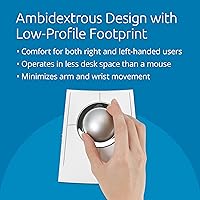
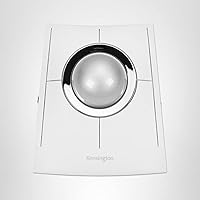
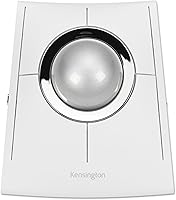
The Kensington SlimBlade Pro EQ Wireless Trackball is a serious ergonomic tool built for users who need relief from the daily grind of mouse-driven work. Unlike budget alternatives, this wireless trackball offers three connection options — Bluetooth, a 2.4GHz nano receiver, and wired USB-C — so switching between devices takes seconds. The low-profile ambidextrous design means left- and right-handed users are equally well served, which is rarer than it should be in this category. Kensington also used 47% post-consumer recycled plastic in the housing, a small but meaningful sustainability commitment. Fair warning though: if you have never used a trackball before, expect a genuine adjustment period before cursor movement feels truly natural.
Features & Benefits

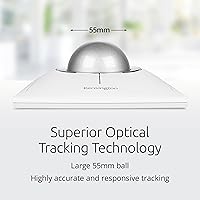
The 55mm optical ball, tracked by dual sensors, delivers cursor precision that holds up well during detailed work like photo editing or spreadsheet navigation. Battery life is genuinely impressive — a single charge keeps things running for close to four months under regular use, and USB-C charging means no hunting for proprietary cables. The programmable buttons let you map shortcuts to your own workflow rather than adapting to a fixed layout. Add 128-bit AES encryption on the wireless connection, and the SlimBlade Pro EQ becomes a credible choice even for professionals in security-conscious environments. It also runs cleanly on both Windows and macOS without requiring a driver install for core functions.

Best For

This wireless trackball is purpose-built for people whose wrists and arms already pay the price of long computer sessions. It makes a strong case for repetitive strain sufferers, where keeping your arm stationary and rolling a ball instead of sweeping a mouse across a pad can noticeably reduce fatigue over an eight-hour day. Designers, CAD workers, and video editors gravitate toward it for the fine cursor control a large ball provides. The compact footprint suits cramped desks or standing-desk setups where a traditional mouse eats up valuable surface space. For people who regularly switch between a Mac and a PC, the triple-connection flexibility removes the usual re-pairing friction entirely.

User Feedback

Among verified buyers, the most consistent praise centers on tracking accuracy and battery longevity that genuinely matches the advertised estimate. Build quality earns positive comments too — the unit feels solid, not plasticky, despite the recycled materials. Left-handed users specifically call out the symmetrical layout as one of the few trackballs that actually delivers on its ambidextrous promise. That said, the learning curve is real: several reviewers note it took one to two weeks before cursor control felt natural. Some find the scroll ring sensitivity inconsistent when switching between applications. On value, opinions split — those who stick with it long-term almost universally say the investment was justified; those who gave up early often do not.

Pros

  • Tracking accuracy is outstanding for precision tasks like photo editing, CAD, and fine cursor placement.
  • Battery life regularly lives up to its four-month estimate under real daily office use.
  • Triple connectivity — Bluetooth, 2.4GHz, and wired USB-C — handles multi-device switching without re-pairing headaches.
  • The ambidextrous layout genuinely works for left-handed users, not just as a marketing claim.
  • Compact footprint frees up meaningful desk space compared to even a mid-size mouse.
  • Build quality feels solid and premium, with no flex, rattle, or cheap-feeling joints.
  • USB-C charging with an included cable and adapter keeps things practical and future-friendly.
  • Programmable buttons reward the time investment, especially in repetitive workflow-heavy software.
  • 128-bit AES wireless encryption makes it a credible choice in corporate or security-sensitive environments.
  • Long-term owners consistently report the investment feels justified once the learning curve is behind them.

Cons

  • The scroll ring sensitivity is uneven across applications and prone to accidental triggering mid-task.
  • Kensington's companion software has stability issues on recent macOS versions, limiting button customization reliability.
  • No carrying pouch is included, leaving the exposed ball surface vulnerable to scratches during travel.
  • The battery level indicator lacks useful granularity — most users only notice a low charge when performance degrades.
  • Button layout has a subtle directional bias that left-handed users may notice during extended sessions.
  • Bluetooth connection can drop after idle periods, requiring a manual prompt to reconnect.
  • The nano USB receiver occupies a USB-A port, which is inconvenient on modern slim laptops with limited port selection.
  • Dust and skin oil accumulate on the ball bearing surface faster than most buyers expect, requiring routine cleaning.
  • Software-based button customizations can behave inconsistently between Windows and macOS on the same device.
  • First-time trackball users face a steep enough adjustment period that return rates among this group are notably higher than average.

Ratings

The Kensington SlimBlade Pro EQ Wireless Trackball has been put through its paces by a wide range of buyers — from ergonomics-focused office workers to precision-hungry designers — and our AI has analyzed verified global reviews, actively filtering out incentivized and bot-generated submissions to surface what real long-term users actually think. Scores reflect both the genuine strengths and the friction points that come up repeatedly across thousands of ratings. Nothing has been glossed over: where buyers consistently hit a wall, the score reflects it.
Tracking Accuracy
91%
The dual optical sensors tracking the 55mm ball earn consistent praise from users doing detail-heavy work. Designers and CAD users in particular report that cursor placement feels confident and repeatable, even during fine movements that would expose cheap sensors immediately.
A small but vocal subset of reviewers note occasional micro-jitter when the ball bearing surface picks up dust or skin oils, requiring more frequent cleaning than they expected. This tends to affect users in drier climates or those who work long uninterrupted sessions.
Ergonomic Comfort
88%
For users coming from a standard mouse with wrist or forearm strain, the shift to this Kensington trackball is frequently described as genuinely relieving. The stationary wrist position and low-profile deck reduce the repetitive lateral arm movement that causes cumulative fatigue over an eight-hour workday.
The low profile, while comfortable for many, does not suit everyone — users with larger hands occasionally report that the flat deck leaves their palm unsupported. It takes some experimenting with hand positioning before the ergonomic benefit fully kicks in, especially for first-time trackball users.
Battery Life
93%
Few aspects of the SlimBlade Pro EQ generate as much consistent praise as the battery life. Buyers regularly confirm that the four-month estimate holds up under real daily use, and the USB-C charging means no proprietary cables to track down when the time does come.
The battery indicator provides limited granularity — most users only discover the charge is low when the device starts behaving erratically, rather than receiving a clear early warning. There is no companion software alert by default, which a handful of reviewers found frustrating mid-workday.
Wireless Connectivity
86%
The triple-connection setup — Bluetooth, 2.4GHz nano receiver, and wired USB-C — is a practical differentiator that multi-device users genuinely rely on. Switching between a work laptop and a personal Mac, for instance, takes seconds rather than the fiddly re-pairing routine that single-mode devices demand.
A portion of buyers report occasional Bluetooth dropout when the device sits idle for extended periods, requiring a button press or ball movement to re-establish the link. The 2.4GHz nano receiver connection is noticeably more stable, so users in wireless-congested open offices sometimes find themselves defaulting to that option.
Build Quality
84%
Despite incorporating a significant proportion of recycled plastic, the chassis feels solid and well-assembled. There are no creaking joints or flex points that suggest cost-cutting, and the ball socket sits snugly without rattling — something earlier Kensington models were occasionally criticized for.
Some buyers feel the matte plastic surface, while fingerprint-resistant initially, starts to show wear marks and minor scuffs after several months of heavy use. A few reviewers also wished the ball itself had a more premium feel, noting it lacks the weighted, glass-like quality of competing flagship trackballs.
Button Layout & Programmability
74%
26%
The programmable buttons appeal strongly to productivity-driven users who want macro shortcuts or application-specific actions mapped without reaching for a keyboard. Power users who invest the time in configuration consistently report that it meaningfully speeds up repetitive workflows in tools like Photoshop or Excel.
The default button placement divides opinion — some users find the layout intuitive out of the box, while others feel the buttons sit at awkward angles relative to a relaxed hand position. Without Kensington's software installed, customization is unavailable, and the software itself has received mixed reviews for stability on certain macOS versions.
Scroll Ring Performance
67%
33%
The scroll ring surrounding the ball is a functional alternative to a traditional scroll wheel and works reasonably well for standard document or web page navigation. Users who scroll in long, deliberate strokes tend to find it responsive enough for everyday use.
This is the most consistently criticized feature in buyer reviews. The scroll ring sensitivity is uneven across applications — fast in some, sluggish in others — and several users report accidental scrolling when repositioning their fingers on the ball. It is a known compromise of the design that Kensington has not fully resolved across generations.
Ambidextrous Design
82%
18%
Left-handed users respond to this trackball with notably higher satisfaction than they do to most peripherals, where left-hand compatibility is often an afterthought. The symmetrical layout genuinely accommodates both orientations without forcing awkward compromises in button access.
True ambidextrous balance is close but not perfect — the primary clickable buttons are laid out with a subtle bias that a few left-handed reviewers pick up on after extended use. It is better than most competitors, but purists who have used fully symmetric trackballs before may still notice the asymmetry.
Learning Curve
61%
39%
Users who persevere through the adjustment period — typically one to two weeks for experienced mouse users — report that trackball navigation eventually feels natural and even preferable. The large 55mm ball offers more tactile feedback than smaller balls, which helps the muscle memory build faster.
First-time trackball users represent a significant proportion of buyer regret in the reviews. The transition from mouse to trackball is more demanding than the product marketing implies, and a notable number of buyers returned the unit within the first week before the learning curve could flatten. This is a product that rewards patience, but not everyone has it.
Software & Driver Experience
63%
37%
Core functions work plug-and-play on both Windows and macOS, which most users appreciate — no driver install required just to get moving. For users who only need basic functionality, the out-of-box experience is clean and friction-free.
Kensington's companion software, required for full button customization, has a patchy reputation. Several macOS users on recent operating system versions report crashes or settings that do not persist after a restart. The software feels overdue for a proper update, and it limits an otherwise capable piece of hardware.
Desk Space Efficiency
89%
One of the most practical selling points for users in space-constrained setups is just how little room this wireless trackball occupies. Reviewers with standing desks, small home office corners, or crowded studio environments specifically highlight this as a key reason they chose it over a traditional mouse.
The nano USB receiver, while small, does add a dongle hanging out of a port — not ideal for ultra-minimal setups or users with limited USB-A availability on modern thin laptops. An adapter is included, but adding a USB-C dongle in a chain does not exactly solve the problem elegantly.
Cross-Platform Compatibility
87%
Switching between Windows and macOS mid-session is genuinely smooth, and buyers who use both platforms daily praise the fact that scroll direction, button behavior, and pointer speed translate consistently without needing to reconfigure from scratch on each system.
Linux users are left unsupported, which matters to a niche but real segment of the technical buyer audience. Additionally, certain advanced button mappings behave differently between operating systems when set via software, which introduces occasional inconsistency for heavy customization users.
Value for Money
72%
28%
Long-term owners — those who stuck with it past the adjustment period and integrated it into daily workflows — overwhelmingly describe the investment as justified. The combination of battery longevity, build quality, and ergonomic benefit adds up to a compelling total-cost-of-ownership argument over cheaper alternatives.
For buyers who are new to trackballs and uncertain whether the format suits them, the premium price is a real barrier. Several reviewers explicitly wished they had tried a less expensive trackball first before committing, particularly given the non-trivial chance of returning it during the learning curve phase.
Portability
78%
22%
At just over a pound and with a footprint smaller than most full-size mice, the SlimBlade Pro EQ travels reasonably well. Business travelers who need a precise pointing device without a mouse pad have adopted it as a carry bag staple, particularly valued in cramped airplane tray setups.
It is not pocket-sized — the unit is compact relative to a mouse, but still requires dedicated bag space. A protective carrying pouch is not included, which feels like an oversight at this price point, and the exposed ball surface is vulnerable to scratches in transit without one.

Suitable for:

The Kensington SlimBlade Pro EQ Wireless Trackball is built for people whose bodies have already started pushing back against a conventional mouse — professionals dealing with wrist strain, forearm fatigue, or early signs of repetitive stress injury will find the stationary-hand posture genuinely relieving after the initial adjustment. Designers, video editors, and CAD users benefit from the large 55mm ball's precise cursor control, where fine placement matters more than rapid sweeping gestures. The triple-connection setup makes it a natural fit for anyone juggling multiple machines — a Windows workstation and a MacBook, for example — since switching inputs takes seconds without re-pairing. Left-handed professionals are particularly well served here, as truly symmetric ambidextrous trackballs at this quality level are rare. Anyone upgrading from an older wired Kensington trackball who wants to cut the cable without sacrificing the familiar form factor will also feel right at home with the SlimBlade Pro EQ.

Not suitable for:

The Kensington SlimBlade Pro EQ Wireless Trackball is a poor match for buyers who have never used a trackball before and need productivity from day one — the learning curve is real, often spanning one to two weeks, and impatient users frequently regret the investment before the muscle memory develops. Gamers looking for fast-twitch responsiveness should look elsewhere entirely; this is an ergonomic productivity tool, not a gaming peripheral, and it is not positioned or priced as one. Users who rely heavily on precise, rapid scrolling will likely be frustrated by the scroll ring, which is inconsistent across applications and prone to accidental activation. Those working primarily on Linux systems have no official driver or software support to fall back on. Finally, buyers on a tight budget who are simply curious about the trackball format would be better served trying a more affordable entry-level model first — committing to a premium device before knowing whether the format suits you is an unnecessary financial risk.
Specifications

  • Ball Size: The trackball uses a 55mm ball, which is large enough to provide fine cursor control with minimal finger movement.
  • Sensors: Dual optical sensors track the ball simultaneously to deliver accurate, responsive cursor positioning across the full range of motion.
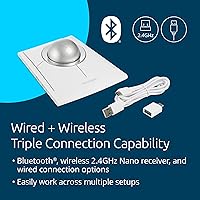
  • Connectivity: Three connection modes are supported: Bluetooth, 2.4GHz wireless via nano USB receiver, and wired USB-C.
  • Wireless Security: The wireless connection uses 128-bit AES encryption to protect data transmission in office and professional environments.
  • Battery Life: A single charge supports up to four months of regular use under standard daily productivity conditions.
  • Charging Port: The device charges via USB-C, with a USB-A to USB-C cable included in the box.
  • Adapter Included: A USB-A (female) to USB-C (male) adapter is included to accommodate systems with only USB-C ports.
  • Dimensions: The unit measures 6.04″ x 5.23″ with a low-profile deck height designed to minimize wrist elevation during use.
  • Weight: The device weighs 1.1 pounds, keeping it stable on a desk surface without being cumbersome to reposition.
  • Hand Orientation: The symmetrical ambidextrous design accommodates both right-handed and left-handed users without hardware modification.
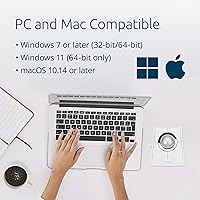
  • OS Compatibility: Fully compatible with Windows 7 and later (including Windows 11 64-bit) and macOS 10.14 and later.
  • Recycled Materials: The plastic housing is composed of 47% post-consumer recycled (PCR) plastic, excluding the PCB assembly, battery, and charging cable.
  • Nano Receiver: A 2.4GHz nano USB receiver is included for plug-and-play wireless connectivity on systems without Bluetooth.
  • Programmable Buttons: Multiple buttons on the device can be remapped using Kensington's companion software for custom workflow shortcuts.
  • Scroll Mechanism: A scroll ring surrounds the trackball and functions as the primary scrolling input in place of a traditional scroll wheel.
  • Power Source: The device is powered by a built-in rechargeable battery rather than replaceable cells, reducing ongoing consumable costs.
  • Encryption Standard: Government-grade 128-bit AES encryption is applied specifically to the 2.4GHz wireless connection for secure data transmission.
  • Brand: Manufactured by Kensington, a brand with a long-standing focus on ergonomic and productivity-oriented computer peripherals.

Related Reviews
Kensington TB450 Wireless Trackball Mouse
78%
88%
Ergonomic Comfort
71%
Tracking Precision
84%
Wireless Reliability
83%
Multi-Device Switching
93%
Battery Life
More
Kensington KM150 Wireless Keyboard & Mouse Combo
81%
88%
Value for Money
91%
Spill Resistance
84%
Wireless Reliability
82%
Keyboard Typing Feel
63%
Mouse Comfort & Ergonomics
More
Kensington MY630 EQ Wireless Rechargeable Mouse
86%
89%
Ergonomics and Comfort
90%
Battery Life
87%
Connectivity Options
88%
Ease of Setup
84%
Programmable Buttons
More
Kensington Pro Fit Ergonomic Wireless Keyboard and Mouse
85%
91%
Ergonomics and Comfort
87%
Typing Experience
88%
Mouse Performance
80%
Wireless Connectivity
84%
Battery Life
More
Kensington Pro Fit Ergonomic Wireless Keyboard K75401US
85%
91%
Ergonomic Comfort
87%
Wireless Connectivity
90%
Key Quietness and Typing Experience
88%
Build Quality
84%
Ease of Setup
More
Kensington Pro Fit Ergo Vertical Wireless Mouse
85%
88%
Ergonomic Comfort
91%
Wireless Connectivity
94%
Battery Life
90%
Ease of Setup
87%
Customizability (DPI Settings)
More
SABLUTE Wireless Trackball Mouse
74%
83%
Ergonomic Comfort
79%
Adjustable Tilt Base
86%
Multi-Device Connectivity
67%
Trackball Precision & Feel
74%
DPI Range & Customization
More
Kensington Orbit Trackball Mouse
77%
83%
Ergonomic Comfort
76%
Tracking Accuracy
61%
Scroll Ring Usability
88%
Build Quality & Durability
57%
Button Layout & Customization
More
Logitech M570 Wireless Trackball
77%
91%
Ergonomic Comfort
88%
Wireless Reliability
93%
Battery Life
84%
Build Quality
61%
Scroll Wheel Quality
More
seenda Wireless Trackball Mouse
78%
88%
Ergonomic Comfort
74%
Trackball Precision
86%
Multi-Device Connectivity
83%
Battery Life
71%
Build Quality
More

FAQ

Basic functionality works plug-and-play on both Windows and macOS — you can plug in the nano receiver or pair via Bluetooth and start using it immediately. You only need to install Kensington's companion software if you want to remap the programmable buttons or fine-tune pointer settings.

Most users report that the adjustment period runs between one and two weeks of daily use before cursor movement starts to feel natural. The first few days are the hardest — expect slower navigation and some frustration. Sticking with it through that window is where the ergonomic benefits really start to pay off.

Yes, and this is one of its more practical strengths. You can pair one connection mode to each device — for example, Bluetooth to your Mac and the 2.4GHz nano receiver to your Windows machine — and switch between them as needed without re-pairing every time.

It is one of the more genuinely ambidextrous trackballs available at this level. Left-handed users consistently respond more positively to this model than to most peripherals that claim symmetrical design as a feature. There is a subtle layout bias that some left-handed power users notice after extended sessions, but for the majority it functions well in either orientation.

Unfortunately, the battery indicator is one of the weaker aspects of the device. There is no precise charge level readout, and most users only notice the battery is critically low when the cursor starts behaving erratically or the device disconnects. Checking in periodically and charging preemptively — say, every three months — is the most practical workaround.

The scroll ring works adequately for standard web browsing and document navigation, but it is the most divisive feature among buyers. Sensitivity varies noticeably between applications, and some users report triggering it accidentally while repositioning fingers on the ball. If smooth, precise scrolling is critical to your workflow, it is worth factoring this into your decision.

Under regular use, most people find cleaning necessary every two to four weeks depending on how much dust and skin oil accumulates in the socket. Removing the ball is straightforward — a push from the underside ejects it cleanly. Wiping the ball and the sensor housing with a dry or lightly dampened cloth keeps tracking accurate.

The 2.4GHz nano receiver connection is generally stable even in congested wireless environments, and 128-bit AES encryption protects the signal. Bluetooth connections can occasionally drop in very high-interference environments, so if your office is packed with wireless devices, defaulting to the nano receiver is the more reliable choice.

The dual optical sensor setup in this wireless version represents a meaningful improvement in accuracy over earlier single-sensor Kensington trackballs. Users upgrading from the older wired lineup consistently report that cursor response feels tighter and more predictable, particularly during slow, deliberate movements where sensor precision matters most.

Kensington typically backs their peripherals with a multi-year limited warranty — check the product packaging or Kensington's website for the exact terms applicable in your region. In terms of build quality, the chassis is solid and well-assembled, with no flex or rattle reported by the majority of long-term users, making it a credible choice for all-day professional use.

Where to Buy