Overview

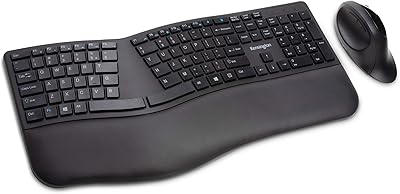
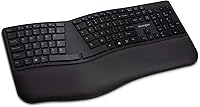
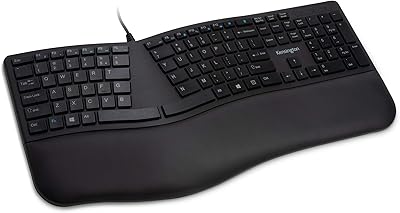
The Kensington Pro Fit Ergonomic Wireless Keyboard is a mid-range comfort-focused board designed for desk workers who spend hours typing and start to feel it in their wrists and forearms. Unlike a standard flat keyboard, this ergonomic keyboard uses a split, sloped layout that angles your hands outward into a more natural resting position. You also get dual wireless — a 2.4GHz USB dongle and Bluetooth 4.0 — which is genuinely useful rather than just a spec-sheet checkbox. Quiet keys and spill resistance round out the office-friendly profile. Just be clear going in: this is not a mechanical keyboard or a gaming board. It’s a practical tool built around comfort.
Features & Benefits

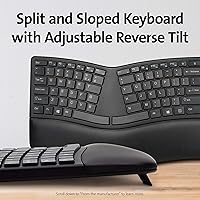
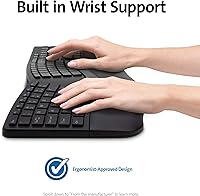
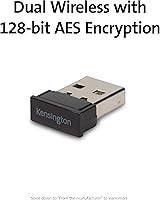
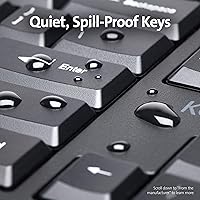
The defining feature of this split keyboard is its adjustable reverse tilt — legs that prop the back of the board higher than the front, which tilts your wrists slightly downward rather than bending them back. That small change matters a lot during long typing sessions. The dual wireless setup means you can plug in the USB dongle for a rock-solid connection or switch to Bluetooth when you want to pair with a laptop or tablet without occupying a port. Both modes use 128-bit AES encryption, so corporate environments are covered. The membrane keys are notably quiet — softer than most standard office keyboards — and the spill-proof construction holds up to disinfectant wipes and accidental coffee splashes alike.

Best For

This ergonomic keyboard hits a sweet spot for office workers who want real wrist relief without committing to a dramatic split or tented design that looks intimidating on a desk. If you’ve been using a standard board for years, the transition here is relatively gentle — there’s an adjustment period, but it isn’t weeks of relearning. It’s also a strong pick for anyone bouncing between a Windows PC and a Mac or Chromebook, since cross-platform support is genuinely solid. Healthcare workers or anyone who regularly sanitizes their workspace will appreciate the solvent-resistant build. And if you want ergonomic benefits without spending heavily on a premium mechanical option, this sits at a sensible price point.

User Feedback

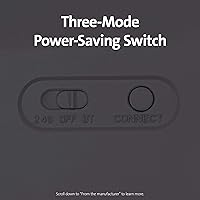
With a 3.8-star average across over 2,500 reviews, the Kensington wireless board has a clearly divided audience. People who stick with it consistently report reduced wrist discomfort after a few weeks, and the quiet keys earn specific praise from those in open-plan offices. That said, the adjustment period trips up more buyers than expected — some return it before giving their hands enough time to adapt. A recurring complaint is that the plastic housing feels a bit light for the price. Bluetooth works well for most users but produces occasional pairing headaches on certain devices. Battery life is generally solid, though new users sometimes miss the three-mode power switch and drain batteries faster than necessary.

Pros

  • The split, sloped layout genuinely reduces wrist and forearm strain during long typing sessions.
  • Dual wireless modes give you reliable 2.4GHz for the desktop and Bluetooth flexibility for a laptop or tablet.
  • Quiet membrane keys are easy on the ears in shared or open-plan office environments.
  • Spill-proof construction survives coffee splashes and regular cleaning with disinfectant wipes.
  • Cross-platform support across Windows, macOS, and Chrome OS makes it versatile for mixed-device households.
  • 128-bit AES encryption makes this ergonomic keyboard a credible choice for corporate or government environments.
  • Batteries and a USB dongle are included in the box, so setup is immediate with no extra purchases needed.
  • The three-mode power switch helps stretch battery life when you remember to use it.
  • The relatively gentle learning curve makes transitioning from a standard flat keyboard manageable for most users.

Cons

  • The adjustment period can be longer than expected — some buyers give up before their hands fully adapt.
  • Plastic build quality feels lighter than the price tag suggests, which can undermine perceived durability.
  • Bluetooth pairing is inconsistent on certain devices and occasionally requires re-pairing after idle periods.
  • Membrane key feel is soft and undifferentiated, which frustrates anyone used to mechanical switches.
  • The power-saving switch is easy to overlook, leading to faster battery drain for new users.
  • No backlight option means this split keyboard is impractical in dim or poorly lit workspaces.
  • At nearly 19 inches wide, the footprint is larger than many compact or tenkeyless alternatives.
  • The 3.8-star average across thousands of reviews signals a meaningfully divided audience — not a universally loved product.

Ratings

Our AI-generated scores for the Kensington Pro Fit Ergonomic Wireless Keyboard were produced by analyzing thousands of verified global buyer reviews, with spam, bot-submitted, and incentivized feedback actively filtered out before scoring. The results reflect a genuinely mixed but instructive picture — this ergonomic keyboard earns real loyalty from the right buyers, while exposing clear trade-offs that others find hard to overlook. Both the standout strengths and the recurring frustrations are represented transparently in each category below.
Ergonomic Comfort
83%
The split, sloped layout with adjustable reverse tilt delivers noticeable relief for users who previously typed on flat keyboards for hours at a stretch. Desk workers dealing with forearm tension or early-stage wrist discomfort consistently report improvement after a proper adjustment period, which most describe as one to two weeks.
The ergonomic benefit is not immediate, and buyers who expect instant comfort improvement often feel let down in the first few days. A small group of users with more severe wrist conditions found the design did not go far enough compared to more aggressive split or tented alternatives.
Build Quality
58%
42%
The keyboard holds up to daily office use without rattling keys or connection failures, and the spill-resistant construction adds a layer of practical durability that many competitors in this range lack. For users who simply need a reliable board that survives a busy desk, it does the job without falling apart.
The lightweight plastic chassis is the single most common complaint across buyer reviews — it simply does not feel proportionate to the price. Several users describe a hollow, insubstantial feel when typing, and a few reported keys developing wobble or inconsistency after extended use.
Wireless Connectivity
77%
23%
The 2.4GHz USB dongle connection is rock solid — virtually every buyer who uses it in this mode reports zero dropouts or lag during long work sessions. Having both a dongle and Bluetooth in one device is a genuine convenience, especially for users juggling a desktop and a laptop throughout the day.
Bluetooth reliability is noticeably less consistent than the dongle connection, with a recurring subset of buyers reporting pairing failures or spontaneous disconnections on certain devices. Re-pairing after a period of inactivity is the most cited annoyance, and it can be frustrating when it happens mid-task.
Typing Feel
69%
31%
The quiet membrane keys are genuinely well-suited to shared office environments — the muted, soft keystroke sound is one of the most praised aspects among buyers who work in open-plan spaces or take calls at their desk. Keys are responsive enough for standard document and email work without feeling sluggish.
Anyone accustomed to mechanical switches will find the membrane feel flat and imprecise, with no tactile click or meaningful actuation feedback. Even among membrane keyboard users, a segment finds the keys slightly too soft, making fast typing feel mushy rather than controlled.
Noise Level
88%
This split keyboard is among the quieter options in its category, and buyers in open offices, libraries, or shared rooms consistently single out the low key noise as a deciding factor in their purchase. The sound profile is closer to a soft thud than the sharp clatter typical of budget keyboards.
A small number of buyers note that the spacebar and a few larger keys produce a slightly louder, less consistent sound compared to the letter keys. It is not a dealbreaker, but it is noticeable enough that a handful of users mention it when comparing to purpose-built quiet keyboards.
Spill Resistance
86%
MIL-STD-810H Method 504.3 certification is not a hollow claim here — buyers in healthcare, food service, and lab settings specifically praise the ability to wipe the keyboard down with alcohol or bleach-based cleaners without degrading the surface or key legends. Coffee spill survivors are a recurring theme in the positive reviews.
The spill resistance covers cleaning solvents and splashes but is not full waterproofing, so submersion or heavy liquid intrusion is still a risk. A few users assumed a higher level of water resistance than the certification actually covers, which led to disappointed reviews after more significant spills.
Battery Life
79%
21%
Running on two included AAA batteries, this ergonomic keyboard delivers several months of regular use for most buyers before a swap is needed. The low-energy Bluetooth 4.0 LE protocol helps keep consumption reasonable even in wireless mode.
Battery drain is noticeably faster for users who forget to toggle the three-mode power switch to off when stepping away, which is easy to overlook given the switch placement. A small group of buyers expected rechargeable battery support at this price point and were disappointed by the AAA-only setup.
Key Layout Adjustment
62%
38%
For buyers who commit to the learning curve, the split layout eventually becomes second nature — many long-term users say they cannot imagine going back to a flat keyboard after a month on this board. The layout is not as extreme as a fully separated or columnar-staggered design, which helps shorten the adaptation window.
The adjustment period is longer than most buyers anticipate, and this is the root cause of many negative reviews and returns. Touch typists with deeply ingrained habits around central keys like T, Y, B, and G tend to struggle most, and some never fully adapt before returning the keyboard.
Cross-Platform Compatibility
81%
19%
Switching between a Windows PC and a MacBook using the same Kensington wireless board requires minimal reconfiguration, and Chrome OS users report the same plug-and-play experience. No additional drivers are needed for standard operation on any of the three supported platforms.
Some Mac-specific shortcut keys do not map perfectly without manual remapping, and a few Chrome OS users note that certain function key behaviors differ from their expectations. The keyboard was clearly designed with Windows as the primary platform, which shows in subtle layout decisions.
Value for Money
71%
29%
At its price point, this ergonomic keyboard offers a compelling combination of dual wireless, certified spill resistance, and a genuine ergonomic layout — features that individually cost more on competing products. For buyers whose primary goal is wrist comfort and quiet office use, the feature-to-cost ratio is reasonable.
The lightweight plastic build is the main factor that undercuts the value argument — buyers paying this much expect a more substantial product. If you compare it to mechanical ergonomic keyboards at a higher price, the gap in build quality and typing satisfaction is significant enough that some buyers feel they should have spent more.
Setup & Ease of Use
84%
Unboxing to typing takes under two minutes with the USB dongle — batteries are included, the receiver is pre-paired, and there are no drivers to install. Even the Bluetooth pairing process follows a straightforward sequence that most users complete on the first attempt.
The three-mode power switch confuses a meaningful number of new users who do not realize it controls which wireless mode is active, leading to connectivity confusion in the first days of use. The manual could do more to clarify how the switch interacts with device pairing.
Office Suitability
85%
Quiet keys, spill resistance, cross-platform support, and a layout that reduces long-session fatigue make this split keyboard genuinely well-rounded for a standard office environment. Healthcare workers in particular find the combination of sanitization tolerance and typing comfort hard to match at a similar price.
The large footprint — nearly 19 inches wide — can crowd a smaller desk setup, especially when paired with a mouse and monitor stand. Workers in compact workstations may find the physical size impractical even if the performance meets their needs.
Bluetooth Reliability
61%
39%
Bluetooth pairing works smoothly on most mainstream laptops and tablets, and buyers who use it as a secondary connection mode for occasional device switching report it as adequate for that purpose. The 128-bit AES encryption is a meaningful advantage for users in regulated or corporate environments.
Bluetooth is clearly the weaker of the two wireless modes, with a consistent thread of buyer complaints around intermittent disconnections, slow reconnection after sleep, and initial pairing failures on certain devices. For users who rely on Bluetooth as their primary connection, this inconsistency is a real daily frustration.

Suitable for:

The Kensington Pro Fit Ergonomic Wireless Keyboard is a well-matched option for office workers who spend the bulk of their day at a desk and have started noticing tension or discomfort in their wrists and forearms. If you want genuine ergonomic relief but find fully split or dramatically tented keyboards too intimidating, this split keyboard offers a gentler on-ramp — the angled layout encourages better hand positioning without forcing an entirely foreign typing posture. It works equally well for professionals who move between multiple devices, since the combination of a USB dongle and Bluetooth 4.0 means you can stay connected to a desktop and a laptop without unplugging anything. The spill-proof, solvent-resistant build also makes it a practical choice for healthcare workers or anyone whose workspace gets wiped down regularly with disinfectant. Budget-conscious buyers who want a reputable brand and real ergonomic credentials without paying a premium price will find good value here.
Not suitable for:

The Kensington Pro Fit Ergonomic Wireless Keyboard is not the right tool for everyone, and it is worth being honest about where it falls short. If you are a touch typist with deeply ingrained muscle memory, expect a real adjustment period — some buyers underestimate how long it takes to feel natural on a split layout, and a few never fully get there. The keyboard uses membrane keys, so anyone who enjoys the tactile feedback and crisp actuation of a mechanical board will likely find the typing feel flat and unsatisfying. The plastic construction, while functional, feels noticeably lightweight, which may disappoint buyers expecting a more substantial desk presence at this price point. Gamers should look elsewhere entirely — this ergonomic keyboard was built around comfort for productivity, not speed or precision for gaming. And if rock-solid Bluetooth reliability is non-negotiable for your setup, the occasional pairing issues reported on certain devices are worth factoring into your decision.
Specifications

  • Brand: Manufactured by Kensington, a brand with a long track record in office peripherals and ergonomic accessories.
  • Model Number: The official model identifier for this keyboard is K75401US.
  • Form Factor: Split and sloped ergonomic layout designed to position hands, wrists, and forearms in a more neutral alignment during extended typing.
  • Dimensions: The keyboard measures 18.98″ in length, 9.92″ in width, and 1.5″ in height.
  • Weight: This split keyboard weighs 2.2 pounds, making it a full-sized board with a moderate desk footprint.
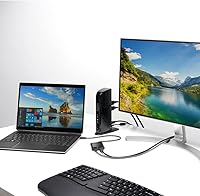
  • Wireless Modes: Supports dual wireless connectivity via a 2.4GHz USB dongle for low-latency use and Bluetooth 4.0 LE for cable-free device flexibility.
  • Encryption: Both wireless modes are secured with 128-bit AES encryption, meeting government-grade security standards.
  • Key Type: Quiet membrane keys designed to minimize typing noise while maintaining a smooth, consistent keystroke feel.
  • Spill Resistance: Certified to MIL-STD-810H Method 504.3, meaning the keyboard can withstand exposure to common cleaning solvents including alcohol and bleach for at least 24 hours.
  • Tilt Adjustment: Adjustable reverse tilt legs allow the back of the keyboard to sit higher than the front, promoting a downward wrist angle that reduces strain.
  • Power Source: Powered by 2 AAA batteries, which are included in the box at purchase.
  • Power Modes: A three-position switch lets users toggle between 2.4GHz, Bluetooth, and Off to manage battery consumption actively.
  • Backlighting: Single-color backlighting is supported, though the lighting is minimal and not intended for use in dark environments.
  • Compatible OS: Fully compatible with Windows, macOS, and Chrome OS without requiring additional drivers for standard operation.
  • Color: Available in Black; no additional color variants are listed for this model.
  • Recommended Use: Designed specifically for office and professional desk environments where all-day typing comfort and quiet operation are priorities.
  • Release Date: This keyboard was first made available in August 2019 and has accumulated a substantial review base since launch.

Related Reviews

Kensington Pro Fit Ergonomic Wireless Keyboard Mouse
74%
78%
Ergonomic Design
74%
Keyboard Feel & Typing Experience
58%
Mouse Comfort & Usability
82%
Wireless Connectivity
88%
Security
More
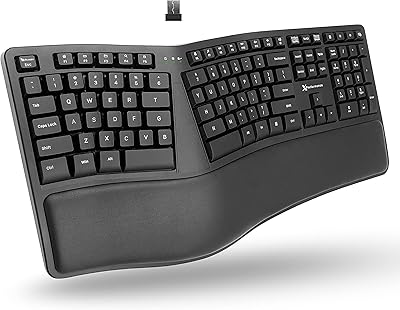
Kensington Pro Fit Ergo Wired Keyboard
77%
78%
Wrist Comfort
67%
Typing Experience
82%
Build Quality
91%
Spill & Solvent Resistance
86%
Noise Level
More
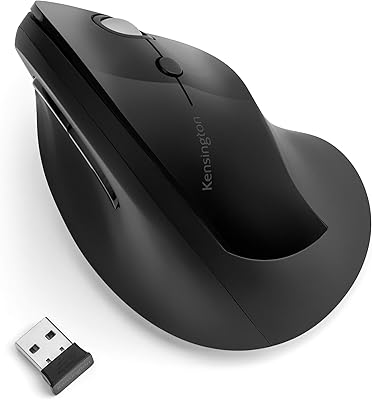
Kensington Pro Fit Ergo Vertical Wireless Mouse
85%
88%
Ergonomic Comfort
91%
Wireless Connectivity
94%
Battery Life
90%
Ease of Setup
87%
Customizability (DPI Settings)
More
QUASIO Wave Keys Ergonomic Wireless Keyboard with Wrist Rest
75%
83%
Ergonomic Comfort
71%
Wrist Rest Quality
67%
Typing Feel & Key Travel
86%
Wireless Reliability
81%
Mac & Windows Compatibility
More
X9 Performance Wireless Ergonomic Split Keyboard

76%
83%
Ergonomic Comfort
58%
Key Feel & Typing Experience
86%
Wireless Performance
88%
Battery Life
62%
Build Quality
More
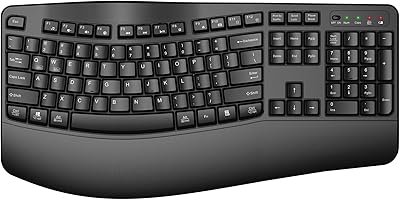
TECKNET TK-EKB01040BS01 Wireless Keyboard
76%
83%
Ergonomic Comfort
86%
Typing Noise Level
79%
Wireless Reliability
62%
Build Quality
88%
Value for Money
More
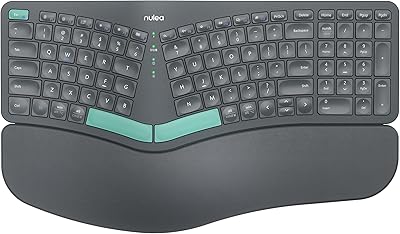
Nulea HD315 Wireless Ergonomic Split Keyboard
75%
83%
Ergonomic Design
81%
Wrist Rest Comfort
76%
Wireless Reliability
88%
Value for Money
58%
Typing Feel
More
HP 960 Ergonomic Wireless Keyboard
73%
84%
Ergonomic Design
81%
Wrist Rest Quality
88%
Detached Numpad
86%
Multi-Device Connectivity
67%
Key Feel & Typing Experience
More
Alienware Pro Wireless Gaming Keyboard
87%
93%
Connectivity
89%
Customization (Hot-Swappable Switches)
91%
Ergonomics and Layout
88%
RGB Lighting
85%
Battery Life
More
Microsoft Surface Ergonomic Wireless Keyboard
72%
88%
Ergonomic Design
84%
Build Quality
91%
Palm Rest Comfort
73%
Typing Experience
76%
Bluetooth Connectivity
More

FAQ

For many users, yes — but it takes time. The split layout and reverse tilt encourage a more neutral wrist position, which genuinely reduces strain during long sessions. That said, you should expect an adjustment period of one to two weeks before the layout feels natural. If you give up after a few days, you may not see the benefit.

Plug-and-play easy for the 2.4GHz dongle — just insert the USB receiver, flip the power switch, and it connects automatically. Bluetooth takes a few more steps to pair initially, but it follows a standard pairing process similar to any Bluetooth device. Most users are up and running within a few minutes either way.

The Bluetooth 4.0 LE connection works with a wide range of devices beyond just computers, and many users do connect it to tablets successfully. However, key mapping may not be perfect on iOS or Android since the keyboard is officially validated for Windows, macOS, and Chrome OS. Basic typing functions will work, but some shortcut keys may behave unexpectedly.

It works on macOS without any drivers needed. The keyboard is officially cross-platform and supports Windows, macOS, and Chrome OS right out of the box. Some Mac-specific function keys may differ from a native Apple keyboard layout, but the core typing experience is fully functional.

Battery life is generally strong — most users report several months of regular use before needing to replace the AAA batteries. The key is remembering to use the three-mode power switch to turn the keyboard off when you step away, since leaving it in an active mode when idle drains power faster than necessary.

Not simultaneously — the keyboard can only be actively connected to one device at a time. You switch between them using the three-mode power switch. It is not a multi-device keyboard in the way some premium boards are, so if quick switching between two active machines is a priority, that is worth knowing upfront.

The keyboard meets MIL-STD-810H Method 504.3, which means it has been tested to survive exposure to cleaning solvents like alcohol and bleach for at least 24 hours without breaking down. In practical terms, this means a coffee spill or a regular wipe-down with a disinfectant cloth should not damage it. It is not waterproof enough to be submerged, but it handles the normal hazards of a busy desk or healthcare workspace well.

It is notably quieter than most standard office keyboards. The membrane keys produce a soft, muted sound rather than a sharp click, which is genuinely unobtrusive in shared spaces. It is not completely silent, but coworkers nearby are unlikely to find it disruptive during normal use.

This is one of the more consistent complaints from buyers, and it is fair. The keyboard is functional and durable enough for everyday office use, but it does not feel heavy or premium in hand. If tactile solidity matters to you as much as comfort, the lightweight plastic construction may disappoint. For most office users focused on ergonomics, it holds up fine over time.

Almost certainly at first, yes. The key positions are the same as a standard keyboard, but the angled split means your muscle memory will need to recalibrate — especially for keys near the middle of the board. Most users find the adjustment takes one to two weeks of regular use. It is worth committing to that period rather than switching back after a day or two when it feels awkward.