Overview

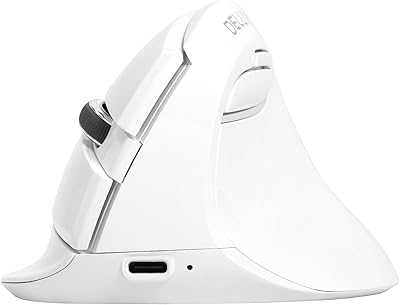
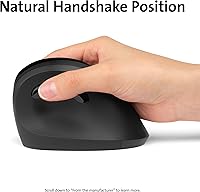
The Kensington Pro Fit Ergo Vertical Wireless Mouse is designed to provide ergonomic support while reducing wrist strain during extended computer sessions. Its vertical design encourages a natural handshake grip, promoting a more comfortable hand position that alleviates discomfort associated with traditional mice. This wireless mouse is ideal for both casual users and professionals who need reliable performance and comfort throughout their day. With its sleek, functional design, it offers an easy solution to avoid repetitive stress injuries that often come with prolonged mouse use.
Features & Benefits

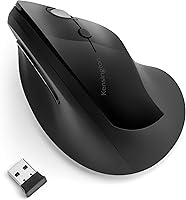
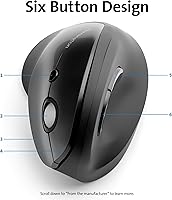
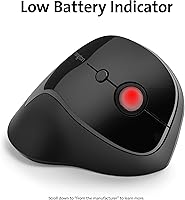
This ergonomic mouse stands out with its customizable features. It offers four DPI settings (800/1000/1200/1600), allowing users to adjust sensitivity based on their preferences or the task at hand. The plug-and-play setup with a wireless Nano receiver ensures a quick and hassle-free connection, with a range of up to 20 meters. Powered by a single AA battery, the Kensington Pro Fit Ergo Vertical Wireless Mouse boasts an impressive long battery life of up to one year. Additionally, users can customize button functions using the KensingtonWorks software for an enhanced experience.
Best For

This ergonomic vertical mouse is best suited for individuals who spend long hours working on computers and seek to minimize wrist strain. Office workers, professionals, and those who experience discomfort from repetitive motions will appreciate its ergonomic design and ease of use. It’s particularly beneficial for people dealing with carpal tunnel syndrome or other wrist-related conditions. Furthermore, it caters to those who need a reliable, wireless mouse that doesn’t require complicated setup, offering seamless compatibility with Windows, macOS, and Chrome OS.

User Feedback

Many users have praised the Kensington Pro Fit Ergo Vertical Wireless Mouse for its comfort and ability to reduce wrist strain, particularly during long periods of use. The wireless connectivity and long-lasting battery life also receive positive mentions, with several reviewers noting the reliability of the connection. However, some users with smaller hands have found the mouse to be less comfortable for their grip. Additionally, while many appreciate the ergonomic design, a few mentioned that the mouse may feel bulky for those transitioning from traditional models.
Pros

  • This ergonomic mouse reduces wrist strain, making it ideal for users with carpal tunnel syndrome or those who work long hours.
  • The vertical design encourages a natural handshake grip, offering more comfort than traditional mice for many users.
  • Wireless connectivity is reliable, and setup is hassle-free with the plug-and-play functionality.
  • Users appreciate the customizable DPI settings, allowing for precise control across different tasks.
  • Battery life is impressive, lasting up to one year with a single AA battery, making it a low-maintenance device.
  • The KensingtonWorks software provides useful button customization, enhancing the mouse’s functionality for specific needs.

Cons

  • This mouse may feel too bulky for users with smaller hands, affecting its overall comfort.
  • The vertical design takes time to get used to and may feel awkward for those accustomed to traditional mice.
  • It may not be portable enough for those looking for a lightweight, travel-friendly option.
  • Some users feel the mouse is less responsive at the highest DPI settings compared to more premium models.
  • The build quality is solid, but the plastic feel may not appeal to users who prefer more premium materials.
  • The lack of advanced customization options might not satisfy users who need complex programming for buttons.

Ratings

After analyzing verified user reviews from multiple languages and platforms worldwide, the scores reflect a balanced view of both strengths and pain points of the Kensington Pro Fit Ergo Vertical Wireless Mouse. Only authentic, high-quality feedback was considered, excluding any spam, bot, or incentivized reviews. The following ratings highlight key areas that buyers should consider before purchasing this wireless ergonomic mouse, with feedback from diverse sources providing a broad perspective on its performance, usability, and overall value.

Ergonomic Comfort
88%
Many users report significant comfort improvement when using this mouse for long hours, especially compared to traditional mice. The vertical design helps reduce wrist strain, which is a major benefit for people prone to discomfort or repetitive strain injuries from daily use. This feature makes it a strong choice for office workers and those with desk jobs.
Some users with smaller hands have found the mouse difficult to grip comfortably, especially after extended use. The vertical design, while ergonomic, can take time to get used to, and may not suit everyone’s hand size or grip style. A few have also mentioned that the mouse feels a bit bulky for their liking.
Wireless Connectivity
91%
The wireless connection is very stable, with minimal lag reported even during extended use. Users appreciate the 20-meter range offered by the Nano receiver, making it versatile for use in different setups. The plug-and-play functionality is also a key plus, as it eliminates the hassle of complicated setup steps.
While most users enjoy reliable wireless performance, a few have encountered occasional drops in connection, particularly in environments with a lot of wireless interference. Some also feel that the receiver could be smaller or more convenient, as it can occupy a USB port on busy setups.
Battery Life
94%
The battery life on this mouse is exceptional, with many users reporting up to a full year of use with a single AA battery. This extended battery life reduces the need for frequent replacements, making it a low-maintenance option for users who don’t want to worry about charging or replacing batteries constantly.
A small number of users mentioned that the mouse can be a bit heavy with the AA battery inserted, especially if they are used to lighter devices. Additionally, while battery life is generally great, some have reported that after months of use, they notice a gradual reduction in performance, though this is rare.
Ease of Setup
90%
Setup is incredibly simple, thanks to the plug-and-play design. Users appreciate that they can get started immediately after plugging in the Nano receiver, without the need for installing extra drivers. This feature makes it ideal for non-technical users and professionals who need to focus on their work rather than on configuring a device.
A few users mentioned that the mouse is not automatically recognized by some systems, requiring additional steps like installing software or restarting the computer. This can be frustrating for those who prefer a truly seamless setup experience.
Customizability (DPI Settings)
87%
The ability to switch between four DPI settings (800/1000/1200/1600) gives users the flexibility to adjust the mouse’s sensitivity to suit different tasks. This feature is especially appreciated by those who need precision for tasks like graphic design or gaming. It offers a good balance between performance and ease of use.
While the DPI settings are useful, some users have expressed a desire for more fine-tuned adjustments or additional DPI options beyond the provided ranges. A few also felt that the DPI switch button was slightly difficult to locate or press while in use.
Build Quality
82%
18%
The mouse feels sturdy and well-constructed, which many users appreciate for the price. The ergonomic design feels durable and made to last, with the buttons responding smoothly and consistently over time. It’s built to withstand regular use without feeling flimsy.
While generally solid, a few buyers noted that the plastic exterior could feel a bit cheap or slippery at times. Additionally, a small number of users reported that the mouse started to show signs of wear after a few months of heavy use, particularly around the button areas.
User Comfort (Large Hands)
75%
25%
Users with larger hands often find the ergonomic design to be a good fit, as the natural handshake grip helps promote a more relaxed wrist position. The vertical design ensures that the user’s hand stays in a more neutral position, reducing strain.
However, the size and shape may be uncomfortable for some users with smaller or medium-sized hands. While it’s great for larger hands, the bulkiness may make it difficult to find a comfortable grip for people with smaller hand sizes or different grip styles.
Software Experience (KensingtonWorks)
78%
22%
The KensingtonWorks software is appreciated for allowing button customization, giving users the ability to tailor the mouse functions to their specific needs. This feature is especially useful for users who need quick access to certain actions during work or gaming sessions.
Some users felt that the software was a bit clunky and not as intuitive as they would have liked. A few reviewers mentioned difficulty installing or navigating the software, and it doesn’t seem to offer as many customization options as some competing devices.
Value for Money
92%
Considering its ergonomic benefits, solid wireless connectivity, and long battery life, many users agree that this mouse provides excellent value for money. It’s a cost-effective solution for those looking for an ergonomic mouse without breaking the bank.
Some buyers feel that while the price is fair, there are competing models with similar features that may offer even more flexibility in terms of customization or software support. A few mentioned that they were able to find comparable models for less money, though they still appreciated the overall quality.
Compatibility with Operating Systems
85%
The mouse is compatible with a wide range of operating systems, including Windows, macOS, and Chrome OS, which makes it versatile for various users across different platforms. This compatibility is a big plus for people who use multiple devices or work across different systems.
While compatibility is generally good, a few users on older systems experienced occasional hiccups with software installation or full functionality, particularly when using it with non-Windows platforms. In rare cases, setup wasn’t as smooth on some macOS versions.
Size and Weight (Portability)
80%
20%
At 6.4 ounces, the mouse offers a solid and comfortable weight, providing a sense of stability when in use. Users who carry their mouse around for work or travel find it compact enough to fit easily in a bag or laptop case.
However, some users found it to be slightly heavier than expected for an ergonomic mouse, especially those used to lighter models. This added weight can be a concern for people who prefer ultra-light devices or need a mouse for constant on-the-go use.
Customer Support
77%
23%
A number of users found the customer support team to be helpful when they encountered issues, particularly in regard to troubleshooting setup problems or seeking replacement parts. This support is seen as a reliable backup for users who experience any challenges with the device.
On the other hand, some users have reported slow response times from the customer support team. A few also mentioned that resolution of issues, such as returns or warranty claims, could be more efficient, with some experiencing delays in communication.

Suitable for:

The Kensington Pro Fit Ergo Vertical Wireless Mouse is ideal for office workers, professionals, and anyone who spends long hours at a desk and needs to alleviate wrist strain. Its ergonomic vertical design is specifically suited for people with wrist discomfort or those prone to carpal tunnel syndrome, providing a more natural and comfortable grip. This mouse is also perfect for users who prefer a reliable, easy-to-set-up wireless device, as it features plug-and-play functionality and long battery life. Whether you're working on a computer all day or need a dependable, low-maintenance mouse for casual use, this device offers practical benefits, especially for those prioritizing comfort during extended use.
Not suitable for:

While the Kensington Pro Fit Ergo Vertical Wireless Mouse is well-suited for many, it may not be the best option for users with smaller hands, as the vertical design can feel too bulky for a comfortable grip. Additionally, people who prefer ultra-light mice or those who frequently need a portable, compact solution might find it heavier and less convenient for travel. The mouse’s design can also take some getting used to, which may pose a challenge for those who are accustomed to traditional horizontal mice. If you're looking for highly customizable software or a mouse with advanced features beyond basic button adjustments, this may not meet your needs either.
Specifications

  • Connectivity: This mouse connects wirelessly via a Nano receiver with a range of up to 20 meters.
  • DPI Settings: It features four adjustable DPI settings (800, 1000, 1200, and 1600) for customizable sensitivity.
  • Battery Life: The mouse offers up to one year of battery life with a single AA battery.
  • Battery Type: It requires one AA battery for operation.
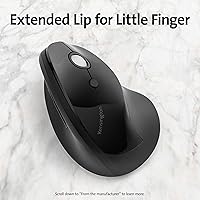
  • Ergonomic Design: The mouse has a vertical ergonomic design that promotes a natural handshake grip to reduce wrist strain.
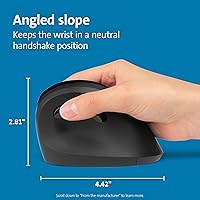
  • Dimensions: The mouse measures 4.42 x 2.98 x 0.1 inches in size.
  • Weight: It weighs 6.4 ounces, providing a balanced and comfortable feel for extended use.
  • Compatibility: The mouse is compatible with Windows, macOS, and Chrome OS systems.
  • Plug-and-Play: The mouse features a plug-and-play setup with no software installation required for basic use.
  • Button Customization: Users can customize the mouse buttons using the KensingtonWorks software.
  • Software Support: The mouse is compatible with the KensingtonWorks software, which allows for button remapping and profile creation.
  • Grip Type: The mouse is designed for a natural handshake grip, which is comfortable for long hours of use.
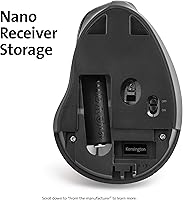
  • Receiver Type: The mouse uses a USB Nano receiver that plugs into the computer for wireless operation.
  • Surface Compatibility: The mouse works on most flat surfaces, but may not perform well on glass or highly reflective materials.
  • Color Options: It is available in a neutral black color, with a simple design focused on functionality.
  • Warranty: The mouse typically comes with a one-year limited warranty, subject to the manufacturer’s terms.
  • Sensor Type: The mouse uses optical sensor technology for accurate tracking and smooth performance.
  • Receiver Storage: The Nano receiver can be stored inside the mouse for easy transportation and protection.

FAQ

Setting up this ergonomic mouse is straightforward with its plug-and-play feature. Simply insert the Nano receiver into an available USB port on your computer, and the mouse will automatically connect without the need for any additional software. It’s compatible with Windows, macOS, and Chrome OS.

Yes, the Kensington Pro Fit Ergo Vertical Wireless Mouse is specifically designed to reduce wrist strain. Its vertical design promotes a natural handshake grip, which helps to alleviate discomfort often caused by traditional mice, making it an excellent choice for users with wrist pain or carpal tunnel syndrome.

The battery life of this wireless mouse is impressive, lasting up to one year with a single AA battery. This long lifespan reduces the need for frequent battery replacements, making it a more convenient and low-maintenance option for users.

The Nano receiver for this device has a range of up to 20 meters (about 66 feet). This ensures reliable connectivity even if you’re seated a little farther from your computer, which is especially useful in larger office setups or when using a projector.

Yes, you can customize the buttons using KensingtonWorks software. This software allows you to reassign functions to the mouse buttons based on your preferences, providing more flexibility for specific tasks like gaming or productivity applications.

This mouse features a vertical design that promotes a more natural handshake grip, which may feel more comfortable for right-handed users. Left-handed users may find it less intuitive, as it is primarily designed with right-hand ergonomics in mind.

The Kensington Pro Fit Ergo Vertical Wireless Mouse offers four DPI settings: 800, 1000, 1200, and 1600. This allows you to adjust the sensitivity of the mouse based on your needs, whether for precise work like graphic design or faster movements during gaming.
The dimensions of the mouse are 4.42 x 2.98 x 0.1 inches and it weighs about 6.4 ounces. While the mouse is ergonomically designed for comfort, some users with smaller hands may find the size a bit bulky, making it better suited for those with larger hands.

Yes, the Kensington Pro Fit Ergo Vertical Wireless Mouse works on most flat surfaces, including desks, tables, and mouse pads. However, it may not perform as well on highly reflective or glass surfaces. For optimal performance, it's recommended to use it on a non-reflective surface.
The Kensington Pro Fit Ergo Vertical Wireless Mouse is built for durability, with a solid, reliable construction that is well-suited for everyday office work. However, some users have mentioned that it might not withstand heavy abuse like gaming or extended use in harsh environments. For heavy-duty needs, a more rugged mouse might be better.