Overview

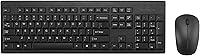
The Kensington KM150 Wireless Keyboard & Mouse Combo arrived in late 2024 as a practical, no-fuss option for anyone who needs a reliable desktop setup without a hefty price tag. It runs on a 2.4GHz wireless connection through a single USB-A nano receiver, works on both Windows and macOS, and requires almost no setup time. What quietly separates it from other combos in this price range is the sealed membrane keyboard, which can handle an accidental coffee spill without turning your morning into a disaster. The design is straightforward and compact — built for getting work done, not for showing off.
Features & Benefits

The spill-resistant sealed membrane is the headline feature here — it meets the MIL-STD-810H contamination standard, meaning liquids can be wiped off without any damage to the electronics underneath. That alone makes it worth considering in a busy office environment. The wireless connection uses AES 128-bit encryption, which is an uncommon security layer at this price point and matters in shared workspaces. The quiet mouse clicks are a small but welcome detail in open-plan offices. One USB-A dongle handles both devices, so you are not sacrificing two ports. The recycled plastic construction — 62% post-consumer content — is a responsible material choice, though it does not affect day-to-day usability.

Best For

This wireless combo makes the most sense for people who eat or drink at their desk regularly and want some peace of mind without paying a premium for it. It is a natural fit for hot-desking environments or shared office setups where keyboards get passed around — easy to wipe clean and straightforward to hand off. Anyone switching from a wired setup on a tight budget will find the installation painless and the connection reliable. It also works well for macOS and Windows users equally, fitting mixed office environments without compatibility headaches. Those looking for high-DPI performance for design work or gaming should look elsewhere.

User Feedback

With a 4.3-star average across nearly 300 ratings, the KM150 set has earned a solid standing among everyday users. The most common praise centers on typing feel and quiet clicks, with many buyers noting the quality feels above what the price suggests. The spill-proof design gets called out frequently as a genuine benefit, not just a marketing claim. On the other side, some users with larger hands find the mouse uncomfortable over long sessions, and a handful mention that 1200 DPI feels limiting on bigger or dual-monitor setups. Battery life reports are generally positive, though Kensington has not published official figures, so individual results will vary.

Pros

  • The sealed membrane keyboard held up to real liquid spills without any damage — a rare feature at this price point.
  • Plug-and-play setup means both devices work the moment you insert the nano dongle, with no software required.
  • AES 128-bit wireless encryption is an uncommon security feature for a budget office combo.
  • The quiet mouse clicks stand out in open-plan offices where click noise from neighboring desks adds up fast.
  • One nano dongle connects both devices, keeping your available USB ports free for other things.
  • Works equally well on Windows and macOS, making it a practical choice for mixed-OS office environments.
  • The keyboard frame is solid with no flex, and key response feels better than most combos at this tier.
  • At roughly the rank of top 700 in its Amazon category with a 4.3-star average, real-world satisfaction is strong and consistent.
  • Certified recycled plastic construction is a credible sustainability credential, not just a marketing label.

Cons

  • The mouse has no DPI adjustment, which limits usefulness on larger or multi-monitor desk setups.
  • Mouse size skews small and lacks ergonomic contouring, which causes hand fatigue for larger-handed users over long sessions.
  • The USB-A dongle format is increasingly incompatible with modern laptops that have dropped USB-A ports entirely.
  • No official battery life figures are published, making it hard to plan for replacements in a managed office environment.
  • The mouse build feels noticeably lighter and less solid than the keyboard, creating an uneven sense of quality between the two devices.
  • There are zero customization options — no remappable keys, no macro support, and no companion software.
  • Spill protection applies only to the keyboard; the mouse remains a standard build with no liquid resistance.
  • Membrane key feel is soft enough that fast or heavy typists may find it unsatisfying compared to even entry-level mechanical options.

Ratings

The scores below for the Kensington KM150 Wireless Keyboard & Mouse Combo were generated by our AI engine after analyzing verified purchase reviews from buyers worldwide, with spam, bot-submitted, and incentivized feedback actively filtered out. Each category reflects what real users consistently praised or flagged in their daily use — nothing is glossed over. Strengths and frustrations are weighted equally so you can make a genuinely informed decision.

Value for Money
88%
For the price, buyers consistently report getting more than they expected — a spill-resistant keyboard, wireless encryption, and quiet mouse all in one package. That combination would typically cost noticeably more from competing brands, and reviewers notice the difference.
A small number of buyers feel the mouse quality lags behind the keyboard in terms of perceived value, and those who needed a higher-DPI mouse found themselves spending more on a separate peripheral shortly after purchase.
Spill Resistance
91%
This is the feature that earns the most unprompted praise. Users working through lunch or keeping a drink on their desk say the sealed membrane genuinely held up when liquids were involved — no panic, just wipe and carry on. The MIL-STD certification gives buyers confidence it is not just marketing language.
A few users note the membrane feel is slightly softer than a standard keyboard, which some find less satisfying for extended typing sessions. The spill protection also does not extend to the mouse, which remains a standard build.
Wireless Reliability
84%
The 2.4GHz connection through a single nano dongle was called out as rock-solid by most buyers, with no reported dropouts during regular office use across distances of several feet. The single-dongle setup keeps things clean and conserves ports.
Some users in environments with heavy wireless interference — shared offices with many devices — noticed occasional minor lag. Also, the USB-A dongle format is increasingly awkward for newer laptops that have moved entirely to USB-C.
Keyboard Typing Feel
82%
18%
The sealed membrane design feels more responsive than many cheap office keyboards at this tier. Buyers switching from aging wired keyboards frequently mention the key travel and resistance feel noticeably better, making long typing sessions comfortable enough.
Enthusiasts who prefer mechanical or even premium membrane keyboards will find the feel underwhelming. The keys lack the tactile crispness some users want for fast or heavy typing work, and the soft membrane can feel slightly mushy under pressure.
Mouse Comfort & Ergonomics
63%
37%
For standard-sized hands and typical office tasks like document editing or web browsing, the mouse works fine throughout a workday. Buyers with average hand sizes rarely mention discomfort in shorter review windows.
This is where the KM150 set draws the most criticism. Users with larger hands flag the mouse as noticeably small, leading to hand fatigue after extended sessions. The shape is fairly generic and lacks any sculpting or side grip support that would improve longer daily use.
Mouse Precision (DPI)
61%
39%
At 1200 DPI, the mouse handles spreadsheets, email, and general office navigation without issue. For the target audience doing routine productivity work on a single standard monitor, the precision is entirely adequate day to day.
On larger monitors or dual-screen setups, 1200 DPI requires noticeably more physical movement across the desk, which several reviewers flagged as tiring. There is no DPI adjustment option, so users cannot dial it up even when they need to.
Noise Level
89%
The quieter-than-average mouse clicks were called out positively by a meaningful number of buyers, particularly those in open-plan offices or shared home workspaces. It is the kind of small detail that makes a real difference when sitting near colleagues in a quiet environment.
The keyboard itself is not marketed as silent, and some users note the key noise is about average for a membrane board — not loud, but not library-quiet either. Buyers expecting near-silent operation from the full set may be slightly surprised by the keyboard.
Build Quality
74%
26%
The keyboard feels solid for its price tier, with no flex across the frame during normal typing. The recycled plastic construction does not feel cheap in hand, and users handling it daily report no rattling keys or structural concerns after weeks of use.
The mouse chassis feels lighter and less premium than the keyboard, and a couple of users mention the scroll wheel has less resistance than they prefer. At this price the build is acceptable, but it does not feel like something that will last five-plus years of heavy use.
Setup & Plug-and-Play Experience
93%
Virtually every reviewer who mentioned setup described it as instant — plug in the nano dongle and both devices work. No driver installation, no software, no pairing steps. For non-technical users or IT teams rolling out multiple desks, that simplicity is a real time-saver.
There are no advanced configuration options at all, which is a reasonable trade-off at this tier but worth knowing. Users who want macro keys, custom DPI settings, or remappable buttons will need to look at a different product category entirely.
OS Compatibility
87%
Working across Windows and macOS without any driver installation is a genuine practical benefit in mixed-OS offices. Buyers who switch between a personal Mac and a work PC mentioned the combo handled both without issue, which is not always the case with budget wireless sets.
Linux compatibility is unconfirmed and not officially supported, which matters for a small but vocal group of buyers who noted the dongle was not always recognized cleanly. ChromeOS performance also appears untested by Kensington officially.
Battery Life
76%
24%
General feedback on battery life skews positive, with most users reporting they went weeks or months before needing to replace batteries. For an always-on office setup, the drain rate appears reasonable compared to similar wireless combos in this price range.
Kensington does not publish official battery life figures, which makes it hard to set expectations upfront. A handful of users reported shorter-than-expected battery life on the mouse specifically, though this may reflect usage intensity rather than a product defect.
Portability & Size
79%
21%
The compact keyboard footprint and lightweight overall package make this a reasonable choice for users who occasionally work from different rooms or carry their setup between home and office. The nano dongle is easy to store and does not protrude awkwardly.
The keyboard does not fold or include a travel case, so it is not truly portable in the way a dedicated travel keyboard would be. Users wanting something for frequent commuting or bag-friendly use would be better served by a Bluetooth compact option.
Eco & Sustainability
77%
23%
The SCS-certified minimum 62% post-consumer recycled plastic content is a tangible and independently verified commitment, not a vague green claim. For buyers who factor environmental impact into purchasing decisions, this is a credible differentiator at this price point.
The recycled material claim excludes the circuit board, wireless dongle, and batteries — components that carry their own environmental footprint. The product also runs on disposable batteries rather than a rechargeable system, which offsets some of the sustainability benefit over time.
Security Features
83%
AES 128-bit encryption on a sub-forty-dollar wireless combo is genuinely uncommon and appreciated by buyers working in offices that handle sensitive information. It removes one potential concern for IT managers considering a bulk deployment of budget peripherals.
The encryption applies only to the wireless signal, not to any software layer, and there is no physical privacy switch or pairing reset button visible to the user. For most buyers this is fine, but security-focused professionals may want a more auditable solution.

Suitable for:

The Kensington KM150 Wireless Keyboard & Mouse Combo is a strong fit for office workers who want practical protection without overcomplicating their setup — particularly anyone who keeps a coffee mug or water bottle within arm's reach of their keyboard. The spill-resistant sealed membrane is a genuinely useful feature in busy shared offices or hot-desk environments where keyboards change hands regularly and hygiene matters as much as functionality. IT managers equipping multiple workstations on a tight budget will appreciate the plug-and-play setup that requires zero driver installation and works across both Windows and macOS without any fuss. The built-in AES 128-bit wireless encryption is an unexpected bonus for cost-conscious teams that still need to meet basic security standards. Anyone upgrading from an aging wired setup who simply wants a clean, clutter-free desk with dependable wireless performance will find this combo delivers exactly what it promises, day in and day out.
Not suitable for:

The Kensington KM150 Wireless Keyboard & Mouse Combo is not the right pick for power users who rely on a large monitor or run a multi-screen workstation — the 1200 DPI mouse with no adjustment option will require noticeably more arm movement and can feel limiting during extended sessions. Gamers, graphic designers, or anyone who depends on precise cursor control should look at dedicated peripherals with adjustable DPI and a more sculpted mouse shape. Users with larger hands may find the mouse physically uncomfortable within hours, and there is no way to modify the ergonomics since the shape is fixed. If your laptop has moved entirely to USB-C ports, the USB-A nano dongle will require an adapter that is not included. Those who prefer the tactile feedback of a mechanical keyboard or want a quieter, near-silent typing experience will also find the membrane feel and key noise fall short of their expectations.

Specifications

  • Wireless Technology: Both the keyboard and mouse connect via a single 2.4GHz USB-A nano receiver included in the box.
  • Encryption: The wireless connection uses AES 128-bit encryption, the same standard referenced in government and enterprise security contexts.
  • Mouse DPI: The mouse operates at a fixed 1200 DPI with no adjustment option available.
  • Mouse Buttons: The mouse has 3 buttons: left click, right click, and a clickable scroll wheel.
  • Keyboard Type: The keyboard uses a sealed membrane design that prevents liquid from reaching internal electronics.
  • Spill Resistance: The keyboard is certified to MIL-STD-810H Method 504.3, confirming resistance to contamination by common fluids including disinfectants.
  • OS Support: The combo is officially compatible with Windows and macOS; no driver installation is required on either platform.
  • Recycled Content: The plastic components contain a minimum of 62% post-consumer recycled content, certified by SCS Recycled Content Standard V8-0, excluding the PCB assembly, dongle, and batteries.
  • Power Source: Both the keyboard and mouse are powered by standard dry-cell batteries, which are not included in the package.
  • Item Weight: The total package weight is 1.65 pounds, covering the keyboard, mouse, and receiver together.
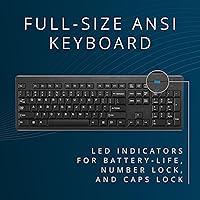
  • Package Dimensions: The retail package measures 21.02 x 6.06 x 1.73 inches, reflecting the full-size keyboard layout.
  • Color: The set is available in Black only.
  • Receiver Type: A single compact USB-A nano receiver pairs with both devices simultaneously, requiring only one port on the host machine.
  • Brand & Series: Manufactured by Kensington under the KM150 product series, model number K75562NA.
  • Date Released: The product became available for purchase in October 2024.
  • Market Ranking: As of available data, the combo holds a rank of #660 in the Amazon Computer Keyboard & Mouse Combos category.
  • Connectivity Type: The set uses USB-A wireless only; there is no Bluetooth pairing option or wired fallback mode.
  • Noise Level: The mouse is engineered with a quieter click mechanism designed to reduce audible noise compared to standard office mice.

Related Reviews

Arteck HW192 Wireless Keyboard and Mouse Combo
78%
78%
Build Quality
72%
Typing Experience
63%
Mouse Comfort & Ergonomics
81%
Battery Life
69%
Wireless Connectivity
More
EDJO Wireless Keyboard and Mouse Combo
76%
88%
Value for Money
94%
Ease of Setup
71%
Keyboard Typing Feel
63%
Mouse Performance
86%
Wireless Connectivity & Range
More
HP 18H24AA Wireless Keyboard and Mouse Combo
79%
91%
Value for Money
93%
Ease of Setup
74%
Keyboard Typing Experience
63%
Mouse Comfort & Ergonomics
86%
Wireless Reliability
More
Links9+ Wireless Keyboard and Mouse Combo
85%
89%
Ergonomics and Comfort
92%
Wireless Performance and Connectivity
85%
Build Quality
94%
Ease of Use and Setup
80%
Battery Life
More
GUKJOB Wireless Keyboard and Mouse Combo
87%
88%
Typing Experience
91%
Design & Aesthetics
75%
Battery Life
95%
Ease of Setup
72%
Build Quality
More
MOWUX Wireless Keyboard and Mouse Combo
88%
91%
Typing Comfort
89%
Mouse Responsiveness
94%
Wireless Connectivity
85%
Build Quality
88%
Keycap Durability
More
Vssoplor Wireless Keyboard and Mouse Combo
82%
91%
Value for Money
84%
Keyboard Typing Experience
61%
Mouse Ergonomics
88%
Wireless Connectivity & Stability
72%
Battery Life
More
CHESONA Wireless Keyboard and Mouse Combo
86%
93%
Multi-device Connectivity
87%
Typing Experience
85%
Battery Life
91%
Design & Build Quality
78%
Ergonomics & Comfort
More
VEILZOR UK418 Wireless Keyboard and Mouse Combo
81%
91%
Value for Money
84%
Typing Comfort
89%
Noise Level
82%
Wireless Reliability
76%
Mouse Ergonomics
More
MPTOG S801AG Wireless Keyboard and Mouse Combo
75%
88%
Aesthetic Design
93%
Ease of Setup
78%
Typing Feel
61%
Mouse Tracking Accuracy
82%
Wireless Reliability
More
Letton Wireless Keyboard and Mouse Combo
83%
89%
Design & Aesthetics
81%
Ergonomics & Comfort
75%
Wireless Connectivity
90%
Battery Life
92%
Value for Money
More

FAQ

No, there is nothing to install. You plug the nano receiver into a USB-A port and both the keyboard and mouse are immediately recognized by Windows and macOS. It is as close to instant setup as you will find.

The receiver uses a USB-A connector, so you would need a USB-A to USB-C adapter to use it with a modern MacBook or any laptop that has dropped full-size USB ports. The adapter is not included, so factor that in if your machine has gone fully USB-C.

The spill resistance is backed by MIL-STD-810H certification, which is a legitimate military-grade test standard — not a vague claim. The sealed membrane is designed so liquid cannot reach the electronics inside. You would want to wipe it down and let it dry, but the internal components should be protected. The mouse does not share this protection, so keep that in mind.

The single nano receiver connects both devices to one computer at a time. There is no multi-device pairing or easy-switch feature, so if you want to use this combo across two separate machines, you would need to physically move the dongle each time.

Both devices run on standard dry-cell batteries, though Kensington has not published official battery life estimates. User feedback generally suggests battery life is reasonable for daily office use, with most buyers reporting weeks to months before needing a replacement. Your results will depend on how heavily you use both devices each day.

At a fixed 1200 DPI with no way to increase sensitivity, you will need to move the mouse more across the desk to cover a larger screen. Most users find it workable for everyday office tasks, but if you are on a large display or running dual monitors, the lack of a DPI adjustment option becomes noticeable over time. It is one of the clearest limitations of this combo.

Yes, and this is one of the practical reasons the Kensington KM150 Wireless Keyboard & Mouse Combo is well-suited to shared environments. It is certified to MIL-STD-810H for disinfectant contamination specifically, which means regular wipe-downs with standard office disinfectants will not degrade the keyboard surface or internals.

The vast majority of users report a stable, dropout-free connection during everyday tasks like typing documents, browsing, and spreadsheet work. In environments with heavy wireless congestion — lots of devices competing in a dense office — a small number of users noticed occasional brief lag, but this appears uncommon and not a widespread issue.

If you are doing heavy all-day typing, the sealed membrane keyboard is comfortable enough for most people, but it does have a softer, slightly pillowy feel compared to mechanical keyboards. Buyers who prefer a crisper, more tactile keystroke may find it unsatisfying after a few hours. For moderate-to-heavy office typing it holds up well, but dedicated typists with strong preferences should factor in the membrane feel before buying.

Kensington officially supports Windows and macOS only. Linux and ChromeOS are not listed as compatible platforms, and user reports on those systems are limited and mixed. If you are running Linux or ChromeOS as your primary OS, this combo may not be the most reliable choice, and you should verify compatibility with your specific setup before committing.