Overview

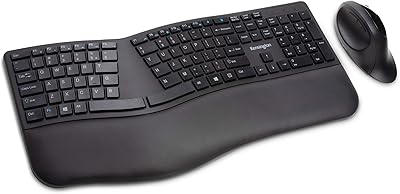
The Kensington Pro Fit Ergo Wired Keyboard sits in a comfortable middle ground — not a budget afterthought, but not a premium split keyboard either. It's Kensington's answer to the growing demand for office-friendly ergonomics without the steep learning curve or price tag that more specialized designs carry. The built-in cushioned wrist rest is the headline feature, keeping your wrists in a more neutral position during long typing sessions. It works across Windows, macOS, and Chrome OS, which is genuinely useful in mixed-device offices. Released in 2019, it has built a quiet but respectable following with over 700 ratings on Amazon.
Features & Benefits

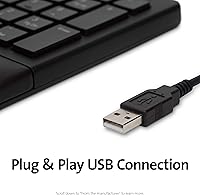
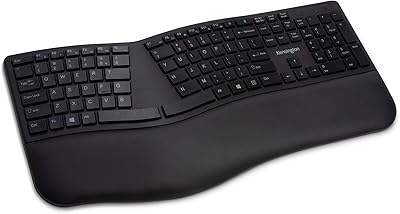
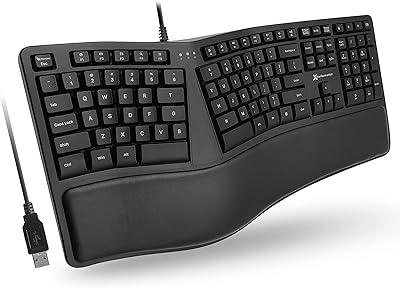
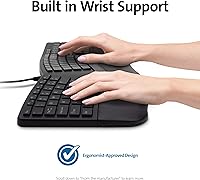
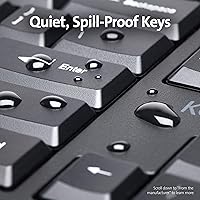
The wrist rest isn't just a foam pad slapped on the edge — it's integrated into the keyboard body, angling your hands into a position that takes pressure off the wrist joints during extended typing. The keys themselves are quiet membrane switches, which won't draw sideways glances in a shared office or during a video call. One underrated spec is the spill resistance: this office keyboard has been tested under MIL-STD-810H standards, meaning it can withstand cleaning solvents like alcohol and bleach for 24-plus hours — a real plus in clinical or food-adjacent environments. Plug in via USB and you're ready to go, no drivers or configuration required.

Best For

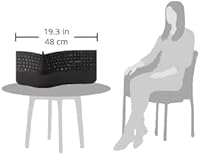
This ergonomic keyboard makes the most sense for people who spend the bulk of their day at a desk and want some wrist relief without committing to an expensive split or tented layout. It's also a strong pick for offices that mandate sanitizable equipment — think healthcare settings, labs, or anywhere keyboards get wiped down regularly. Plug-and-play wired connectivity makes it ideal for IT departments that want zero pairing headaches across a mixed fleet of Windows, Mac, and Chromebook machines. That said, if you're working on a smaller desk, the nearly 19-inch width is worth measuring for before you buy.

User Feedback

With a 4.0 out of 5 average across more than 700 reviews, the Kensington wired keyboard lands in solidly positive territory — but it's not without its critics. Most buyers call out the comfortable wrist rest and the quieter-than-expected keys as genuine highlights. Where opinions split is on key travel: users who prefer a meatier, more mechanical feel tend to find the membrane action a bit flat. A handful of reviewers also flag the wide footprint as a desk-space concern. On the plus side, durability rarely surfaces as a complaint, which suggests the build holds up reasonably well through daily use.

Pros

  • Built-in wrist rest removes the need for a separate accessory, saving desk space and money.
  • Quiet membrane keys are considerate in open-plan offices or during calls without feeling completely mushy.
  • Spill and solvent resistance makes it one of the more hygienic options for professional or clinical environments.
  • Works across Windows, macOS, and Chrome OS right out of the box — no drivers needed.
  • Wired USB connection means zero latency, no batteries, and nothing to pair or re-sync.
  • Full-size layout with a numpad is a plus for anyone doing data entry or number-heavy work.
  • Sturdy build quality holds up well over time, with few reports of premature key failure.
  • At its price point, the combination of ergonomic features and durability is genuinely hard to beat.

Cons

  • The ergonomic benefit is limited — this is not a tented or split keyboard and won't correct serious wrist alignment issues.
  • Membrane key action lacks depth and tactile feedback, which frustrates users who prefer a more responsive feel.
  • The nearly 19-inch width can crowd smaller desks and leaves little room for a mouse on the right side.
  • No wireless option at all — users who want a cleaner, cable-free desk are out of luck.
  • Single-color backlighting is minimal and may not be sufficient in dim environments for all users.
  • The wrist rest padding, while useful, is not removable or replaceable if it wears down over time.
  • Not a viable option for users with existing RSI conditions who need more corrective ergonomic support.
  • Heavier than typical flat keyboards at 2.2 pounds, which matters if you ever need to move or pack it.

Ratings

The scores below for the Kensington Pro Fit Ergo Wired Keyboard were generated by our AI rating engine after analyzing hundreds of verified global buyer reviews, with spam, bot submissions, and incentivized feedback actively filtered out. Each category reflects the real distribution of opinion — not just the highlights — so both the genuine strengths and the recurring frustrations are transparently baked into every score.
Wrist Comfort
78%
22%
For buyers coming from a standard flat keyboard, the built-in cushioned wrist rest makes a noticeable difference during long workdays. Many users report less end-of-day wrist fatigue after switching, particularly those who type for four or more hours at a stretch.
Users with pre-existing wrist conditions or those used to tented and split keyboard designs often find the comfort benefit modest at best. The keyboard does not change the angle of the hands, so the ergonomic relief has a ceiling that more specialized boards can exceed.
Typing Experience
67%
33%
The membrane keys are smooth and consistent, and the noise level is low enough that most coworkers won't notice you typing during a shared call or in an open-plan office. For everyday document work and email, the action gets the job done without drama.
Users who have experienced mechanical keyboards frequently describe the key travel as shallow and the feedback as too soft to be satisfying. There is no tactile click or physical bump to confirm a keypress, which can lead to more typos for fast or heavy-handed typists.
Build Quality
82%
18%
The keyboard feels solid and well-constructed for its price tier — there is no flex in the chassis and the keys don't wobble or feel loose after months of use. Long-term durability reports are generally positive, with few buyers mentioning key failures within the first year or two of daily use.
The wrist rest padding, while comfortable initially, is not replaceable and may compress or show wear over time with heavy use. A small number of buyers noted that the plastic surface of the body shows scuffs and desk debris more readily than darker matte finishes.
Spill & Solvent Resistance
91%
The MIL-STD-810H certification is a genuine differentiator for professional environments — it means this office keyboard can withstand direct contact with isopropyl alcohol and bleach-based cleaners for over 24 hours without the internal components degrading. Healthcare workers and lab staff in particular call this out as a deciding factor.
The certification covers solvent resistance, not full liquid submersion, so pouring a full drink onto it is still a risk. Some buyers also note that repeated heavy wiping can dull the key legends over time, even if the electronics survive.
Noise Level
86%
Reviewers working in quiet offices or shared rooms consistently praise how unobtrusive the typing sound is compared to typical office keyboards. On video calls, the keystrokes rarely bleed into the microphone noticeably, which is a real-world advantage many buyers didn't anticipate until after using it.
The quiet action comes from membrane construction, which some users associate with a mushy, imprecise feel rather than a satisfying typing experience. A small group of reviewers specifically noted that the lack of audible feedback made it harder to type confidently at speed.
Ergonomic Design
63%
37%
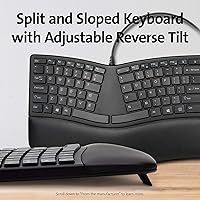
The keyboard's shape guides the hands into a slightly more relaxed position compared to a perfectly flat board, and the integrated wrist rest helps keep the palms from dropping awkwardly below the key level. For casual to moderate typists, this is a meaningful quality-of-life upgrade.
Serious ergonomics advocates will note that this is not a true ergonomic keyboard — there is no split, no tenting, and no negative tilt option to reduce forearm pronation. Buyers expecting relief comparable to premium ergonomic designs are frequently disappointed and say so in their reviews.
Compatibility
93%
Plug-and-play functionality across Windows, macOS, and Chrome OS is consistently highlighted as a strong point, especially by IT teams managing mixed-device environments. There are virtually no setup barriers — connect the USB cable and it works, on almost any machine.
The USB-A connection means users with newer laptops that only have USB-C ports will need a separate adapter, which is not included. A very small number of macOS users report minor key-mapping quirks with Windows-labeled function keys, though these are generally manageable.
Desk Footprint
58%
42%
The full-size layout with a dedicated numpad is a genuine plus for accountants, data entry workers, and anyone who frequently inputs numbers — it avoids the awkward reach to a separate numberpad peripheral.
At nearly 19 inches wide, this keyboard takes up significantly more horizontal desk space than a tenkeyless or compact layout, and several buyers have flagged that it pushes their mouse uncomfortably far to the right. On smaller workstations, the size can feel genuinely cramped.
Value for Money
81%
19%
At its mid-range price point, the combination of a built-in wrist rest, spill resistance, and broad OS compatibility represents solid value — buying those features separately would cost more. Most buyers feel they got a fair deal, especially those who compared it against pricier ergonomic alternatives.
A handful of buyers feel the typing feel alone doesn't justify the price when basic membrane keyboards cost a fraction as much. The value case depends heavily on how much the wrist rest and spill resistance matter to you specifically.
Setup & Plug-and-Play
94%
There is genuinely nothing to configure — plug the USB cable in and start typing. No software download, no driver installation, no account creation, and no pairing sequence to navigate. For less tech-savvy users or busy IT departments rolling out multiple units, this simplicity is a real asset.
The complete lack of software also means there is no way to remap keys, create macros, or adjust any aspect of the keyboard behavior. Power users who want even basic customization will find this frustrating.
Key Legends & Labeling
72%
28%
The key legends are clearly printed and easy to read under normal office lighting. The layout is conventional and intuitive, so there is no learning curve for anyone switching from a standard keyboard.
The legends are pad-printed rather than laser-engraved, meaning they can fade with extended heavy use, particularly on high-frequency keys like the spacebar and common letters. Under low lighting, the single-color backlight is barely sufficient for touch typists who occasionally glance down.
Backlighting
51%
49%
The inclusion of any backlighting at this price tier is better than nothing, and for users working in moderately dim environments it provides just enough visibility to find less-used keys without turning on an overhead light.
The backlighting is single-color only, not adjustable in brightness, and not bright enough to be genuinely useful in a dark room. Users expecting even basic RGB or brightness controls will find this feature underwhelming and borderline cosmetic.
Longevity
79%
21%
The general consensus from buyers who have used this keyboard for over a year is that it holds up well — keys remain responsive and the chassis stays intact under normal daily use. Very few reviews mention hardware failures within the first 18 months.
Membrane keyboards inherently have a finite lifespan compared to mechanical switches, and heavy typists may begin to notice key inconsistency after several years. The non-replaceable wrist rest padding is also a long-term concern, as it cannot be refreshed independently.

Suitable for:

The Kensington Pro Fit Ergo Wired Keyboard is a practical choice for desk workers who spend most of their day typing and want some relief from wrist fatigue without overhauling their entire setup. If you've been putting off buying a separate wrist rest, the fact that it's built right in is a genuine convenience — one less accessory to lose or reposition. It's also a strong fit for offices that share equipment or require regular sanitization, since the keyboard's resistance to alcohol and bleach-based cleaning products makes it easier to maintain hygiene standards without worrying about damage. IT managers equipping multiple desks will appreciate the plug-and-play USB connection and broad OS compatibility across Windows, macOS, and Chrome OS, which eliminates compatibility headaches in mixed-device environments. Budget-conscious buyers who want a step up from a basic flat keyboard — but aren't ready to invest in a premium ergonomic split layout — will find this sits in a sensible middle ground.
Not suitable for:

The Kensington Pro Fit Ergo Wired Keyboard is unlikely to satisfy anyone with serious ergonomic needs or existing repetitive strain injuries who requires a more corrective typing posture. This is a conventional keyboard shape with a cushioned rest — it does not tilt, tent, or split the hands apart, so the wrist relief it offers is modest compared to purpose-built ergonomic designs at higher price points. Mechanical keyboard enthusiasts will also want to look elsewhere; the membrane keys have a soft, quiet action that many tactile typists find unsatisfying. At nearly 19 inches wide, it can genuinely crowd a compact desk, so anyone working in a tight space should measure carefully before committing. Wireless-only setups are also a non-starter here, since this keyboard is strictly wired with no Bluetooth option. Finally, if you frequently switch between a laptop on the go and a desktop at home, the size and corded design make portability impractical.
Specifications

  • Brand: Manufactured by Kensington, a company with a long track record in office peripherals and ergonomic accessories.
  • Model Number: The exact model identifier is K75400US, part of the Pro Fit Ergo product series.
  • Dimensions: The keyboard measures 1.5″ in height, 18.98″ in width, and 9.92″ in depth, making it a full-size layout.
  • Weight: The unit weighs 2.2 pounds, which is slightly heavier than a standard flat keyboard due to the integrated wrist rest.
  • Connectivity: Connection is via standard wired USB, requiring no software installation, Bluetooth pairing, or battery management.
  • Compatible OS: Fully compatible with Windows, macOS, and Chrome OS out of the box without additional drivers.
  • Key Type: Keys use a quiet membrane switch mechanism designed to reduce typing noise in shared or open-plan work environments.
  • Wrist Rest: A cushioned wrist rest is built directly into the keyboard body to support neutral wrist alignment during extended typing sessions.
  • Spill Resistance: The keyboard meets MIL-STD-810H Method 504.3 certification, confirming resistance to cleaning solvents such as isopropyl alcohol and bleach for a minimum of 24 hours.
  • Backlighting: Single-color backlighting is supported, providing basic low-light visibility without RGB customization options.
  • Layout: Full-size keyboard layout includes a dedicated numeric keypad, function row, and navigation keys such as Caps Lock, Num Lock, and Scroll Lock.
  • Power Source: The keyboard is powered entirely through its USB connection, so no external power adapter or batteries are required.
  • Color: Available in black, with a uniform finish across the keyboard body and integrated wrist rest.
  • Keyboard Style: Designed as an ergonomic full-size keyboard with a conventional (non-split, non-tented) form factor.
  • BSR Ranking: Currently ranked #93 in the Computer Keyboards category on Amazon, based on recent sales performance.
  • User Rating: Holds an average rating of 4.0 out of 5 stars from over 700 verified customer reviews on Amazon.
  • Release Date: The product was first made available in September 2019 and has not been discontinued by the manufacturer.

Related Reviews

Kensington Pro Fit Ergonomic Wireless Keyboard K75401US
85%
91%
Ergonomic Comfort
87%
Wireless Connectivity
90%
Key Quietness and Typing Experience
88%
Build Quality
84%
Ease of Setup
More
Kensington Pro Fit Ergonomic Wireless Keyboard Mouse
74%
78%
Ergonomic Design
74%
Keyboard Feel & Typing Experience
58%
Mouse Comfort & Usability
82%
Wireless Connectivity
88%
Security
More
Kensington Pro Fit Ergo Vertical Wireless Mouse
85%
88%
Ergonomic Comfort
91%
Wireless Connectivity
94%
Battery Life
90%
Ease of Setup
87%
Customizability (DPI Settings)
More
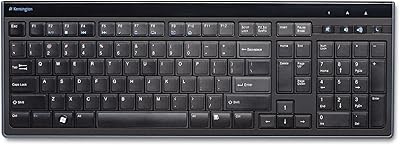
Kensington K72357USA Slim Wired Keyboard
77%
83%
Typing Feel & Key Response
88%
Noise Level
77%
Build Quality & Durability
91%
Slim Profile & Desk Footprint
84%
Numeric Keypad Usability
More
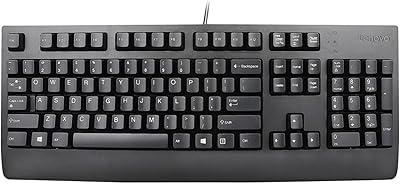
Lenovo Preferred Pro II Wired USB Keyboard
78%
83%
Typing Comfort
78%
Build Quality
88%
Typing Noise
93%
Setup & Compatibility
89%
Value for Money
More
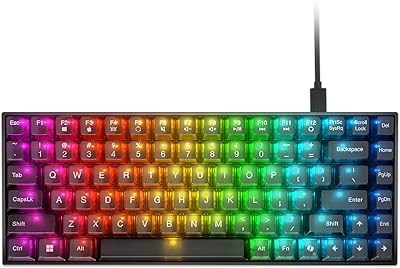
Lenovo Legion K510 Mini Pro Mechanical Keyboard
80%
83%
Build Quality
81%
Typing Feel
91%
Hot-Swap Feature
86%
RGB Lighting
58%
Software Experience
More
Evoluent EKB Compact Wired Keyboard
71%
84%
Ergonomic Design
67%
Typing Feel
73%
Build Quality
61%
Hotkey Usability
91%
Connectivity & Setup
More
Macally SLIMKEYCA Compact Wired Keyboard
77%
83%
Typing Experience
68%
Build Quality
89%
Value for Money
92%
Mac Compatibility
57%
Keycap Durability
More
ZAGG Pro Keyboard 17 Wireless Keyboard
75%
88%
Wireless Reliability
76%
Multi-Device Switching
83%
Typing Comfort
81%
Qi Wireless Charging
84%
Battery Life
More
KNOWSQT Wired Computer Keyboard
85%
89%
Design & Aesthetics
83%
Typing Experience
94%
Ease of Setup
88%
Build Quality
70%
Key Press Feel
More

FAQ

Yes, it works on macOS right away — just plug it into a USB port and you're good to go. No drivers or software needed. A few keys may have Windows-labeled functions, but the core layout operates normally on a Mac.

No, the wrist rest is built into the keyboard chassis and cannot be detached or swapped out. That integration keeps the design clean and stable on your desk, but it also means you can't replace the padding if it wears down over time.

They're noticeably quieter than a standard membrane keyboard and much quieter than any mechanical switch. Most people sitting nearby won't find the sound distracting. That said, if you're in a completely silent room, you'll still hear some soft key noise — it's not completely silent.

Yes, and that's one of this office keyboard's more practical strengths. It's been tested under MIL-STD-810H standards, which means it can handle exposure to alcohol-based cleaners and bleach solutions without the internals breaking down. Just avoid soaking it directly — a wipe or lightly dampened cloth works best.

This is worth thinking carefully about before buying. At just under 19 inches wide, it's on the larger end of full-size keyboards, especially with the numpad included. If your desk is already tight, measure the space you have and make sure there's still enough room for your mouse on the right side.

No, the Kensington Pro Fit Ergo Wired Keyboard uses membrane switches, not mechanical ones. The keys are quieter and have a softer feel compared to mechanical boards. If you prefer a clicky, tactile typing experience, you'll likely find this keyboard underwhelming in that regard.
It uses a standard USB-A connector. If your computer only has USB-C ports, you'll need a USB-A to USB-C adapter, which isn't included in the box.

It may offer some relief, but it's important to be realistic about what this keyboard can and can't do. The built-in wrist rest helps keep your wrists in a more neutral position, which reduces strain compared to typing on a flat surface. However, it's not a tented or split keyboard, so it doesn't change the fundamental angle of your hands. If your wrist issues are more serious, you may need a more specialized ergonomic solution.

No dedicated software is required or available for this keyboard. What you see is what you get — it's a plug-and-play device with no macro programming, key remapping, or RGB lighting controls.

Based on user feedback, durability is generally not a common complaint. Most buyers report the keyboard holding up well through regular daily office use. There are very few reports of early key failures, which suggests the build quality is solid for its price range. That said, long-term durability beyond a few years is harder to guarantee for any membrane keyboard used heavily every day.

Where to Buy