Overview

The ELECOM DEFT PRO Trackball Mouse has been quietly holding its ground in the ergonomic peripheral market since 2018 — a run that reflects real, sustained demand rather than fleeting hype. Trackball mice remain a niche choice, but they're drawing more converts as desk workers look for ways to cut down on wrist and arm fatigue. This one sits in the mid-range segment and stands out with three connectivity modes — wired USB, 2.4GHz wireless, and Bluetooth — making it genuinely practical for multi-device setups. The thumb-operated ball keeps your hand relaxed, shifting cursor work away from your wrist entirely. Power users, office workers, and anyone managing repetitive strain concerns will find it worth a serious look.
Features & Benefits

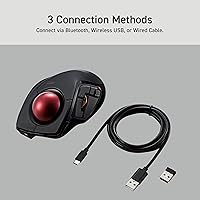
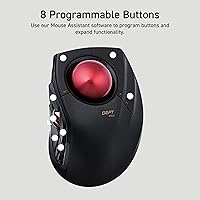
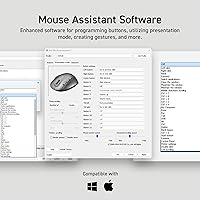
The DEFT PRO packs real daily utility into a compact body. You get three connection options — wired, 2.4GHz dongle, and Bluetooth — switchable without digging through menus. The DPI button cycles through 500, 1000, and 1500 settings, giving you enough range to shift from detailed editing work to fast browser navigation without touching any software. All eight buttons are remappable through ELECOM Mouse Assistant, which requires a separate download — it's functional, though not the most polished interface around. Assigning shortcuts like copy-paste or browser back-forward takes only minutes once you're in. The ruby ball bearings roll impressively smoothly and genuinely resist dust buildup better than plastic alternatives, reducing how often you need to clean.

Best For

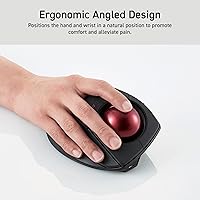
Elecom's thumb trackball is a particularly strong fit for anyone dealing with wrist discomfort or early-stage RSI. It won't replace medical advice, but keeping your wrist stationary while your thumb handles the tracking can meaningfully reduce daily strain for many users. It's also a natural pick for multi-device workers — if you bounce between a desktop and laptop throughout the day, one mouse that connects to both via Bluetooth or wireless saves real hassle. Tight desk space? The compact footprint helps there too. For Windows or macOS power users who actually take the time to configure their peripherals, deep button customization gives this mouse a workflow edge that a conventional mouse simply cannot offer.

User Feedback

Across more than 2,000 ratings and a 4.0-star average, buyer feedback on this trackball mouse is notably consistent. Most users praise the smooth ball movement, solid build quality, and reliable connection switching. Battery life also earns consistent compliments — a single AA cell holds up well under normal daily use. That said, new trackball users almost universally mention an adjustment period; expect a week or two before cursor control feels fully natural. The scroll wheel occasionally gets flagged for feeling stiffer than expected, which is worth considering if your workflow is scroll-heavy. ELECOM Mouse Assistant works fine but feels dated — manageable once learned, though not exactly a joy to navigate on first use.

Pros

  • Three connection modes — wired, 2.4GHz wireless, and Bluetooth — let you switch between devices without buying separate peripherals.
  • Ruby ball bearings roll smoothly and resist dust buildup far better than standard plastic bearings.
  • Eight fully remappable buttons offer real workflow customization once you spend time with the companion software.
  • The thumb-operated design keeps your wrist stationary, which can meaningfully reduce daily strain during long work sessions.
  • DPI switching between 500, 1000, and 1500 covers both fine detail work and quick desktop navigation.
  • Battery longevity is strong — a single AA cell lasts a long time under normal daily use.
  • The compact footprint makes this trackball a practical choice for cramped desk setups or travel bags.
  • A 4.0-star average across more than 2,000 buyer ratings reflects consistent real-world satisfaction.
  • The ball is easy to pop out and clean, keeping maintenance quick and straightforward.
  • Compatible with both Windows and macOS right out of the box, with no driver headaches for basic use.

Cons

  • New trackball users will face a genuine adjustment period — expect reduced precision for at least the first week.
  • The ELECOM Mouse Assistant software is functional but feels dated and is not the most intuitive to navigate.
  • Companion software requires a separate download, which adds a setup step that some buyers find inconvenient.
  • The scroll wheel feels noticeably stiffer than what most users are accustomed to on standard mice.
  • Strictly right-handed design excludes left-handed users with no ambidextrous alternative in this specific model.
  • No built-in rechargeable battery — rivals at a similar price point offer USB-C charging as standard.
  • The 1500 DPI maximum is adequate for office work but falls short for users who need high-sensitivity cursor control.
  • Bluetooth pairing can occasionally require re-establishing the connection after periods of inactivity.
  • The software UI has not seen significant updates in years, which may frustrate users expecting a modern configuration experience.

Ratings

Our AI-generated scores for the ELECOM DEFT PRO Trackball Mouse were built by analyzing thousands of verified global user reviews, with spam, bot activity, and incentivized feedback actively filtered out to ensure the results reflect genuine buyer experiences. Every category below captures both what users consistently praised and the real frustrations that surfaced across multiple markets. Nothing has been softened — the scores reflect the full picture.
Ergonomic Comfort
83%
Users who switched to this trackball after dealing with wrist soreness or early RSI symptoms consistently reported meaningful relief during long desk sessions. Keeping the wrist stationary while the thumb does the work is a genuine shift in how strain accumulates, and most buyers noticed the difference within days of switching.
A minority of users with smaller hands found the palm rest less supportive than expected, with the thumb having to stretch slightly to reach the ball comfortably. The ergonomic benefits are also more gradual than some buyers anticipate — it is not an instant fix, especially for those already managing chronic discomfort.
Tracking Precision
78%
22%
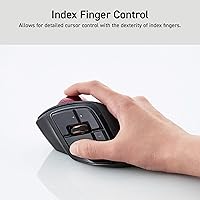
For office tasks, spreadsheet navigation, and general desktop work, the optical tracking is accurate and responsive enough to satisfy most productivity-focused users. The three DPI levels give a useful range — 500 for detail-oriented work and 1500 for quick cross-screen jumps — and the on-the-fly switching button is well-placed.
At maximum 1500 DPI, users doing photo editing or fine graphic work sometimes felt the ceiling was limiting compared to higher-DPI competitors. Newcomers to trackball navigation also frequently noted that their precision suffered noticeably during the first one to two weeks while muscle memory was still forming.
Multi-Device Connectivity
86%
Having wired, 2.4GHz wireless, and Bluetooth all in one mouse is a practical advantage that multi-device users genuinely rely on daily. Office workers who alternate between a work desktop and a personal laptop repeatedly called out this feature as one of the primary reasons they chose this trackball over competitors.
Connection switching is manual rather than automatic, which adds a small but noticeable interruption to fast-paced workflows. A handful of users also reported that Bluetooth occasionally required re-pairing after periods of inactivity, which became a minor but recurring irritation over extended ownership.
Build Quality
84%
The overall construction feels solid and purposeful — nothing flexes or rattles, and the matte black finish holds up well against daily handling and the oils from prolonged use. The ruby ball bearings in particular drew praise for their premium feel compared to the plastic bearings found in cheaper alternatives.
A small number of long-term owners noted that the surface finish around the thumb area showed wear after a year or more of heavy use. While nothing structurally fails, the aesthetic aging is noticeable for users who care about how their peripherals look on a desk.
Ball & Bearing Smoothness
88%
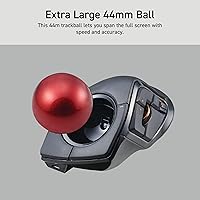
The 34mm trackball rolls with a satisfying, fluid consistency that users frequently highlighted as better than expected for the price. The artificial ruby bearings reduce the grinding or sticking sensation that plagues cheaper trackballs, making sustained use during long work sessions noticeably more comfortable.
A few users reported a very slight roughness when the bearings were brand new, which smoothed out after a break-in period of several days. Occasional dust still accumulates around the bearing seats in drier environments, though far less frequently than with plastic-bearing designs.
Button Customization
74%
26%
Eight programmable buttons is a generous count for a mid-range trackball, and buyers who took the time to configure them reported real workflow gains — assigning copy, paste, browser navigation, and media controls saved meaningful time across the workday. The physical button placement is logical and easy to reach.
The ELECOM Mouse Assistant software is where this category loses points. Users consistently described it as functional but dated, with a UI that feels like it has not been updated in years. The requirement to download it separately — it is not included in any packaged form — also frustrated buyers expecting a more polished out-of-box experience.
Software Experience
58%
42%
Once configured, the software does its job reliably — button assignments stick, settings persist across reboots, and the DPI configurations behave as expected. For users willing to invest 20 to 30 minutes upfront in the setup process, the long-term payoff in workflow customization is real.
The interface looks and feels like a legacy application, with a layout that is not intuitive for first-time users. Several reviewers across multiple regions specifically flagged the software as the weakest link in the overall experience, and the lack of meaningful updates since launch is a clear gap compared to what competitors now offer.
Battery Life
82%
18%
Battery longevity earned consistent praise across the user base — most buyers reported several months of reliable use from a single AA cell under normal daily workloads. The inclusion of a battery in the box means the mouse is immediately usable without a trip to the store.
The absence of a built-in rechargeable battery is a legitimate complaint from buyers who have come to expect USB-C charging on mid-range peripherals. While AA batteries are convenient and globally available, users who prefer a zero-waste or cable-charged setup will need to factor in this ongoing cost and effort.
Scroll Wheel Feel
61%
39%
The scroll wheel is accurate and does not skip steps, which matters for users navigating long documents or code files where precise line-by-line scrolling is essential. It also has a satisfying tactile click between each notch that some users preferred for controlled document review.
Stiffness was the single most common complaint about the scroll wheel, with many buyers describing it as noticeably harder to spin than what they expected coming from standard office mice. For users whose workflow involves heavy vertical scrolling — reading long reports or browsing — this friction becomes a real daily annoyance.
Portability & Desk Footprint
81%
19%
The compact profile and stable, planted design make this trackball genuinely practical for small desks, shared workspaces, and carry-on travel. Unlike a traditional mouse, it does not need open surface area to move across, which is a real advantage in cramped hotel-room or airplane-tray setups.
At 5.8 oz without battery, it is not ultralight by portable-peripheral standards, and the lack of a carrying pouch or case in the box means travelers need to protect it themselves. The USB dongle is also small enough to lose easily if not stored carefully during transit.
Learning Curve
55%
45%
For buyers who committed to the transition, the learning curve eventually paid off — users report that after two to three weeks, cursor control with the thumb trackball becomes second nature and they could not imagine switching back. The adjustment is real but finite.
This is the category that generates the most frustration in early reviews. New trackball users routinely describe the first week as genuinely difficult, with missed clicks, overshooting targets, and slower overall navigation than their previous mouse. Buyers expecting plug-and-play precision will be disappointed initially.
Value for Money
76%
24%
The combination of three connectivity modes, eight programmable buttons, and premium ruby bearings at this price point represents solid value within the trackball category specifically. Users who stayed with it long-term consistently said the investment was justified, particularly when factoring in reduced wrist discomfort.
Compared to conventional mice in the same price bracket, the feature-per-dollar ratio feels less compelling — especially given the dated software and the absence of rechargeable charging. Buyers on a tighter budget can find basic trackballs for significantly less, even if they lack the connectivity flexibility.
macOS Compatibility
79%
21%
Basic functionality on macOS is genuinely plug-and-play — cursor movement, scrolling, and standard clicking work immediately without any software install. Mac users who only need the core mouse functions will find the experience smooth and reliable.
Full button remapping on macOS requires the ELECOM Mouse Assistant software, which some Mac users found less stable than the Windows version. A small number of reviewers on Apple Silicon Macs also noted minor compatibility quirks that required additional troubleshooting before everything worked as expected.
Right-Hand Exclusivity
44%
56%
For right-handed users, the shell contour is well-executed — the palm rest cradles the hand naturally and the button layout positions all controls within easy reach without awkward finger stretching during long sessions.
There is simply no option for left-handed users, which is a hard dealbreaker for a meaningful portion of potential buyers. In a product category already limited in choice, the complete absence of an ambidextrous or mirrored variant is a gap that noticeably narrows the audience for this otherwise capable trackball.

Suitable for:

The ELECOM DEFT PRO Trackball Mouse is a strong pick for office workers, remote professionals, and anyone who spends long hours at a desk and wants to reduce the arm and wrist movement that a traditional mouse demands. If you're experiencing early signs of repetitive strain or carpal tunnel discomfort, shifting cursor control to your thumb can genuinely help — though it's not a medical fix, just a more ergonomic working posture. Multi-device users will appreciate the flexibility of three connection types, making it easy to stay on one peripheral whether you're on a work desktop, a personal laptop, or a tablet. Power users who invest time in customizing their workflow through button remapping will find the eight programmable buttons genuinely useful for cutting down on repetitive keyboard shortcuts. It also suits anyone working in a tight space, since the mouse stays planted and your hand barely moves.
Not suitable for:

The ELECOM DEFT PRO Trackball Mouse is not the right fit for anyone expecting to pick it up and immediately match the precision and speed they get from a conventional mouse. The learning curve is real — most newcomers to trackballs need at least a week or two before cursor movement starts to feel natural, and some never fully click with the format. Left-handed users should look elsewhere entirely, as the shell is designed exclusively for right-hand use. Gamers who rely on fast, sweeping movements or high-DPI sensitivity will find the 1500 DPI ceiling limiting compared to dedicated gaming trackballs or standard gaming mice. If you prefer a rechargeable peripheral and dislike managing disposable batteries, competitors in this price range do offer built-in charging, which this mouse lacks. Those who want plug-and-play simplicity without downloading any additional software may also find the setup mildly frustrating.
Specifications

  • Connectivity: Supports three connection modes: wired USB, 2.4GHz wireless via USB dongle, and Bluetooth, allowing use with multiple devices without re-pairing.
  • DPI Settings: Cursor sensitivity is switchable between 500, 1000, and 1500 DPI using a dedicated button on the mouse body.
  • Buttons: Features 8 programmable buttons that can be remapped using the ELECOM Mouse Assistant software, available as a free download.
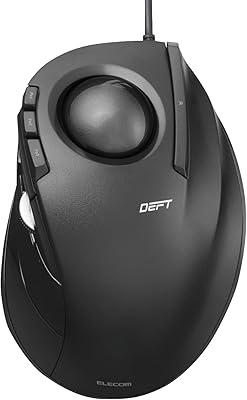
  • Ball Operation: The trackball is positioned on the left side of the mouse for thumb operation, keeping the wrist stationary during use.
  • Ball Bearings: The trackball rolls on three 2.5mm artificial ruby ball bearings, which provide low friction and resist dust accumulation better than plastic alternatives.
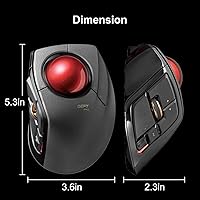
  • Dimensions: The mouse measures 5.25″ in length, 3.6″ in width, and 2.26″ in height, making it compact enough for use in tight desk setups.
  • Weight: The unit weighs 5.8 oz without battery installed, providing a stable feel on the desk without being heavy to transport.
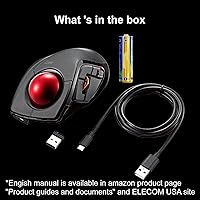
  • Power Source: Powered by a single AA battery, which is included in the box; no built-in rechargeable cell is present.
  • OS Compatibility: Compatible with Windows 8, Windows 10, and Windows 11 or later, as well as macOS 10.13 or later; note that horizontal scrolling does not function under Windows RT 8.1.
  • Software: ELECOM Mouse Assistant is the companion configuration application for button remapping and is available as a free download from the ELECOM website.
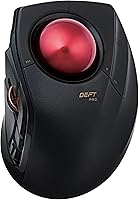
  • Color: The mouse body is finished in matte black with a distinctive red trackball, which also aids visibility when locating the ball for thumb placement.
  • Hand Orientation: The shell is ergonomically contoured exclusively for right-handed use, with a palm rest designed to support a neutral wrist position.
  • Tracking Technology: Uses optical tracking technology to detect trackball movement, translating thumb motion into precise cursor positioning on screen.
  • Ball Size: The trackball diameter is 34mm, which is a standard thumb-trackball size that balances control precision with comfortable thumb reach.
  • Market Rank: Holds a Best Sellers Rank of #15 in the Computer Trackballs category on Amazon at time of review.
  • User Rating: Carries an average rating of 4.0 out of 5 stars based on over 2,070 customer ratings on Amazon.
  • Availability: First made available in May 2018 and confirmed as not discontinued by the manufacturer, indicating ongoing production and support.
  • Battery Included: One AA battery is included in the package, so the mouse is ready to use out of the box without a separate battery purchase.

Related Reviews
ELECOM DEFT Trackball Mouse
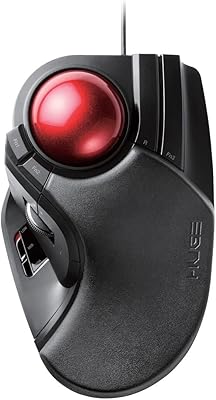
76%
83%
Ergonomic Comfort
72%
Tracking Accuracy
58%
DPI & Cursor Control
81%
Build Quality
76%
Button Layout & Feel
More
ELECOM HUGE Wired Finger Trackball Mouse
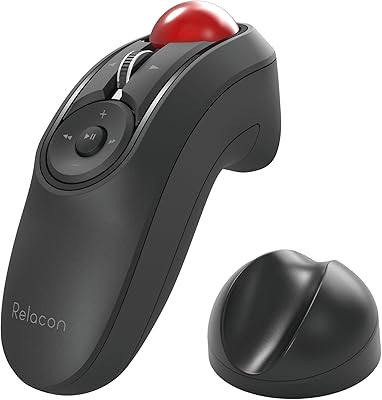
80%
91%
Tracking Smoothness
88%
Ergonomic Comfort
63%
Learning Curve
86%
Build Quality
79%
Button Layout & Usability
More
ELECOM Relacon M-RT1BRXBK Handheld Trackball
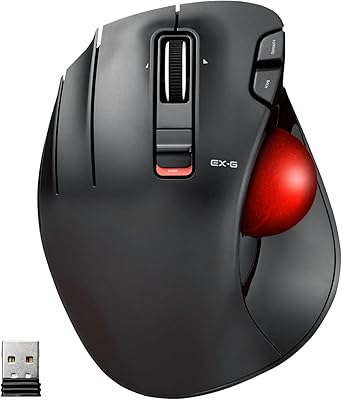
75%
83%
Ergonomics & Comfort
71%
Trackball Precision
68%
Bluetooth Connectivity
66%
Button Layout & Customization
61%
Learning Curve
More
ELECOM EX-G Left-Handed Wireless Trackball Mouse
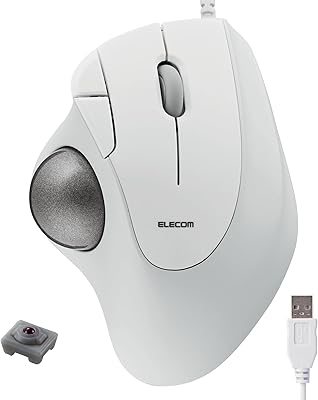
79%
93%
Left-Hand Ergonomics
81%
Tracking Accuracy
84%
Wireless Performance
58%
DPI Range & Customization
76%
Build Quality
More
Kensington Orbit Trackball Mouse
77%
83%
Ergonomic Comfort
76%
Tracking Accuracy
61%
Scroll Ring Usability
88%
Build Quality & Durability
57%
Button Layout & Customization
More
SABLUTE Wireless Trackball Mouse
74%
83%
Ergonomic Comfort
79%
Adjustable Tilt Base
86%
Multi-Device Connectivity
67%
Trackball Precision & Feel
74%
DPI Range & Customization
More
seenda Wireless Trackball Mouse
78%
88%
Ergonomic Comfort
74%
Trackball Precision
86%
Multi-Device Connectivity
83%
Battery Life
71%
Build Quality
More
ELECOM M-IT10URWH Wired Thumb Trackball
78%
84%
Ergonomic Comfort
81%
Tracking Smoothness
67%
Build Quality
76%
Button Performance
71%
Software & Customization
More
Nulea M501
Nulea M501
72%
83%
Ergonomic Comfort
78%
Trackball Smoothness
86%
Multi-Device Connectivity
91%
Value for Money
74%
Battery Life
More
SANWA Wired Ergonomic Trackball Mouse
86%
91%
Ergonomics & Comfort
88%
Trackball Precision
87%
Silent Click Performance
95%
Setup & Installation
93%
Device Compatibility
More

FAQ

Honestly, yes — there is a real adjustment period. Most first-time trackball users find that precision feels off for the first week or so as your thumb learns to make fine movements. Stick with it for at least 7 to 14 days before judging whether it suits you, because nearly everyone who pushes through that phase reports the control becoming natural over time.

You can pair it to multiple devices, but switching between them does require manually toggling the connection mode using the button on the mouse. It is not automatic multi-device switching like some premium mice offer, so keep that in mind if you swap between machines constantly throughout the day.

It works on both platforms. Basic plug-and-play functionality works on macOS 10.13 or later without any additional software. If you want to remap buttons, you will need to download ELECOM Mouse Assistant, which also supports Mac.

Less frequently than you might expect, thanks to the ruby ball bearings, which resist dust and debris better than standard plastic ones. A quick clean every few weeks under normal office use is usually enough. The ball pops out easily by pushing it through the hole on the underside, so when cleaning is needed, it takes about two minutes.

You can use it right out of the box without installing anything — all basic functions work immediately. The software is only necessary if you want to remap the programmable buttons. Just note that ELECOM Mouse Assistant is a separate download from the ELECOM website and is not included on any disc or drive in the box.

Battery life is one area where this trackball earns consistent praise from users. Under typical office use — several hours a day — most people report a single AA cell lasting several months. Results will vary depending on whether you use Bluetooth or the 2.4GHz connection, as wireless protocols draw power at different rates.

No — the shell design is built specifically for right-handed use, with the palm rest and thumb trackball positioned accordingly. Left-handed users would find it awkward at best and unusable at worst. There is no mirrored left-hand version of this specific model available.

The scroll wheel is functional and accurate, but a number of buyers have noted that it feels stiffer than what they are used to on a standard mouse. It is not defective — it is just a design characteristic. If scroll wheel feel is something you are particularly sensitive to, it is worth being aware of before purchasing.

Yes, the 2.4GHz connection requires the USB dongle to stay plugged in while in wireless mode. If you are already short on USB-A ports, Bluetooth is a practical alternative that keeps all your ports free. Just keep the dongle somewhere safe if you switch to Bluetooth full-time — they are easy to misplace.

For most office and general productivity tasks, 1500 DPI is perfectly adequate. For highly precise graphic design or photo editing work where fine pixel-level control matters, some users may find the ceiling limiting compared to higher-DPI options. Trackball control is inherently more deliberate than a traditional mouse, which can actually help with fine work — but the DPI cap is still worth factoring in if precision is your priority.

Where to Buy