Overview

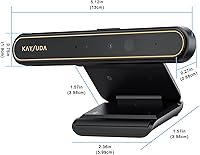
The KAYSUDA DX5 Windows Hello IR Webcam does two jobs at once: it logs you into Windows without a password and handles everyday video calls, all from a single USB device. Inside the slim bar sit both an IR camera and a standard RGB camera — the IR sensor handles face recognition while the RGB side covers your video feed. At 1080p entry-level, this isn't aimed at streamers chasing broadcast quality; it targets the average home or office user who wants reliable performance without overspending. One thing to know upfront: USB bandwidth matters here. Plug it directly into your PC's own USB port, not a hub, or you may run into login errors. There's also a hardware privacy switch on the unit, which is a genuinely useful touch.

Features & Benefits

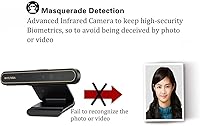
The IR face recognition is the headline feature — point your face at the camera and Windows Hello logs you in within about a second. That speed holds up well in practice, and the depth sensor adds a layer of security by rejecting flat photos or printouts trying to spoof the system. The RGB camera shoots at 1920x1080 and 30fps, which covers Teams and Zoom calls without issue. Built-in dual microphones mean you can leave your headset on the shelf for basic calls, though they won't replace a dedicated mic for anything demanding. A standout detail is multi-user face support, letting different people on a shared PC each register their own Windows Hello profile and keep their accounts separate.

Best For

This IR webcam makes the most sense for people with a desktop or older laptop that has no built-in Windows Hello camera. If you're running Windows 10 or 11 and want passwordless face login without shelling out for a premium device, this fits the brief. Remote workers who need a single unit for both login and video conferencing will find the combination practical. It's also a solid pick for shared household PCs — the multi-user support means each family member can register their own face and log into their own account without hassle. That said, if your priority is sharp video quality for content creation or streaming, you'd be better served by a camera built specifically for that purpose.

User Feedback

Sitting at 3.7 stars across roughly 200 reviews, the KAYSUDA face recognition camera draws a fairly divided response. Buyers who got setup right — plugged directly into a motherboard USB port — generally praise fast, reliable login and how straightforward the Windows Hello enrollment process is. The complaints tend to cluster around USB hubs and docking stations, where limited bandwidth triggers login failures; that's a real limitation worth knowing before you buy. Video quality gets a shrug from most users: fine for calls, forgettable for anything more. The microphones are similar — functional but unremarkable. A handful of reviewers also noted some friction getting drivers installed initially. Honest bottom line: it delivers on its core promise when set up correctly, and falls short mostly when it isn't.

Pros

  • Face recognition logs you into Windows Hello in roughly one second — noticeably fast in daily use.
  • The depth sensor actively blocks photo and printout spoofing, adding real security to the biometric login.
  • Multi-user face profile support makes it practical for shared family or office PCs with multiple accounts.
  • The hardware privacy switch physically cuts the camera feed, giving you control no software setting can match.
  • Built-in dual microphones handle everyday calls without needing a separate audio device on your desk.
  • 1080p video at 30fps covers Teams and Zoom calls competently for a camera at this price point.
  • The 4.92ft cable gives you enough reach to position the camera comfortably on most monitor setups.
  • Setup through Windows Hello enrollment is straightforward once the camera is connected to a direct USB port.
  • At under 5 inches wide and 140g, this IR webcam sits tidily on top of virtually any monitor.
  • Compatible with both USB 2.0 and USB 3.0, giving it flexibility across different PC configurations.

Cons

  • USB hubs and docking stations frequently cause login failures due to insufficient data bandwidth — a well-documented headache.
  • Video quality is entry-level; do not expect the color accuracy or clarity of a purpose-built streaming camera.
  • Built-in microphones are serviceable at best and will disappoint anyone used to even a basic standalone mic.
  • Some users report friction during initial driver installation, requiring extra troubleshooting before the camera is recognized correctly.
  • The 30cm–100cm operating range is narrow; sitting too close or too far from your monitor breaks face recognition.
  • No Mac or Linux support — this Windows Hello camera is exclusively useful on Windows 10 and Windows 11.
  • The IR camera resolution of 640x360 is low, which can cause recognition delays in poor or uneven lighting conditions.
  • At 3.7 stars from around 200 reviews, real-world satisfaction is mixed enough to warrant careful setup expectations.
  • No included mounting hardware beyond the clip, which may not grip well on very thin ultrawide or frameless monitors.

Ratings

The KAYSUDA DX5 Windows Hello IR Webcam was evaluated by our AI rating engine after deep analysis of verified global buyer reviews, with spam, incentivized, and bot-generated feedback actively filtered out. Scores reflect the honest consensus of real-world users across both praise and frustration — nothing is glossed over. Where this Windows Hello camera earns trust, the numbers show it; where it falls short, those gaps are scored just as transparently.

Face Recognition Speed
83%
Most users who set this camera up correctly report logging into Windows in roughly one second, which is fast enough to feel effortless in a daily routine. The IR sensor picks up faces reliably under normal indoor lighting, and the one-shot recognition rarely requires a second attempt when conditions are consistent.
Recognition can slow noticeably in dim lighting or when the user's position shifts outside the 30cm–100cm sweet spot. A handful of users report occasional misses first thing in the morning or in rooms with strong backlight behind them, requiring a PIN fallback.
Windows Hello Setup
78%
22%
The enrollment process itself is genuinely straightforward — Windows 10 and 11 walk you through it in under two minutes, and most users describe it as one of the easier hardware setups they have done. Multi-user registration works cleanly, which is a real convenience for shared household PCs.
A recurring complaint involves driver recognition friction on initial connection, where Windows does not always identify the camera automatically and users have to hunt for drivers manually. This step trips up less technical buyers more than it should for a device at this price point.
USB Compatibility
51%
49%
When plugged directly into a motherboard USB 3.0 port, the camera runs without issue and the bandwidth demand is met cleanly. Users with a direct connection rarely report any login errors or dropout during video calls, confirming the hardware itself is capable when conditions are right.
This is the most frequently cited pain point across all reviews. USB hubs and docking stations — which are extremely common in home office setups — frequently fail to supply enough bandwidth, resulting in Windows Hello throwing a sorry error mid-login. It is a significant real-world limitation that catches many buyers off guard.
Video Call Quality
67%
33%
For Teams, Zoom, and Google Meet calls, the 1080p RGB output is more than adequate — colleagues on the other end see a clear, stable image without compression artifacts during normal conversation. The 30fps frame rate keeps motion smooth enough that there is no distracting choppiness.
Colors lean slightly washed out in anything less than strong natural or artificial light, and fine detail in the background is soft by modern webcam standards. Anyone expecting crisp, vivid video comparable to mid-range streaming cameras will be disappointed; this is entry-level 1080p in practice, not just in name.
Microphone Quality
61%
39%
The dual built-in microphones pick up voice clearly enough for everyday calls, and most participants on the receiving end of a Teams or Zoom meeting report hearing the user without issue. For a no-frills work-from-home setup, they remove the need to buy a separate mic entirely.
Audio lacks warmth and depth — voices come through flat and slightly tinny compared to even a basic standalone USB microphone. Background noise suppression is minimal, so open-plan rooms or households with ambient noise will expose the microphone's limitations quickly.
Anti-Spoofing Security
81%
19%
The depth sensor backing the IR camera does its job well: photographs and printed images held up to the lens are consistently rejected, which gives the biometric login genuine security value rather than cosmetic reassurance. For a shared or semi-public PC, this matters.
The spoofing protection has not been extensively stress-tested by buyers in the review pool, so edge cases with very high-quality 3D masks or unusual lighting scenarios remain untested in real-world feedback. It meets the baseline expectation but has not been pushed beyond it.
Privacy Switch
86%
The physical hardware switch is one of the most appreciated secondary features among buyers who prioritize privacy. Knowing the camera is cut at the hardware level — rather than relying on a software mute that could be bypassed — gives users genuine peace of mind, especially on always-on desktop setups.
The switch itself is small and positioned in a way that some users find slightly awkward to reach without moving the camera. A couple of reviewers note that the tactile feedback when toggling is not as confident as they expected, making it briefly unclear whether it is on or off.
Build Quality
63%
37%
The slim bar form factor feels purposefully designed, and the monitor clip holds the camera in place without wobbling during calls. At 140g, it is light enough that even narrow monitor bezels handle it without stress.
The plastic housing feels noticeably budget-grade up close, with a finish that picks up fingerprints easily and does not inspire confidence in long-term durability. A few users report the clip feeling slightly loose on thinner monitors, which introduces minor tilt over time.
Low-Light Performance
54%
46%
Under decent artificial lighting — a standard desk lamp aimed at the face — the camera produces a usable image for calls and the IR sensor still recognizes faces without major delay. It handles typical home office conditions reasonably well when the lighting is intentional.
In genuinely dim conditions, the RGB camera struggles significantly: noise increases, detail collapses, and the image takes on a grainy, washed-out look. The IR recognition also becomes less reliable in poor light, which can force users to fall back to PIN login more often than expected.
Multi-User Support
84%
Families and small teams with shared PCs consistently call out multi-user face enrollment as a standout feature. Each user registers independently, and Windows Hello correctly identifies the right account at login without confusion between profiles — a practical time-saver in multi-account households.
There is no documented limit on user profiles, but a few buyers with three or more registered faces note that recognition accuracy drops slightly when profiles are similar in appearance. Edge cases like siblings with similar features occasionally result in misidentification.
Value for Money
72%
28%
For buyers who specifically need Windows Hello face login on a desktop PC that lacks an IR sensor, this IR webcam fills a genuine gap at a price that is hard to argue with. The combination of biometric login, 1080p video, and microphone in one device represents solid utility per dollar spent.
The USB hub limitation, below-average microphone quality, and entry-level video output mean that buyers expecting a fully capable all-in-one solution may feel the value is diluted. If your setup relies on a docking station, the effective value drops considerably because the core feature becomes unreliable.
Ease of Installation
66%
34%
When Windows detects the camera automatically — which happens for the majority of users on Windows 11 — the full setup including Windows Hello enrollment takes only a few minutes. The process is guided entirely by the OS, which removes most of the complexity for average users.
The minority of users who hit driver issues face a frustrating experience involving manual downloads and, in some cases, device manager troubleshooting that goes well beyond what a plug-and-play device should require. Support documentation from the brand is thin, which compounds the frustration.
Cable & Connectivity
74%
26%
The 4.92ft (1.5m) cable covers the distance between a desktop tower or the back of a monitor and a front-facing USB port on most standard desk setups without any cable management headaches. The USB connector is solid and seats firmly in the port.
The cable is fixed and non-removable, so if it is damaged, the whole unit is effectively unusable. A few users working with tower PCs positioned on the floor found the cable length barely sufficient, requiring the camera to be repositioned or the cable routed awkwardly.
Compatibility Range
48%
52%
Within its intended environment — a Windows 10 or 11 PC with a direct USB connection — the camera works as described and integrates cleanly with the operating system. For users in that specific setup, compatibility is a non-issue.
The device is essentially useless outside of Windows Hello-capable systems. Mac users, Linux users, and anyone still on Windows 7 or 8 get no biometric benefit whatsoever, and the RGB camera functions only as a basic webcam in those environments. The narrow compatibility window limits its audience significantly.

Suitable for:

The KAYSUDA DX5 Windows Hello IR Webcam is a practical fit for anyone running a desktop PC or older laptop that lacks a built-in IR sensor and wants passwordless face login without buying a whole new machine. It works especially well for remote workers who want a single device that covers both their Windows Hello login and their daily video calls on Teams or Zoom, cutting down on desk clutter. Households with a shared family computer will find the multi-user face profile support genuinely useful — each person can register their own face and access their own account without typing a password. Small office setups where security matters but budgets are tight will also appreciate the depth-sensor spoofing protection, which keeps the biometric login honest. If you're comfortable plugging directly into one of your PC's onboard USB ports and following a straightforward Windows Hello enrollment process, this camera does exactly what it promises at a price that won't cause regret.

Not suitable for:

The KAYSUDA DX5 Windows Hello IR Webcam is not the right call if your workstation relies heavily on USB hubs or docking stations, since the combined IR, RGB, and microphone data stream demands more bandwidth than most hubs reliably supply — login errors are a documented and frustrating result. Content creators, streamers, or anyone who needs genuinely sharp, color-accurate video will find the entry-level 1080p output disappointing; it looks acceptable on a video call but falls well short of what a dedicated streaming webcam delivers. If you're a Mac user or running an older Windows version, Windows Hello compatibility simply isn't there, making this camera largely pointless for your setup. People who need a high-quality microphone for podcasting, voice-overs, or professional calls should budget for a separate mic rather than relying on the built-in ones here. And if you're expecting a plug-and-play experience with zero setup friction, know that some users have hit driver installation hurdles that required a bit of troubleshooting patience before things worked smoothly.
Specifications

  • RGB Resolution: The RGB camera captures video at 1920x1080 pixels and runs at up to 30 frames per second for standard video calls and recording.
  • IR Resolution: The infrared camera used for Windows Hello face recognition operates at 640x360 pixels, dedicated solely to biometric identification.
  • Field of View: The lens covers a horizontal angle of 72.4°, a vertical angle of 44.7°, and a diagonal field of view of 80.0°.
  • USB Interface: The camera connects via USB 2.0 or USB 3.0, with USB 3.0 strongly recommended to ensure sufficient data bandwidth for all three data streams simultaneously.
  • Cable Length: The attached USB cable measures 4.92ft (1.5m), providing enough reach for most standard monitor and desktop setups.
  • Operating Distance: Face recognition functions reliably at a distance of 30cm to 100cm (approximately 1ft to 3.3ft) from the camera lens.
  • Dimensions: The camera bar measures 5.51 x 0.98 x 0.29 inches, making it compact enough to sit on top of most monitors without obstructing the screen.
  • Weight: The unit weighs 140g (4.2 oz), light enough that the monitor clip holds it in place without tipping or sliding.
  • Power Draw: The camera draws 5V at 500mA over USB, which is within standard USB power delivery limits and requires no external power adapter.
  • Video Formats: Supported video decode formats are YUY2 and MJPG, both of which are natively compatible with Windows video conferencing and capture applications.
  • Audio: Two built-in microphones are integrated into the camera bar, providing stereo-adjacent audio capture for calls and conferencing without a separate mic.
  • Privacy Switch: A physical hardware switch on the unit allows users to cut the camera feed entirely when connected, independent of any software or operating system setting.
  • Multi-User Support: The camera supports registration of multiple Windows Hello face profiles, allowing different users on the same PC to each use face-based login.
  • Spoofing Protection: A depth sensor paired with the IR camera enables masquerade detection, actively rejecting flat photographs or printed images used to attempt unauthorized login.
  • Compatible OS: Windows Hello functionality requires Windows 10 or Windows 11; the camera is not compatible with macOS, Linux, or earlier Windows versions for biometric login.
  • Sensor Type: The RGB camera uses a CMOS image sensor, which is standard for webcams in this price tier and performs adequately in well-lit conditions.
  • Color: The unit is available in black only, with a matte finish that blends with most monitor bezels and office environments.
  • Model Number: The official model designation is DX5, manufactured by KAYSUDA.

Related Reviews
TOALLIN Hello SE
TOALLIN Hello SE
70%
81%
Windows Hello Reliability
72%
Image Quality
61%
Windows Hello Setup Experience
58%
Build Quality & Design
67%
Microphone Quality
More
MOERTEK 2K HD Webcam with Windows Hello Facial Recognition

85%
89%
Video Quality
93%
Ease of Setup
85%
Facial Recognition Performance
82%
Microphone Quality
76%
Build Quality
More
HuddleCamHD HC-WEBCAM-94
77%
83%
Video Quality (Daylight)
51%
Low-Light Performance
91%
Field of View
94%
Ease of Setup
57%
Audio Quality
More
PixelForge 4K Webcam
86%
94%
Video Quality
88%
Audio Performance (Microphone)
91%
Ease of Setup
89%
Lighting Effectiveness
86%
Privacy Features
More
XOCLON 2K Webcam
XOCLON 2K Webcam
86%
89%
Video Quality
91%
Audio Performance
96%
Ease of Setup
85%
Low-Light Performance
87%
Field of View
More
MOERTEK MT 4K Webcam
76%
83%
Image Quality at 1080P
67%
4K Capture Quality
71%
AI Auto-Framing
91%
Ease of Setup
62%
Microphone Performance
More
UGREEN 25442 2K Webcam
76%
83%
Image Clarity
54%
Low-Light Performance
78%
Autofocus Speed
74%
Microphone Quality
94%
Ease of Setup
More
Akyta 1080P Webcam
Akyta 1080P Webcam
82%
88%
Video Quality
85%
Audio Quality
94%
Ease of Setup
82%
Field of View
80%
Noise Reduction
More
PEATOP 4K-C80CCMD Webcam
75%
74%
Video Quality
68%
Autofocus Performance
61%
Low-Light Performance
63%
Microphone Quality
93%
Setup & Compatibility
More
Lusinx TW 4K Webcam
Lusinx TW 4K Webcam
73%
73%
Video Quality
79%
Low-Light Performance
71%
Microphone Quality
91%
Setup & Compatibility
58%
Build Quality
More

FAQ

For most users on Windows 10 or 11, the camera is detected automatically and Windows Hello guides you through face enrollment without any manual driver installation. That said, a small number of reviewers have reported needing to download drivers from KAYSUDA directly before the camera was recognized, so it is worth having that option ready if plug-and-play does not work on the first try.

Technically yes, but in practice it often causes problems. The camera runs three data streams at once — IR, RGB, and microphone — and that combined load exceeds what many hubs can supply reliably. The result is usually a login error when Windows Hello tries to authenticate. Plugging directly into one of your motherboard's USB ports is the safest approach and eliminates this issue for most users.

It is simpler than it sounds. Once the camera is recognized by Windows, you go to Settings, then Accounts, then Sign-in Options, and select Windows Hello Face. Windows walks you through a short scan where you look at the camera for a few seconds. The whole process takes under two minutes and you only do it once per user account.

No. Windows Hello is a Microsoft feature and this camera is built specifically around it. On a Mac or Linux machine, the RGB camera and microphone may function as a basic webcam, but the face recognition and IR features will not work since neither platform supports Windows Hello.

Yes, and this is one of the more practical features on this IR webcam. Each Windows user account can enroll its own face profile independently, so everyone in the household logs into their own account just by sitting in front of the camera. There is no limit specified in the documentation, so it should cover a typical family setup without issue.

It is solid for everyday calls — people on the other end will see a clear, reasonably sharp image. What it is not is a high-fidelity streaming camera; colors are adequate rather than vibrant, and low-light performance is average at best. If your goal is professional-grade video for content creation or broadcasting, you would want to look at cameras built specifically for that purpose.

The face recognition is designed to work between about 30cm and 100cm from the lens, which covers most normal sitting distances at a desk. If you sit closer than a foot or further than about three feet, Windows Hello may struggle to detect your face reliably and either delay or fail to log you in.

For regular video calls where you just need to be heard clearly, the microphones do the job. They are not impressive — audio quality is functional rather than rich — but you will not be cutting out or sounding hollow in a Teams meeting. If you do any recording, podcasting, or frequent calls where audio quality matters to you professionally, a dedicated USB microphone is still worth having.

It is a physical hardware switch, which means it disconnects the camera at the hardware level rather than just telling software to ignore it. This is a meaningful distinction for anyone who wants genuine assurance that the lens is off, rather than relying on an app or OS setting that could theoretically be overridden.

The depth sensor built into the IR camera is specifically designed to prevent that. It analyzes the three-dimensional structure of a face rather than just a flat image, so holding up a photograph in front of the camera should not trigger a successful login. This type of protection is called anti-spoofing or masquerade detection, and it is one reason IR-based Windows Hello cameras are considered meaningfully more secure than simple PIN or password setups.

Where to Buy