Overview

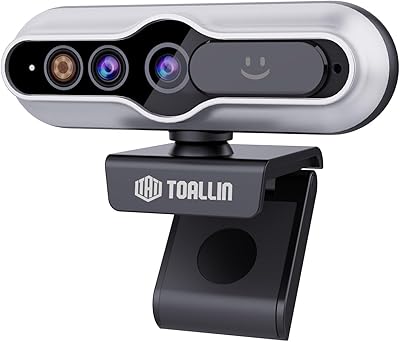
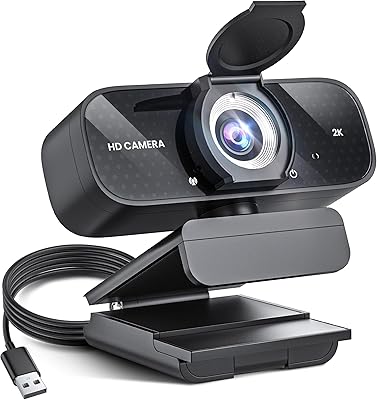
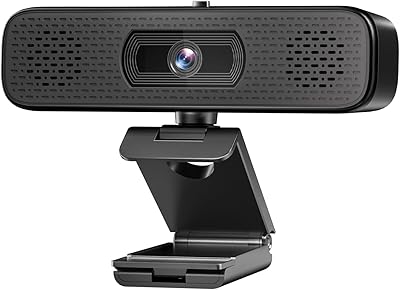
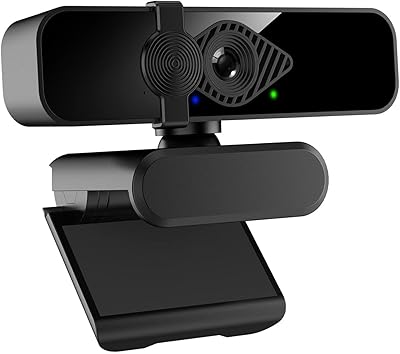
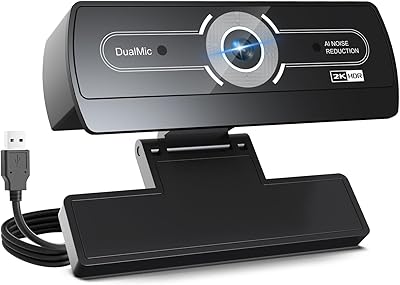
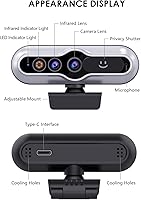
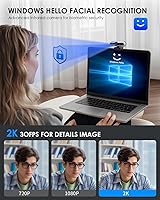
The MOERTEK 2K HD Webcam with Windows Hello Facial Recognition is a versatile camera designed for those who need a high-quality, secure webcam. This plug-and-play device features a 2K resolution, ensuring clear and crisp video for video calls, streaming, and online learning. Equipped with facial recognition technology, it allows quick, secure logins through Windows Hello. The built-in noise-canceling microphone ensures clear audio, while the privacy cover lets you control when the camera is on. This webcam is an excellent choice for those looking for an easy-to-use, reliable option for both work and personal use.
Features & Benefits

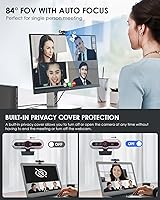
This MOERTEK webcam boasts a range of features that set it apart from standard webcams. With Windows Hello, you can use facial recognition to log into your device securely and quickly. The autofocus function ensures sharp video, even in low-light environments, while the built-in noise-canceling microphone captures clear sound up to 3 meters away. The camera also has an 84° field of view, offering flexible angles for different settings. Additionally, the privacy cover allows you to easily turn off the camera when not in use, making it a secure and versatile tool for various needs.

Best For

This webcam is ideal for a wide range of users. It's especially suited for remote workers and professionals who need reliable, secure logins and high-quality video for virtual meetings. Educators and students will appreciate the webcam's sharp resolution and easy setup for online learning. Streamers and content creators will find it perfect for creating clear, professional-quality videos. Additionally, anyone looking for a versatile webcam for video calls or conferences will benefit from its combination of video clarity and ease of use.

User Feedback

User reviews for this webcam are generally positive, with many appreciating its easy setup and plug-and-play functionality. The video quality, especially at 2K resolution, has been praised for its clarity and smooth performance during calls. Users also noted the effective noise-canceling microphone, which enhances the overall audio experience. However, a few users expressed concerns about the camera mount's stability, particularly when attached to certain displays. Despite this, most users are satisfied with the webcam’s performance and its ability to deliver professional-quality video calls.

Pros

  • Easy plug-and-play setup, perfect for quick live streaming or video conferencing.
  • Windows Hello facial recognition offers fast, secure login without passwords.
  • Autofocus works effectively even in low-light environments, ensuring clear video.
  • Built-in noise-canceling microphone delivers crisp, clear audio during calls.
  • 84° field of view is ideal for group video calls and content creation.
  • Privacy cover provides an added layer of security when not in use.

Cons

  • Mounting clip may not provide stable support on certain displays, leading to wobbling.
  • Some users report slower facial recognition in very dimly lit environments.
  • The camera lacks more advanced features such as 60fps support for smoother video.
  • Build quality may not feel as premium as other webcams in the same price range.
  • The webcam’s plastic construction may not be durable enough for heavy daily use.
  • Limited compatibility with older Windows versions, requiring at least Windows 10.

Ratings

The scores for the MOERTEK 2K HD Webcam with Windows Hello Facial Recognition are based on verified global user feedback collected from various platforms and languages. Only high-quality, authentic reviews were considered, excluding spam, bot-driven, and incentivized content. While the product has garnered praise for its setup ease and video quality, some users raised concerns about its mount stability. These insights reflect both the positive aspects and areas where users see room for improvement, providing a comprehensive view of what to expect from this webcam.
Video Quality
89%
Many users praise the sharp 2K resolution and crisp video quality, making it ideal for both professional calls and personal use. The autofocus feature ensures that faces are always clear, even during movement or in low-light settings, adding significant value for those working in diverse environments.
Some users feel that the video quality doesn't live up to expectations in certain lighting conditions. A few also mentioned that the video can appear a bit grainy when viewed on larger screens, making it less ideal for those who prioritize ultra-high-definition footage.
Ease of Setup
93%
The plug-and-play functionality is widely appreciated, with users reporting a seamless setup process on both Windows and Mac. There's no need for additional drivers, which makes it an excellent choice for those who want a hassle-free webcam experience, especially for busy professionals and remote workers.
While the ease of setup is a significant plus, a small number of users noted occasional compatibility issues with older operating systems. These users experienced difficulties connecting the webcam without needing to install additional software, which can be a turnoff for non-technical buyers.
Facial Recognition Performance
85%
The Windows Hello integration offers fast and secure login, which many users find a huge time-saver. The facial recognition technology is responsive, even in dim lighting, and it works well across different environments, making it a secure and user-friendly option for daily use.
Some users experienced delays or occasional failures in facial recognition, particularly when using the webcam in low-light conditions or at certain angles. These issues were more prevalent on devices with older hardware, which could affect the experience for some users.
Microphone Quality
82%
18%
The built-in, noise-canceling microphone is a strong feature for clear audio during calls and meetings. Many users found it effective in reducing background noise, especially when used in home offices or environments with some level of ambient sound.
However, a few users mentioned that the microphone doesn't always deliver the best sound quality in more professional settings. Some felt that the mic lacked depth, which made voices sound somewhat muffled or distant during video calls or live streams.
Build Quality
76%
24%
The webcam has a sturdy design and feels durable. The inclusion of a privacy cover is a thoughtful touch, giving users peace of mind when the camera isn't in use. It's compact and portable, making it easy to take on the go for business or personal travel.
Despite its solid build, several users have pointed out concerns with the camera mount's stability. Some mentioned that the webcam can wobble or feel insecure when attached to certain monitors, which can be a distraction during use.
Privacy Features
91%
The built-in privacy cover is a standout feature, as it allows users to easily disable the webcam when not in use. This is especially appreciated by those who are security-conscious or want to ensure their privacy during personal or work-related activities.
A small number of users reported that the privacy cover feels a bit flimsy or difficult to open and close. This issue may not be a dealbreaker for most, but it's worth considering for those who prioritize convenience in their daily use.
Mount Stability
65%
35%
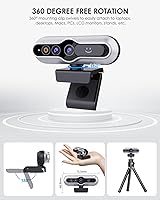
The webcam is equipped with a versatile mounting option, allowing it to be placed on a variety of monitors or even a tripod for different setups. This is great for users who need flexible placement for streaming, video conferencing, or online learning.
However, several users reported that the mounting clip doesn't hold the camera securely in certain setups. This can lead to instability, especially when using the webcam with larger or thinner monitors. Some also noted that the camera might slip out of place during use, causing disruptions.
Low Light Performance
80%
20%
The automatic brightness adjustment works well in most environments, providing a clearer image even in darker rooms. Users found that the webcam's ability to adapt to low light makes it a good choice for late-night calls or those working in dimly lit spaces.
While the low-light performance is generally decent, some users found the image to be too dark or grainy in very low-light conditions. The webcam may struggle in darker settings without additional lighting, which could affect the quality for some video calls or streams.
Compatibility
88%
The webcam is compatible with both Windows and Mac systems, making it a flexible choice for a wide range of users. Additionally, it supports popular video conferencing software like Zoom and Skype, ensuring a smooth experience across different platforms.
A few users with older operating systems or non-Windows devices reported some connection issues. While the webcam is advertised as plug-and-play, certain configurations might require additional software or troubleshooting for optimal performance.
Value for Money
92%
Given the range of features, including 2K video quality, facial recognition, and a noise-canceling microphone, many users felt that this webcam offers excellent value for its price. It's especially appreciated by remote workers and educators for its performance in both professional and personal settings.
Some users feel that while the webcam provides solid features, there are similarly priced options that offer slightly better build quality or additional features. Still, for most buyers, the combination of performance and affordability makes it a solid investment.
Software/Driver Requirements
90%
The plug-and-play setup is a major positive, as it eliminates the need for additional drivers or software installation. This is a key selling point for users who want a quick, hassle-free experience without worrying about system compatibility or updates.
A small number of users noted that certain software packages, like video editing or streaming apps, may require some manual adjustments or additional configuration to get the most out of the webcam's features. These users would have preferred more seamless integration across all platforms.
Noise Cancellation
84%
The noise-canceling feature does a solid job of filtering out background noise, making it easier for users to hear and be heard during calls. This is particularly useful in noisy home offices or shared spaces, where distractions could otherwise affect communication.
However, a few users found the noise cancellation to be inconsistent, with some background sounds still coming through during calls. This could be an issue for those needing absolute clarity in high-noise environments, like open office spaces or busy homes.

Suitable for:

The MOERTEK 2K HD Webcam with Windows Hello Facial Recognition is ideal for remote workers and professionals who need quick, secure logins and clear video quality for virtual meetings. The plug-and-play setup is a significant advantage, making it perfect for users who need a hassle-free, easy-to-use solution. Students and educators will also benefit from its excellent video and sound clarity, particularly in online learning environments where communication is key. Additionally, content creators, including streamers, will appreciate the high-quality video and autofocus functionality for dynamic setups and clear, consistent broadcasts.
Not suitable for:

However, this webcam may not be the best fit for users requiring absolute stability in the mounting setup. Some users have noted that the mounting clip can be insecure on certain displays, leading to wobbling or instability during use, which can be a major inconvenience for those using it in professional or high-movement settings. Additionally, while the facial recognition and low-light performance are generally praised, users in extremely dim environments or those using older hardware may experience issues with slow or failed recognition. Those expecting superior video quality in very low-light conditions or a sturdier build for heavy-duty use might find this product lacking.

Specifications

  • Resolution: The webcam offers a 2K HD resolution for clear and sharp video quality during calls and streaming.
  • Field of View: The camera provides a wide 84° field of view, allowing for broader visibility during video calls.
  • Sensor: It uses a 5MP CMOS sensor to capture high-quality video with better light sensitivity.
  • Frame Rate: This webcam supports a 30fps frame rate, ensuring smooth video performance for most applications.
  • Microphone: Equipped with a built-in noise-canceling microphone, it helps reduce background noise for clearer audio.
  • Autofocus: The camera features autofocus, ensuring the subject stays clear and in focus, even in dynamic settings.
  • Privacy Cover: A privacy cover is included, allowing you to block the camera lens when not in use.
  • Connectivity: The webcam connects via USB, ensuring easy plug-and-play functionality without the need for additional software.
  • Compatibility: It is compatible with Windows 10 and above, making it suitable for a wide range of modern PCs.
  • Mounting Options: The webcam comes with a display clip and is also tripod-ready for flexible mounting options.
  • Software Requirements: No additional software is required, as the webcam operates with plug-and-play functionality.
  • Low-Light Adjustment: The webcam features automatic brightness adjustment, optimizing image quality in low-light environments.
  • Windows Hello: It supports Windows Hello for secure and fast facial recognition login, enhancing user convenience.
  • Usage Scenarios: Designed for video conferencing, streaming, online learning, and professional use.
  • Mount Stability: Some users have noted concerns with the stability of the camera’s mount, especially on certain displays.

FAQ

The setup is straightforward with plug-and-play functionality. Simply connect the webcam to a USB port on your computer, and Windows should automatically recognize it. You may need to install any necessary drivers if prompted.

Yes, the MOERTEK webcam supports Windows Hello facial recognition. Once set up, you can use your face for quick and secure login to your Windows 10 or newer PC, eliminating the need for passwords.

This webcam comes with a built-in noise-canceling microphone that helps ensure clear audio during video calls and streaming, reducing background noise for better communication.

The MOERTEK webcam is fully compatible with Windows 10 and above. While it should work with MacOS, full functionality such as Windows Hello facial recognition may be limited on Mac systems.

Users have reported that the autofocus works well even in low-light conditions, ensuring sharp video quality during meetings, streaming, or online learning, even when ambient lighting is not ideal.

Yes, this webcam is well-suited for streaming and content creation. Its 2K resolution, clear audio capture, and wide field of view make it a solid choice for creating high-quality videos, live streams, or tutorials.

Some users have mentioned concerns about the stability of the camera’s mount, especially when attached to certain displays. For better stability, you might consider using the tripod-ready mounting option if needed.

Yes, the MOERTEK webcam is tripod-ready. If the included display clip doesn’t provide the stability you need, simply use a compatible tripod to secure the camera for a more stable setup.

Yes, this webcam includes a privacy cover. This feature allows you to quickly disable the camera when not in use, ensuring your privacy is protected.

The webcam has an 84° field of view, making it ideal for group video calls and ensuring that everyone can be seen clearly without having to adjust the camera constantly.