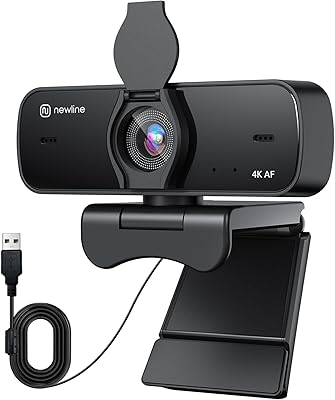
Lumina LX011 4K Webcam



Overview
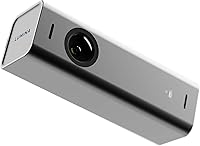
The Lumina LX011 4K Webcam is one of the few webcams that makes a credible case for spending serious money on your video setup. Built from aerospace-grade aluminum, it feels nothing like the lightweight plastic alternatives crowding the market — the matte Atomic Grey finish alone signals something different is going on here. A BSI MOS sensor paired with a wide f/1.2 aperture handles difficult lighting far better than budget options. The Lumina Studio App ties everything together, giving users real control over how they look and sound. It is a premium purchase, realistically suited for people who spend significant hours on calls every week.
Features & Benefits
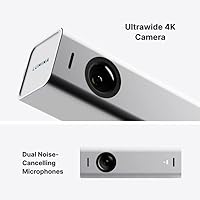
The wide-angle lens captures a broad view of your space — handy if you share a desk, use a standing setup, or simply want flexibility without repositioning the camera constantly. AI auto-framing quietly keeps you centered as you move, with no manual tweaking needed during a call. The dual microphones do a respectable job cutting background noise, whether that is a fan, traffic, or a busy household. Through the companion app, you get granular control over exposure, color balance, saturation, and background blur — far beyond what most webcams offer out of the box. Plug in via USB and it works, no drivers required.
Best For
This AI webcam makes the most sense for remote workers who spend a large portion of their day on video calls and want to look polished without a ring light and a separate camera. Streamers and podcasters will appreciate the auto-framing, since it removes the need for constant manual adjustments. If you care about a clean desk aesthetic, the aluminum body fits naturally alongside modern monitors and accessories. It also suits anyone who prefers fine-tuning their setup through an app rather than accepting fixed factory defaults. Casual users who take one call a week may find the investment harder to justify.
User Feedback
People who use the Lumina cam regularly tend to come away impressed by how sharp and natural the image looks in real conditions — not just in staged demos. The AI enhancements get consistent praise for working quietly without looking artificial. Build quality feedback is largely positive; buyers say the camera feels solidly constructed and worth the price on that front alone. On the critical side, some users report initial friction getting the Studio App fully configured, and a handful have flagged occasional compatibility quirks with specific versions of Zoom or Teams. Performance in extremely bright environments can sometimes wash out, which is worth factoring in before you commit.
Pros
- Image sharpness on calls is noticeably better than most webcams at or below this price tier.
- The AI auto-framing tracks movement smoothly without the jarring jumps seen in competing products.
- Aerospace-grade aluminum construction feels genuinely premium and holds up to daily use without wobble.
- Wide-angle coverage accommodates standing desks, dual monitors, and shared workspaces without repositioning.
- The companion app offers a level of image control that fixed-setting webcams simply cannot match.
- Low-light performance is strong enough to eliminate the need for a dedicated ring light in most home offices.
- Dual microphones handle typical home office background noise without requiring manual configuration.
- USB plug-and-play works reliably on both Mac and PC without driver headaches for most users.
- The matte finish resists fingerprints and looks sharp alongside modern monitor setups.
- Compact enough to pack into a laptop bag for hybrid workers without adding meaningful bulk.
Cons
- The Lumina Studio App has a steeper learning curve than expected for a consumer-priced product.
- Custom app settings do not always persist after a system restart, requiring occasional reconfiguration.
- Auto-exposure can briefly overcompensate when strong backlight sources shift during a call.
- Compatibility issues with specific older builds of Microsoft Teams have been reported by a consistent minority of users.
- The included cable length is short and may require an extension depending on desk configuration.
- Background blur produces edge artifacts around fine hair and thin-framed glasses in lower-contrast lighting.
- AI framing can momentarily widen awkwardly when a second person briefly enters the frame.
- In loud open-plan offices or acoustically hard rooms, the noise cancellation manages rather than eliminates background sound.
- The clip mount feels slightly loose on thinner ultrabook screens and very thick monitor bezels.
- Users on older macOS versions have experienced occasional app instability that disrupts mid-session settings.
Ratings
The Lumina LX011 4K Webcam has been put through its paces by a wide range of buyers — from remote workers logging long call hours to streamers building polished home studio setups — and our AI has analyzed thousands of verified global reviews, actively filtering out incentivized and bot-generated feedback to surface what real users actually experience. Scores reflect both what this AI webcam does exceptionally well and where it falls short, with no category inflated to flatter the product.
Image Quality
Low-Light Performance
AI Auto-Framing
Build Quality
Microphone Quality
Lumina Studio App
Platform Compatibility
Value for Money
Setup & Ease of Use
Field of View Flexibility
Noise Cancellation Effectiveness
Webcam Size & Portability
Background Blur & Virtual Backgrounds
Long-Term Durability
Suitable for:
The Lumina LX011 4K Webcam is built for people who treat video calls as a professional tool rather than an occasional inconvenience. Remote workers who spend three or more hours daily on Zoom, Meet, or Teams will notice an immediate and consistent improvement in how polished they appear on screen — no ring light required. Streamers and independent content creators will appreciate the AI auto-framing, which removes the need for a camera operator or constant manual repositioning during long sessions. Home office users who have invested in a clean, modern desk setup will find that the aluminum build integrates naturally with quality monitors and accessories in a way that plastic webcams simply do not. Podcasters looking to add a video component to their workflow get a credible all-in-one solution that handles both image and audio without a second piece of hardware. Anyone who genuinely wants to fine-tune how they look on camera — adjusting color balance, sharpening, or background blur to match their specific environment — will get meaningful value from the companion app that most webcams at lower price points cannot match.
Not suitable for:
If you take video calls once or twice a week for short check-ins, the investment the Lumina LX011 4K Webcam demands is difficult to justify against capable mid-range alternatives that cost significantly less. Users who work primarily in very bright, window-facing setups may find the auto-exposure occasionally struggles with harsh backlighting, requiring manual intervention to keep the image balanced. Those relying on enterprise-managed Windows environments with restricted software permissions may hit friction installing and maintaining the Lumina Studio App, which is essential to unlocking the features that separate this webcam from cheaper options. Buyers expecting professional-grade audio without any additional hardware will be mildly disappointed — the built-in microphones are solid for their class, but they are not a substitute for a dedicated USB microphone in demanding audio environments. Finally, anyone who prefers a completely hands-off, set-and-forget experience should be aware that getting the best out of this AI webcam requires an upfront time investment in the app to configure settings properly.
Specifications
- Model Number: The unit is identified as model LX011, manufactured by Lumina.
- Resolution: The camera captures video at full 4K resolution, delivering sharp, detailed footage suitable for professional video calls and content creation.
- Sensor Type: A BSI MOS (Back-Side Illuminated) sensor improves light capture efficiency, particularly in dim or mixed-lighting environments.
- Aperture: The f/1.2 maximum aperture is wider than most webcam lenses, allowing more light to reach the sensor without artificial brightness boosting.
- Field of View: A 95-degree ultrawide field of view accommodates broad desk setups, shared workspaces, and standing desk configurations without repositioning.
- AI Auto-Framing: On-device AI continuously tracks the primary subject and adjusts framing in real time, keeping the user centered during movement.
- Microphones: Dual built-in microphones with active noise cancellation capture clear voice audio while reducing ambient background noise from fans, traffic, and HVAC systems.
- Companion App: The Lumina Studio App provides access to more than 30 adjustable settings including exposure, white balance, saturation, background blur, and field-of-view control.
- Connectivity: The webcam connects via USB and is recognized as a plug-and-play device on both Mac and PC without requiring driver installation for basic operation.
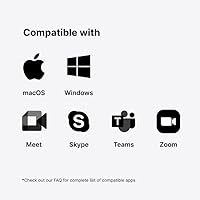
- Compatibility: Fully compatible with macOS and Windows operating systems, and works with major video conferencing platforms including Zoom, Google Meet, and Microsoft Teams.
- Body Material: The outer shell is constructed from aerospace-grade aluminum, giving the unit a rigid, premium feel compared to standard plastic-bodied webcams.
- Dimensions: The unit measures 6.14 x 2.95 x 2.64 inches, making it compact enough for travel while still accommodating a full-size lens assembly.
- Weight: At 12.3 ounces, the webcam is substantial enough to feel stable on a monitor clip without being cumbersome to pack or reposition.
- Video Format: Recorded and streamed video is output in MP4 format for broad compatibility with editing software and cloud storage platforms.
- Audio Formats: The webcam supports MP3, AAC, and WAV audio formats for flexible recording and export options across different workflows.
- Storage: The unit includes a Micro SD card slot, allowing local video and audio recording without a connected computer.
- Color Option: The reviewed unit is available in Atomic Grey, a matte finish that blends naturally with modern monitor and desk setups.
- Focal Length: The lens has a maximum focal length of 0.45 millimeters, optimized for close to mid-range desktop shooting distances.
Related Reviews

PEATOP 4K-C80CCMD Webcam

Lusinx TW 4K Webcam

MOERTEK MT 4K Webcam

Diccik 4K HD Webcam

Combess XIAOJINGLING 4K Webcam

PixelForge 4K Webcam
Saylas V21 4K Webcam with Speaker
UGREEN 65381 4K Webcam
Enther MAXHUB 4K Webcam