



Overview

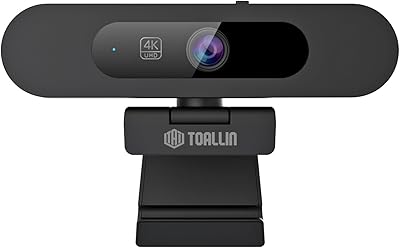
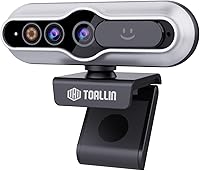
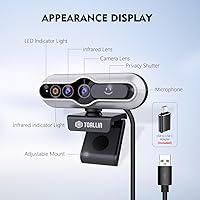
The TOALLIN Hello SE arrived in late 2024 as one of the few budget webcams to include a dedicated infrared camera for genuine Windows Hello facial recognition — not a workaround, but an actual separate IR module alongside the main lens. That distinction matters if passwordless login is your main reason for buying. It connects via USB with no additional software, keeping setup straightforward. The compact housing won't win any design awards, and the plastic build honestly reflects the price point. Think of this IR webcam as a practical tool for getting Windows Hello working on a desktop or external monitor setup without overspending.

Features & Benefits

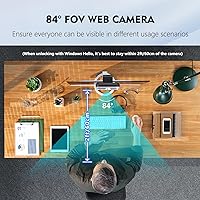
The Hello SE pairs a 5-megapixel CMOS sensor with a 2K output — up to 2592x1944 at 30 frames per second — which is noticeably crisper than a standard 1080p webcam for video calls. The 84° wide field of view is broad enough to frame two people side by side, useful in small shared offices. Autofocus handles standard face-distance shooting and surprisingly capable close-up shots, handy if you occasionally photograph small products. The built-in microphone applies noise reduction that manages moderate background noise reasonably well, though it won't replace a dedicated USB mic in loud rooms. A physical privacy shutter slides over the lens — simple, but genuinely useful.

Best For

This Windows Hello camera makes the most sense for Windows 10 or 11 users running on a desktop or a laptop that lacks a built-in IR sensor — the most common scenario being a monitor setup where facial login simply isn't available otherwise. Home office workers who log in and out multiple times a day will appreciate face unlock versus typing a PIN repeatedly. It also suits shared workstations, since Windows Hello supports enrolling multiple faces. If you shoot product photos for a small online shop and need just enough close-up clarity from a webcam, this IR webcam can handle that light-duty work too.

User Feedback

The Hello SE holds a 3.8-star rating, which tells a predictable story for value-tier hardware. Buyers who get Windows Hello running successfully tend to rate it highly, praising fast recognition speed and reliable unlock performance in well-lit conditions. The friction comes during initial setup — some users need to run Windows' built-in camera troubleshooter before facial recognition activates, which isn't a dealbreaker but is annoying. Low-light image quality draws consistent criticism, with noticeable drops in dim rooms. The lightweight plastic build also reads as cheap to some reviewers. Negative reviews frequently compare it to Logitech alternatives, though those options cost considerably more.

Pros

  • Genuine dedicated IR module delivers real Windows Hello face login, not a software approximation.
  • Face recognition is fast and consistent in well-lit rooms, unlocking the PC in roughly one to two seconds.
  • 2K output is a visible step up from standard 1080p, making video calls look sharper and cleaner.
  • Multi-face enrollment works reliably, making the Hello SE a practical choice for shared desks.
  • Physical privacy shutter provides real peace of mind without relying on software toggles.
  • Autofocus handles both standard face-distance calls and basic close-up product shots without manual adjustment.
  • No drivers or companion software required — Windows handles everything natively after plugging in.
  • Built-in noise reduction manages steady background hum well enough for most home office calls.
  • Compact and lightweight, it sits on a monitor without drawing attention or stressing the clip mount.
  • The feature set offered at this price point is difficult to match with competing options.

Cons

  • Low-light image quality degrades quickly, with heavy grain appearing in anything less than good lighting.
  • Initial Windows Hello activation sometimes fails, requiring a reboot or Windows camera troubleshooter to resolve.
  • The plastic construction feels noticeably cheap and the clip mechanism lacks confidence over time.
  • Microphone quality drops significantly in echoey or reverberant rooms, resulting in hollow-sounding audio.
  • Staying within roughly two feet of the camera is necessary for reliable face unlock — awkward on deeper desks.
  • Color accuracy in close-up mode is inconsistent, particularly under artificial or mixed light sources.
  • The wide field of view exposes more background than many users want, with no built-in framing adjustment.
  • Autofocus occasionally hunts and refocuses when subjects shift position or objects cross the frame.
  • Effectively a Windows-only device — the core IR feature is completely non-functional on macOS or Linux.
  • Some units report a loosening shutter tab over time, reducing the confidence of the privacy cover.

Ratings

The TOALLIN Hello SE earns a mixed but fair verdict after our AI analyzed hundreds of verified global buyer reviews, actively filtering out incentivized and bot-generated feedback to surface what real users actually experience day to day. Scores reflect both the genuine strengths that keep buyers satisfied and the recurring friction points that pull the overall average down. Nothing is sugarcoated here — this camera has a clear sweet spot, and knowing exactly where it lands helps you decide if it fits your setup.

Windows Hello Reliability
81%
19%
When the IR camera initializes correctly, face unlock works quickly and consistently — most users report recognition within one to two seconds under normal indoor lighting. Home office workers who log in and out repeatedly throughout the day find this genuinely useful compared to typing a PIN every time.
A notable subset of buyers encounters a setup hurdle where Windows fails to detect the IR camera on first connection, requiring a reboot or running the Windows camera troubleshooter before Hello activates. This initial friction frustrates users who expected a truly plug-and-play experience.
Image Quality
72%
28%
The 2K output is a real step up from the 1080p cameras built into most laptops, producing sharper edges and more defined color in well-lit environments. Video calls in natural daylight or near a desk lamp look noticeably cleaner and more professional compared to budget 1080p alternatives.
Low-light performance is a consistent complaint — grain creeps in quickly once ambient lighting drops, and colors shift toward a cooler, washed-out tone in dim rooms. At this price tier that is expected, but buyers who work in darker home offices should temper expectations significantly.
Windows Hello Setup Experience
61%
39%
For users who sail through the initial setup, the experience is straightforward — plug in, open Windows Hello settings, enroll your face, and you're done in under two minutes. The ability to enroll multiple faces is a practical bonus for shared workstations or family desktops.
The brand itself includes a multi-step troubleshooting guide in the product listing, which is a telling sign that setup problems are common enough to warrant proactive documentation. Users who are not comfortable navigating Windows system settings may find the troubleshooting process confusing and time-consuming.
Build Quality & Design
58%
42%
The compact footprint is genuinely appreciated — it sits neatly on top of a monitor without dominating the desk, and the lightweight body at under four ounces means the clip grip holds it in place without stressing the monitor bezel.
The all-plastic construction feels noticeably budget-grade in hand, and several reviewers describe the clip mechanism as flimsy compared to webcams from more established brands. There is little confidence that it would survive a drop or heavy daily repositioning over a long period.
Microphone Quality
67%
33%
In a quiet home office, the built-in microphone picks up voice clearly enough for standard video calls and online meetings without needing a separate external mic. The noise reduction algorithm does a reasonable job filtering out consistent low-level hum like air conditioning or a nearby fan.
In reverberant or echoey rooms — basements, tiled home offices, open-plan spaces — the microphone struggles, and call participants notice a hollow or slightly muffled quality. Anyone who frequently calls from a noisy environment will likely want a dedicated USB microphone alongside this camera.
Autofocus Performance
74%
26%
The autofocus locks onto a face at typical webcam distances quickly and holds focus well during normal head movement in calls. It also handles close-up shots of small objects reasonably well, which is a useful bonus for sellers who occasionally photograph products without a dedicated camera setup.
In some edge cases — particularly when a user moves far back from the desk or another object crosses the frame — the autofocus hunts noticeably before resettling. It is not a deal-breaker for standard use, but it can be distracting during screen-sharing sessions where the camera reaction is visible to others.
Field of View
77%
23%
The 84-degree angle is wide enough to comfortably frame two people sitting side by side, making this a practical pick for small shared desks or compact meeting rooms where a narrower webcam would cut people out of frame. It avoids the extreme distortion that some ultra-wide lenses introduce at the edges.
For single-person use, the wide angle means more of your background ends up in frame than you might want, which can be an issue in cluttered or private home environments. Virtual background tools in software like Zoom or Teams can compensate, but that adds a step to the workflow.
Privacy Shutter
83%
The physical shutter slider feels like a small but meaningful design decision — it provides genuine peace of mind when the camera is not in use, with no need to rely on software toggles or tape over the lens. Users who are privacy-conscious in home or office settings specifically mention this feature positively.
The shutter mechanism on some units feels slightly loose after repeated sliding, and a few users noted that the plastic tab is small enough to make it mildly fiddly to operate in a hurry. It works, but the execution does not feel as robust as on pricier webcams.
Value for Money
78%
22%
At this price, getting a dedicated IR module for Windows Hello alongside a 2K sensor, autofocus, a noise-filtering microphone, and a privacy shutter in one package is objectively good value. There is simply no other feature set quite like this available at this price point for passwordless login on desktop setups.
Buyers who compare it directly against Logitech or Anker options in a slightly higher price range often feel the gap in build quality and low-light performance is large enough to reconsider. If Windows Hello is not a priority, there are more polished 1080p webcams available for similar or less money.
Compatibility & OS Support
69%
31%
Works reliably on Windows 10 and Windows 11 machines once the Hello face authentication is correctly initialized, and the USB connection requires no manufacturer drivers or companion software — the OS handles everything natively.
This camera is effectively Windows-only for its primary feature — macOS and Linux users get a standard 2K webcam, but the IR facial recognition functionality is completely unavailable on those platforms. The listing could communicate this limitation more prominently to avoid disappointed buyers.
Close-Up & Product Photography
66%
34%
The autofocus system does better-than-expected work at short distances, making it usable for casual product shots — small items, documents, or handwritten notes held close to the lens come through with adequate sharpness for social media or marketplace listings.
Color accuracy in close-up mode is inconsistent, particularly under artificial lighting, and the 2K resolution — while decent — falls short of what even an entry-level smartphone camera delivers for product photography. Serious sellers would outgrow this capability quickly.
Ease of Installation
71%
29%
For users who have previously set up Windows Hello on a laptop with a built-in IR camera, the process feels familiar — plug in the USB, navigate to sign-in settings, and enroll. No additional software download is required at any point.
For first-time Windows Hello users or less tech-savvy buyers, the fact that some machines require troubleshooting steps before the IR camera registers adds unexpected complexity. The brand has published workaround steps, but finding and following them is a barrier that costs this camera real stars in reviews.
Low-Light Performance
47%
53%
Under strong and consistent indoor lighting — a ring light, bright overhead LEDs, or a well-lit window — the image holds up respectably and the noise stays manageable enough for video calls without drawing comments from colleagues.
In anything less than good lighting, image quality deteriorates fast. Grain becomes heavy, faces lose definition, and the overall output looks noticeably worse than competing webcams that prioritize low-light sensors. This is arguably the single biggest technical weakness and the primary driver of negative reviews.

Suitable for:

The TOALLIN Hello SE is a strong fit for Windows 10 and 11 users who want passwordless face login on a desktop or external monitor setup — the most common scenario where the built-in IR sensor found on most modern laptops simply isn't available. Remote workers and students who log into their machines repeatedly throughout the day will notice a real quality-of-life improvement from face unlock compared to typing a PIN or password every session. Shared workstations and small business desks also benefit, since this Windows Hello camera supports enrolling multiple faces, so different team members can each log in with their own account without any extra configuration. The 84-degree wide angle and 2K output make it a reasonable upgrade for anyone currently stuck with a blurry built-in webcam, particularly for video calls in decently lit home offices. If you occasionally need to photograph small products or documents close-up for an online shop or marketplace listing, the autofocus handles that light-duty task competently enough to save you reaching for your phone.

Not suitable for:

Buyers who work primarily in dim or inconsistently lit environments should think carefully before committing to this IR webcam, as low-light image quality is its most frequently cited weakness and one that no software fix will fully address. Mac and Linux users should skip it entirely — the IR facial recognition is a Windows-exclusive feature, and on other operating systems this camera is just a basic 2K webcam without its main selling point. If you are comparing it against Logitech or Anker webcams in a slightly higher price range and image quality or build durability is your top priority, the gap in those areas is real enough to matter over months of daily use. Anyone who is not comfortable navigating Windows system settings or running a troubleshooter should also be cautious — a portion of buyers require extra steps to get Hello working, and the TOALLIN Hello SE does not always activate facial recognition instantly out of the box. Finally, if you are a content creator, streamer, or anyone who needs professional-grade video or audio quality, this camera will not meet those standards regardless of the lighting conditions.

Specifications

  • Resolution: Captures video at 2K QHD (2592x1944 pixels) at up to 30 frames per second for noticeably sharper output than standard 1080p webcams.
  • Sensor: Uses a 5-megapixel CMOS image sensor to handle color reproduction and light capture across the frame.
  • IR Camera: Includes a dedicated infrared camera module physically separate from the main lens, enabling genuine Windows Hello facial recognition.
  • Field of View: Provides an 84-degree wide-angle field of view, wide enough to comfortably frame two people sitting side by side at a desk.
  • Focus System: Features continuous autofocus that adjusts automatically for both standard face-distance video calls and close-up object or product shots.
  • Aperture: Lens aperture is f/1.9, allowing a reasonable amount of light in under well-lit conditions while maintaining depth of field.
  • Focal Length: Maximum focal length is 2.51mm, optimized for the short working distances typical of desktop webcam use.
  • Microphone: Built-in single microphone with a noise-reduction algorithm designed to suppress steady ambient background sounds during calls.
  • Privacy Shutter: Equipped with a physical sliding shutter that mechanically covers the lens when closed, blocking the camera entirely without software.
  • Connectivity: Connects to a host computer via USB; no drivers or manufacturer software are required, as the device is recognized natively by Windows.
  • OS Compatibility: Windows Hello facial recognition requires Windows 10 or Windows 11 with the Windows Hello Face feature enabled; standard webcam functions work on other systems.
  • Multi-Face Enrollment: Supports enrollment of multiple individual faces within Windows Hello, allowing different users on the same machine to authenticate with their own facial profile.
  • Dimensions: The camera unit measures approximately 4.06 x 2.64 x 1.93 inches, making it compact enough to sit unobtrusively on most monitor bezels.
  • Weight: Weighs 3.84 ounces, light enough that the monitor clip holds it securely without placing stress on the display frame.
  • Recognition Range: For reliable Windows Hello face unlock performance, the manufacturer recommends staying within approximately 2 feet (60cm) of the camera.
  • Video Format: Outputs video in MPEG format, compatible with standard video conferencing and recording applications on Windows.
  • Audio Format: Captures audio in PCM format, the uncompressed standard that most communication and recording software accepts without conversion.
  • Model Number: The official model designation is Hello SE, as listed by TOALLIN on the product packaging and in Windows device management.

Related Reviews
Firewalla Purple SE
Firewalla Purple SE
86%
91%
Value for Money
88%
Ease of Setup
93%
Protection Against Cyber Threats
85%
Parental Controls
87%
App Interface
More
Sennheiser HD 25 Special Edition
85%
94%
Build Durability
89%
Ambient Noise Isolation
86%
Professional Sound Accuracy
68%
Ergonomics & Comfort
91%
Overall Value
More
Pioneer SE-MJ522-L Headphones
84%
91%
Sound Quality
85%
Comfort
88%
Portability
83%
Build Quality
70%
Cable Length
More
Imou SE 4MP Security Camera
82%
88%
Value for Money
91%
Ease of Installation
85%
Picture Quality
82%
Motion Tracking Accuracy
80%
Night Vision Performance
More
Noctua NH-U12S SE-AM4
89%
91%
Cooling Performance
95%
Noise Level
88%
Installation Ease
89%
Build Quality
90%
Size and Compatibility
More
Laifen SE Lite Hair Dryer
88%
95%
Drying Speed
93%
Portability
89%
Noise Level
87%
Ease of Use
91%
Frizz Reduction
More
Pioneer SE-MX9-K Headphones
85%
88%
Sound Quality
85%
Comfort & Fit
91%
Build Quality
89%
Portability
83%
Ease of Use
More
Pioneer SE-M521 Over-Ear Headphones
83%
87%
Sound Quality
92%
Comfort for Long Sessions
68%
Bass Performance
91%
Build Quality
58%
Cord Length & Convenience
More
Creative Stage SE mini
87%
96%
Space Efficiency
93%
Setup Simplicity
88%
Vocal Clarity
91%
Bluetooth Performance
89%
Physical Controls
More
Sennheiser HD 4.50 SE
82%
91%
Sound Quality
88%
Active Noise Cancellation
76%
Comfort & Fit
85%
Battery Life
79%
Wireless Connectivity
More

FAQ

It does work with genuine Windows Hello face authentication — the camera includes a dedicated infrared module specifically for this purpose, not a software trick. That said, a portion of buyers need to run the Windows camera troubleshooter or reboot before the IR camera registers correctly in Windows Hello settings. Once it is set up properly, recognition is fast and reliable for most users.

For basic webcam use — video calls, recording — it will function as a standard 2K USB camera on macOS or Linux. However, Windows Hello is a Windows-exclusive feature, so the infrared facial recognition capability is completely unavailable on other operating systems. If face login is your main reason for buying, this camera is a Windows-only solution.

Plug the camera in via USB, then open Windows Settings, go to Accounts, and select Sign-in options. Under Windows Hello Face, choose Set Up and follow the on-screen prompts to enroll your face. If Windows says it cannot find a compatible camera, try restarting your computer first — that resolves the issue for most buyers without any further steps.

Start with a simple reboot — this clears the issue for many users. If that does not work, go to Settings, then System, then Troubleshoot, then Other Troubleshooters, and run the Camera troubleshooter. Follow the prompts and allow the automated diagnostics to run, then test Windows Hello again afterward.

Yes, the TOALLIN Hello SE supports multi-face enrollment through Windows Hello, which means each user on a shared PC or workstation can register their own face under their individual Windows account. Each person logs in separately and the camera recognizes the right profile automatically.

The manufacturer recommends staying within about 2 feet — roughly 60 centimeters — of the camera for consistent recognition. If you sit further back than that, the IR sensor may not pick up your face reliably, which can cause slower or failed unlock attempts. This is worth keeping in mind if you use a deep desk setup.

In a well-lit room, the 2K output looks noticeably sharper than a typical built-in laptop camera and holds up well for standard video meetings. Low-light performance is a real weakness though — if your workspace is dim or relies on inconsistent artificial lighting, image quality drops significantly. For professional streaming or content creation, you would likely want something more capable.

In a quiet home office, it picks up voice clearly and the noise reduction manages steady background hum like a fan or air conditioning reasonably well. In echoey spaces — like rooms with hard floors and bare walls — call participants may notice a slightly hollow or muffled quality. It is fine for everyday calls but will not replace a standalone USB microphone if audio quality is important to you.

It does a decent job at short distances, and the autofocus can lock onto small objects held close to the lens with reasonable sharpness. Color accuracy under artificial lighting is inconsistent, so results vary depending on your light source. For casual marketplace or social media photos it is usable, but a smartphone camera will generally produce better results.

This IR webcam fills a specific niche that most Logitech options at the same price do not cover — genuine Windows Hello facial recognition. Where established brands pull ahead is in build quality, low-light performance, and long-term reliability, all of which are areas where budget trade-offs are noticeable here. If Windows Hello is not a priority for you, Logitech and similar brands offer a more polished all-round webcam experience at comparable prices.