Overview

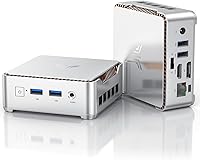
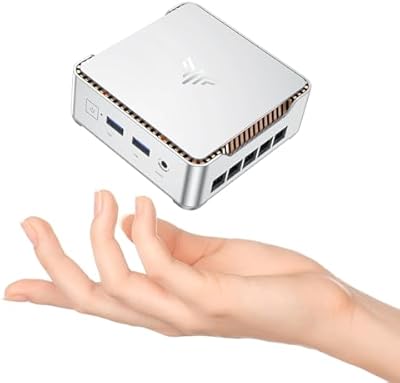
The KAMRUI Essenx E2 N150 16GB Mini PC enters an increasingly competitive space where small form-factor desktops are fighting hard for desk real estate and wallet share. What sets this one apart from the previous generation is Intel's Twin Lake-N N150 processor, a chip that delivers a genuinely noticeable jump in CPU and GPU performance over the older N100 and N95 designs. That said, managing expectations matters here: this is a capable machine for everyday computing, not a replacement for anything demanding video encoding or serious rendering work. The compact silver chassis measures under four inches square, and the included VESA mount is a practical touch. Windows 11 Pro comes pre-installed, which at this price tier is a legitimate value add.
Features & Benefits

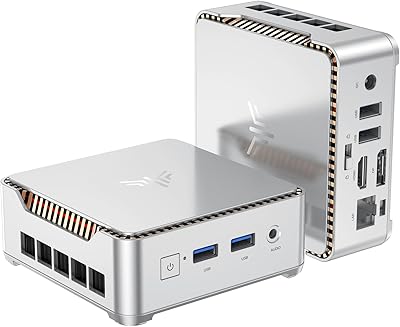
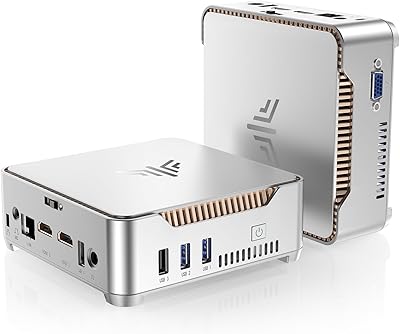
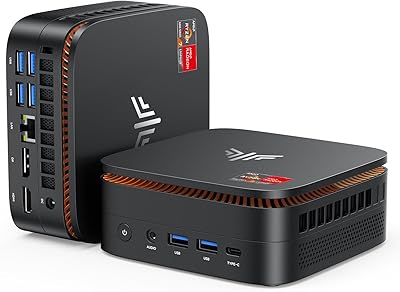
In daily use, the N150's extra headroom over Jasper Lake chips makes a real difference when you're juggling a dozen browser tabs, a spreadsheet, and a video call simultaneously. The 16GB of DDR4 RAM handles that kind of workflow without flinching, and the 512GB NVMe SSD means the system boots fast and apps open without that familiar pause. For display flexibility, the combination of HDMI 2.0 and DisplayPort 1.4 lets you run dual 4K monitors at 60Hz, which is genuinely useful for multi-monitor office setups or as a living room media hub. Port coverage is solid for the size: two USB 3.2 Gen2 ports handle fast peripherals, Gigabit Ethernet keeps network transfers reliable, and the 3.5mm jack covers basic audio. One honest caveat: the single RAM slot is capped at 16GB, so what you see is what you get.

Best For

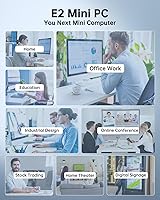
This compact desktop makes the most sense for people who need a tidy, low-power computer that doesn't dominate their desk or their electricity bill. Remote workers juggling multiple monitors will appreciate the dual 4K output, while the VESA mount makes it trivial to hide the unit behind a screen entirely. It's also a strong pick for anyone building a home theater setup — tucked behind a television, this mini PC handles 4K streaming without breaking a sweat. Students, educators, and anyone running light server tasks or small NAS workloads will find the 15W TDP particularly attractive. Where it falls short is clear: if you're coming from a modern mid-range laptop expecting gaming or heavy workload performance, this is not that machine. It's for people who need reliability and simplicity, not raw power.

User Feedback

Early buyers of the Essenx E2 tend to highlight two things: how quickly it's up and running out of the box, and how surprisingly capable it feels for its size. Setup simplicity and the pre-loaded Windows 11 Pro experience earn consistent praise. Build quality gets reasonable marks too — the chassis feels more substantial than you might expect given its weight. On the other side, a recurring concern is the single memory slot with no upgrade path beyond 16GB, which matters if your needs grow. Fan noise is reported as minimal during light tasks, though a handful of users note it can become audible under sustained load. Since this is a relatively new listing, long-term reliability data is still thin, so early impressions should be treated as a starting point rather than the full picture.

Pros

  • The Intel N150 chip delivers noticeably better responsiveness than older N100 and N95 generation mini PCs.
  • 16GB of DDR4 RAM handles multitasking well for everyday browser, office, and communication workloads.
  • Dual 4K output via HDMI 2.0 and DisplayPort 1.4 is a practical feature rarely standard at this price tier.
  • The included VESA mount makes it easy to hide the unit behind a monitor or television for a clean setup.
  • Windows 11 Pro comes pre-installed, saving buyers the cost and hassle of a separate license.
  • At just 9.5 oz and under four inches square, this compact desktop fits in spaces where nothing else will.
  • The 512GB NVMe SSD delivers fast boot times and snappy app loading without a perceptible lag.
  • Gigabit Ethernet and WiFi 5 dual-band connectivity give users flexibility for both wired and wireless setups.
  • A 2-year warranty with 24/7 support is a reassuring commitment for a budget-tier device.
  • The 15W TDP keeps operating costs low and makes it a practical choice for always-on or server-adjacent use.

Cons

  • The single RAM slot is permanently capped at 16GB, leaving no upgrade path as workload demands grow.
  • Intel UHD Graphics 600 rules out casual gaming entirely — even older or lightweight titles will struggle.
  • The SSD slot is limited to PCIe 3.0 speeds, which bottlenecks faster NVMe drives if you upgrade storage.
  • WiFi 5 is serviceable but trails behind the WiFi 6 standard now appearing on competing devices at similar prices.
  • Fan noise can become audible under sustained CPU load, which may be noticeable in quiet work environments.
  • Only two USB 2.0 ports are available alongside the faster Gen2 ports, which limits simultaneous peripheral connections.
  • No USB-C port of any kind is included, which is an increasingly glaring omission for modern peripherals.
  • As a recently launched product, long-term reliability data and driver maturity are still limited.
  • No dedicated graphics output beyond integrated Intel UHD means photo or video editing workflows will feel constrained.
  • The power adapter is external and adds cable clutter, which somewhat undermines the ultra-compact pitch.

Ratings

The scores below reflect an AI-driven analysis of verified global buyer reviews for the KAMRUI Essenx E2 N150 16GB Mini PC, with spam, incentivized posts, and bot activity actively filtered out to ensure honest representation. Each category captures what real users praised and where they ran into friction, so you get a transparent picture of both the wins and the trade-offs before you commit.

Everyday Performance
83%
Users upgrading from N100 or older Celeron-based systems consistently describe a tangible jump in snappiness during typical workdays. Browsing with 15 to 20 tabs open, hopping between a spreadsheet and a video call, and streaming simultaneously all land within comfortable territory for this chip.
Push it toward anything sustained and CPU-intensive — extended video exports, large file compressions, or multi-app compilation — and the N150 hits its ceiling quickly. A handful of users noted perceptible slowdowns when running several background processes alongside active foreground tasks.
Multitasking & RAM
79%
21%
The 16GB DDR4 configuration handles the kind of browser-heavy, document-plus-comms workflow that defines most home office days without forcing users to think about memory pressure. For its target audience, that headroom feels well-matched to daily demands.
The hard ceiling is the frustration: one SO-DIMM slot with no upgrade path beyond 16GB means users who develop heavier habits over a two- or three-year ownership window have no recourse. Several buyers flagged this as something they wished they had known before purchasing.
Display & Dual Monitor Support
88%
Dual 4K output at 60Hz via HDMI 2.0 and DisplayPort 1.4 is a genuine standout at this price tier, and buyers setting up two-monitor home office rigs or connecting the unit to a 4K television report sharp, stable visuals without configuration headaches. It punches clearly above what competing N100 units typically offer.
A DisplayPort cable is not included in the box, which catches some buyers off guard when they unpack expecting to go dual-screen immediately. There is also no support for a third display, which limits users who have grown accustomed to triple-monitor productivity setups.
Build Quality & Design
76%
24%
The silver aluminum-accented chassis feels more solid than the price tier would lead you to expect, and the compact square footprint draws consistent positive comments from users who care about a tidy desk. At 9.5 oz, it is light without feeling hollow or cheap.
A few users noted minor flex in the base panel and some inconsistency in port fit — particularly around the USB slots — that suggests the manufacturing tolerances are not quite at the level of more established brands. It is not a dealbreaker, but it does fall short of premium feel.
Thermal Management & Fan Noise
71%
29%
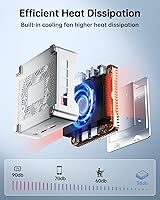
During light and moderate use, the Essenx E2 runs quietly enough that most users working in typical office or home environments simply forget the fan is there. The dual exhaust design does a reasonable job of moving heat away from the processor without spiking temperatures under everyday workloads.
Sustained loads cause the fan to ramp up to an audible level that some users in quiet environments find distracting. A couple of buyers specifically mentioned that prolonged video encoding or large file transfers made the fan noticeably louder than they anticipated for a low-TDP device.
Storage Speed & Capacity
78%
22%
The 512GB NVMe SSD delivers fast boot times and responsive app loading that makes the system feel snappier than its specs might suggest on paper. For most light-productivity users, 512GB is adequate headroom, and the M.2 slot means upgrading to a larger drive is straightforward.
The PCIe 3.0 interface caps sequential read and write speeds well below what modern Gen4 NVMe drives are capable of, so buyers who drop in a premium SSD will not see its full rated performance. The slot limitation is a real constraint for power users planning a storage upgrade.
Port Selection & Connectivity
67%
33%
Two USB 3.2 Gen2 Type-A ports cover fast external drives and modern peripherals reliably, and the Gigabit Ethernet port gives wired network users a stable, low-latency connection that WiFi cannot always match. Most standard home office setups will find enough ports for daily use.
The complete absence of USB-C is increasingly hard to overlook as more peripherals, monitors, and docks migrate to that standard. The two remaining USB 2.0 ports feel dated, and users with more than a few peripherals will find themselves reaching for a hub more often than they would like.
WiFi & Wireless Performance
69%
31%
Dual-band WiFi 5 with 2.4GHz and 5GHz support covers standard streaming, browsing, and video call use cases without dropping connections under normal home network conditions. Buyers using the Essenx E2 as a living room HTPC tucked behind a TV report consistently stable wireless streaming.
WiFi 6 is now the baseline expectation on competing devices at this price point, and the WiFi 5 implementation shows in environments with network congestion or thick walls, where a small number of users reported inconsistent throughput. Driver updates have reportedly improved stability, but early units had occasional hiccups.
Graphics & Media Playback
72%
28%
Intel UHD Graphics 600 handles 4K video decode efficiently, making this compact desktop a capable media playback machine for streaming services, local video files, and YouTube at full resolution. Home theater users report smooth, artifact-free playback in typical HTPC scenarios.
Gaming is effectively off the table — even casual, older titles struggle to maintain playable frame rates at modest settings. Photo editing in Lightroom or similar applications is workable for basic adjustments but becomes sluggish with large RAW files or batch processing tasks.
Setup & Out-of-Box Experience
86%
Pre-installed and activated Windows 11 Pro means buyers go from unboxing to a working desktop in under ten minutes, with no license key hunting or OS installation required. The included HDMI cable and VESA bracket remove two common friction points that competing devices often leave to the buyer.
Some users reported a modest amount of pre-installed bloatware that required a cleanup pass before the system felt fully their own. A small number of early buyers also noted that driver packages needed manual updates out of the box to resolve minor peripheral recognition issues.
Value for Money
81%
19%
Windows 11 Pro, 16GB of RAM, dual 4K output, and the VESA mount bundled together at this price tier represent a genuinely competitive package when compared to similar N100-based systems that often offer less memory or a Home OS license. Remote workers and students especially see strong value here.
The single RAM slot with no upgrade path and the WiFi 5 ceiling are real constraints that slightly undercut the long-term value case, particularly as competing models inch toward WiFi 6 inclusion. Buyers who plan to keep their machine for more than three years may find the expandability limitations start to sting.
VESA Mount & Form Factor
84%
The included mounting bracket transforms the Essenx E2 into a genuinely invisible desktop when tucked behind a monitor or television, which buyers setting up clean desk workspaces or living room media setups consistently celebrate. At the size of a thick paperback, it fits where no tower ever could.
The VESA bracket hardware quality is functional but basic — a couple of users noted that the mounting screws felt slightly undersized for heavier monitor arms. It works perfectly on standard VESA-compatible screens but may need reinforcement on older or non-standard mounting patterns.
Warranty & Support
74%
26%
A 2-year manufacturer warranty is above the typical 1-year baseline found on many budget mini PCs, and KAMRUI's 24/7 support availability gives buyers a meaningful safety net for a newly released product with limited community troubleshooting resources online.
Response quality from KAMRUI support has been described as inconsistent in early buyer reports, with some users receiving fast, helpful resolutions and others experiencing slower turnaround. As a relatively young brand in Western markets, the depth of its service infrastructure is still being established.
Power Efficiency
87%
The 15W TDP translates directly into very low electricity costs during continuous operation, which users running the Essenx E2 as a home server, always-on HTPC, or secondary office machine find particularly compelling. It runs cool enough under light loads that the fan rarely needs to engage at all.
During peak multi-application loads, actual power draw climbs meaningfully above the rated TDP, which slightly undermines the low-power pitch for users who planned their energy budget around the headline figure. It is still efficient by any reasonable standard, but the gap can surprise those who measured carefully.

Suitable for:

The KAMRUI Essenx E2 N150 16GB Mini PC is a strong fit for anyone who needs a dependable, low-footprint desktop without the bulk or power draw of a traditional tower. Remote workers who run a browser-heavy setup across two monitors will get real mileage from the dual 4K output and the responsive 16GB RAM configuration. Students and educators will appreciate the no-fuss Windows 11 Pro experience and the fact that it handles documents, video calls, and light research without complaint. It also earns a genuine recommendation as a home theater PC — mounted behind a television via the included VESA bracket, it becomes an unobtrusive 4K streaming hub. Anyone still running an aging N5095, N5105, or Atom-era mini PC will notice a tangible improvement in day-to-day snappiness. Those running light home server tasks or small NAS workloads will also value the 15W TDP, which keeps electricity costs and heat generation low over long runtime hours.
Not suitable for:

Buyers expecting the KAMRUI Essenx E2 N150 16GB Mini PC to handle anything beyond light-duty computing should look elsewhere before committing. The Intel UHD Graphics 600 is adequate for 4K video playback but offers no meaningful capability for PC gaming, even at low settings, and creative applications involving video encoding or 3D rendering will quickly expose the chip's limits. The single SO-DIMM slot means RAM is permanently capped at 16GB with no upgrade path, which is a real concern for anyone whose workload might grow over a two- or three-year ownership window. Users who rely on Thunderbolt connectivity, multiple NVMe drives, or high-bandwidth USB-C peripherals will find the port layout insufficient. It is also not the right tool for anyone running virtual machines, compiling code regularly, or managing large local databases, where sustained CPU throughput matters far more than idle efficiency.
Specifications

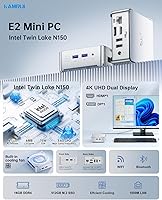
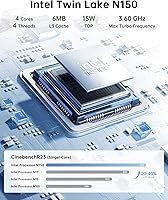
  • Processor: Intel Twin Lake-N N150 with 4 cores and 4 threads, a 6MB smart cache, and a boost clock reaching up to 3.6GHz.
  • TDP: The N150 chip operates at a 15W thermal design power, keeping energy consumption low during typical workloads.
  • RAM: 16GB of DDR4 memory running at 3200MHz is installed in a single SO-DIMM slot, which is the maximum supported capacity.
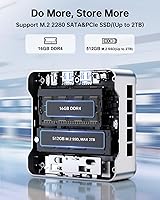
  • Storage: A 512GB M.2 2280 NVMe SSD is included, with the single M.2 slot supporting upgrades up to 2TB via PCIe 3.0 or SATA.
  • Graphics: Intel UHD Graphics 600 with 24 execution units and a frequency up to 1.0GHz handles integrated display and video decode duties.
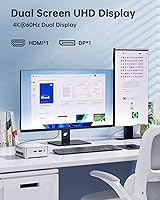
  • Display Output: One HDMI 2.0 port and one DisplayPort 1.4 port enable simultaneous dual 4K output at 60Hz.
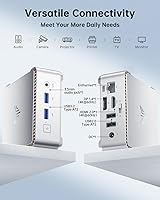
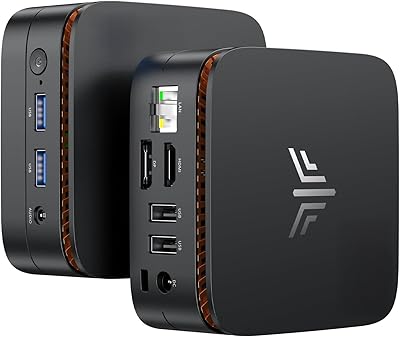
  • USB Ports: Four USB Type-A ports are provided in total: two USB 3.2 Gen2 ports for fast peripherals and two USB 2.0 ports for standard devices.
  • Networking: A Gigabit Ethernet RJ45 port and dual-band WiFi 5 (802.11ac) covering both 2.4GHz and 5GHz bands are built in.
  • Bluetooth: Bluetooth 5.0 is integrated, supporting wireless keyboards, mice, headsets, and other compatible peripherals.
  • Audio: A single 3.5mm combo audio jack on the chassis handles both headphone output and microphone input.
  • Dimensions: The unit measures 3.94″ x 3.94″ x 1.42″ (10 x 10 x 3.6 cm), occupying a very small physical footprint on a desk or shelf.
  • Weight: At 9.5 oz (approximately 270g), the chassis is light enough to mount behind a monitor without stressing a VESA arm.
  • Cooling System: An active cooling setup combines a 2300RPM fan with dual exhaust ports and a large-area heat sink to manage thermals under load.
  • Operating System: Windows 11 Pro is pre-installed and activated, ready to use immediately out of the box without any additional license purchase.
  • VESA Mount: A VESA-compatible mounting bracket is included in the box, allowing the unit to be attached to the back of a monitor or television.
  • Warranty: KAMRUI covers this unit with a 2-year manufacturer warranty and offers 24/7 customer support for technical issues.
  • Power Input: The unit is powered via a DC barrel connector using the included external power adapter.
  • Chassis Color: The enclosure ships in a silver finish with a compact rectangular profile and smooth exterior surfaces.

Related Reviews
KAMRUI Essenx E1 Mini PC 12GB 256GB
77%
82%
Everyday Performance
86%
Value for Money
74%
Build Quality
71%
Thermal Management
83%
Noise Level
More
KAMRUI Essenx E2 Mini PC
81%
83%
Everyday Performance
71%
Thermal Management
88%
Display Output
86%
Port Selection & Connectivity
91%
Upgrade Friendliness
More
KAMRUI Essenx E2 Mini PC
77%
78%
Everyday Performance
84%
Value for Money
72%
Build Quality
81%
Display Output Quality
74%
Thermal Management
More
KAMRUI GK3Plus Mini PC (N95, 16GB RAM, 512GB SSD)
81%
89%
Multitasking Performance
92%
Value for Money
86%
Thermal Management
84%
Display Versatility
81%
4K Media Playback
More
BOSGAME Mini PC E3 (N150, 16GB/512GB)
79%
88%
Value for Money
74%
Processing Performance
91%
Multi-Display Support
89%
Connectivity & Ports
76%
Build Quality & Design
More
KAMRUI AM21 Mini PC
KAMRUI AM21 Mini PC
74%
88%
CPU Performance
61%
Thermal Management
93%
Port Selection & Connectivity
76%
Integrated GPU & Display Output
82%
Build Quality & Form Factor
More
BOSGAME E2 Mini PC 16GB/512GB
80%
88%
Value for Money
83%
Performance for Everyday Tasks
76%
Build Quality & Design
61%
Thermal Management & Fan Noise
82%
Display Output & Multi-Monitor Support
More
ACEMAGIC Vista Mini V1 (N150, 16GB/256GB)
78%
83%
Performance for Daily Tasks
81%
Build Quality & Design
62%
Storage Speed & Configuration
54%
RAM & Upgradeability
88%
Display & Multi-Monitor Support
More
KAMRUI Hyper H1 Mini PC
77%
88%
Value for Money
86%
CPU Performance
61%
Thermal Management
63%
Fan Noise
91%
Multi-Monitor Support
More
Beelink Mini S12 Pro (N100, 16GB, 500GB)
83%
83%
Everyday Performance
91%
Value for Money
76%
Build Quality & Design
84%
Thermal Management & Noise
88%
Connectivity & Ports
More

FAQ

Yes, the Essenx E2 supports dual display output simultaneously through its HDMI 2.0 and DisplayPort 1.4 ports. Both outputs are capable of 4K at 60Hz, so you can run two full-resolution screens side by side without any compromise.

Unfortunately, no. There is only one SO-DIMM slot and it is already populated with the 16GB module. The slot also maxes out at 16GB, so there is no upgrade path available. If you anticipate needing more memory in the future, this is an important limitation to weigh before purchasing.

During light tasks like browsing, streaming, or document work, the fan is nearly inaudible. Under sustained heavier loads, such as extended video playback or multiple demanding applications running simultaneously, you may notice a soft hum, but it is not intrusive. Users in quiet office environments have generally found it acceptable.

Yes, Windows 11 Pro comes pre-installed and pre-activated. You do not need to purchase a separate license or go through a manual activation process. Just plug it in, complete the initial Windows setup wizard, and you are good to go.

Absolutely, and it is actually one of the better use cases for this machine. The HDMI 2.0 port connects directly to your television, the Intel UHD Graphics handles 4K video playback without issue, and the included VESA mount lets you tuck the unit cleanly behind most flat-screen TVs. It is a tidy, low-power streaming solution.

Yes. The single M.2 2280 slot supports both NVMe PCIe 3.0 and SATA SSD formats, and you can swap in a drive up to 2TB. Just keep in mind that the PCIe 3.0 interface will cap the sequential speeds of faster Gen4 drives, so you will not get the full rated performance from a premium NVMe stick, but any standard M.2 drive will work fine.

For typical remote work use, it handles video calls, shared screens, and collaboration tools without any real trouble. Running Zoom or Teams alongside a browser and a document editor at the same time is well within what the N150 chip and 16GB of RAM can manage comfortably.

No, there is no USB-C port of any kind on this unit. All four USB ports are standard Type-A. If you rely on USB-C for peripherals, a dock, or charging, you would need a separate adapter, which adds a bit of friction to an otherwise clean setup.

The Intel N150 in this compact desktop is built on the newer Twin Lake-N architecture and offers a meaningful performance improvement over the N100 and N95 generation in both CPU throughput and integrated graphics. In practical terms, that translates to snappier multitasking and more headroom when running several applications at once, though neither chip is designed for heavy workloads.

The box includes the mini PC itself, a power adapter, an HDMI cable, the VESA mounting bracket, and a user manual. Most buyers will not need to purchase anything extra to get started, though you will need your own monitor, keyboard, and mouse if you do not already have them. A DisplayPort cable is not included, so grab one separately if you plan to use that output.