Overview

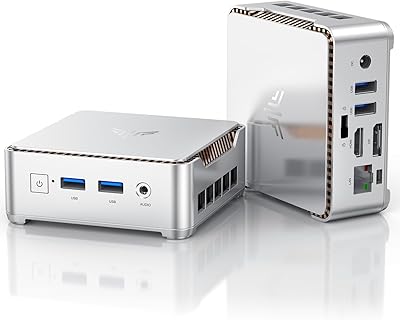
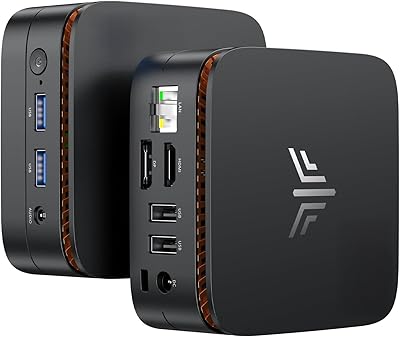
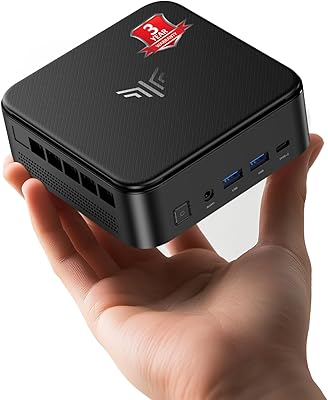
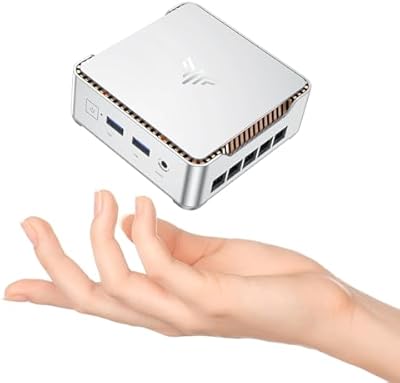
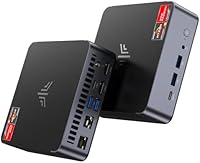
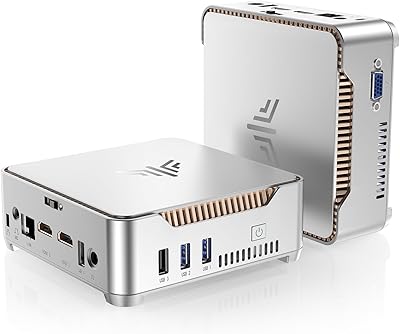
The KAMRUI AM21 Mini PC enters a crowded small-form-factor market with a surprisingly capable AMD processor and a port selection that punches well above its price tier. Launched in mid-2025, it competes directly with established names like Beelink and Minisforum, but carves out a niche with its dual Ethernet configuration — a 2.5G and 1G port combo you rarely find on machines this compact. It ships ready to use with 16GB DDR5 and a 512GB NVMe SSD, and both the RAM and storage have clear upgrade paths for those who eventually need more headroom. For anyone trying to reclaim desk space without giving up real computing power, the form factor alone makes a compelling case.

Features & Benefits

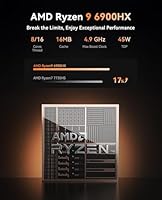
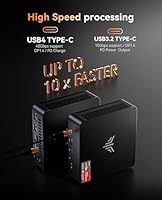
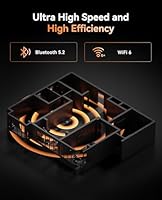
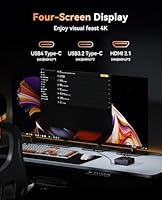
The Ryzen 9 6900HX is the real story here. Built on AMD's 6nm process with 8 cores and 16 threads, it handles multitasking, light video editing, and productivity workloads without breaking a sweat. The Radeon 680M integrated GPU is no afterthought either — it can drive up to four displays simultaneously at 4K/60Hz through a mix of DisplayPort, dual HDMI 2.1, and a USB-C port. There is also a USB4 port at 40Gbps, which future-proofs the machine for fast external storage or even a GPU enclosure down the line. WiFi 6 and Bluetooth 5.2 handle wireless duties without any add-ons, and the 90W power supply keeps energy draw modest compared to a standard tower desktop.

Best For

This compact PC is a natural fit for home office setups where desk real estate is limited but the workload is not. It handles video calls, document work, and running multiple apps in parallel without complaint. Indie and retro gamers will find the Radeon 680M capable for 1080p titles that are not especially demanding — just do not expect it to run modern AAA games at high settings. Network hobbyists get a genuine bonus with the dual Ethernet, making it a viable base for a home router or firewall appliance. It also works well as a secondary machine, a 4K media center attached to a large TV, or a quiet bedroom PC where a full tower would be overkill.

User Feedback

Buyers generally respond well to the AM21's build quality and connectivity, often noting that the port variety — especially the dual Ethernet — stands out against competitors at this price. Fan noise appears manageable at idle, but several users flag that the system gets noticeably louder under sustained CPU load, which is understandable given the thermal constraints of a chassis this small. A more significant concern worth flagging: the product listing contains spec inconsistencies, including references to both DDR4 and DDR5 memory and an Intel chipset label on what is clearly an AMD platform. Verify your unit's actual specs on arrival. Included accessories receive mixed marks, with some buyers finding them adequate and others expecting better.

Pros

  • Ryzen 9 6900HX delivers fast multi-core performance that outpaces most mini PCs in this price range.
  • Dual Ethernet ports — including a 2.5G connection — are unusually rare and valuable for home lab users.
  • Quad 4K display output via HDMI, DisplayPort, and USB-C makes multi-monitor setups genuinely practical.
  • USB4 at 40Gbps future-proofs the AM21 for fast external drives or GPU enclosures down the line.
  • DDR5 memory and PCIe 4.0 storage slots mean the hardware foundation is modern, not recycled.
  • WiFi 6 and Bluetooth 5.2 eliminate the need for any wireless adapters or dongles.
  • The compact chassis weighs under three pounds and mounts behind a monitor via the included VESA bracket.
  • Two M.2 slots allow internal storage expansion up to 4TB without relying on external drives.
  • At 90W power draw, running costs are a fraction of what a comparable full-size desktop would consume.

Cons

  • Sustained CPU workloads trigger thermal throttling, limiting real-world performance under heavy, prolonged use.
  • The product listing contains spec inconsistencies that make it hard to verify exactly what you are ordering.
  • No operating system is included, adding cost and setup effort that the listing does not always make obvious.
  • Fan noise ramps up noticeably under load, which becomes distracting in quiet rooms or shared workspaces.
  • The 512GB base storage fills up fast once an OS, apps, and any media files are installed.
  • Included accessories — particularly the power adapter and cables — feel budget-grade relative to the hardware inside.
  • The compact PC is not a viable option for modern 3D gaming at medium or high settings, despite the gaming-oriented branding.
  • Accessing internal components for upgrades requires disassembly and is more involved than tool-free designs from rival brands.

Ratings

Our AI-powered scoring for the KAMRUI AM21 Mini PC was built by analyzing verified buyer reviews from multiple global markets, with spam, bot-submitted, and incentivized feedback actively filtered out before any score was calculated. The result is a transparent breakdown that captures both what users genuinely appreciate and where real frustrations tend to surface — no sugarcoating, no manufactured enthusiasm.

CPU Performance
88%
The Ryzen 9 6900HX consistently impresses users coming from older Core i5 or Ryzen 5 machines. Buyers report smooth multitasking across browser-heavy workflows, light video editing in DaVinci Resolve, and fast file compression — tasks that would noticeably strain less capable mini PCs at this price point.
Under sustained workloads like extended rendering or prolonged compilation tasks, some users report the CPU throttles back to protect thermals. The performance ceiling in a chassis this small is real, and buyers expecting workstation-class sustained throughput may hit it faster than expected.
Thermal Management
61%
39%
For everyday office use, video calls, and light productivity, the AM21 stays relatively cool and quiet. Users running it as a home office machine or media center rarely push it hard enough to trigger noticeable thermal behavior, making day-to-day use comfortable.
This is where buyer feedback gets critical. Under sustained CPU load, fan noise ramps up significantly and thermal throttling has been flagged by multiple users. The compact enclosure limits cooling headroom, and the Ryzen 9 6900HX is a chip that genuinely wants more airflow than a box this size can reliably provide.
Port Selection & Connectivity
93%
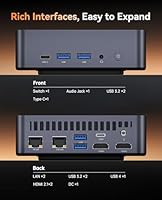
The port lineup is a standout feature that buyers consistently highlight as a reason they chose this unit over competitors. Having USB4, dual HDMI 2.1, DisplayPort, and dual Ethernet — including a 2.5G port — on a mini PC at this price tier is genuinely uncommon and earns strong praise from power users and home lab enthusiasts alike.
A small number of users note that the physical port placement requires some cable management effort, and a few report inconsistent USB-C behavior depending on the peripheral connected. These are minor gripes rather than dealbreakers, but worth knowing before you plan a tight desk setup.
Integrated GPU & Display Output
76%
24%
The Radeon 680M handles 4K video playback, multi-monitor productivity setups, and lighter 1080p gaming without issue. Users driving two or three displays for spreadsheet work, video streaming, and light creative tasks report a smooth and responsive experience that exceeds expectations for an integrated solution.
Anyone expecting to run modern 3D titles at playable frame rates will be disappointed. The 680M is the best integrated GPU available at this price point, but it is still an integrated GPU — demanding games at 1080p medium settings are about its realistic ceiling, and that ceiling drops fast with newer titles.
Build Quality & Form Factor
82%
18%
The chassis feels solid for its price class. Buyers frequently compare it favorably to competing mini PCs in the same range, noting that it does not feel hollow or plasticky. At under three pounds, it is genuinely portable, and the VESA mount compatibility makes it easy to tuck behind a monitor.
A handful of users note that the matte plastic shell picks up fingerprints and scuffs more than they would like, and the overall aesthetic is fairly utilitarian. It is not an ugly machine, but it is not a showpiece either — function clearly took priority over form here.
RAM & Storage Out of the Box
79%
21%
Shipping with 16GB DDR5 and a 512GB NVMe SSD is a reasonable starting point that covers most home office and light creative use cases without an immediate upgrade. Boot times are fast, app switching feels snappy, and the DDR5 bandwidth pairs well with the Radeon 680M which benefits from faster memory.
Power users or anyone planning to run virtual machines will likely find 16GB limiting within months. The 512GB SSD fills up quickly once you factor in an OS, a few applications, and a game library. The upgrade path exists, but it is an added cost buyers should budget for upfront.
Networking Performance
91%
The dual Ethernet configuration — with a 2.5G and a 1G port — is a legitimately differentiating feature that home lab users and network-conscious buyers celebrate. Paired with WiFi 6, the AM21 handles large file transfers, NAS connectivity, and stable video conferencing without any reported bottlenecks.
The dual Ethernet is only valuable if your router or switch can match the 2.5G throughput. For users on standard gigabit home networks, the 2.5G port offers no real-world advantage, making it more of a future-proofing perk than an immediate performance benefit for most households.
Spec Listing Accuracy
44%
56%
When buyers receive a unit that matches expectations, they are generally satisfied with the hardware performance relative to the advertised specifications. The core CPU and GPU claims appear to hold up for most buyers who benchmark their systems after purchase.
This is a notable red flag that multiple informed buyers have flagged. The Amazon listing simultaneously references DDR4 and DDR5 memory and lists an Intel chipset on what is an AMD-based system. These are not minor typos — they are the kind of inconsistencies that erode trust and make it hard to know exactly what you are ordering.
Value for Money
84%
At its price point, landing a Ryzen 9 6900HX with USB4, dual Ethernet, and DDR5 memory is genuinely strong value by mini PC market standards. Buyers who compare it against name-brand alternatives with similar specs consistently note that the AM21 offers more hardware per dollar than most of its direct competitors.
The value calculation shifts if you factor in the cost of adding an OS license, upgrading the RAM or storage to usable levels for heavier workloads, and the uncertainty around spec accuracy. What looks like excellent value on paper requires a bit more investment than the listing price alone suggests.
Noise Levels
63%
37%
At idle and during light tasks like web browsing, document editing, or 4K video playback, the fan is quiet enough that most users in living rooms or home offices would barely notice it. As a media center or light-use desktop, acoustic performance is acceptable.
Under load the fan ramps up to a level several buyers describe as distracting, especially in quiet environments. If you plan to run CPU-intensive tasks regularly — even just extended Teams calls with screen sharing — expect the fan to become a background presence you will eventually notice.
Software & OS Setup
58%
42%
Buyers who are comfortable installing their own OS appreciate the flexibility this bare-bones approach provides. There is no bloatware, no trial software, and no vendor-imposed Windows configuration to undo — you start with exactly what you want.
Shipping without an OS is a genuine barrier for less technical buyers who assume a ready-to-use desktop. The listing language is not always clear about this, and several buyers have expressed frustration after receiving the unit expecting Windows to be pre-installed. Factor in the cost and setup time of an OS license.
Included Accessories
57%
43%
The VESA mounting bracket is a practical inclusion that home office users and monitor-mount setups genuinely appreciate. It is a small touch that makes the overall package feel more considered than entry-level bare-bones kits that include nothing beyond the unit itself.
The power adapter and included cables receive mixed feedback, with some buyers describing them as adequate and others noting they feel budget-grade. A handful of users report the power brick runs noticeably warm under load, which is not dangerous but not reassuring either.
Upgrade & Expandability
86%
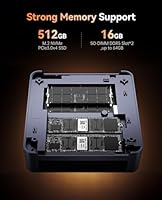
Two M.2 slots and two SO-DIMM slots give the AM21 a meaningful upgrade ceiling. Users who buy it knowing they will add a second NVMe drive and bump the RAM to 32GB find the upgrade process straightforward and the resulting system noticeably more capable for heavier workloads.
Accessing the internals requires disassembly that some buyers find more fiddly than expected. The upgrade potential is real, but it is not as simple as a tool-free panel swap — expect to spend some time with a screwdriver and a careful hand to avoid damaging anything.

Suitable for:

The KAMRUI AM21 Mini PC is a smart pick for home office workers who need a capable, quiet machine for video conferencing, document work, and running several applications at once — without a tower eating up their desk. It also makes a strong case as a 4K media center, since the Radeon 680M can drive multiple displays simultaneously, making it a practical living room or bedroom PC hooked up to a large TV. Network enthusiasts and home lab hobbyists will particularly appreciate the dual Ethernet setup, which opens the door to running pfSense, Untangle, or similar routing software on capable hardware for a reasonable outlay. Indie and retro gamers who are not chasing modern AAA titles can get decent 1080p mileage out of the integrated GPU without needing a dedicated graphics card. The two M.2 slots and expandable RAM also make this a reasonable long-term investment for users who like to grow into their hardware over time rather than buying maxed-out from the start.

Not suitable for:

Buyers who need sustained, heavy compute performance should think carefully before committing to this compact PC — the Ryzen 9 6900HX is a genuinely fast chip, but the small chassis limits how long it can maintain peak performance under prolonged workloads like 3D rendering, large compilation jobs, or extended video exports. Anyone planning to game seriously will also hit a wall quickly, as the Radeon 680M is an excellent integrated GPU but cannot substitute for a discrete card when modern titles are involved. Less technical buyers should be aware that the unit ships without an operating system, meaning you need to budget for and install Windows or Linux yourself before the machine is usable. The spec listing on the product page contains real inconsistencies — references to both DDR4 and DDR5 memory and an Intel chipset label on an AMD platform — which means buyers who want absolute certainty about what they are receiving may find the purchase process frustrating. If you need a plug-and-play desktop with guaranteed out-of-the-box specs and no setup friction, a more established brand with tighter quality control might serve you better.

Specifications

  • Processor: AMD Ryzen 9 6900HX, 8 cores and 16 threads, base clock 3.3GHz with boost up to 4.9GHz, built on TSMC 6nm FinFET process.
  • Architecture: AMD Zen3+ microarchitecture with 16MB L3 cache, offering strong single and multi-threaded performance in a power-efficient design.
  • Integrated GPU: AMD Radeon 680M running at 2400MHz, capable of driving up to four independent displays simultaneously at 4K resolution.
  • RAM: 16GB DDR5 4800MHz installed across two SO-DIMM slots, upgradeable to a maximum of 64GB (2x32GB).
  • Storage: 512GB M.2 2280 NVMe PCIe SSD pre-installed, with a second M.2 slot available supporting PCIe 3.0 or 4.0 drives up to 2TB each.
  • Display Outputs: One DisplayPort 1.4, two HDMI 2.1, and one USB-C with DisplayPort 1.4 alt mode, all supporting 4K at 60Hz output.
  • USB Ports: One USB4 port at 40Gbps, two USB 3.2 Gen2 Type-A, two USB 3.2 Gen1 Type-A, and one USB 3.2 Gen2 Type-C with Power Delivery.
  • Networking: Dual wired Ethernet with one 2.5Gbps and one 1Gbps RJ45 port, plus Intel WiFi 6 and Bluetooth 5.2 for wireless connectivity.
  • Power Supply: External 90W adapter rated at 19V/4.74A via DC barrel jack; power draw is modest compared to full-size desktops with similar CPU performance.
  • Audio: One combined 3.5mm audio and microphone jack for headset or speaker connectivity.
  • Dimensions: Approximately 6.93 x 6.89 x 3.9 inches, making it compact enough to sit behind a monitor or mount via VESA bracket.
  • Weight: 2.75 pounds without cables or power adapter, light enough to relocate between rooms or pack for travel without difficulty.
  • Operating System: Ships without a pre-installed OS; buyers must supply and install their own Windows license or preferred Linux distribution.
  • Form Factor: Mini PC desktop chassis with VESA mount compatibility, designed for placement on a desk, behind a monitor, or in an entertainment center.
  • Expandability: Two SO-DIMM RAM slots and two M.2 SSD slots provide a clear internal upgrade path without requiring external storage enclosures.
  • Wireless Standard: WiFi 6 (802.11ax) delivers faster throughput and better performance in congested network environments compared to WiFi 5.
  • Bluetooth: Bluetooth 5.2 supports modern wireless peripherals including keyboards, mice, headsets, and speakers with stable low-latency connections.
  • Thermal Design: Active cooling via internal fan; thermal performance is adequate for light and moderate workloads but may throttle under extended heavy CPU load.

Related Reviews
KAMRUI E2 Mini PC, 16GB RAM, 256GB SSD
85%
87%
Performance
92%
Value for Money
84%
Build Quality
88%
Ease of Setup
80%
Connectivity
More
KAMRUI GK3Plus Mini PC (N95, 16GB RAM, 512GB SSD)
81%
89%
Multitasking Performance
92%
Value for Money
86%
Thermal Management
84%
Display Versatility
81%
4K Media Playback
More
KAMRUI Essenx E2 N150 Mini PC, 16GB RAM, 512GB SSD
86%
88%
Performance
92%
Value for Money
90%
Cooling and Noise Level
85%
Dual Display Support
80%
Build Quality
More
KAMRUI Essenx E1 Mini PC, N150 Processor, 16GB RAM, 1TB SSD
86%
89%
Value for Money
91%
Performance for Office Tasks
94%
Ease of Setup
88%
Multitasking Capabilities
90%
4K Display Support
More
KAMRUI E3B Mini PC (Ryzen 5 7430U, 32GB RAM, 512GB SSD)
86%
94%
Multitasking Performance
91%
Office Productivity
89%
Display Connectivity
93%
Value for Money
96%
Space Efficiency
More
KAMRUI Hyper H1 Mini Gaming PC, AMD Ryzen 7 6800H, 16GB RAM, 512GB SSD
86%
91%
Performance
88%
Design & Build Quality
85%
Connectivity (WiFi/Bluetooth)
92%
Multitasking Efficiency
89%
Gaming Experience
More
KAMRUI Essenx E2 Mini PC
81%
83%
Everyday Performance
71%
Thermal Management
88%
Display Output
86%
Port Selection & Connectivity
91%
Upgrade Friendliness
More
Beelink Mini S12 Pro (N100, 16GB, 500GB)

83%
83%
Everyday Performance
91%
Value for Money
76%
Build Quality & Design
84%
Thermal Management & Noise
88%
Connectivity & Ports
More
Beelink Mini S12 Mini PC, Intel 12th Gen, 8GB RAM, 256GB SSD
86%
87%
Performance for Everyday Tasks
92%
Energy Efficiency
82%
Multitasking Capability
89%
Setup and Installation
85%
Display Quality
More
ACEMAGICIAN Kron Mini K1 Mini PC, Ryzen 7 7730U, 16GB RAM, 512GB SSD
85%
88%
Value for Money
91%
Performance for Everyday Tasks
94%
Compact Design & Portability
90%
Setup & Ease of Use
78%
Gaming Performance (Light)
More

FAQ

No, it ships without any operating system. You will need to purchase a Windows license separately and install it yourself, or install a Linux distribution if that suits your needs. Make sure to factor in the OS cost when budgeting for this machine, as it is not included in the box price.

Yes, and it is fairly straightforward if you are comfortable opening up small electronics. There are two SO-DIMM slots that support up to 64GB total using two 32GB DDR5 sticks, and two M.2 slots for NVMe SSDs. The second M.2 slot ships empty, so adding a second drive is a simple way to expand storage without replacing anything.

It depends entirely on what you want to play. For older titles, indie games, and anything that is not graphically demanding, the 680M handles 1080p gaming reasonably well. For modern AAA titles at medium or high settings, you will run into performance walls quickly. Think of it as a capable casual gaming GPU, not a replacement for a dedicated graphics card.

For most home users it means having a fast wired connection for your PC while the second port remains available for another device or a NAS. For home lab enthusiasts, the dual port setup makes this a practical base for running pfSense or Untangle as a software router or firewall appliance — something you rarely find in a mini PC at this price point.

The product description clearly states DDR5 4800MHz, and that is what most buyers report receiving. The DDR4 reference in the spec table appears to be a listing error rather than a real variation. That said, the inconsistency in the listing is worth flagging — confirm your unit's actual specs when it arrives if you want to be certain.

At idle and during light tasks like browsing or video playback, it is quiet enough that you will barely notice it. Push the CPU hard — sustained rendering, large file transfers, or heavy multitasking — and the fan spins up to a level several users describe as noticeable in a quiet room. It is not unusually loud, but it is not silent either.

Yes, it has four video output ports: one DisplayPort 1.4, two HDMI 2.1, and one USB-C with DisplayPort alt mode. All four support 4K at 60Hz simultaneously. You will need four displays and the appropriate cables, but the hardware supports it natively without any adapters or docking stations.

Quite a bit, actually. At 40Gbps it is fast enough to run a high-speed external SSD at full bandwidth, connect a Thunderbolt-compatible dock, or potentially attach an external GPU enclosure if you want to add discrete graphics later. It also supports DisplayPort output, so it doubles as a fourth video output.

Yes, a VESA mounting bracket is included in the box. This lets you attach the compact PC to the back of most monitors or displays that have VESA mount holes, which is a practical touch for keeping your desk clear. Some users note the bracket feels basic, but it functions as expected.

It can work in that role, especially given the dual Ethernet and relatively low power draw. For light NAS duties — serving media files, running a small home server — it has more than enough CPU headroom. Just keep in mind that it does not have multiple SATA ports, so storage expansion beyond the two M.2 slots requires external USB drives rather than internal bays.