Overview

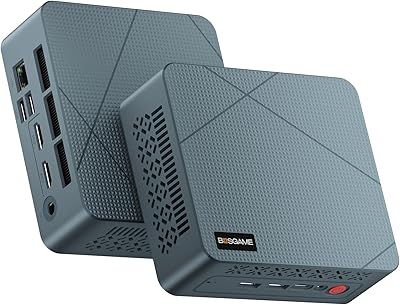
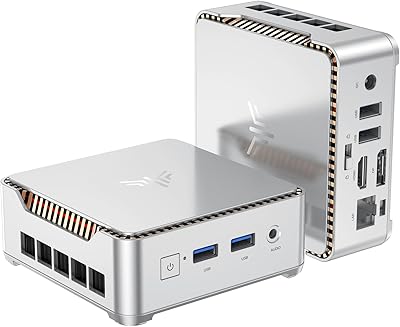
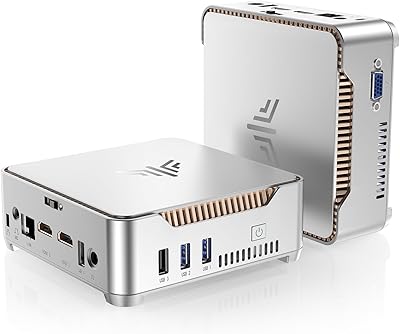
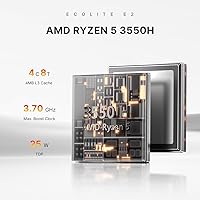
The BOSGAME E2 Mini PC 16GB/512GB is a compact desktop aimed at home office users and everyday computing tasks without taking up much desk real estate. Powered by AMD's Ryzen 5 3550H — a mobile-class processor that handles the basics well at this price point — it pairs with integrated Radeon Vega 8 graphics for light visual work and 4K video playback. At roughly 6.46 x 6.46 inches, it's small enough to mount behind a monitor or tuck away entirely. It entered a crowded market in late 2024, but its out-of-the-box pairing of 16GB RAM and a 512GB NVMe SSD gives it a solid head start over many similarly priced rivals.
Features & Benefits

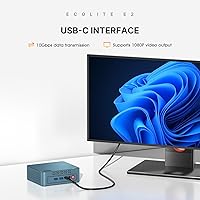
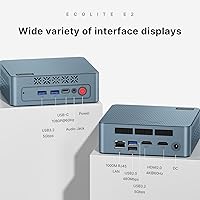
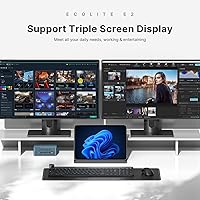
The standout capability is triple-display support — connect up to three monitors using dual HDMI 2.0 ports, each capable of 4K at 60Hz, plus a USB-C port. Worth noting: the USB-C output tops out at 1080p, making it best suited as a reference or secondary screen rather than your main display. The PCIe 3.0 NVMe SSD keeps things noticeably snappier than the SATA drives common in this category. RAM can be expanded to 32GB if workloads grow. Connectivity covers the essentials well — Wi-Fi 5, Bluetooth 5.0, three USB 3.0 ports, and a Gigabit Ethernet jack. Linux and Ubuntu support is a genuine plus for developers wanting a low-cost, dedicated machine.

Best For

This mini PC makes the most sense for remote workers and students who need a capable desktop without a large footprint or outlay. A multi-monitor home office is where it shines most — two 4K HDMI displays for productivity and a third for video or reference. It handles streaming, light document work, and browser-heavy multitasking without breaking a sweat. Developers running Ubuntu or a lightweight Linux distro will find the hardware and OS flexibility genuinely useful. It also fits well as a secondary or guest machine — something to set up in a corner or pass to a family member who just needs reliable, everyday computing.

User Feedback

The BOSGAME E2 launched in late 2024, so the pool of verified buyer reviews is still growing — treat early impressions accordingly. That said, buyers consistently highlight value for money and painless setup as its strongest points. The compact desktop handles routine tasks without complaint. On the flip side, some users note the fan becomes audible during sustained workloads, which is not surprising given the small chassis and a processor originally designed for laptops. Wi-Fi range in larger spaces has drawn a few comments. Build quality is generally described as solid, and those who have attempted RAM or storage upgrades report the process being straightforward.

Pros

  • Starts with 16GB DDR4 RAM and a PCIe NVMe SSD — genuinely strong specs at this price tier.
  • Dual HDMI 2.0 ports support two 4K displays at 60Hz simultaneously, a rare capability here.
  • RAM is upgradeable to 32GB via accessible SO-DIMM slots, extending useful lifespan.
  • Handles everyday multitasking — browsers, office apps, video calls — without sluggishness.
  • Linux and Ubuntu support works reliably out of the box, a real plus for developers.
  • Weighs under 2 pounds and fits in a bag, making it surprisingly portable for a desktop.
  • Gigabit Ethernet and Wi-Fi 5 together mean wired and wireless connectivity are both covered.
  • Setup is fast and straightforward — most buyers are up and running within minutes.
  • 4K video streaming and local playback perform smoothly under normal viewing conditions.
  • A third display output via USB-C adds flexibility most similarly priced rivals skip entirely.

Cons

  • Fan noise ramps up noticeably under sustained load — not ideal for quiet shared workspaces.
  • No Windows license included, so buyers expecting a ready-to-use Windows setup face an added cost.
  • Wi-Fi antenna performance weakens noticeably in larger homes or with the unit far from the router.
  • The USB-C display output is capped at 1080p, which surprises buyers expecting a third 4K screen.
  • Memory speed is limited to 2400MHz DDR4, leaving performance gains on the table for memory-intensive tasks.
  • No USB4 or Thunderbolt support limits compatibility with modern high-bandwidth peripherals and docks.
  • Thermal throttling is a documented concern during prolonged processor-intensive workloads.
  • The Ryzen 5 3550H is aging hardware — newer competing platforms offer better performance-per-watt.
  • Documentation in the box is minimal, which can frustrate less experienced users during initial setup.
  • Wi-Fi 6 is absent, meaning wireless bandwidth will feel increasingly dated as network standards advance.

Ratings

The BOSGAME E2 Mini PC 16GB/512GB scores here reflect AI-driven analysis of verified global buyer reviews, with spam, bot activity, and incentivized feedback actively filtered out. Ratings are built from real-world usage patterns — home offices, student setups, and developer workstations — so both the genuine strengths and the recurring frustrations are represented honestly.
Value for Money
88%
Buyers consistently point to this compact desktop as one of the better-specced machines at its price tier. Getting 16GB of RAM and a PCIe NVMe SSD out of the box, without paying extra for upgrades, lands well with budget-conscious buyers setting up a home office or study station.
A handful of users feel the older mobile-class processor slightly undercuts long-term value, particularly as software requirements creep up. Those who needed more performance quickly found themselves spending extra on RAM upgrades sooner than expected.
Performance for Everyday Tasks
83%
For the daily workload most buyers actually run — browser tabs, spreadsheets, video calls, and streaming — the BOSGAME E2 holds up well. The Ryzen 5 3550H handles multitasking without the sluggishness common in cheaper ARM-based or Celeron-powered rivals.
Push it toward video editing, heavy virtual machines, or compiling larger codebases and the CPU's mobile origins start to show. It is not a machine for sustained, processor-intensive work, and buyers who underestimated this came away disappointed.
Build Quality & Design
76%
24%
The chassis feels solid for the price, with a clean, no-nonsense aesthetic that fits unobtrusively on a desk or mounted behind a monitor. Port placement on the front and rear is functional, and most buyers found nothing obviously cheap about the construction.
Some users noted the plastic casing lacks the premium rigidity of pricier small-form-factor machines. A few reported minor flex when pressing ports, and the overall finish, while acceptable, does not suggest a product built for heavy daily handling.
Thermal Management & Fan Noise
61%
39%
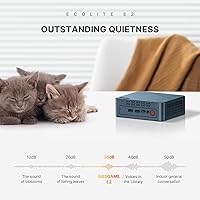
Under light workloads — browsing, document editing, and video playback — the cooling system stays quiet enough that most buyers barely notice it running. Idle and light-use temperatures are well managed for such a compact chassis.
Under sustained load the fan becomes audible and the chassis warms noticeably, which is a predictable limitation of cramming a laptop processor into a sealed box this small. Users running VMs or encoding tasks for extended periods flagged thermal throttling as a real concern.
Display Output & Multi-Monitor Support
82%
18%
The dual HDMI 2.0 ports delivering 4K at 60Hz each is a genuine win for a machine at this price, and buyers who set up a two-monitor productivity rig were broadly pleased with how smoothly it worked. Having a third output via USB-C adds flexibility most rivals skip entirely.
The USB-C port caps at 1080p, which catches some buyers off guard expecting a third 4K display. It works fine as a supplementary screen, but if your third monitor is a high-resolution panel, you will not get full resolution from it.
RAM & Storage Performance
86%
The PCIe 3.0 NVMe SSD makes a real, noticeable difference compared to the SATA drives common in competing budget mini PCs — boot times are quick and application launches feel responsive. Starting with 16GB of DDR4 means most users do not feel an immediate need to upgrade.
Memory speed is capped at 2400MHz, which leaves some performance on the table compared to newer platforms. Users who pushed the machine with memory-intensive workloads noticed it, though for everyday tasks it rarely causes any visible issue.
Connectivity & Port Selection
81%
19%
Three USB 3.0 ports and one USB 2.0, combined with Gigabit Ethernet and dual-band Wi-Fi, cover the practical needs of most home office setups without requiring a hub. Buyers appreciated having wired and wireless options available simultaneously.
There is no USB4 or Thunderbolt support, which limits the BOSGAME E2 for users who rely on high-bandwidth external drives or docking stations. Power users coming from more capable machines noticed the absence of faster peripheral connections fairly quickly.
Wi-Fi & Wireless Reliability
69%
31%
For users within a reasonable distance of their router, Wi-Fi 5 dual-band performs reliably for streaming, video calls, and general browsing without dropped connections. Bluetooth 5.0 pairs cleanly with keyboards, mice, and speakers in typical home setups.
Buyers in larger homes or with the unit placed further from their router reported weaker-than-expected signal strength, suggesting the internal antenna is modest. Wi-Fi 6 is notably absent, which means this machine will age faster in bandwidth-heavy environments.
Software & OS Flexibility
84%
Out-of-the-box Linux and Ubuntu support is a genuine differentiator at this price point, and developer-oriented buyers appreciated not fighting with drivers to get a working environment up and running. Windows compatibility is straightforward for mainstream users.
BOSGAME does not ship with a licensed Windows copy included, so buyers expecting a ready-to-use Windows desktop need to factor that in. A small number of Linux users reported needing to tweak Wi-Fi drivers depending on the distro and kernel version.
Setup & Out-of-Box Experience
87%
Ease of setup is among the most consistently praised aspects across buyer reviews. Most users had the machine connected, configured, and running within minutes, which matters a lot for non-technical buyers or those setting up a secondary workstation quickly.
The included documentation is minimal, and buyers less familiar with mini PC setups occasionally needed to look up basic configuration steps online. A short quick-start guide with display and network setup would meaningfully improve the first-use experience.
Upgradeability & Longevity
78%
22%
Dual SO-DIMM slots allowing expansion to 32GB of RAM gives this compact desktop more room to grow than most sealed mini PCs at this price. The M.2 NVMe slot is also accessible, so storage upgrades are a practical option as needs evolve.
The Ryzen 5 3550H is not a current-generation processor, and the platform ceiling means the machine will feel its age sooner than a newer-architecture rival would. Buyers planning a 4- to 5-year lifespan should weigh that honestly before purchasing.
Noise Level
67%
33%
During casual use — light browsing, document work, or video playback — most buyers described the fan noise as barely perceptible, making it a reasonable choice for quiet work environments or shared spaces where noise is a concern.
Several buyers noted that the fan ramps up aggressively when the machine is pushed, and the pitch of the fan is on the higher end. In a quiet room, sustained-load noise becomes distracting, and there is no software fan curve control readily available.
Size & Portability
91%
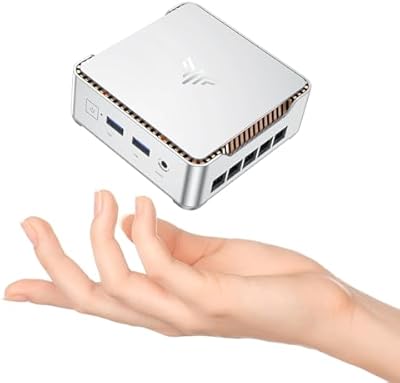
At under 2 pounds and roughly the footprint of a thick paperback book, the BOSGAME E2 is genuinely easy to relocate, travel with, or mount out of sight. Buyers who needed a desktop they could pack into a bag for remote work or move between rooms found it highly practical.
The compact size does come with thermal trade-offs, as noted elsewhere. A small number of buyers also found the power brick adds bulk when portability was the main goal, partially offsetting the machine's own compact dimensions.
4K Video Playback
85%
The integrated Radeon Vega 8 graphics handle 4K streaming and local video playback without stuttering, which is a practical win for buyers using this machine as a living room media player or a desk-side entertainment hub alongside work tasks.
Locally decoded 4K HDR content at high bitrates can push the integrated GPU close to its limits, occasionally causing dropped frames in less-optimized players. Buyers expecting smooth playback of very large, high-bitrate video files may need to adjust player settings.

Suitable for:

The BOSGAME E2 Mini PC 16GB/512GB is a strong fit for anyone who needs a capable, space-saving desktop without a large budget commitment. Remote workers and students who spend their days in browsers, spreadsheets, video calls, and document editors will find it handles that workload reliably without complaint. If you want a multi-monitor setup but your desk is already crowded, the dual HDMI 2.0 outputs make it easy to run two 4K displays side by side, which is a real productivity boost at this price tier. Developers looking for a low-cost, dedicated Linux or Ubuntu machine will appreciate that the hardware plays nicely with alternative operating systems out of the box. It also works well as a secondary or guest PC — a clean, always-ready machine in a spare room, a small business reception desk, or a home media setup where 4K streaming is the primary task.
Not suitable for:

The BOSGAME E2 Mini PC 16GB/512GB is not the right choice for buyers who need sustained, heavy-duty processing power. The Ryzen 5 3550H is a mobile-class processor from an older generation — it gets the job done for everyday tasks, but video editing, 3D rendering, large-scale data processing, or running multiple resource-hungry virtual machines simultaneously will push it to its limits quickly. Thermal throttling under prolonged heavy load is a real pattern in user feedback, meaning performance can dip rather than stay consistent during intensive sessions. Anyone expecting Wi-Fi 6 speeds, Thunderbolt connectivity, or a third 4K display will be disappointed — the USB-C port caps at 1080p and the wireless hardware is already showing its age relative to newer platforms. If you are planning to keep a machine running demanding workloads for four or five years without hardware obsolescence becoming a concern, this compact desktop's platform ceiling makes it a harder long-term bet.
Specifications

  • Processor: AMD Ryzen 5 3550H quad-core processor with 8 threads, a base clock of 2.1GHz, and a turbo boost up to 3.7GHz.
  • Graphics: Integrated AMD Radeon Vega 8 GPU handles everyday visuals, 4K video playback, and light graphical workloads without a dedicated card.
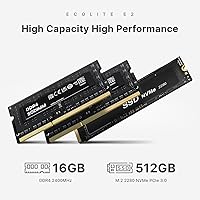
  • RAM: 16GB DDR4 SO-DIMM running at up to 2400MHz, installed as a single module with a second slot free for expansion.
  • Max RAM: Memory is upgradeable to a maximum of 32GB using two 16GB DDR4 SO-DIMM modules rated at up to 2400MHz.
  • Storage: 512GB M.2 PCIe 3.0 x4 NVMe SSD provides fast read and write speeds well above what SATA-based drives in this category typically offer.
  • Display Outputs: Two HDMI 2.0 ports support up to 4K at 60Hz each, plus one USB-C port that supports display output at up to 1080p.
  • USB Ports: Four USB ports in total: three USB 3.0 and one USB 2.0, covering standard peripherals, external drives, and accessories simultaneously.
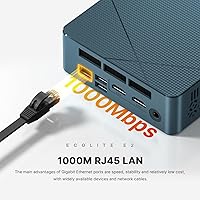
  • Networking: Dual-band Wi-Fi 5 (802.11a/g/n/ac) and a Gigabit RJ45 Ethernet port provide both wireless and wired connectivity options.
  • Bluetooth: Bluetooth 5.0 enables stable, low-latency connections to wireless keyboards, mice, speakers, and other peripherals.
  • OS Support: Compatible with Windows, Ubuntu, and Linux distributions; no licensed OS is included in the box.
  • CPU Cache: 4MB L3 cache supports faster data access for frequently used processes and multitasking workloads.
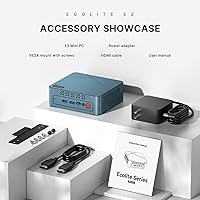
  • Dimensions: The unit measures 6.46 x 6.46 x 4.17 inches, small enough to mount on the back of a monitor using a VESA adapter.
  • Weight: The machine weighs 1.98 lbs, making it light enough to carry between locations or pack alongside a laptop in a bag.
  • Form Factor: Small form factor mini PC desktop designed for desk use, wall mounting, or discreet placement in home and office environments.
  • Warranty: Covered by a 1-year limited manufacturer warranty addressing design and workmanship defects, with dedicated after-sales support included.
  • Availability Date: First made available in October 2024, making it a relatively recent product with a growing base of verified buyer feedback.

Related Reviews

KAMRUI Essenx E2 N150 Mini PC, 16GB RAM, 512GB SSD
86%
88%
Performance
92%
Value for Money
90%
Cooling and Noise Level
85%
Dual Display Support
80%
Build Quality
More
BOSGAME Mini PC E3 (N150, 16GB/512GB)
79%
88%
Value for Money
74%
Processing Performance
91%
Multi-Display Support
89%
Connectivity & Ports
76%
Build Quality & Design
More
BOSGAME P4 Mini Gaming PC AMD Ryzen 7 5700U 16GB RAM 512GB SSD
85%
88%
Performance
85%
Build Quality
91%
Size & Portability
89%
Setup & Installation
93%
Noise & Quiet Operation
More
KAMRUI Essenx E2 Mini PC
81%
83%
Everyday Performance
71%
Thermal Management
88%
Display Output
86%
Port Selection & Connectivity
91%
Upgrade Friendliness
More
ACEMAGICIAN Kron Mini K1 Mini PC, Ryzen 7 7730U, 16GB RAM, 512GB SSD
85%
88%
Value for Money
91%
Performance for Everyday Tasks
94%
Compact Design & Portability
90%
Setup & Ease of Use
78%
Gaming Performance (Light)
More
KAMRUI GK3Plus Mini PC (N95, 16GB RAM, 512GB SSD)
81%
89%
Multitasking Performance
92%
Value for Money
86%
Thermal Management
84%
Display Versatility
81%
4K Media Playback
More
GEEKOM Air12 Mini PC 16GB/512GB
82%
88%
Value for Money
82%
Everyday Performance
71%
Build Quality
74%
Thermal Management & Noise
91%
Connectivity & Port Selection
More
KAMRUI E2 Mini PC, 16GB RAM, 256GB SSD
85%
87%
Performance
92%
Value for Money
84%
Build Quality
88%
Ease of Setup
80%
Connectivity
More
Blackview MP60 Mini PC, 16GB RAM, 512GB SSD
88%
88%
Performance
94%
Compactness and Design
85%
Multitasking Capability
91%
Energy Efficiency
90%
Display and Connectivity
More
MeLE Mini PC Quieter 4C, 16GB RAM, 512GB SSD
87%
85%
Performance
90%
Build Quality
88%
Display Quality
93%
Energy Efficiency
92%
Noise Level
More

FAQ

No, the BOSGAME E2 Mini PC 16GB/512GB does not include a licensed Windows copy in the box. You will need to purchase and install your own Windows license separately, or you can install Ubuntu or another Linux distribution, both of which are fully supported.
Yes, you can — but there is an important caveat. The two HDMI 2.0 ports each support 4K at 60Hz, which is great for your main displays. The USB-C port adds a third output, but it tops out at 1080p, so it works best as a supplementary screen rather than a primary high-resolution display.

It is fairly accessible. The machine has two SO-DIMM slots and ships with one 16GB module installed, leaving the second slot open. Most users who have done the upgrade describe it as a standard process — remove the base panel, slot in the new module, and you are done. No advanced technical knowledge is required.

During everyday tasks like browsing, document editing, or streaming video, the fan is quiet enough that most people do not notice it. Under heavier loads — like running a virtual machine or encoding a video — the fan does spin up audibly. It is not disruptive in a busy office, but in a quiet room it becomes noticeable.

Yes, that is genuinely where this compact desktop performs at its best. The Ryzen 5 processor and 16GB of RAM handle that kind of multitasking without trouble. Video calls on Zoom or Teams, multiple browser tabs, and a spreadsheet open simultaneously is well within its comfort zone.

It does. Ubuntu and other mainstream Linux distributions install and run without major driver issues on this hardware. The Wi-Fi card may occasionally need a driver check depending on your kernel version, but most users report a smooth experience getting a Linux environment up and running.

Absolutely — this is one of its stronger use cases. The HDMI 2.0 outputs support 4K at 60Hz, and the integrated Radeon Vega 8 graphics handle 4K streaming from services like Netflix or YouTube without stuttering. For very high-bitrate local video files, you may need to adjust playback settings in your media player.

This is one area where some buyers have expressed disappointment. At typical router distances in a small to medium-sized room, Wi-Fi 5 performs reliably. In larger homes or with walls and floors between the unit and the router, signal strength can drop off more than expected. If your setup allows it, using the Gigabit Ethernet port is the more reliable long-term choice.

Yes. The storage is an M.2 NVMe drive, and the slot is accessible once you open the case. Swapping in a larger NVMe SSD is a straightforward hardware upgrade that buyers have done without issues. Just make sure any replacement drive uses the M.2 2280 form factor and PCIe interface.

It can run lightweight virtual machines — a single Ubuntu VM for development or testing, for example — without too much trouble. However, running multiple VMs simultaneously or allocating heavy resources to a guest OS will push the processor and cooling system to their limits. For occasional, low-demand VM use it is practical; for VM-heavy workflows it is not the ideal platform.