Overview

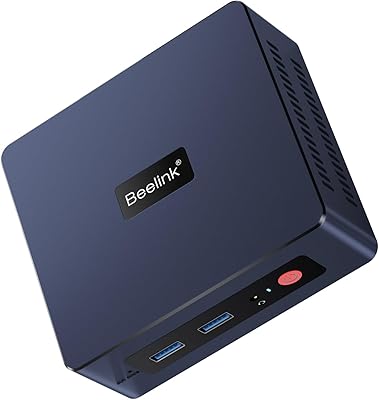
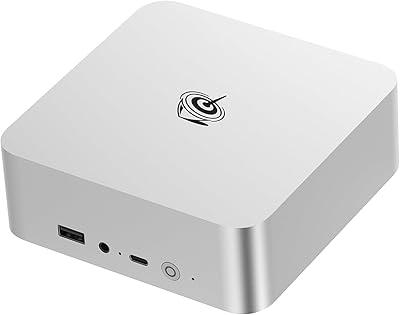
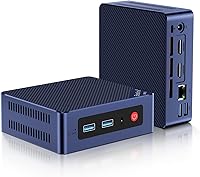
The Beelink Mini S12 Pro (N100, 16GB, 500GB) is a compact, low-power desktop built around Intel's 12th Gen N100 chip, and it punches well above what you'd expect from something roughly the size of a thick paperback book. Windows 11 Home comes pre-installed, so you're up and running within minutes of unboxing. At just 4.52 x 4.01 x 1.54 inches, this mini PC tucks neatly behind a monitor or onto a crowded shelf without complaint. Beelink has clearly aimed this at home office workers, students, and anyone tired of paying for a full tower they don't actually need. On the market since early 2023, it has quietly climbed the sales charts — not through hype, but through consistent, reliable everyday performance.
Features & Benefits

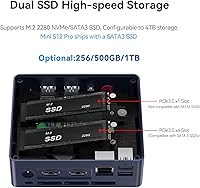
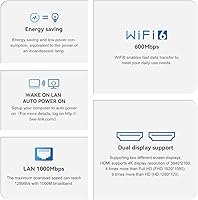
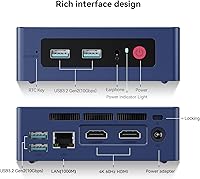
The N100 processor is a genuine step forward from the older N5095 and N5105 chips that dominated this price tier — you'll notice it during browser-heavy multitasking, video calls, and light spreadsheet work. 16GB of DDR4 RAM is an unusually generous allocation at this level, preventing the sluggishness that plagues cheaper 8GB alternatives. Dual HDMI 2.0 ports let you run two 4K monitors at 60Hz simultaneously, a real bonus for anyone working across multiple windows. Connectivity is strong: WiFi 6 and Bluetooth 5.2 come standard, alongside four USB 3.2 Gen 2 ports capable of 10Gbps transfers. Storage can be expanded via both the M.2 slot and a 2.5-inch SATA bay, giving you room to grow without replacing the whole machine.

Best For

This compact desktop earns its keep in a few specific scenarios. Home office professionals who want a dual-monitor setup without a bulky tower will appreciate it immediately. Students handling coursework, video calls, and light content creation get a capable, quiet machine that won't drain electricity bills. It also works well as a media center PC — the N100 handles 4K playback and AV1 decoding comfortably at just 6 watts. Low-power enthusiasts have been deploying it as a NAS or soft-router replacement, running 24/7 without meaningful energy costs. If you're coming from an aging all-in-one or a slow older laptop and don't need a discrete GPU, this is a practical, no-fuss upgrade. It was never designed for gaming or video editing — and it doesn't pretend otherwise.

User Feedback

Buyers generally come away positive, citing fast boot times, a near-silent fan even under load, and build quality that feels more solid than the plastic chassis might suggest. The out-of-box experience is mostly clean, though a handful of reviewers mention pre-installed software requiring a quick cleanup pass. The more technical crowd appreciates the BIOS flexibility — Auto Power On and Wake-on-LAN work reliably, which matters when running this headless. The recurring criticism worth taking seriously is the single RAM slot: no dual-channel mode means some performance is left on the table. A few users also report mild throttling during sustained CPU loads like extended file compression or light virtual machines. For everyday tasks, most find the Beelink N100 machine delivers well beyond what its price tier would suggest.

Pros

  • Ships with Windows 11 Home pre-installed and fully activated — ready to use within minutes of unboxing.
  • 16GB of DDR4 RAM at this price tier is genuinely uncommon and prevents the sluggishness common in 8GB alternatives.
  • Dual HDMI 2.0 ports support two 4K monitors at 60Hz simultaneously, a rare feature at this price point.
  • The N100 chip runs at just 6W TDP, keeping electricity costs negligible even when left on around the clock.
  • Four USB 3.2 Gen 2 ports handle most peripheral setups without requiring a separate hub.
  • WiFi 6 and Bluetooth 5.2 bring modern wireless performance that holds up well in busy home networks.
  • A secondary 2.5-inch SATA bay means you can add a second drive without replacing anything.
  • The fan is near-silent during typical office workloads — easy to forget the machine is even running.
  • Advanced BIOS features like Wake-on-LAN and Auto Power On work reliably for headless or server-style deployments.
  • Snappy boot times and responsive everyday performance make it a clear upgrade over older N5095 or Celeron-based machines.

Cons

  • The single RAM slot means no dual-channel mode, leaving measurable integrated graphics performance unused.
  • M.2 storage is SATA3 only — no NVMe support caps read and write speeds well below modern standards.
  • Sustained CPU-heavy tasks can trigger mild throttling, which is noticeable during extended file compression or VM use.
  • No USB-C or Thunderbolt port limits compatibility with newer monitors and high-speed external storage.
  • Some units arrive with pre-installed third-party software that requires manual cleanup before the system feels clean.
  • The one-year warranty is shorter than what several competing brands offer in the same category.
  • Plastic chassis, while functional, feels less premium compared to aluminum-bodied rivals at a similar price.
  • The included power adapter is bulkier than expected given how small the machine itself is.

Ratings

The Beelink Mini S12 Pro (N100, 16GB, 500GB) has been evaluated by our AI rating engine after processing thousands of verified global buyer reviews, with spam, bot-submitted, and incentivized feedback actively filtered out before scoring. The result is a balanced picture of where this compact desktop genuinely excels and where real-world buyers have run into frustration. Both standout strengths and recurring pain points are reflected transparently in every score below.
Everyday Performance
83%
For web browsing, video calls, document editing, and light multitasking, the N100 chip handles the workload without hesitation. Users switching from older Celeron or Pentium Silver machines consistently describe the difference as immediately noticeable — tabs load faster, apps open cleanly, and the system stays responsive with multiple windows open.
Push it into anything CPU-intensive — extended file compression, running virtual machines, or batch processing — and you will see clock speeds pull back to manage heat. It is not a machine designed for sustained heavy workloads, and buyers who expect otherwise tend to be disappointed.
Value for Money
91%
The combination of a current-generation Intel chip, 16GB of RAM, a 500GB SSD, and dual 4K output at this price tier is genuinely hard to beat. Most reviewers explicitly state they expected less and got more, particularly appreciating that Beelink did not cut corners on RAM the way many direct competitors do.
A small number of buyers feel the single-channel RAM configuration and SATA-only storage limit the long-term value proposition compared to units with NVMe slots. If you intend to use it as a serious daily driver for years, that ceiling can feel premature.
Build Quality & Design
76%
24%
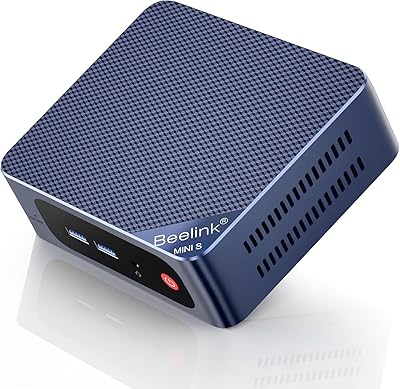
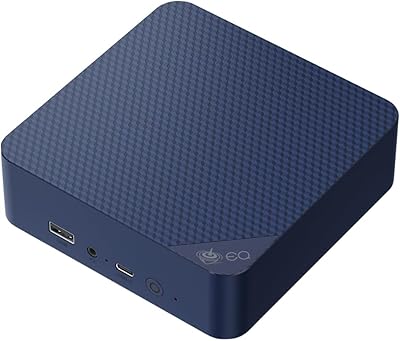
The laser-engraved plastic chassis is more fingerprint-resistant and scratch-tolerant than it looks in photos. At under 1.5 pounds, it feels surprisingly solid, and the compact footprint means it disappears onto a desk or behind a monitor without drawing attention.
It is still plastic, and buyers who have handled aluminum mini PCs from other brands notice the difference immediately. The dark blue finish can show dust over time, and a few users have noted the lid flexes slightly under pressure — nothing structural, but noticeable.
Thermal Management & Noise
84%
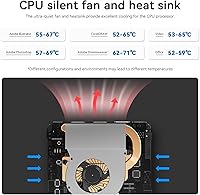
Under typical office workloads, this compact desktop runs near-silently. The upgraded copper heatsink and larger fan represent a real improvement over earlier Beelink generations, and most users report they forget the machine is even running during normal use.
Sustained CPU loads — think lengthy video exports or multiple simultaneous browser-based applications — do cause the fan to spin up audibly and temperatures to climb. Some users have reported throttling during these peaks, which is manageable but worth knowing before purchase.
Connectivity & Ports
88%
Four USB 3.2 Gen 2 ports running at 10Gbps is an unusually strong offering for this class, meaning most users plug in their keyboard, mouse, external drive, and webcam without needing a hub. Gigabit Ethernet performs reliably, and WiFi 6 delivers noticeably cleaner speeds in congested wireless environments.
There is no USB-C, no Thunderbolt, and no DisplayPort — which matters if you use modern monitors or external SSDs that rely on those interfaces. For most home office users this is fine, but creative professionals accustomed to USB-C workflows will feel the absence.
Display Output
86%
Running two 4K monitors at 60Hz simultaneously is the kind of feature that used to cost significantly more, and it works reliably here. Users setting up dual-monitor home office or media room configurations specifically call this out as a deciding factor in choosing this machine over single-output alternatives.
Both outputs are HDMI 2.0 only, so users with DisplayPort-native monitors need adapters. A small number of buyers also report that some HDMI switches or KVM setups introduce minor handshake delays — not a hardware flaw, but worth testing with your existing equipment.
RAM & Memory
78%
22%
Arriving with 16GB pre-installed means most users never need to think about memory. For the target audience — home office workers, students, and light business users — 16GB handles Chrome-heavy workflows, video calls, and background apps without complaint.
The single SODIMM slot is the most consistently criticized design choice. There is no dual-channel mode, which leaves measurable integrated GPU performance on the table. Users who understand memory architecture well tend to view this as a compromise that Beelink could have addressed with a second slot.
Storage & Expandability
77%
23%
The 500GB SATA SSD covers daily use comfortably for most buyers, and the presence of a secondary 2.5-inch SATA bay for a second drive is a practical touch that gives the machine a longer useful life. NAS and home server users particularly appreciate having two storage interfaces.
The M.2 slot is SATA3 only — no NVMe support — which caps sequential read and write speeds well below what modern M.2 drives are capable of. For pure media storage this is irrelevant, but users expecting NVMe-class speeds will need to look elsewhere.
Wireless Performance
82%
18%
WiFi 6 support makes a real-world difference in homes with busy wireless networks, where older WiFi 5 chips would struggle to maintain consistent throughput. Bluetooth 5.2 pairs reliably with keyboards, mice, and audio peripherals, with no notable dropout complaints in the user base.
Maximum WiFi 6 throughput is 600Mbps — solid but on the lower end of WiFi 6 implementations. Users with multi-gigabit internet and high-end routers may notice it does not saturate their connection the way a wired or higher-tier WiFi 6 adapter would.
Software & Out-of-Box Experience
71%
29%
Windows 11 Home comes activated and ready to use, which saves the setup friction that comes with bare-metal alternatives. The initial boot experience is generally clean, and most users are productive within the first hour of unboxing.
A recurring thread in user feedback involves pre-installed software that requires manual removal before the system feels truly clean. Nothing malicious, but enough third-party additions to annoy buyers who prefer a minimal baseline — a quick cleanup session is essentially expected.
Power Efficiency
93%
A 6W TDP processor running a full Windows 11 desktop is genuinely impressive. Users running this machine as an always-on NAS, soft router, or background file server report monthly electricity costs that are practically negligible compared to even low-power tower alternatives.
Power efficiency is one of this machine's strongest suits, so criticism here is minor. A handful of users note that the included power brick is larger than expected given the machine's size, which slightly undercuts the clean desk aesthetic the form factor promises.
Setup & Ease of Use
87%
The plug-and-play setup process draws consistent praise. Connecting two monitors, plugging in peripherals, and powering on takes minutes, with Windows 11 walking through the rest. Advanced features like Auto Power On and Wake-on-LAN are accessible in BIOS and work reliably for users who need them.
BIOS navigation is functional but not polished compared to mainstream desktop boards. Users who want granular performance tuning or advanced power state configuration may find the options limited — it covers the essentials but does not cater to enthusiast-level tinkering.
Multimedia & Media Playback
85%
4K video playback is smooth, and AV1 decode support means modern streaming codecs handle efficiently without taxing the CPU. Users running Plex, Kodi, or browser-based 4K content report a clean, stutter-free experience that makes this an attractive HTPC option at low cost.
The integrated GPU is not suited for any meaningful gaming or GPU-accelerated creative work. Light titles from several years ago run adequately, but anyone expecting to game on this machine — even casually — should recalibrate expectations before purchasing.
Warranty & Support
74%
26%
A one-year warranty with a 24/7 support channel is a reasonable offering at this price level, and several users report that Beelink's support team responded promptly to pre-sale questions and early fault claims. The machine carries CE, FCC, and RoHS certifications, which adds purchase confidence.
Post-warranty support is less certain for a brand that does not have a physical retail presence in most markets. A minority of buyers report slower response times for replacement or repair claims, and the one-year term is shorter than what you get from some competing mini PC brands.

Suitable for:

The Beelink Mini S12 Pro (N100, 16GB, 500GB) is a strong fit for anyone who needs a capable, quiet Windows PC without dedicating significant desk space or electricity budget to it. Home office workers running dual monitors will get immediate practical value from the dual HDMI 4K output, while the near-silent fan means it disappears into the background during calls and focused work sessions. Students and educators will appreciate that it arrives ready to use — Windows 11 Home is pre-installed and the machine handles coursework, video conferencing, and light productivity without hesitation. Media enthusiasts setting up a living room PC will find that 4K playback and AV1 decode work smoothly at a power draw that barely registers on an electricity bill. For technically inclined users, the Wake-on-LAN, PXE boot, and Auto Power On features make it a compelling always-on NAS or soft-router candidate that costs pennies to run around the clock. Anyone upgrading from an aging desktop, slow all-in-one, or underpowered previous-generation mini PC will notice the improvement immediately in everyday responsiveness.
Not suitable for:

The Beelink Mini S12 Pro (N100, 16GB, 500GB) is the wrong machine if your workload regularly pushes hardware hard. Video editors, 3D rendering hobbyists, software developers running heavy local build environments, or anyone who wants to game beyond very casual browser-based titles will hit the ceiling of the N100 integrated GPU and single-channel RAM configuration quickly. The M.2 slot supports SATA3 only — buyers expecting NVMe-class storage speeds will be disappointed, as sequential performance is significantly slower than what a PCIe NVMe drive delivers. There is no USB-C port and no Thunderbolt support, which rules it out for users who rely on modern peripheral ecosystems built around those interfaces. The single RAM slot also means there is no path to dual-channel memory, a limitation that compounds under GPU-intensive tasks since integrated graphics share system bandwidth. If you need a machine that can grow substantially with you over several years through hardware upgrades, this compact desktop has a fairly defined ceiling that is worth acknowledging before you buy.
Specifications

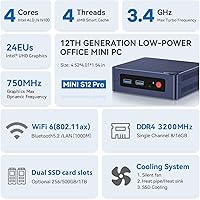
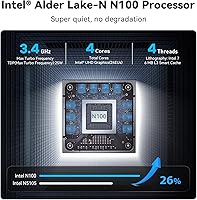
  • Processor: Intel N100 (Alder Lake-N), 4 cores, 4 threads, base clock 800MHz, max turbo up to 3.4GHz, built on Intel 7 process node.
  • TDP: The N100 operates at a standard 6W thermal design power, enabling near-silent cooling and very low idle energy consumption.
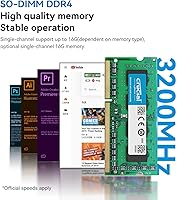
  • RAM: 16GB DDR4-3200MHz SODIMM installed in a single slot, with a maximum supported capacity of 16GB.
  • Primary Storage: 500GB M.2 2280 SATA3 SSD handles the operating system and primary application storage out of the box.
  • Secondary Storage: One internal 2.5-inch SATA III bay supports an additional HDD or SSD up to 2TB for expanded local storage.
  • Graphics: Intel UHD Graphics with 24 Execution Units (integrated), supporting hardware AV1 decode and driving up to two 4K displays simultaneously.
  • Display Output: Two HDMI 2.0 ports support dual-monitor configurations at up to 4K resolution at 60Hz each.
  • Wireless: WiFi 6 (802.11ax, up to 600Mbps) and Bluetooth 5.2 are built in for cable-free peripheral and network connectivity.
  • Ethernet: One Gigabit Ethernet (1000Mbps) LAN port provides a reliable wired network connection for office or server use.
  • USB Ports: Four USB 3.2 Gen 2 Type-A ports deliver up to 10Gbps transfer speeds each, covering most peripheral needs without a hub.
  • Audio: One 3.5mm combination headphone and microphone jack is located on the chassis for direct audio peripheral connection.
  • Operating System: Windows 11 Home is pre-installed and activated, so the machine is ready to use immediately after first-time setup.
  • Dimensions: The unit measures 4.52 x 4.01 x 1.54 inches, making it compact enough to mount behind a monitor using a VESA adapter.
  • Weight: The machine weighs 1.43 pounds, making it easy to reposition or mount without additional structural considerations.
  • Chassis: The enclosure uses a plastic shell with a deep laser-engraved texture that resists surface scratches and reduces visible fingerprints.
  • Special Features: BIOS-level support for Auto Power On, Wake-on-LAN, and PXE network boot is included for headless and server-oriented deployments.
  • Certifications: The unit carries CE, EMC, FCC, and RoHS certifications, confirming compliance with major international safety and environmental standards.
  • Warranty: Beelink provides a one-year limited warranty backed by a 24/7 after-sales support team for product-related issues.

Related Reviews

Beelink Mini S13 Pro N150 16GB/500GB
82%
83%
Everyday Performance
78%
Build Quality & Design
61%
Thermal Management
86%
RAM & Multitasking
74%
Storage Speed & Expandability
More
Beelink SEI Mini PC (Ryzen 5500U, 16GB/500GB)
81%
84%
Everyday Performance
61%
RAM Configuration
91%
Display & Multi-Monitor Support
73%
Cooling & Thermal Management
88%
Networking
More
Beelink SER3 Mini PC, AMD Ryzen 3 3200U, 16GB RAM, 500GB SSD
84%
85%
Performance
92%
Value for Money
88%
Build Quality
94%
Compact Design
90%
Ease of Setup
More
Beelink EQi12 Mini PC (i5-1235U, 16GB, 500GB)
80%
83%
Processing Performance
67%
Thermal Management
79%
RAM & Expandability
86%
Storage Speed & Flexibility
88%
Display Output
More
Beelink EQI12 Mini PC (i3-1220P, 16GB/500GB)
81%
84%
Everyday Performance
89%
Boot & Load Speed
71%
Thermal Management & Cooling
86%
Display & Dual Monitor Support
82%
Build Quality & Design
More
Beelink EQI13 PRO Mini PC, Intel Core i7-13620H, 32GB RAM, 500GB SSD
87%
88%
Performance
91%
Multitasking
84%
Build Quality
93%
Connectivity
89%
Display Quality
More
Beelink Mini S12 Mini PC, Intel 12th Gen, 8GB RAM, 256GB SSD
86%
87%
Performance for Everyday Tasks
92%
Energy Efficiency
82%
Multitasking Capability
89%
Setup and Installation
85%
Display Quality
More
ALLDOCUBE iPlay 70 mini Pro 16GB + 256GB
83%
88%
Performance
84%
Battery Life
86%
Display Quality
91%
Storage Capacity
82%
Connectivity (Wi-Fi/4G/Bluetooth)
More
Beelink EQ14 Mini PC (N150, 16GB, 1TB)
74%
74%
Everyday Performance
61%
RAM & Memory Configuration
83%
Storage & Expandability
91%
Connectivity & Networking
79%
Display Output
More
PELADN WI-6 Mini PC (N100, 16GB DDR4, 512GB SSD)
79%
88%
Value for Money
83%
Performance for Daily Tasks
91%
Triple-Display Support
74%
Build Quality & Design
71%
Setup & Out-of-Box Experience
More

FAQ

Windows 11 Home comes pre-installed and fully activated straight from the factory. You do not need to purchase a separate license — just plug it in, complete the initial Windows setup wizard, and you are ready to go.

Yes. The Beelink Mini S12 Pro (N100, 16GB, 500GB) has two HDMI 2.0 ports, and both support 4K output at 60Hz simultaneously. This makes it a practical choice for dual-monitor home office setups or extended desktop media configurations.
The machine ships with 16GB already installed in a single SODIMM slot, which is also the maximum supported capacity. There is no room to expand beyond 16GB, and the single slot also means the system runs in single-channel mode rather than dual-channel.

There is a secondary 2.5-inch SATA III bay inside the chassis where you can add a standard laptop-style HDD or SSD up to 2TB. Combined with the primary M.2 SSD, that gives you two internal drives total — useful for media storage or light NAS setups.

Under typical workloads — web browsing, document editing, video calls — the fan is close to inaudible. Most users describe it as whisper-quiet during daily use. The fan does spin up noticeably during sustained CPU-heavy tasks, but returns to near-silence quickly once the load drops.

It is actually one of the better choices for exactly that use case. The 6W processor means it costs very little to run around the clock, and the BIOS supports Wake-on-LAN, Auto Power On, and PXE boot — features that matter when running headless. The secondary storage bay adds extra practical value for NAS deployments.

Yes, 4K playback on streaming platforms runs smoothly. The N100 includes hardware AV1 decode support, which is the codec increasingly used by YouTube and other platforms, meaning the CPU is not doing heavy lifting during playback. This machine works well as a low-power media center PC.

Unfortunately, there is no USB-C port on this compact desktop. All four USB ports are standard Type-A connectors. If your monitor or accessories rely on USB-C or Thunderbolt, you would need adapters or a separate dock, which is worth factoring into your decision.

Very casual gaming on older or less demanding titles is possible, but you should set expectations accordingly. The integrated Intel UHD Graphics with 24 EUs can manage some lighter indie games and older titles at reduced settings, but this machine was not designed for gaming and will struggle with anything graphically demanding from the past few years.

A number of buyers have mentioned finding some third-party software pre-loaded on the machine out of the box. Nothing harmful — but enough to warrant spending a few minutes uninstalling unwanted apps before settling in. Running a clean Windows setup or simply doing a manual review of installed programs shortly after unboxing is a good habit with most mini PCs in this category.