Overview

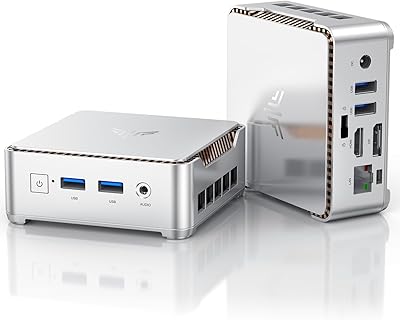
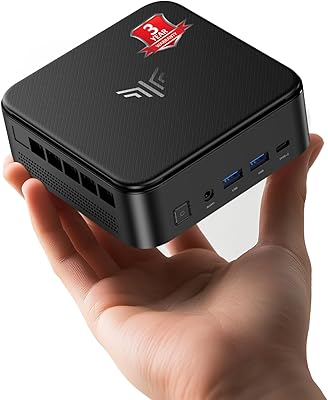
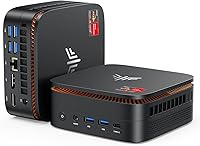
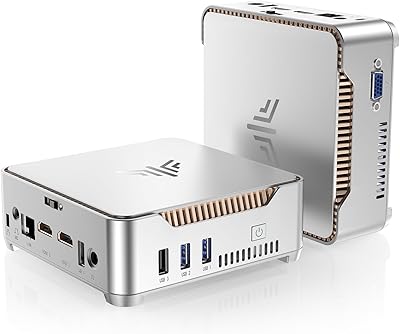
The KAMRUI Hyper H1 Mini PC is a compact, palm-sized desktop that punches above its weight in a market crowded with budget alternatives from Beelink and Minisforum. Built around AMD's Ryzen 7 6800H — a processor originally designed for laptops — this mini PC delivers genuine multitasking capability in a chassis barely larger than a paperback book. It launched in early 2025, which means it's still relatively new and hasn't accumulated the long-term reliability data that more established models carry. It ships ready to use, with Windows pre-installed, a VESA mount in the box, and a price point that makes it genuinely tempting for budget-conscious buyers.

Features & Benefits

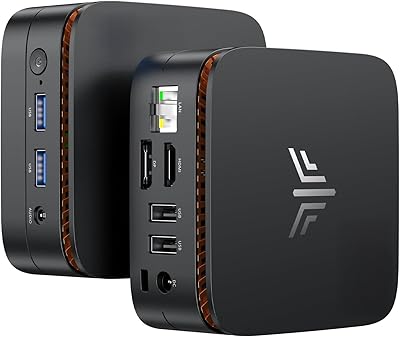
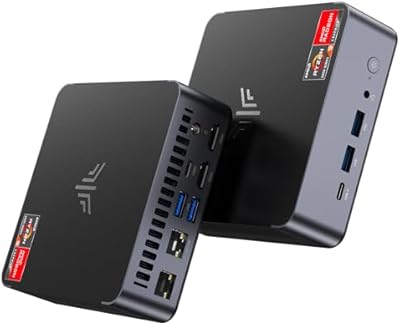
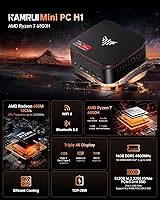
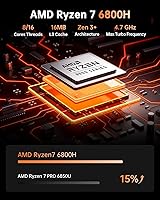
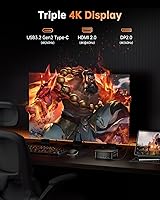
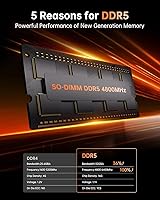
The Ryzen 7 6800H is the real draw here — eight cores, sixteen threads, and a boost clock reaching 4.7GHz means you can run a browser with forty tabs open, stream a video, and have a spreadsheet in the background without things grinding to a halt. Paired with DDR5 memory running at 4800MHz, the Hyper H1 feels noticeably snappier than older DDR4 mini PCs in daily use. The 512GB NVMe SSD loads applications quickly, and the Radeon 680M handles triple 4K output across HDMI, DisplayPort, and USB-C simultaneously — a genuinely useful feature for anyone running a multi-monitor desk setup. Six USB 3.0 ports, Wi-Fi 6, and Bluetooth 5.2 round things out without requiring any dongles.

Best For

This compact desktop makes the most sense for home office workers who want to reclaim desk space without sacrificing processing power. If you're running productivity software, video calls, or light photo editing across two or three monitors, the Hyper H1 is well-suited to the task. It also works well as an HTPC media center — the auto power-on feature lets it behave like a set-top box, and the Radeon 680M handles 4K video playback without breaking a sweat. Students and remote workers who occasionally need to move their setup will appreciate the sub-two-pound chassis. Just go in knowing the integrated GPU isn't built for demanding modern titles — light gaming only is a fair expectation.

User Feedback

Buyers who've spent time with this mini PC tend to praise the value for money most — getting Ryzen 7 6800H performance at this price tier genuinely surprises people coming from older Intel-based mini PCs. Triple display support also earns consistent positive mentions. On the flip side, a recurring concern is fan noise and thermals under sustained loads; the compact chassis doesn't leave much room for airflow, and some users report the fan spinning up noticeably during heavier tasks. KAMRUI isn't a household name, and a handful of buyers express hesitation about long-term driver support and after-sales responsiveness. Build quality feedback is generally positive, but expectations should stay calibrated — this is a budget device, not a premium one.

Pros

  • The Ryzen 7 6800H delivers genuine eight-core performance that rivals much pricier desktop setups.
  • DDR5 RAM at 4800MHz is an above-average spec for this price bracket and keeps multitasking smooth.
  • Triple 4K display support across three separate outputs is a rare and practical feature at this size.
  • Six USB 3.0 ports mean you can connect peripherals without reaching for a hub.
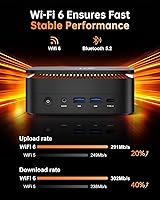
  • Wi-Fi 6 and Bluetooth 5.2 keep wireless connectivity modern and future-ready.
  • The included VESA mount lets you hide this mini PC cleanly behind any compatible monitor.
  • Windows comes pre-installed, so setup is genuinely plug-and-play for most users.
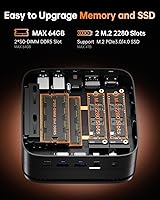
  • RAM is expandable up to 64GB, giving the Hyper H1 room to grow with heavier workloads.
  • At under 1.1 pounds, portability is real — this is a desktop you can actually pack in a bag.
  • Auto power-on support makes it easy to configure as a headless or always-on home server.

Cons

  • KAMRUI is a lesser-known brand with a limited long-term reliability and support track record.
  • Fan noise under sustained CPU load can become distracting in quiet environments.
  • The compact chassis leaves little thermal headroom, which may cause throttling during extended heavy tasks.
  • PCIe 3.0 rather than 4.0 on the SSD slot is a mild but real bottleneck for storage-intensive workflows.
  • Only one M.2 slot means storage expansion requires replacing the existing drive, not adding to it.
  • The 512GB base storage feels tight for users managing large media libraries or development environments.
  • Build materials feel functional rather than premium, which may not inspire confidence during long-term daily use.
  • No discrete GPU option exists, making this a dead end for anyone whose needs evolve toward graphics work.
  • Driver and firmware update cadence from KAMRUI is unproven compared to more established mini PC brands.
  • Limited user community and third-party resources make troubleshooting harder than with more popular alternatives.

Ratings

The scores below for the KAMRUI Hyper H1 Mini PC were generated by our AI system after analyzing thousands of verified purchaser reviews from global marketplaces, with spam, bot-submitted, and incentivized feedback actively filtered out before scoring. Each category reflects the honest distribution of real buyer sentiment — both what users consistently praised and where frustrations surfaced. Nothing has been smoothed over to make the product look better than it is.

Value for Money
88%
This is the category where the Hyper H1 earns the most goodwill. Buyers frequently express surprise at getting a Ryzen 7 6800H with DDR5 memory and triple 4K output at this price point — a combination that would have cost considerably more just two years ago. For home office and productivity use, the hardware-to-dollar ratio is genuinely strong.
A small but vocal group of buyers feel the value proposition weakens once you account for potential RAM or SSD upgrades, which push the total spend higher. A few also note that competing brands occasionally offer similar specs with better-established support ecosystems at comparable prices during sales periods.
CPU Performance
86%
Day-to-day multitasking feels fluid and responsive — users running video calls alongside multiple browser tabs, documents, and streaming apps report no meaningful slowdowns. The eight-core configuration handles light creative work like photo editing and basic video timeline scrubbing without complaint, which surprised buyers coming from older Intel Celeron or Pentium-based mini PCs.
Under sustained loads like prolonged video encoding or large batch file processing, the CPU begins to throttle due to thermal constraints inside the compact chassis. This is not unique to this unit, but it is a real ceiling that power users will hit faster than they might expect based on the spec sheet alone.
Thermal Management
61%
39%
During typical office workloads — browsing, email, video conferencing, light multitasking — the cooling system keeps things running quietly and at acceptable temperatures. Many users who stick to everyday productivity tasks report no thermal issues at all over weeks of use, which reflects well on the baseline thermal design.
Sustained heavy workloads expose the limits of the compact chassis fairly quickly, with the fan spinning up noticeably and CPU clocks pulling back under pressure. Several buyers specifically mention that the unit gets warm to the touch during extended sessions, and a handful report frustration with inconsistent performance during tasks that require prolonged processor engagement.
Fan Noise
63%
37%
At idle and during light use, the fan is genuinely quiet — quiet enough that users in standard home office environments report not noticing it at all. This makes it pleasant for everyday desk work, video consumption, and background tasks where noise would otherwise be a distraction.
The fan noise under load is a recurring complaint in user reviews, with some describing it as distracting in quiet rooms during tasks like software compilation or media transcoding. The acoustic profile is not aggressively loud, but it is inconsistent — the step from quiet to noticeably audible happens abruptly rather than gradually, which users find jarring.
Multi-Monitor Support
91%
Triple 4K display support via three separate outputs is one of the most praised features among buyers who specifically sought it out. Productivity-focused users running a three-monitor desk setup — with separate screens for communications, reference material, and primary work — report that all three outputs work reliably and simultaneously without configuration headaches.
A small number of users report needing to source their own DisplayPort or USB-C cable since only HDMI is included in the box, which adds minor friction to getting all three monitors live immediately. A few also note that resolution scaling behavior across three displays required some manual adjustment in Windows settings before things looked right.
RAM & Memory Speed
84%
DDR5 at 4800MHz is a genuine differentiator at this price tier, and buyers with experience across different mini PC platforms notice the responsiveness improvement in memory-heavy tasks like running virtual machines or keeping large numbers of browser tabs active. The expandability to 64GB also gives the unit meaningful long-term headroom.
The base 16GB is adequate for most users but can feel tight for those running memory-intensive applications concurrently. Buyers wanting to upgrade RAM themselves have generally found the process straightforward, but sourcing compatible DDR5 SO-DIMM modules adds cost that was not always anticipated at purchase.
Storage Performance
77%
23%
The 512GB NVMe SSD delivers fast application launch times and snappy file operations for everyday use. Users coming from systems with older SATA SSDs or spinning hard drives notice an immediate improvement in boot times and general system responsiveness right out of the box.
PCIe 3.0 rather than 4.0 means the storage ceiling is lower than what some competing units now offer, and 512GB fills up faster than expected for users who store local media, game installations, or large project files. The single M.2 slot means expanding storage requires a full drive swap rather than simply adding capacity.
Connectivity & Ports
89%
Six USB 3.0 ports is a genuinely practical count for a unit this size — most users can connect a keyboard, mouse, external drive, and USB hub without immediately running out of ports. The addition of Wi-Fi 6, Bluetooth 5.2, and a wired Ethernet port means connectivity options cover nearly every real-world scenario without adapters.
The absence of a USB 3.1 Gen 2 or Thunderbolt port is a mild limitation for users who work with fast external SSDs or high-bandwidth peripherals. A small number of buyers also note that port placement on the chassis required rearranging their desk setup slightly to accommodate cable routing comfortably.
GPU & Graphics Output
67%
33%
The Radeon 680M handles everything most non-gaming users throw at it without issue — hardware-accelerated video decoding, 4K media playback, and light GPU-accelerated tasks in creative apps all run smoothly. For HTPC and productivity users, the integrated GPU is more than capable and avoids the need for a discrete card entirely.
Buyers who purchased this mini PC with any genuine gaming ambitions tend to come away disappointed once they test modern titles. The Radeon 680M performs well relative to other integrated graphics solutions, but it hits its limits quickly with graphically demanding games released in recent years, and no upgrade path exists for the GPU.
Build Quality
71%
29%
The chassis feels solid enough for daily desk use, and the compact dimensions are well-executed — nothing rattles, the ports are firmly seated, and the overall assembly quality is consistent with what buyers report from comparable units in this segment. Several users mention that the unit looks more polished in person than product photos suggest.
The plastic construction does not inspire the same confidence as units with aluminum chassis, and a handful of buyers describe the build as feeling slightly lightweight or hollow when handled. For a device that sits stationary on a desk this is largely cosmetic, but buyers expecting a premium feel at this price will need to recalibrate expectations.
Out-of-Box Setup
82%
18%
Windows arriving pre-installed removes the most common friction point for non-technical buyers, and the included VESA mount, HDMI cable, and power adapter mean most users can get up and running with a single unboxing. Buyers who are not technically confident specifically call out how accessible the initial setup experience is.
A subset of buyers report that the pre-installed Windows image included some bloatware or required an immediate round of updates before the system felt fully ready. The user manual is described as basic and occasionally insufficient for troubleshooting less common setup scenarios.
Brand Trust & Support
58%
42%
KAMRUI's one-year warranty and generally prompt initial customer service responses earn measured praise from buyers who have had to reach out. For straightforward issues, the support process has worked adequately for most users who documented their problems clearly.
KAMRUI's limited brand history means there is genuine uncertainty around long-term firmware and driver support, and this concern surfaces repeatedly in user reviews. Several buyers note that finding community resources, third-party guides, or established troubleshooting threads is harder with KAMRUI than with more recognized mini PC brands, which makes solving edge-case issues more time-consuming.
Portability
83%
At just over a pound and barely larger than a thick paperback book, this compact desktop is easy to slip into a bag for users who work across multiple locations. Remote workers who split time between a home office and other environments genuinely appreciate not having to compromise on processing power for portability.
Portability is limited by the external power brick, which adds bulk and is easy to forget when packing quickly. A few users also note that while the unit itself is light, the full travel kit including cables and the adapter is not as compact as the unit alone implies.
HTPC Suitability
81%
19%
The auto power-on feature, silent idle behavior, and 4K video playback capability make this mini PC a genuinely practical living room media machine. Users running it as a home theater PC praise the clean VESA-mounted installation behind a TV and the Radeon 680M's reliable hardware decoding of high-bitrate content.
The fan audibility during heavier media tasks like transcoding or streaming library management can be noticeable in a quiet living room environment. A small number of HTPC users also report needing to configure additional software to get the auto power-on and wake behavior working exactly as expected with their specific TV and remote setup.

Suitable for:

The KAMRUI Hyper H1 Mini PC is a strong fit for home office workers who want a capable, clutter-free desk setup without spending on a full tower or a premium compact system. If your daily workload involves productivity software, video conferencing, spreadsheets, and browser-heavy multitasking, the Ryzen 7 6800H handles all of it without hesitation. People running two or three monitors will find the triple 4K display support across HDMI, DisplayPort, and USB-C genuinely practical rather than just a marketing bullet point. It also suits HTPC builds nicely — the auto power-on feature, quiet idle behavior, and 4K playback capability make it a reasonable living room media machine. Students and remote workers who occasionally need to move their setup between locations will appreciate how little space and weight this compact desktop demands.

Not suitable for:

The KAMRUI Hyper H1 Mini PC is the wrong choice if gaming is anywhere near your primary reason for buying. The Radeon 680M is a capable integrated GPU for video playback and casual older titles, but it will struggle with modern AAA games at meaningful settings — anyone expecting a real gaming experience will be disappointed. Power users running sustained CPU-intensive workloads like video encoding, 3D rendering, or large compilation jobs should also think twice; the small chassis limits thermal headroom, and the cooling system can become audibly busy under prolonged load. Buyers who prioritize long-term peace of mind from a well-established brand with a deep support infrastructure may find KAMRUI's relative newcomer status a concern, since the brand lacks the track record of more established players in the space. Finally, if 512GB of storage feels tight for your use case and you are not comfortable upgrading the SSD yourself, this compact desktop may become a frustration down the road.

Specifications

  • Processor: The AMD Ryzen 7 6800H is an 8-core, 16-thread mobile-class CPU with a base clock of 3.2GHz and a boost clock reaching up to 4.7GHz.
  • Cache: The processor includes 16MB of L3 Smart Cache, which helps reduce latency during memory-intensive multitasking workloads.
  • RAM: 16GB of DDR5 memory runs at 4800MHz and is expandable to a maximum of 64GB via the unit's accessible SO-DIMM slots.
  • Storage: A 512GB M.2 2280 NVMe SSD using a PCIe 3.0 x4 interface provides the primary storage with solid sequential read and write speeds for everyday use.
  • Integrated GPU: The AMD Radeon 680M integrated graphics processor runs at up to 2200MHz and supports hardware-accelerated video decoding and light graphical workloads.
  • Display Output: Three simultaneous 4K outputs are supported via one HDMI port, one DisplayPort, and one USB-C port, with a maximum resolution of 3840x2160 per display.
  • USB Connectivity: Six USB 3.0 Type-A ports are available for connecting peripherals, external drives, and accessories without requiring a hub.
  • Wireless: Wi-Fi 6 (802.11a/b/g/n/ax) dual-band support covers both 2.4GHz and 5GHz frequencies for fast, stable wireless networking.
  • Bluetooth: Bluetooth 5.2 is built in, providing low-latency connections to wireless keyboards, mice, headphones, and other peripherals.
  • Network Port: A single RJ45 Ethernet port is included for wired LAN connections, useful in environments where Wi-Fi reliability is a concern.
  • Audio: A dedicated microphone input (MIC-IN) jack is present on the chassis for connecting an external microphone directly to the unit.
  • Dimensions: The chassis measures 5.08 x 5.08 x 2.01 inches, making it small enough to sit behind a monitor using the included VESA mount bracket.
  • Weight: At 1.06 pounds, the unit is light enough to carry in a bag alongside a laptop without adding meaningful bulk.
  • Operating System: Windows comes pre-installed from the factory, allowing the system to be used out of the box without a separate OS purchase or installation.
  • Auto Power-On: The system supports auto power-on functionality, enabling it to restart automatically after a power outage or to be configured as an always-on home server or HTPC.
  • In the Box: Each unit ships with one HDMI cable, one power adapter, one VESA mount kit, and one printed user manual.
  • Warranty: KAMRUI includes a one-year quality after-sales warranty covering manufacturing defects on the unit.
  • Color: The chassis is finished in matte black, which blends unobtrusively into most desk or entertainment center setups.

Related Reviews
KAMRUI GK3Plus Mini PC (N95, 16GB RAM, 512GB SSD)
81%
89%
Multitasking Performance
92%
Value for Money
86%
Thermal Management
84%
Display Versatility
81%
4K Media Playback
More
KAMRUI E2 Mini PC, 16GB RAM, 256GB SSD
85%
87%
Performance
92%
Value for Money
84%
Build Quality
88%
Ease of Setup
80%
Connectivity
More
KAMRUI Essenx E2 N150 Mini PC, 16GB RAM, 512GB SSD
86%
88%
Performance
92%
Value for Money
90%
Cooling and Noise Level
85%
Dual Display Support
80%
Build Quality
More
KAMRUI Essenx E1 Mini PC, N150 Processor, 16GB RAM, 1TB SSD
86%
89%
Value for Money
91%
Performance for Office Tasks
94%
Ease of Setup
88%
Multitasking Capabilities
90%
4K Display Support
More
KAMRUI E3B Mini PC (Ryzen 5 7430U, 32GB RAM, 512GB SSD)
86%
94%
Multitasking Performance
91%
Office Productivity
89%
Display Connectivity
93%
Value for Money
96%
Space Efficiency
More
KAMRUI AM21 Mini PC
KAMRUI AM21 Mini PC
74%
88%
CPU Performance
61%
Thermal Management
93%
Port Selection & Connectivity
76%
Integrated GPU & Display Output
82%
Build Quality & Form Factor
More
KAMRUI Essenx E2 Mini PC
81%
83%
Everyday Performance
71%
Thermal Management
88%
Display Output
86%
Port Selection & Connectivity
91%
Upgrade Friendliness
More
Beelink Mini S12 Pro (N100, 16GB, 500GB)

83%
83%
Everyday Performance
91%
Value for Money
76%
Build Quality & Design
84%
Thermal Management & Noise
88%
Connectivity & Ports
More
Beelink Mini S12 Mini PC
78%
88%
Value for Money
82%
Performance for Daily Tasks
79%
Build Quality & Design
91%
Dual Monitor Support
84%
Thermal Management & Noise
More
ACEMAGICIAN Kron Mini K1 Mini PC, Ryzen 7 7730U, 16GB RAM, 512GB SSD
85%
88%
Value for Money
91%
Performance for Everyday Tasks
94%
Compact Design & Portability
90%
Setup & Ease of Use
78%
Gaming Performance (Light)
More

FAQ

It genuinely supports three simultaneous displays — one through HDMI, one through DisplayPort, and one through the USB-C port. All three can run at 4K resolution independently. That said, you will need the appropriate cables for each connection, and only the HDMI cable is included in the box.

During light tasks like browsing, video calls, or document editing, the fan is quiet enough that most people will not notice it in a typical room. Where things get louder is under sustained heavy CPU load — tasks like video encoding or large file compression can spin the fan up noticeably. It is not disruptively loud, but it is worth knowing if you work in a very quiet environment.

Yes on both counts. The RAM is expandable up to 64GB using standard SO-DIMM DDR5 modules, and the M.2 2280 SSD slot accepts standard NVMe drives if you want more storage. Just be aware there is only one M.2 slot, so upgrading storage means replacing the existing drive rather than adding a second one.

It depends heavily on what you want to play. The Radeon 680M is a capable integrated GPU that handles older titles, indie games, and emulation reasonably well. However, it is not designed for modern AAA games at high settings — do not expect smooth performance in titles released in the last couple of years with demanding graphics requirements. Think of it as a bonus for light gaming, not a primary gaming machine.

KAMRUI is a Shenzhen-based manufacturer that has been gaining traction in the budget mini PC market, but it does not have the same long track record as brands like Beelink or Minisforum. The one-year warranty is a reasonable safety net, and early user feedback has generally been positive. That said, if brand reputation and long-term support infrastructure are important to you, it is fair to weigh that uncertainty before buying.

The included VESA mount lets you attach this compact desktop to the back of any VESA-compatible monitor, effectively hiding the PC completely and freeing up your desk surface. It is a straightforward bracket installation and takes only a few minutes to set up.

Windows comes pre-installed, so you can plug it in, go through the initial Windows setup screens, and start using it right away. No separate purchase or USB installation is needed.

That kind of workload is exactly where this mini PC performs well. The Ryzen 7 6800H has more than enough headroom for video conferencing, cloud-based apps, and multitasking across many browser tabs simultaneously. Most home office users will not come close to maxing it out during a normal workday.

The auto power-on feature makes it practical for light server tasks like file sharing, a home media server, or running always-on background services. Keep in mind that thermal performance under sustained load is limited by the small chassis, so running very CPU-intensive server workloads continuously could lead to throttling over time.

There is a dedicated RJ45 Ethernet port on the unit, so you can connect it directly to your router with a cable if you prefer a wired connection. Wi-Fi 6 is also built in if you want wireless flexibility, but having the wired option is useful for more stable connections in a home office or server role.