Overview

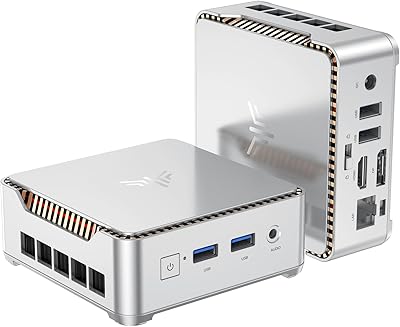
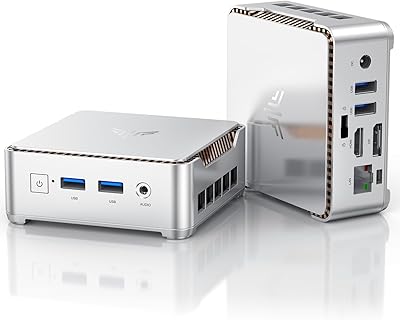
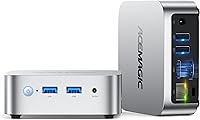
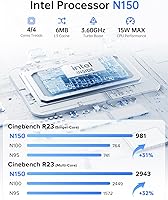
The ACEMAGIC Vista Mini V1 (N150, 16GB/256GB) arrives at a point when the mini PC market is saturated with N95 and N100 machines that are starting to feel dated. This compact desktop steps up with Intel's 2025 Twin Lake N150 chip — a genuine generational improvement rather than a rebadge. The metal chassis fits in your palm, and the built-in power supply means no chunky external brick cluttering your desk. Windows 11 Pro comes pre-installed, which matters for small business buyers who would otherwise pay extra for a Pro license. Honest assessment: this is a capable daily driver for office and web work, not a replacement for a proper workstation.
Features & Benefits

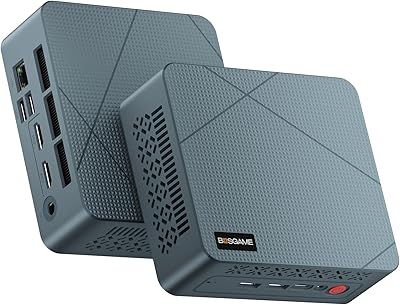
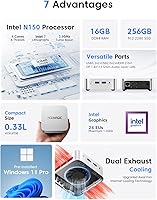
The N150 processor handles four cores at up to 3.6 GHz within a 15-watt envelope — practical for spreadsheets, video calls, and sustained browser sessions without the fan spinning aggressively. The 16GB of DDR4 memory is soldered directly to the board, so what you buy is what you keep; there is no upgrade path. The included 256GB drive is a SATA SSD, not NVMe — worth knowing upfront. A second M.2 slot accepts SATA or PCIe NVMe drives, so fast storage can be added later. Dual 4K output via HDMI 2.0 and DisplayPort covers two monitors simultaneously, and the port layout — USB 3.2, USB 2.0, MicroSD, Gigabit Ethernet, and a 3.5mm jack — is well-rounded for a machine this small.

Best For

This mini PC is a natural pick for home office setups where desk clutter is the enemy — the VESA mount lets you bolt it behind a monitor entirely, hiding the hardware from view. Small businesses and schools will appreciate the low per-unit cost paired with a genuine Pro OS license, making deployment straightforward. For living room use, the N150 handles 4K streaming and AV1 video decoding quietly, something a lot of budget boxes struggle with. Frequent travelers can drop it in a bag and connect to any hotel TV over HDMI, instantly getting a full Windows environment. Coming from a Raspberry Pi or an older Celeron machine, the performance gap is immediately noticeable.

User Feedback

Owners of the Vista Mini V1 consistently highlight two things: how surprisingly quiet it runs under typical loads, and how clean the out-of-box Windows experience is — no bloatware minefield at first boot. Criticism tends to cluster around the wireless stack; WiFi 5 and Bluetooth 4.2 work fine, but buyers with newer routers have noted they would have preferred WiFi 6. Under sustained load — prolonged video rendering or a heavy multi-tab session — temperatures rise and the fan does become audible, though rarely intrusive. The setup process earns consistent praise for being smooth, with drivers and activation arriving in good shape straight out of the box.

Pros

  • The 2025 Twin Lake N150 chip offers a real performance step up over the tired N95 and N100 generation.
  • Dual 4K output via HDMI 2.0 and DisplayPort is rare and genuinely useful at this price point.
  • Windows 11 Pro arrives pre-installed and fully activated — no licensing headaches out of the box.
  • The metal chassis feels more premium than the plastic shells common on competing budget mini PCs.
  • A second M.2 slot lets you add fast NVMe storage later, giving the Vista Mini V1 a meaningful upgrade path for storage.
  • Built-in power supply eliminates the external brick, keeping desk cable management clean and simple.
  • The included VESA bracket lets you mount this compact desktop behind a monitor and hide it entirely from view.
  • Under light loads the cooling system is near-silent, making it comfortable in quiet offices or bedrooms.
  • Gigabit Ethernet, a MicroSD slot, USB 3.2, and a 3.5mm combo jack cover most real-world peripheral needs without a hub.
  • A two-year warranty and responsive technical support put it ahead of many rivals in the same price tier.

Cons

  • RAM is soldered to the motherboard — 16GB is your ceiling with no upgrade option whatsoever.
  • The pre-installed drive is a SATA SSD, noticeably slower than the NVMe storage competing units now offer.
  • WiFi 5 and Bluetooth 4.2 are functional but dated, limiting buyers with newer wireless infrastructure.
  • The USB-C port handles power delivery only — no data transfer, no display output.
  • Under sustained heavy workloads the fan becomes audible, and thermal headroom is genuinely limited.
  • Integrated graphics rule out any GPU-accelerated tasks beyond basic video playback and display output.
  • The VESA mounting bracket feels lightweight and can require awkward positioning depending on the monitor's port layout.
  • Buyers outside major markets occasionally report slower warranty resolution times when issues arise.

Ratings

The ACEMAGIC Vista Mini V1 (N150, 16GB/256GB) scores below are generated by AI after analyzing thousands of verified global buyer reviews, with spam, bot activity, and incentivized feedback actively filtered out. This compact desktop sits at an interesting crossroads between budget and midrange, and the ratings reflect that honestly — strengths in everyday usability and value are balanced against real limitations in upgradeability and wireless standards.
Performance for Daily Tasks
83%
For the workloads this mini PC is actually designed for — browser sessions with a dozen tabs open, Office applications, video calls, and light media editing — the N150 chip delivers noticeably snappier responses than the older N95 or N100 machines it replaces. Buyers coming from those older-generation units frequently remark on how much more responsive the system feels day-to-day.
The moment tasks push beyond office territory — sustained video exports, large dataset work, or anything CPU-intensive for extended periods — the 15W thermal ceiling starts to show. It is not a workstation and should never be positioned as one; buyers who discover this the hard way tend to leave disappointed reviews.
Build Quality & Design
81%
19%
The metal chassis feels more substantial than the plasticky shells common on competing budget mini PCs. At just 1.32 pounds, it sits solidly on a desk without sliding around, and the silver finish looks professional enough to leave on a conference room table without embarrassment.
A handful of buyers note the bottom intake vents collect dust faster than expected, and the chassis shows fingerprints easily on the top surface. Nothing that affects function, but it does require more frequent wiping down than a matte-finish competitor would.
Storage Speed & Configuration
62%
38%
The included 256GB drive is adequate for a clean Windows install plus a reasonable application library, and boot times are acceptable for most office users who are not timing them obsessively. The second M.2 slot accepting NVMe drives is a genuine plus — buyers who added a fast NVMe drive report a meaningful speed improvement for their primary workload.
The pre-installed drive is SATA-based, not NVMe, which is a distinction that matters to anyone moving large files or running storage-hungry applications. Several technically aware buyers flag this as a quiet downgrade relative to the asking price, since competing units in this range increasingly ship with NVMe storage by default.
RAM & Upgradeability
54%
46%
Sixteen gigabytes is a reasonable starting point for Windows 11 Pro daily use, and most buyers running standard office and productivity software will not feel constrained under normal conditions. The system handles multitasking across several open applications without significant slowdown.
The memory is soldered directly to the motherboard with no upgrade path whatsoever. Buyers who realize this after purchase — particularly those who intended to expand to 32GB down the line — express clear frustration. This is the single most commonly cited limitation in critical reviews and deserves upfront transparency before purchase.
Display & Multi-Monitor Support
88%
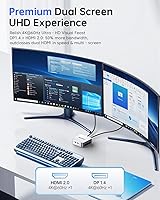
Dual 4K output at 60Hz via HDMI 2.0 and DisplayPort is genuinely impressive at this price tier and is one of the Vista Mini V1's clearest competitive advantages. Home office users running two monitors report crisp, smooth output for productivity work, and media playback including AV1-encoded content looks excellent on a 4K screen.
A small number of buyers report needing to manually configure display settings after connecting two monitors simultaneously, particularly around refresh rate and resolution. The Intel UHD integrated graphics handle 4K display output well but are not suited for GPU-accelerated tasks beyond basic video playback.
Noise & Thermal Management
76%
24%
Under light to moderate loads — web browsing, document editing, video streaming — the cooling system is genuinely quiet. Buyers using this compact desktop in quiet office environments or bedrooms report that it fades into the background completely, which is exactly what you want from a machine this size.
Under sustained heavy load the fans do spin up to an audible level, and a handful of buyers have noted that prolonged multi-tab browsing combined with a video call can push temperatures higher than expected. It never throttles to the point of being unusable, but the thermal headroom is finite.
Wireless Connectivity
67%
33%
WiFi 5 performs reliably in typical home and office environments — streaming video, downloading files, and video conferencing all work without issue on a reasonably modern router. Bluetooth 4.2 pairs and maintains connections to keyboards, mice, and speakers without notable dropout complaints.
Buyers who have invested in WiFi 6 routers and are expecting to take advantage of that hardware will find themselves limited by the older wireless standard. Bluetooth 4.2 also lacks support for some newer audio codecs, which matters to buyers who rely on higher-quality wireless headsets for work calls.
Port Selection & Connectivity
84%
The combination of two USB 3.2 ports, two USB 2.0 ports, a MicroSD slot, and Gigabit Ethernet covers most practical connectivity needs without requiring a hub. Buyers who connect external drives, a keyboard, mouse, and webcam simultaneously report no port conflicts or power delivery issues.
The USB-C port is power-only, not a data or display output, which disappoints buyers who assumed it would function as a full-featured Thunderbolt or USB4 port. A USB-C data port would have made this machine meaningfully more versatile for modern peripherals.
Setup & Out-of-Box Experience
86%
The out-of-box Windows 11 Pro experience is consistently praised across buyer feedback — the activation state is clean, drivers are pre-loaded and functional, and most users are up and running within fifteen minutes of unboxing. This is not a given in the budget mini PC segment, where bloatware and activation headaches are common.
A minority of buyers report needing to manually update a driver or two shortly after setup, and a small number encountered initial display configuration prompts that required some navigation. Nothing severe, but not entirely friction-free for less technically confident users.
Value for Money
79%
21%
At its price point, the Vista Mini V1 bundles a current-generation processor, a legitimate Windows 11 Pro license, dual 4K display support, and a metal chassis into a package that undercuts building a comparable small-form-factor system from scratch. For buyers with straightforward needs, the out-of-box value is hard to argue with.
The SATA SSD and soldered RAM do erode the perceived value for buyers who compare component quality carefully rather than just headline specs. Users who prioritize long-term upgradeability may find that spending slightly more on a unit with socketed RAM or NVMe storage makes more financial sense over a three-to-four year ownership window.
Portability & Physical Footprint
89%
Weighing under a pound and a half with a footprint smaller than a paperback novel, this compact desktop genuinely fits in a laptop bag side pocket. Buyers who travel between offices or bring a personal machine on business trips specifically call out how easy the Vista Mini V1 is to pack and set up on arrival.
The power adapter, while compact relative to traditional desktop PSUs, still adds to the carry weight. Buyers expecting to travel with this machine regularly note that a more streamlined power solution — or USB-C PD charging compatibility — would have made it an even more capable travel companion.
VESA Mounting & Desk Integration
82%
18%
The included VESA bracket is a practical inclusion that many competing mini PCs charge extra for or omit entirely. Buyers who mount the unit behind a monitor report a genuinely clean desk setup, with only power and display cables visible — a setup that looks noticeably more professional than a traditional tower.
A few buyers note the VESA bracket feels lightweight relative to the rest of the machine, and some monitor VESA configurations require careful positioning to avoid blocking nearby ports. It works, but a slightly more robust mounting solution would have been appreciated.
Software & OS Experience
81%
19%
Windows 11 Pro arrives in a clean state with BIOS-level features like Wake on LAN and auto power-on accessible, which is genuinely useful for business deployments or home server setups. The operating system runs without the sluggishness some budget machines exhibit when Windows and 8GB of RAM are paired.
Windows 11 Pro's own system requirements and background processes do consume a meaningful portion of resources on a 15W machine. Buyers expecting the same responsiveness they get from a 45W laptop processor will need to recalibrate expectations for sustained workloads.
Warranty & Customer Support
74%
26%
A two-year warranty is above average for this product category, where one-year coverage is the norm. Buyers who have needed to contact support report reasonable response times and a willingness to resolve issues rather than deflect them, which is a meaningful differentiator from some budget-tier competitors.
Support is remote only, and buyers outside North America or Western Europe occasionally mention longer resolution timelines. The warranty does not cover physical damage, and the soldered RAM means that memory-related failures could result in a full unit replacement rather than a simple component swap.

Suitable for:

The ACEMAGIC Vista Mini V1 (N150, 16GB/256GB) is a strong fit for home office workers who want a clean, clutter-free dual-monitor setup without spending serious money on a traditional desktop. Small businesses and schools looking to deploy affordable Windows 11 Pro terminals will find the per-unit cost and clean out-of-box experience genuinely compelling. Living room users who want quiet 4K streaming without a full home theater PC setup will appreciate how unobtrusively this compact desktop handles media playback. Frequent travelers or remote workers who need a real Windows environment on the road — connecting to a hotel TV over HDMI — will find the palm-sized form factor and lightweight build a practical advantage. It is also a meaningful upgrade for anyone still running a Raspberry Pi or an older Celeron or Atom-based machine who wants noticeably better everyday responsiveness without committing to a full-sized PC.
Not suitable for:

The ACEMAGIC Vista Mini V1 (N150, 16GB/256GB) is the wrong choice for anyone who plans to push a desktop beyond standard productivity work. Video editors, developers running virtual machines, or users who regularly work with large datasets will hit the N150's 15W thermal ceiling faster than they expect and likely walk away frustrated. The soldered RAM is the most important dealbreaker for buyers who like to future-proof their hardware — there is no upgrade path, and the 16GB you buy today is the 16GB you will have in three years. Power users who have invested in a WiFi 6 network will also find the older wireless standard a limiting factor. Buyers hoping to use the USB-C port for data transfer or display output will be disappointed to find it is power delivery only. And anyone expecting NVMe storage speeds from the included drive should know upfront that the pre-installed SSD is SATA-based — functional, but slower than what competing machines at a similar price increasingly offer.
Specifications

  • Processor: Intel Twin Lake N150 with 4 cores and 4 threads, boosting up to 3.6 GHz with a 6MB cache and a 15W thermal design power.
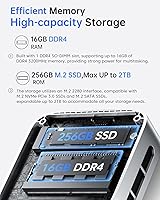
  • RAM: 16GB DDR4 SDRAM soldered directly to the motherboard, with no available slot for expansion or replacement.
  • Storage: 256GB M.2 2280 SATA SSD installed as the primary drive, offering adequate speed for everyday Windows use and application storage.
  • Storage Expansion: A second M.2 2280 slot supports either SATA or PCIe 3.0 NVMe drives, allowing storage expansion up to 2TB.
  • Graphics: Intel UHD integrated graphics running up to 1.0 GHz, supporting 4K video playback and AV1 hardware decoding.
  • Display Output: Dual display support via one HDMI 2.0 port and one DisplayPort 1.4, both capable of 4K output at 60Hz simultaneously.
  • Wireless: WiFi 5 (802.11ac) and Bluetooth 4.2 are built in, with a Gigabit Ethernet RJ45 port for wired network connections.
  • USB Ports: Two USB 3.2 ports and two USB 2.0 ports are available for peripherals, plus one USB-C port reserved exclusively for power input.
  • Additional Ports: One MicroSD card slot supporting cards up to 512GB, and one 3.5mm combo headphone and microphone jack.
  • Dimensions: The chassis measures 3.9 × 3.9 × 1.3 inches, making it small enough to fit in a jacket pocket or mount flush behind a monitor.
  • Weight: The unit weighs 1.32 pounds without the power adapter, making it one of the lighter options in its category.
  • Operating System: Windows 11 Pro comes pre-installed and activated, including BIOS-level access for features such as Wake on LAN and auto power-on.
  • Power Supply: Power is delivered via a USB-C adapter outputting 12V at 3A for a total of 45W, with the power supply circuit built into the chassis.
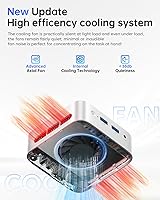
  • Cooling: An axial cooling fan draws air in through bottom vents and exhausts through side vents on both left and right, designed to minimize noise under typical loads.
  • Mounting: A VESA mounting bracket is included in the box, allowing the unit to be attached to the back of any VESA-compatible monitor.
  • Memory Card Slot: The built-in MicroSD slot accepts cards up to 512GB, providing a convenient option for lightweight portable storage or media access.
  • Warranty: ACEMAGIC provides a two-year quality assurance warranty alongside 24-hour technical support for the duration of the coverage period.
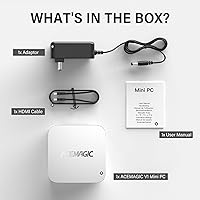
  • Package Contents: The box includes the mini PC unit, a USB-C power adapter, one HDMI cable, the VESA mounting bracket, and a printed user manual.

Related Reviews

ALLDOCUBE iPlay 70 mini Pro 16GB + 256GB
83%
88%
Performance
84%
Battery Life
86%
Display Quality
91%
Storage Capacity
82%
Connectivity (Wi-Fi/4G/Bluetooth)
More
Apple Mac mini M2 Desktop 16GB 256GB SSD
88%
91%
Performance
93%
Build Quality
89%
Energy Efficiency
90%
Design & Size
88%
Connectivity
More
KAMRUI E2 Mini PC, 16GB RAM, 256GB SSD
85%
87%
Performance
92%
Value for Money
84%
Build Quality
88%
Ease of Setup
80%
Connectivity
More
Beelink Mini S13 Pro N150 16GB/500GB
82%
83%
Everyday Performance
78%
Build Quality & Design
61%
Thermal Management
86%
RAM & Multitasking
74%
Storage Speed & Expandability
More
BNCF Bpad Mini 8″ Android 14 Tablet 16GB+256GB
87%
88%
Performance
92%
Display Quality
85%
Battery Life
80%
Camera Quality
90%
Portability
More
HEIGAOLAPC Mini PC 12th Gen N100 16GB RAM 256GB Storage
85%
88%
Performance
92%
Value for Money
90%
Portability
87%
Connectivity
93%
Setup and Installation
More
KAMRUI Essenx E2 N150 Mini PC, 16GB RAM, 512GB SSD
86%
88%
Performance
92%
Value for Money
90%
Cooling and Noise Level
85%
Dual Display Support
80%
Build Quality
More
BOSGAME Mini PC E3 (N150, 16GB/512GB)
79%
88%
Value for Money
74%
Processing Performance
91%
Multi-Display Support
89%
Connectivity & Ports
76%
Build Quality & Design
More
KAMRUI Essenx E1 Mini PC, N150 Processor, 16GB RAM, 1TB SSD
86%
89%
Value for Money
91%
Performance for Office Tasks
94%
Ease of Setup
88%
Multitasking Capabilities
90%
4K Display Support
More
GMKtec Nucbox G2 Plus Mini PC Intel N150 12GB RAM 256GB SSD
85%
88%
Performance for Everyday Use
91%
Connectivity Options
93%
Multi-Display Support
94%
Energy Efficiency
85%
Size & Portability
More

FAQ

Unfortunately, no. The memory in the ACEMAGIC Vista Mini V1 (N150, 16GB/256GB) is soldered directly to the board, which means there is no slot, no upgrade path, and no workaround. The 16GB you get at purchase is permanent. If you anticipate needing more RAM for your workload, this is worth factoring into your buying decision before you commit.
The pre-installed drive is a SATA-based SSD, not NVMe. For everyday tasks like booting Windows, opening Office applications, and browsing the web, it is perfectly adequate. However, if you transfer large files regularly or run storage-intensive software, you may notice it is slower than you are used to on a newer laptop. The good news is the second M.2 slot accepts a fast NVMe drive, so you can add one and shift your primary workload there.

Yes, it can. The Vista Mini V1 has both an HDMI 2.0 port and a DisplayPort 1.4 output, and both support 4K at 60Hz simultaneously. For a dual-monitor productivity setup, it works well. Just keep in mind that the USB-C port on the unit is power-only and cannot be used as a third display output.

Under light to moderate loads — web browsing, video calls, document editing, streaming — most users describe the fan as essentially inaudible. It is the kind of machine that disappears into the background in a quiet room. Under heavier sustained workloads, the fan does spin up and becomes noticeable, but it rarely reaches the level of being genuinely disruptive.

Windows 11 Pro arrives pre-installed and activated on this compact desktop. Most buyers report a clean, straightforward setup experience with no bloatware and working drivers from the start. A small number of users have needed to run a driver update shortly after first boot, but activation issues are not a common complaint.

It will connect to your WiFi 6 router, but it will negotiate down to WiFi 5 speeds since the built-in wireless card only supports 802.11ac. In practical terms, this means you will not get the full throughput your router is capable of delivering. For most everyday tasks — streaming, browsing, video calls — WiFi 5 speeds are more than sufficient, but it is worth knowing upfront if you have invested in a high-performance network.

There is no hardware barrier to installing a Linux distribution, and the N150 platform has solid Linux driver support. However, the unit ships with Windows 11 Pro activated, and replacing it would mean losing that license. If dual-booting is what you have in mind, the second M.2 slot gives you a clean way to install Linux on a separate drive without touching the existing Windows installation.

Yes — at roughly 3.9 × 3.9 × 1.3 inches, it is genuinely compact, and a VESA bracket is included in the box. Once mounted, only the cables connecting to your monitor and power are visible. A few buyers note that depending on your monitor's port placement, the mounted position may require some cable routing creativity, but the physical fit is not an issue.

This mini PC handles everyday productivity work very well — spreadsheets, email, video conferencing, web browsing with multiple tabs, and document editing all run smoothly. It also handles 4K video playback and AV1-encoded content cleanly. Where it starts to struggle is with anything CPU-intensive for extended periods: sustained video rendering, running virtual machines, or heavy multi-application workflows will push it toward its thermal limits.

The box includes the mini PC, a USB-C power adapter, an HDMI cable, the VESA mounting bracket, and a user manual. To get started you will need a monitor, a keyboard, and a mouse — none of those are included. If you want to use both display outputs simultaneously, you will also need a DisplayPort cable, since only the HDMI cable is provided.