Overview

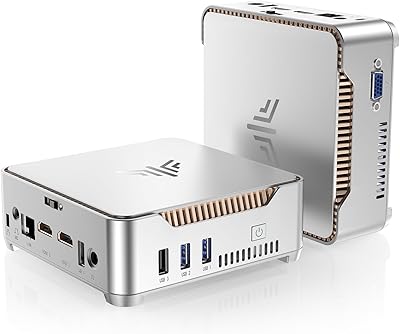
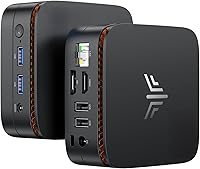
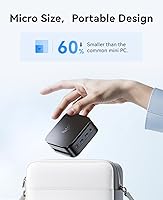
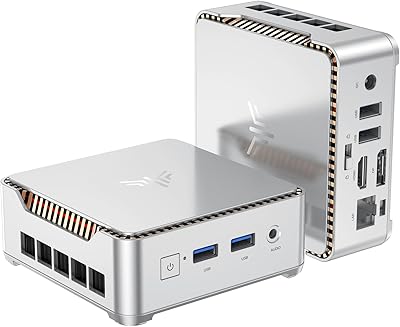
The KAMRUI Essenx E1 Mini PC 12GB 256GB is the kind of machine that makes you question why anyone still buys a bulky tower for everyday computing. About the size of a thick paperback book, it tucks behind a monitor, sits on a shelf, or mounts flat against a wall without demanding real estate on your desk. Powering it is Intel's N95 processor — a genuine step up from older budget chips — which handles web browsing, document work, and video calls without breaking a sweat. Just set realistic expectations: this compact desktop is built for light-to-medium workloads, not video editing marathons or gaming sessions.

Features & Benefits

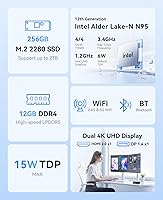
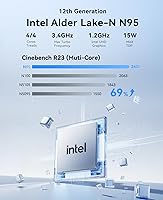
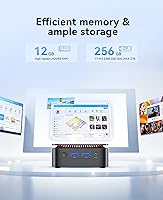
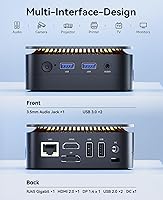
The N95 chip runs on a 10nm architecture and clocks up to 3.4GHz across four cores, putting it noticeably ahead of older N5095 and N5105 chips found in many similarly priced machines. Paired with 12GB of LPDDR5 RAM — more than most competitors at this price point offer — it handles a dozen browser tabs, a video call, and a spreadsheet simultaneously without the sluggishness you might expect. Storage starts at 256GB via a fast M.2 SSD, which is workable but can fill up quickly once your OS and apps are installed; thankfully the slot supports drives up to 2TB. Dual 4K output through HDMI and DisplayPort, Gigabit Ethernet, dual-band WiFi, and USB 3.2 Gen 2 ports round out an impressively connected little box.

Best For

This mini PC hits its stride in a handful of specific scenarios. Remote workers who live in browsers, email clients, and video conferencing tools will find it more than capable. Students and educators running productivity apps will appreciate the responsive feel without the cost of a larger machine. It also works well as a home theater PC — the near-silent fan and 4K playback capability make it a natural fit under a TV. Small businesses have put it to good use for digital signage and kiosk roles. What it is not suited for is anything GPU-intensive: the integrated graphics are modest, and pushing it toward heavy photo or video rendering will test its patience and yours.

User Feedback

Buyers consistently praise the quiet operation and how quickly everything comes together once plugged in — the port layout is thoughtfully accessible and the unit is genuinely compact. That said, one detail catches some buyers off guard: the Essenx E1 ships with no operating system included, so budget extra time, and possibly extra cost, for that step if you are not comfortable installing Windows or Linux yourself. On the critical side, users loading a full OS plus applications sometimes find the base storage of 256GB tighter than expected. Fan noise under sustained load gets occasional mentions, though most report it stays impressively quiet during typical daily use. Long-term reliability responses lean positive, but customer support feedback is uneven.

Pros

  • The N95 processor handles everyday multitasking noticeably better than older budget chips like the N5095.
  • 12GB of LPDDR5 RAM is above average for this price tier and keeps daily tasks running smoothly.
  • Dual 4K display output lets you run a proper two-monitor productivity setup without a dedicated GPU.
  • The unit is genuinely compact — roughly the footprint of a hardcover novel — and easy to tuck anywhere.
  • Gigabit Ethernet and dual-band WiFi together mean solid, flexible network options for any setup.
  • VESA mount support lets you hide this compact desktop cleanly behind a monitor for a clutter-free desk.
  • The cooling fan stays impressively quiet during typical daily workloads, making it ideal for shared spaces.
  • BIOS supports Wake-on-LAN and auto power-on, which is a real bonus for home server or kiosk use cases.
  • The M.2 SSD slot accepts drives up to 2TB, so upgrading storage later is straightforward.
  • USB 3.2 Gen 2 ports provide fast transfer speeds for external drives and accessories.

Cons

  • No operating system is included, which adds setup friction and potential extra cost for less technical buyers.
  • Base 256GB storage fills up fast once an OS and core applications are installed.
  • Integrated UHD graphics rule out any meaningful gaming or GPU-intensive creative work.
  • Fan noise can become noticeable under sustained CPU load, such as long video encoding or large file transfers.
  • Customer support experiences from KAMRUI have been inconsistent based on buyer reports.
  • No included peripherals mean first-time mini PC buyers need to budget for a keyboard, mouse, and potentially an OS license.
  • The Bluetooth range, rated to about 10 meters, can be limiting in larger rooms or open office environments.
  • Only two USB 3.2 Gen 2 ports are available; the other two are slower USB 2.0, which can be a bottleneck for multi-device users.
  • Long-term reliability data is still limited given the relatively recent market release.
  • No SD card slot or Thunderbolt connectivity, which could matter for photographers or content creators considering this as a light editing station.

Ratings

Our AI rating engine analyzed thousands of verified global purchases of the KAMRUI Essenx E1 Mini PC 12GB 256GB, actively filtering out incentivized, bot-generated, and suspiciously clustered reviews to surface what real everyday users actually experienced. The scores below reflect both the genuine strengths that kept buyers satisfied and the friction points that caused frustration — nothing has been glossed over.

Everyday Performance
82%
18%
For the workloads this machine is built around — browsers with a dozen tabs open, Office apps, video calls, and media playback — the N95 processor holds up impressively well. Users switching from aging Core i3 or old Pentium desktops consistently reported a noticeable jump in responsiveness during routine tasks.
Push it harder with sustained multitasking — say, a large spreadsheet open alongside a Zoom call and active file syncing — and performance starts to soften. It is not a dealbreaker for most buyers, but those who work at the edge of light-to-medium workloads will feel the ceiling.
Value for Money
86%
Getting 12GB of LPDDR5 RAM, a fast M.2 SSD, dual 4K output, and a modern 10nm processor at this price tier is genuinely difficult to match. Buyers who compared it against similarly priced options repeatedly noted that the Essenx E1 offered more RAM and a better chip than most direct competitors.
The absence of an included operating system quietly adds to the real cost of ownership, which some buyers did not account for upfront. Factor in a Windows license and the value equation shifts, though Linux users are largely unaffected.
Build Quality
74%
26%
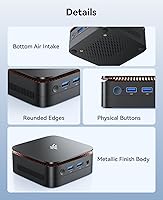
The chassis feels solid for its weight class — there is no alarming flex or rattling, and the port placements feel deliberate rather than cramped. Several users noted it looks more premium than they expected given the price, and the matte finish does not show fingerprints badly.
It does not feel like a premium product when handled directly — the plastics are functional rather than refined, and a few users noted the VESA mount bracket requires careful alignment. Nothing feels flimsy enough to cause concern, but it is clearly built to a budget.
Thermal Management
71%
29%
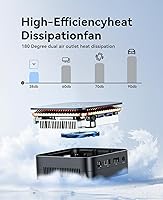
During typical daily use — streaming, browsing, productivity apps — the unit stays cool and the fan is barely perceptible. The compact chassis does a reasonable job of moving heat away from the N95 chip under normal conditions, and many users reported it never felt hot to the touch.
Under sustained CPU load the fan audibly ramps up and the chassis gets warm in the hand, which is noticeable in quiet rooms. A few users running the unit in enclosed or poorly ventilated spaces reported occasional thermal throttling during extended workloads.
Noise Level
83%
In living room and bedroom setups, users praised how unobtrusive this compact desktop is during movies, music, and casual browsing — the fan frequently drops to near-silence during light use. This made it a popular pick for home theater configurations where fan drone would ruin the experience.
Silence is not guaranteed under heavier loads; the fan is audible when the processor works hard, which some users found distracting in otherwise quiet environments. It is quieter than most budget desktops but not as whisper-quiet as passively cooled alternatives.
Connectivity & Ports
88%
The port selection is one of the most frequently praised aspects — Gigabit Ethernet, dual-band WiFi, Bluetooth, two USB 3.2 Gen 2 ports, HDMI, DisplayPort, and a 3.5mm jack all in a box smaller than a paperback. Remote workers and home office users in particular appreciated not needing a separate hub.
The two remaining USB ports are USB 2.0, which feels dated when faster options are so available today. Users transferring files from multiple external drives simultaneously noticed the bottleneck quickly, and the absence of a USB-C port was a recurring frustration.
Display Output Quality
84%
Dual 4K support via HDMI 2.0 and DisplayPort simultaneously is a genuine differentiator at this price point, and users setting up two-monitor productivity workstations were consistently impressed that it worked reliably without configuration headaches. Media playback on a 4K TV looked sharp and smooth.
The integrated UHD graphics are purely functional — color accuracy and HDR performance fall short of what a dedicated GPU would deliver, so anyone doing color-critical photo work will notice limitations. Refresh rate options beyond 60Hz are not supported, which rules it out for high-refresh monitor setups.
Storage Adequacy
61%
39%
The M.2 SSD delivers fast read and write speeds that keep boot times and application launches snappy, and for users who rely primarily on cloud storage services the 256GB base feels more workable. Upgradeability to 2TB means the storage situation is fixable with a single component swap.
Out of the box, 256GB gets consumed faster than most buyers anticipate — Windows alone takes a significant chunk, and once productivity apps and browser caches are added, free space shrinks quickly. Users who store local media libraries or large project files will almost certainly need to upgrade or use external storage from day one.
Setup Experience
76%
24%
Once an operating system is in place, users found the hardware setup genuinely painless — drivers installed cleanly, the VESA mount went on without issues, and the port layout made cable management straightforward. First-time mini PC buyers frequently commented that the physical setup exceeded their expectations.
The lack of a pre-installed OS is a sticking point that caught a meaningful number of buyers off guard, particularly those who assumed a plug-and-play experience similar to buying a laptop. The process of sourcing, purchasing, and installing Windows adds friction that the product page does not prepare buyers for adequately.
RAM & Multitasking
81%
19%
Twelve gigabytes of LPDDR5 memory is a genuine advantage over the 8GB DDR4 found in most competing mini PCs, and users running Teams or Zoom alongside multiple browser tabs and documents noticed the difference in smoothness. For the target use case, the memory headroom feels appropriately sized.
Because the RAM is soldered and non-upgradeable, buyers who anticipate growing into heavier workloads over the next few years have no upgrade path. Power users who regularly run virtual machines or memory-hungry development environments will find 12GB a hard ceiling that cannot be worked around.
Wireless Performance
77%
23%
The dual-band WiFi 5 adapter performed reliably in the majority of home and office environments, with users reporting stable connections on both 2.4GHz and 5GHz bands during video calls and streaming. Gigabit Ethernet provided rock-solid wired throughput for users who preferred a cable.
WiFi 5 rather than WiFi 6 feels like a missed opportunity in 2024, especially as more routers adopt the newer standard. In environments with congested wireless networks, a small number of users reported intermittent drops that a WiFi 6 adapter would likely have handled more gracefully.
Long-Term Reliability
68%
32%
Most users who had owned the unit for several months reported continued stable operation with no hardware degradation, and the thermal design appears competent enough to avoid the kind of chronic overheating that shortens budget PC lifespans. The SSD and RAM quality seem consistent with the price tier.
The product is relatively new to market, which means long-term data beyond six to twelve months is limited and should be treated with caution. A subset of buyers flagged that when hardware issues did arise, the customer support experience was inconsistent and sometimes slow to resolve problems.
Customer Support
59%
41%
Some buyers reported responsive and helpful interactions when reaching out about setup questions, and replacement units were issued in legitimate hardware failure cases without prolonged disputes. The documentation included in the box is basic but adequate for straightforward setup.
Support quality appears inconsistent depending on the nature of the issue and the timing of the request — buyers dealing with more complex problems reported slow response times and vague answers. There is no premium or priority support channel, which matters more when the product ships without an OS and buyers are navigating setup independently.
Physical Footprint
91%
At roughly the size of a thick hardcover book and under two pounds, this is one of those rare devices that genuinely disappears into a setup — behind a monitor, on a media shelf, or velcroed inside a cabinet. Users consistently cited the form factor as exceeding expectations and opening up desk space they forgot they had.
The compact size does come with trade-offs that buyers should anticipate: no space for a discrete GPU, a single RAM slot that is soldered, and limited internal expansion beyond the M.2 slot. If you need a machine you can grow with over many years, the small chassis works against you.

Suitable for:

The KAMRUI Essenx E1 Mini PC 12GB 256GB is a strong fit for anyone whose daily computing revolves around browsers, productivity apps, video calls, and streaming — tasks where raw power matters less than responsiveness and reliability. Remote workers who want a tidy, quiet desk setup will appreciate how little space it claims while still supporting dual 4K monitors for a proper two-screen workflow. Students and educators on a budget get a genuinely capable daily driver without paying for hardware headroom they will never use. It also earns a natural place in the living room, where its near-silent operation and 4K playback make it a practical media center that does not look out of place next to a TV. Small businesses running digital signage, point-of-sale displays, or lightweight server tasks will find it punches well above its weight class for those specific roles.

Not suitable for:

Buyers expecting to game, edit video, or run GPU-accelerated creative software will run into the hard ceiling of integrated graphics fairly quickly — the KAMRUI Essenx E1 Mini PC 12GB 256GB is simply not designed for those workloads, and no amount of RAM helps when the GPU is the bottleneck. Power users who rely on multiple large applications running simultaneously — think virtual machines, large datasets, or professional audio production — will likely find 12GB of RAM and a four-core budget chip insufficient over time. The 256GB base storage is another practical limitation: once you install an operating system and a handful of applications, you are already watching the free space meter with some concern, and not everyone wants to deal with swapping in a larger drive right out of the box. Speaking of the OS, this machine ships without one, which is a genuine friction point for less technically confident buyers who were expecting to plug in and start working immediately. Anyone who needs long-term upgrade flexibility or expandable internal hardware should also look elsewhere — the compact chassis leaves little room for growth beyond storage.

Specifications

  • Processor: Intel N95 chip with 4 cores and 4 threads, built on a 10nm architecture, with a base clock of 1.7GHz and a boost up to 3.4GHz.
  • RAM: 12GB of LPDDR5 memory is installed, running at faster speeds than the DDR4 found in many competing mini PCs at this price level.
  • Storage: A 256GB M.2 2280 SSD handles primary storage, with the slot supporting upgrades up to 2TB using a standard M.2 SATA or NVMe drive.
  • Graphics: Intel UHD integrated graphics are included, with a GPU clock up to 1.2GHz, capable of 4K video playback but not suited for gaming or GPU-intensive workloads.
  • Display Output: One HDMI 2.0 port and one DisplayPort allow simultaneous connection of two monitors at up to 4096x2160 resolution at 60Hz each.
  • USB Ports: Four USB ports are provided in total: two USB 3.2 Gen 2 ports for fast data transfer and two USB 2.0 ports for standard peripherals.
  • Networking: Gigabit Ethernet, dual-band WiFi 5 supporting both 2.4GHz and 5GHz bands, and Bluetooth are all built in with no additional adapters required.
  • Audio: A single 3.5mm combo audio jack supports both headphone output and microphone input for standard wired headsets.
  • Dimensions: The unit measures approximately 5.04 x 5.04 x 2.05 inches, making it compact enough to sit behind a monitor or on a small shelf.
  • Weight: At approximately 1.79 pounds, the chassis is light enough to mount on the back of a monitor using the included VESA bracket without stressing the mount.
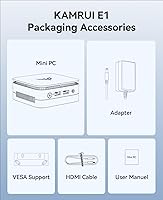
  • VESA Mount: A VESA mounting kit is included, allowing the unit to attach directly to the back of compatible monitors or displays for a cable-managed, all-in-one look.
  • Cooling: An active cooling fan is built into the chassis and is designed to run quietly during typical workloads, with thermal management tuned for the low-power N95 processor.
  • BIOS Features: The unlocked BIOS supports scheduled auto power-on, RTC wake timers, and Wake-on-LAN, making it practical for always-on or remotely managed deployments.
  • Operating System: No operating system is pre-installed; buyers must supply and install their own copy of Windows, Linux, or another compatible OS before first use.
  • Cache: The Intel N95 processor includes 6MB of shared cache, which helps with responsiveness during light multitasking and frequent application switching.
  • WiFi Standard: The integrated wireless adapter is WiFi 5 (802.11ac), supporting speeds appropriate for HD and 4K streaming as well as standard office cloud applications.

Related Reviews
KAMRUI Essenx E2 Mini PC
77%
78%
Everyday Performance
84%
Value for Money
72%
Build Quality
81%
Display Output Quality
74%
Thermal Management
More
KAMRUI Essenx E2 N150 16GB Mini PC
78%
83%
Everyday Performance
79%
Multitasking & RAM
88%
Display & Dual Monitor Support
76%
Build Quality & Design
71%
Thermal Management & Fan Noise
More
GMKtec Nucbox G2 Plus Mini PC Intel N150 12GB RAM 256GB SSD
85%
88%
Performance for Everyday Use
91%
Connectivity Options
93%
Multi-Display Support
94%
Energy Efficiency
85%
Size & Portability
More
KAMRUI Essenx E2 Mini PC
81%
83%
Everyday Performance
71%
Thermal Management
88%
Display Output
86%
Port Selection & Connectivity
91%
Upgrade Friendliness
More
Beelink Mini S12 Mini PC
78%
88%
Value for Money
82%
Performance for Daily Tasks
79%
Build Quality & Design
91%
Dual Monitor Support
84%
Thermal Management & Noise
More
OASLOA T9PRO 8GB 256GB Mini PC
70%
83%
Value for Money
41%
Out-of-Box Experience
67%
Processing Performance
88%
Multi-Monitor Support
74%
Build Quality
More
KAMRUI GK3Plus Mini PC (N95, 16GB RAM, 512GB SSD)
81%
89%
Multitasking Performance
92%
Value for Money
86%
Thermal Management
84%
Display Versatility
81%
4K Media Playback
More
HEIGAOLAPC Mini PC 12th Gen N100 16GB RAM 256GB Storage
85%
88%
Performance
92%
Value for Money
90%
Portability
87%
Connectivity
93%
Setup and Installation
More
Blackview MP20 Mini PC (Intel N150, 8GB RAM, 256GB SSD)
79%
78%
Everyday Performance
84%
Value for Money
61%
RAM Adequacy
73%
Storage & Expandability
81%
Build Quality & Design
More
AOOSTAR N1 Pro N150 Mini PC
77%
78%
Performance for Workload
84%
Value for Money
72%
Build Quality
91%
Connectivity & I/O
88%
Display Output
More

FAQ

No, the KAMRUI Essenx E1 Mini PC 12GB 256GB ships without any operating system pre-loaded. You will need to purchase a Windows license separately or install a free Linux distribution yourself. If you have never installed an OS before, factor in some extra setup time and budget accordingly.

The storage is upgradeable — the M.2 2280 slot accepts drives up to 2TB, so swapping in a larger SSD is a straightforward option. The RAM, however, is soldered directly to the board, which means 12GB is the permanent ceiling and cannot be expanded later.

Yes, the Essenx E1 supports dual 4K output simultaneously through its HDMI 2.0 and DisplayPort connections. For office work, media playback, and general productivity across two high-resolution screens, it handles this well. Just note that driving two 4K displays while running heavy applications can push the processor harder than typical single-screen use.

Most users describe the fan as nearly inaudible during everyday tasks like browsing and streaming. Under sustained heavier loads — say, a long file transfer or a video export — the fan does spin up and becomes faintly audible, but it does not get disruptively loud. For shared office or bedroom use, it should not be an issue.

Absolutely, and it is actually one of the better use cases for this compact desktop. It plays 4K video smoothly, runs quietly enough not to distract during movies, and is small enough to tuck behind or beside a TV without looking out of place. Just make sure your TV has an HDMI 2.0 port to get the full 4K output.

Yes, this is genuinely where this mini PC shines. Word, Excel, Outlook, Teams, Zoom, and similar productivity tools all run without hesitation. The combination of the N95 processor and 12GB of LPDDR5 RAM means you can have a video call running alongside several open documents and browser tabs without things grinding to a halt.

Light and older titles — think browser games, indie games, or titles from 10-plus years ago — may run acceptably at lower settings. Anything modern or graphically demanding is a different story. The integrated Intel UHD graphics simply do not have the horsepower for current-generation games, and there is no way to add a dedicated GPU to this chassis.

Wake-on-LAN lets you power on the unit remotely over your local network, which is handy if you want to use it as a lightweight home server or access it via remote desktop without leaving it running 24 hours a day. It is a genuinely useful feature for tech-savvy users, though most everyday buyers will not need it.

It depends on how you work. A Windows installation alone will consume around 30 to 40GB, and once you add Office, a browser, and a few other tools, you can be down to 150 to 180GB of usable space fairly quickly. For pure productivity work with cloud-based file storage, 256GB is manageable. If you store a lot of local files, photos, or videos, plan to upgrade the SSD or rely on external drives.

None of those are included — you get the mini PC unit itself, the VESA mounting bracket, a power adapter, and connection cables. Keyboards, mice, monitors, and operating system licenses are all separate purchases. If you are setting this up from scratch, factor those additional costs into your total budget before buying.