Overview

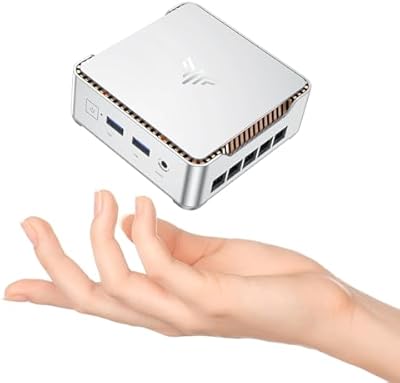
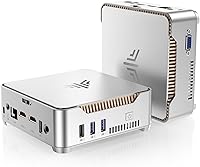
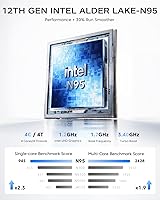
The KAMRUI GK3Plus Mini PC (N95, 16GB RAM, 512GB SSD) serves as a modern answer for anyone looking to ditch their bulky tower without sacrificing daily productivity. Built around the 12th Gen Intel Alder Lake N95 processor, this Alder Lake mini PC offers surprising efficiency for its size. The silver chassis feels solid and lightweight, measuring just over five inches across. It arrives ready to go with 16GB of RAM and a 512GB SSD already installed, which is a welcome relief compared to barebones kits. This space-saving design fits easily on a cramped desk or hidden away entirely. It represents a capable desktop alternative for users who value a clean workspace over internal expandability.
Features & Benefits

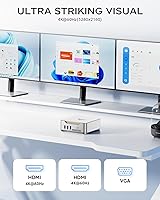
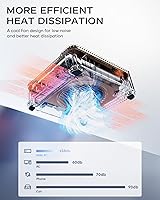
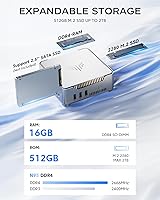
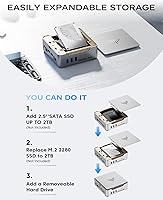
The jump to the N95 chip provides a noticeable performance boost over older Celeron units, handling web browsing and office apps with ease. One standout feature of this compact desktop is its triple display support, utilizing two HDMI ports and a VGA connection to drive multiple monitors simultaneously. While many small PCs struggle with heat, the internal fan keeps things impressively quiet during standard workloads. You also get expandable storage via an internal 2.5-inch SATA bay if the 512GB SSD fills up. For entertainment, it handles 4K video playback at 60Hz quite well, making it a reliable choice for high-definition streaming or managing a local media collection without lag.

Best For

This GK3Plus unit hits the sweet spot for home office professionals who need to manage spreadsheets and browser tabs without the machine slowing down. It is also an excellent fit for students who require a reliable workstation for research and writing. Because of its 4K capabilities and small footprint, it works beautifully as a dedicated media center tucked behind a TV. Even hobbyists doing light photo editing will find the 16GB of memory provides enough headroom for basic creative tasks. Essentially, if your work revolves around web-based tools or productivity software rather than heavy video rendering, this hardware provides exactly what you need without the unnecessary bulk.

User Feedback

Buyers frequently highlight how snappy the system feels, especially when juggling dozens of Chrome tabs thanks to that 16GB of memory. The included VESA mount is a big hit for those wanting to create a pseudo All-in-One setup by attaching it to the back of a monitor. While the plastic casing is functional, some users note it lacks the premium feel of aluminum competitors, though it stays surprisingly cool during long work sessions. It is important to remember that this is not a gaming rig; while it handles casual titles, it will struggle with demanding 3D games. Overall, the consensus points to a stable performance profile that exceeds expectations for the price.

Pros

  • The 16GB of DDR4 RAM provides a noticeable advantage in multitasking over cheaper 8GB models.
  • Supporting triple display outputs through HDMI and VGA is a rare find at this price point.
  • The integrated active cooling fan runs quietly, preventing performance throttling during long work sessions.
  • Users can easily expand their storage up to 2TB via the internal 2.5-inch SATA bay.
  • The included VESA mount allows you to bolt the unit behind a monitor for an ultra-clean desk.
  • This GK3Plus unit handles 4K video playback at 60Hz smoothly for streaming and media.
  • Its small footprint makes it incredibly easy to transport or hide in a small media cabinet.
  • The N95 processor is significantly more efficient than previous Celeron generations for daily productivity.

Cons

  • The all-plastic build quality lacks the premium feel and durability of metal-cased competitors.
  • Absence of any USB-C ports is a major drawback for users with modern peripherals and cables.
  • Integrated UHD graphics are strictly for productivity and struggle with any modern 3D gaming titles.
  • Utilizing older WiFi 5 and Bluetooth 4.2 standards feels dated compared to the latest wireless technologies.
  • The VGA port is increasingly obsolete and offers lower visual quality compared to modern digital connections.
  • Reaching the power button can be difficult if the unit is mounted behind a large monitor.
  • Initial system setup usually requires an active internet connection, which may slow down the first-time user.
  • The KAMRUI GK3Plus Mini PC (N95, 16GB RAM, 512GB SSD) lacks the internal expansion slots found in larger PCs.
Ratings

Our experts analyzed thousands of global verified reviews to evaluate the KAMRUI GK3Plus Mini PC (N95, 16GB RAM, 512GB SSD), filtering out incentivized feedback to ensure a transparent look at its real-world utility. This data-driven scorecard balances the unit’s impressive multitasking strengths against its physical and graphical limitations to help you decide if it fits your specific workspace. From thermal management to port selection, these scores reflect the honest experiences of home office users and media enthusiasts alike.

Multitasking Performance
89%
The inclusion of 16GB RAM is a significant advantage, allowing users to keep dozens of browser tabs open while running office software without the system stuttering. It handles standard productivity suites and video conferencing simultaneously with surprising fluidness for a budget machine.
While it excels at general office work, the N95 processor hits a ceiling when attempting heavy video rendering or complex data processing. Power users may notice slight delays when switching between several resource-heavy professional applications.
Value for Money
92%
This GK3Plus unit offers an exceptional price-to-performance ratio, providing a newer Alder Lake chip and ample storage for less than many big-brand alternatives. It is a cost-effective way to modernize a home office or student desk without a massive investment.
To keep the price low, the manufacturer used a plastic chassis rather than premium alloys. Some buyers feel the build feels a bit lightweight, reminding you that this is a budget-oriented device rather than a luxury workstation.
Thermal Management
86%
The internal cooling fan does a solid job of keeping temperatures low even during full workdays. Users appreciate that the unit remains stable and doesn’t throttle performance due to heat, which is a common failure point in ultra-small computers.
In extremely quiet rooms, the fan noise can become audible when the processor is under load. While it isn’t a loud roar, the high-pitched whir might be distracting for those used to completely silent, fanless designs.
Display Versatility
84%
Having three video outputs—dual HDMI and one VGA—is rare at this price point and highly valued by users with older monitors. It makes setting up a panoramic three-screen workstation straightforward and increases overall screen real estate for researchers.
The VGA port feels a bit dated and limits the resolution for the third screen compared to the 4K HDMI outputs. Cable management can also get messy when all three ports are occupied on such a tiny device.
4K Media Playback
81%
19%
As a dedicated streaming box, this compact desktop handles 4K video at 60Hz smoothly, making it a favorite for home theater setups. It easily replaces smart TV apps that are often sluggish or limited in codec support.
While playback is smooth, navigating heavy media library interfaces like Plex or high-bitrate 4K files can occasionally cause brief stutters. It is strictly a media player, not a high-end content creation machine.
Build Quality & Aesthetics
73%
27%
The silver finish gives it a clean, professional look that blends in well with modern peripherals. Its tiny footprint is the main draw, as it practically disappears on a desk or stays hidden behind a display.
The all-plastic exterior feels somewhat hollow and can be prone to scratches over time. It lacks the ruggedness of industrial mini PCs, so it should be handled with a bit of care during setup.
Storage Expandability
88%
The easy-access 2.5-inch SATA bay is a huge win for users who want to add a cheap secondary drive for backups or extra media. It allows you to grow your storage capacity to 2TB without needing to replace the main system drive.
Adding a secondary drive increases the heat inside the small enclosure slightly. Users must also supply their own SSD or HDD, as the expansion drive is not included in the base package.
Gaming Capabilities
38%
62%
It can handle very basic, older titles or web-based casual games without much trouble. It is fine for simple puzzle games or retro emulation that doesn’t require modern 3D hardware acceleration.
Modern AAA games are virtually unplayable even on the lowest settings due to the integrated UHD graphics. This machine is strictly for productivity and media, so gamers should look elsewhere for a dedicated GPU.
Port Selection
79%
21%
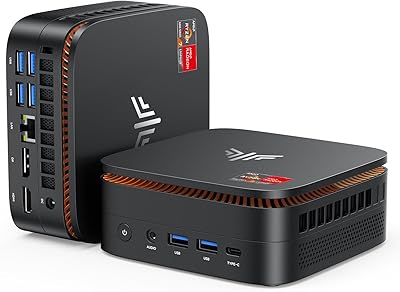
With four USB ports and a dedicated Ethernet jack, it covers the essentials for connecting a mouse, keyboard, and stable wired internet. The layout is logical, with enough spacing to accommodate most standard-sized USB drives.
The lack of a USB-C port is a noticeable omission in 2026, forcing users to rely on older USB-A adapters for modern accessories. Fast data transfers are limited by the absence of more advanced port standards.
Ease of Installation
94%
Most users report having the system up and running within ten minutes of unboxing. The pre-installed operating system and included VESA mount make it one of the most user-friendly options for those who aren’t tech-savvy.
A few buyers noted that the initial setup requires an internet connection for updates, which can be slow over WiFi. The included HDMI cable is also a bit short for some desk configurations.
Wireless Connectivity
76%
24%
The dual-band WiFi 5 provides enough bandwidth for 4K streaming and standard web work without dropped connections. Bluetooth 4.2 works reliably for connecting wireless mice and keyboards at a reasonable distance.
In a world moving toward WiFi 6 and Bluetooth 5.0, these older standards feel a bit behind the curve. Users in congested apartment buildings might experience slightly slower speeds compared to more modern wireless cards.
Compactness & VESA Mounting
91%
The VESA bracket is a standout inclusion that effectively turns any standard monitor into an all-in-one PC. This is a game-changer for dorm rooms or reception desks where every inch of surface space is precious.
Mounting it behind a monitor makes accessing the power button and USB ports much more difficult. You will likely need a USB hub or a keyboard with a power button to maintain convenience.

Suitable for:

The KAMRUI GK3Plus Mini PC (N95, 16GB RAM, 512GB SSD) is a standout choice for home office professionals who primarily work within browser tabs and document editors. Students will appreciate the reliable performance for research, while media enthusiasts can easily convert it into a quiet 4K home theater hub. This Alder Lake mini PC is particularly beneficial for those with limited desk space who want a clean, minimalist setup. Its ability to drive three monitors makes it a practical workstation for anyone who needs to reference multiple sources at once. It essentially provides the core desktop experience without the bulky footprint.
Not suitable for:

However, the KAMRUI GK3Plus Mini PC (N95, 16GB RAM, 512GB SSD) is not a replacement for a dedicated gaming rig or a professional workstation used for heavy 4K video editing. Power users who rely on the latest connectivity standards will find the lack of a USB-C port and the inclusion of older WiFi 5 and Bluetooth 4.2 disappointing. If your daily tasks involve intensive 3D rendering or high-bandwidth data transfers, this compact desktop will likely struggle to keep up. It is also not ideal for users who prefer the tactile, premium feel of a metallic chassis. Buyers looking for a powerhouse with significant internal expansion should stick to traditional mid-tower desktops instead.
Specifications

  • Processor: Intel 12th Gen Alder Lake N95 quad-core CPU with a clock speed reaching up to 3.4GHz.
  • Memory: Equipped with 16GB DDR4 RAM for efficient multitasking and high-tab browser usage.
  • Primary Storage: Built-in 512GB M.2 SSD provides fast boot times and ample space for office applications.
  • Expandable Storage: Features an internal 2.5″ SATA bay supporting secondary SSD or HDD upgrades up to 2TB.
  • Graphics: Integrated Intel UHD Graphics clocked at 1.20GHz support 4K resolution at 60Hz.
  • Video Outputs: Dual HDMI ports and one VGA port allow for a triple-monitor workstation configuration.
  • Networking: Includes a Gigabit Ethernet port alongside dual-band WiFi 5 for reliable internet connectivity.
  • Bluetooth: Built-in Bluetooth 4.2 supports wireless peripherals like keyboards, mice, and headsets.
  • USB Ports: Connectivity includes two USB 3.2 ports and two USB 2.0 ports for diverse accessory support.
  • Audio Interface: Features a dedicated 3.5mm audio-out jack and a separate microphone input.
  • Dimensions: The compact chassis measures approximately 5.1 x 5.1 x 1.96 inches.
  • Weight: The lightweight unit weighs in at roughly 1.34 pounds for easy portability.
  • Mounting: Includes a standard VESA mount and hardware to attach the PC directly to a monitor.
  • Cooling System: Utilizes an active internal fan designed for quiet operation and thermal stability.
  • Power Supply: Comes with a dedicated DC power adapter specifically rated for this mini PC model.

Related Reviews
KAMRUI Essenx E2 N150 Mini PC, 16GB RAM, 512GB SSD
86%
88%
Performance
92%
Value for Money
90%
Cooling and Noise Level
85%
Dual Display Support
80%
Build Quality
More
KAMRUI Hyper H1 Mini Gaming PC, AMD Ryzen 7 6800H, 16GB RAM, 512GB SSD
86%
91%
Performance
88%
Design & Build Quality
85%
Connectivity (WiFi/Bluetooth)
92%
Multitasking Efficiency
89%
Gaming Experience
More
KAMRUI Essenx E2 Mini PC
81%
83%
Everyday Performance
71%
Thermal Management
88%
Display Output
86%
Port Selection & Connectivity
91%
Upgrade Friendliness
More
ACEMAGICIAN Kron Mini K1 Mini PC, Ryzen 7 7730U, 16GB RAM, 512GB SSD
85%
88%
Value for Money
91%
Performance for Everyday Tasks
94%
Compact Design & Portability
90%
Setup & Ease of Use
78%
Gaming Performance (Light)
More
KAMRUI E2 Mini PC, 16GB RAM, 256GB SSD
85%
87%
Performance
92%
Value for Money
84%
Build Quality
88%
Ease of Setup
80%
Connectivity
More
GEEKOM Air12 Mini PC 16GB/512GB
82%
88%
Value for Money
82%
Everyday Performance
71%
Build Quality
74%
Thermal Management & Noise
91%
Connectivity & Port Selection
More
Blackview MP60 Mini PC, 16GB RAM, 512GB SSD
88%
88%
Performance
94%
Compactness and Design
85%
Multitasking Capability
91%
Energy Efficiency
90%
Display and Connectivity
More
MeLE Mini PC Quieter 4C, 16GB RAM, 512GB SSD
87%
85%
Performance
90%
Build Quality
88%
Display Quality
93%
Energy Efficiency
92%
Noise Level
More
GEEKOM A5 2025 Edition Mini PC, 16GB RAM, 512GB SSD
88%
86%
Performance
90%
Build Quality
92%
Value for Money
95%
Ease of Setup
88%
Connectivity
More
BOSGAME Mini PC E3 (N150, 16GB/512GB)
79%
88%
Value for Money
74%
Processing Performance
91%
Multi-Display Support
89%
Connectivity & Ports
76%
Build Quality & Design
More

FAQ

Not really. This Alder Lake mini PC is designed for office work and media streaming rather than gaming. While it can handle very basic or older titles on low settings, it lacks the dedicated graphics card needed for modern AAA games.

Yes, it arrives with a pre-installed operating system so you can get through the initial setup and start working almost immediately.

The 16GB included with this GK3Plus unit is typically the maximum supported by the N95 chipset architecture. Fortunately, 16GB is quite a lot for this class of computer and should be plenty for heavy multitasking.

You can easily pop the case open and slide in a 2.5″ SATA SSD or hard drive. It is a simple plug-and-play process that allows you to add up to 2TB of extra space for your movies or files.

It absolutely does. You can use the two HDMI ports and the one VGA port to run three separate displays simultaneously, which is great for productivity.

This particular model uses WiFi 5 (802.11ac). While it is not the very latest version, it still provides more than enough speed for 4K streaming and high-speed web browsing in most homes.

Definitely. It comes with a VESA mounting bracket in the box. You can use it to bolt this compact desktop directly to the back of your monitor so it stays completely out of sight.

The fan is designed to be very quiet. You might hear a slight whir if you are doing something very intensive, but for standard office tasks or watching movies, it usually stays in the background.

Yes, that is actually one of its best uses. It supports 4K at 60Hz, so your videos will look sharp and play smoothly, making it a much better experience than most built-in smart TV apps.

No, this model relies on standard USB-A ports (the rectangular ones). If you have USB-C accessories, you will just need to use a simple adapter to plug them in.