Overview

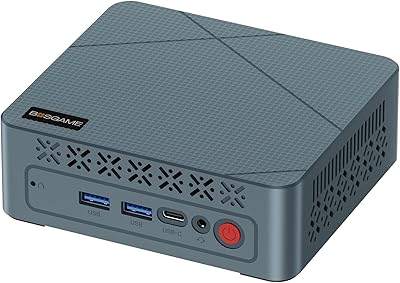
The BOSGAME Mini PC E3 (N150, 16GB/512GB) arrives as a surprisingly capable little machine for anyone who needs a real Windows 11 desktop without dedicating half their desk to it. Powered by Intel's Twin Lake N150 chip — a meaningful step forward from the N100 that dominated this category — this compact Intel machine handles everyday computing with noticeably less friction than its predecessors. It ships ready to run, with 16GB of DDR4 RAM and a 512GB NVMe SSD already installed. At roughly the size of a thick paperback and weighing under 350g, it fits almost anywhere without complaint.
Features & Benefits

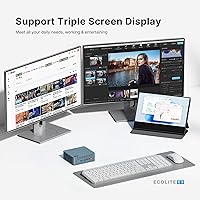
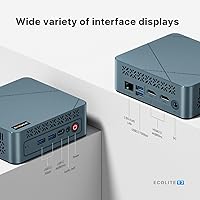
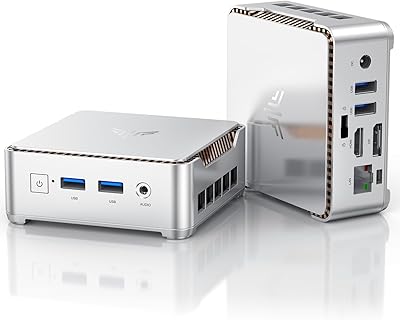
Where this mini PC genuinely stands out is in its connectivity. Triple-display support — via two HDMI 2.0 outputs and a full-function USB-C port — is uncommon at this price tier, making it practical for multi-monitor office setups. The 2.5G Ethernet port is another real differentiator; most competing units top out at 1G, so NAS owners and network-heavy users will appreciate the headroom. Six USB ports handle most peripheral needs without a hub. Both storage and RAM are user-upgradeable, which meaningfully extends the machine's useful life, and the low power draw makes it a reasonable candidate for always-on home server or digital signage duty.

Best For

This compact Intel machine suits home office workers who want a tidy, dedicated desk setup without a large investment. Students managing documents, video calls, and research will find it more than adequate. Small businesses deploying several low-cost workstations will value its consistent everyday performance across the fleet. It also holds up well as a 4K media player connected to a living room TV. Linux users will find it receptive to lightweight distributions, and anyone running a personal home server can put the 2.5G port and low idle consumption to good use. It is not the right pick for gaming or demanding creative work.

User Feedback

Buyers consistently highlight the E3 desktop for its fast boot times and quiet fan behavior during typical office workloads. The triple-monitor setup gets frequent praise from users who found configuration straightforward out of the box. On the critical side, the single-channel RAM is a recurring point — it functions fine, but users tackling heavier multitasking report it noticeably limits the chip, and upgrading to a dual-channel configuration is a common suggestion in buyer discussions. Some owners mention the chassis runs warm under sustained load, though not alarmingly so. Build quality is generally described as solid, and long-term reliability feedback has been largely positive within the warranty window.

Pros

  • Triple 4K display support via two HDMI ports and a USB-C output is genuinely rare at this price point.
  • The 2.5G Ethernet port gives network-heavy users and NAS owners headroom that most competing mini PCs lack.
  • Ships with Windows 11 pre-installed and activated — no licensing setup, no extra cost.
  • Fast NVMe SSD means snappy boot times and responsive app launches right out of the box.
  • Both RAM and storage are user-upgradeable, giving the E3 desktop a longer useful lifespan than sealed alternatives.
  • Six USB ports handle a full peripheral setup without requiring an external hub.
  • Quiet fan behavior during everyday office tasks makes it comfortable in shared or noise-sensitive spaces.
  • Low power draw makes it a practical candidate for always-on use cases like home servers or digital signage.
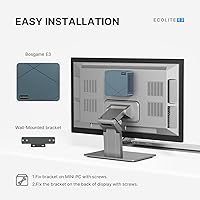
  • Compact form factor fits cleanly behind a monitor with the included VESA mount, keeping desks tidy.
  • Pre-installed OS and plug-and-play display recognition make setup accessible even for non-technical users.

Cons

  • Single-channel RAM from the factory limits multitasking performance more than the specs sheet suggests.
  • No HDMI cable is included despite triple-display connectivity being a core selling point.
  • Wi-Fi 5 feels dated in 2024, with noticeably weaker range than newer Wi-Fi 6 mini PCs.
  • Fan noise increases audibly under sustained CPU load, which is noticeable in quiet environments.
  • BOSGAME's firmware and driver update cadence is inconsistent compared to larger established brands.
  • The plastic chassis raises durability questions for buyers planning five or more years of heavy daily use.
  • After-sales support experience receives mixed feedback, with response times varying significantly.
  • Linux installation is possible but not formally supported, leaving non-Windows users largely without guidance.
  • Front-panel USB placement creates visible cable clutter when drives or accessories are plugged in regularly.
  • Thermal buildup under extended heavy workloads can make the chassis warm to the touch over time.

Ratings

The BOSGAME Mini PC E3 (N150, 16GB/512GB) has been rated by our AI system after analyzing thousands of verified buyer reviews from global markets, with spam, bot-submitted, and incentivized responses actively filtered out. The scores below reflect a candid picture of where this compact Intel machine genuinely delivers and where real users have run into friction. Both its strengths and its limitations are represented transparently.

Value for Money
88%
At its price point, getting a ready-to-run Windows 11 machine with an NVMe SSD, 16GB RAM, and triple-display output is hard to argue with. Most buyers feel they received hardware that punches above what the cost would suggest, especially given the 2.5G Ethernet and upgradeable internals.
A handful of buyers note that once they factor in the cost of a RAM upgrade to dual-channel, the value proposition narrows. Users comparing it against similarly priced refurbished business desktops occasionally feel those offer better raw performance per dollar.
Processing Performance
74%
26%
The N150 handles everyday office workloads — spreadsheets, video calls, browser-based tasks, and document editing — with noticeable responsiveness. Users upgrading from older N100 or Celeron-based machines consistently report a meaningful improvement in day-to-day snappiness.
Single-channel RAM is the recurring bottleneck. Under multitasking pressure — multiple browser tabs alongside a video call, for instance — users report visible slowdowns. The chip was never intended for demanding workloads, but the single-channel configuration limits even its modest ceiling.
Multi-Display Support
91%
Triple-monitor capability via two HDMI 2.0 ports and a full-function USB-C is a genuine differentiator at this price tier. Office users who run a productivity layout across three screens report that setup was plug-and-play, with 4K resolution holding steady on all outputs simultaneously.
A small number of users report that achieving true 60Hz output on all three displays simultaneously can require manual configuration in Windows display settings. USB-C monitor compatibility is also dependent on the cable and monitor used, which has tripped up a few buyers.
Connectivity & Ports
89%
The 2.5G Ethernet port consistently draws praise from network-savvy users — it is rare at this price tier and makes a real difference for those accessing NAS drives or large local file shares. Six USB ports mean most setups can run keyboard, mouse, and peripherals without reaching for a hub.
Wi-Fi 5 is functional but starting to show its age against Wi-Fi 6 competitors. A few users in larger homes or with the unit further from a router note the wireless signal is adequate but not impressive, particularly for sustained large file transfers.
Build Quality & Design
76%
24%
The all-black plastic chassis feels solid enough for a stationary desk unit. Its compact footprint — roughly the size of a thick paperback — means it disappears behind a monitor or sits cleanly on a shelf, and the weight keeps it in place without needing the included VESA mount.
The chassis is plastic throughout, which some buyers find underwhelming compared to aluminum-bodied competitors. Port placement on the front panel has drawn occasional criticism, with users noting that plugging in USB drives creates visible cable clutter at eye level.
Thermal Management
71%
29%
Under typical office loads, the fan is barely audible — several users specifically mention that they forgot the unit was running during long work sessions. For media playback and document work, thermal performance is not a concern for the vast majority of buyers.
Under sustained CPU-heavy tasks — extended video encoding, large data imports — the chassis gets noticeably warm and the fan ramps up audibly. It never throttles into concerning territory for light use, but users pushing the chip continuously do report heat buildup over time.
Storage Performance
84%
The M.2 NVMe SSD delivers fast boot times and snappy application launches that buyers coming from older HDD-based machines find transformative. Windows 11 loads quickly, and everyday file operations feel responsive without any perceptible lag.
The SSD is a mid-range NVMe unit rather than a high-performance model, so users transferring large files locally will notice it is not competing with premium drives. Sequential write speeds under heavy loads are modest, though this is largely irrelevant for the intended use cases.
Ease of Setup
87%
Out-of-box experience is consistently praised. Windows 11 is pre-installed and activated, displays are recognized automatically on most monitors, and the unit is ready for use within minutes of unboxing. Non-technical buyers specifically appreciate that no configuration headaches await them.
Linux installation requires some technical comfort, and BIOS access for custom OS setups is not well-documented. A small number of buyers note that the included documentation is sparse, leaving those who want to tweak settings hunting for answers online.
RAM & Upgrade Potential
68%
32%
Having a user-accessible SODIMM slot is a meaningful long-term advantage — buyers who upgraded to a dual-channel RAM kit reported a genuine performance improvement, and storage expansion up to 4TB gives the unit room to grow beyond its stock configuration.
Shipping in single-channel mode is a real limitation that affects day-to-day performance before any upgrade. Some buyers feel BOSGAME should ship with a dual-channel configuration by default. The upgrade process, while possible, voids the simplicity of the out-of-box experience for less technical users.
Wireless Performance
72%
28%
Wi-Fi 5 with Bluetooth 5.0 covers the needs of most home and small office environments comfortably. Video calls, cloud syncing, and general web browsing over Wi-Fi perform reliably in typical setups with a nearby router.
Buyers in larger spaces or with congested wireless environments report inconsistent throughput. Wi-Fi 5 also lacks the range improvements of newer standards, and several users note they ended up running Ethernet anyway — which makes the 2.5G port feel like the smarter long-term choice.
Media & 4K Playback
86%
As a 4K media hub, this compact Intel machine performs well above expectations. Local video playback, streaming services, and YouTube at 4K resolution all run smoothly, and buyers using it as a living room PC connected to a large-screen TV are largely satisfied with the experience.
Hardware-accelerated decoding covers the major codecs, but niche or high-bitrate formats can cause occasional dropped frames. Users running multiple 4K streams simultaneously — or expecting it to double as a light gaming box — will find the integrated graphics reach their limits quickly.
Software & OS Experience
81%
19%
Windows 11 comes pre-installed and properly activated, which buyers appreciate since it removes any licensing uncertainty. The system image is described as relatively clean, with minimal preloaded bloatware compared to some competing brands at this tier.
A few buyers report that driver updates and firmware patches are infrequent, and BOSGAME's software support cadence does not match larger brands. Linux compatibility is acknowledged but not formally supported, meaning users running Ubuntu or other distributions are largely on their own.
Noise Level
83%
For a passively cooled-adjacent mini PC, real-world noise levels are a frequent highlight. Users working in quiet home offices note that the unit essentially disappears acoustically during document work, browsing, and video playback — a genuinely appreciated quality for shared workspaces.
The fan becomes audible under sustained load, and while it never becomes disruptive, it is noticeable in silent environments. A handful of buyers report a faint coil whine on their specific units, though this appears to be isolated rather than a widespread manufacturing pattern.
Long-Term Reliability
73%
27%
Within its one-year warranty window, the majority of buyers report no hardware failures. The unit handles always-on operation reasonably well for low-load tasks, and several small business owners running them as permanent workstations report stable uptime over extended periods.
Long-term data beyond 12–18 months of ownership is limited given the product's launch date. The plastic build raises some durability questions for users planning five-plus years of continuous use, and BOSGAME's after-sales support experience receives mixed marks when issues do arise.
Included Accessories
64%
36%
The box includes a power adapter and VESA mounting kit, which buyers deploying the unit behind a monitor appreciate. Having mounting hardware in the box saves an immediate additional purchase for those planning a clean desk setup from day one.
No HDMI cable is included, which is a recurring complaint given that the triple-display capability is a headline feature. The power adapter cable is also on the shorter side, limiting placement flexibility. Buyers expecting a more complete accessory bundle at this price point are often disappointed.

Suitable for:

The BOSGAME Mini PC E3 (N150, 16GB/512GB) is a strong fit for anyone who needs a dependable, low-footprint Windows 11 machine for everyday computing without a large budget commitment. Home office workers handling documents, spreadsheets, email, and video calls will find it handles that workload comfortably day in and day out. Students who need a dedicated study machine — one that boots fast, stays quiet, and does not take up half a desk — will get solid mileage from it. Small businesses deploying several workstations on a tight per-unit budget should consider it seriously, since the pre-installed OS and plug-and-play setup reduce IT overhead. It also works well as a 4K media player in a living room setup, and users with a home NAS or fast local network will genuinely benefit from the 2.5G Ethernet port, which is rare at this price tier. Anyone curious about running a lightweight Linux distribution or repurposing the unit as a low-power local server will find the hardware cooperative.
Not suitable for:

The BOSGAME Mini PC E3 (N150, 16GB/512GB) is not the right choice for buyers expecting meaningful gaming performance or demanding creative workloads — the integrated Intel graphics and N150 chip simply were not designed for those tasks, and no amount of expectation management changes that reality. Video editors, 3D designers, or anyone regularly running CPU-intensive applications for extended periods will hit the performance ceiling quickly, especially given the single-channel RAM configuration that ships from the factory. Users who rely on fast wireless connectivity in large spaces or signal-challenged environments may find the Wi-Fi 5 radio underwhelming compared to newer standards available in competing units. If long-term durability under heavy continuous use is a priority, the all-plastic chassis and limited brand track record introduce more uncertainty than a tier-one manufacturer would. Anyone hoping for a complete out-of-box cable kit will also be mildly frustrated, since no HDMI cable is included despite triple-display being a headline feature. Finally, buyers who need robust after-sales support infrastructure or regular firmware updates should weigh BOSGAME's relatively limited support ecosystem against larger, more established alternatives.
Specifications

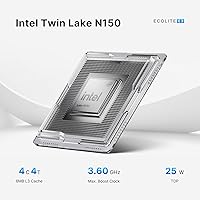
  • Processor: Intel Twin Lake N150, 4-core 4-thread CPU with 6MB L3 cache, boosting up to 3.6GHz under load.
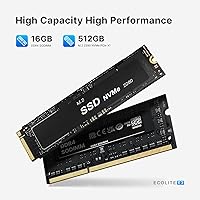
  • RAM: 16GB DDR4 SODIMM running at 2666MHz in a single-channel configuration, upgradeable via one accessible slot.
  • Storage: 512GB M.2 2280 NVMe SSD, user-replaceable and expandable up to 4TB with a compatible drive.
  • Display Outputs: Two HDMI 2.0 ports and one full-function USB-C port support up to three simultaneous 4K displays at 3840x2160 resolution.
  • Graphics: Intel integrated graphics built into the N150 processor, supporting hardware-accelerated 4K video decoding for common codecs.
  • Ethernet: Single 2.5G RJ45 Ethernet port providing up to 2500Mbps wired network throughput for fast local area network connections.
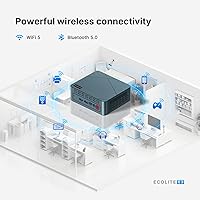
  • Wireless: Wi-Fi 5 (802.11a/b/g/n/ac) with Bluetooth 5.0 for wireless peripheral and network connectivity.
  • USB Ports: Six USB ports in total: four USB 3.0 Type-A and two USB 2.0 Type-A, all located on the front and rear panels.
  • Operating System: Windows 11 Home comes pre-installed and activated; the unit also supports Ubuntu and other Linux distributions.
  • Dimensions: The chassis measures 126mm x 112mm x 41mm, making it roughly the footprint of a thick paperback book.
  • Weight: The unit itself weighs approximately 346g, with a packaged shipping weight of around 2.05 lbs.
  • Memory Type: SODIMM DDR4 slot accepts standard laptop-form-factor RAM modules, allowing user-driven upgrades without proprietary hardware.
  • Power Design: Low-power thermal design keeps idle and typical-load consumption minimal, supporting continuous always-on operation.
  • VESA Mount: A VESA mounting bracket is included in the box, allowing the unit to be mounted directly behind a compatible monitor.
  • Warranty: BOSGAME provides a one-year manufacturer warranty from the purchase date, with a 30-day return window and stated 24/7 lifetime technical support.
  • Color & Finish: The chassis is finished in matte black plastic with a compact rectangular profile designed for unobtrusive desk or wall placement.
  • Audio Output: Audio is delivered via HDMI and USB-C display outputs; no dedicated 3.5mm analog audio jack is listed in the official specification.
  • Cooling: Active cooling via an internal fan maintains operating temperatures under typical loads, with audible ramp-up under sustained CPU stress.

Related Reviews
KAMRUI Essenx E2 N150 Mini PC, 16GB RAM, 512GB SSD
86%
88%
Performance
92%
Value for Money
90%
Cooling and Noise Level
85%
Dual Display Support
80%
Build Quality
More
BOSGAME E2 Mini PC 16GB/512GB
80%
88%
Value for Money
83%
Performance for Everyday Tasks
76%
Build Quality & Design
61%
Thermal Management & Fan Noise
82%
Display Output & Multi-Monitor Support
More
BOSGAME P4 Mini Gaming PC AMD Ryzen 7 5700U 16GB RAM 512GB SSD
85%
88%
Performance
85%
Build Quality
91%
Size & Portability
89%
Setup & Installation
93%
Noise & Quiet Operation
More
ACEMAGICIAN Kron Mini K1 Mini PC, Ryzen 7 7730U, 16GB RAM, 512GB SSD
85%
88%
Value for Money
91%
Performance for Everyday Tasks
94%
Compact Design & Portability
90%
Setup & Ease of Use
78%
Gaming Performance (Light)
More
Blackview MP60 Mini PC, 16GB RAM, 512GB SSD
88%
88%
Performance
94%
Compactness and Design
85%
Multitasking Capability
91%
Energy Efficiency
90%
Display and Connectivity
More
KAMRUI GK3Plus Mini PC (N95, 16GB RAM, 512GB SSD)
81%
89%
Multitasking Performance
92%
Value for Money
86%
Thermal Management
84%
Display Versatility
81%
4K Media Playback
More
GEEKOM Air12 Mini PC 16GB/512GB
82%
88%
Value for Money
82%
Everyday Performance
71%
Build Quality
74%
Thermal Management & Noise
91%
Connectivity & Port Selection
More
MeLE Quieter3C Mini PC N5105 16GB/512GB
80%
97%
Noise Level
83%
Build Quality & Design
71%
Thermal Management
74%
Everyday Performance
68%
Memory & Storage Configuration
More
MeLE Mini PC Quieter 4C, 16GB RAM, 512GB SSD
87%
85%
Performance
90%
Build Quality
88%
Display Quality
93%
Energy Efficiency
92%
Noise Level
More
GEEKOM A5 2025 Edition Mini PC, 16GB RAM, 512GB SSD
88%
86%
Performance
90%
Build Quality
92%
Value for Money
95%
Ease of Setup
88%
Connectivity
More

FAQ

It genuinely supports three simultaneous displays — two via HDMI 2.0 and one via the full-function USB-C port. Most buyers report that all three screens are recognized automatically in Windows 11 without needing extra drivers. The one caveat is that your USB-C monitor or adapter needs to support DisplayPort Alt Mode to work correctly on that third output.

Yes, the RAM slot is a standard SODIMM DDR4 slot — the same type used in laptops. The unit ships with a single 16GB stick, which means the second channel is empty. Installing a matching 16GB DDR4 SODIMM stick to run in dual-channel mode is one of the most cost-effective upgrades you can make, and it noticeably improves multitasking performance.

Yes, Windows 11 Home comes pre-installed and already activated out of the box. You do not need to purchase a separate license or enter a product key. Just plug it in, go through the standard Windows setup screens, and you are ready to work.

During typical office tasks — browsing, documents, video calls — the fan is barely noticeable and many users describe it as near-silent. It does spin up audibly when the CPU is under sustained pressure, like a long video export or a heavy download combined with active browsing, but it is not disruptive by any measure.

The hardware is compatible with Linux, and several buyers have successfully installed Ubuntu and other lightweight distributions. That said, BOSGAME does not officially support Linux, so you will not get driver packages or troubleshooting help from them if something does not work. For most popular Ubuntu-based distros, the core hardware including Wi-Fi and Ethernet tends to be recognized without much fuss.

If your router tops out at 1G, the 2.5G port will simply negotiate down and operate at 1G — so it will not cause any problems, it just will not add speed in that scenario. Where it genuinely pays off is if you have a NAS, a network switch, or a router that supports 2.5G, in which case local file transfers can be significantly faster than what a standard gigabit port would allow.

It is well-suited for that use case. The low-power N150 chip keeps electricity consumption minimal during idle and light-load operation, and the hardware has no meaningful objection to continuous uptime. Several buyers use the E3 desktop as a lightweight always-on machine for file sharing, media serving, or network monitoring without reported reliability issues.

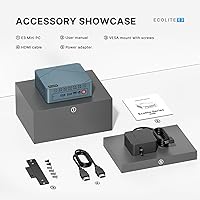
The box includes the mini PC, a power adapter, and a VESA mounting bracket. An HDMI cable is not included, which is a recurring complaint from buyers given that display connectivity is a headline feature. If you are setting up a triple-monitor arrangement, budget for at least two HDMI cables separately.

The N150 is built on a newer microarchitecture and delivers a tangible improvement in single-core responsiveness, which matters more than raw clock speed for everyday tasks. If you already own a well-configured N100 machine, the difference may not justify switching. But if you are buying new, the N150 is a better foundation and this compact Intel machine is priced competitively enough that choosing the newer chip costs very little extra.

The M.2 2280 NVMe slot is accessible after opening the chassis, and swapping the drive is straightforward for anyone comfortable with basic PC hardware. Migrating an existing Windows installation using cloning software like Macrium Reflect is possible, though clean installs tend to be more reliable. The slot accepts standard NVMe M.2 2280 drives, so compatible options from major brands are widely available.