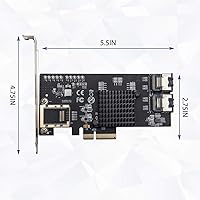
Overview

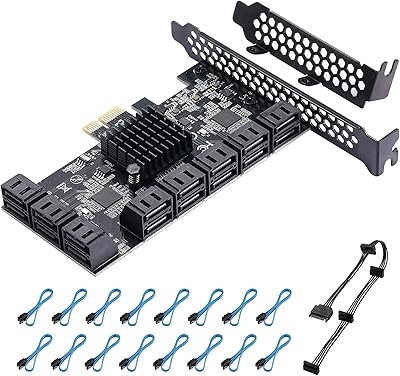
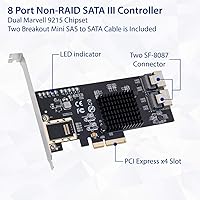
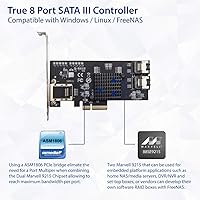
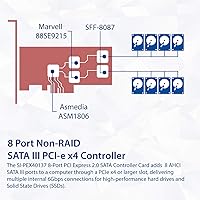
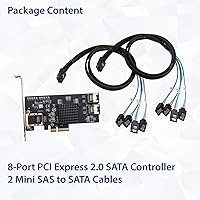
The IO CREST SI-PEX40137 8-Port PCIe SATA Card is a straightforward, no-frills solution for anyone who needs to add more SATA III ports without the overhead of a hardware RAID controller. It runs two Marvell 88SE9215 chips bridged by an ASM1806 PCIe switch, which keeps each port operating at its own dedicated bandwidth rather than forcing all eight drives to share a single pipe. The card is PCI-Express 2.0 native but drops back to PCIe 1.x without complaint. A set of Mini SAS breakout cables is included, so you can start cabling drives right away. In a crowded mid-range HBA market, it holds its own as a dependable pick for home NAS builders.

Features & Benefits

Each of the eight SATA III ports on this SATA expansion card operates at up to 6.0 Gbps independently, which is the real selling point here. Without the ASM1806 bridge chip in the mix, two Marvell controllers sharing a single PCIe x4 lane would inevitably create a bottleneck under heavy multi-drive workloads — the bridge prevents that, keeping throughput honest. Hot-plug and hot-swap capability means swapping a failed drive mid-operation is possible without powering the system down, which is genuinely useful in an always-on NAS setup. NCQ support keeps I/O requests organized across drives, and the AHCI 1.0 interface means Linux, Windows, and FreeNAS all recognize the card without custom drivers in most cases.

Best For

This PCIe HBA card was clearly designed with the homelab and prosumer NAS crowd in mind. If you are building a FreeNAS or TrueNAS pool and want ZFS to see each physical drive directly — no RAID abstraction layer in the way — this is exactly the type of controller to reach for. It also works well for anyone whose motherboard is running short on native SATA ports and needs a clean, AHCI-based expansion without the complexity of a hardware RAID card. One thing worth stating plainly: this card does no hardware RAID whatsoever. If you need RAID 5 or RAID 6 offloaded to the controller, look elsewhere. For pure JBOD setups, it fits well.

User Feedback

Community sentiment around the IO CREST 8-port card is broadly positive among NAS builders, particularly those on FreeNAS or Linux-based systems who report solid out-of-box detection and stable long-term operation. FreeNAS compatibility gets mentioned consistently as a genuine strength. On the critical side, a handful of users have reported heat buildup under sustained load, and the included breakout cables have drawn mixed reactions — some find them perfectly adequate, while others swap them out for higher-quality alternatives fairly quickly. A few builders also hit compatibility snags with older motherboards or unusual PCIe slot configurations. The consensus, though, is that for a non-RAID SATA expansion at this price tier, the card delivers what it promises.

Pros

  • All eight SATA III ports operate independently at up to 6.0 Gbps, with no bandwidth sharing between drives.
  • The ASM1806 bridge chip genuinely solves the dual-controller bottleneck problem that plagues cheaper alternatives.
  • FreeNAS and TrueNAS detect this SATA expansion card reliably out of the box with no custom driver hunting.
  • Hot-swap support lets you replace a failed drive in a running NAS without a full system shutdown.
  • NCQ support keeps multi-drive I/O organized and responsive under real workloads.
  • Broad OS compatibility covers Windows, most Linux distributions, and FreeNAS without extra configuration.
  • Included Mini SAS breakout cables mean you can start cabling drives immediately after installation.
  • The compact PCB size makes it compatible with a wide range of cases, including smaller NAS chassis.
  • PCIe 2.0 with backward compatibility to 1.x gives it flexibility across older and newer platforms.
  • Community reputation in homelab forums is consistently positive for long-term stability.

Cons

  • Zero hardware RAID support means this card cannot replace a dedicated RAID controller under any configuration.
  • A subset of users report noticeable heat output during sustained multi-drive workloads, and there is no onboard heatsink.
  • The included breakout cables are serviceable but not high quality — many builders replace them fairly quickly.
  • Compatibility issues with certain older motherboards and non-standard PCIe slot implementations have been reported.
  • No SAS drive support limits the card strictly to SATA devices, which may matter as storage needs grow.
  • Vendor documentation and official support resources are minimal, so troubleshooting largely falls on community forums.
  • The bracket situation is not always clearly communicated — buyers with low-profile cases should confirm fit before purchasing.
  • Some users have flagged inconsistent PCIe slot recognition in systems with multiple expansion cards installed.

Ratings

The scores below reflect an AI-driven analysis of verified global user reviews for the IO CREST SI-PEX40137 8-Port PCIe SATA Card, with spam, incentivized submissions, and bot-generated feedback actively filtered out before scoring. Ratings span the full spectrum of buyer experience — from the areas where this card consistently impresses homelab builders to the friction points that have frustrated a meaningful subset of users. Both sides are represented honestly here.

OS Compatibility
92%
FreeNAS, TrueNAS, and mainstream Linux distributions recognize this SATA expansion card at boot without manual driver installation in the vast majority of reported cases. Homelab users building ZFS pools have repeatedly cited this plug-and-play behavior as a decisive reason for choosing it over alternatives with spottier kernel support.
A small but consistent number of users on older Linux kernels or niche distributions have had to do manual configuration to get all eight ports recognized correctly. Windows compatibility is generally fine but receives less enthusiastic feedback than the Linux and FreeNAS experience.
Per-Port Bandwidth
89%
The ASM1806 bridge chip genuinely earns its place here — users running sustained multi-drive workloads in TrueNAS report that individual drive throughput holds up without the compression you see on cheaper cards that skip the bridge. Each port behaves as a truly independent channel, which matters enormously in ZFS scrub operations.
A few technically thorough users note that aggregate throughput across all eight ports simultaneously is still constrained by the PCIe x4 interface ceiling, which becomes relevant in high-density sequential write scenarios. This is a fundamental architecture reality rather than a defect, but it is worth understanding before buying.
ZFS & NAS Suitability
91%
Among NAS and homelab forum communities, this PCIe HBA card has developed a solid reputation as a reliable non-RAID controller for ZFS deployments where direct drive visibility is essential. Users building 6- to 8-drive pools report consistent long-term stability with no phantom disconnects under normal operating conditions.
Users expecting any form of hardware-assisted redundancy will find this card completely unsuitable — it is strictly a passthrough device, and that limitation excludes an entire category of buyers who did not read the specs carefully before purchasing.
Hot-Swap Reliability
83%
Hot-swap works as advertised for the majority of users, and NAS builders running always-on systems genuinely appreciate being able to pull a failed drive and slot in a replacement without scheduling downtime. This feature alone justifies the card for anyone managing a home media server or backup array.
A handful of users have reported that hot-swap behavior can be inconsistent depending on the operating system configuration and how ZFS or mdadm is set up to handle drive events — the card itself supports it, but the end-to-end experience requires the software stack to cooperate as well.
Thermal Performance
61%
39%
In well-ventilated mid-tower cases with reasonable airflow, the dual Marvell controllers run warm but within acceptable limits during typical NAS workloads like RAID scrubs and large sequential transfers. Users who planned their builds with airflow in mind report no heat-related issues over extended periods.
In compact or poorly ventilated chassis, the lack of any onboard heatsink becomes a real concern — multiple users have reported uncomfortably high chip temperatures under sustained load, and some have resorted to sticking aftermarket heatsinks on the controllers as a workaround. This is a notable design omission at the mid-range price point.
Included Cables
58%
42%
The bundled Mini SAS to SATA breakout cables get the job done for initial setup and mean you do not have to place a separate cable order before your first boot. For temporary or test builds, most users find them perfectly adequate.
Long-term impressions of the included cables are mixed at best — a meaningful portion of buyers describe them as flimsy or poorly sleeved and choose to replace them with higher-quality alternatives within the first few months. For a permanent production NAS build, budgeting for better cables is probably the right call.
Build Quality
74%
26%
The PCB itself feels solid and components are laid out cleanly, with no reports of cold solder joints or obviously cheap component choices. The card's physical construction inspires reasonable confidence for a mid-range expansion card.
The bracket quality has drawn some criticism, and users needing a low-profile bracket have found that the situation is not always clearly communicated in the packaging. A few buyers received cards where the bracket fit was imprecise, requiring minor adjustments before installation.
Installation Experience
86%
The physical installation is straightforward — slot it into a PCIe x4 or larger slot, connect the breakout cables, and power on. Most Linux and FreeNAS users report a clean detection experience on first boot with no BIOS configuration required.
Users coming from a Windows background and expecting a driver disc or detailed setup guide may be surprised by the minimal documentation included in the box. The installation experience is smooth only if you already know what you are doing, which fits the target audience but could trip up less experienced builders.
Value for Money
79%
21%
For a non-RAID 8-port SATA III expansion card with a proper bridge chip and hot-swap support, the price lands in a reasonable range relative to the feature set. Homelab builders consistently describe it as a cost-effective way to get eight clean, independent SATA connections from a single PCIe slot.
Some users feel the value proposition weakens slightly when factoring in the need to replace the bundled cables and the absence of any heatsink solution — two additions that would have meaningfully improved the out-of-box experience without dramatically affecting the price.
Long-Term Stability
84%
Users who have been running this PCIe HBA card continuously for a year or more in FreeNAS and TrueNAS environments generally report stable operation with no degradation in drive detection or throughput. Community threads on homelab forums frequently cite it as a card that simply keeps working once it is set up correctly.
A subset of users has reported sporadic drive disconnection events over time, though these incidents appear to be linked to specific motherboard or cable combinations rather than the card itself failing. Isolating root cause on these edge cases is difficult, which adds some uncertainty for buyers in unusual build configurations.
Motherboard Compatibility
71%
29%
The card works without issue in the majority of modern motherboards with a PCIe x4 or larger slot, and the backward compatibility with PCIe 1.x extends its usability to older platforms that homelab builders frequently repurpose for NAS duty.
A recurring theme in negative reviews involves compatibility conflicts with specific older motherboards and BIOS versions, where the card is either not detected or only partially recognized. This is not a widespread issue, but it is unpredictable enough that users with vintage hardware should check community reports for their specific board before buying.
Driver Support
81%
19%
Because the Marvell 88SE9215 chipset has been in the market long enough to be integrated into major OS kernels, driver support is largely invisible — it just works. Linux users in particular benefit from years of mature kernel-level support that requires no ongoing maintenance.
There is no meaningful manufacturer driver support or firmware update pathway for end users, which means that if a specific driver issue emerges in a future kernel version, buyers are reliant on the open-source community or their own troubleshooting skills to resolve it rather than an official vendor fix.
Port Count Utility
88%
Eight ports from a single PCIe slot is a genuinely useful density for home NAS builds, covering the typical 4- to 8-drive pool without requiring a second expansion card. Users building out their first serious ZFS array often find that eight ports is exactly the right number to grow into.
For builders whose storage ambitions extend beyond eight drives, this card becomes a stepping stone rather than a final solution — a second card or a different platform is needed, and not all motherboards have enough PCIe slots to accommodate that gracefully.

Suitable for:

The IO CREST SI-PEX40137 8-Port PCIe SATA Card is purpose-built for home lab enthusiasts and prosumer NAS builders who need to expand their SATA port count without introducing a hardware RAID layer between the OS and the physical drives. If you are running FreeNAS or TrueNAS with a ZFS pool, this type of AHCI-based controller is exactly what those platforms prefer — ZFS wants to talk directly to each drive, and this card respects that. It is also a practical upgrade for anyone whose motherboard has run out of native SATA ports and needs a clean, driver-friendly solution that just works on Linux or Windows without hunting down obscure firmware. The hot-swap support is a real operational bonus for always-on systems where pulling a drive without a full shutdown matters. Builders who want eight independent, full-speed SATA III connections from a single PCIe x4 slot will find this card hits the right balance of capability and value for the money.

Not suitable for:

The IO CREST SI-PEX40137 8-Port PCIe SATA Card is not the right tool if you need hardware RAID — full stop. This card does JBOD only, so anyone expecting onboard RAID 5, RAID 6, or even RAID 1 offloaded to the controller will be disappointed from the first boot. It is also not ideal for enterprise or production environments where thermal management, certified drivers, and long-term vendor support are non-negotiable requirements. Users with very tight PCIe slot availability may find the x4 slot requirement limiting, and those with older or unusual motherboards should do compatibility homework before purchasing, as a small but consistent number of users have run into slot-level conflicts. If your workflow demands SAS drive support rather than SATA, this card offers nothing on that front either.

Specifications

  • Brand: This card is manufactured by IO CREST, a brand produced under the I/O Crest label.
  • Model Number: The exact model designation is SI-PEX40137, which is also the series identifier used across retailer listings.
  • Host Interface: The card connects to the motherboard via a PCI-Express x4 slot running at PCIe 2.0 specification, with backward compatibility to PCIe 1.x.
  • SATA Ports: Eight SATA III ports are provided onboard, each capable of operating independently at up to 6.0 Gbps.
  • Controller Chipset: Two Marvell 88SE9215 controllers handle the SATA port management, bridged together by an ASM1806 PCIe switch chip.
  • Bridge Chip: The ASM1806 PCIe bridge eliminates bandwidth contention between the dual Marvell controllers, ensuring each port gets its own dedicated throughput.
  • RAID Support: This card offers no hardware RAID functionality and operates purely in JBOD or passthrough mode, making it ideal for software RAID and ZFS environments.
  • Hot-Swap: Both hot-plug and hot-swap are supported, allowing drives to be connected or removed while the system is running without requiring a reboot.
  • NCQ Support: Native Command Queuing is fully supported, which helps maintain read and write efficiency when multiple drives are active simultaneously.
  • AHCI Version: The card implements the AHCI 1.0 programming interface, ensuring native recognition across a broad range of operating systems without requiring proprietary drivers.
  • Compatible OS: Officially supported operating systems include Windows, Linux distributions, and FreeNAS, covering the most common homelab and NAS deployment environments.
  • Included Cables: The package includes Mini SAS to SATA breakout cables, providing immediate connectivity for drives without requiring a separate cable purchase.
  • Dimensions: The PCB measures 5.5″ in length, 4.75″ in width, and 0.75″ in height, fitting most standard and compact chassis configurations.
  • Weight: The card weighs approximately 10.2 ounces (roughly 0.29 kilograms), which is typical for a full-length expansion card of this type.
  • PCIe Compatibility: While designed for PCIe 2.0, the card is backward compatible with PCIe 1.x slots, offering flexibility across older and current generation motherboards.
  • Port Speed Range: Communication speeds supported per port span 1.5 Gbps, 3.0 Gbps, and 6.0 Gbps, automatically negotiating with each connected drive.
  • Form Factor: The card is designed to be compatible with low-profile bracket configurations, making it usable in smaller chassis with the appropriate bracket installed.
  • Availability Status: As of the product listing, the SI-PEX40137 has not been discontinued by the manufacturer and remains in active production.

Related Reviews
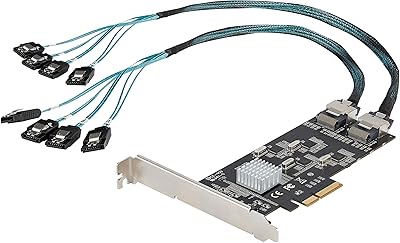
BEYIMEI 8-Port PCIe SATA Expansion Card
71%
88%
Value for Money
91%
Ease of Installation
86%
Port Count & Connectivity
57%
Throughput Performance
74%
Driver & OS Compatibility
More
StarTech 8-Port SATA III PCIe Expansion Card
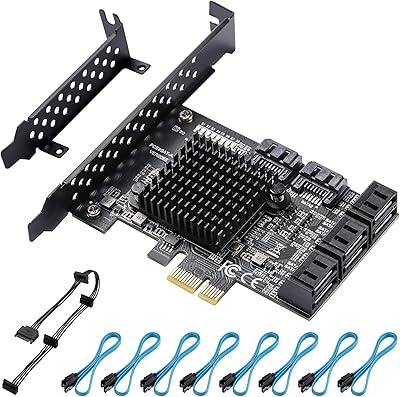
80%
88%
Drive Detection Reliability
84%
Multi-Controller Architecture
79%
OS Compatibility
86%
Motherboard Compatibility
81%
Included Cables
More
YBBOTT PCE 16SAT 16-Port SATA Expansion Card
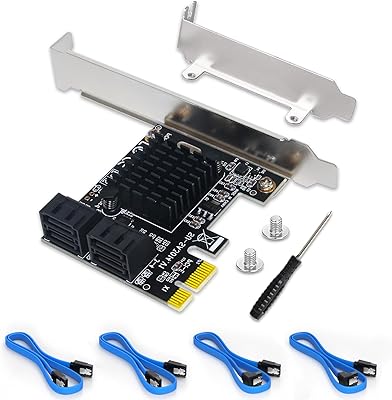
77%
88%
Multi-Drive Detection Reliability
83%
Data Throughput Stability
81%
Chipset Stability & Architecture
86%
Operating System Compatibility
79%
Boot Drive Support
More
Moonqkuses 4-Port SATA 3.0 PCIe Expansion Card
78%
88%
Ease of Installation
91%
Driver & OS Compatibility
86%
Drive Detection Reliability
72%
Boot as System Disk
78%
Thermal Performance
More
GLOTRENDS SA3026-C 6-Port PCIe SATA Card
84%
92%
Ease of Installation
89%
OS & Platform Compatibility
74%
Throughput & Bandwidth
91%
Value for Money
83%
Build & Component Quality
More
Trotwei Blue SSU-10P-SATA3 10-Port SATA PCIe Card
70%
83%
Value for Money
58%
Driver Installation
91%
Port Count & Expansion
76%
Motherboard Compatibility
69%
Transfer Speed Performance
More
IO CREST 8-Bay Tool-Less SATA Hard Drive Enclosure, 22TB Capacity
86%
89%
Value for Money
93%
Ease of Installation
88%
Performance (Speed/Transfer Rate)
85%
Build Quality and Durability
90%
Cooling and Noise Management
More
IO CREST AQC113 10Gbps PCIe Network Card
79%
83%
Real-World Transfer Speed
89%
Chipset Reliability
78%
Installation & Driver Setup
86%
Multi-Gig Auto-Negotiation
91%
Case & Bracket Compatibility
More
FebSmart FS-S4-Pro V2 PCIe to 4-Ports SATA III Expansion Card
82%
88%
Performance
91%
Ease of Installation
85%
Compatibility with Operating Systems
86%
Build Quality
75%
Power Supply Requirements
More
IO CREST SY-ENC50119 8-Bay External HDD Enclosure
75%
83%
Build Quality
79%
Drive Compatibility
76%
Thermal Management
68%
Fan Noise
71%
USB 3.0 Transfer Performance
More

FAQ

Yes, and this is genuinely one of its strongest points. The Marvell 88SE9215 chipset is well-recognized by the FreeBSD kernel that underpins FreeNAS and TrueNAS, so in most cases the system detects all eight drives without any manual driver installation. A number of NAS builders specifically choose this card for that reason.

No, this card does not support hardware RAID in any form. It operates purely as a JBOD or passthrough controller, meaning the drives appear individually to the operating system. If you need RAID, it has to be handled at the software level — which is actually the preferred approach for ZFS users anyway, but worth knowing upfront.

Yes. PCIe slots are electrically and physically compatible across sizes when the card is smaller than the slot, so a PCIe x4 card will run in an x8 or x16 slot without issues. The only thing to be aware of is that the card will only use x4 lanes regardless of slot size.

They are functional and sufficient for getting started, but opinions are mixed on their long-term durability. Several users have chosen to replace them with higher-quality aftermarket cables after a few months, particularly in builds where the cables are routed under stress or in tight spaces. For a clean permanent install, budgeting for better cables is a reasonable idea.

You can connect up to eight SATA drives simultaneously, one per port. There is no port multiplier involved, so each drive gets its own direct connection to one of the Marvell controller channels — no sharing, no compromise on individual drive performance.

It can run warm under sustained multi-drive workloads, and there is no heatsink included on the controllers. In a well-ventilated case this is generally not a problem, but in a cramped or poorly airflowed chassis it is something to keep an eye on. A few users in dense NAS builds have added small adhesive heatsinks to the chips as a precaution.

Yes, the card is backward compatible with PCIe 1.x, so it should work in older systems. That said, the combined bandwidth available in a PCIe 1.x x4 slot is lower than in a 2.0 slot, so theoretical maximum throughput across all eight ports simultaneously would be more constrained. For typical NAS workloads this rarely becomes a real-world limitation.

In most cases, no. The Marvell 88SE9215 chipset has been supported in the mainline Linux kernel for quite some time, so modern distributions should recognize this PCIe HBA card automatically at boot. Older kernel versions or niche distributions might require some manual configuration, but this is uncommon.

Yes, hot-swap is fully supported. You can pull a drive and insert a replacement while the system is running, which is particularly useful in an always-on NAS where downtime is something you want to minimize. Just make sure your operating system and software RAID or ZFS configuration are also set up to handle hot-swap events properly.

This SATA expansion card works with any standard SATA drive, including both traditional spinning hard drives and SATA solid-state drives. It does not support SAS drives or NVMe drives. As long as the drive uses a standard SATA interface at 1.5, 3.0, or 6.0 Gbps, it will work fine here.

Where to Buy