Overview

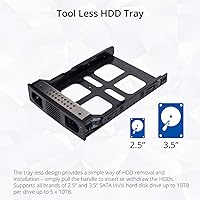
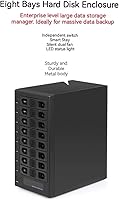
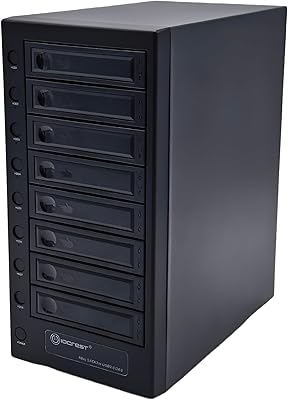
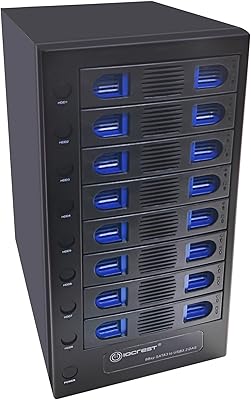
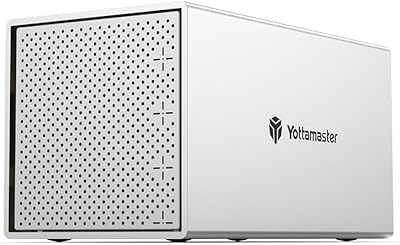
The IO CREST SY-ENC50119 8-Bay External HDD Enclosure is a serious piece of kit aimed squarely at power users, small office teams, and anyone who has outgrown the chaos of juggling half a dozen individual drives. IO CREST is not a household name, but the brand has quietly built a solid reputation in the storage peripheral space for functional, no-frills hardware. This 8-bay enclosure accepts both 2.5-inch and 3.5-inch SATA drives without tools or trays, making physical installation genuinely fast. It does not support RAID or NAS functions — this is pure direct-attached storage expansion, so manage expectations accordingly before buying.
Features & Benefits

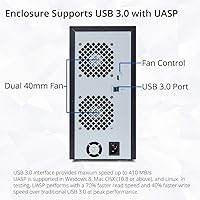
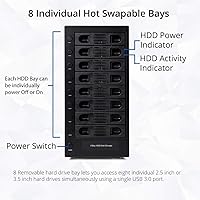
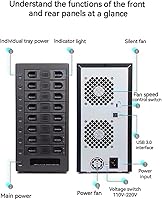
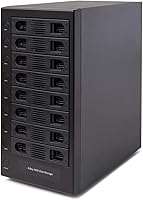
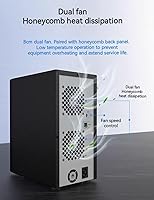
The hot-swap capability is one of the more practical aspects here — you can pull and replace drives without shutting the unit down, which matters during active workflows. Each bay has its own independent power switch, letting you spin down drives you are not using rather than running all eight constantly. USB 3.0 with UASP support pushes up to 5 Gbps, but that bandwidth is shared across all active drives at once, not dedicated per bay — worth knowing before expecting top-end sequential speeds across the board. The smart thermal fan adjusts automatically based on internal temperature, with three manual speed options available if you prefer control, while the steel alloy shell acts like a passive heat sink around the whole assembly.

Best For

This multi-drive enclosure makes the most sense for a specific type of buyer. Video editors and photographers archiving large project files across multiple bare drives will find the centralized setup a genuine improvement over a cluttered desk of individual docks. Home lab users wanting bulk storage expansion without committing to a full NAS appliance will also fit right in. IT staff handling manual backup rotations in small office environments will appreciate the per-bay power controls. And if you already have a pile of spare SATA drives sitting idle, the IO CREST dock turns that collection into something organized and immediately usable without much friction or additional hardware.

User Feedback

Owners generally speak well of the build quality, noting the steel chassis feels appropriately solid and fan noise stays tolerable on lower speed settings. Drive compatibility is broad in practice — most standard SATA drives slot in without drama. Friction tends to appear at the edges: some users report occasional hiccups with drive detection when switching operating systems or hot-swapping under heavy sustained load. A handful of long-term buyers have mentioned early unit failures, though these read more like outliers than a consistent pattern. Against competing multi-bay docks, most buyers consider the value reasonable, particularly for anyone who genuinely needs eight bays and wants to avoid the added complexity and cost of a dedicated NAS enclosure.

Pros

  • Eight bays supporting both 2.5-inch and 3.5-inch SATA drives gives rare flexibility for mixed drive collections.
  • Tool-less hot-swap design makes physical drive changes fast, clean, and doable without powering the unit down.
  • Independent power switches per bay let you spin down idle drives without disrupting the ones actively in use.
  • The steel alloy chassis feels noticeably more solid than competing enclosures in this price range.
  • Smart fan with automatic thermal sensing keeps temperatures managed without requiring constant manual adjustment.
  • Works out of the box on Windows, Linux, and most server environments with no driver installation needed.
  • Consolidating multiple bare drives into one enclosure dramatically reduces desk clutter and cable chaos.
  • UASP support helps single-drive transfer speeds stay closer to the drive hardware limit rather than USB overhead.

Cons

  • USB 3.0 bandwidth is shared across all active drives — parallel transfers across multiple bays slow down significantly.
  • Long-term reliability reports are inconsistent, with a notable minority citing fan or USB controller failures within eighteen months.
  • Fan noise at higher speed settings is genuinely disruptive in quiet office or bedroom workstation environments.
  • Drive detection after hot-swapping can lag or require manual intervention, particularly on macOS systems.
  • The power brick is bulky and the stiff cable makes clean desk routing harder than the single-connection promise implies.
  • Included documentation is thin and IO CREST offers limited online support resources for troubleshooting edge cases.
  • The IO CREST dock offers no hardware data protection whatsoever — a single drive failure means that data is simply gone.
  • At 10 pounds unloaded, relocating the unit between workstations is genuinely inconvenient without a handle or carry case.
  • Bay locking mechanisms feel slightly imprecise compared to premium competitors, which can unsettle buyers used to tighter tolerances.

Ratings

The scores below reflect an AI-driven analysis of verified buyer reviews for the IO CREST SY-ENC50119 8-Bay External HDD Enclosure, sourced globally and filtered to exclude incentivized, duplicate, and bot-generated submissions. Each category was scored to honestly reflect what real users experienced over weeks and months of active use — strengths and frustrations alike. Nothing has been rounded up to flatter the product.

Build Quality
83%
The steel alloy chassis earns consistent praise from buyers who expected cheaper plastic at this price point. It feels dense and purposeful on a desk, and the overall construction gives the impression it can handle years of daily drive swaps without flexing or rattling apart.
A subset of users noted that the bay mechanisms, while functional, feel slightly looser than premium competitors. Some reported minor cosmetic scuffs arriving out of the box, which, while not functional issues, dent confidence in packaging quality.
Drive Compatibility
79%
21%
Support for both 2.5-inch and 3.5-inch SATA drives across three interface generations gives this enclosure genuine flexibility. Most users loading a mix of older archive drives alongside newer high-capacity units reported zero compatibility surprises during initial setup.
Edge cases do exist — a handful of users found that certain older or less common SATA drives were not detected reliably on first insertion and required reseating. Detection hiccups were more frequent when hot-swapping under sustained read or write operations.
Thermal Management
76%
24%
The built-in thermal sensor does its job quietly in moderate workloads — think of it like a thermostat that ramps the fan up before things get uncomfortable, rather than waiting until drives are already throttling. Users running four to six drives simultaneously reported stable temperatures during multi-hour transfers.
With all eight bays fully populated and active, some buyers reported that the fan climbs to its higher speed settings and stays there, producing noticeable noise in quiet office environments. The enclosure clearly works harder at full capacity than its fan acoustics might suggest at first.
Fan Noise
68%
32%
On the lowest manual fan setting or in auto mode during light workloads, noise levels are acceptable for a desk setup — closer to ambient white noise than an intrusive hum. Users running overnight backups in separate rooms had no complaints.
At higher fan speeds the noise becomes distinctly audible and a real nuisance in shared or quiet workspaces. Several reviewers specifically mentioned they wished for a zero-RPM idle mode, which this unit does not offer.
USB 3.0 Transfer Performance
71%
29%
Single-drive transfers are brisk and consistent, comfortably saturating what most SATA hard drives can deliver sequentially. For workflows involving one or two active drives at a time — moving large video project folders, for example — the connection feels responsive and stable.
The 5 Gbps USB 3.0 link is shared across all eight drives simultaneously, not dedicated per bay. Users attempting parallel transfers across four or more drives at once saw speeds drop noticeably, which is an inherent architectural limitation rather than a defect but still catches buyers off guard.
Hot-Swap Usability
81%
19%
The tool-less hot-swap mechanism genuinely works as advertised for the majority of users. IT staff rotating backup drives on regular schedules found the process clean and repeatable — no screwdrivers, no powered-down downtime, just a firm press and pull.
Detection after a hot-swap is not always instantaneous, particularly on macOS. Some users reported needing to wait several seconds or manually refresh disk utilities before a newly inserted drive appeared. Under Windows the experience was generally more consistent.
Per-Bay Power Controls
87%
Individual power switches per bay are a genuinely useful feature that separates this enclosure from simpler docks. Users archiving infrequently accessed drives appreciated being able to spin down idle bays independently, reducing both noise and wear without affecting active drives.
The physical switches feel slightly cheap relative to the rest of the chassis — a minor but noticeable inconsistency. A few users also reported that switch actuation occasionally required a firm press to register reliably, which became mildly annoying during repeated use.
OS Compatibility
82%
18%
Out-of-the-box recognition on Windows 10 and 11 is essentially plug-and-play with no driver installation required. Linux users running common distributions like Ubuntu also reported straightforward detection, making this enclosure a practical choice for home server and NAS-adjacent setups.
macOS users encountered the most friction, particularly with drive mounting reliability after sleep cycles and OS updates. A small but vocal group of macOS buyers reported drives occasionally dismounting unexpectedly, requiring a manual reconnect — a workflow disruptor for anyone relying on sustained access.
Setup & Installation
88%
Getting drives into this enclosure is about as fast as it gets for an 8-bay unit — no screws, no rails, no cable routing inside the chassis. Most users reported having all eight drives installed and recognized by their system within fifteen minutes of unboxing.
The documentation included in the box is thin, and first-time buyers unfamiliar with direct-attached storage had questions that the manual did not adequately answer. IO CREST's online support resources are limited, which compounds the problem for less experienced users.
Long-Term Reliability
63%
37%
Many buyers who have used this multi-drive enclosure for over a year report no functional degradation — drives detected cleanly, fan still operating, switches still responsive. For users in controlled environments with moderate workloads, the unit appears to hold up adequately.
A meaningful minority of reviews describe unit failures within the first six to eighteen months, including fan failures and USB controller issues. The pattern is not overwhelming but frequent enough to register as a genuine concern, particularly for buyers planning to use this in a production or archival context without redundancy.
Value for Money
74%
26%
Compared to the per-bay cost of buying multiple individual docks, consolidating into this 8-bay enclosure does save money and desk space. For users who already own a collection of bare drives, the total cost of ownership argument holds up reasonably well.
Buyers comparing this directly against premium competitors felt the price sits in an awkward middle zone — not cheap enough to dismiss quality concerns easily, not polished enough to justify full confidence. If one or two more reliability complaints stack up over time, the value equation tips unfavorably.
Footprint & Portability
66%
34%
At roughly 12.5 x 10.5 x 6 inches, the enclosure occupies a defined but manageable footprint on a workstation desk. Users who cleared dedicated shelf space for it had no complaints, and the steel housing means it stays put rather than sliding around.
At 10 pounds fully unloaded, this is not something you move often or transport easily. A few buyers who anticipated occasional relocation between workstations found the weight and lack of a carrying handle to be more inconvenient than expected.
Cable Management
58%
42%
The single USB 3.0 connection to the host system keeps the cable run simple — one data cable to manage instead of the tangle that multiple individual docks would create. Users appreciated the cleaner desk result after consolidating.
The power brick is large and the cable relatively stiff, making clean routing behind a desk more difficult than the single-cable promise implies. Several buyers mentioned the power cable length felt just short of ideal for their specific setup, requiring the enclosure to sit closer to the wall than preferred.
JBOD Flexibility
77%
23%
For users who explicitly want each drive to appear as an independent volume — no striping, no mirroring, no pooling complexity — the straightforward JBOD approach works cleanly. Home lab users pairing this with software-based backup tools found the simplicity an advantage rather than a limitation.
Buyers who purchased expecting RAID functionality were disappointed, and a noticeable number of negative reviews stem directly from this misunderstanding. The absence of hardware RAID is clearly stated in the specs, but it remains a friction point that shapes the product's real-world audience significantly.

Suitable for:

The IO CREST SY-ENC50119 8-Bay External HDD Enclosure was built for a specific kind of buyer, and when it lands in the right hands, it makes a lot of sense. Video editors and photographers who have accumulated a library of bare SATA drives across multiple projects will find genuine value in having a single, organized hub rather than a desktop cluttered with individual docks and cables. Home lab enthusiasts who want bulk storage expansion without the overhead and complexity of setting up a dedicated NAS appliance will also feel right at home — this is direct-attached storage, simple and uncomplicated by design. IT administrators in small offices handling manual backup rotations or drive archiving workflows will appreciate the independent per-bay power switches, which allow individual drives to be managed without disturbing others. If you already own a collection of 2.5-inch or 3.5-inch SATA drives sitting idle in a drawer, this enclosure turns that pile into an immediately functional and centralized storage solution with minimal effort.
Not suitable for:

The IO CREST SY-ENC50119 8-Bay External HDD Enclosure is the wrong tool for a fairly wide group of buyers, and being clear about that upfront saves real frustration. Anyone expecting RAID functionality — striping for performance, mirroring for redundancy, or any hardware-level data protection — should stop here and look elsewhere; this is a JBOD enclosure where each drive appears as its own independent volume, full stop. Users who need high-speed parallel transfers across multiple drives simultaneously will run into the shared USB 3.0 bandwidth ceiling quickly — splitting 5 Gbps across eight active drives does not produce eight fast connections, and that architectural reality is not something a firmware update can fix. Casual users who only occasionally need to access an extra drive or two are massively over-buying here; a single or dual-bay dock would serve them better at a fraction of the cost and desk footprint. macOS users with strict uptime requirements should also factor in the reported drive-mounting inconsistencies after sleep cycles before committing. And anyone expecting plug-and-play reliability without any troubleshooting tolerance should approach this unit with caution.
Specifications

  • Drive Bays: The enclosure accommodates eight drives simultaneously, accepting both 2.5″ and 3.5″ SATA hard drives in any combination across all bays.
  • SATA Support: Compatible with SATA I, II, and III interfaces, covering the full range of SATA hard drives manufactured over the past two decades.
  • Max Capacity: Each individual bay supports drives up to 24 TB, allowing a theoretical total raw storage ceiling of 192 TB when all eight bays are fully populated.
  • Host Interface: Connects to a host computer via a single USB 3.0 port, with UASP (USB Attached SCSI Protocol) support enabled for improved transfer efficiency.
  • Transfer Rate: The USB 3.0 connection delivers a maximum interface speed of 5 Gbps, shared across all active drives in the enclosure simultaneously.
  • Hot-Swap: All eight bays support tool-less hot-swapping, allowing drives to be inserted or removed while the enclosure remains powered on.
  • Power Switches: Each bay is equipped with its own independent power switch, enabling individual drives to be powered down without affecting the remaining bays.
  • Cooling System: An internal smart fan with a built-in thermal sensor operates in automatic mode or can be manually set to one of three fixed speed levels by the user.
  • Housing Material: The outer chassis is constructed from alloy steel, providing passive heat dissipation and structural rigidity across the full enclosure frame.
  • RAID Support: This enclosure does not support any RAID configuration; each drive appears as an independent volume on the host system in standard JBOD fashion.
  • OS Compatibility: Verified compatible with Windows, macOS, Linux, and server operating environments without requiring proprietary driver installation on most platforms.
  • Dimensions: The enclosure measures 12.5 x 10.5 x 6 inches (L x W x H), designed for stationary desktop or shelf placement rather than portable use.
  • Weight: The unit weighs approximately 10 pounds unloaded, increasing substantially when fully populated with eight hard drives.
  • Model Number: The manufacturer model designation is SY-ENC50119, used for warranty registration, driver lookup, and support identification purposes.
  • Brand: Manufactured and sold under the IO CREST brand, a storage peripheral specialist with a product range focused on enclosures, adapters, and expansion hardware.
  • Drive Form Factor: Designed primarily around 3.5-inch hard drives but fully supports 2.5-inch SATA drives in the same bays without requiring adapter trays or additional hardware.
  • NAS Support: The enclosure does not include NAS functionality and cannot operate as a standalone network-attached storage device; it requires a direct host connection at all times.

Related Reviews

IO CREST SY-ENC50127 USB 3.2 Type-C Dual Bay HDD + M.2 NVMe External Enclosure
83%
88%
Performance
93%
Ease of Setup
91%
Build Quality
87%
Data Transfer Speed
90%
Cooling/Heat Management
More
IO CREST SY-ENC50129 8-Bay USB4 40Gbps SATA Enclosure
76%
88%
Build Quality
83%
Drive Compatibility
86%
USB4 Interface & Compatibility
71%
Real-World Transfer Speed
74%
Fan Noise & Thermal Management
More
IO CREST 8-Bay Tool-Less SATA Hard Drive Enclosure, 22TB Capacity
86%
89%
Value for Money
93%
Ease of Installation
88%
Performance (Speed/Transfer Rate)
85%
Build Quality and Durability
90%
Cooling and Noise Management
More
Syba 5 Bay 2.5″/3.5″ SATA HDD External RAID Enclosure SY-ENC50122
85%
87%
Performance
91%
Ease of Use
89%
Build Quality
85%
Data Transfer Speed
90%
RAID Flexibility
More
ICY DOCK ToughArmor MB998SP-B 8-Bay 2.5” SATA/SAS HDD/SSD Mobile Rack Enclosure for 5.25″ Bay
87%
91%
Performance
88%
Cooling Efficiency
89%
Build Quality
93%
Ease of Installation
72%
Noise Level
More
Syba SY-ENC50104 4-Bay 3.5” SATA III HDD Enclosure
85%
88%
Build Quality & Durability
91%
Ease of Setup & Installation
83%
Cooling Efficiency
72%
Noise Level
89%
Storage Capacity & Expansion
More
ORICO 9858RU3 5-Bay RAID HDD Enclosure
75%
88%
Build Quality
84%
Ease of Setup
81%
RAID Mode Flexibility
67%
Transfer Speed
74%
Thermal Management
More
Yottamaster 4 Bay External Hard Drive Enclosure 64TB
82%
94%
Storage Capacity
88%
Ease of Setup
85%
Cooling Performance
90%
Build Quality
91%
Data Transfer Speed
More
Yottamaster PS500U3 5-Bay External HDD Enclosure
74%
84%
Build Quality
79%
Cooling Performance
61%
Transfer Speed
88%
Drive Compatibility
91%
Ease of Installation
More
QNAP TL-D800C 8-Bay JBOD Storage Enclosure
71%
83%
Build Quality
78%
Drive Compatibility
74%
USB 3.2 Gen 2 Throughput
51%
JBOD Architecture Clarity
57%
NAS Integration
More

FAQ

Yes, you can mix drive sizes freely across the eight bays without any configuration changes. Each bay accepts either format independently, so you could run four 3.5-inch archive drives alongside four 2.5-inch SSDs or laptop drives if that fits your workflow.

It does not support RAID in any form — no mirroring, no striping, no parity configurations. The IO CREST SY-ENC50119 8-Bay External HDD Enclosure operates purely as a JBOD setup, meaning each drive shows up on your computer as a completely separate, independent volume. If data protection through redundancy is important to you, you would need to handle that at the software level using your operating system or a dedicated backup application.
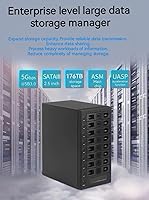
No — the 5 Gbps is the total bandwidth for the entire enclosure shared across however many drives are active at once. In practice, if you are only accessing one or two drives at a time, speeds are quite usable. But if you are running parallel transfers across five or six bays simultaneously, each drive's share of that bandwidth drops considerably. It is a real-world limitation worth factoring into your expectations.

On Windows 10, Windows 11, and most current Linux distributions, the enclosure is recognized automatically without any driver installation — just plug in the USB cable and drives start mounting. macOS is generally plug-and-play as well, though some users have reported occasional drive mounting quirks after system sleep or OS updates, so macOS users should factor in that possibility.

The fan runs continuously and cannot be switched off entirely — there is no zero-RPM idle mode. On the lowest setting or in automatic mode during light workloads, most users describe it as a low background hum that blends into ambient noise. At higher speeds under heavy load with all bays active, it becomes noticeably audible. If you work in a very quiet environment and noise sensitivity is high, this is worth considering before buying.

Hot-swapping is supported and generally works reliably, but you should always properly eject the drive through your operating system before physically removing it — just like you would with any external USB drive. Pulling a drive that is actively reading or writing without ejecting it first risks data corruption regardless of what the hardware supports. The hot-swap feature means the enclosure stays on during the swap, not that it protects against improper removal.

Each bay can accommodate drives up to 24 TB in capacity. As drive manufacturers push beyond that ceiling in the future, compatibility with larger drives would not be guaranteed without a firmware update from IO CREST — but at the time of writing, 24 TB per bay covers everything currently available in standard retail SATA hard drives.

No. This enclosure has no network port, no built-in processor, and no NAS operating system. It must be connected directly to a computer via USB to function, and only that computer can access the drives. If you want network-accessible storage, you would need a dedicated NAS device instead.

The enclosure uses a standard USB 3.0 Type-A connector on the host side. If your laptop only has USB-C ports, you will need a USB-C to USB-A adapter or hub to connect it. Adapters generally work fine for this type of device, but for best performance make sure the adapter supports USB 3.0 speeds rather than only USB 2.0.

Each bay has a dedicated physical switch on the front of the enclosure that controls power to that specific drive slot independently. Flipping a switch off spins down that drive and removes it from your system without affecting the other seven bays. It is a straightforward mechanical control — no software required — which makes it particularly useful for spinning down archive drives you are not actively using to save power and reduce noise.

Where to Buy