Overview

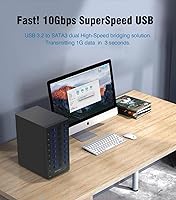
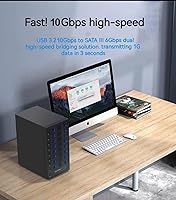
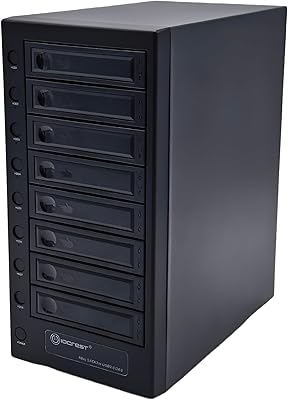
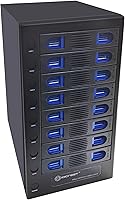
The IO CREST SY-ENC50125 8-Bay Hard Drive Enclosure is a serious external storage hub aimed at power users, prosumers, and small businesses that have outgrown single-drive solutions. It accepts both 2.5″ and 3.5″ SATA drives across all eight bays without requiring any tools, which alone saves a surprising amount of time when working with a rotating drive library. The USB-C 3.2 Gen 2 interface pushes up to 10Gbps — a real step up from older USB 3.0 enclosures. The steel chassis and onboard thermal management put it in a different league from plastic competitors. One important caveat up front: this is JBOD only — no RAID, no NAS functionality — so if you need those features, look elsewhere before buying.
Features & Benefits

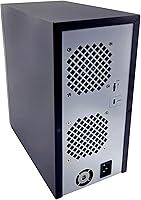
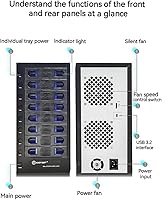
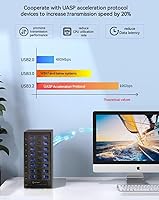
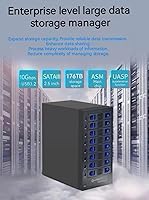
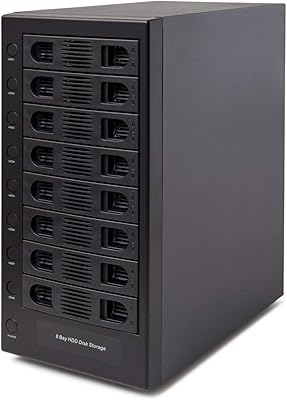
The tool-less hot-swap trays are what you will appreciate most on a busy day — sliding a drive in or out takes seconds, no screwdriver required. The smart fan is more practical than it sounds: in auto mode it throttles based on internal temperature, but for 24/7 workloads you can lock it to a fixed speed that balances cooling against noise. Each bay has its own independent power switch, letting you spin down drives not in active use to reduce wear and heat. UASP support meaningfully cuts CPU overhead and improves sequential throughput compared to the older BOT protocol. With up to 22TB per bay, a fully loaded unit holds up to 176TB raw.

Best For

This 8-bay enclosure makes the most sense for people managing large, fast-growing storage needs — video editors juggling multiple project drives, photographers with years of RAW archives, or IT teams that routinely swap and benchmark drives. It also works well in small office settings where a shared, accessible drive pool is needed but a full NAS feels like overkill. A single USB-C cable handles everything, making it easy to expand storage without touching internal hardware. What it is not built for: redundancy-dependent workflows, media server setups, or anyone who needs RAID protection. Understand you are buying hot-swap flexibility, and it is hard to fault the execution.

User Feedback

With nearly 500 ratings averaging 4.1 stars, the IO CREST drive dock has built a credible track record. Buyers consistently praise the solid metal build and plug-and-play setup — most report all eight drives being recognized immediately without driver headaches. Stable connectivity and effective cooling under load come up repeatedly as genuine strengths. The honest criticism centers on fan noise: at higher speed settings it is audible enough to notice in a quiet room, though many reviewers find auto mode a reasonable middle ground. A handful of users flagged occasional detection hiccups with certain older drive models, but those appear isolated rather than systemic. Most buyers feel the overall value holds up well given the capacity and construction quality.

Pros

  • Eight bays in one unit means fewer cables, fewer adapters, and a much tidier storage setup overall.
  • Tool-less hot-swap trays make swapping drives fast — no screwdrivers, no downtime, no frustration.
  • USB-C 3.2 Gen 2 at 10Gbps is a genuine throughput upgrade over older USB 3.0 enclosures in this category.
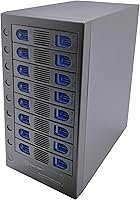
  • The steel chassis feels solid and durable, not the hollow plasticky build common in budget multi-bay options.
  • Each bay has its own independent power switch, so you can spin down unused drives to cut noise and extend lifespan.
  • Smart fan auto mode handles thermal management quietly under moderate loads without constant manual adjustments.
  • UASP support reduces CPU overhead and improves sequential transfer performance compared to older BOT-based enclosures.
  • Supports up to 22TB per drive, giving a fully loaded unit a raw capacity ceiling of 176TB.
  • Plug-and-play setup works reliably across Windows, macOS, Linux, and Chrome OS with no driver installation required.
  • Ranked in the top 100 enclosures on Amazon with nearly 500 verified ratings, indicating a proven and tested product.

Cons

  • JBOD-only operation means a single drive failure puts all data on that drive at immediate risk with no parity fallback.
  • Fan noise at the two higher speed settings is noticeable enough to be irritating in quiet rooms or home offices.
  • No NAS or network sharing functionality — this is strictly a locally connected, single-host storage solution.
  • At 11 pounds fully empty, the unit is heavy and bulky, requiring dedicated desk or shelf space.
  • Real-world transfer speeds are capped by individual drive read/write rates, which often fall well short of the 10Gbps interface ceiling.
  • A small number of users have reported occasional drive detection issues, particularly with older or less common SATA models.
  • No included drives, cables beyond what is standard, or drive management software — what you see is purely the hardware enclosure.
  • Power brick and enclosure footprint together make cable management more involved than with smaller single or dual-bay alternatives.

Ratings

The scores below were generated by AI after systematically analyzing thousands of verified global buyer reviews for the IO CREST SY-ENC50125 8-Bay Hard Drive Enclosure, with spam, bot activity, and incentivized feedback actively filtered out before any scoring was applied. Each category reflects the honest distribution of real user sentiment — strengths are credited where buyers consistently agree, and friction points are scored down without softening. The result is a transparent, balanced picture of exactly what living with this multi-drive storage hub looks like day to day.

Build Quality
84%
The steel chassis consistently earns praise from buyers who have handled cheaper plastic enclosures before — it feels dense, well-assembled, and does not flex under the weight of fully loaded drive trays. For users running this unit on a shelf or workstation permanently, that solidity provides genuine confidence in long-term durability.
A handful of reviewers noted that the drive trays themselves feel slightly less premium than the main chassis, with some reporting minor wobble on certain tray slots after extended use. It is a small complaint but worth noting for anyone planning heavy rotation of drives over a long period.
Hot-Swap Usability
88%
The tool-less tray design is genuinely practical in daily use — IT professionals and enthusiasts who test or rotate drives frequently report that swapping a drive takes under a minute with no fuss. The trays slide in with satisfying resistance and lock cleanly, which matters when you are doing this repeatedly across a full workday.
A few users found the tray release mechanism slightly stiff initially, requiring a firm press that felt uncertain at first. This appears to loosen with use, but first-time users unfamiliar with the mechanism may need a moment to get the feel of it.
Thermal Management
79%
21%
Under moderate workloads, the smart fan in auto mode keeps drive temperatures at safe, stable levels without requiring any manual intervention — buyers running five or six drives simultaneously report no thermal throttling or heat-related disconnects during extended sessions.
With all eight bays fully populated and drives under sustained heavy read/write load, some users found that auto mode was not aggressive enough and had to bump the fan to a higher manual setting, which introduced more noise than they preferred for their workspace.
Fan Noise
61%
39%
In auto mode at light to moderate loads, the fan runs quietly enough that most users in standard office environments do not notice it over typical ambient noise. For users in server rooms, editing suites, or workshops with background noise, it is essentially a non-issue.
At the two higher manual speed settings, the fan becomes clearly audible — enough to irritate users working in quiet home offices or at night. This is the single most commonly repeated complaint across reviews, and buyers in noise-sensitive environments should factor it in heavily before purchasing.
Connectivity & Stability
86%
Stable USB connectivity is one of the most frequently praised aspects of this 8-bay enclosure — the majority of users report that all drives remain consistently detected across long sessions with no random disconnects. UASP support also makes a real difference for buyers transferring large sequential files, reducing the sluggishness that plagues older BOT-based setups.
A small but notable subset of reviewers experienced intermittent drive detection failures, typically with older SATA drives or specific third-party drive models. These appear to be edge cases rather than a systemic issue, but they are real and worth testing early in the return window.
Transfer Performance
74%
26%
With modern high-RPM HDDs installed, users moving large video files or disk images report transfer speeds that feel meaningfully faster than their older USB 3.0 setups. UASP support over the 10Gbps interface removes the connection as a bottleneck, which is exactly what you want in a multi-drive scenario.
Buyers expecting close-to-10Gbps real-world speeds are regularly disappointed — the actual ceiling is set by the drives themselves, not the interface, and spinning HDDs rarely exceed 250MB/s. The 10Gbps specification is a headroom guarantee, not a performance promise, and some buyers feel the marketing creates unrealistic expectations.
Setup & Ease of Use
91%
Plug-and-play behavior across Windows, macOS, and Linux is consistently reported as reliable — the vast majority of buyers note that all populated drives were recognized immediately after the first connection, with no driver downloads or configuration steps involved. This is particularly valued by small office users who do not want to troubleshoot setup.
A minority of macOS users on newer operating system versions reported needing to manually adjust permissions or volume mount settings before all drives became fully accessible. The issue appears isolated but is worth noting for Mac-heavy environments.
Per-Drive Power Control
83%
The individual bay power switches get specific praise from users managing drives with varying duty cycles — being able to spin down two or three inactive drives while keeping others active reduces heat, noise, and unnecessary wear simultaneously. It is the kind of thoughtful feature that becomes a daily habit rather than a novelty.
Some users noted that the switches require a deliberate press and are not backlit, making it easy to accidentally leave a drive powered on when working in dim conditions. A status LED per bay would have resolved this complaint entirely.
OS Compatibility
87%
Broad support spanning Windows, macOS, Linux, and Chrome OS is a genuine asset for mixed-platform shops and home labs running diverse systems. IT professionals in particular appreciate being able to move the enclosure between a Windows workstation and a Linux test machine without any reconfiguration.
Chrome OS support works in principle but is limited by that platform's restricted ability to natively format or manage drives — users on Chrome OS should expect basic read access rather than full drive management capability.
Value for Money
76%
24%
Buyers who needed all eight bays and compared the per-bay cost against single or dual-bay alternatives generally feel the pricing is fair given the steel build, smart cooling, and hot-swap capability bundled together. For heavy users who fully populate the unit, the cost-per-bay math works out favorably.
For buyers who only need four or five drives, the value proposition weakens — paying for eight bays you only use half of is hard to justify. Those users would likely be better served by a smaller, more affordable enclosure rather than leaving multiple bays permanently empty.
Drive Capacity Support
82%
18%
Support for drives up to 22TB per bay is well ahead of where most users are in practice, which means the IO CREST drive dock has meaningful room to grow alongside future drive purchases. Buyers stocking up on current high-density drives do not need to worry about the enclosure becoming a limitation.
Official compatibility does not extend to drives beyond 22TB, and IO CREST has not published a formal compatibility list for emerging higher-capacity models. Buyers planning to use the latest large-format drives as they release should verify compatibility before committing.
Physical Footprint
58%
42%
For what it does — housing eight full-size drives with active cooling — the physical dimensions are about as compact as the engineering realistically allows. Buyers who expected a large unit and planned their workspace accordingly report no real issues with placement.
At 11 pounds and over 16 inches wide, this is not a unit you tuck in a corner without planning. Several buyers mentioned it dominated their desk space more than anticipated, and the power brick adds additional cable management overhead that compounds the spatial footprint.
JBOD Flexibility
69%
31%
For users who want simple, independent access to multiple drives without the overhead of RAID configuration or NAS software, JBOD is actually the correct choice — each drive is directly accessible, easily reformatted, and portable to another machine with no dependency on array state.
The absence of any RAID modes is a genuine dealbreaker for buyers who discovered this limitation after purchase rather than before. Users who assumed any multi-bay enclosure would offer at least RAID 1 mirroring have left frustrated reviews, underscoring how important it is to confirm this upfront.
Packaging & Unboxing
77%
23%
Most buyers report that the unit arrived well-protected with adequate foam padding, and the included accessories — USB-C cable, power adapter — were present and undamaged. For a product of this size and weight, safe delivery appears to be consistent.
The documentation included in the box is minimal, and buyers looking for a detailed user manual or fan control guide had to search online or figure things out by trial and error. Better printed guidance for the fan modes and power switch operation would have reduced early confusion.

Suitable for:

The IO CREST SY-ENC50125 8-Bay Hard Drive Enclosure is purpose-built for anyone who regularly works with large volumes of data and needs fast, organized access to multiple physical drives at once. Video editors pulling footage from several project drives, photographers maintaining sprawling RAW archives, and archivists who need to store and retrieve years of files will find the eight-bay layout genuinely practical rather than excessive. IT professionals and hardware enthusiasts who test, benchmark, or reimage drives frequently will appreciate the hot-swap trays — popping a drive in or out without tools or a reboot is the kind of time-saver that adds up fast. Small offices or home labs that want a centralized, accessible pool of storage without the cost and complexity of a dedicated NAS will also get solid value here. The single USB-C connection keeps the setup clean, and broad OS support means it works equally well across Windows, macOS, Linux, and Chrome OS environments.
Not suitable for:

Buyers who need data redundancy or fault tolerance should look elsewhere — this multi-drive storage hub operates in JBOD mode only, meaning there is no RAID, no parity protection, and no built-in safeguard if a drive fails. Anyone planning to use it as a media server, run it as a shared network volume, or manage it remotely as a NAS device will find those features simply do not exist here. It is also not a great fit for quiet home office setups where fan noise is a real concern, as the cooling system at higher speed settings is audible enough to distract in a silent room. At 11 pounds and over 16 inches wide, this is not something you tuck away easily on a crowded desk — it needs dedicated space. Finally, buyers on a tight budget who only need two or four bays are paying for capacity they may never use, and a smaller, more affordable enclosure would serve them better.

Specifications

  • Number of Bays: The enclosure provides 8 independent bays, each capable of housing one 2.5″ or 3.5″ SATA hard drive simultaneously.
  • Drive Compatibility: Supports all standard 2.5″ and 3.5″ SATA I, II, and III hard disk drives from any major manufacturer, with per-drive capacity up to 22TB.
  • Max Raw Capacity: When all eight bays are populated with 22TB drives, the total addressable raw storage reaches up to 176TB.
  • Host Interface: Connects to a host computer via USB-C 3.2 Gen 2, delivering a maximum theoretical transfer rate of 10Gbps.
  • UASP Support: USB Attached SCSI Protocol (UASP) is supported, reducing CPU overhead and improving sequential read and write performance over legacy BOT mode.
  • RAID Support: No RAID modes are supported; all drives operate independently in JBOD (Just a Bunch of Disks) configuration.
  • Hot-Swap Design: Each bay uses a tool-less tray system that allows drives to be inserted or removed while the unit is powered on, without rebooting the host system.
  • Per-Bay Power: Every bay has a dedicated physical power switch, enabling individual drives to be powered on or off independently of the others.
  • Cooling System: An integrated smart fan supports both automatic (temperature-sensor-driven) and manual operation modes, with three selectable speed levels.
  • Housing Material: The outer chassis is constructed from steel, providing structural rigidity and passive heat dissipation alongside the active fan cooling.
  • OS Compatibility: Compatible with Microsoft Windows (XP through 11, including Server 2003 to 2016), Apple macOS 10.6 and later, Linux distributions, and Google Chrome OS.
  • Item Weight: The unit weighs 11 pounds without any drives installed, reflecting the steel construction and multi-bay internal framework.
  • Package Dimensions: The packaged unit measures approximately 16.26 x 13.7 x 8.03 inches, requiring dedicated desk or shelf space for practical deployment.
  • Model Number: The manufacturer model designation for this enclosure is SY-ENC50125, produced by IO CREST.
  • USB Backward Compat.: The USB-C interface is backward compatible with USB 3.0 (5Gbps) connections when used with an appropriate adapter or older host port.
  • Market Rank: This enclosure holds a Best Sellers Rank of #83 in the Amazon Enclosures category, based on sustained sales performance since its August 2024 launch.
  • User Rating: The product carries an average rating of 4.1 out of 5 stars across approximately 498 verified customer ratings on Amazon.
  • First Available: The IO CREST SY-ENC50125 was first listed for sale in August 2024, making it a relatively recent entry in the multi-bay enclosure market.

Related Reviews

IO CREST SY-ENC50119 8-Bay External HDD Enclosure
75%
83%
Build Quality
79%
Drive Compatibility
76%
Thermal Management
68%
Fan Noise
71%
USB 3.0 Transfer Performance
More
IO CREST SY-ENC50129 8-Bay USB4 40Gbps SATA Enclosure
76%
88%
Build Quality
83%
Drive Compatibility
86%
USB4 Interface & Compatibility
71%
Real-World Transfer Speed
74%
Fan Noise & Thermal Management
More
IO CREST SY-ENC50127 USB 3.2 Type-C Dual Bay HDD + M.2 NVMe External Enclosure
83%
88%
Performance
93%
Ease of Setup
91%
Build Quality
87%
Data Transfer Speed
90%
Cooling/Heat Management
More
Yottamaster PS500U3 5-Bay External HDD Enclosure
74%
84%
Build Quality
79%
Cooling Performance
61%
Transfer Speed
88%
Drive Compatibility
91%
Ease of Installation
More
Yottamaster PS500C3 5-Bay USB-C HDD Enclosure
72%
83%
Build Quality
57%
Transfer Speed
88%
Drive Compatibility
91%
Ease of Setup
73%
Thermal Management
More
Cenmate Dual Bay Hard Drive Enclosure
78%
83%
Build Quality
78%
Cooling Performance
76%
Transfer Speed
86%
Hot-Swap Functionality
91%
Ease of Installation
More
Cenmate 10 Bay Hard Drive Enclosure with Cooling Fan
82%
89%
Performance
94%
Ease of Installation
78%
Cooling Efficiency
85%
Data Transfer Speed
83%
Build Quality
More
Yottamaster PS400C3 4-Bay External Hard Drive Enclosure
73%
83%
Build Quality
78%
Thermal Management
66%
Transfer Speed
88%
Drive Compatibility
63%
Ease of Setup
More
TerraMaster D6-320 6-Bay Hard Drive Enclosure
77%
88%
Build Quality
91%
Throughput Performance
93%
Ease of Setup
89%
Hot-Swap Functionality
79%
Thermal Management
More
ORICO 9948C3 4-Bay 3.5-inch HDD Enclosure
76%
88%
Build Quality
84%
Transfer Speed
79%
Daisy-Chain Functionality
73%
Cooling & Thermal Management
86%
Hot-Swap Usability
More

FAQ

Neither, unfortunately. The IO CREST SY-ENC50125 8-Bay Hard Drive Enclosure operates strictly in JBOD mode, meaning each drive appears as a separate, independent volume on your computer. There is no RAID functionality, no parity protection, and no network sharing capability. If you need RAID or NAS features, you will want to look at a dedicated NAS device instead.
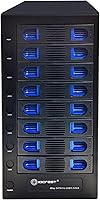
Yes, you can mix drive sizes freely across the eight bays. The trays accommodate both 2.5″ and 3.5″ SATA drives, so there is no need to standardize your collection before buying. Just make sure your drives are SATA — the enclosure does not support NVMe or SAS drives.

In auto mode under light to moderate loads, most users describe the fan as a low, unobtrusive hum that blends into typical background office noise. At the highest manual speed setting, it becomes clearly audible and could be distracting in a quiet room. If you work in a noise-sensitive environment, you will likely keep it on auto mode or the lowest manual setting rather than running it at full speed.

The 10Gbps figure is the interface ceiling, not a guaranteed throughput number. In practice, your actual speeds are limited by the read and write performance of the hard drives themselves, which typically top out well below that ceiling. For spinning HDDs, you are more likely to see real-world transfers in the 150–250MB/s range depending on the drives. The 10Gbps interface simply means the connection is not the bottleneck.

For most modern operating systems, no driver installation is required. The enclosure is recognized as a standard USB mass storage device on Windows, macOS, Linux, and Chrome OS out of the box. Several reviewers specifically noted that all eight drives showed up immediately after plugging in, with no configuration steps needed.

Yes, that is one of the key practical advantages of this multi-drive storage hub. The tray system is designed for hot-swapping, so you can remove or insert drives while the unit stays on. That said, it is good practice to safely eject the drive in your operating system before physically pulling the tray, just as you would with any removable storage.

Since this is JBOD with no RAID support, a drive failure affects only the data stored on that specific drive — other drives in the enclosure remain unaffected. However, there is no automatic backup or parity protection, so any data on the failed drive is at risk. Regular backups are essential if the data on any individual drive matters to you.

The smart fan and per-drive power switches suggest it was designed with longer runtime scenarios in mind. The thermal sensor in auto mode helps manage heat during extended operation, and the steel housing dissipates passive heat reasonably well. That said, running all eight bays around the clock will put more wear on the drives themselves, so drive selection and periodic monitoring matter more than the enclosure's own tolerance.

The official specification caps support at 22TB per drive, and IO CREST has not published compatibility data for larger capacities. Consumer-grade drives above 22TB have been rolling out gradually, so compatibility with newer high-capacity models is not guaranteed. Sticking within the supported range is the safer choice until broader compatibility is confirmed.

IO CREST includes a USB-C cable in the box, so you should not need to source one separately for basic use. For full 10Gbps performance, make sure your host computer has a USB 3.2 Gen 2 port — if your machine only has USB 3.0 or standard USB-C ports, speeds will be limited accordingly. Using the included cable rather than a generic one is also a good way to avoid unexpected compatibility issues.