Overview

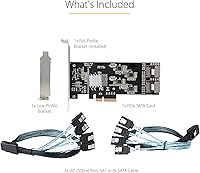
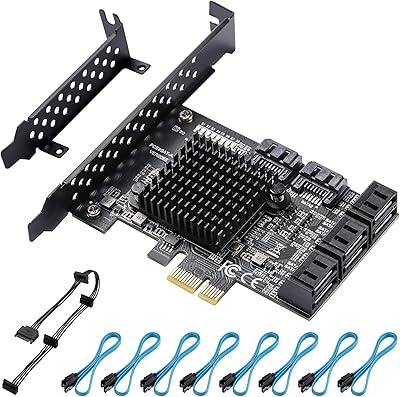
The StarTech 8-Port SATA III PCIe Expansion Card is a straightforward, well-engineered answer to a problem most storage enthusiasts eventually hit: you have filled every native SATA port on your motherboard and still have drives to add. What separates this SATA expansion card from cheaper alternatives is its quad-controller architecture — four independent 2-port host controllers rather than one overloaded chip sharing bandwidth across all eight ports. It runs over a PCIe x4 Gen 2 slot, which provides enough headroom for real-world multi-drive workloads. Both full-profile and low-profile brackets are included, so it fits most desktop and server cases without hassle. NAS builders, home lab enthusiasts, and small business IT staff are the natural audience here.
Features & Benefits

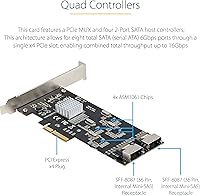
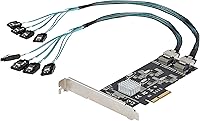
The design decision that matters most here is how StarTech handled bandwidth. Instead of routing all eight SATA ports through a single controller — which creates a bottleneck when multiple drives are active simultaneously — this PCIe storage adapter uses a PCIe MUX to distribute traffic across four separate two-port controllers, giving each drive pair its own dedicated pipeline. The card ships with two Mini-SAS to four-port locking SATA cables, so you can connect drives straight out of the box. No motherboard bifurcation is required, removing a common compatibility headache. OS support spans modern Windows, macOS, and Linux LTS kernels, and software RAID can be managed entirely through native OS tools like Storage Spaces or mdadm rather than any proprietary utility.

Best For

This SATA expansion card is a natural fit for anyone building a home NAS or media server who has outgrown their motherboard's native SATA capacity. It works equally well in small office workstations where an IT technician needs to add several drives without swapping the board. If your system has an open PCIe x4 slot and no remaining SATA headers, this card resolves the problem cleanly. One honest caveat: if you need hardware RAID with dedicated cache and battery backup, this is not that card — it handles storage expansion, not true RAID offloading. For users comfortable with OS-level software RAID, or those who simply want eight clean additional ports with no RAID at all, it covers the use case well.

User Feedback

Across roughly 60 ratings, the StarTech 8-port card holds a solid four-star average — respectable for a niche product in a category where compatibility issues can torpedo scores quickly. Most positive reviews highlight reliable drive detection across all eight ports, and buyers appreciate that the included cables are genuinely usable, not obvious budget afterthoughts. The two-year warranty and StarTech's 24/5 multilingual support get mentioned repeatedly as real reassurances, not just marketing copy. On the critical side, some users report drive enumeration quirks — the OS may not number drives in the order expected because of the multi-controller topology. A few Linux users also note that sticking to LTS kernels is important for stable operation. Neither issue is a dealbreaker, but they are worth knowing upfront.

Pros

  • All eight ports are reliably detected at boot — no drive juggling or BIOS tweaks needed in most setups.
  • The quad-controller design gives each drive pair its own bandwidth path, avoiding the bottleneck common in single-chip competitors.
  • Locking SATA cables are included in the box, saving you an extra cable order before you can get started.
  • No motherboard bifurcation required, which removes a major compatibility hurdle for consumer-grade boards.
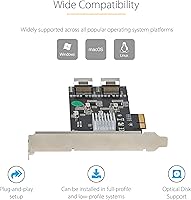
  • Works across Windows, macOS, and Linux LTS kernels — genuinely cross-platform without needing third-party drivers in most cases.
  • Both full-profile and low-profile brackets ship in the box, covering the majority of desktop and server case formats.
  • StarTech backs it with a two-year warranty and free lifetime 24/5 multilingual tech support, which is rare at this product tier.
  • Software RAID is handled by familiar OS-native tools, so you stay in control without learning proprietary management software.
  • Ranked among the top products in its category on Amazon with a consistently solid rating across dozens of real-world reviews.

Cons

  • Drive enumeration order can be unpredictable due to the multi-controller topology, which may confuse automated scripts or OS labeling.
  • Linux users on non-LTS kernels may hit compatibility walls that require kernel pinning or manual troubleshooting.
  • All RAID processing runs on the host CPU — under heavy rebuild loads, you will feel it in system performance.
  • Only two Mini-SAS connectors are exposed, so replacing or extending cables requires sourcing specific SFF-8087 compatible parts.
  • No hardware RAID capability whatsoever — buyers expecting even basic RAID 1 to be handled onboard will be disappointed.
  • Requires a true PCIe x4 slot; systems with only x1 slots are fully incompatible, and there is no workaround.
  • A small number of users have reported heat buildup in poorly ventilated cases, which is worth considering in tight server enclosures.
  • At its price point, it sits above budget single-chip alternatives, which may be hard to justify if you only need two or four extra ports.

Ratings

The scores below reflect an AI-driven analysis of verified buyer reviews for the StarTech 8-Port SATA III PCIe Expansion Card, drawn from global feedback and actively filtered to exclude incentivized, bot-generated, or spam submissions. Each category is scored to honestly represent where real users found value and where they ran into friction. Both the strengths that earned this card its loyal following and the edge cases that frustrated certain buyers are transparently captured here.

Drive Detection Reliability
88%
The vast majority of buyers report that all eight drives are recognized immediately at boot without any manual configuration. NAS builders stacking multiple HDDs in a new array were particularly vocal about this — the card simply works, which is not a given in this product category.
A small number of users encountered detection hiccups after OS updates, particularly on Linux systems running non-LTS kernels. These cases appear tied to kernel compatibility rather than hardware failure, but they are disruptive enough to be worth flagging for affected users.
Multi-Controller Architecture
84%
Having four independent 2-port controllers rather than a single shared chip means drives are not competing for the same bandwidth pipeline. Home lab users running simultaneous large file transfers across several drives noticed meaningfully more consistent throughput compared to cheaper single-chip alternatives they had tried before.
The multi-controller design introduces occasional drive enumeration inconsistencies, where the OS assigns device names or labels in a non-intuitive order. Users relying on port-based drive identification — common in scripted backup setups — have had to adapt their workflows to use UUID or serial-number-based identification instead.
OS Compatibility
79%
21%
Coverage across Windows XP through 10, Windows Server editions, macOS 10.6 through 11, and Linux LTS kernels is genuinely broad for a card in this category. IT professionals managing mixed-OS environments appreciated not having to source separate cards for different machine types.
Linux support is explicitly limited to LTS kernel releases, which excludes users on rolling-release distros like Arch or Manjaro without kernel pinning. A handful of macOS users on Big Sur also reported needing to verify driver behavior after system updates, adding a layer of post-update maintenance overhead.
Motherboard Compatibility
86%
The absence of a bifurcation requirement is a genuine differentiator — most consumer motherboards do not expose bifurcation controls, and cards that need it simply will not work in those systems. Users with mid-range B450 and Z490 boards reported clean, hassle-free installation with no BIOS changes required.
The card is strictly limited to systems with a physical PCIe x4 or larger slot, which rules out compact mini-ITX builds where all available slots are x1. A few users also reported compatibility edge cases with older server motherboards that had non-standard PCIe power delivery, requiring a follow-up with StarTech support.
Included Cables
81%
19%
Shipping with two Mini-SAS to 4x locking SATA breakout cables that can immediately connect all eight drives is a meaningful convenience — many competing cards ship bare or include flimsy non-locking cables. Buyers building NAS systems in a single session appreciated not having to place a secondary cable order first.
The cable length may be insufficient for larger tower cases or rackmount servers where drives are positioned far from the expansion slot. Users in extended ATX or 4U chassis sometimes needed to source longer aftermarket Mini-SAS to SATA cables, adding a small additional cost and delay to the build.
Software RAID Usability
72%
28%
For users already comfortable with Storage Spaces on Windows or mdadm on Linux, the software RAID workflow feels natural and gives full control over array configuration without being locked into a proprietary utility. Home lab users building redundant storage arrays found the setup straightforward once they understood the OS-side tooling.
Buyers expecting hardware RAID behavior — including dedicated cache, battery-backed write journaling, and offloaded parity calculations — will be genuinely disappointed. Under heavy rebuild workloads, the host CPU carries the full load, which is noticeable on lower-end systems and can impact responsiveness during array recovery operations.
Build Quality
83%
The card has a solid, well-finished feel that matches StarTech's reputation for professional-grade hardware. IT staff deploying it in workstations and servers noted that it seated firmly, showed no flex in the PCIe connector, and looked appropriate in a business environment rather than like a budget afterthought.
There is no heatsink or thermal management component on the controllers, which a small number of users in high-density or poorly ventilated enclosures flagged as a concern during extended high-throughput workloads. The card runs warm under sustained load, and in fanless or restricted-airflow cases this bears monitoring.
Installation Experience
87%
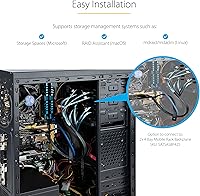
The plug-and-play installation experience is consistently praised — slot the card in, connect the cables, power on, and the OS enumerates the drives without driver hunting on modern Windows or Linux LTS systems. Both brackets are clearly labeled and the swap between full-profile and low-profile takes under a minute.
Users new to Mini-SAS connectors occasionally found the cable orientation and locking mechanism confusing compared to standard SATA connectors they were used to. The documentation included in the box is minimal, which pushed a few less experienced buyers toward StarTech's online resources or support line during initial setup.
Thermal Performance
67%
33%
In well-ventilated desktop towers and server chassis with adequate airflow across the expansion slot area, the card operates without any heat-related issues during typical multi-drive workloads. Most users in standard ATX builds running four to eight spinning HDDs reported no thermal concerns over extended periods.
In tight or passive-cooled enclosures, heat accumulation on the controller chips is a reported concern, particularly during sustained sequential writes across multiple drives simultaneously. No onboard thermal solution is provided, and there is no official guidance on safe operating temperature ranges, leaving users to monitor this independently.
Value for Money
74%
26%
For buyers who specifically need eight well-allocated SATA ports without bifurcation and with broad OS support, the price reflects a meaningful step up in architecture quality over budget single-chip cards. IT professionals who factor in the lifetime support and two-year warranty view it as a justifiable infrastructure investment.
Casual users who only need two or four extra SATA ports will likely find the price hard to rationalize against simpler, cheaper alternatives. The premium over budget cards is real, and buyers who do not need the quad-controller architecture or the full eight ports may find themselves paying for headroom they will never use.
Technical Support Quality
89%
StarTech's 24/5 multilingual support is referenced in reviews far more often than is typical for expansion cards — buyers clearly contact them and come away satisfied. IT professionals managing deployments across multiple machines mentioned using support to pre-validate compatibility with specific server platforms before purchasing.
Support is not available around the clock, and the 24/5 window means weekend late-night troubleshooting during a build session may require waiting until Monday. A small number of users also noted that tier-one support responses for complex Linux kernel issues sometimes required escalation before getting a technically substantive answer.
Warranty Coverage
85%
A two-year warranty in a category where some competitors offer ninety days or nothing at all is a meaningful differentiator. Buyers who have experienced failed expansion cards mid-deployment cited the warranty as a key reason they trusted this card enough to build a production storage system around it.
The warranty covers manufacturing defects but does not extend to damage from incorrect installation or incompatible system configurations, which is standard but leaves some edge-case failures in a gray area. International buyers also noted that warranty service logistics can vary by region, adding potential friction for non-US users.
Port Density Efficiency
82%
18%
Delivering eight SATA ports through a single x4 PCIe slot is a genuinely efficient use of limited expansion real estate, especially in servers or workstations where every slot is spoken for. Media server builders with six to eight drives appreciated preserving remaining PCIe slots for GPU or network cards rather than stacking multiple two-port SATA adapters.
The theoretical combined throughput ceiling of approximately 16Gbps shared across all eight ports means that simultaneously saturating every port with fast SATA SSDs will create contention. In HDD-heavy builds this is rarely an issue, but SSD-focused users planning high-throughput workloads should account for this architectural constraint.
Documentation & Setup Resources
63%
37%
StarTech maintains a reasonably detailed online knowledge base and product page with driver downloads and compatibility notes, which experienced users found sufficient to resolve most setup questions independently. The product page clearly lists supported OS versions, which helped buyers make an informed purchase decision upfront.
In-box documentation is sparse — little more than a basic quick-start sheet — which left less experienced buyers without enough guidance during initial installation. Several reviewers specifically noted they had to search online or contact support for steps that a more thorough printed guide could have covered, adding unnecessary friction to the setup process.

Suitable for:

The StarTech 8-Port SATA III PCIe Expansion Card is built for people who have simply run out of SATA ports and need a reliable, no-drama way to add more without touching their motherboard. Home lab enthusiasts stacking drives for local backups or test environments will find it fits naturally into an existing build — slot it in, connect the included cables, and the OS picks up all eight drives. NAS and media server builders are probably the sweetest spot: anyone running Plex, TrueNAS, or a similar platform who needs four to eight spinners or SSDs connected simultaneously will appreciate that each drive pair gets its own controller rather than competing for shared bandwidth. Small business IT staff who need to expand workstation or server storage quickly — without a procurement cycle for a new board — will also get solid mileage here. The dual-bracket design means it drops into both standard ATX towers and slimmer small-form-factor cases without modification, which matters when you are working across a mixed fleet of machines.
Not suitable for:

If you are shopping for a hardware RAID card with onboard cache, battery backup, and a dedicated RAID processor, the StarTech 8-Port SATA III PCIe Expansion Card is not what you need — it handles port expansion, and any RAID you build on top of it lives entirely in software on your CPU. That is a perfectly valid setup for many use cases, but it does mean RAID rebuild times and parity calculations consume host system resources rather than being offloaded. Linux users should also know upfront that the card is validated against LTS kernels only; if you are running a rolling-release distro or a custom kernel, you may encounter stability issues that require troubleshooting. Buyers with motherboards that only expose a PCIe x1 or x2 slot will not be able to use this card at all, since it requires a physical x4 or larger slot. And if your case or server chassis has no available full-height or low-profile PCIe slot, there is simply nowhere for it to go, so confirm your slot inventory before purchasing.
Specifications

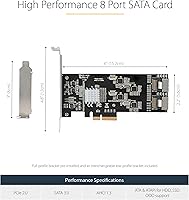
  • SATA Ports: Provides 8 independent SATA III ports, each capable of 6Gbps transfer speeds for connecting HDDs or SSDs.
  • PCIe Interface: Uses a PCIe x4 Gen 2 slot, delivering up to 16Gbps of combined throughput across all eight ports.
  • Host Controllers: Features four separate 2-port SATA host controllers distributed via a PCIe MUX, so no single chip bottlenecks all connected drives.
  • MUX Topology: A PCIe multiplexer routes traffic between the four onboard controllers and the single x4 PCIe slot without requiring motherboard bifurcation support.
  • Connectors: Two Mini-SAS SFF-8087 connectors on the card interface with the included breakout cables to reach individual SATA drive ports.
  • Included Cables: Ships with two Mini-SAS to 4x locking SATA adapter cables, providing all necessary connections for eight drives out of the box.
  • RAID Support: No hardware RAID is implemented onboard; software RAID can be configured through OS-native tools such as Storage Spaces, mdadm, or RAID Assistant.
  • Bracket Options: Full-profile bracket is pre-installed; a low-profile bracket is included in the box for smaller desktop and server chassis.
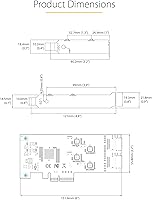
  • Dimensions: The card measures 5.9″ long by 4.7″ wide by 0.7″ thick, fitting standard PCIe expansion slots in most ATX and micro-ATX cases.
  • Weight: The card weighs 2.4 ounces, making it lightweight enough to seat securely without stressing the PCIe slot.
  • Windows Support: Compatible with Windows XP, Vista, 7, 8, 8.1, and 10, as well as Windows Server 2003 through 2019.
  • macOS Support: Supports macOS versions 10.6 through 11, covering a wide range of Mac Pro and Hackintosh configurations with available PCIe slots.
  • Linux Support: Validated on Linux kernel 2.6.32 and later LTS releases; non-LTS and rolling-release kernels are not officially supported.
  • Warranty: Backed by a 2-year manufacturer warranty covering defects in materials and workmanship.
  • Tech Support: Includes free lifetime 24/5 multilingual technical support directly from StarTech, accessible by phone, email, or chat.
  • Form Factor: Standard PCIe expansion card designed for full-height and low-profile slots in desktop towers, workstations, and rackmount servers.
  • Drive Compatibility: Works with any standard SATA III or SATA II HDD or SSD; SATA I drives are also supported at their native lower speeds.
  • BSR Ranking: Ranked number 3 in the Computer Internal SCSI Port Cards category on Amazon at the time of this review.

Related Reviews
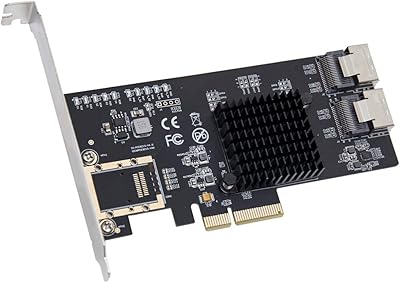
IO CREST SI-PEX40137 8-Port PCIe SATA Card
80%
92%
OS Compatibility
89%
Per-Port Bandwidth
91%
ZFS & NAS Suitability
83%
Hot-Swap Reliability
61%
Thermal Performance
More
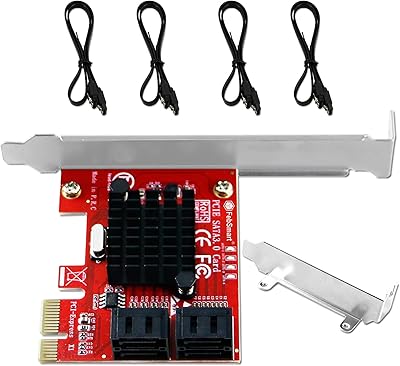
FebSmart FS-S4-Pro V2 PCIe to 4-Ports SATA III Expansion Card
82%
88%
Performance
91%
Ease of Installation
85%
Compatibility with Operating Systems
86%
Build Quality
75%
Power Supply Requirements
More
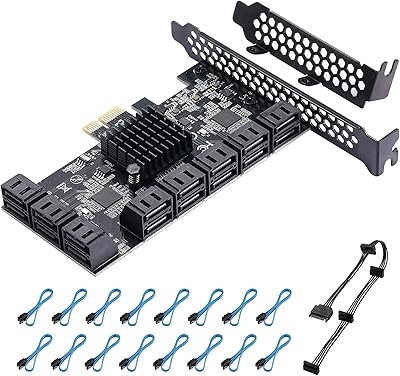
BEYIMEI 8-Port PCIe SATA Expansion Card
71%
88%
Value for Money
91%
Ease of Installation
86%
Port Count & Connectivity
57%
Throughput Performance
74%
Driver & OS Compatibility
More
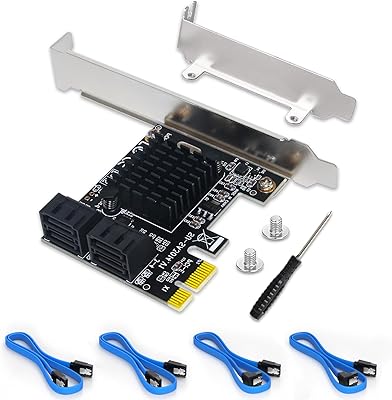
YBBOTT PCE 16SAT 16-Port SATA Expansion Card
77%
88%
Multi-Drive Detection Reliability
83%
Data Throughput Stability
81%
Chipset Stability & Architecture
86%
Operating System Compatibility
79%
Boot Drive Support
More
Moonqkuses 4-Port SATA 3.0 PCIe Expansion Card
78%
88%
Ease of Installation
91%
Driver & OS Compatibility
86%
Drive Detection Reliability
72%
Boot as System Disk
78%
Thermal Performance
More
Trotwei Blue SSU-10P-SATA3 10-Port SATA PCIe Card
70%
83%
Value for Money
58%
Driver Installation
91%
Port Count & Expansion
76%
Motherboard Compatibility
69%
Transfer Speed Performance
More
GLOTRENDS SA3026-C 6-Port PCIe SATA Card
84%
92%
Ease of Installation
89%
OS & Platform Compatibility
74%
Throughput & Bandwidth
91%
Value for Money
83%
Build & Component Quality
More
StarTech PEX2S1050 2-Port PCIe Serial Card
80%
88%
Driver Installation & Setup
61%
OS Compatibility
91%
Signal Reliability & UART Performance
83%
Physical Build Quality
86%
Low-Profile Bracket Usability
More
StarTech PEX1394B3 3-Port FireWire PCIe Card
87%
91%
Data Transfer Speed
89%
Ease of Installation
93%
Compatibility with Operating Systems
84%
Build Quality
88%
Reliability
More
StarTech ST1000SPEX2L 1-Port PCIe Network Card
82%
91%
Ease of Installation
88%
Connection Stability
93%
Low-Profile Compatibility
82%
OS & Driver Compatibility
94%
Value for Money
More

FAQ

No, and that is one of its more practical advantages. The card uses an onboard PCIe MUX to handle the traffic distribution internally, so your motherboard just sees a single x4 device. Most consumer boards do not support bifurcation at all, so this design sidesteps the issue entirely.

Yes. PCIe slots are backward and forward compatible in terms of physical size — a card designed for an x4 slot will work fine seated in a larger x8 or x16 slot. You will only use four lanes of bandwidth regardless, but that is all the card needs.

You can, but the RAID itself runs in software on your host CPU rather than on a dedicated controller chip. On Linux that means mdadm, on Windows it is Storage Spaces, and on macOS you would use RAID Assistant. For most home NAS and media server use cases this works well, but if you need hardware RAID with dedicated cache or battery-backed write protection, you will need a different card.

Generally yes for both. TrueNAS runs on FreeBSD or Linux, and Unraid runs on Linux, so compatibility depends on which kernel version is in use. Sticking to a recent LTS kernel release is the safest path — StarTech validates against LTS builds specifically, and most TrueNAS SCALE and Unraid releases track LTS kernels closely.

They are locking SATA cables, which is a step above what many expansion cards include. Reviewers generally report they are functional and hold securely. That said, if you need longer runs or angled connectors for a tight case layout, aftermarket Mini-SAS to SATA cables in your preferred length are widely available.

Not necessarily. Because the card has four separate controllers rather than one, the OS enumerates them as four distinct host adapters. Drive letters or device names may not appear in the order you expect based on which cable port you used. It is worth labeling your drives by serial number or UUID in your OS rather than relying on port order for identification.

Under typical workloads with spinning HDDs, heat is generally not a concern. A small number of users in dense or poorly ventilated cases have noted warmth on the card, particularly when several drives are active simultaneously. If your server chassis has reasonable airflow past the expansion slots, you should be fine without any extra cooling.

On a current Ubuntu LTS release, no manual driver installation should be needed. The card is recognized by the standard kernel AHCI driver. If you are on a non-LTS Ubuntu version or a custom kernel, you may hit edge cases, so StarTech specifically recommends sticking to LTS kernel builds for stable operation.

It works with any SATA device — SSDs, spinning HDDs, or a mix of both. The SATA III interface supports up to 6Gbps per port, which is enough to run most SATA SSDs at or near their rated speeds. Just keep in mind the total combined bandwidth across all eight ports tops out at around 16Gbps, so saturating every port simultaneously with fast SSDs could introduce some contention.

StarTech's included lifetime technical support is 24/5 and multilingual, which is more accessible than many competitors offer in this product category. Multiple buyers specifically call it out in reviews as a genuine resource rather than a runaround. The two-year warranty also provides a concrete fallback if the card develops a hardware fault within that window.

Where to Buy