Overview

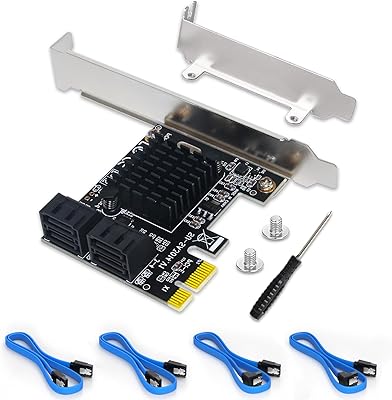
The FebSmart FS-S4-Pro V2 PCIe SATA Expansion Card exists for a straightforward reason: motherboards run out of SATA ports, and this fills the gap without drama. At its core is the ASMedia ASM1064 chipset, which has earned a reputation for being rock-solid and recognized by operating systems without fuss. The card slots into a PCIe 3.0 x1 interface and delivers a total of 8Gbps of bandwidth shared across four ports — enough for most storage workloads, though not unlimited. It skips RAID entirely, which is an honest call for the audience it serves. Broad OS support across Windows, macOS, and Linux makes it unusually flexible for a card that asks so little of your system.
Features & Benefits

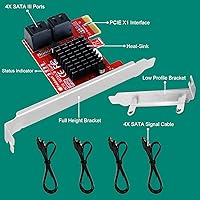
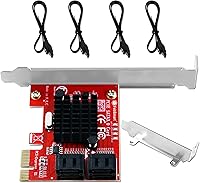
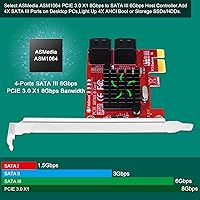
Each of the four SATA III ports is rated for up to 6Gbps, but it helps to understand the shared-bandwidth reality: all four ports draw from a single 8Gbps PCIe 3.0 x1 lane. For everyday HDD use or moderate SSD activity, that ceiling is rarely a practical issue. The card operates strictly in AHCI mode — no RAID configurations, but full support for booting an OS directly from a connected drive. That also means any operating system sees connected drives instantly, without digging for drivers. It fits PCIe slots from 1.0 through 4.0 and works with older SATA I and II drives as well. A low-profile bracket is included, which is genuinely useful for slim cases and compact workstations.

Best For

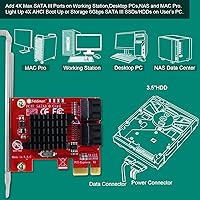
This PCIe SATA adapter is a natural fit for anyone building a home NAS or server on a desktop chassis — four extra drives without needing to upgrade the motherboard is exactly the kind of practical win this crowd appreciates. Workstation users who repurpose older PCs for video archiving or backup duty will find it equally sensible. Mac Pro owners on older macOS versions get a rare plug-and-play option that does not require hunting down third-party drivers. It also makes a quiet case for IT environments, where Windows Server stability matters more than peak sequential speed. If you want a card that just works without overcomplicating things, the FebSmart card fits that brief well.

User Feedback

The most consistent praise for this SATA expansion card centers on how reliably it is recognized out of the box — Windows and Linux users repeatedly report zero driver hunting. That said, a fair number of buyers running all four ports under sustained sequential load do notice the shared bandwidth ceiling in benchmarks, even if daily file transfers feel fine. The warning about AHCI mode is worth taking seriously: a handful of users did report a Blue Screen of Death after installing the card on systems still set to legacy IDE mode. Long-term reliability feedback is mostly positive, with several NAS and home server users noting months of continuous operation without issues. Not flawless, but the complaints are specific and avoidable with a bit of preparation.

Pros

  • Plug-and-play recognition on Windows, macOS, and Linux means no manual driver hunting after installation.
  • The ASMedia ASM1064 chipset is well-regarded for stability, making this SATA expansion card a safe long-term bet.
  • Supports booting an OS directly from a connected drive, which many competing cards in this category do not.
  • Low-profile bracket is included in the box, so slim desktop and SFF builds are covered without extra purchases.
  • Backward compatibility with older SATA I and SATA II drives means you can reuse existing hardware without upgrades.
  • Works in any PCIe slot from x1 through x16 across PCIe generations 1.0 to 4.0, giving broad motherboard flexibility.
  • Compact physical size keeps it from crowding adjacent slots in tighter motherboard layouts.
  • Windows Server support stretches from 2003 through 2022, making it genuinely useful for aging enterprise and lab machines.
  • Buyer feedback consistently highlights months of continuous uptime in home NAS and server builds with no incidents reported.

Cons

  • All four ports share a single 8Gbps lane, so running multiple fast SSDs simultaneously creates a noticeable throughput bottleneck.
  • No RAID support whatsoever — users who need hardware or even basic software RAID must look at a different card entirely.
  • The AHCI mode requirement is a real risk: systems still in legacy IDE mode will likely trigger a Blue Screen on boot.
  • Four ports may not be enough if storage plans grow, requiring an additional card or a completely different expansion solution.
  • macOS support tops out at version 10.15.x, so users on newer Apple systems will find this card incompatible.
  • Buyers should confirm their PSU can deliver power to four drives simultaneously — underpowered setups may cause unstable behavior.
  • Benchmark performance under simultaneous four-drive load disappoints users expecting each port to operate at its full rated speed.
  • The card occupies one PCIe slot permanently, which may be a meaningful constraint on boards with limited expansion room.

Ratings

Our AI-generated scores for the FebSmart FS-S4-Pro V2 PCIe SATA Expansion Card are produced by processing verified buyer reviews from across the globe, with automated filters applied to remove spam, bot submissions, and incentivized feedback. Every score reflects the honest distribution of real buyer sentiment — where this card earns genuine trust and where recurring frustrations show up in volume. Strengths and pain points are weighted equally so you see a complete picture, not a curated one.
Driver Compatibility
91%
The ASMedia ASM1064 chipset delivers near-universal automatic recognition across Windows, macOS, and Linux — most buyers describe plugging the card in and finding their new SATA ports fully functional after a single reboot, no driver downloads needed. IT administrators deploying this across Windows Server environments consistently highlight automatic recognition as the card's most dependable real-world trait.
macOS support ends at version 10.15.x, leaving anyone on Big Sur or newer without a compatible driver path. A smaller group of buyers on legacy or niche OS versions also report incomplete automatic detection, requiring a manual search for drivers that may not be straightforward to locate.
Installation Ease
83%
For most buyers, setup amounts to sliding the card into a PCIe slot and rebooting — no software to install, no jumpers to configure. NAS builders and home server hobbyists frequently note that the entire process, including physical installation, takes under ten minutes from unboxing to working ports.
The AHCI mode requirement in the BIOS is a genuine stumbling block for less experienced users. Several buyers who had never adjusted BIOS settings before found the step stressful, and a notable cluster of reviews describes triggering Blue Screen errors on first boot after installing the card on systems still set to legacy IDE mode.
Bandwidth & Throughput
63%
37%
For typical HDD-based storage expansion — a home NAS holding media archives, backup volumes, or surveillance footage — the shared 8Gbps lane rarely surfaces as a practical problem. Single-drive throughput performs as expected for spinning-disk workloads, and buyers in this segment consistently report that the bandwidth ceiling never affects their day-to-day experience.
All four ports share a single 8Gbps lane, which becomes a real constraint when attaching fast SSDs or pushing multiple drives under sustained simultaneous load. Buyers who expected each port to run independently at full 6Gbps were genuinely surprised by the throughput ceiling, particularly when running disk-intensive workloads across all four ports at once.
Chipset Stability
92%
Buyers running this card continuously in home servers and NAS builds report months of uninterrupted operation without dropped connections or unexplained drive errors. The ASMedia ASM1064 has a strong track record in the enthusiast storage community, and real-world feedback across Windows, Linux, and macOS consistently reflects that reputation for low-drama, always-on reliability.
A recurring minority complaint involves drive disconnection events after the system resumes from sleep or hibernate states, which is disruptive in always-on server environments. This does not affect most users, but it surfaces frequently enough across reviews to suggest a chipset-level interaction with certain power management configurations on specific motherboards.
Value for Money
86%
For a card that adds four reliable SATA III ports using a well-regarded chipset and works out of the box across three major operating systems, the asking price is hard to challenge. Budget-conscious builders consistently position this PCIe SATA adapter as one of the strongest options in its category when dependability matters more than raw performance.
The shared bandwidth ceiling weakens the value argument for SSD-heavy builds. Buyers who later realize they need independent full-speed lanes per drive must upgrade to a significantly more expensive card, and some reviewers note they would have made a different decision had the throughput limitation been more clearly communicated upfront.
Build Quality
76%
24%
The card feels solid for its weight class — the PCB is well-constructed and the SATA port connectors accept cables with a firm, reliable fit. Buyers installing it in tight cases appreciate that the card does not flex or shift once seated in the slot, and no widespread reports of port connectors loosening under normal handling have surfaced.
Construction is strictly utilitarian, with no premium materials or finish. A handful of buyers in vibration-prone NAS enclosures report the card gradually working loose from the PCIe slot over several months, suggesting the bracket hardware could be more robust for physically demanding installation environments.
RAID Capability
17%
83%
AHCI-only operation does ensure every connected drive is immediately visible to the host OS as a fully independent volume — exactly what straightforward NAS builds and backup storage setups need, without any configuration overhead or driver complexity.
This card offers zero RAID support — no striping, no mirroring, no parity configurations of any kind. That is a firm design boundary, not a hidden setting. Buyers expecting to set up even a basic RAID 1 mirror for data redundancy discovered this only after installation, with several frustrated reviews describing it as a costly and avoidable surprise.
OS Compatibility
88%
The breadth of supported operating systems is genuinely unusual at this price tier. Windows coverage from XP through Windows 11 and across major Server editions, combined with support for most Linux kernel versions, covers the overwhelming majority of real-world desktop and server environments buyers are likely to encounter.
The hard cutoff at macOS 10.15.x is a meaningful gap as Apple's installed base has moved well beyond that release. There is also no official guidance on ongoing driver maintenance or future OS compatibility, raising legitimate questions about the card's long-term support trajectory.
PCIe Slot Flexibility
89%
Compatibility with any PCIe slot from x1 through x16 across four generations of the standard makes this card workable in virtually any desktop motherboard produced in the past fifteen years. Users in older workstations with no available x1 slots report fitting it into an x4 or x8 slot without any functional penalty whatsoever.
The card uses only a single x1 lane regardless of slot size, so a larger slot provides no additional bandwidth benefit. Several buyers were caught off guard by this, having assumed that seating the card in a wider slot would unlock more throughput — an expectation the product listing does not clearly address.
Form Factor Versatility
82%
18%
The included low-profile bracket makes this card genuinely usable in slim desktop cases and compact workstations where a standard-height card simply will not clear the chassis. Small-form-factor NAS builders specifically call out the bracket inclusion as a practical detail that competing cards at similar price points sometimes skip entirely.
Swapping to the low-profile bracket requires unscrewing and precise realignment, which is fiddly in a cramped case with limited hand clearance. No cable management accessories are included either, which can leave SATA data cables running loosely across other components in tight internal builds.
Long-Term Reliability
87%
Reviews from buyers running this card continuously in always-on home servers and NAS enclosures for six months or longer are largely positive, with many specifically noting zero port errors or disconnections over extended operation. The chipset's known tendency to run cool and draw minimal idle power further supports its reputation in never-off server builds.
A persistent minority thread of reviews describes intermittent drive disconnections following wake-from-sleep events — frustrating in environments that are never fully powered down. A handful of buyers on specific motherboard configurations also report occasional cold-boot initialization failures requiring a full power cycle to clear.
Boot Drive Support
73%
27%
AHCI mode enables any connected drive to serve as a bootable OS volume, a meaningful capability that many budget-tier SATA expansion cards simply do not offer. Several buyers purchased the FebSmart card specifically to attach a system drive to a machine that had exhausted its native SATA ports, reporting it worked correctly once BIOS settings were confirmed.
The AHCI prerequisite is a genuine barrier for users unfamiliar with BIOS configuration. Multiple reviews describe triggering Blue Screen of Death errors on first boot after installing on systems in legacy IDE mode — recoverable, but a jarring experience that in some cases required OS repair steps before the machine would boot cleanly again.
Setup Documentation
61%
39%
The manufacturer includes the critical AHCI mode warning in the product documentation, which at minimum surfaces the most common setup risk before it causes damage. Basic installation steps are outlined clearly enough for experienced builders, and the low-profile bracket swap is described adequately for most use cases.
The documentation treats the AHCI requirement as a passive warning label rather than a step-by-step guide, which leaves less experienced users without actionable direction. Buyers unfamiliar with BIOS navigation consistently note that being told a warning exists is very different from being shown how to address it safely.
Heat & Power Draw
84%
The ASMedia ASM1064 runs notably cool under typical workloads — buyers monitoring system temperatures report negligible heat output from the card itself even during extended continuous drive activity. Its minimal idle power draw also makes it a practical choice for always-on NAS and server builds where cumulative power consumption matters.
Under sustained simultaneous load across all four ports, a small cluster of users notes the chipset becomes noticeably warm to the touch. While this has not been linked to throttling or failures in reviewed cases, buyers in poorly ventilated cases may want to verify adequate airflow around the card's installed position.
Legacy Drive Compatibility
94%
Backward compatibility with SATA I and SATA II drives is a practical asset for users consolidating older hardware into a new storage build. Buyers connecting drives from machines dating back a decade consistently report automatic speed negotiation with no manual configuration, making this card a natural fit for hardware repurposing and storage consolidation projects.
A small number of reviews involving very old or worn SATA I drives describe occasional inconsistent recognition during initialization. Most evidence points to the condition and age of those specific drives rather than a limitation in the card itself, but buyers reusing aging hardware should factor in that variable.

Suitable for:

The FebSmart FS-S4-Pro V2 PCIe SATA Expansion Card is the right call for desktop users who have run out of native SATA ports and need a dependable, no-fuss way to connect more drives. Home NAS and media server builders are probably the best-fit audience — people who want to stack several HDDs for bulk storage without the complexity or cost of a RAID controller. Workstation users repurposing older towers for video archiving, editing scratch drives, or automated backup pools will find it handles those workloads reliably. IT administrators managing Windows Server environments benefit from the card's broad version support and automatic OS recognition, which cuts down on driver troubleshooting time. Mac Pro owners on older macOS versions also get a practical option here, since the ASMedia ASM1064 chipset has historically worked well with Apple hardware without requiring third-party driver installs. If steady, long-term operation across four drives matters more to you than chasing maximum throughput, this card earns its keep.
Not suitable for:

The FebSmart FS-S4-Pro V2 PCIe SATA Expansion Card is a firm pass for anyone who needs RAID — there is no hardware RAID support, and no firmware or software workaround changes that reality. Buyers planning to run four fast SSDs in parallel at sustained sequential speeds will likely hit a real bottleneck, since all four ports share a single 8Gbps PCIe 3.0 x1 lane. This card is also a risky choice for systems still operating in legacy IDE mode, as the AHCI requirement is non-negotiable and a subset of buyers have reported Blue Screen errors when that step was skipped. Anyone building a storage solution where data redundancy is critical should look at a dedicated RAID card or a higher-bandwidth HBA instead. Users on current Apple hardware running macOS 11 or later will find no compatible driver support, making this a non-starter for modern Mac builds.
Specifications

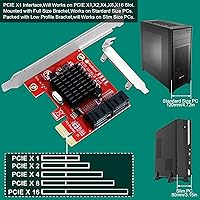
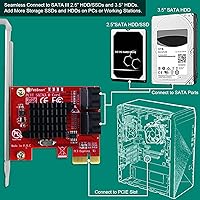
  • Interface: Connects natively via a PCIe 3.0 x1 slot and is compatible with PCIe 1.0 through 4.0 slots in x1, x2, x4, x8, or x16 configurations.
  • SATA Ports: Provides four independent SATA III ports for connecting HDDs, SSDs, or optical drives to a desktop system.
  • Port Speed: Each SATA III port supports a maximum data transfer rate of 6Gbps under the SATA Revision 3.1 specification.
  • Total Bandwidth: All four ports share a combined 8Gbps of bandwidth through the single PCIe 3.0 x1 interface lane.
  • Chipset: Powered by the ASMedia ASM1064 controller, which is widely recognized for driver stability and broad operating system compatibility.
  • RAID Support: This card operates exclusively in AHCI mode and does not support any RAID configuration, including RAID 0, 1, or 5.
  • Boot Support: Drives connected to this card can serve as boot drives, provided the host system's BIOS is configured to AHCI mode.
  • SATA Standard: Fully compliant with SATA Revision 3.1 and backward compatible with SATA I (1.5Gbps) and SATA II (3Gbps) devices.
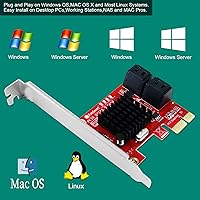
  • Windows Support: Compatible with Windows XP through Windows 11 and Windows Server editions from 2003 through 2022 in both 32-bit and 64-bit versions.
  • macOS Support: Supports Apple macOS versions 10.4.x through 10.15.x on compatible Mac hardware.
  • Linux Support: Works with most Linux kernel versions without requiring manual driver installation.
  • Low-Profile Bracket: A low-profile bracket is included in the box alongside the standard-height bracket, enabling installation in slim and small-form-factor desktop cases.
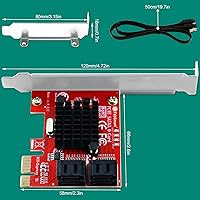
  • Dimensions: The card measures 4.72″ in length, 2.6″ in width, and 0.72″ in height.
  • Weight: The card weighs 82 grams and sits securely in any standard PCIe slot without requiring additional mechanical support.
  • Power Source: Connected drives are powered directly via SATA power connectors from the host system's power supply unit, not through the PCIe slot itself.
  • Model Number: The official model designation is FS-S4-Pro V2, representing the second revision of FebSmart's four-port SATA III PCIe expansion line.
  • Brand: Designed and sold by FebSmart Co., Ltd., a hardware manufacturer specializing in PCIe expansion and connectivity cards.

Related Reviews

YBBOTT PCE 16SAT 16-Port SATA Expansion Card
77%
88%
Multi-Drive Detection Reliability
83%
Data Throughput Stability
81%
Chipset Stability & Architecture
86%
Operating System Compatibility
79%
Boot Drive Support
More
Moonqkuses 4-Port SATA 3.0 PCIe Expansion Card
78%
88%
Ease of Installation
91%
Driver & OS Compatibility
86%
Drive Detection Reliability
72%
Boot as System Disk
78%
Thermal Performance
More
GLOTRENDS SA3026-C 6-Port PCIe SATA Card
84%
92%
Ease of Installation
89%
OS & Platform Compatibility
74%
Throughput & Bandwidth
91%
Value for Money
83%
Build & Component Quality
More
Trotwei Blue SSU-10P-SATA3 10-Port SATA PCIe Card
70%
83%
Value for Money
58%
Driver Installation
91%
Port Count & Expansion
76%
Motherboard Compatibility
69%
Transfer Speed Performance
More
IO CREST SI-PEX40137 8-Port PCIe SATA Card
80%
92%
OS Compatibility
89%
Per-Port Bandwidth
91%
ZFS & NAS Suitability
83%
Hot-Swap Reliability
61%
Thermal Performance
More
FOSA M5015 SAS SATA RAID Controller Card
68%
83%
Value for Money
78%
Compatibility
66%
Firmware Flashing Experience
61%
Build Quality
69%
Drive Detection Reliability
More
StarTech 8-Port SATA III PCIe Expansion Card
80%
88%
Drive Detection Reliability
84%
Multi-Controller Architecture
79%
OS Compatibility
86%
Motherboard Compatibility
81%
Included Cables
More
BEYIMEI 8-Port PCIe SATA Expansion Card
71%
88%
Value for Money
91%
Ease of Installation
86%
Port Count & Connectivity
57%
Throughput Performance
74%
Driver & OS Compatibility
More
GIGABYTE GC-WIFI7 WiFi 7 PCIe Card
77%
83%
Wireless Performance
88%
Installation Ease
71%
Router Compatibility
86%
Connection Stability
67%
Case Compatibility
More
OWC Accelsior 4M2 8TB NVMe SSD Card
80%
93%
Raw Throughput
88%
Build Quality
84%
Installation Experience
71%
SoftRAID Software
62%
Thermal Management
More

FAQ

For most users, no. The FebSmart FS-S4-Pro V2 PCIe SATA Expansion Card is recognized automatically by Windows, macOS, and most Linux distributions without any manual driver installation. You slot it in, boot your system, and the new SATA ports show up ready to use. If you are on an older or less common OS version, checking FebSmart's support page for drivers is a sensible precaution just in case.
Yes, you can — but there is one important condition. Your system's BIOS or UEFI must already be set to AHCI mode, not legacy IDE mode. If that setting is in place, the card handles AHCI boot-up without any issue and you can attach a boot drive to any of the four ports. If you are unsure which mode your system is in, check your BIOS settings before connecting a boot drive.

It is worth taking seriously. If your system's storage controller is set to legacy IDE mode in the BIOS, installing this card and trying to boot can trigger a Blue Screen of Death. The fix is to switch your BIOS storage setting to AHCI before installing the card, but on older Windows systems that were originally set up in IDE mode, making that switch can itself cause boot problems with your existing installation. If your PC is relatively modern and already running in AHCI mode, you have nothing to worry about — the warning is mainly relevant to older machines.

Absolutely. The card fits physically into any PCIe slot that is x1 or larger, including x4, x8, and x16. It will only use one x1 lane regardless of which slot it occupies, so you are not gaining extra bandwidth by using a larger slot, but it works correctly all the same.

Yes, the card is backward compatible with both SATA I (1.5Gbps) and SATA II (3Gbps) devices, as well as full-speed SATA III drives. It auto-negotiates to the correct speed for whatever you plug in, so there is nothing to configure on your end.

No, and that is a hard limit rather than a setting you can toggle. This PCIe SATA adapter operates in AHCI mode only, with no hardware RAID support of any kind. If you need RAID 0, 1, 5, or similar configurations, you will need a dedicated RAID expansion card — this one is not designed for that purpose.

It should, provided you are running macOS 10.4 through 10.15. The ASMedia ASM1064 chipset has native support across that macOS range, which covers a wide span of Mac Pro generations. If your Mac is on macOS 11 or later, however, compatibility is not guaranteed and you should verify driver availability before purchasing.

For most users, it is not. That shared ceiling only becomes a noticeable constraint when all four drives are being read from or written to at high sequential speeds simultaneously — a scenario that rarely occurs with HDDs used for NAS storage, backups, or media archives. Where it does matter is if you are attaching four fast SSDs and pushing them all at full tilt at the same time, which is an unusual workload for a card like this. For spinning drives or mixed-use storage, most buyers report that the bandwidth limit never becomes a practical issue.

Yes, as long as your slim PC has an available PCIe slot. The card ships with a standard-height bracket already installed, but a low-profile bracket is included in the box for slim cases — you just swap it out before fitting the card. The card's compact physical size also helps, since it is unlikely to interfere with neighboring components or cables in a tight enclosure.

This card adds exactly four SATA ports, so you can connect up to four additional drives. For a typical home server, NAS build, or general storage expansion, four extra ports covers most needs comfortably. If you know upfront that you will need six or more drives, it is worth looking at a higher-port-count SATA card from the start rather than buying a second card later.