Overview

When Intel launched the Intel Core i7-9700K Octa-Core Desktop Processor in late 2018, it represented the peak of what Coffee Lake Refresh could deliver for enthusiast desktop builders. Eight physical cores running at a 3.6 GHz base clock made it a genuinely competitive option at a time when AMD was pushing Intel hard on core counts. The unlocked multiplier was the real hook for builders who wanted to squeeze every bit of performance from a Z370 or Z390 board. Years later, it holds up reasonably well for gaming workloads, though newer platforms have closed the gap considerably. If you are invested in LGA 1151, this chip still makes sense as an upgrade path.
Features & Benefits

The 4.9 GHz Turbo Boost ceiling is where this i7-9700K earns its keep for gaming — single-core frequency still matters enormously for frame rates, and Intel's architecture squeezed as much as possible out of 14nm++ here. Compared to the i9-9900K, the absence of Hyper-Threading means fewer logical cores under heavy multi-threaded loads, but most games barely noticed. The 12MB Smart Cache keeps latency tight during rapid data access, which translates to smoother gameplay in fast-paced titles. On the thermal side, expect real heat at 95W TDP under sustained load — a 240mm all-in-one liquid cooler or a high-end tower air cooler is strongly advisable, not optional. Integrated UHD 630 graphics exist but serve only as a troubleshooting fallback.

Best For

Intel's 9th-gen octa-core chip hits its stride with 1080p and 1440p gaming paired alongside a capable discrete GPU — frame rates stay high and consistent, which is what competitive gamers actually care about. Overclockers with a Z390 board will find genuine headroom to push well past stock clocks, often landing in the 5.0 GHz range with proper cooling. If you are already on an LGA 1151 platform and want a meaningful step up without swapping motherboards, this is a clean, practical solution. Light-to-moderate video editors benefit from the high single-core speeds for real-time preview and export tasks. For buyers picking one up secondhand, the value-to-performance ratio at current used prices is genuinely hard to argue with.

User Feedback

Owners of this Coffee Lake processor have been largely satisfied over the long haul — gaming performance consistently draws praise, and those who dialed in overclocks report running reliably at 5.0 GHz or above for years without issue. The most common complaint centers on thermals: stock coolers are wholly inadequate, and even some mid-range aftermarket options struggle under full load. A few Z370 board owners flagged the need for a BIOS update before the chip was recognized correctly, so checking firmware versions before installation is wise. On value, opinions split sharply between buyers who paid full retail and those who grabbed it used — the latter group tends to be far more enthusiastic. Long-term reliability scores are strong across the board.

Pros

  • Turbo Boost up to 4.9 GHz delivers excellent single-core gaming performance that holds up well even years after launch.
  • Eight physical cores handle everyday multitasking, light content creation, and gaming workloads without breaking a sweat.
  • The unlocked multiplier makes overclocking accessible and well-supported on Z370 and Z390 motherboards.
  • 12MB of Smart Cache keeps frequently accessed data close to the cores, reducing latency in fast-paced games.
  • Proven long-term reliability — many owners report smooth daily operation years into ownership.
  • Secondhand pricing makes this i7-9700K a genuinely compelling value for builders on a tighter budget.
  • Strong compatibility within the LGA 1151 ecosystem means existing platform users avoid a costly full rebuild.
  • Integrated UHD 630 graphics provide a useful fallback for display output during GPU troubleshooting.
  • Mature platform support means stable, well-tested BIOS revisions are widely available for Z390 boards.

Cons

  • No Hyper-Threading limits multi-threaded throughput, putting this chip behind similarly priced modern alternatives in rendering and encoding tasks.
  • LGA 1151 is a dead-end socket — there is no upgrade path once you outgrow this Coffee Lake processor.
  • A quality aftermarket cooler is effectively mandatory; budget air coolers struggle to keep temperatures in check under sustained load.
  • DDR4-2666 memory support looks dated compared to newer platforms that handle significantly faster RAM with tangible performance benefits.
  • Z370 board owners must verify and apply a BIOS update before the chip is recognized — an easy step that catches some builders off guard.
  • Full retail pricing is difficult to justify given the competition from newer-generation chips at similar or lower cost.
  • Power consumption at 95W TDP is meaningful in the context of a high-end system running continuously for long gaming or work sessions.
  • Integrated graphics are too limited for any real display workload beyond basic desktop use or diagnostic output.
  • Streaming while gaming puts noticeable pressure on the 8-thread ceiling, often requiring compromises in encoding quality or game settings.

Ratings

Our AI rating engine analyzed thousands of verified global user reviews for the Intel Core i7-9700K Octa-Core Desktop Processor, actively filtering out incentivized, bot-generated, and duplicate submissions to surface only genuine buyer experiences. The scores below reflect a balanced synthesis of real-world praise and recurring frustrations — nothing is sanitized or skewed toward the positive. Whether this chip earns a place in your build or not, these ratings give you an honest picture.

Gaming Performance
91%
Gamers consistently report smooth, high frame rates at 1080p and 1440p, with the near-5.0 GHz Turbo Boost making a tangible difference in CPU-limited titles. Competitive multiplayer players in particular note how responsive and stable frame pacing feels compared to lower-clocked alternatives they had previously used.
At 4K, the GPU becomes the clear bottleneck and the CPU advantage largely disappears, making some buyers feel the chip is slightly over-specified for ultra-high-resolution gaming. A small number of users in very CPU-heavy open-world titles have noted occasional dips that a Hyper-Threading-enabled chip might have handled more gracefully.
Single-Core Speed
89%
The Turbo Boost ceiling of 4.9 GHz is one of the highest of any consumer desktop chip from its generation, and users feel this immediately in tasks that depend on fast single-threaded execution — snappy application launches, responsive game engines, and fluid real-time audio or video preview during editing sessions.
Newer architectures have since narrowed the single-core gap significantly, meaning buyers comparing this chip to current-generation options on benchmarks may find the advantage less dramatic than it once was. On heavily parallelized workloads, the per-core speed advantage becomes largely irrelevant.
Overclocking Potential
88%
Enthusiast builders repeatedly highlight how accessible and rewarding overclocking this chip is on a Z390 platform — hitting 5.0 GHz on all cores is a common, stable outcome with proper cooling. The mature BIOS ecosystem on Z370 and Z390 boards means settings are well-documented and dialing in a reliable overclock rarely takes more than an afternoon.
Thermal headroom becomes the hard ceiling for most overclock attempts, and pushing past 5.1 GHz typically requires exotic cooling solutions that most builders do not have. Users on Z370 boards specifically flag that BIOS tuning options are slightly less refined than on Z390, occasionally requiring more trial-and-error to find a stable all-core configuration.
Build Quality & Longevity
86%
Long-term ownership reports are notably positive — buyers who installed this chip in 2018 and 2019 frequently describe it as still running reliably as a daily driver years later, with no degradation in performance. Intel's integrated heat spreader is well-built, and the chip handles sustained workloads without showing signs of wear under normal operating conditions.
A small number of users who ran aggressive overclocks without adequate cooling over extended periods reported instability that worsened over time, though it is difficult to separate CPU degradation from motherboard VRM wear in those cases. As a platform, LGA 1151 reaching end-of-life limits the long-term investment case even if the chip itself remains healthy.
Value for Money
74%
26%
Buyers who acquired this i7-9700K on the secondhand market are overwhelmingly satisfied with what they got for the price, frequently describing it as one of the better-value performance chips they have owned. For LGA 1151 platform owners doing an upgrade without replacing the motherboard, the cost-to-performance ratio is particularly compelling.
Buyers who paid full retail pricing at launch or shortly after are considerably more divided — the lack of Hyper-Threading meant the i9-9900K was a stronger multi-threaded value at a modest premium. At current new-unit pricing, it is difficult to recommend over newer-generation alternatives that offer a better upgrade path.
Thermal Management
58%
42%
At stock clock speeds with a quality aftermarket cooler — a 240mm all-in-one liquid cooler or a high-end tower air cooler like a Noctua NH-D15 — temperatures during gaming sessions typically stay in a manageable 65 to 80 degree Celsius range. Users who invested in proper thermal solutions report quiet, stable operation even during extended gaming sessions.
Under sustained full-core load, particularly during overclocked stress tests or long rendering jobs, temperatures climb quickly toward the 90 degree Celsius range even with mid-range aftermarket coolers. Stock coolers are widely considered completely inadequate for this chip, and buyers who underestimated the cooling requirement frequently report throttling and frustrating troubleshooting sessions.
Multi-threaded Performance
67%
33%
For everyday multitasking — running a browser with many tabs, a game, and background applications simultaneously — the 8 physical cores handle the load without visible strain. Light video editing workflows that do not lean heavily on effects or plugin stacks also run well, with export times that most casual content creators find acceptable.
The absence of Hyper-Threading is a genuine limitation in CPU-bound multi-threaded workloads like 3D rendering, large software compilation, or simultaneous game streaming and recording. Buyers who use their system for both gaming and professional creative work consistently wish they had stretched to a chip with Hyper-Threading enabled.
Platform Compatibility
71%
29%
Within the LGA 1151 ecosystem, compatibility is broad — the chip drops into any Z370 or Z390 board, and many H370 and B360 boards work as well. For users already on a 300-series platform doing a targeted upgrade, the experience is largely plug-and-play once BIOS firmware is current.
Z370 board owners frequently flag the BIOS update requirement as an unexpected friction point, particularly for first-time builders who do not realize the need before their first boot attempt. Beyond the 300-series, compatibility does not extend to older or newer Intel platforms, and LGA 1151 as a whole offers no forward upgrade path.
Power Efficiency
62%
38%
At stock settings during light workloads and browsing, power draw is reasonable and the chip does not place excessive demands on the system power supply. Users running modest configurations report that a quality 550W to 650W PSU is more than sufficient for a complete gaming system built around this processor.
Under full load — and especially when overclocked — power consumption rises sharply, which puts pressure on motherboard VRMs that are not rated for sustained high-current delivery. Users on budget Z370 boards with weaker VRM configurations occasionally report thermal throttling originating from the motherboard rather than the CPU itself.
Out-of-Box Setup
73%
27%
Installation is straightforward for anyone familiar with LGA socket CPUs — the chip drops into the socket cleanly, and most Z390 boards recognize it immediately with up-to-date firmware. Retail packaging is professional and the chip arrives well-protected, which buyers who order online appreciate given the value of the component.
The absence of a bundled cooler catches some buyers off guard, particularly those coming from AMD Ryzen builds that include capable stock coolers. First-time builders on Z370 boards also face the BIOS update hurdle before the system will POST correctly, which requires either a second CPU on hand or assistance from a motherboard with a BIOS flashback feature.
Cache Performance
84%
The 12MB L3 Smart Cache is well-sized for the core count and helps maintain low latency during the rapid, irregular data requests that characterize gaming workloads. Users who run fast-paced competitive titles in particular tend to benefit from how quickly frequently accessed game data is served from cache rather than main memory.
In workloads that push large datasets significantly beyond what the 12MB cache can hold — such as scientific simulations or large database operations — the chip falls back to main memory latency, where its DDR4-2666 memory controller speed is a modest constraint compared to faster-clocked memory platforms.
Memory Performance
69%
31%
Dual-channel DDR4 at 2666 MHz provides ample bandwidth for gaming and general desktop use, and most buyers running standard 16GB kits report no memory-related bottlenecks in their day-to-day workloads. The memory controller is stable and well-tested, with broad compatibility across major DDR4 kit manufacturers.
The 2666 MHz official support ceiling looks dated next to platforms that handle DDR4-3600 or DDR5 natively, and users who run memory-bandwidth-sensitive workloads feel this gap. While XMP profiles above 2666 MHz technically work on many boards, they are not officially supported and occasionally cause stability issues that require troubleshooting.
Integrated Graphics
41%
59%
The UHD Graphics 630 serves its intended niche reliably — providing a working display output during initial system builds, GPU troubleshooting, or temporary use while waiting for a discrete card to arrive. For basic desktop tasks and media playback, it is functional and unobtrusive.
No user at this performance tier should expect to do any meaningful gaming or GPU-accelerated work on UHD 630, and the vast majority of buyers using Intel's 9th-gen octa-core chip will never rely on integrated graphics for anything beyond diagnostics. Its presence is a technical checkbox rather than a practical feature for this audience.
Long-term Viability
63%
37%
For buyers already embedded in the LGA 1151 ecosystem, this Coffee Lake processor has proven it can serve as a capable daily driver for multiple years without becoming a bottleneck in the workloads it was designed for. Gaming performance in particular has aged well enough that many users feel no urgency to upgrade.
The platform dead-end is the unavoidable long-term concern — LGA 1151 supports no future Intel processors, meaning the next CPU upgrade will require a new motherboard and likely new memory as well. Buyers planning their systems for a five-plus year horizon will find the total platform cost of ownership less favorable compared to starting fresh on a current-generation socket.

Suitable for:

The Intel Core i7-9700K Octa-Core Desktop Processor is a strong fit for PC gamers who prioritize high, stable frame rates at 1080p and 1440p resolutions and plan to pair the chip with a dedicated graphics card — the high Turbo Boost ceiling does real work here. Enthusiast builders who enjoy overclocking will find this K-series chip particularly rewarding, especially on a Z390 motherboard where BIOS tuning options are mature and well-documented. It also makes practical sense for anyone already invested in the LGA 1151 platform who wants a meaningful CPU upgrade without the cost and complexity of moving to a new motherboard and memory standard. Light-to-moderate content creators — people doing video editing in Premiere or DaVinci Resolve without leaning on heavy multi-threaded rendering pipelines — will appreciate the snappy single-core performance in day-to-day tasks. Budget-conscious builders hunting the secondhand market will likely find this Coffee Lake processor offers excellent real-world output relative to what it costs to acquire today.
Not suitable for:

Buyers building a brand-new system from scratch in the current market should think carefully before committing to this platform, as LGA 1151 is a dead-end socket with no upgrade path beyond 9th-gen Intel chips, and newer platforms deliver meaningfully better performance-per-dollar. The Intel Core i7-9700K Octa-Core Desktop Processor also lacks Hyper-Threading, which puts it at a disadvantage in heavily multi-threaded workloads like 3D rendering, large compilation jobs, or professional video encoding where logical core count directly affects throughput. Anyone planning to run the chip without a quality aftermarket cooler should reconsider — at 95W TDP under sustained load, temperatures climb fast, and the chip throttles noticeably without adequate thermal management. Streamers who simultaneously game and encode in software will feel the thread-count limitation more acutely than pure gamers. If your workload regularly involves running multiple demanding applications in parallel, a newer architecture with both more cores and Hyper-Threading will serve you considerably better.
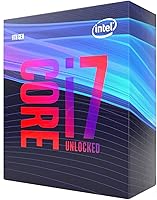
Specifications

  • Brand: This processor is manufactured and sold by Intel under its Core i7 consumer desktop lineup.
  • Processor Family: It belongs to Intel's 9th Generation Core series, based on the Coffee Lake Refresh microarchitecture built on a 14nm++ process node.
  • Model Number: The official Intel model number is BX80684I79700K, identifying the retail boxed version of this chip.
  • Core Count: The processor features 8 physical cores, each capable of executing one thread simultaneously for a total of 8 concurrent threads.
  • Thread Count: With no Hyper-Threading support, the chip runs exactly 8 threads — one per physical core — unlike HT-enabled Intel processors of the same generation.
  • Base Clock: The processor operates at a base frequency of 3.6 GHz across all cores under sustained, fully loaded conditions.
  • Turbo Boost: Intel Turbo Boost 2.0 allows the chip to reach up to 4.9 GHz on a single core when thermal and power headroom permits.
  • Cache: A 12MB Intel Smart Cache (L3) is shared across all 8 cores, reducing memory latency during high-frequency data access in gaming and compute tasks.
  • CPU Socket: The processor uses the LGA 1151 (Socket H4) physical interface, which requires a compatible Intel 300-series motherboard.
  • Chipset Support: Full overclocking functionality is supported on Z370 and Z390 chipsets; H370, B360, and H310 boards support the chip but lock the multiplier.
  • Thermal Design Power: The rated TDP is 95W, reflecting the thermal output under Intel-specified maximum operating conditions at stock clock speeds.
  • Integrated Graphics: Intel UHD Graphics 630 is built into the processor die, providing basic display output but not suitable for gaming or GPU-accelerated workloads.
  • Memory Support: The processor officially supports DDR4 memory at speeds up to 2666 MHz in dual-channel configuration across two memory channels.
  • Lithography: Manufactured on Intel's refined 14nm++ process node, which prioritizes higher clock speeds and improved power efficiency over earlier 14nm revisions.
  • Overclocking: As a K-series processor, it ships with an unlocked multiplier that allows manual frequency adjustments via compatible Z370 or Z390 motherboard BIOS settings.
  • Package Size: The retail box measures 3.94 x 3.94 x 3.94 inches, containing the processor and Intel documentation but no bundled CPU cooler.
  • Item Weight: The packaged unit weighs approximately 1.6 ounces, reflecting the compact physical size of the CPU die and integrated heat spreader.
  • Launch Date: This processor was first made available to consumers in October 2018 as part of Intel's 9th Generation Coffee Lake Refresh desktop lineup.

Related Reviews
Intel Core i7-9700F Desktop Processor
71%
88%
Gaming Performance
91%
Single-Core Speed
74%
Multi-Core / Threaded Performance
86%
Thermal Efficiency
69%
Platform Compatibility
More
Intel Core i7-12700 Desktop Processor
81%
92%
Multi-threaded Performance
89%
Gaming Performance
83%
Value for Money
71%
Thermal Management
68%
Platform Compatibility
More
Intel Core i7-8700K Desktop Processor
73%
88%
Gaming Performance
87%
Single-Core Speed
91%
Overclocking Potential
83%
Value for Money
41%
Future-Proofing
More
Intel Core i7-11700K Desktop Processor
67%
88%
Gaming Performance
54%
Thermal Management
77%
Overclocking Headroom
63%
Value for Money
49%
Power Efficiency
More
Intel Core i7-10700F Desktop Processor
77%
91%
Multi-Threaded Performance
88%
Single-Core Responsiveness
84%
Value for Money
67%
Thermal Management
86%
Platform Compatibility
More
Intel Core i7-7700K Desktop Processor

70%
91%
Single-Core Performance
88%
Gaming Performance
84%
Overclocking Headroom
54%
Thermal Management
78%
Value for Money
More
Intel Core i5-13400F 2.5GHz 10-Core Desktop Processor
87%
88%
Performance
92%
Value for Money
84%
Gaming Performance
89%
Multi-core Efficiency
91%
Ease of Installation
More
Intel Core i5-9500 Desktop Processor

72%
88%
Everyday Performance
81%
Gaming Capability
91%
Thermal Management
58%
Multi-threaded Workloads
83%
Platform Compatibility
More
Intel Core i5-8600 Desktop Processor
71%
83%
Single-Core Performance
61%
Multithreaded Performance
74%
Gaming Performance
71%
Value for Money
88%
Thermal Efficiency
More
Intel Core i9-11900K Desktop Processor
70%
91%
Gaming Performance
93%
Single-Core Speed
67%
Multi-Threaded Performance
54%
Thermal Performance
84%
Overclocking Capability
More

FAQ

No, it does not. Intel's K-series processors ship without a bundled cooler, so you will need to purchase one separately. Given the 95W TDP and the heat generated during overclocking, a quality aftermarket cooler is not optional — plan for at minimum a solid tower air cooler like the Noctua NH-U12S or a 240mm all-in-one liquid cooler.

Any LGA 1151 motherboard based on Intel's 300-series chipsets will work — that includes Z390, Z370, H370, B360, and H310. If you want to overclock, stick to Z390 or Z370 boards since the other chipsets lock the CPU multiplier. Z370 boards may also need a BIOS update before the chip is recognized, so check your board manufacturer's site before first boot.

Yes, and it is more approachable than many people expect. On a Z370 or Z390 motherboard, you can raise the CPU multiplier directly in the BIOS without specialized tools. Most chips overclock comfortably to around 5.0 GHz on all cores with good cooling — some reach a bit higher. Start conservatively, stress-test with something like Prime95 or Cinebench, and dial it in from there.

For 1080p and 1440p gaming paired with a capable discrete GPU, it genuinely holds up well. Frame rates in most titles remain competitive, and the high Turbo Boost clock matters more than raw thread count for the majority of games. That said, if you are building a new system from scratch, newer platforms offer better long-term value since LGA 1151 has no further upgrade path.

The i9-9900K adds Hyper-Threading, giving it 16 threads versus 8, which makes a real difference in heavily multi-threaded workloads like 3D rendering, video encoding, and some productivity applications. For pure gaming, the gap is much smaller — often within a few percentage points. If gaming is your primary use, the price difference rarely translates to a meaningful in-game experience improvement, but for content creators it is a more compelling case.

In most cases yes, but you will likely need to update the BIOS first. Many Z370 boards shipped before 9th-gen CPUs existed, so the firmware needs an update to recognize them correctly. Check your motherboard manufacturer's support page, download the latest BIOS version, and apply it — ideally using a compatible 8th-gen chip to perform the update before swapping in this processor.

Technically yes — the UHD Graphics 630 will drive a display and handle basic desktop tasks, web browsing, and light media playback. But treat it as a diagnostic or emergency fallback, not a real graphics solution. It cannot handle modern games at any meaningful settings, and GPU-accelerated tasks in creative applications will be extremely slow. A dedicated GPU is essentially required to get real value from this chip.

For light-to-moderate editing work — cutting footage, color grading in Premiere or Resolve at 1080p or 4K, and similar tasks — the high single-core clock speed delivers snappy real-time playback and responsive timelines. Where it starts to show its limits is heavy multi-threaded workloads like long export queues or heavy effects stacking, where chips with more threads pull ahead. It is a capable editing workstation CPU, just not a workstation-class one.

At stock speeds with a good cooler, idle temperatures typically sit between 30 and 45 degrees Celsius, while gaming loads usually push into the 65 to 80 degree range depending on the cooler and case airflow. Under a full synthetic stress test or during heavy overclocked loads, hitting 85 to 90 degrees Celsius is not unusual. Sustained temperatures above 95 degrees Celsius will trigger thermal throttling, so cooler selection genuinely matters here.

Generally yes, CPUs are among the most durable PC components and rarely fail from normal use. Check that the seller provides photos of the IHS and pins for any physical damage, and confirm the chip posts correctly before fully committing. Many users have run this chip hard for years with no issues, so a well-kept used unit is a reasonable purchase — especially given how favorably secondhand pricing compares to current-generation alternatives.

Where to Buy