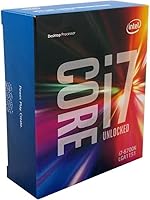
Intel Core i7-6700K Desktop Processor
Overview
The Intel Core i7-6700K Desktop Processor was Intel's top-tier Skylake offering for enthusiast desktop builders, and it earned that reputation honestly. Its unlocked multiplier set it apart from locked sibling chips, giving builders real headroom to push clocks beyond stock settings without jumping through hoops. Built around the LGA 1151 socket, it works with Intel's 100- and 200-series chipsets, so there's a solid pool of compatible motherboards to choose from. One thing to know upfront: this Skylake chip ships as a tray unit only — no heatsink, no fan. Budget accordingly. For those hunting a capable legacy platform without overspending, it still makes a compelling case.
Features & Benefits
At 4.0 GHz base with a 4.2 GHz Turbo Boost ceiling, the i7-6700K sits in comfortable territory for clock-speed-sensitive workloads. Four cores and eight threads via Hyper-Threading mean it handles multitasking well — running a browser, a game, and background apps simultaneously without obvious bottlenecks. The unlocked multiplier is where things get interesting: on a Z170 or Z270 board, pushing past 4.5 GHz is achievable with a decent aftermarket cooler and some patience in BIOS. Memory support spans both DDR3L and DDR4, which is a practical flexibility bonus. The 91W TDP is worth respecting — airflow planning matters here. Intel HD Graphics 530 is on board as a basic display fallback, not a gaming GPU.
Best For
This unlocked processor makes the most sense for a specific type of buyer. If you already have an LGA 1151 board — particularly a Z170 or Z270 motherboard — upgrading to this chip is one of the more cost-effective ways to extend that platform's useful life. Overclockers who want to experiment without investing in a newer ecosystem will find it approachable. Gamers focused on titles that respond well to high single-core frequency rather than raw core count will still see respectable frame rates. It also serves well as a secondary workstation CPU for light video editing or streaming. Anyone building entirely from scratch today, though, should honestly compare it against current-gen options before committing.
User Feedback
With over 1,300 ratings averaging 4.6 out of 5, buyer sentiment around this unlocked processor is broadly positive. Overclocking stability draws consistent praise — many users report hitting 4.5 GHz or higher with minimal fuss on compatible boards. Longevity is another recurring theme; quite a few owners mention years of reliable daily use without complaint. On the downside, the missing cooler catches people off guard more often than it should — read the listing carefully before checkout. A smaller group of buyers flagged BIOS update requirements on older boards to properly recognize the chip, which is manageable but worth knowing ahead of time. Value perception understandably shifts depending on what newer alternatives are selling for at any given moment.
Pros
- The unlocked multiplier makes overclocking genuinely accessible — no exotic tools or advanced expertise required.
- A 4.0 GHz base clock holds up well for gaming titles that prioritize single-core frequency.
- Hyper-Threading gives the i7-6700K eight usable threads, keeping multitasking smooth for everyday workloads.
- Supports both DDR3L and DDR4 memory, giving builders flexibility depending on what they already own.
- Extensive community documentation means overclocking guides, stability tips, and BIOS settings are easy to find.
- Buyers consistently report years of stable daily use — this Skylake chip has a strong longevity track record.
- Works with a wide range of Z170 and Z270 boards, many of which are available used at low cost.
- Over 1,300 user ratings averaging 4.6 out of 5 reflect broad, sustained buyer satisfaction.
- Intel HD Graphics 530 provides a functional display output fallback if a dedicated GPU is unavailable temporarily.
Cons
- No cooler is included — a capable aftermarket heatsink is a mandatory additional purchase, especially for overclocking.
- Four cores are increasingly limiting for heavily threaded tasks like 3D rendering or large-scale video encoding.
- The LGA 1151 platform is a dead end — no upgrade path exists beyond chips of the same generation.
- Older Z170 boards may require a BIOS update before the chip is recognized, which can complicate first boot.
- The 91W TDP demands thoughtful case airflow planning; poor cooling choices lead to thermal throttling under load.
- Integrated graphics performance is too limited for anything beyond basic desktop use or emergency display output.
- Value proposition weakens significantly when priced close to entry-level current-gen alternatives with better efficiency.
- DDR4 memory support depends on the specific motherboard; not all LGA 1151 boards handle both memory types equally well.
- Resale value continues to decline as the platform ages, making it a harder long-term investment to justify.
Ratings
The Intel Core i7-6700K Desktop Processor has accumulated well over 1,300 verified ratings worldwide, and our AI-driven scoring system has analyzed that feedback in depth — actively filtering out incentivized, bot-generated, and outlier reviews to surface what genuine buyers actually experience. The scores below reflect both the strengths that keep this Skylake chip relevant years after launch and the real friction points that prospective buyers should weigh before purchasing. Nothing has been softened or inflated; the ratings are an honest synthesis of what this unlocked processor consistently delivers and where it falls short.
Raw CPU Performance
Overclocking Headroom
Gaming Suitability
Thermal Management
Value for Money
Platform Compatibility
Longevity & Reliability
Out-of-Box Setup Experience
Multitasking Capability
Integrated Graphics
Overclocking Stability
Noise & Power Efficiency
Memory Performance
Suitable for:
The Intel Core i7-6700K Desktop Processor is a strong pick for anyone already invested in the Skylake platform who wants to squeeze more life out of an LGA 1151 build without replacing everything. If you have a Z170 or Z270 motherboard sitting in a working rig, dropping this chip in and pushing it past 4.5 GHz with a decent aftermarket cooler is genuinely one of the better cost-conscious upgrades available on that platform. Gamers whose favorite titles lean heavily on single-core clock speed rather than core count will still get solid, responsive performance. It also suits secondary workstation builds — think a home editing box for light video work or a dedicated streaming machine — where you want reliable throughput without paying current-gen prices. Overclock-curious builders who want a forgiving, well-documented chip to experiment with will find the unlocked multiplier approachable and the community knowledge base extensive.
Not suitable for:
Buyers starting a brand-new build from scratch today will find the i7-6700K a harder sell, since current-gen platforms offer meaningfully better performance-per-dollar along with longer forward compatibility. This Skylake chip tops out at four cores and eight threads, which is increasingly thin for heavily threaded workloads like 3D rendering, large compilation tasks, or serious video production — areas where modern six- and eight-core CPUs pull noticeably ahead. Anyone who needs integrated graphics for more than basic display output will also be disappointed; the HD Graphics 530 is a fallback, not a functional GPU. The tray-only packaging means you must budget separately for a capable cooler, especially if you plan to overclock — this is a real added cost, not a minor footnote. Finally, buyers on platforms other than Intel 100 or 200 series simply cannot use it, so compatibility research is non-negotiable before purchasing.
Specifications
- Socket: The i7-6700K uses the LGA 1151 socket, which is physically compatible with Intel 100 and 200 series chipset motherboards only.
- Generation: This is a 6th Generation Intel Core processor, built on Intel's Skylake microarchitecture using a 14nm manufacturing process.
- Base Clock: The processor runs at a 4.0 GHz base frequency, which it sustains consistently across all cores during standard workloads.
- Turbo Boost: Intel Turbo Boost 2.0 allows the chip to push up to 4.2 GHz on active cores when thermal and power headroom permits.
- Cores & Threads: It features 4 physical cores and 8 logical threads via Intel Hyper-Threading Technology, enabling more responsive parallel task handling.
- TDP: The thermal design power is rated at 91W, which requires a capable aftermarket cooler and adequate case airflow to sustain performance.
- Memory Support: Compatible with both DDR3L and DDR4 RAM, with specific memory type support determined by the paired motherboard's design.
- Multiplier: The K-series unlocked multiplier allows straightforward CPU overclocking through BIOS settings on compatible Z-series motherboards.
- Chipset Support: Full feature support, including overclocking, requires a Z170 or Z270 motherboard; H-series boards lock the multiplier.
- Integrated Graphics: Intel HD Graphics 530 is built in, capable of driving a display for basic desktop tasks but not suited for gaming or GPU-intensive work.
- Cache: The processor includes 8MB of Intel Smart Cache (L3), shared across all four cores to reduce memory latency on repeated data access.
- Memory Channels: Dual-channel memory configuration is supported, which improves bandwidth when two matched memory modules are installed.
- Instruction Sets: Supports SSE4.1, SSE4.2, AVX 2.0, and AES-NI, covering a broad range of modern software optimization requirements.
- PCIe Version: Provides PCIe 3.0 lanes directly from the processor, supporting full-bandwidth communication with modern discrete graphics cards.
- Package Contents: Ships as a tray unit only — no heatsink or cooling fan is included, so a separate cooler purchase is required before use.
- Model Number: Official Intel model designation is i7-6700K, manufactured by Intel Corporation under the Core i7 product family.
- Dimensions: The physical die package measures approximately 1.55 x 1.55 inches, standard for LGA 1151 socket processors.
- Virtualization: Intel VT-x and VT-d virtualization technologies are supported, making the chip compatible with hypervisors and virtual machine environments.
Related Reviews
Intel Core i7-11700K Desktop Processor
Intel Core i7-10700F Desktop Processor
Intel Core i7-12700 Desktop Processor
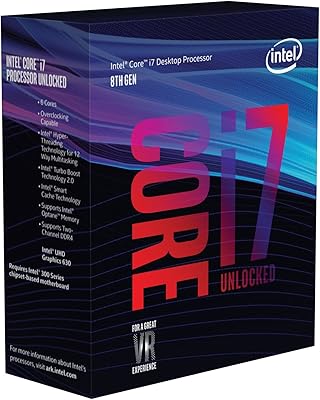
Intel Core i7-8700K Desktop Processor
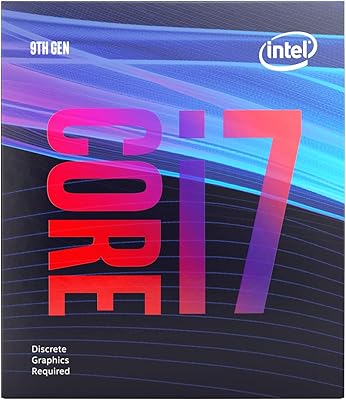
Intel Core i7-9700F Desktop Processor
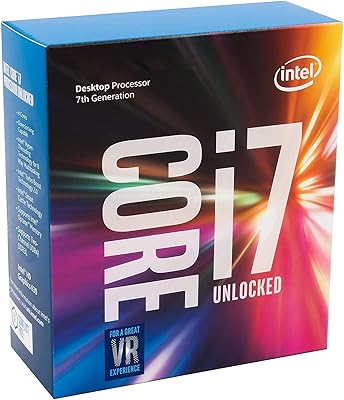
Intel Core i7-7700K Desktop Processor
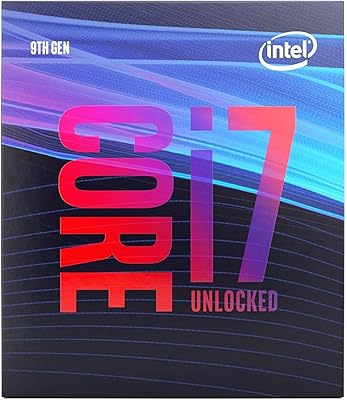
Intel Core i7-9700K Octa-Core Desktop Processor

Intel Core i5-13400F Raptor Lake Desktop Processor

Intel Core i5-9500 Desktop Processor
