Overview

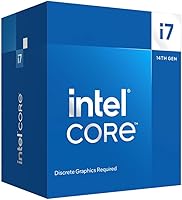
The Intel Core i7-14700F Desktop Processor lands squarely in Intel's 14th-gen Raptor Lake Refresh lineup, offering a meaningful step up from its 13th-gen predecessor without reinventing the wheel. Intel's hybrid core architecture — splitting duties between Performance and Efficiency cores — is baked into how this chip handles workloads, not just a talking point on a spec sheet. One thing to know upfront: there is no integrated graphics, so a discrete GPU is non-negotiable. That said, broad compatibility with both 600- and 700-series motherboards makes it an attractive pick for upgraders and new builders alike. Strong multi-threaded performance at its price tier is the real draw.
Features & Benefits

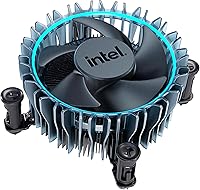
Twenty cores — 8 Performance and 12 Efficiency — with 28 threads means the 14700F handles heavy workloads without hesitation. When you're running a game, encoding video, and keeping 30 browser tabs alive simultaneously, the E-core workload distribution absorbs background tasks while the P-cores stay locked on priority work. Boost clocks reaching 5.4 GHz via Turbo Boost Max 3.0 keep single-threaded responsiveness sharp. The 33MB L3 cache reduces latency noticeably in games and rendering pipelines. DDR4 and DDR5 support offers genuine flexibility for different build budgets, and PCIe 5.0 readiness keeps the platform relevant for next-gen storage. The 65W base TDP runs cooler than K-series chips, and the bundled thermal solution works as a solid starter cooler.

Best For

This i7-14700F hits its stride in a few specific scenarios. Gamers pairing it with a mid-to-high-end discrete GPU get fast boost clocks without paying the overclockable-K premium. Content creators — video editors, 3D artists, streamers — benefit directly from the high thread count when render queues pile up or timelines get complex. Builders with existing DDR4 memory can drop this into a compatible 600-series board after a BIOS update and skip a costly RAM upgrade entirely. Users upgrading from 12th or 13th-gen platforms will find it a relatively painless platform transition. It also handles workstation-adjacent setups well, where multiple demanding applications run side by side without things grinding down.

User Feedback

Across 154 ratings, this 14th-gen Intel chip holds a 4.6 out of 5 — a score that reflects genuine, not inflated, buyer satisfaction. The most consistent praise centers on performance per dollar, with builders noting they got more than expected from a non-K chip. Installation on 700-series boards was widely described as painless. On the critical side, the missing integrated graphics catches some buyers off guard — a real issue for anyone who builds before their GPU arrives. A handful of 600-series users mentioned needing a BIOS update before the chip would post, which is manageable but can trip up first-timers. Long-term reliability feedback is largely positive, with stable sustained performance reported consistently over time.

Pros

  • Handles heavy multitasking cleanly thanks to 20 cores and 28 threads working in tandem.
  • Boost clocks up to 5.4 GHz keep single-threaded tasks — gaming included — feeling snappy and responsive.
  • Compatible with both DDR4 and DDR5 memory, giving builders real flexibility depending on budget.
  • 65W base TDP runs noticeably cooler than K-series chips, which helps in tighter or quieter builds.
  • PCIe 5.0 support keeps the platform viable for next-gen NVMe drives and GPUs down the road.
  • Broad compatibility across 600- and 700-series boards makes it a practical upgrade for existing Intel rigs.
  • A bundled thermal solution means first-time builders can get running without buying a cooler separately.
  • Rated 4.6 out of 5 across real buyer reviews — strong, consistent satisfaction across gaming and workstation use cases.
  • The 14th-gen Raptor Lake Refresh architecture delivers a reliable generational step up over 12th and 13th-gen predecessors.

Cons

  • No integrated graphics whatsoever — a discrete GPU is required before the system will even display an image.
  • 600-series motherboard users may need a BIOS update before the chip is recognized, which can be a hurdle for first-timers.
  • Not overclockable — buyers wanting manual frequency tuning need to step up to a K-series chip instead.
  • The performance gains over 13th-gen chips are incremental, making it a harder sell for those already on Raptor Lake.
  • At its price point, AMD Ryzen alternatives offer competitive multi-threaded performance worth comparing before committing.
  • High thread counts benefit creative and workstation workloads far more than typical everyday or light gaming use.
  • The RM1 stock cooler is adequate but not impressive — users in warm environments or running sustained loads may want an aftermarket option.
  • Requires platform investment — LGA1700 motherboards add to total build cost if starting from scratch.

Ratings

Our AI rating system analyzed verified global user reviews for the Intel Core i7-14700F Desktop Processor, actively filtering out incentivized, bot-generated, and low-quality submissions to surface what real builders and buyers actually experienced. The scores below reflect both the genuine strengths that earned this chip its loyal following and the friction points that real users ran into — nothing is glossed over. From gaming rigs to content creation workstations, the ratings paint an honest picture of where this 14th-gen chip delivers and where it falls short.

Multi-Threaded Performance
93%
Users consistently report that the 20-core, 28-thread configuration handles demanding parallel workloads with ease — video exports finish faster than expected, and render queues in tools like Blender and Premiere Pro rarely cause the system to sweat. The hybrid core design keeps background tasks invisible during heavy creative sessions.
A small portion of users noted the multi-threaded advantage only becomes obvious in genuinely thread-hungry software. Casual users running lighter workloads may not notice a meaningful difference compared to lower-core-count alternatives at a reduced price.
Single-Core Boost Speed
91%
Gamers in particular praised how snappy the chip feels during high-framerate gaming sessions, with the 5.4 GHz Turbo Boost Max 3.0 ceiling giving the most latency-sensitive tasks a real edge. Fast single-core performance also benefits everyday responsiveness — app launches, browser tabs, and general desktop use feel fluid.
A handful of reviewers pointed out that sustained single-core boost is dependent on adequate cooling, and users running the stock RM1 cooler in warm ambient environments occasionally saw the chip pull back from its peak frequencies sooner than expected.
Value for Money
88%
The ratio of performance delivered to price paid is the single most praised aspect across user reviews. Builders who compared the 14700F against competing chips at similar price points frequently came away feeling they got more core count and platform flexibility than expected for the spend.
A few buyers noted that when factoring in the mandatory discrete GPU — which adds substantial cost to any build — the all-in price of a 14700F-based system climbs quickly. The value perception drops slightly for buyers starting from scratch with no existing components to reuse.
Thermal Efficiency
86%
The 65W base TDP is a genuine differentiator from the K-series variants, and users building in smaller cases or prioritizing quiet operation appreciated that the chip stays composed under moderate loads. Several reviewers noted that the bundled RM1 cooler handled everyday gaming and productivity work without complaint.
Under sustained all-core stress — long encoding runs or extended 3D renders — users reported that temperatures climb and fan noise from the stock cooler becomes noticeable. Thermal performance under peak loads is adequate but not impressive without an aftermarket solution.
Motherboard Compatibility
82%
18%
Support for both 600- and 700-series Intel chipset boards gives this chip an unusually wide compatibility window, which buyers upgrading from 12th or 13th-gen platforms found genuinely convenient. Many users confirmed successful drop-in installations on Z690 and Z790 boards without issues.
A recurring frustration in reviews was the BIOS update requirement on 600-series boards — some users were caught off guard when the system failed to post until the firmware was updated. The process is manageable but adds a step that inexperienced builders found stressful.
Memory Flexibility
84%
The dual DDR4 and DDR5 support gave builders real options, and users who reused existing DDR4 kits from previous builds noted significant cost savings without any obvious performance penalty for typical gaming and productivity tasks. DDR5 adopters appreciated the future-facing bandwidth headroom.
Some users noted that DDR4 support, while convenient, doesn't fully extract the chip's memory bandwidth potential. A few buyers also mentioned minor confusion when sourcing compatible RAM, particularly around DDR5 speed configurations and XMP profile behavior on certain boards.
Included Cooler Quality
61%
39%
The inclusion of the RM1 thermal solution is better than shipping with nothing — first-time builders valued being able to boot and test the system on day one without a separate cooler purchase. For light workloads and basic desktop use, it keeps temperatures under control.
The stock cooler drew consistent criticism from users running the chip harder. It runs audibly under load, and thermal headroom for sustained performance tasks is thin. Most experienced builders treated it as a temporary placeholder and replaced it quickly with an aftermarket option.
Gaming Performance
89%
Across gaming-focused reviews, users consistently reported smooth, high-framerate experiences across modern titles when paired with a capable GPU. The combination of fast boost clocks and background-task offloading to E-cores kept frame pacing stable even during streaming or recording simultaneously.
A small number of users noted that in GPU-bottlenecked scenarios, the CPU's strengths become largely invisible — the 14700F is rarely the limiting factor, but that also means buyers with mid-range GPUs may not see the full benefit of the chip's capabilities.
Ease of Installation
87%
The majority of reviewers described installation as clean and straightforward, with the LGA1700 socket offering a familiar experience for anyone who has built on a recent Intel platform. First-time builders also reported success following standard guides without complications on 700-series boards.
The BIOS update requirement for 600-series motherboards introduced installation friction for a subset of buyers, particularly those without a secondary system to flash firmware beforehand. This remains a known and solvable issue but is worth flagging for less experienced builders.
Platform Longevity
74%
26%
PCIe 5.0 support and DDR5 compatibility give the platform a degree of forward relevance, and buyers who valued a longer useful lifespan before their next upgrade appreciated those future-facing specs. The LGA1700 socket is well-established and supported by a wide ecosystem of boards and coolers.
Intel's confirmed shift to new socket architectures in upcoming generations means LGA1700 has a defined end of life, which tempers long-term upgrade confidence. Some users expressed frustration knowing this chip generation is likely the last for the platform before another board swap becomes necessary.
Content Creation Workloads
91%
Video editors and 3D artists noted substantially faster export and render times compared to their previous 8- and 10-core systems, with the E-cores absorbing background application overhead while P-cores stayed focused on primary workloads. The 14700F handled multi-app creative setups without slowdown or task-switching lag.
For professional-grade workloads involving very large scene files or ultra-high-resolution footage, a handful of users noted the chip begins to show its limits compared to higher-end HEDT alternatives. It's a capable creative chip, but not a professional workstation replacement.
Overclocking Headroom
38%
62%
The chip performs well within its locked frequency bounds, and Intel's Turbo Boost Max 3.0 squeezes meaningful automatic performance from the fastest cores without manual intervention. Users who had no interest in overclocking found the out-of-box performance entirely satisfying.
Enthusiast builders who expected tuning headroom were consistently disappointed — the multiplier is locked, and there is no path to meaningful manual overclocking. Several reviewers specifically flagged this as a reason they would have chosen the K-variant if given the decision again.
No Integrated Graphics
29%
71%
For dedicated gaming and workstation builds where a discrete GPU is always present, the lack of integrated graphics is functionally irrelevant. Users in this category had no complaints and saw the omission as a reasonable trade-off for the chip's price positioning.
The missing iGPU generated more negative feedback than almost any other single attribute. Buyers who discovered this mid-build — after their GPU had not yet arrived — were left with non-functional systems. The frustration was compounded by the fact that the listing does not always make this obvious upfront.
Long-Term Reliability
88%
Users who had owned the chip for six months or more consistently reported stable, consistent performance with no degradation or instability issues under normal operating conditions. The chip held its performance characteristics well over time without requiring BIOS tweaks or re-seating.
The long-term dataset is still relatively limited given the chip's January 2024 release, and a small number of users reported needing to revisit power limit settings on certain motherboards to maintain consistent behavior over extended use. Sample size for multi-year reliability is still building.

Suitable for:

The Intel Core i7-14700F Desktop Processor is a strong match for anyone building or upgrading a high-performance desktop who already owns or plans to buy a dedicated graphics card. Gamers running demanding titles will appreciate the fast boost clocks and the way the hybrid core design keeps background processes from eating into frame rates. Content creators — particularly those doing regular video editing, 3D rendering, or live streaming — will get real, tangible mileage out of the 20-core, 28-thread configuration when timelines and render queues pile up. Builders working with an existing DDR4 setup can slot this i7-14700F into a compatible 600- or 700-series board and avoid a costly full-platform overhaul. It also suits workstation-adjacent users who routinely run several heavy applications at once and need headroom without thermal chaos.

Not suitable for:

The 14700F is a poor fit for anyone who needs or expects integrated graphics — there are none, full stop, and that catches more buyers off guard than it should. If you're building a PC in stages and plan to use the CPU's graphics temporarily before a GPU arrives, this chip will leave you with a black screen on day one. Users on older Intel platforms like 400- or 500-series boards will need a full motherboard swap, making the upgrade path more expensive than it might first appear. Those who want an unlocked multiplier for overclocking will find the 14700F off-limits in that respect — the K-series variants are the right choice for that use case. Budget-focused builders who don't need professional-grade multitasking may find the performance ceiling here exceeds what their workloads actually demand, making a lower-tier chip a smarter spend.

Specifications

  • Core Count: The processor features 20 cores in a hybrid configuration — 8 Performance cores and 12 Efficiency cores — designed to distribute workloads intelligently based on priority.
  • Thread Count: A total of 28 threads allows the chip to handle a high number of simultaneous tasks, benefiting both multitasking workloads and parallel-heavy applications like video rendering.
  • Base Clock: The Performance cores run at a base frequency of 2.1 GHz under sustained, all-core load conditions.
  • Boost Clock: Via Intel Turbo Boost Max 3.0, the processor can reach up to 5.4 GHz on its fastest Performance core for demanding single-threaded tasks.
  • L3 Cache: 33 MB of Intel Smart Cache (L3) reduces memory latency and helps maintain consistent frame rates in games and faster throughput in creative workloads.
  • L2 Cache: An additional 28 MB of L2 cache works alongside the L3 to keep frequently accessed data close to the cores, reducing bottlenecks in data-intensive pipelines.
  • CPU Socket: The processor uses the LGA1700 socket, compatible with Intel 600-series and 700-series chipset motherboards.
  • Chipset Support: Full native support is provided for Intel 700-series motherboards; 600-series boards are compatible but may require a BIOS update before the chip is recognized.
  • Memory Support: The 14700F supports both DDR4 memory up to 3200 MT/s and DDR5 memory up to 5600 MT/s, giving builders the choice to reuse existing RAM or adopt the newer standard.
  • PCIe Support: The chip provides 20 CPU PCIe lanes with support for both PCIe 5.0 and PCIe 4.0, enabling high-bandwidth connectivity for modern GPUs and NVMe storage devices.
  • Base Power (TDP): Rated at a 65W base thermal design power, this chip runs significantly cooler than its unlocked K-series counterparts under typical workloads.
  • Integrated Graphics: There is no integrated graphics unit on this processor; a discrete dedicated graphics card must be installed for the system to produce display output.
  • Overclocking: The multiplier is locked, meaning manual CPU overclocking beyond Intel's Turbo specifications is not supported on this non-K variant.
  • Thermal Solution: An Intel RM1 thermal solution is included in the box, providing an entry-level cooler suitable for moderate workloads and standard operating conditions.
  • Turbo Boost Tech: Intel Turbo Boost Max Technology 3.0 is supported, allowing the chip to identify and preferentially boost the two fastest cores for latency-sensitive tasks.
  • Platform Generation: This is a 14th-generation Intel Raptor Lake Refresh processor, built on the Intel 7 process node and sharing architectural DNA with the 13th-gen Raptor Lake family.
  • Release Date: The processor became commercially available in January 2024 as part of Intel's refreshed 14th-gen desktop lineup.
  • Model Number: The official Intel model identifier for this boxed processor is BX8071514700F.
  • Customer Rating: The processor holds a rating of 4.6 out of 5 stars based on 154 verified customer ratings on Amazon at the time of review.
  • Sales Rank: It currently holds a Best Sellers Rank of #75 in the Computer CPU Processors category on Amazon, reflecting strong and consistent buyer demand.

Related Reviews

Intel Core i7-12700 Desktop Processor
81%
92%
Multi-threaded Performance
89%
Gaming Performance
83%
Value for Money
71%
Thermal Management
68%
Platform Compatibility
More
Intel Core i7-9700F Desktop Processor
71%
88%
Gaming Performance
91%
Single-Core Speed
74%
Multi-Core / Threaded Performance
86%
Thermal Efficiency
69%
Platform Compatibility
More
Intel Core i7-10700F Desktop Processor
77%
91%
Multi-Threaded Performance
88%
Single-Core Responsiveness
84%
Value for Money
67%
Thermal Management
86%
Platform Compatibility
More
Intel Core i7-11700K Desktop Processor
84%
92%
Gaming Performance
89%
Overclocking Potential
88%
Multitasking and Productivity
86%
Value for Money
74%
Thermal Management
More
Intel Core i7-8700K Desktop Processor
86%
92%
Performance
90%
Overclocking Potential
93%
Gaming Performance
84%
Thermal Management
88%
Multitasking Ability
More
Intel Core i7-7700K 7th Gen Desktop Processor
83%
93%
Performance
91%
Overclocking Potential
90%
Gaming Performance
75%
Heat Management
88%
Multitasking and Productivity
More
Intel Core i5-13400F 2.5GHz 10-Core Desktop Processor
87%
88%
Performance
92%
Value for Money
84%
Gaming Performance
89%
Multi-core Efficiency
91%
Ease of Installation
More
Intel Core i7-9700K 8-Core 3.60 GHz Processor
87%
95%
Gaming Performance
91%
Overclocking Potential
88%
Multi-Core Performance
92%
Compatibility with LGA 1151 Motherboards
80%
Thermal Management
More
Intel Core i5-9500 Desktop Processor 6 Cores 3.0 GHz
82%
85%
Performance for Everyday Use
80%
Gaming Performance
82%
Multitasking Efficiency
88%
Power Efficiency (TDP)
91%
Value for Money
More
Intel Core i5-8600 Desktop Processor 6-Core 3.1 GHz (BX80684I58600)
86%
88%
Performance
92%
Value for Money
85%
Gaming Performance
87%
Multitasking Ability
91%
Energy Efficiency
More

FAQ

Yes, it includes Intel's RM1 thermal solution. It's a basic cooler that will get you up and running without extra cost, but if you're pushing sustained heavy workloads or just want quieter operation, an aftermarket cooler is worth considering.

It should, yes — 600-series boards like the Z690 are compatible with the LGA1700 socket. The catch is that you'll almost certainly need to update your motherboard's BIOS first. Check your board manufacturer's website for the latest BIOS version that adds 14th-gen support before you install the chip.

Unfortunately, no. The Intel Core i7-14700F Desktop Processor has no integrated graphics at all, so you won't get a display signal without a dedicated GPU installed. If you're building in stages, either have a graphics card ready on day one or borrow one temporarily — otherwise the system simply won't show anything on screen.
It's a solid gaming CPU, particularly for titles that benefit from fast single-core boost speeds. The P-cores can hit up to 5.4 GHz, and the E-cores quietly handle background tasks without pulling resources away from your game. Pair it with a capable discrete GPU and you'll have a well-balanced gaming rig.

No — the 14700F has a locked multiplier, so traditional CPU overclocking isn't on the table. If manual frequency tuning is important to you, you'd need to look at the i7-14700K or i7-14700KF instead, which are unlocked and designed for that use case.

It supports both, which is one of the genuinely useful aspects of this platform. If you already own DDR4 sticks from a previous build, you can reuse them. If you're starting fresh and want to future-proof a bit, DDR5 up to 5600 MT/s is also fully supported.

Quite well, especially for tasks that scale with thread count — things like timeline rendering, export encoding, and multi-layer compositing. The 20-core, 28-thread setup gives editing software like Premiere Pro or DaVinci Resolve a lot to work with. It's not a Threadripper, but for most independent creators it's more than capable.

Honestly, probably not. The 14th-gen Raptor Lake Refresh is an incremental update over 13th-gen Raptor Lake — the architecture is nearly identical, and real-world performance differences are modest. If you're on a 12th-gen or older chip, the upgrade case is much stronger.

On most current 700-series boards, yes — you can drop the 14700F in without any prep work and it should post immediately. The smoother experience is one reason many builders specifically target a Z790 or B760 board for this chip rather than trying to make it work with an older 600-series board that needs a BIOS update first.

The 65W base TDP means it runs considerably cooler than the K-series variants during everyday use. Under sustained all-core stress it will draw more power, but real-world gaming and creative workloads tend to stay manageable with the included cooler. If you're encoding video for hours straight, an aftermarket cooler will keep things quieter and temperatures more stable.

Where to Buy