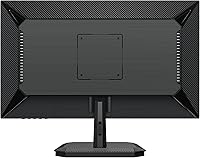
Overview

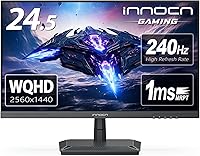
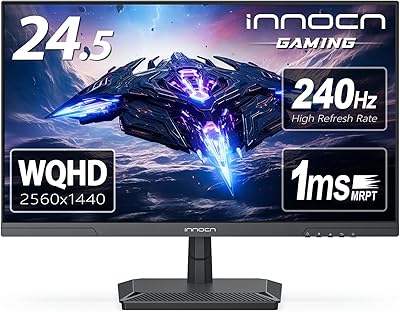
The INNOCN 25G2S 24.5″ Gaming Monitor sits at an interesting crossroads in the display market — sharp enough for detail-oriented work, fast enough for competitive play, and priced to challenge more established names. INNOCN has been quietly building a reputation among enthusiasts who want capable hardware without paying the LG or ASUS premium. Out of the box, the slim three-sided bezels and matte finish make a solid first impression, and colors look reasonably well-calibrated without immediately needing manual adjustments. What genuinely separates this INNOCN display from the crowd is HDMI 2.1 support, which opens the door to console gaming at high refresh rates — a feature most monitors at this size simply don't offer.

Features & Benefits

At its core, this 24.5-inch QHD panel runs a 2560x1440 IPS screen covering 99% of the sRGB color space, which translates to punchy, accurate colors in games and respectable performance for light creative work. For competitive gaming, 240Hz at 1ms MPRT is the headline — but to actually hit that ceiling, you need to be on DisplayPort 1.4, not HDMI. The HDMI 2.1 port runs at a lower refresh ceiling for PC use, though it fully supports PS5 and Xbox Series X at 1440p with solid headroom. G-Sync compatibility keeps tearing in check, and the frameless panel design with a tilt-adjustable metal stand keeps the desk setup clean, if not the most ergonomically flexible arrangement.

Best For

This INNOCN display makes the most sense for competitive FPS players who refuse to trade resolution for speed — 1440p at 240Hz means you're not giving up anything on either front. It's also a strong pick for anyone running both a gaming PC and a current-gen console from the same desk, since the HDMI 2.1 port handles both without an adapter shuffle. If you work from home during the day and game in the evenings, the crisp QHD image holds up well for productivity. Multi-monitor users will appreciate the ultra-thin bezels, and anyone upgrading from a 1080p 144Hz panel will immediately feel the difference in both clarity and motion fluidity.

User Feedback

Owners of this 25G2S gaming monitor consistently praise the out-of-box color accuracy — most find the image well-balanced without needing to dig into the OSD, which is a genuine convenience. The 240Hz motion is broadly described as smooth and responsive in fast-paced titles. That said, stand wobble is a recurring complaint; it moves more than you'd expect at this tier, and since height adjustment isn't available, tilt is your only ergonomic recourse. HDR is technically present but lands flat in practice — treat it as a minor bonus, not a reason to buy. Console users on PS5 report the HDMI 2.1 connection performing reliably, which earns real credibility in buyer feedback.

Pros

  • QHD 1440p resolution at 240Hz is a rare and genuinely useful combination on a 24.5-inch IPS panel.
  • Out-of-box color accuracy is strong — most users report no immediate need for manual calibration.
  • HDMI 2.1 support for PS5 and Xbox Series X at high refresh rates is uncommon at this screen size.
  • G-Sync compatibility keeps gameplay tear-free across a wide range of framerates.
  • The three-sided frameless design looks clean and works well in multi-monitor arrangements.
  • DisplayPort 1.4 connection delivers the full 240Hz bandwidth without compromise.
  • Flicker-free backlight and blue light reduction make extended sessions noticeably more comfortable.
  • Metal stand feels solid and the overall build quality punches above expectations for the brand.
  • VESA 100x100 mount support makes it easy to transition to a monitor arm later.
  • Built-in speaker is a convenient backup option for casual use without extra desk clutter.

Cons

  • The stand only tilts — no height adjustment or pivot, which is a real ergonomic shortcoming for desk workers.
  • Some users report noticeable stand wobble, which can be distracting during intense gaming sessions.
  • HDR mode delivers minimal real-world benefit; peak brightness does not improve meaningfully when enabled.
  • INNOCN offers just a one-year warranty, which is shorter than what most competing brands provide.
  • 240Hz is only achievable over DisplayPort; HDMI caps out at a lower refresh rate for PC use.
  • Brand recognition remains limited, which can make resale value and long-term support harder to predict.
  • No height adjustment means buyers with specific ergonomic needs will likely have to invest in a separate arm.
  • The built-in speaker is adequate at best — not a replacement for even a basic external audio setup.
  • Color gamut coverage stays within sRGB; there is no meaningful wide-gamut option for creative workflows.
  • Limited OSD customization compared to more established gaming monitor brands at this tier.

Ratings

Our AI rating engine analyzed verified global buyer reviews for the INNOCN 25G2S 24.5″ Gaming Monitor, actively filtering out incentivized, bot-generated, and unverified feedback to surface what real users consistently experience. Scores reflect a balanced synthesis of genuine praise and recurring frustrations — nothing is smoothed over to make the product look better than it is. Both the standout strengths and the honest trade-offs are factored into every category below.

Image Clarity
91%
The jump from 1080p to QHD on a 24.5-inch IPS screen is immediately obvious — text is sharper, game environments show more detail, and the overall picture feels noticeably more refined. Buyers switching from older 1080p 144Hz panels consistently describe the clarity improvement as one of the most satisfying aspects of the upgrade.
A small number of users note that the pixel density, while excellent, can make certain older or poorly optimized games appear slightly softer due to upscaling behavior. This is more of a content limitation than a panel flaw, but it is worth knowing going in.
Refresh Rate Performance
88%
At 240Hz over DisplayPort, fast-paced FPS and RTS titles feel fluid and responsive in a way that lower refresh rate panels simply cannot match. Buyers who game competitively describe motion as genuinely smooth, with no perceptible judder during high-action sequences.
Reaching 240Hz requires a DisplayPort 1.4 connection specifically — HDMI users on PC will hit a lower ceiling, which frustrates buyers who assumed any cable would unlock the full spec. This distinction is not always clear at the point of purchase and generates recurring complaints.
Color Accuracy
86%
Out-of-box calibration is a genuine highlight here — most buyers report that colors look balanced and natural without any immediate need to adjust settings, which is not always the case at this price tier. Games with rich environments and skin tones in video content both look lifelike and well-saturated.
The color space tops out at sRGB, so anyone doing serious photo editing or color-critical creative work will find it limiting. A handful of reviewers also note slight warm color temperature bias out of the box, which requires a minor white balance tweak to correct.
Gaming Responsiveness
84%
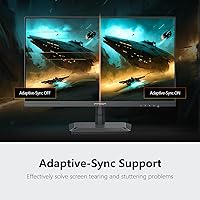
G-Sync and FreeSync compatibility work reliably across tested GPU brands, keeping tearing and stutter absent even when framerates fluctuate. In competitive titles, the combination of adaptive sync and the high refresh rate translates to a noticeably cleaner and more consistent feel during fast movement.
The 1ms MPRT rating is a motion blur reduction figure rather than a true pixel response measurement, and some users notice this distinction in practice — particularly in fast lateral camera sweeps where residual blur can appear with the backlight strobing mode disabled.
Console Compatibility
89%
HDMI 2.1 support is a genuinely differentiating feature at this screen size, and PS5 and Xbox Series X users consistently report clean, stable high-refresh connections without needing adapters or workarounds. For anyone running a dual PC and console desk setup, this single port handles both scenarios impressively well.
Since the native resolution is 1440p, console output will not reach 4K on this panel, which may disappoint buyers expecting a true 4K gaming experience from their console. A few Xbox users also report needing to manually configure output settings to avoid defaulting to a lower resolution.
Build Quality
73%
27%
The panel housing and bezel finish feel sturdy and intentional — the matte black chassis does not look or feel cheap, and the metal stand base adds a sense of solidity that plastic-footed competitors at this tier often lack. Most buyers are pleasantly surprised by the overall construction relative to INNOCN's price positioning.
The stand arm itself is the weak link — multiple reviewers flag noticeable wobble when the desk is bumped or during typing, which erodes confidence in a panel that otherwise feels well-made. The single-axis tilt adjustment also feels limited compared to rivals offering height and swivel adjustment at similar prices.
Ergonomics
58%
42%
The VESA 100x100mm compatibility is a practical saving grace — buyers who invest in a monitor arm effectively resolve the ergonomic shortcomings and gain full positional freedom. Once on an arm, the monitor itself is light enough to reposition with minimal effort.
Out of the box, tilt is the only available adjustment, and the fixed stand height does not suit all desk-to-eye-level configurations. This is a recurring point of dissatisfaction among home office users who need a more adaptable setup for long daily working sessions.
HDR Performance
47%
53%
HDR mode is present and activates without issue, which at least gives buyers the option to experiment with compatible game titles. In a small number of HDR-optimized scenarios, users report a marginal improvement in highlight separation.
Peak brightness is insufficient to deliver a meaningful HDR experience, and most users who test the mode end up turning it off and returning to standard SDR output. This is largely a checkbox feature at this panel tier and should not factor into any purchasing decision.
Bezel Design
87%
The three-sided frameless design is one of the most visually clean implementations at this size category — the ultra-thin borders make it an ideal candidate for side-by-side multi-monitor setups where bezels would otherwise create distracting visual breaks between screens.
The bottom bezel is noticeably thicker than the other three sides, which is standard industry practice but can look slightly asymmetrical in multi-monitor arrangements where uniformity is important. Some buyers mention this as a minor but persistent aesthetic irritant.
Out-of-Box Setup
83%
Assembly is reported as quick and hassle-free — the stand clicks into place without tools, and the monitor is ready to use in minutes. The pre-calibrated picture settings mean most buyers are up and gaming or working within a very short time of unboxing.
The OSD menu navigation is functional but not particularly intuitive, and a few buyers report needing extra time to locate specific settings like refresh rate confirmation or input switching. A clearer menu layout would improve an otherwise smooth setup experience.
Built-in Speaker
52%
48%
The built-in speaker covers basic utility — it handles video call audio and system sounds adequately, and its presence means buyers always have a fallback output without needing to connect external devices.
Bass is essentially absent, volume ceiling is low, and audio quality noticeably degrades at higher volumes. Virtually every buyer who comments on the speaker recommends treating it as an emergency fallback only, not a substitute for even an entry-level external speaker or headset.
Eye Comfort
82%
18%
The flicker-free backlight and blue light reduction mode work as advertised — buyers who spend long hours in front of this INNOCN display during work and evening gaming sessions report meaningfully less eye strain compared to monitors without these features. The matte screen finish also helps in mixed-lighting environments.
The blue light filter mode visibly warms the color temperature, which some users find distracting during color-sensitive work or gaming. Buyers who need precise color and low eye fatigue simultaneously may find the trade-off frustrating.
Value for Money
79%
21%
The combination of QHD resolution, 240Hz refresh, IPS panel quality, and HDMI 2.1 in a single display represents a genuinely strong feature-per-dollar case, particularly for buyers who want one monitor to handle both PC gaming and current-gen consoles without compromise.
Buyers comparing this INNOCN display directly against established brands like LG or ASUS at similar prices often feel the warranty length and brand support ecosystem do not match the hardware ambition. The one-year warranty in particular stands out as a weak point that affects perceived long-term value.
Brand Confidence
64%
36%
INNOCN has been building a credible track record among enthusiast communities, and most verified buyers report that the product matches its advertised specifications without major reliability issues in the short term. Customer support response times are generally described as adequate.
INNOCN simply does not carry the after-sales infrastructure or brand recognition of established monitor makers, and buyers who have needed warranty service report variable experiences. For a display at this tier, the gap in brand confidence versus panel performance remains the most consistent hesitation point in buyer reviews.

Suitable for:

The INNOCN 25G2S 24.5″ Gaming Monitor is a strong fit for competitive PC gamers who want the clarity of QHD without sacrificing the high refresh rates that make fast-paced titles feel genuinely responsive. If you play a lot of FPS or RTS games and have been frustrated by the softness of 1080p but weren't ready to drop refresh rate to get sharper pixels, this panel threads that needle well. It's also a smart choice for anyone running a dual setup — PC during the day, PS5 or Xbox Series X in the evening — since the HDMI 2.1 port handles current-gen console output at high refresh rates without needing a separate display. Home office workers who moonlight as gamers will appreciate the accurate-out-of-box color rendering for documents and video calls, plus the flicker-free backlight for long sessions. Multi-monitor desk builders will find the three-sided slim bezels make side-by-side arrangements look clean and cohesive.

Not suitable for:

Buyers who prioritize ergonomic flexibility will likely find this INNOCN display frustrating — tilt is the only stand adjustment available, and there is no height raise or pivot, which matters a lot during long work sessions. If you are a content creator or designer who needs color accuracy beyond sRGB, the absence of a wide-gamut DCI-P3 panel is a real limitation worth noting. Shoppers who lean heavily on brand trust and established after-sales networks may feel uneasy with INNOCN, since the brand lacks the retail presence and long track record of LG, ASUS, or BenQ. Those hoping for a genuinely capable HDR experience should look elsewhere — the HDR mode on this panel is functional in name only and does not deliver meaningful peak brightness improvements. Anyone expecting 240Hz over HDMI will also be disappointed, since that ceiling is only achievable through DisplayPort 1.4.

Specifications

  • Screen Size: The panel measures 24.5 inches diagonally, offering a compact footprint well-suited to single and multi-monitor desk setups.
  • Resolution: Native resolution is 2560x1440 pixels (QHD), delivering noticeably sharper detail than 1080p at the same screen size.
  • Panel Type: Uses an IPS panel for wide viewing angles and consistent color reproduction across the screen.
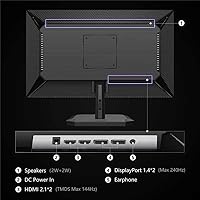
  • Refresh Rate: Supports up to 240Hz when connected via DisplayPort 1.4, with lower refresh rate options including 120Hz, 144Hz, 165Hz, and 180Hz also available.
  • Response Time: Rated at 1ms MPRT (Moving Picture Response Time), targeting reduced motion blur in fast-paced gaming scenarios.
  • Color Gamut: Covers 99% of the sRGB color space, providing accurate and vibrant color output for gaming and general productivity use.
  • Sync Technology: Compatible with AMD FreeSync and NVIDIA G-Sync, enabling adaptive refresh for tear-free gameplay across both major GPU platforms.
  • Connectivity: Equipped with one HDMI 2.1 port and one DisplayPort 1.4 port, supporting PC, gaming laptops, PS5, and Xbox Series X connections.
  • Aspect Ratio: Standard 16:9 widescreen aspect ratio, consistent with the vast majority of games, video content, and productivity applications.
  • Stand Adjustment: The included metal stand supports tilt adjustment only; height raise, swivel, and pivot are not available on the factory stand.
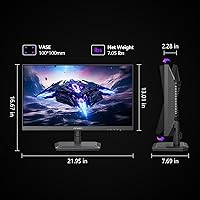
  • VESA Compatibility: Supports VESA 100x100mm wall and arm mounting, making it straightforward to attach a third-party ergonomic arm.
  • Built-in Speaker: Includes an integrated speaker for basic audio output, intended as a convenience feature rather than a primary sound solution.
  • Eye Care: Features a flicker-free backlight and a blue light reduction mode designed to reduce eye strain during extended viewing sessions.
  • Surface Finish: The screen uses a matte anti-glare coating, which helps manage reflections in brighter room environments.
  • Dimensions: With stand attached, the monitor measures approximately 21.9 inches wide, 16.67 inches tall, and 7.6 inches deep.
  • Weight: The panel without stand weighs 7.03 lbs, and the total assembled unit comes in at approximately 8.98 lbs.
  • Bezel Design: Features a three-sided frameless design with ultra-narrow borders on the top and both sides for a cleaner, less obtrusive look.
  • Warranty: INNOCN provides a one-year product quality warranty alongside 24/7 customer support contact for product and order issues.

Related Reviews
INNOCN 25G2S 24.5″ QHD Gaming Monitor

73%
91%
Image Sharpness & Clarity
88%
Refresh Rate & Motion Smoothness
79%
Response Time & Input Lag
74%
Color Accuracy & Gamut
93%
Connectivity & Port Selection
More
CRUA CR245ZB 24.5″ Gaming Monitor
78%
83%
Gaming Performance
86%
Refresh Rate & Smoothness
74%
Color Accuracy & Vibrancy
91%
Ergonomics & Adjustability
68%
Build Quality & Materials
More
Acer KB252Q G0bi 24.5″ IPS Monitor
73%
83%
Image Quality
86%
Color Accuracy
78%
Refresh Rate & Gaming
61%
Response Time
54%
Brightness
More
KTC 24.5″ Gaming Monitor 180Hz FHD
87%
89%
Display Quality
91%
Response Time
92%
Refresh Rate
88%
Color Accuracy
85%
Build Quality
More
KOORUI G2511E 24.5-Inch 320Hz Gaming Monitor
78%
93%
Refresh Rate Performance
88%
Response Time
84%
Color Accuracy
51%
HDR Quality
67%
Panel Uniformity
More
Alienware 25 Gaming Monitor AW2523HF 24.5″
88%
95%
Display Performance
92%
Color Accuracy
88%
Ergonomics/Adjustability
90%
Ease of Setup
89%
Build Quality
More
ASUS TUF Gaming VG259QM 24.5″ Gaming Monitor
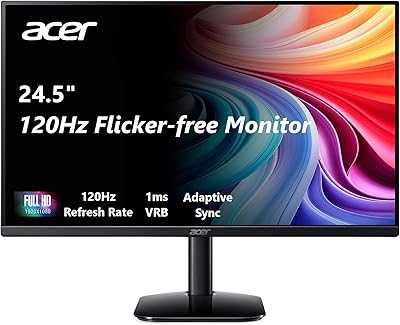
76%
93%
Refresh Rate Performance
88%
Response Time & Motion Clarity
81%
Color Accuracy & Image Quality
86%
Adaptive Sync & Compatibility
52%
Stand & Ergonomics
More
Dell G2524H Gaming Monitor 24.5-inch
87%
92%
Performance
96%
Refresh Rate
88%
Build Quality
91%
Ergonomics
93%
Display Quality
More
Gawfolk GF240A 24.5-inch 200Hz Gaming Monitor
68%
83%
Refresh Rate Performance
79%
Response Time & Motion Clarity
71%
Image & Color Quality
88%
Value for Money
57%
Build Quality & Stand
More
GIGABYTE GS25F2 24.5″ FHD Gaming Monitor
80%
93%
Refresh Rate Performance
88%
Response Time & Motion Clarity
84%
Color Accuracy & Vibrancy
91%
Value for Money
87%
Adaptive Sync (FreeSync)
More
Gawfolk GF245A 24.5-Inch Curved Gaming Monitor
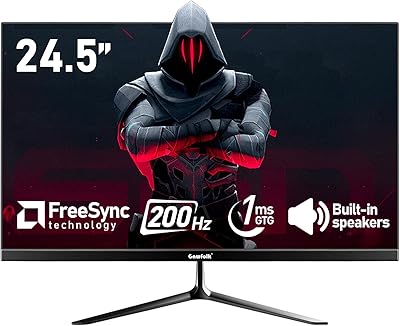
72%
88%
Value for Money
79%
Image Quality
83%
Refresh Rate Performance
81%
Response Time
63%
Build Quality
More

FAQ

You need DisplayPort 1.4 to hit the full 240Hz refresh rate on this panel. The HDMI 2.1 port is excellent for console use and handles high refresh rates well on PS5 and Xbox Series X, but for a PC pushing 240Hz, DisplayPort is the cable you want. This is one of the most common points of confusion with this monitor, so double-check your GPU has a DisplayPort output before assuming you are covered.

Quite well, actually. The HDMI 2.1 connection supports the bandwidth needed for current-gen console output at elevated refresh rates, which is relatively uncommon on a 24.5-inch display. Most buyers using it with a PS5 or Xbox Series X report a clean, responsive experience. Just keep in mind the native resolution tops out at 1440p, so the console will output at QHD rather than 4K.

It holds up well for daily work use. The QHD resolution makes text crisp and readable at normal desk distances, and the 99% sRGB color accuracy means web browsing, documents, and video calls all look natural. The flicker-free backlight is a genuine comfort advantage for long working hours. It is not a professional color-grading display, but for standard office and creative tasks it performs solidly.

The factory stand only tilts — there is no height adjustment built in. If ergonomics matter to you, the VESA 100x100mm mounting pattern makes it easy to swap in a monitor arm, which is honestly the better long-term solution anyway. Several buyers specifically mention adding an arm after finding the default stand position too low for comfortable extended use.

It is real but situation-dependent. If you type firmly or bump your desk regularly, you may notice some movement in the panel. For most gaming use it is not disruptive, but if you are coming from a heavier, more premium stand, the difference is noticeable. Mounting it on an arm eliminates the issue entirely if it bothers you.

Honestly, not really. The HDR mode is present and technically functional, but the panel does not have the peak brightness or local dimming capability to deliver a meaningful HDR experience. It is the kind of HDR implementation you see on monitors at this price tier — more of a checkbox than a genuine feature. Leave it off and enjoy the standard picture quality, which is genuinely good.

The 1ms figure is MPRT (Moving Picture Response Time), which is a motion blur reduction metric rather than a direct measurement of pixel transition speed. In practice, fast-paced games feel smooth and responsive at 240Hz, and most users do not report ghosting as a concern. That said, MPRT numbers can sometimes be achieved through backlight strobing, so it is worth checking whether any motion blur reduction mode introduces other visual trade-offs in your specific game titles.

Most buyers report being pleasantly surprised by the out-of-box color accuracy. Colors look balanced and natural without needing to dive into the OSD immediately. That is not always the case with monitors at this tier, so it is a genuine plus. If you want to fine-tune, the controls are there, but for the average gamer or office user, the default settings are more than acceptable.

It works as a backup — good enough for a video call or background audio when you do not have headphones handy. Do not expect room-filling sound or meaningful bass. Think of it as a convenience safety net rather than an audio solution. Anyone who cares about sound quality will want external speakers or headphones regardless.

INNOCN is a smaller, newer brand that competes primarily on specifications per dollar rather than brand heritage. The hardware inside this 24.5-inch QHD panel is competitive, and most build quality complaints are about the stand rather than the panel itself. Where you feel the brand gap most is in warranty length — one year versus the two or three years major brands often offer — and in the less established resale value. If having a recognized name on the bezel matters to you, that is a fair consideration; if you are spec-focused and comfortable with a newer brand, the trade-off is reasonable.

Where to Buy