Overview

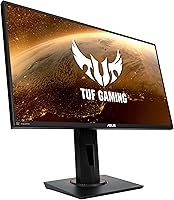
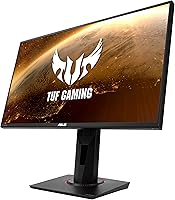
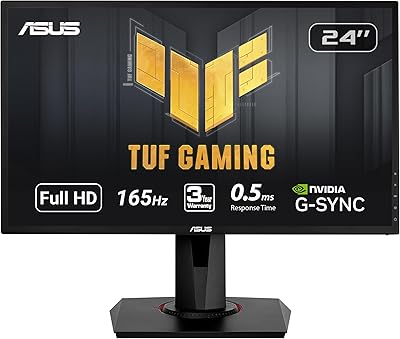
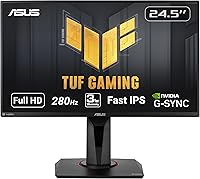
The ASUS TUF Gaming VG259QM 24.5″ Gaming Monitor arrived in 2020 and has held its ground in a crowded market ever since. At a time when most IPS gaming panels were still stuck at 144Hz, this one pushed well beyond that ceiling — making it a serious option for competitive players who refused to give up color quality for speed. The Fast IPS panel sits comfortably in the mid-to-upper tier of the 1080p gaming monitor space. Not a budget pick, but it delivers real value for the asking price. For everyday desk work or casual gaming between ranked sessions, the panel technology means colors look genuinely respectable outside of high-octane gameplay too.
Features & Benefits

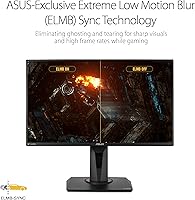
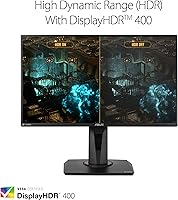
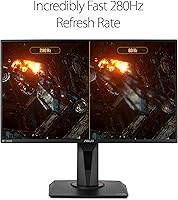
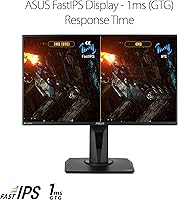
What separates the VG259QM from many competitors is the combination of raw speed and panel quality. Running at 280Hz, motion on screen feels noticeably tighter than a 144Hz display in fast shooters — not a subtle difference when enemies are cutting around corners. The 1ms GTG response time is delivered through Fast IPS rather than TN, meaning you get that speed without sacrificing accurate colors or viewing angles. ELMB SYNC deserves a mention too: running motion blur reduction and adaptive sync simultaneously is something many monitors still cannot do. G-SYNC Compatible certification means it works cleanly with both major GPU brands. The DisplayHDR 400 support is real but modest — think improved contrast over standard SDR, not the dramatic pop you would see on a premium OLED or mini-LED panel.

Best For

This 280Hz panel is built for one type of buyer above all: the competitive FPS player who genuinely pushes high frame rates and wants every on-screen advantage available. If you are jumping from a 144Hz monitor, the difference is real and felt within the first session. That said, your GPU needs to keep up — a mid-to-high-end card is required to actually leverage what the display offers. The 24.5-inch size is a deliberate preference for many esports players who prefer a tighter field of view. One honest note: if you are coming from a 1440p monitor, the 1080p resolution may feel like a step back. But for those whose priority is frame rate over pixel count, this ASUS TUF monitor makes a strong case.

User Feedback

With over 4,700 ratings, the VG259QM has a track record that is hard to dismiss. Most buyers highlight the out-of-box color accuracy as a pleasant surprise at this price point, and the responsive feel at high refresh rates draws consistent praise from FPS players. Where things get less rosy: the stand is a recurring frustration. Height adjustment is limited, and many owners end up purchasing a third-party arm fairly quickly. There is also a panel lottery element — a small but vocal subset of buyers has reported backlight bleed or minor uniformity issues. These are not universal, but worth factoring in. Long-term reliability reports are generally positive, with few durability complaints from those who have owned it for two or more years.

Pros

  • Fast IPS technology delivers competitive response times without the washed-out colors typical of TN panels.
  • Running ELMB and G-SYNC Compatible simultaneously is a rare feature that genuinely reduces ghosting during fast gameplay.
  • The high refresh rate provides a noticeably smoother experience in competitive titles compared to standard 144Hz monitors.
  • Out-of-box color calibration is strong for a gaming-focused display, requiring little to no adjustment for most users.
  • G-SYNC Compatible certification works reliably with both AMD and NVIDIA graphics cards.
  • The matte anti-glare coating handles ambient light well, making it comfortable in brighter room environments.
  • Eye care features including flicker-free backlight make extended daily sessions noticeably less fatiguing.
  • The 24.5-inch size is a practical sweet spot for desk setups where a tighter, focused field of view is preferred.
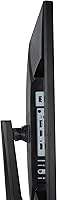
  • Connectivity options cover the essentials cleanly with DisplayPort and dual HDMI ports.
  • Long-term reliability reports from verified buyers are consistently positive, with few durability issues surfacing over time.

Cons

  • The included stand offers limited height and ergonomic adjustment, often pushing buyers toward a third-party monitor arm.
  • A subset of buyers has reported backlight bleed or panel uniformity inconsistencies — panel quality is not perfectly guaranteed.
  • DisplayHDR 400 support is entry-level and offers only a modest improvement over standard SDR; it is not a true HDR experience.
  • The 1080p resolution may feel like a downgrade for anyone transitioning from a higher-resolution display.
  • Maximizing the high refresh rate requires a capable mid-to-high-end GPU, which adds to the total cost of the setup.
  • At 11-plus pounds, the monitor is not particularly light, which can matter when mounting or repositioning frequently.
  • No USB hub functionality is included, which is a minor but notable omission at this price tier.
  • Cable management options on the stand are minimal, which can affect desk tidiness for setup-conscious buyers.

Ratings

The scores below reflect AI-assisted analysis of verified global buyer reviews for the ASUS TUF Gaming VG259QM 24.5″ Gaming Monitor, with spam, bot-generated, and incentivized feedback actively filtered out before scoring. Each category is weighted against real-world usage patterns reported by thousands of confirmed purchasers. Both the genuine strengths and the recurring frustrations are represented transparently — nothing is inflated to flatter the product.

Refresh Rate Performance
93%
Buyers consistently describe the jump to 280Hz as immediately and viscerally noticeable in fast shooters, particularly in tracking moving targets and rapid camera panning. In games like CS2 and Valorant, the smoothness at maximum refresh feels qualitatively different from 144Hz in a way that most users did not expect.
Getting full value requires a GPU capable of sustaining very high frame rates, which not every buyer factors into their purchase. In more demanding titles, most systems will fall short of the panel maximum, meaning the headline number is not always achievable in practice.
Response Time & Motion Clarity
88%
The Fast IPS panel delivers sharp, clean motion that holds up well during rapid gameplay — a meaningful step beyond what most IPS monitors offered at launch. Buyers upgrading from slower IPS or VA panels frequently comment on how much crisper fast movement looks, especially with ELMB SYNC active.
A handful of users with particularly sensitive eyes noted mild residual trailing in very specific edge-case scenarios, though this is uncommon in general feedback. ELMB SYNC can introduce a slight brightness reduction when enabled, which some users find off-putting in darker game environments.
Color Accuracy & Image Quality
81%
19%
For a gaming-focused IPS panel, the out-of-box color calibration draws regular praise — most buyers report that colors look rich and accurate without needing manual adjustment. General desktop use and media consumption look noticeably better than on TN alternatives in the same price range.
It is not a wide-gamut panel, and buyers doing any serious photo editing or color-grading work will find its color space coverage insufficient for professional purposes. Compared to higher-end IPS or OLED displays, the depth of blacks and overall contrast ratio is a clear limitation.
Adaptive Sync & Compatibility
86%
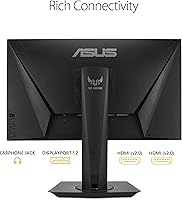
G-SYNC Compatible certification works reliably across both major GPU brands, and buyers report that VRR kicks in smoothly without handshake issues or flickering on supported hardware. The dual HDMI 2.0 and DisplayPort 1.2 setup covers most connection scenarios cleanly.
VRR over HDMI is not universally stable across all devices and firmware versions, with a small subset of users reporting inconsistency when connecting consoles or secondary PCs. Getting the most out of adaptive sync sometimes requires toggling settings in the OSD, which is not immediately intuitive.
Stand & Ergonomics
52%
48%
The stand is sturdy enough that the monitor does not wobble or shift during use, and basic tilt adjustment is functional for users whose desk and chair height happen to align well with the default positioning. Assembly is straightforward and takes only a few minutes.
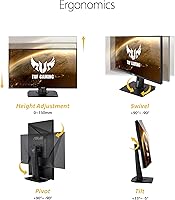
Limited height and pivot adjustment is the single most common complaint across the entire review base, and it is hard to argue against. Many buyers end up purchasing a separate monitor arm within weeks, effectively making the included stand redundant and adding unplanned cost to the setup.
HDR Performance
47%
53%
DisplayHDR 400 does provide a mild boost in brightness ceiling and contrast relative to standard SDR output, and some buyers appreciate the incremental improvement in games that support HDR natively. For users who have never owned an HDR-capable display, the certification adds some legitimate value.
Buyers expecting a meaningful HDR experience are frequently disappointed — the certification sits at the entry-level tier and cannot replicate the deep blacks or peak brightness of OLED or mini-LED panels. Multiple reviewers explicitly flag HDR as a feature to ignore when evaluating this monitor.
Build Quality & Aesthetics
77%
23%
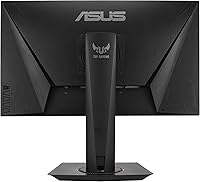
The overall construction feels solid and well-assembled, with a matte plastic finish that resists fingerprints and does not attract dust aggressively. The design is restrained by gaming monitor standards, making it fit comfortably on work desks without looking out of place outside of a gaming setup.
The back panel and stand plastics feel mid-grade rather than premium, and the TUF branding aesthetic will not appeal to buyers looking for a cleaner, more minimal look. A few buyers noted minor flex in the rear housing under pressure, though this has not translated into reported durability problems.
Panel Uniformity & Backlight
71%
29%
The majority of buyers report clean, even backlight distribution with no significant issues, and the matte coating handles glare from ambient light sources better than glossy alternatives in typical home or office lighting. For most users the panel performs consistently across its face.
A notable minority of reviews mention backlight bleed along screen edges, particularly visible against dark backgrounds in games or film. Panel-to-panel variability exists, and buyers unlucky with their unit may face a mildly uneven viewing experience that is difficult to correct through software calibration alone.
OSD & Software Controls
68%
32%
The on-screen display covers all essential adjustments — brightness, response time overdrive, ELMB SYNC toggle, and refresh rate settings — without burying options in overly complex menus. Most buyers find the default settings usable with only minor tweaks.
Navigation through the OSD joystick can feel fiddly, particularly when toggling between ELMB and G-SYNC Compatible modes which cannot both be fully optimized through a single press. A few users found the menu layout less intuitive than competing brands at a similar tier.
Eye Comfort & Long Sessions
82%
18%
The flicker-free backlight and low blue light mode make a genuine difference for buyers who spend four or more hours daily at their desk, with several reviewers specifically noting reduced headaches and eye fatigue compared to previous monitors. The matte screen surface also reduces the visual tension that comes with prolonged exposure to glossy panels.
The low blue light mode shifts the color temperature noticeably warm, which some users find too aggressive for comfortable gaming. Buyers who prefer a cooler white point will likely disable it and rely on the flicker-free backlight alone for eye relief.
Value for Money
79%
21%
Relative to competing 280Hz Fast IPS monitors at launch and since, the VG259QM has consistently offered a strong feature set for its market position — particularly the ELMB SYNC combination, which remains uncommon at this price tier. Buyers who prioritize competitive performance over resolution tend to feel the purchase is well-justified.
The stand limitations and entry-level HDR make it harder to feel fully satisfied when comparing against newer rivals that have closed the gap at similar or lower price points. Buyers who factor in the likely cost of a third-party arm will find the effective value proposition slightly less compelling.
Setup & Out-of-Box Experience
83%
Physical assembly is quick, and the monitor reaches a fully usable state without requiring firmware updates or significant calibration work for most users. The included cable kit is adequate, and the display detected correctly by Windows in testing reported across multiple buyer setups.
The OSD defaults are not perfectly optimized for every use case — overdrive settings in particular benefit from manual adjustment to avoid unwanted overshoot at certain refresh rates. New users unfamiliar with gaming monitor settings may need to spend time researching recommended configurations online.
Long-Term Reliability
84%
With a release history stretching back to 2020 and a large verified review base, the long-term reliability picture for the VG259QM is reassuringly positive. Few buyers report hardware failures or significant degradation in panel performance over extended ownership periods.
As with most IPS panels, there is a low but non-zero risk of stuck pixels or backlight issues emerging over time, and ASUS warranty experiences reported by buyers are mixed depending on region. Some international buyers noted slower resolution times compared to domestic support channels.

Suitable for:

The ASUS TUF Gaming VG259QM 24.5″ Gaming Monitor is purpose-built for competitive gamers who treat frame rate as a non-negotiable priority. If you play fast-paced shooters or battle royale titles seriously — whether at a casual-competitive or ranked level — the high refresh rate delivers a tangible improvement in how smooth and readable motion feels during play. Gamers who are currently on a 144Hz display and have the GPU horsepower to push well beyond that threshold will notice a genuine, meaningful difference rather than a marginal one. The Fast IPS panel also makes it a solid fit for people who spend long hours at their desk, since the eye care features and comfortable viewing angles hold up well outside of gaming sessions. Those who prefer a compact 24-to-25-inch screen — common among players who sit close to their display or have limited desk space — will find the form factor exactly right.
Not suitable for:

Buyers who prioritize image fidelity, color depth, or resolution over raw speed will likely find the VG259QM a frustrating fit. If you are coming from a 1440p or 4K display, the 1080p resolution at 24.5 inches is workable, but the downgrade in pixel density will be noticeable and, for many, difficult to accept long-term. Content creators, photo editors, or anyone doing color-sensitive work should look elsewhere — while the colors are good for a gaming monitor, it is not a professional-grade panel and does not cover the color spaces that serious creative work demands. The HDR support is entry-level and should not factor into a purchase decision for anyone expecting rich, high-contrast HDR visuals. Finally, buyers who want a fully adjustable stand out of the box may find the stock hardware limiting, especially if ergonomics are a priority in a long-session setup.

Specifications

  • Panel Type: Uses a Fast IPS panel, which combines the color accuracy and wide viewing angles of traditional IPS with response times competitive enough for high-refresh-rate gaming.
  • Screen Size: The active display area measures 24.5 inches diagonally, a size widely favored in esports and competitive gaming environments.
  • Resolution: Native resolution is 1920x1080 (Full HD), delivering a clean, sharp image at this screen size without demanding excessive GPU resources.
  • Refresh Rate: Supports a maximum refresh rate of 280Hz, with backward compatibility down to 144Hz for use with a wider range of systems.
  • Response Time: Rated at 1ms GTG (gray-to-gray), minimizing pixel transition artifacts during fast on-screen movement.
  • Adaptive Sync: Certified as G-SYNC Compatible, enabling variable refresh rate (VRR) support for both NVIDIA and AMD graphics cards via DisplayPort.
  • Motion Blur Tech: ASUS ELMB SYNC technology allows backlight strobing for motion blur reduction to operate simultaneously with adaptive sync — an uncommon combination at this tier.
  • HDR Support: Carries DisplayHDR 400 certification, offering a modest uplift in contrast and brightness over standard SDR but not comparable to premium HDR implementations.
  • Connectivity: Includes one DisplayPort 1.2 and two HDMI 2.0 ports, covering connections for a PC and up to two additional devices simultaneously.
  • Aspect Ratio: Standard 16:9 widescreen aspect ratio, compatible with all mainstream game engines, media formats, and desktop operating systems.
  • Screen Surface: Matte anti-glare coating reduces reflections from ambient light sources, improving comfort in moderately lit or mixed-lighting environments.
  • Eye Care: Incorporates a flicker-free backlight and a low blue light mode to reduce eye strain during extended viewing or gaming sessions.
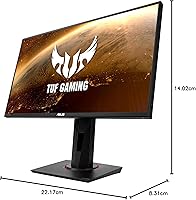
  • Dimensions: The monitor measures approximately 22.17″ wide, 14.02″ deep, and 8.31″ tall with the stand attached.
  • Weight: Total weight with stand is 11.24 lbs, which is typical for a monitor of this size and build class.
  • Stand Adjustments: The included stand supports tilt adjustment; height and pivot adjustability are limited compared to higher-end monitor stands.
  • VESA Compatibility: The display supports standard VESA mounting, allowing use with third-party monitor arms for improved ergonomic flexibility.
  • Power Input: Rated for 240V input, compatible with standard power configurations across most global regions with the appropriate adapter.
  • Color Gamut: As a Fast IPS panel, the VG259QM covers the sRGB color space well, making it suitable for general content consumption alongside gaming.

Related Reviews

ASUS VG247Q1A 24-Inch Gaming Monitor
76%
91%
Gaming Performance
93%
Refresh Rate & Smoothness
88%
Response Time & Motion Clarity
89%
Adaptive-Sync & Compatibility
71%
Image Quality & Color
More
ASUS VG249QE5A 24-inch Gaming Monitor
76%
88%
Image Quality
91%
Refresh Rate Performance
86%
Motion Clarity
93%
Value for Money
47%
Ergonomics & Stand
More
ASUS ROG Swift PG259QN 24.5” 360Hz Gaming Monitor
88%
93%
Performance
91%
Visual Quality
88%
Build Quality
87%
Ergonomics & Adjustability
89%
Connectivity Options
More
ASUS VG32WQ3B 32-inch Curved Gaming Monitor
79%
88%
Image Clarity
91%
Refresh Rate Performance
86%
Color Accuracy
89%
Motion Blur & Ghosting
74%
Shadow Boost Effectiveness
More
ASUS ROG Strix XG259QNS 24.5-inch Gaming Monitor
80%
93%
Motion Clarity
91%
Input Responsiveness
78%
Refresh Rate Value
67%
Image Quality
88%
Build Quality
More
ASUS ROG Strix XG259CMS 24.5-inch Gaming Monitor
78%
93%
Motion Clarity
91%
Response Time
84%
Refresh Rate Value
83%
Build Quality
61%
Ergonomics & Stand
More
ASUS VG248QG 24″ Gaming Monitor
85%
92%
Performance
89%
Display Quality
95%
Response Time
88%
Value for Money
91%
Eye Care Features
More
ASUS TUF Gaming VG32VQR 31.5-inch Monitor
79%
88%
Image Quality
91%
Contrast & Black Levels
67%
Motion Performance
84%
Refresh Rate & Smoothness
86%
Adaptive Sync (FreeSync)
More
CRUA CR245ZB 24.5″ Gaming Monitor
78%
83%
Gaming Performance
86%
Refresh Rate & Smoothness
74%
Color Accuracy & Vibrancy
91%
Ergonomics & Adjustability
68%
Build Quality & Materials
More
KOORUI G2511E 24.5-Inch 320Hz Gaming Monitor
78%
93%
Refresh Rate Performance
88%
Response Time
84%
Color Accuracy
51%
HDR Quality
67%
Panel Uniformity
More

FAQ

Yes, and more so than the jump from 60Hz to 144Hz might suggest in terms of feel. In fast shooters where you are consistently hitting high frame counts, motion on screen looks tighter and enemy movement is easier to track. The difference is most apparent during rapid camera sweeps and in close-quarters gameplay.

It works with both. The G-SYNC Compatible certification means adaptive sync functions over DisplayPort with NVIDIA GPUs, and AMD FreeSync is also supported. You do not need a specific brand of GPU to take advantage of variable refresh rate on this display.

ELMB SYNC lets you run backlight strobing — which reduces perceived motion blur — at the same time as adaptive sync. Most monitors force you to choose one or the other. Whether you need it depends on how sensitive you are to blur; competitive FPS players tend to appreciate it, but many users are perfectly happy without it enabled.

Honest answer: it is basic. DisplayHDR 400 is the entry-level tier of HDR certification, and while it does provide a slight boost in brightness and contrast over standard SDR, it is not the kind of HDR you would see on a high-end OLED or mini-LED panel. Do not buy the ASUS TUF Gaming VG259QM 24.5″ Gaming Monitor expecting a dramatic HDR experience — treat it as a bonus feature rather than a selling point.
Yes, the monitor supports standard VESA mounting. Many owners actually prefer this route given the limited ergonomic range of the included stand, and a good monitor arm will give you far more flexibility for height, tilt, and positioning.

Not at normal desktop viewing distances. At 24.5 inches, 1080p sits at a pixel density where text and images look acceptably sharp for most users. That said, if you are coming from a 1440p or 4K monitor, the difference in crispness will be noticeable, particularly with fine text and detailed textures.

Quite a bit, depending on the game. In less demanding esports titles you can realistically hit very high frame rates with a mid-range GPU, but in more graphically intensive games you will likely run below the panel maximum. The monitor also supports 144Hz, so you can still use it effectively while your system scales up.

A small portion of buyers have reported backlight bleed or minor panel uniformity issues, which is not unusual for IPS panels in general. The majority of users do not report significant problems, but there is some variability between individual units — this is something to check during any return window if it concerns you.

Only in a limited way. The stand supports tilt but does not offer a wide range of height or pivot adjustment. This is one of the more consistent complaints from buyers, and many opt to replace it with a VESA-compatible arm fairly early on.

It holds up well for general use. The Fast IPS panel produces decent colors for everyday tasks, the matte coating handles office lighting reasonably, and the eye care features help during long work sessions. It is not a color-accurate professional monitor, but for mixed-use — work by day, gaming in the evening — it performs comfortably.

Where to Buy