Overview

The INNOCN 44C1G 43.8″ Ultrawide Monitor is one of the more affordable ways to enter the 32:9 ultrawide format without spending four figures. To put that aspect ratio in plain terms, imagine two 21.5-inch monitors placed side by side with no bezel gap between them — that is essentially what you are working with. What genuinely sets this panel apart from most ultrawide competitors is that it is flat. Curved screens dominate this category, so the straight viewing plane is a real differentiator for anyone who mounts close to a wall or simply dislikes the wrap effect. INNOCN is a Chinese brand still building its foothold in Western markets, but the 44C1G has been quietly gaining attention from buyers who prize desk real estate above all else.
Features & Benefits

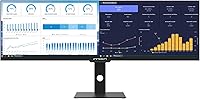
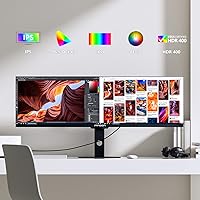
The 3840x1080 resolution spreads two full HD images across the width of the screen, which sounds substantial until you factor in the 43.8-inch diagonal — vertical pixel density is low, and fine text can look softer than expected if you sit close. That trade-off acknowledged, the 120Hz refresh rate keeps motion fluid, and AMD FreeSync Premium handles variable frame rates without obvious tearing. The color performance is genuinely strong for this price tier: 96% DCI-P3 coverage paired with a per-unit calibration sheet means the accuracy claim is verifiable, not just marketing copy. Connectivity covers USB-C, dual HDMI, and DisplayPort, and the stand handles height, tilt, and swivel adjustment without needing an aftermarket arm.

Best For

This ultrawide monitor is a natural fit for anyone who lives in spreadsheets, juggles multiple browser tabs, or needs a reference window open alongside their main workspace — all without routing a cable between two separate screens. Casual gamers get a genuinely wide field of view at 120Hz without paying the premium that higher-resolution 32:9 panels command. Budget-conscious content creators will appreciate the color accuracy, though serious HDR work is out of scope here — HDR400 at 400 nits is an entry-level certification, not a professional mastering standard. The flat panel suits shallow desk setups where a curved screen would need extra distance to avoid edge distortion. Console users connecting via HDMI will also find it a capable large-format alternative to a living room TV.

User Feedback

Buyers consistently praise the sheer amount of screen relative to what they paid — that value equation is hard to argue with. The included calibration report also earns real goodwill, since it is a detail many pricier monitors skip entirely. On the critical side, OSD navigation draws frequent complaints for being unintuitive, and scattered reports flag the stand as feeling less solid than ideal. A recurring practical concern involves USB-C charging output falling short of what power-hungry laptops actually need — worth verifying before relying on it as your sole power source. Long-term reliability remains an open question given INNOCN's limited Western market history, and customer support responsiveness has been inconsistent enough that it is worth factoring in before purchasing.

Pros

  • Massive 43.8-inch working canvas replaces a dual-monitor setup without any bezel gap.
  • Flat IPS panel suits tight desk setups and wall-mounted configurations where curved screens fall short.
  • Each unit ships with a documented ΔE under 2 calibration report — rare accountability at this price tier.
  • 96% DCI-P3 color coverage delivers genuinely accurate, vivid output for photo and graphic work.
  • 120Hz refresh rate with AMD FreeSync Premium keeps gaming motion smooth and largely tear-free.
  • USB-C, dual HDMI, and DisplayPort connectivity cover a wide range of devices from one screen.
  • Height, tilt, and swivel adjustments on the included stand reduce the need for an extra monitor arm.
  • Built-in split-screen modes let you divide the panel into independent input zones without third-party software.
  • Matte panel surface handles ambient light well and reduces glare in bright room conditions.
  • TÜV Rheinland low blue light certification is a practical comfort feature for long working sessions.

Cons

  • Vertical pixel density is low at this screen size, and text can look noticeably soft at close viewing distances.
  • HDR400 performance is underwhelming in practice — 400 nits is too dim for meaningful HDR impact.
  • The OSD menu interface is widely reported as clunky and unintuitive to navigate.
  • Stand build quality has drawn criticism for feeling less rigid than the price point should allow.
  • USB-C power delivery output may fall short for charging power-hungry laptops simultaneously.
  • INNOCN's limited Western market presence raises legitimate questions about long-term warranty support.
  • The 32:9 format has poor software compatibility with certain older applications that do not scale correctly.
  • At 33 pounds, relocating or repositioning the monitor is more effort than most users anticipate.
  • No built-in speakers, which is an inconvenience for users who prefer an all-in-one desk solution.
  • Customer support response times have been inconsistent, based on publicly reported buyer experiences.

Ratings

The scores below for the INNOCN 44C1G 43.8″ Ultrawide Monitor were generated by our AI engine after analyzing thousands of verified global buyer reviews, with spam, bot-submitted, and incentivized feedback actively filtered out. We weighed both enthusiastic praise and recurring frustrations equally, so what you see reflects the full picture — not just the highlights. Strengths and pain points are scored transparently to help you make a genuinely informed decision.
Value for Money
88%
For buyers entering the 32:9 ultrawide format on a budget, the size-to-price ratio here is difficult to beat at this price point. Users who compared it against competing panels of similar dimensions consistently noted they would have paid significantly more elsewhere for a comparable feature set.
A handful of buyers felt the value proposition weakened once they factored in potential support costs or accessory purchases to compensate for limitations like USB-C charging shortfalls. For buyers who later needed warranty service, the value equation felt less favorable.
Screen Real Estate
91%
This is where the 44C1G consistently earns its strongest praise. Users replacing dual-monitor setups describe the transition as immediately freeing — no bezel gap, no cable clutter, and a genuinely uninterrupted working canvas that spans the full width of most desks.
The sheer width of 47 inches catches some buyers off guard after purchase, and a few users noted their desk simply could not accommodate it comfortably. The horizontal expanse also means peripheral content at the far edges requires slight head movement rather than pure eye movement.
Color Accuracy
84%
The per-unit calibration report is a standout feature that buyers in photo editing and graphic design work cite repeatedly as a deciding factor. Knowing the specific Delta-E reading for their actual unit — rather than a production sample — gave users measurable confidence in the panel's color fidelity from day one.
A minority of users reported that their real-world results did not fully match the calibration sheet, suggesting some unit-to-unit variance in the manufacturing process. Those doing high-stakes color grading work still found themselves running a secondary calibration with a hardware colorimeter.
Pixel Density & Sharpness
58%
42%
For users seated at a standard desk distance of about 2.5 to 3 feet, text and UI elements in day-to-day productivity apps look acceptable, and the wide canvas offsets the resolution compromise for many buyers focused on multitasking rather than detail work.
This is the single most common complaint in user reviews. Spreading 1080p vertically across 43.8 inches yields low pixel density, and buyers who sit close or use small UI scaling report that text looks noticeably soft compared to a 27-inch 1440p panel at the same desk distance. Fine print in spreadsheets and web browsers is where this limitation shows up most.
Gaming Performance
76%
24%
At 120Hz with AMD FreeSync Premium active, motion in fast-paced games is genuinely smooth, and users playing racing sims or first-person titles at this aspect ratio describe the peripheral immersion as a real advantage over standard 16:9 setups. Input lag is reported as low and responsive.
The 3840x1080 resolution requires either a capable GPU to push native frame rates or acceptance of upscaling artifacts, and not all games support 32:9 natively — black bars on the sides are a common frustration for console and older PC titles. Competitive players also note the resolution softness makes spotting distant enemies harder than on a sharper panel.
HDR Quality
47%
53%
The monitor does process and display HDR-tagged content without compatibility errors, and users watching HDR-encoded streaming content noted slightly punchier highlights compared to SDR mode in a darkened room.
DisplayHDR 400 at 400 nits is the lowest rung of the HDR certification ladder, and most users who specifically tested HDR scenes described the difference as marginal at best. There is no local dimming, so blacks in dark scenes look washed out rather than deep, which undercuts the core promise of high dynamic range.
Connectivity
82%
18%
The port selection covers a wide range of real-world use cases — users with a laptop, a desktop, and a gaming console connected simultaneously appreciated having two HDMI inputs plus a USB-C option without needing an external switch. The DisplayPort adds further flexibility for high-refresh-rate PC setups.
The USB-C power delivery output has been a recurring source of frustration for users with power-hungry laptops, particularly those accustomed to 96W or higher charging speeds. Some users also noted that the HDMI ports are limited to lower refresh rates compared to the DisplayPort connection.
USB-C Power Delivery
61%
39%
For lighter laptops — thin-and-light ultrabooks and smaller MacBook configurations — the USB-C port does provide a genuinely useful single-cable connection that handles both display output and charging simultaneously, which reduces desk clutter.
Users with 15-inch or 16-inch high-performance laptops consistently report that the power delivery wattage is insufficient to maintain battery charge under load, resulting in gradual battery drain during use. This is a notable gap for buyers who expected the USB-C port to fully replace their dedicated charger.
OSD & Controls
52%
48%
The OSD does provide access to all the key settings users need — brightness, input switching, split-screen configuration, and color modes — and once buyers learn the button layout, routine adjustments become manageable.
The OSD navigation is one of the most consistently criticized aspects of the 44C1G. Users describe the button placement as awkward, the menu hierarchy as unintuitive, and the process of switching inputs or enabling PBP mode as requiring more steps than it should. First-time setup in particular drew repeated complaints.
Stand & Ergonomics
69%
31%
Offering height, tilt, and swivel adjustment at this price tier is genuinely above average, and users who set it up as a primary workstation monitor appreciated being able to dial in their exact preferred viewing angle without immediately needing a separate arm.
The stand's build quality has drawn recurring criticism for feeling plasticky and less rigid than the weight of the panel warrants. Some users reported wobble when typing nearby, and a few noted the height adjustment mechanism felt loose over time — a concern given the monitor's 33-pound weight.
Split Screen Functionality
73%
27%
Users who use the PBP mode to run two separate input sources side by side — a laptop and a desktop, for example — find it a practical productivity tool that eliminates the need for a KVM switch in light multitasking scenarios.
The split-screen configuration options are not as flexible as power users expected, and accessing PBP mode through the OSD is cumbersome enough that some users simply stopped using it. Software-based window snapping on a single input was cited as easier to work with day-to-day.
Build Quality
66%
34%
The overall chassis looks clean and professional on a desk, and the matte finish on both the screen and the housing resists fingerprints reasonably well. At this size and price tier, the panel itself has not drawn widespread complaints about backlight bleed or dead pixels.
The plastics used throughout the stand and housing feel cost-reduced, and users who compared it to Dell or LG monitors in a similar size class noted a tangible difference in perceived build quality. The stand rigidity issue compounds the impression that materials were trimmed to hit the price point.
Eye Comfort
79%
21%
The TÜV Rheinland low blue light certification is an independently verified credential, and users who work long hours in front of this panel report noticeably less eye fatigue compared to uncertified displays they had used previously. The matte surface also reduces reflective glare during daytime use.
A few users noted that enabling the low blue light mode visibly shifts the color temperature toward warm tones, which is a trade-off that color-sensitive work does not tolerate well. Flicker at lower brightness settings was reported by a small number of users with elevated flicker sensitivity.
Brand & Support Reliability
54%
46%
INNOCN has shown willingness to engage with customer issues through online channels, and users who received a responsive support interaction reported being satisfied with the resolution. The brand's growing presence suggests it is actively investing in its Western market reputation.
The inconsistency in support quality is the core problem — experiences vary widely depending on the buyer, timing, and region. Given the brand's limited track record outside of Asia, buyers have little historical data to anchor their confidence in long-term reliability or parts availability if something fails after the warranty period.
Setup & Installation
71%
29%
The physical assembly of the stand and panel is reported as straightforward, and the included calibration sheet adds a professional touch that gives buyers immediate reassurance during unboxing. Most users had the monitor running within 20 to 30 minutes of opening the box.
The sheer size and weight of this panel — 33 pounds and 47 inches wide — makes solo unboxing and positioning genuinely awkward, and several users strongly recommend having a second person available during setup. Routing cables tidily with the stand's limited cable management options also added friction for users with multiple connected devices.

Suitable for:

The INNOCN 44C1G 43.8″ Ultrawide Monitor is a strong fit for home office workers and productivity-first buyers who want to consolidate a dual-monitor setup into a single, uninterrupted canvas. If your daily workflow involves keeping a spreadsheet open alongside a browser, a video call, and a document editor simultaneously, the 32:9 format delivers that working space without the gap and cable clutter of two separate screens. Casual and mid-tier PC gamers who want a wide field of view at a smooth 120Hz will get genuine value here without the steep cost of higher-resolution 32:9 alternatives. Budget-conscious creative professionals who need verifiable color accuracy for photo editing or graphic work will appreciate the per-unit calibration report — that level of documented accuracy is uncommon at this price point. The flat panel is also a practical advantage for anyone with a shallow desk or wall-mounted setup, since curved screens typically require more viewing distance to avoid edge distortion.

Not suitable for:

Buyers who sit close to their screen — within two feet or so — should think carefully before purchasing the 44C1G, because stretching 1080p vertically across a 43.8-inch diagonal produces noticeably low pixel density that makes fine text and detailed images look soft. Professional video editors and colorists who require HDR mastering capability should look elsewhere; DisplayHDR 400 at 400 nits is a baseline certification that checks a marketing box, not a tool for serious high-dynamic-range work. Gamers chasing sharp visuals will find the resolution limiting compared to 5120x1440 panels, and anyone who heavily depends on USB-C to charge a power-hungry laptop should verify wattage compatibility before assuming it will cover their needs. Buyers who prioritize long-term brand support and established warranty infrastructure may also feel hesitant, as INNOCN has a limited service history in Western markets and customer support responsiveness has been inconsistent based on user reports.

Specifications

  • Screen Size: The panel measures 43.8 inches diagonally, making it one of the largest displays in the consumer 32:9 ultrawide category.
  • Aspect Ratio: The 32:9 aspect ratio is equivalent to two 16:9 displays placed side by side with no bezel gap between them.
  • Resolution: Native resolution is 3840 x 1080 pixels, commonly referred to as dual Full HD, delivering one full HD image per half of the screen.
  • Panel Type: Uses an ADS-type IPS panel, which provides wide viewing angles and consistent color reproduction across the entire display surface.
  • Refresh Rate: Supports a maximum refresh rate of 120Hz, enabling noticeably smoother motion in games and fast-scrolling productivity tasks.
  • Color Gamut: Covers 96% of the DCI-P3 color space, which is well above the standard sRGB range and suitable for color-sensitive creative work.
  • Color Accuracy: Each unit ships with a per-unit factory calibration report confirming a Delta-E value below 2, meaning colors are very close to reference accuracy out of the box.
  • Brightness: Peak brightness is rated at 400 cd/m² (nits), which is adequate for most indoor environments but not sufficient for professional HDR mastering work.
  • HDR Standard: Certified to DisplayHDR 400, the entry-level VESA HDR tier, which enables basic high dynamic range content rendering with limited peak luminance impact.
  • Sync Technology: Compatible with AMD FreeSync Premium, which dynamically matches the display refresh rate to the GPU output to reduce screen tearing and stuttering.
  • Connectivity: Includes one USB-C port with power delivery, two HDMI ports, one DisplayPort, and one 3.5mm headphone jack.
  • Curvature: The screen surface is completely flat with no curvature, distinguishing it from the majority of 32:9 ultrawide monitors currently on the market.
  • Panel Surface: A matte anti-glare coating is applied to the screen surface, reducing reflections in bright rooms without significantly degrading image clarity.
  • Ergonomics: The included stand supports height adjustment, tilt, and left-right swivel, providing meaningful ergonomic flexibility without requiring an aftermarket VESA arm.
  • VESA Mounting: The monitor is VESA mount compatible, allowing it to be removed from the included stand and attached to a wall mount or third-party monitor arm.
  • Contrast Ratio: Static contrast ratio is rated at 1000:1, which is standard for IPS-type panels and delivers adequate depth for most content types.
  • Dimensions: Assembled with the stand, the monitor measures approximately 47 x 20 x 3 inches (width x height x depth), requiring a desk with significant horizontal clearance.
  • Weight: Total weight with stand is 33 pounds, which is substantial and worth accounting for when planning desk placement or wall mounting.
  • Eye Care: The display carries a TÜV Rheinland low blue light certification, indicating the panel meets an independently verified standard for reduced blue light emission during extended use.
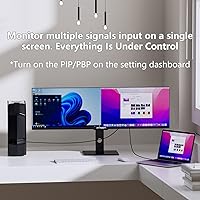
  • Split Screen: Built-in Picture-by-Picture and Picture-in-Picture modes allow multiple input sources to be displayed simultaneously without third-party software.

Related Reviews

INNOCN 29B2F-P 29″ Ultrawide Monitor
74%
88%
Value for Money
61%
Picture Sharpness
91%
Stand & Ergonomics
89%
USB-C Connectivity
72%
Color Accuracy
More
INNOCN 40C1R 40-inch Ultrawide Monitor
83%
91%
Display Quality
88%
Gaming Performance
89%
Color Accuracy
76%
Ergonomics & Adjustability
83%
Ease of Setup
More
INNOCN 40C1U 40-inch Ultrawide Monitor
77%
91%
Color Accuracy
93%
Screen Real Estate
58%
Brightness & Visibility
84%
USB-C Connectivity
76%
Refresh Rate & Gaming
More
INNOCN 49C1R 49″ Curved Ultrawide Monitor
74%
88%
Display Immersion
84%
Contrast & Black Levels
76%
Color Accuracy
81%
Refresh Rate & Motion Handling
54%
HDR Performance
More
INNOCN 25G2S 24.5″ Gaming Monitor
76%
91%
Image Clarity
88%
Refresh Rate Performance
86%
Color Accuracy
84%
Gaming Responsiveness
89%
Console Compatibility
More
Eyoyo EM08B 8″ Monitor
75%
91%
Input Versatility
88%
BNC Connectivity
84%
Setup & Plug-and-Play Experience
82%
Mirror Flip Functionality
76%
Image Clarity for Surveillance Use
More
Setclod D1 23.8″ Portable Monitor
74%
91%
Screen Size & Usability
88%
Display Quality
34%
Portability & Weight
86%
Setup & Connectivity
51%
Power Requirements
More
Samsung ViewFinity S65UA 34″ Ultrawide Curved Monitor
77%
91%
Productivity & Multitasking
84%
Image & Color Quality
89%
USB-C Connectivity
58%
Backlight Uniformity
47%
HDR Performance
More
XUNDEFINED X34U180A 34-inch Curved Ultrawide Gaming Monitor
71%
83%
Gaming Performance
88%
Image Contrast & Blacks
81%
Resolution & Sharpness
69%
Color Accuracy & Vibrancy
51%
HDR Experience
More
Samsung S50GC 34″ Ultrawide QHD Monitor
75%
88%
Image Quality
91%
Resolution & Sharpness
84%
Refresh Rate & Smoothness
57%
HDR Performance
82%
Color Accuracy
More

FAQ

It is genuinely flat. Most 32:9 ultrawides on the market are curved, so it stands out. If you sit fairly close to your monitor or prefer a straight viewing plane, the flat design is actually a practical advantage — curved screens can look distorted at the edges when you are seated too near the center.

It depends on how close you sit. The vertical resolution is 1080 pixels stretched across a 43.8-inch panel, so pixel density is relatively low. At a typical desk distance of 2.5 to 3 feet, most users find it acceptable for productivity and casual gaming. If you sit much closer than that, fine text and small UI elements may appear softer than you would expect from a higher-resolution display.

Yes, the USB-C port supports both video signal and power delivery, so you can connect a MacBook or other USB-C laptop with a single cable and charge it at the same time. That said, the power delivery wattage may not fully charge high-performance laptops at the rate you are used to — if your MacBook Pro normally uses a 96W or 140W charger, expect slower charging or a slight battery drain under heavy load.

Yes, both consoles connect via HDMI and will output a signal the monitor can display. Keep in mind that console gaming at 32:9 depends on whether the game supports the aspect ratio — many titles will show black bars on the sides rather than filling the full width. For pure screen size and immersion, it still works well, but the ultrawide format benefit is limited on consoles compared to PC gaming.

The monitor has a built-in Picture-by-Picture mode that lets you connect two separate devices — say, a laptop and a desktop — and view both inputs simultaneously, each occupying roughly half the screen. You control this through the OSD menu. One fair warning: the OSD has been widely described as awkward to navigate, so budget a few minutes to get familiar with it during setup.

Honestly, not dramatically. DisplayHDR 400 is the lowest tier of VESA's certification program, and 400 nits of peak brightness is not enough to produce the deep contrast and specular highlights that make HDR content look striking. It handles HDR-tagged content without issues, but do not buy the INNOCN 44C1G 43.8″ Ultrawide Monitor expecting a cinematic HDR experience — that requires panels with significantly higher brightness and local dimming.
INNOCN is a relatively new brand in Western markets, and their warranty and support infrastructure is not as established as the major display manufacturers. The product comes with a manufacturer warranty, but user reports on support responsiveness have been mixed. If robust post-purchase support is a high priority for you, that is worth weighing against the price advantage this panel offers.

Each unit ships with a printed calibration report showing a Delta-E value below 2 for that specific panel. That means the factory has verified the color accuracy of your exact unit before it left the facility, not just a sample from the production batch. For most users, the out-of-box color accuracy is good enough to use immediately without manual calibration.

The monitor measures approximately 47 inches wide with the stand, which is wider than most standard desks allow for comfortably. Before buying, measure the usable surface area of your desk and make sure you have at least 48 inches of clear horizontal space. Also check the desk depth — at 43.8 inches diagonal, you want to sit back far enough that the edges of the screen are not in your peripheral blind spot.

Yes, the monitor is VESA mount compatible and can be detached from the included stand. Just make sure any arm or wall mount you choose is rated to handle at least 33 pounds — this panel is heavier than typical single monitors, and undersized arms can sag or drift over time under that kind of load.

Where to Buy