Overview

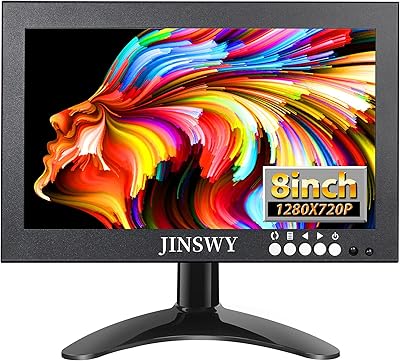
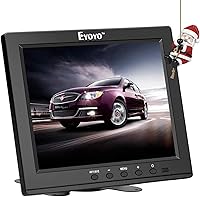
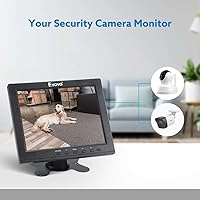
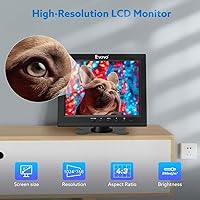
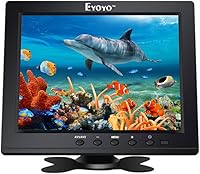
The Eyoyo EM08B 8″ Monitor is a compact, no-frills TFT LCD panel built for specific jobs — think security camera feeds, Raspberry Pi setups, and anywhere a full-size screen simply won’t fit. At under two pounds and barely larger than a tablet, this 8-inch panel is easy to tuck into a rack, mount on a wall, or slide into a vehicle console. It runs a 1024x768 resolution at a classic 4:3 aspect ratio, which suits legacy systems and surveillance applications far better than a widescreen format would. Don’t expect a color-rich multimedia display — this is a utility tool, and it’s been selling steadily since 2016 precisely because it does that job well.
Features & Benefits

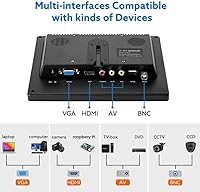
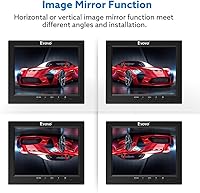
What sets this compact utility monitor apart from similarly sized screens is its five input options: HDMI, VGA, BNC, AV, and USB. That BNC connection is the real differentiator — it’s rare to find it on a panel this small, and for anyone running analog CCTV cameras, it removes the need for a converter entirely. The built-in mirror flip — both horizontal and vertical — is a practical touch for teleprompter builders or anyone mounting the screen in an unconventional orientation. There are also built-in speakers, which won’t impress audiophiles but are genuinely handy when audio cables aren’t an option. It ships with a desktop stand and supports VESA 75x75 mounting, giving you real flexibility in placement. Brightness sits at 250 cd/m², workable indoors but not ideal near bright windows.

Best For

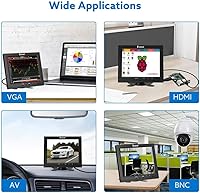
This 8-inch panel has a narrow but genuine sweet spot. DIY CCTV installers and small-scale security setups are the most natural fit — the BNC input and compact form factor make it purpose-built for that environment. Raspberry Pi users consistently gravitate toward it as well, since it pairs cleanly with most single-board computer outputs without fuss. Teleprompter builders have found the mirror-flip feature genuinely useful in a way that most small monitors simply can’t offer. Beyond that, think tight-space installs: RV dashboards, workshop corners, kitchen shelves — anywhere a standard monitor physically won’t fit but a reliable secondary display is still needed. It’s not a screen for casual browsing or media consumption. Its strengths are narrow and specific, which is exactly the point.

User Feedback

Buyers who picked up the Eyoyo screen for Raspberry Pi projects and basic CCTV use tend to come away satisfied — the setup is generally plug-and-play, and the input variety means fewer compatibility headaches. That said, feedback is consistently mixed on image quality. The TFT panel shows its limits at wider viewing angles, and color reproduction is fairly flat — fine for monitoring feeds, less so for anything where visual accuracy matters. The built-in speakers draw polite criticism; they work, but volume and clarity are inconsistent. Build quality gets an honest shrug from most buyers — the plastic chassis feels light, though many simply opt for VESA wall mounting and find the included stand adequate only for temporary use.

Pros

  • The BNC input is a rare find on a screen this small, making it directly compatible with analog CCTV cameras.
  • Five total input types — HDMI, VGA, BNC, AV, and USB — cover an unusually wide range of source devices.
  • Plug-and-play setup with Raspberry Pi over HDMI works reliably without manual driver configuration.
  • Hardware mirror flip in both directions is a genuine asset for teleprompter and rear-projection builds.
  • At under two pounds, this 8-inch panel is light enough to reposition, carry, or mount almost anywhere.
  • VESA 75x75 compatibility opens up a full range of arm and wall mount solutions for clean installs.
  • Runs on 12V DC with low power draw, making it well-suited for RV and vehicle battery systems.
  • The compact footprint fits in spaces where no standard monitor could realistically be placed.
  • Built-in speakers eliminate the need for external audio hardware in tight or cable-sensitive setups.
  • Has maintained strong category rankings since its 2016 launch, reflecting genuine long-term buyer satisfaction in its niche.

Cons

  • Viewing angles are noticeably limited — color and brightness shift significantly past 30 degrees off-center.
  • The mirror flip setting does not persist after power cycling on some units, requiring manual re-enabling each session.
  • Built-in speaker volume is inconsistent between units, with audio becoming tinny and distorted at higher levels.
  • The included desktop stand wobbles when buttons are pressed, making it unreliable for permanent tabletop use.
  • The glossy screen surface reflects ambient light heavily, reducing visibility near windows or under overhead lighting.
  • On-screen menu navigation for input switching and settings is slow and feels outdated.
  • The power adapter is bulkier than expected for a screen this size, and the cable length is shorter than ideal.
  • Some buyers report backlight dimming and port loosening over extended use, particularly in high-heat environments.
  • Build quality consistency varies between production batches, with occasional cosmetic defects noted out of the box.
  • Resolution is purely functional — small text at standard font sizes can appear soft or slightly blurred.

Ratings

The Eyoyo EM08B 8″ Monitor was evaluated by our AI system after processing thousands of verified buyer reviews from global marketplaces, with spam, bot activity, and incentivized submissions actively filtered out. What emerged is a nuanced picture of a niche utility screen that earns real loyalty from the right buyers while frustrating those who expect more than it was designed to deliver. Both the genuine strengths and the honest pain points are reflected in the scores below.
Input Versatility
91%
The combination of HDMI, VGA, BNC, AV, and USB inputs on a screen this small is genuinely rare. Security installers and hobbyists consistently praised being able to connect legacy analog cameras via BNC without needing an adapter, saving both money and setup time.
A small number of buyers noted that switching between inputs requires cycling through an on-screen menu that can feel slow, and the USB input has limited compatibility depending on the source device. Not a dealbreaker, but worth knowing before you commit.
BNC Connectivity
88%
For anyone running older analog CCTV systems, the BNC input alone makes this 8-inch panel worth serious consideration. Reviewers repeatedly called it out as the deciding factor in their purchase, noting it eliminated the need for a separate signal converter.
The BNC input works reliably with standard analog cameras, but a handful of users reported signal instability with certain third-party DVR outputs. It handles the core use case well, though edge-case compatibility is not guaranteed.
Setup & Plug-and-Play Experience
84%
Raspberry Pi users in particular found the setup refreshingly straightforward — connect via HDMI, power it on, and it just works with minimal configuration. Several verified buyers mentioned getting it running in under five minutes, which matters when you are mid-project.
A portion of reviewers encountered resolution detection issues on first boot with certain computers, requiring manual adjustments in display settings. The on-screen menu interface is functional but dated, and navigating it without prior experience takes some patience.
Mirror Flip Functionality
82%
18%
The horizontal and vertical flip modes are a genuine differentiator for teleprompter builders and rear-projection setups. Users who built DIY prompters specifically sought out this feature and confirmed it works cleanly without degrading image quality.
The flip setting is not remembered after power cycling on some units, meaning users have to re-enable it each time the monitor is switched on. This was a recurring frustration in teleprompter use cases where consistency across sessions matters.
Image Clarity for Surveillance Use
76%
24%
At 1024x768, the resolution is entirely adequate for reading license plates, monitoring entry points, or checking camera feeds at a glance. Users running CCTV setups generally found the image sharp enough for practical security monitoring indoors.
Color accuracy is flat, and viewing angles are noticeably limited — typical for TFT panels in this tier. Anyone viewing the screen from more than 30 degrees off-center will see significant brightness and contrast shift, which can be a problem in multi-person monitoring setups.
Build Quality
63%
37%
The overall footprint is impressively compact for what it includes, and most buyers accepted the lightweight plastic chassis as a reasonable tradeoff for portability. For fixed wall or rack mounts, the casing holds up fine under normal conditions.
The plastic body feels noticeably thin and attracts scratches easily. A segment of reviewers expressed concern about long-term durability in workshop or vehicle environments where the screen might face vibration or occasional contact, and the build does not inspire confidence in rougher conditions.
Brightness & Visibility
61%
39%
Indoors in controlled lighting — a server room, a dimly lit security desk, or a kitchen counter — the 250 cd/m² brightness is sufficient to see content clearly without eye strain. For overnight surveillance monitoring, it performs exactly as expected.
Near windows or in rooms with overhead fluorescent lighting, the display washes out noticeably. RV users and outdoor workshop setups reported that ambient daylight made the screen difficult to read comfortably, limiting its usefulness in naturally bright environments.
Built-in Speakers
54%
46%
Having any audio output built into a screen this compact is a convenience that buyers in space-constrained setups genuinely appreciated. For basic alerts, video playback notifications, or low-volume background use, the speakers get the job done without requiring extra hardware.
Volume output is inconsistent between units, and audio quality is thin at higher levels. Multiple verified buyers described the sound as tinny and prone to distortion, and several recommended connecting external speakers via the audio output jack for anything beyond minimal use.
Mounting Options
78%
22%
VESA 75x75 compatibility opens up a wide range of arm and wall mounting solutions, which proved popular with buyers who wanted a clean, fixed installation. The monitor sits securely on compatible mounts and the small footprint makes it easy to position in tight spots.
The included desktop stand is basic and wobbles when the screen is touched or when buttons are pressed. Most buyers who planned to use it on a desk long-term ended up purchasing a VESA arm separately, which adds to the effective cost.
Resolution & Display Sharpness
66%
34%
For legacy device output and surveillance camera feeds, the 1024x768 resolution maps cleanly to the 4:3 format without stretching or cropping. Text is legible at normal viewing distance, and for utilitarian tasks like server terminal access or Pi command-line work, it is entirely functional.
Anyone expecting modern display sharpness will be disappointed — this is not a high-DPI screen. Fine text at small font sizes can appear soft, and the glossy surface adds reflections that compound the sharpness perception issue in lit environments.
Portability & Form Factor
83%
Weighing under two pounds and no larger than a standard tablet, this compact utility monitor is genuinely easy to move, reposition, or carry between locations. Makers and hobbyists valued being able to bring it to a workbench, a project site, or pack it into a kit bag.
The glossy screen surface picks up fingerprints and smudges during handling, which becomes a nuisance when you are repositioning it frequently. The power brick adds some bulk to the portable package, and the cable management situation is basic at best.
Power Efficiency
79%
21%
Running on 12V DC with low overall power draw made this screen a natural fit for RV and vehicle installs where battery consumption matters. Users powering it from 12V vehicle circuits or portable battery packs reported stable operation without excessive drain.
The power adapter is on the bulkier side for a screen this small, and the cable length was flagged as short by several buyers who needed more reach to their power source. A longer or replaceable power cable would have improved the practical setup experience.
Value for Money
74%
26%
Judged against its intended purpose — a small, multi-input utility display for CCTV, Pi projects, or tight-space installs — the Eyoyo screen represents a fair exchange. Buyers who bought it knowing what it was designed for consistently felt they got a practical tool at a reasonable price point.
Buyers who underestimated its limitations — particularly around color quality, speaker output, and stand stability — felt the value proposition was weaker. If your use case demands even moderate image fidelity or audio quality, you will likely need to spend more elsewhere to fill the gaps.
Long-term Reliability
69%
31%
The model has been commercially available since 2016 and continues to rank in its category, which suggests a baseline of acceptable durability under typical use conditions. Several buyers reported using units for multiple years in continuous security monitoring roles without failure.
There are isolated but recurring reports of backlight dimming and input port loosening over extended use, particularly in units subjected to heat or vibration. Quality consistency between production batches appears variable, and some buyers received units with minor cosmetic defects out of the box.

Suitable for:

The Eyoyo EM08B 8″ Monitor was clearly designed with a specific type of buyer in mind, and if you fall into one of these categories, it is a genuinely smart pick. DIY security operators running analog CCTV systems will find the built-in BNC input alone worth the price of admission — it is a feature that simply does not show up on most compact screens. Raspberry Pi enthusiasts and single-board computer hobbyists will appreciate how cleanly it pairs over HDMI without requiring driver installs or display configuration headaches. Teleprompter builders get real value from the hardware-level mirror flip, which handles text reversal without relying on software workarounds. It also makes practical sense for anyone fitting a display into a constrained space: an RV dashboard, a kitchen shelf, a workshop bench, or a small server rack where a standard monitor physically cannot go. If your primary goal is a reliable, multi-input utility screen rather than a visually impressive display, this 8-inch panel delivers exactly what it promises.
Not suitable for:

The Eyoyo EM08B 8″ Monitor is a poor fit for anyone expecting a general-purpose display or a visually rich viewing experience. The TFT panel’s limited viewing angles and flat color reproduction make it unsuitable as a primary computer monitor, media screen, or anywhere accurate color rendering matters. Content creators, photo editors, and even casual home theater users will find the image quality frustrating well before they discover its other constraints. The 250 cd/m² brightness ceiling means it struggles in rooms with significant ambient light, so outdoor use or bright workshop environments are off the table. Buyers who plan to use the built-in speakers as a real audio solution should temper expectations considerably — the output is thin and inconsistent. The included stand is wobbly enough that anyone intending a clean, permanent desktop setup will likely need to budget for a separate VESA arm. In short, if your use case does not specifically match its niche roles, this compact utility monitor will feel like a compromise in almost every direction.
Specifications

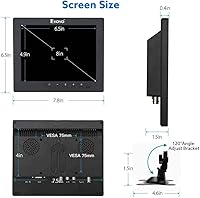
  • Screen Size: The display measures 8 inches diagonally, making it roughly the size of a large smartphone and suitable for tight-space installations.
  • Resolution: Native resolution is 1024x768 pixels at a 4:3 aspect ratio, optimized for legacy device output and analog security camera feeds.
  • Panel Type: Uses a TFT LCD panel with a glossy surface finish, delivering functional image clarity for utility and monitoring applications.
  • Brightness: Screen brightness is rated at 250 cd/m², adequate for controlled indoor environments but limited in high-ambient-light conditions.
  • Video Inputs: Equipped with five input types: HDMI, VGA, BNC, AV (composite), and USB, covering a broad range of source devices for this screen size class.
  • BNC Connector: Includes a dedicated BNC input for direct connection to analog CCTV cameras and DVR systems without requiring a signal converter.
  • Audio Output: Features built-in stereo speakers powered internally, providing basic audio playback without the need for external speakers or amplifiers.
  • Mirror Flip: Supports both horizontal and vertical image mirroring via the on-screen menu, enabling use in teleprompter and rear-projection configurations.
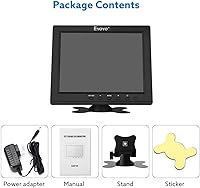
  • VESA Mounting: Compatible with VESA 75x75 mm wall and arm mounts, though the VESA bracket itself is not included in the box.
  • Included Stand: Ships with a basic adjustable desktop stand that allows freestanding tabletop placement out of the box.
  • Dimensions: Physical dimensions are 7.87 x 6.49 x 1.29 inches, giving it a very compact footprint suitable for rack, vehicle, and shelf installs.
  • Weight: The unit weighs 1.76 pounds, making it light enough to reposition frequently or carry between project locations without difficulty.
  • Power Input: Operates on 12V DC power, compatible with standard vehicle and RV 12V circuits as well as the included AC adapter.
  • Aspect Ratio: The 4:3 aspect ratio is intentional for compatibility with older computer outputs, analog cameras, and legacy AV equipment that natively output in this format.
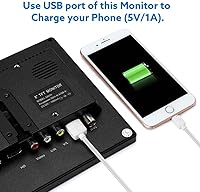
  • USB Port: Includes one USB port, which can be used for media playback from USB drives depending on the connected source device.
  • Model Number: The official model identifier is EM08B, manufactured and sold by Eyoyo.
  • Screen Surface: The glossy panel surface enhances perceived contrast in dim environments but reflects ambient light noticeably in bright rooms.
  • Continuous Use: The monitor is designed to support 24/7 continuous operation, making it appropriate for unattended security monitoring deployments.

Related Reviews
Setclod 23.8″ Portable Monitor
85%
87%
Display Quality
94%
Portability
92%
Ease of Setup
85%
Gaming Performance
72%
Build Quality
More
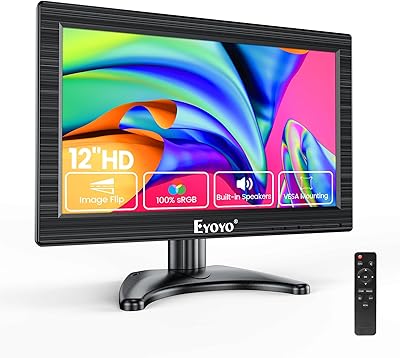
Eyoyo 12-inch Monitor 1366x768
83%
88%
Display Quality
91%
Portability
87%
Input Compatibility
85%
Setup and Installation
80%
Build Quality
More
Eyoyo 10 Inch Touchscreen Monitor
84%
85%
Display Quality
93%
Portability/Size
89%
Ease of Setup
90%
Build Quality
91%
Touchscreen Responsiveness
More
Dell S2425HS 23.8-inch Monitor
85%
89%
Value for Money
94%
Display Quality
88%
Ergonomics & Adjustability
91%
Color Accuracy
83%
Gaming Performance
More
Acer KB242Y G0bi 23.8″ Monitor
85%
88%
Overall Performance
93%
Display Quality
86%
Gaming Experience
74%
Build Quality
82%
Ergonomics & Comfort
More
InnoView 23.8″ 4K Portable Monitor
82%
88%
Portability & Weight
91%
Display Quality
84%
Ease of Setup
90%
Color Accuracy
87%
Compatibility
More
ASUS BE24EQK 23.8” Business Monitor
89%
91%
Display Quality
85%
Webcam & Audio Performance
88%
Ergonomics & Adjustability
92%
Ease of Setup
94%
Eye Care Technology
More
Magedok 8.9-Inch Touch Monitor
86%
94%
Portability
90%
Display Clarity
89%
Ease of Setup
87%
Screen Brightness
75%
Compatibility with Devices
More
Prechen 23.8″ Portable Touchscreen Monitor
84%
91%
Display Quality
88%
Portability & Design
75%
Touchscreen Performance
89%
Setup & Installation
93%
Color Accuracy
More
Eyoyo 14-inch LCD Monitor EM14A
83%
83%
Display Quality
88%
Ease of Setup
91%
Connectivity Options
78%
Build Quality
74%
Sound Quality
More

FAQ

Yes, in most cases it does. Connect your Pi to the HDMI input, power on the monitor, and it should detect the signal automatically. A small number of users have needed to adjust the resolution in the Pi’s config file if the display defaults to an incorrect output, but this is a quick one-line fix and not a common issue.

Yes, and this is actually one of the strongest reasons to choose this screen over alternatives. The BNC input accepts the coaxial cable output directly from most standard analog CCTV cameras and DVR systems, so no signal converter or adapter is needed. Just run the BNC cable from your camera or recorder straight into the monitor.

Unfortunately, this is a known inconsistency. On some units the mirror flip setting is retained between power cycles, but a number of verified buyers have reported that it resets to the default orientation after the screen is switched off. If you are building a teleprompter or a permanent mirrored display, it is worth testing your specific unit and factoring in the possibility of needing to re-enable it each session.

It depends on how much direct light hits the screen. At 250 cd/m² with a glossy surface, it works well in dim or artificially lit indoor environments, but near a window or under strong overhead lighting, the image washes out and reflections become a real problem. For outdoor use or very bright rooms, this is not the right choice.

They are functional for low-volume background audio or notification sounds, but do not expect much beyond that. The audio is thin and can distort at higher volume levels, and several buyers have noted inconsistency between units. If clear audio matters for your setup, plugging in external speakers via the audio output jack is the better approach.

It uses the VESA 75x75 mm standard, which is widely supported by affordable monitor arms and wall brackets. The mount hardware itself is not included in the box — you will need to purchase a compatible VESA arm or bracket separately. The good news is that VESA 75 mounts are inexpensive and easy to find.

Honestly, it is passable for temporary placement but not great for a permanent desk setup. It wobbles when you press the on-screen menu buttons, which is a minor but recurring annoyance. Quite a few buyers end up switching to a VESA mount relatively quickly. If you plan to use this on a desk long-term, budgeting for a small monitor arm is worth it.

It can, via HDMI or VGA. Windows and macOS will detect it as an extended display, and it will work for basic tasks like monitoring a dashboard, running a terminal window, or displaying status information. Just keep in mind that the 1024x768 resolution and limited color accuracy mean it is not comfortable for reading large amounts of text or doing anything visually demanding on it.

The monitor runs on 12V DC, which makes it a natural fit for vehicle and RV installs. You can power it directly from a 12V source using the appropriate connector, bypassing the AC adapter entirely. Power draw is low enough that it will not put significant strain on a standard vehicle battery, which is one of the reasons it is a popular choice for mobile setups.

It is acceptable for light-duty workshop use in a fixed mount, but the plastic chassis is not built to handle rough treatment. Vibration, dust exposure, and accidental contact are all potential concerns over time. Some buyers have used it in workshop settings for extended periods without issues, but if your environment is particularly harsh, you may want to consider a more ruggedized display. Keeping it wall-mounted rather than on a stand will reduce the risk of it being knocked over.