Overview

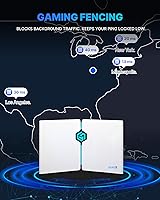
The HYPEREV GearUP AX3000 WiFi 6 Gaming Router is not your typical Wi-Fi upgrade — it's a purpose-built gaming appliance that pairs hardware with a network optimization subscription. HYPEREV is a niche brand focused specifically on gaming network performance, and this device reflects that narrow focus. The router works fine on its own, but the real pitch — reduced ping, smoother online sessions — depends on the GearUP Booster app, which is free for the first 90 days and then requires a paid subscription. At its mid-range price point, you're buying both hardware and a software layer. Don't expect whole-home coverage; this is a gaming traffic tool, not a primary router replacement.
Features & Benefits

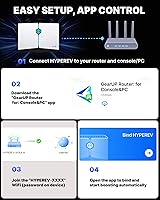
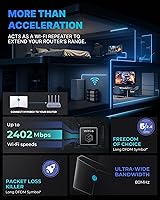
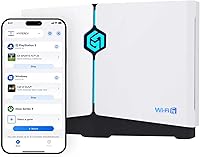
Running on Wi-Fi 6 (802.11ax), the GearUP router delivers up to 2402 Mbps on its 5 GHz band while the 2.4 GHz band keeps older devices connected. Beamforming focuses the signal toward your gaming hardware rather than scattering it across the room, which genuinely helps in environments with interference. The GearUP Booster app handles setup and lets you monitor real-time traffic — no digging into browser-based admin panels. Both wired and wireless connections are supported, and two ethernet cables come in the box. One limitation worth noting upfront: only two devices can receive gaming optimization simultaneously, so larger households with multiple active players will hit that ceiling quickly.

Best For

This Wi-Fi 6 gaming device makes the most sense for console players on PS5, Xbox Series X|S, or Nintendo Switch who want lower ping without reconfiguring their entire home network. It's also a solid fit for apartment or dorm living, where it can sit behind your ISP's modem and prioritize gaming traffic on a congested shared connection. PC gamers dealing with lag spikes in titles like Call of Duty or Fortnite are the target audience here. That said, anyone expecting whole-home coverage or needing more than two devices optimized at once should look elsewhere. And you should go in knowing that keeping the optimization features running after the trial will mean paying for a plan.

User Feedback

With a 3.9-star average across 163 ratings, feedback on the GearUP router skews cautiously positive. The most consistent praise centers on genuinely noticeable ping drops in popular titles and how straightforward the setup process is — several reviewers appreciated the Discord-based customer support as well. On the critical side, the subscription surprise is the most common complaint: buyers who didn't read the fine print felt misled when the 90-day trial ended. A handful of reviews flag app connectivity issues and occasional drop-outs that required restarting the device. Optimization consistency also varies — games from the top of the supported library tend to benefit more than niche titles. Given the product only launched in mid-2024, the review pool is still building.

Pros

  • Measurable ping improvements in popular competitive titles like Call of Duty and Fortnite on congested shared networks.
  • Wi-Fi 6 dual-band setup handles gaming devices on 5 GHz while keeping older devices on 2.4 GHz without interference.
  • App-guided setup takes minutes — no networking knowledge or browser-based admin panels required.
  • Two ethernet cables included in the box, so you can connect immediately without extra purchases.
  • Beamforming directs signal toward your gaming hardware rather than scattering it inefficiently across the room.
  • The GearUP router supports PS5, Xbox, Switch, PC, and Steam Deck — covering virtually every major gaming platform.
  • 90-day trial period gives you enough real playtime to judge whether the optimization service is worth the ongoing cost.
  • Discord-based customer support is consistently praised for fast, human responses rather than scripted replies.
  • Compact footprint fits neatly on a desk or entertainment unit without requiring dedicated shelf space.

Cons

  • Gaming optimization features require a paid subscription after the 90-day trial — this is not clearly communicated at point of sale.
  • Only two devices can receive simultaneous gaming optimization, which is a hard ceiling for multi-player households.
  • The app has a documented history of losing connection to the router overnight, silently dropping the boost service.
  • Performance gains are inconsistent for niche or less popular game titles outside the mainstream library.
  • Total cost of ownership over 12 months is significantly higher than the upfront price once subscription fees are included.
  • No support for traditional router admin access — everything runs through the GearUP app, which limits advanced configuration.
  • The router runs noticeably warm during extended sessions, with no active cooling or ventilation management.
  • With only around 163 reviews since its May 2024 launch, long-term reliability data is still limited.
  • Switch players report weaker optimization results compared to PS5 or Xbox users, likely due to the console's own network stack.

Ratings

The HYPEREV GearUP AX3000 WiFi 6 Gaming Router earns a nuanced scorecard — our AI has analyzed verified buyer reviews from global sources, actively filtering out incentivized and bot-generated feedback to surface what real users actually experienced. Scores reflect both the genuine wins this gaming router delivers for its target audience and the friction points that have frustrated buyers who expected something closer to a full-featured home router. Nothing is glossed over here; the strengths and the shortcomings are weighted equally.

Gaming Latency Reduction
78%
22%
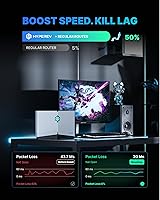
For popular titles like Call of Duty and Fortnite, a solid chunk of reviewers reported measurable ping drops after connecting through the GearUP Booster service. Console players on PS5 and Xbox Series X described noticeably smoother online sessions during peak hours when their ISP connection was otherwise congested.
The improvements are inconsistent outside the top-tier supported games. Buyers playing niche or indie titles found little to no benefit, and a few noted that results varied significantly depending on their ISP and geographic location — making the performance gains feel less predictable than advertised.
Setup & Ease of Use
83%
The app-guided setup is genuinely straightforward — most reviewers had the router up and running within minutes, even without any networking background. The GearUP Router app walks you through each step clearly, and the inclusion of two ethernet cables means you can get started without hunting for accessories.
A recurring complaint involves the app requiring account creation before any features unlock, which some users found intrusive for a hardware purchase. A small number of Android users also flagged occasional app crashes during initial pairing, requiring a restart of both the app and the router.
Subscription Model Transparency
52%
48%
The 90-day trial is a legitimate way to evaluate the gaming optimization service before committing financially, and buyers who understood the model upfront appreciated the low barrier to entry. Customer support via Discord was praised for clearly explaining subscription options when buyers reached out.
This is the single biggest source of negative reviews. Many buyers did not realize the core gaming features — the main reason to buy this over a generic router — require an ongoing paid subscription after the trial ends. The product listing does not make this prominent enough, and the frustration in reviews from buyers who felt blindsided is substantial.
Wi-Fi 6 Performance
74%
26%
As a Wi-Fi 6 device, throughput on the 5 GHz band is competitive for this price tier, and buyers in smaller spaces like apartments or dorm rooms reported clean, stable connections for both gaming and general use. Beamforming helps direct signal strength toward stationary gaming setups rather than wasting it across a large floor plan.
This is not a router built for range. Users in larger homes or multi-floor setups found coverage dropped off quickly, and it was never intended to replace a primary router. At this hardware tier, the Wi-Fi 6 specs are functional but not exceptional compared to dedicated networking brands at similar price points.
Device Optimization Limit
47%
53%
For solo gamers or households with one or two active players, the two-device simultaneous optimization limit is rarely an issue. A student gaming in a dorm room or a single player on a PS5 will likely never hit the ceiling, making the restriction invisible in practice for that specific use case.
Families or shared apartments where multiple people game at the same time will find this limitation genuinely restrictive. Several reviewers with roommates or siblings on separate consoles were frustrated that only two devices could benefit from the boosted service at once, which significantly reduces the value of the purchase in those households.
App Stability
61%
39%
When the app functions correctly, real-time traffic monitoring and device management work as described. Reviewers who had smooth experiences praised the clean interface and the ability to see which games were being actively optimized without digging through settings menus.
A recurring thread in critical reviews mentions connectivity drops between the app and the router, requiring periodic restarts to restore the optimization service. Some users reported the app losing its connection to the device overnight, meaning they woke up to a router that was running in basic mode without the gaming boost active.
Build Quality & Design
71%
29%
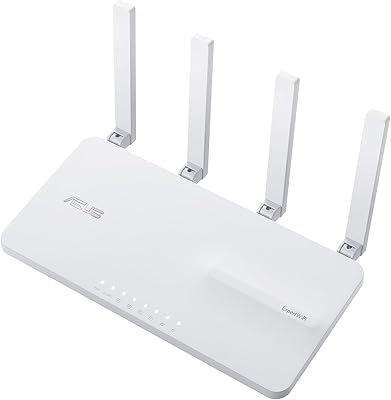
The physical build feels reasonably solid for the price category — not premium, but not flimsy either. The compact footprint fits neatly on a desk or entertainment unit without dominating the space, and the white finish stays neutral next to most gaming setups.
At this price point, the plastics feel adequate rather than confidence-inspiring, and a few reviewers noted the router runs noticeably warm under extended load. There are no external antennas, which some buyers associate with better signal control, even if modern internal antenna designs can be equally effective.
Value for Money
66%
34%
If you commit to the subscription and primarily play supported titles, the combined hardware-plus-optimization package can genuinely justify the asking price for dedicated console or PC gamers. The included trial period lets you verify the benefits before any recurring cost kicks in.
Once you factor in the ongoing subscription, the total cost of ownership over a year climbs meaningfully above the upfront hardware price. Buyers who want a set-and-forget purchase without recurring fees will find better straightforward value from competing routers in this price range that do not tie performance to a service plan.
Customer Support
79%
21%
HYPEREV's Discord-based support channel received consistent praise from buyers who actually used it. Response times were described as fast relative to typical email-only support, and the team was noted for walking users through troubleshooting steps rather than sending generic scripted replies.
Support is entirely app and Discord-dependent, which may not suit all buyers — particularly older users or those who prefer traditional phone or live chat channels. If you encounter issues outside the app ecosystem, your options for getting help are more limited than with established networking brands.
Compatibility
82%
18%
Broad platform support covering PS5, PS4, Xbox Series X|S, Xbox One, Nintendo Switch, PC, and even Steam Deck means most gamers will find their primary device on the list. The dual-band setup also keeps legacy devices connected on 2.4 GHz without forcing everything onto one band.
Optimization quality varies significantly by platform. Switch users, in particular, reported less dramatic improvements compared to PS5 or Xbox users, likely due to the console's own network limitations. Buyers with older or less common hardware should check the supported game library before purchasing.
Supported Game Library
73%
27%
Over 1,000 supported titles is a credible library for a service at this tier, and GearUP actively updates it. Players of major competitive games — Call of Duty, FIFA, Fortnite, Apex Legends — are well covered, which aligns with the largest segment of buyers.
Coverage drops off sharply for niche genres, older MMOs, and indie multiplayer titles. Buyers who primarily play outside the mainstream competitive catalog may find that a significant portion of their game time receives no optimization benefit, making the subscription feel less worthwhile for that use case.
Installation & Hardware Included
81%
19%
Including two ethernet cables is a practical touch that saves buyers a separate purchase — especially useful when connecting directly to a modem and a console simultaneously. The power adapter and footbeds are all included, so the box has everything needed to get started immediately.
The router requires connection to an existing modem or ISP gateway, which is clearly a secondary device setup rather than a standalone solution. Buyers in rental situations who cannot access their ISP equipment directly may have trouble getting the most out of the hardware configuration.
Review Maturity & Long-term Reliability
58%
42%
Early adopters who purchased close to launch have now had the device for nearly a year, providing enough real-world usage data to identify consistent performance patterns. The positive reviews from long-term users suggest the hardware itself holds up without degrading noticeably over time.
With only 163 ratings as of mid-2025, the review pool is still too small to draw firm conclusions about long-term reliability or whether the subscription service maintains its quality over years. The product simply has not been on the market long enough to assess durability or sustained software support with confidence.

Suitable for:

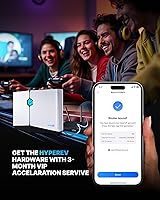
The HYPEREV GearUP AX3000 WiFi 6 Gaming Router is a practical pick for solo or two-player households where online gaming is a genuine priority and lag is a recurring frustration. It works best as a secondary device sitting behind your existing ISP modem — think a college dorm room, a studio apartment, or a dedicated gaming corner where you want gaming traffic separated from everything else on the network. Console players on PS5 or Xbox Series X who compete in titles like Call of Duty, Fortnite, or EA FC and regularly hit lag spikes during peak evening hours will likely see the most tangible benefit from the GearUP Booster service. PC gamers in shared living situations — where roommates streaming video are eating up bandwidth — will also appreciate how the router prioritizes gaming packets over general household traffic. The key qualifier is that the right buyer needs to be comfortable with a subscription-based service model and should factor that recurring cost into their decision before purchasing.
Not suitable for:

If you are looking for a single router to handle whole-home Wi-Fi coverage across multiple rooms or floors, the HYPEREV GearUP AX3000 WiFi 6 Gaming Router is not designed for that role and will leave you disappointed. Families or shared apartments where three or more people game simultaneously will quickly hit the two-device optimization cap, meaning some players get the boosted experience and others are just on standard Wi-Fi. Buyers who want a one-time hardware purchase with no ongoing costs should also look elsewhere — once the 90-day trial ends, the core selling point of this router is locked behind a subscription, and without it you are essentially paying a premium for a mid-tier Wi-Fi 6 router. Anyone who plays primarily niche, indie, or older online titles may find their games are not meaningfully supported by the GearUP library, which concentrates its coverage on mainstream competitive titles. And if you are an advanced networking user who wants full control over QoS settings, custom firmware, or detailed traffic analytics, the app-only management interface will feel limiting compared to traditional router administration tools.
Specifications

  • Wi-Fi Standard: This router uses the 802.11ax (Wi-Fi 6) standard, which offers improved throughput and better handling of multiple connected devices compared to previous Wi-Fi generations.
  • Max Speed: The 5 GHz band delivers a maximum theoretical throughput of 2402 Mbps, while the 2.4 GHz band handles legacy devices at standard Wi-Fi 6 speeds for that frequency.
  • Frequency Bands: Dual-band operation covers both 5 GHz for high-speed gaming and 2.4 GHz for broader-range connectivity with older or less demanding devices.
  • Ethernet Port: One ethernet port is included on the device, and two ethernet cables are provided in the box to support wired connections to a modem and a gaming console or PC simultaneously.
  • Beamforming: Beamforming technology directs the wireless signal toward connected devices rather than broadcasting omnidirectionally, helping maintain stronger, more focused signal quality for gaming hardware.
  • Optimized Devices: The GearUP Booster service supports active gaming optimization for a maximum of two devices at the same time, regardless of how many devices are connected to the network overall.
  • Gaming Service: GearUP Booster is an app-based network optimization service that reroutes gaming traffic through private pathways to reduce in-game lag and dropped connections across 1000+ supported titles.
  • Trial Period: A 90-day GearUP Booster subscription is bundled with the hardware; after the trial period, continued use of the gaming optimization features requires an active paid membership.
  • Supported Platforms: Compatible gaming platforms include PS5, PS4, Xbox Series X|S, Xbox One, Nintendo Switch, Windows PC, and Steam Deck.
  • Game Library: The GearUP Booster service supports over 1,000 titles at launch, with the library updated on a rolling basis to add new releases and additional games.
  • App Management: The router is managed exclusively through the GearUP Router app, available for both iOS and Android, which handles setup, device monitoring, traffic prioritization, and firmware updates.
  • Dimensions: The router measures 7.05 x 2.52 x 7.05 inches, making it compact enough to sit on a desk or entertainment unit without occupying significant space.
  • Weight: The unit weighs 1.32 pounds, making it lightweight and easy to reposition between gaming setups or move between rooms as needed.
  • Color: The router is finished in white, offering a neutral aesthetic that blends into most desk or entertainment center environments.
  • Model Number: The official model designation is NIT-GU-07-HR, manufactured by HYPEREV.
  • Connectivity Type: The device supports both ethernet and Wi-Fi connectivity, allowing console and PC users to connect via cable for maximum stability or wirelessly for flexible placement.
  • In-Box Contents: The package includes the router unit, two ethernet cables, a power adapter, and footbeds for stable surface placement.
  • Base Mode (No Sub): Without an active subscription, the app still allows users to manage Wi-Fi passwords, monitor connected devices, and apply firmware upgrades, though gaming optimization is disabled.

Related Reviews
Cudy WR3000 AX3000 WiFi 6 Router
75%
91%
Value for Money
78%
Wireless Performance
88%
Setup & Ease of Use
58%
App & Software Experience
74%
VPN Functionality
More
ASUS RT-AX82U
ASUS RT-AX82U
82%
88%
Wireless Performance
91%
Gaming Latency
93%
Setup & Ease of Use
71%
Range & Coverage
82%
Build Quality & Design
More
D-Link AX3000 M30 WiFi 6 Mesh Router
78%
74%
WiFi Coverage & Range
78%
WiFi Speed & Throughput
88%
Setup & Installation
71%
App Experience
83%
Parental Controls
More
ASUS EBR63 AX3000 WiFi 6 Business Router
77%
88%
Ease of Setup
84%
App & Remote Management
86%
Guest Portal Customization
83%
Network Segmentation
74%
WiFi Speed & Performance
More
ASUS TUF-AX4200 WiFi 6 Router
79%
88%
Gaming Performance
91%
Port Forwarding & NAT
83%
WiFi Speed & Throughput
89%
Wired Connectivity
63%
Wireless Range
More
D-Link G530 5G AX3000 WiFi 6 Router
84%
89%
Performance
91%
Wi-Fi Speed & Range
84%
Setup & Installation
87%
Dual-WAN Failover
88%
App Experience & Remote Management
More
ASUS ROG Rapture GT-AX6000 WiFi 6 Gaming Router
86%
94%
Gaming Performance
91%
Connection Stability
78%
Setup/Installation Ease
88%
Value for Money
85%
Build Quality
More
ASUS ROG Rapture GT6 WiFi 6 Mesh Router
81%
91%
Wireless Performance
88%
Gaming Latency
84%
Coverage & Range
83%
Setup & App Experience
71%
Mesh Roaming
More
ASUS ROG Rapture GT-AX11000 Pro
77%
91%
Wireless Performance
93%
Wired Port Flexibility
82%
Gaming Features
61%
Setup & Configuration
89%
Network Security
More
GL.iNet GL-MT6000 Flint 2
82%
93%
VPN Performance
81%
Wireless Speed & WiFi 6
92%
Wired Connectivity
88%
Firmware & Software
89%
AdGuard Home Integration
More

FAQ

You do not need to replace your existing router. The GearUP router is designed to work behind your current modem or ISP gateway as a secondary device. Think of it as a gaming-focused layer added to your existing network, not a full replacement for your home Wi-Fi setup.

Once the free trial period is up, the GearUP Booster optimization service requires a paid subscription to keep running. Without an active plan, the router still functions as a standard Wi-Fi 6 device and the app continues to let you manage basic settings, but the ping-reduction and traffic-rerouting features are turned off until you subscribe.

Yes, the PS5 is one of the primary supported platforms. You can connect it either wirelessly or via the included ethernet cable, and the GearUP Booster service will prioritize its gaming traffic for supported titles.

Unfortunately, no. The active optimization is capped at two devices simultaneously. If you have three or more people gaming at the same time, only two of those devices will benefit from the boosted routing — the rest will be on regular Wi-Fi without any traffic prioritization.

Results vary depending on your ISP, location, and the specific game you are playing. Most users in congested network environments — shared apartments, dorms, or homes with heavy general internet use — report noticeable reductions in lag during peak hours. If your connection is already clean and uncongested, the gains will be more modest. The biggest improvements tend to show up in popular competitive titles like Call of Duty and Fortnite.

The Switch is officially listed as a supported platform. That said, several users have noted that the optimization gains are less dramatic on Switch compared to PS5 or Xbox, likely because the Switch's own networking hardware has inherent limitations. It will still work, but manage your expectations accordingly.

For most users, yes. The GearUP app walks you through the setup process step by step, and the box includes the cables you need to get started. You do not need to log into any browser-based admin panel or configure anything manually. Most buyers report being up and running within 10 to 15 minutes.

This is a compact, single-unit router optimized for gaming performance rather than range. It works best in smaller spaces like a single room, apartment, or dorm. If you need coverage across multiple rooms or floors, this device is not designed for that — you would need a mesh system or a higher-powered router for whole-home coverage.

If a game is not in the GearUP library, the router will not apply any gaming optimization to its traffic. The library covers over 1,000 titles and is updated regularly, so newer or less popular games may be added over time. Before purchasing, it is worth checking the GearUP supported game list to confirm your most-played titles are included.

Unfortunately, yes — this is one of the more consistent complaints in user reviews. Some buyers report the app losing its connection to the router after running for extended periods, which effectively pauses the gaming optimization without any visible alert. The usual fix is restarting the router and relaunching the app. HYPEREV support via Discord has been responsive to these reports, so reaching out there is a good first step if restarts do not resolve it.