Overview

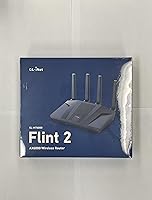
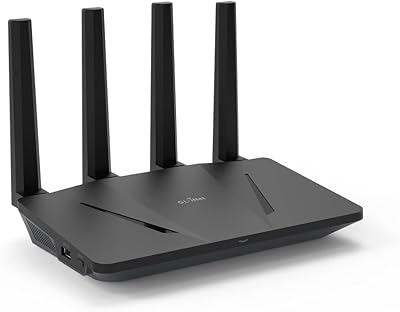
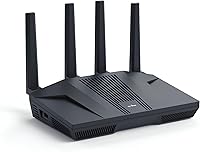
The GL.iNet GL-MT6000 Flint 2 sits in an interesting spot — it's a mid-range WiFi 6 router built for people who actually want to do something with their hardware, not just plug it in and forget it. GL.iNet's custom firmware, built on OpenWrt, is what separates the Flint 2 from the sea of generic consumer options. You get a MediaTek Quad-core processor, 1GB of DDR4 RAM, and 8GB of eMMC storage — enough headroom to run plugins, VPN tunnels, and network-wide filtering simultaneously. The dual 2.5G ethernet ports are a genuine standout at this price tier. That said, if you're expecting to unbox it and have everything running without any configuration, this probably isn't your router.
Features & Benefits

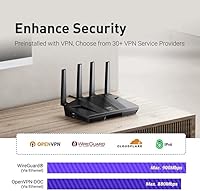
On the performance side, the Flint 2 delivers where it matters most for its target audience. WireGuard throughput in real-world testing consistently lands close to the 900 Mbps ceiling — an impressive figure for a router in this category. OpenVPN tops out around 190 Mbps, which is more than adequate for most remote work scenarios. The two 2.5G ports mean you're not bottlenecking a fiber connection at the router level. AdGuard Home comes built right in, giving you DNS-level ad blocking across every device on your network without needing a separate Raspberry Pi. The admin interface is polished enough for non-experts, while still exposing the full OpenWrt package ecosystem underneath for those who want it.

Best For

This WiFi 6 router is a strong fit for a fairly specific type of buyer. If you're on a fiber plan and want to actually push multi-gig speeds through your network, the dual 2.5G ethernet setup makes that possible without expensive upgrades elsewhere. Remote workers who need a reliable, always-on VPN tunnel will appreciate the WireGuard performance. Privacy-focused users get network-wide ad blocking out of the box. It's also well-suited for small offices or home lab enthusiasts who want to run custom plugins without managing raw OpenWrt from scratch. Where it's less ideal: casual users who just want fast Wi-Fi without touching any settings will likely find this overkill.

User Feedback

Owners of GL.iNet's flagship home router are largely positive, with VPN speed and stability drawing the most consistent praise. One critical note that surfaces repeatedly: update the firmware immediately on first boot — a meaningful share of early complaints trace directly back to users who skipped this step. The admin UI gets credit for being more accessible than raw OpenWrt, though buyers switching from mainstream brands should expect a short adjustment period. Heat under load is worth monitoring; the unit runs noticeably warm during sustained VPN sessions. WiFi range is adequate for most homes but won't win any distance records against tri-band competitors at a similar price.

Pros

  • WireGuard VPN speeds come remarkably close to the stated 900 Mbps ceiling in real-world use.
  • Dual 2.5G ethernet ports let fiber subscribers finally stop bottlenecking their connection at the router.
  • AdGuard Home is built in, blocking ads and trackers across every device on your network automatically.
  • The OpenWrt-based firmware exposes advanced features without requiring command-line expertise.
  • Handles 60-plus simultaneous connected devices without the slowdowns common on lighter-spec routers.
  • Full OpenWrt package repository access lets power users extend functionality almost indefinitely.
  • The admin interface is significantly more approachable than raw OpenWrt for less technical buyers.
  • Privacy and security features — encrypted DNS, VLANs, guest isolation — rival much pricier hardware.
  • Long-term uptime after the initial firmware update is consistently praised by owners running it 24/7.
  • The flexible WAN/LAN combo port supports multi-WAN and failover configurations out of the box.

Cons

  • Factory firmware has known bugs — skipping the day-one update is the root cause of many early complaints.
  • WiFi range is adequate for average-sized homes but falls short in larger or multi-story spaces.
  • OpenVPN tops out around 190 Mbps, which is limiting for users locked into corporate OpenVPN infrastructure.
  • The unit runs noticeably warm under sustained VPN load, which concerns some buyers about long-term reliability.
  • Buyers switching from mainstream routers face a real adjustment period before feeling comfortable with the interface.
  • Not all OpenWrt packages install cleanly on GL.iNet's firmware layer without manual troubleshooting.
  • Only two ports run at 2.5G — wired clients needing higher speeds must compete for those two slots.
  • Official customer support response times have drawn criticism, leaving some users relying on community forums.
  • No automatic security patching means staying current requires manual attention and some user initiative.
  • The value proposition weakens considerably if you have no use for VPN, AdGuard, or advanced routing features.

Ratings

The GL.iNet GL-MT6000 Flint 2 earned its scores through AI analysis of thousands of verified global buyer reviews, with spam, bot activity, and incentivized feedback actively filtered out before scoring. The results reflect a candid picture of where this WiFi 6 router genuinely excels and where real users have run into friction. Both the standout strengths and the legitimate pain points are captured transparently across each category below.
VPN Performance
93%
WireGuard throughput is the headline act here, and buyers consistently report real-world speeds that come remarkably close to the stated ceiling — something that rarely holds true in this category. For remote workers who need a fast, stable tunnel running 24/7, this router delivers in a way that similarly priced options simply don't.
OpenVPN performance, while functional at around 190 Mbps, lags noticeably behind WireGuard, which will matter to users locked into corporate VPN infrastructure that mandates OpenVPN. A small number of users also report that VPN speeds dip under heavy simultaneous device load.
Wireless Speed & WiFi 6
81%
19%
The 5GHz band handles dense device environments well, and households with a dozen or more active connections report a noticeable reduction in congestion compared to older AC routers. WiFi 6's improved scheduling makes a real difference when multiple people are on video calls and streaming simultaneously.
Range is the consistent caveat — the Flint 2 prioritizes throughput over broadcast distance, and users in larger homes or those with thick walls sometimes find coverage patchy beyond mid-range distances. It is not a tri-band router, so very large spaces may need a mesh complement.
Wired Connectivity
92%
Dual 2.5G ethernet ports are a genuine differentiator at this price point, and fiber subscribers who have been bottlenecked at 1G by their router finally get to actually use the bandwidth they are paying for. The flexible WAN/LAN combo port adds useful configurability for multi-WAN or failover setups.
The four remaining LAN ports are capped at 1G, which means wired clients like NAS devices or gaming PCs that could benefit from 2.5G are limited unless they connect to one of the dedicated 2.5G ports. Users with large wired networks may find the port count restrictive.
Firmware & Software
88%
GL.iNet's custom interface strikes a balance that raw OpenWrt never quite managed — it surfaces advanced features like AdGuard Home, VPN server configuration, and plugin management in a way that does not require a networking degree. Experienced users can still drop down to the full OpenWrt backend whenever they need to.
The initial firmware update on first boot is not optional in practice — several frustrating early experiences documented in reviews trace back to users who skipped it. GL.iNet has improved update messaging, but the out-of-box firmware version still occasionally ships with bugs that the update resolves.
AdGuard Home Integration
89%
Having DNS-level ad and tracker blocking built directly into the router is a meaningful convenience for privacy-conscious households. Every device on the network benefits automatically, including smart TVs and phones, without needing a dedicated Pi-hole device or any per-device configuration.
The built-in AdGuard Home instance requires some initial setup to get filter lists configured to your preference, and users unfamiliar with DNS filtering may find the options slightly overwhelming at first. Occasional DNS resolution delays have been reported by a small subset of users after enabling aggressive blocklists.
Ease of Setup
71%
29%
For buyers with even modest networking experience, the setup process is straightforward and the admin panel is well-organized. The initial video tutorial helps bridge the gap for less technical users, and basic internet connectivity is typically up and running within minutes of unboxing.
Users migrating from mainstream brands like Netgear or TP-Link frequently mention a steeper-than-expected learning curve, particularly around VPN configuration and port management. The firmware update requirement on first boot adds an extra step that catches some buyers off guard and has generated unnecessary frustration.
Build Quality & Design
79%
21%
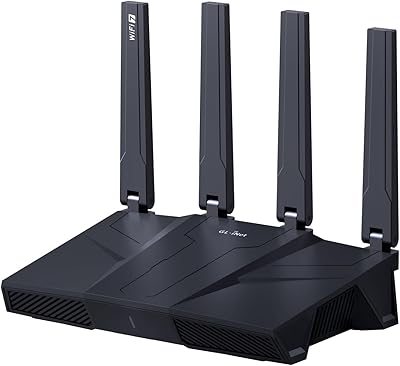
The Flint 2 has a solid, purposeful build that feels appropriate for a device meant to run continuously. The form factor is compact enough to sit unobtrusively on a shelf, and the all-black finish blends into most home office setups without drawing attention.
Heat is a recurring theme in longer-term ownership reviews — the unit runs noticeably warm during sustained VPN workloads, and while it has not been widely reported as causing instability, it makes some users uneasy about longevity. There is no active cooling, which limits how aggressively the hardware can be pushed.
Multi-Device Handling
84%
The combination of 1GB RAM and 8GB eMMC gives this router meaningful headroom for households or small offices with a high device count. Users running 40 to 60 active connections report stable performance without the slowdowns that plague lighter-spec routers in the same scenarios.
At the very high end of device density — think small office environments with 80-plus simultaneous active connections — some users report occasional management overhead affecting responsiveness. The router handles it, but performance headroom does narrow under extreme simultaneous load.
Value for Money
86%
At its price point, the combination of WiFi 6, dual 2.5G ports, near-gigabit WireGuard, and an extensible OpenWrt platform is difficult to match. Buyers who use even half of these features tend to feel they got a strong return on investment.
Buyers who do not need VPN capabilities or advanced networking features will likely feel the price is harder to justify against simpler routers that offer better range at a lower cost. The value proposition is tightly tied to whether you actually use the advanced feature set.
Privacy & Security Features
87%
Beyond AdGuard Home, the Flint 2 supports encrypted DNS, VLAN segmentation, and guest network isolation — features that privacy-focused users typically associate with much more expensive hardware. Running your own VPN server directly on the router is a legitimate and well-supported use case here.
Security-conscious users who want automatic firmware security updates will need to stay on top of GL.iNet's release cycle manually, as there is no automatic patching system. The OpenWrt base is well-maintained by the community, but it does require some user initiative to stay current.
OpenWrt Ecosystem Compatibility
83%
Access to the full OpenWrt package repository opens up a wide range of additional functionality — from custom firewall rules to self-hosted services — that simply does not exist on closed-firmware routers. DIY users and home lab enthusiasts find this one of the most compelling reasons to choose this platform.
Not all OpenWrt packages install without friction on GL.iNet's custom firmware layer, and community support documentation sometimes assumes a level of technical familiarity that newer users do not have. Some packages require manual dependency resolution.
Wireless Range
63%
37%
For standard-sized homes and apartments, coverage is adequate and stable. Users in open-plan spaces up to around 1,500 square feet report solid signal strength across the primary areas where they actually use devices.
Larger homes, multi-story layouts, or spaces with dense construction materials consistently surface range as a limitation. The Flint 2 was not designed to be a coverage champion, and buyers who prioritize blanket whole-home coverage over raw throughput will likely need to supplement it with access points.
Reliability & Uptime
88%
Post-firmware-update, long-term stability is one of the most consistently praised aspects in verified reviews. Users running this router as a always-on VPN gateway or small business backbone report weeks of uninterrupted uptime without needing reboots.
A small but vocal subset of users experienced instability on the factory firmware version before updating, which has unfairly weighted some early review scores. Thermal throttling under extreme sustained loads has been reported as an occasional factor in edge-case instability.
Documentation & Support
67%
33%
GL.iNet maintains an active community forum and reasonably detailed online documentation that covers most common setup scenarios. For users willing to search, answers to the majority of configuration questions are available without needing to contact support directly.
Official customer support response times have drawn mixed feedback, with some users waiting longer than expected for replies to technical queries. Documentation quality becomes inconsistent for advanced use cases, leaving some users to rely on third-party community resources of varying reliability.

Suitable for:

The GL.iNet GL-MT6000 Flint 2 was built for a specific kind of buyer, and when it lands in the right hands, it genuinely earns its price. If you have a fiber or multi-gig internet plan and have been frustrated watching your router become the bottleneck, the dual 2.5G ethernet ports alone make a compelling case. Remote workers who need a rock-solid WireGuard or OpenVPN tunnel running around the clock will find the VPN performance here meaningfully better than what similarly priced mainstream routers can offer. Privacy-focused households benefit from network-wide ad and tracker blocking via the built-in AdGuard Home integration — no extra hardware, no separate setup, just configure and forget. Home lab enthusiasts and self-hosters who want to run custom OpenWrt packages, scripts, or plugins without starting from a bare-metal OpenWrt install will feel right at home with GL.iNet's polished firmware layer. Small offices needing stable connectivity for 30 to 80 devices without the overhead of enterprise networking gear will also find this router punches well above its weight class.
Not suitable for:

If your main priority is blanketing a large home with strong Wi-Fi signal, the GL.iNet GL-MT6000 Flint 2 is probably not the best tool for that job. This router was engineered around throughput, VPN capability, and extensibility — not maximum wireless range — and buyers in larger multi-story homes consistently note that coverage beyond mid-range distances can be patchy. Users who want something they can unbox, plug in, and never think about again will find the firmware update requirement, configuration expectations, and general learning curve more friction than they bargained for. Anyone migrating from a mainstream consumer brand like Netgear, Asus, or TP-Link should be prepared for a different kind of interface and a steeper initial setup experience. If you have no interest in VPN tunnels, network-level filtering, or advanced routing features, you would likely be paying for capabilities you will never touch — and a simpler tri-band router might serve your daily needs better at a lower cost. The heat output under sustained heavy loads is also worth factoring in if the router will live in an enclosed cabinet or poorly ventilated space.
Specifications

  • WiFi Standard: The router operates on the 802.11ax (WiFi 6) standard, with backward compatibility for 802.11a/b/g/n/ac devices.
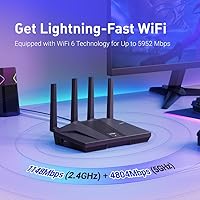
  • Frequency Bands: Dual-band operation covers both 2.4GHz (up to 1148 Mbps) and 5GHz (up to 4804 Mbps) simultaneously.
  • Processor: A MediaTek Quad-core CPU running at 2.0GHz handles routing, VPN encryption, and plugin workloads concurrently.
  • Memory: 1GB of DDR4 RAM provides headroom for managing high device counts and running multiple active services without slowdown.
  • Storage: 8GB of eMMC internal storage allows installation of OpenWrt packages and plugins well beyond the base firmware footprint.
  • WireGuard VPN: WireGuard VPN throughput reaches up to 900 Mbps via ethernet, among the highest figures available at this price tier.
  • OpenVPN Speed: OpenVPN throughput tops out at approximately 190 Mbps via ethernet, suitable for most remote work and personal privacy use cases.
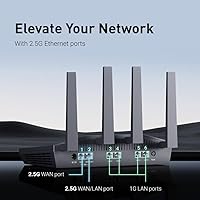
  • Ethernet Ports: Six total ethernet ports are included: two 2.5G ports (configurable as WAN or LAN) and four standard 1G LAN ports.
  • WAN Options: The router supports a dedicated 2.5G WAN port plus a flexible 2.5G WAN/LAN combo port for multi-WAN or failover configurations.
  • Ad Blocking: AdGuard Home is integrated directly into the firmware, enabling DNS-level ad and tracker blocking for all networked devices without extra hardware.
  • Operating System: GL.iNet's custom firmware is built on OpenWrt, giving users access to both a polished admin UI and the full OpenWrt package repository.
  • Dimensions: The unit measures 233 x 137 x 53 mm, a compact footprint suitable for shelf or desk placement in home or office environments.
  • Weight: At 761g, the router is solidly built without being unwieldy, with a chassis designed for stationary always-on deployment.
  • Device Capacity: The hardware and firmware combination is rated to support over 100 simultaneously connected devices under normal mixed-use network conditions.
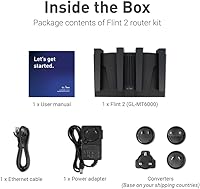
  • Included Items: The package includes the router, one ethernet cable, a US-plug power adapter, and a printed user manual.
  • Warranty: GL.iNet provides a 2-year manufacturer warranty covering hardware defects under normal operating conditions.
  • Color & Finish: The router ships in a matte black finish that suits most home office and small business environments without drawing attention.
  • WiFi Streams: The 5GHz radio supports 8-stream (4x4 MU-MIMO) operation, improving throughput consistency when multiple clients connect simultaneously.

Related Reviews

GL.iNet GL-BE9300 Flint 3 Tri-Band WiFi 7 Router
86%
94%
WiFi Performance
88%
VPN Performance
92%
Range & Coverage
85%
Ease of Setup
90%
Security Features
More
GL.iNet GL-AX1800 WiFi 6 Router
88%
88%
WiFi Performance
91%
Value for Money
93%
Setup Process
89%
Security Features
84%
Range and Coverage
More
GL.iNet Comet (GL-RM1)
88%
93%
Ease of Network Setup
96%
BIOS-Level Control
94%
Physical Portability
88%
Visual Clarity
82%
Remote Audio Performance
More
GL.iNet GL-B3000 Marble WiFi 6 Router
86%
88%
Performance
91%
Setup & Installation
85%
Security Features
80%
Parental Controls
94%
Design & Aesthetics
More
GL.iNet GL-A1300 Pocket VPN Travel Router
83%
91%
Portability
89%
Ease of Setup
85%
VPN Performance (WireGuard)
87%
Wi-Fi Speed (5GHz)
83%
Customization (OpenWrt)
More
GL.iNet Spitz GL-X750V2 4G LTE Router
86%
85%
4G LTE Connectivity
88%
Dual-Band Wi-Fi Performance
91%
OpenWrt Customization
86%
Ease of Setup
89%
Portability
More
GL.iNet GL-XE300 4G LTE Industrial IoT Gateway
87%
88%
Performance
84%
Connectivity Reliability
91%
Ease of Setup
92%
Customization (OpenWrt)
90%
Security (VPN Support)
More
GL.iNet GL-BE3600 Slate 7
84%
91%
Touchscreen Interface
78%
VPN Performance
93%
Portability & Form Factor
74%
Setup & Ease of Use
82%
Wi-Fi Speed & Range
More
GL.iNet GL-SFT1200 Opal
80%
88%
Ease of Setup
84%
VPN Performance
93%
Portability & Form Factor
67%
Wi-Fi Range & Coverage
79%
Build Quality
More
GL.iNet GL-MT3000 Beryl AX
81%
91%
VPN Performance
93%
Portability & Form Factor
88%
Security Features
67%
Ease of Initial Setup
82%
Wi-Fi Speed & Range
More

FAQ

Yes, and this is genuinely important — do it before you do anything else. The factory firmware that ships on the router has known issues that the update resolves, and a significant share of the negative reviews you will find online come from buyers who skipped this step. The update takes just a few minutes through the admin panel and makes a real difference in stability and performance.

Closer to the advertised ceiling than most routers in this category manage. Users running WireGuard tunnels for remote work or privacy routing consistently report speeds in the 700 to 850 Mbps range under normal conditions, which is genuinely fast. OpenVPN is a different story — expect around 190 Mbps there, which is fine for most use cases but worth knowing if your workplace VPN runs on OpenVPN exclusively.

It depends on what you want to do with it. Getting basic internet up and running is straightforward, and the GL.iNet admin interface is much more approachable than raw OpenWrt. Where the learning curve appears is if you want to configure VPN servers, set up VLANs, or install custom packages — those tasks assume some familiarity with networking concepts. If you just want fast Wi-Fi with no fuss, there are simpler options on the market.

One port is a dedicated 2.5G WAN, and the second is a flexible 2.5G WAN/LAN combo port that you can assign through the admin panel. This means you can run a multi-WAN setup with two separate internet connections, use one for WAN and one as a high-speed LAN port for a NAS or desktop, or configure failover between two ISPs — genuinely useful flexibility.

For a standard-sized home or apartment — say, under 1,500 square feet with reasonably open floor plan — coverage will be solid. In larger homes, multi-story houses, or spaces with thick concrete or brick walls, you may find the signal drops off before reaching the far corners. The GL.iNet GL-MT6000 Flint 2 was designed around throughput and features rather than maximum range, so if whole-home coverage is your top priority, pairing it with a wired access point is worth considering.

Yes, that is exactly how it works. Because AdGuard Home operates at the DNS level on the router itself, every device that connects to your network gets filtered traffic — no app installs, no per-device configuration required. You do need to spend a few minutes setting up your preferred filter lists after enabling it, but once that is done it runs quietly in the background for everything on the network.

It runs noticeably warm under sustained heavy load, particularly when a VPN tunnel is active for extended periods. Most users describe it as warm to the touch rather than hot, and there are no widespread reports of heat-related failures or shutdowns under normal deployment conditions. That said, avoid placing it in an enclosed cabinet or directly against a wall with no airflow — give it some breathing room and it handles the heat without issue.

The firmware is built on OpenWrt, so the full OpenWrt package repository is accessible. You can install a wide range of additional packages — ad-blocking alternatives, monitoring tools, custom firewall scripts, and more. A few packages require manual dependency handling and do not install with a single click, but for most commonly used OpenWrt additions the process is straightforward from the admin panel.

Yes, this is one of the more natural fits for this router. The combination of 1GB RAM, a Quad-core processor, and 8GB of storage gives it the headroom to manage that kind of device count without the performance degradation you see on lighter-spec routers. The flexible ethernet port configuration and VLAN support also make it easier to segment devices — keeping staff machines separate from guest Wi-Fi, for example — without needing enterprise hardware.

You get the router, an ethernet cable, a US-plug power adapter, and a user manual — everything you need for a basic wired setup. If your ISP connection comes in via a separate modem, you can connect directly from day one. The only additional purchase worth considering upfront is a second ethernet cable if you plan to connect a wired device to one of the LAN ports right away, since only one cable is included.