Overview

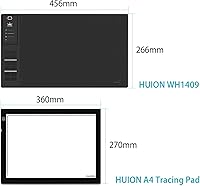
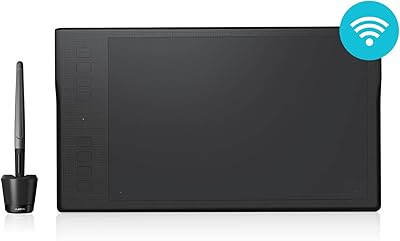
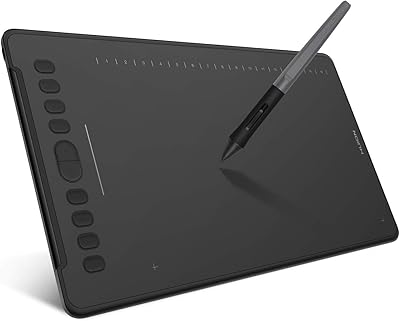
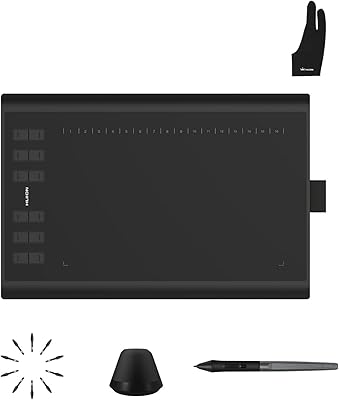
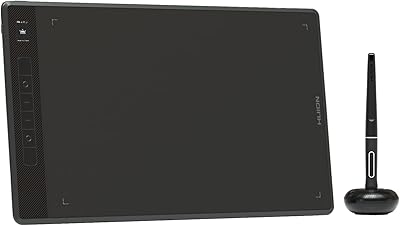
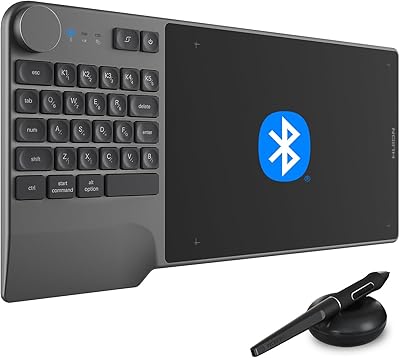
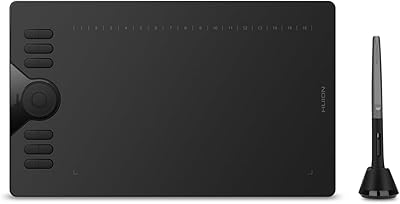
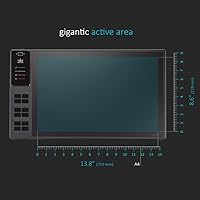
The Huion WH1409 Wireless Graphic Drawing Tablet offers a large, spacious drawing surface of 13.8 x 8.6 inches, providing ample room for your creative work. This tablet supports up to 8192 levels of pressure sensitivity, allowing for precise control and detailed strokes. It also features wireless connectivity via a 2.4 GHz connection, which ensures more flexibility and a cleaner workspace. Compatible with both Windows and macOS, this device is a versatile option for artists and designers who prefer a reliable and wide-reaching solution.
Features & Benefits

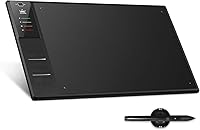
The WH1409 tablet includes 12 customizable express keys, designed to streamline your workflow and improve productivity. Its rechargeable pen offers tilt support for a more natural drawing experience, and the high resolution of 5080 LPI guarantees sharp, detailed lines. The 2000mAh battery provides up to 25 hours of continuous use in wireless mode, minimizing the need for frequent recharges. These features make the tablet ideal for long, uninterrupted creative sessions, whether for professional work or personal projects.

Best For

This Huion tablet is best suited for professional and hobbyist digital artists who need both precision and space to create detailed work. Its large drawing surface is perfect for illustrators, graphic designers, and anyone involved in digital art. Artists who prioritize flexibility will appreciate the wireless functionality, which eliminates the clutter of cables and allows for a more ergonomic workspace. Its combination of advanced features and portability also makes it ideal for those working on the go.

User Feedback

Overall, users praise the Huion WH1409 for its pressure sensitivity and responsive performance, making it a great choice for digital artwork. However, some users mention a learning curve due to its larger size and more complex controls. There are occasional complaints regarding the initial wireless setup, but most find that once configured, the tablet works smoothly. Many appreciate its long-lasting battery life, which is particularly useful for extended creative sessions without worrying about constant recharging.

Pros

  • The large 13.8 x 8.6-inch drawing surface provides ample space for detailed artwork and designs.
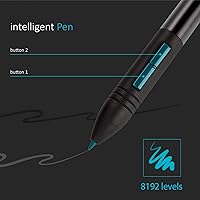
  • With 8192 levels of pressure sensitivity, this tablet offers precise and responsive control for digital artists.
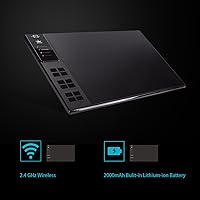
  • The wireless functionality with 2.4 GHz connectivity eliminates clutter and offers greater flexibility during use.
  • Compatible with both Windows and macOS, making it suitable for a wide range of users across different platforms.
  • The 12 customizable express keys help streamline workflow by allowing users to assign shortcuts to frequently used functions.
  • The 2000mAh battery lasts up to 25 hours of wireless use, making it ideal for long, uninterrupted creative sessions.

Cons

  • Some users found the wireless setup to be tricky and noted a learning curve when configuring the tablet.
  • The tablet's large size may not be ideal for users with limited desk space or those who need a more compact device.
  • A few reviewers mentioned that the tablet can feel too heavy or bulky for prolonged use during intensive drawing sessions.
  • There were occasional complaints about the stylus' grip, with some users feeling it could be more comfortable for extended use.
  • Despite its advanced features, beginners may find the range of settings and buttons overwhelming at first.
  • Initial setup can be challenging for users who are not technically inclined or experienced with graphic tablets.

Ratings

The Huion WH1409 Wireless Graphic Drawing Tablet has received a range of feedback from users worldwide, with reviews collected across multiple platforms and languages. After filtering out spam, bot, and incentivized reviews, the aggregated scores reflect both strengths and pain points noted by genuine users. This device is particularly praised for its wireless functionality and precision, though some concerns about setup and learning curve were noted by a portion of users.
Wireless Functionality
91%
Many users appreciate the seamless wireless experience this device offers. The 2.4 GHz connection ensures stable and uninterrupted drawing sessions, making it ideal for both professionals and hobbyists who prefer a clutter-free workspace. The flexibility to move freely without being tethered to a computer is a huge advantage for digital artists.
However, some users have reported occasional issues with the initial wireless setup. While the connection is generally stable after configuration, the setup process can be confusing for first-time users, leading to frustration before they can begin working smoothly.
Pressure Sensitivity
93%
The 8192 levels of pressure sensitivity are a standout feature for many artists. Users find that it allows for highly precise control, making this tablet a favorite for detailed artwork. Whether for fine lines or broader strokes, this sensitivity ensures a natural and responsive drawing experience, appealing to both beginners and experienced creators alike.
On the downside, some users mention that the pressure sensitivity can feel too sensitive or overly responsive in certain situations. A few users also noted that fine adjustments can be tricky unless calibrated correctly, especially for those transitioning from other devices with different pressure ranges.
Battery Life
89%
With a 2000mAh lithium-ion battery, this device offers up to 25 hours of wireless use, which is more than enough for most digital artists. Many users find the battery life impressive, allowing for long, uninterrupted creative sessions. The rechargeable feature also adds to its convenience, reducing the need for frequent battery replacements.
That said, some users have experienced faster-than-expected battery drainage after extended use, especially when using the tablet for high-intensity tasks. A few users would have liked to see a longer battery life, particularly for those using it for professional work or longer sessions.
Setup Process
65%
35%
Once the tablet is set up, it works smoothly and provides a responsive and fluid drawing experience. Users generally report that the tablet's compatibility with both Windows and macOS ensures it works well across multiple platforms. The setup guides are clear for most, making the process straightforward for experienced users.
The main drawback comes with the initial setup, where users report occasional difficulties with connecting the tablet wirelessly. Some have experienced challenges with software installation or Bluetooth pairing, especially when using it for the first time. These issues can be frustrating and may delay the start of creative work.
Drawing Surface Size
87%
The large 13.8 x 8.6-inch drawing surface provides plenty of room for creating detailed artwork, making it ideal for professionals and hobbyists alike. Artists enjoy the spacious workspace for both intricate designs and expansive sketches. This generous surface area contributes to a more comfortable and immersive drawing experience.
However, some users have pointed out that the tablet can feel bulky or cumbersome for those with limited desk space. The large size may not be ideal for people who need a more compact drawing tablet for portability or smaller working areas.
Customization Options (Express Keys)
84%
With 12 customizable express keys, this device allows users to streamline their workflow by assigning shortcuts for common functions. This flexibility is particularly appreciated by users who require quick access to tools and features while working on complex designs. The customizability adds to the tablet's overall usability and makes it a versatile tool for digital art.
A few users found that the express keys can be somewhat stiff or difficult to program, especially for those who are new to graphic tablets. While useful, the lack of tactile feedback on the keys can sometimes lead to confusion or unintended presses during use.
Pen Quality (Tilt & Battery-Free)
90%
The pen’s battery-free design and tilt support are highly praised by users. The stylus feels natural in hand, and its 60° tilt functionality provides a more organic drawing experience, making it easier to replicate traditional media. Artists especially appreciate the responsiveness and precision offered by this pen, which is a key feature for creating detailed work.
Some users mention that the pen, while comfortable, can feel a bit too light for certain tasks. Additionally, there are occasional reports of the pen being prone to scratching or wearing down over time, especially for users who press hard during drawing or shading.
Resolution and Detail
88%
The tablet’s 5080 LPI resolution delivers sharp and detailed strokes, allowing users to create precise and intricate artwork. Many users appreciate how the high resolution enhances the clarity of their designs, making it perfect for work that requires fine details. The resolution is especially favored by graphic designers and illustrators working on high-quality projects.
However, some users feel that the resolution might not be as critical for casual drawing or simple projects. A few users noted that the difference in resolution isn’t always noticeable when compared to lower-priced tablets, especially if they don't require ultra-high-definition detail in their work.
Build Quality
80%
20%
The build quality of this device is generally solid, with users noting that it feels durable and sturdy. The large drawing surface and overall design contribute to a professional feel, making it a reliable option for both home studios and portable setups. Most users find that it stands up well to regular use.
However, some users have reported concerns about the tablet’s weight and fragility. While the device is sturdy, it can feel heavy for extended use, and there have been occasional complaints about the outer casing feeling a little too plastic or prone to scratches.
Operating System Compatibility
92%
Users are pleased with the broad operating system compatibility, which includes both Windows and macOS support. This ensures that the tablet is versatile and can easily integrate into a variety of digital art workflows. Compatibility with multiple systems helps make the device accessible to a wide range of users, from hobbyists to professionals.
A small number of users have experienced occasional driver or software issues, especially when using the tablet on macOS. While the majority find compatibility smooth, those running older versions of macOS or specific OS configurations have reported some challenges with installing the necessary drivers.
User-Friendliness
75%
25%
While the tablet offers great functionality, it’s still relatively user-friendly. Once the initial setup is done, many find it easy to navigate and use. The customizable options make it adaptable for different workflows, whether you are a beginner or an experienced digital artist.
However, new users often struggle with the setup process, especially regarding the wireless connection and software installation. This can lead to a steeper learning curve compared to other, more plug-and-play options on the market. Some also feel the interface could be simplified for quicker access to basic features.
Value for Money
90%
For its price, this tablet offers excellent value with its large drawing surface, high resolution, and responsive pen. Many users consider it a great investment for both amateur and professional artists, as it provides features typically found in higher-end models at a more affordable price point.
On the other hand, some users feel that while the tablet is affordable, the setup issues and occasional build quality concerns make it less attractive for those who want a completely seamless experience. There’s a perception that higher-end models might offer more robust build and smoother initial setup.

Suitable for:

The Huion WH1409 Wireless Graphic Drawing Tablet is ideal for professional and hobbyist digital artists who require precision and flexibility in their work. With its large 13.8 x 8.6-inch drawing surface, it offers ample space for detailed illustrations and designs. The tablet’s 8192 levels of pressure sensitivity make it an excellent choice for artists who rely on fine control, while the wireless functionality provides greater freedom and reduces workspace clutter. Additionally, its compatibility with both Windows and macOS ensures that it can easily integrate into diverse digital art workflows, making it a versatile tool for users across different platforms. Designers and illustrators working on detailed projects, especially those who need a larger workspace, will find this tablet highly beneficial.
Not suitable for:

While the Huion WH1409 Wireless Graphic Drawing Tablet offers many advantages, it may not be the best fit for users looking for a compact and lightweight drawing tablet for travel or mobile use. Its relatively large size can be cumbersome for those with limited desk space or for artists who prefer a more portable device. Additionally, some users have noted a learning curve associated with the setup, particularly when configuring the wireless connection. This might be frustrating for beginners or those who want a simpler, plug-and-play experience. Furthermore, users who need ultra-portable devices or those on very tight budgets may find more affordable, smaller alternatives better suited to their needs.
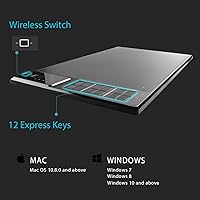
Specifications

  • Drawing Surface: The tablet features a 13.8 x 8.6-inch active drawing area, offering a spacious workspace for detailed artwork.
  • Pressure Sensitivity: The device supports 8192 levels of pressure sensitivity for precise and dynamic stroke control.
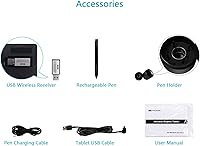
  • Wireless Connectivity: The tablet connects wirelessly via a 2.4 GHz USB receiver, providing flexibility and reducing cable clutter.
  • Resolution: With a resolution of 5080 LPI, the tablet delivers high-definition detail for sharp and accurate lines.
  • Response Rate: The tablet has a 233 RPS (reports per second) response rate, ensuring minimal lag during use.
  • Battery Life: The 2000mAh lithium-ion battery provides up to 25 hours of continuous wireless use on a single charge.
  • Tilt Support: The tablet's pen supports up to 60° tilt, offering more natural drawing angles and improved stroke variety.
  • Express Keys: There are 12 customizable express keys, allowing users to assign shortcuts for more efficient workflow.
  • Pen Type: The included pen is rechargeable, battery-free, and designed for ergonomic, long-term use.
  • Compatibility: The tablet is compatible with both Windows 7+ and macOS 10.11+ for broad device support.
  • OS Requirements: Requires Windows 7 or later, or macOS 10.11 or later to ensure proper functionality.
  • Weight: The tablet weighs approximately 1.1 kg, making it portable but substantial enough for stable drawing.
  • Dimensions: The tablet's dimensions are 15.3 x 10.1 x 0.4 inches, providing ample space while remaining compact.
  • USB Port: The tablet includes a USB port for charging and direct connection to the computer for wired use.
  • Software Support: The tablet supports a wide range of digital art software, including Adobe Photoshop, Illustrator, and CorelDRAW.
  • Warranty: The product comes with a standard warranty, offering peace of mind in case of defects or issues.

FAQ

To set up this tablet, simply connect the wireless receiver to your computer's USB port. Then, install the necessary drivers from the Huion website or use the included installation CD. Once drivers are installed, the tablet should be ready for use after a quick reboot.

Yes, the WH1409 is fully compatible with both Windows (7 and above) and macOS (10.11 and above). You can use it on both platforms without any issues, making it a versatile choice for cross-platform users.

The Huion WH1409 offers 8192 levels of pressure sensitivity. This provides precise control over brush strokes, allowing artists to create detailed work with varying thickness based on pressure.

With its 2000mAh lithium-ion battery, this tablet can last up to 25 hours on a full charge. This makes it ideal for extended creative sessions without needing frequent recharges.

Yes, the WH1409 comes with a rechargeable, battery-free pen. It also supports tilt functionality, which allows for a more natural drawing experience.

This device supports wireless functionality via a 2.4 GHz connection, giving you the freedom to work without being tethered by wires. However, you can also use it with a USB connection if preferred.

The tablet features 12 customizable express keys. These can be programmed to streamline your workflow by assigning frequently used shortcuts, making it easier to access tools during your projects.

This tablet is ideal for professional and hobbyist digital artists, illustrators, and designers who need precision and ample workspace. It's also a great option for users who prefer wireless functionality for a cleaner and more flexible workspace.

Some users report a slight learning curve with the initial wireless setup, but once it's configured, the connection tends to be stable and smooth. If you're having trouble, ensure that the drivers are up-to-date and the receiver is correctly placed.

The WH1409 features a resolution of 5080 LPI (lines per inch), which contributes to clear and detailed strokes. This high resolution is crucial for artists who require fine details and accurate lines in their digital artwork.