Overview

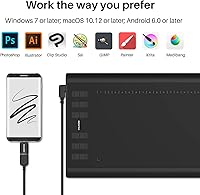
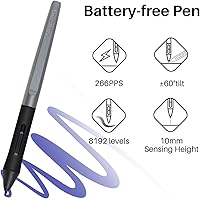
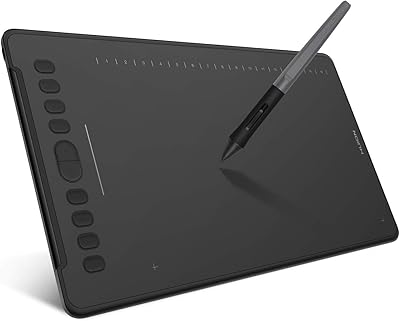
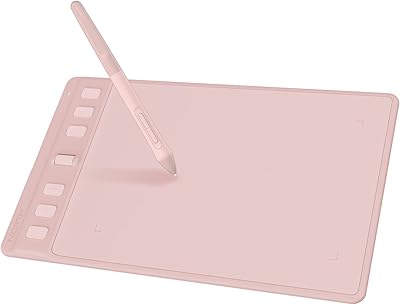
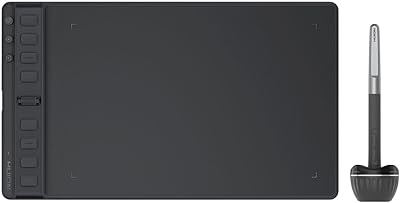
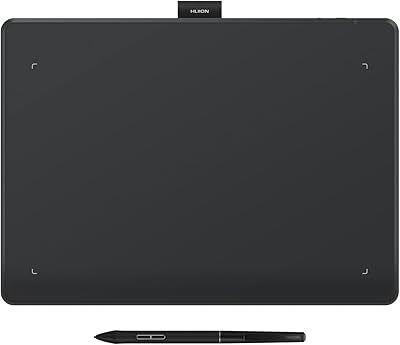
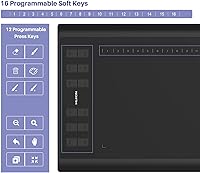
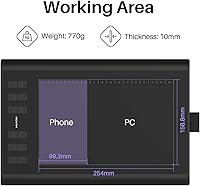
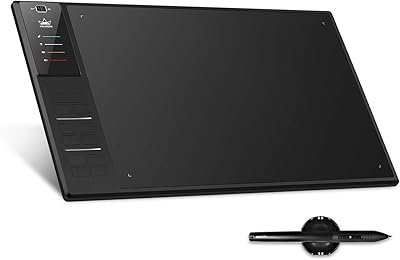
The Huion Inspiroy H1060P Graphics Drawing Tablet offers a spacious 10 x 6.25-inch active area that provides plenty of room for creative work. This drawing tablet comes equipped with a battery-free PW100 stylus, providing 8192 levels of pressure sensitivity and tilt support up to ±60°, ensuring precise and dynamic drawing. It's compatible with Windows, macOS, and Android devices (Android 6.0+), making it versatile for various platforms. With 16 customizable soft keys and 12 press keys, users can streamline their workflow, while the tablet's lightweight design makes it ideal for both professionals and hobbyists.
Features & Benefits

The 8192 pressure sensitivity of the PW100 stylus ensures each stroke is captured with fine detail, making this tablet perfect for artists who require high precision. Its tilt support adds to the realism of drawing by recognizing angles up to ±60°, enabling more natural, flowing lines. The tablet is also equipped with programmable keys that can significantly improve workflow efficiency, allowing users to customize shortcuts. Additionally, with no battery required for the stylus, there's no downtime for charging, making the drawing experience smoother and more efficient. Broad compatibility with major operating systems adds to its convenience.

Best For

This drawing tablet is ideal for digital artists and illustrators who need a reliable, responsive device for their craft. It's also well-suited for graphic designers who benefit from customizable keys for quicker task execution. Freelancers and hobbyists will appreciate the tablet's portability and versatility, whether they work on the go or at home. Additionally, those who prefer a tablet that can seamlessly work with both desktop and mobile devices will find this tablet a convenient option. Its broad OS compatibility ensures it's a good fit for various user setups.

User Feedback

Users generally praise the Huion tablet's responsive pen and pressure sensitivity, with many highlighting its ability to capture fine details. The customizable keys are often mentioned as a productivity booster, allowing users to set shortcuts for various tasks. However, some users have reported compatibility issues with certain Android devices, particularly older Samsung Galaxy models. On the plus side, many buyers find this tablet a great choice for budget-conscious creatives, offering impressive features at an affordable price point. Overall, it’s seen as a reliable and cost-effective option for digital drawing and design.

Pros

  • The tablet's 8192 levels of pressure sensitivity provide precise and responsive drawing for artists.
  • Its tilt recognition feature enhances drawing accuracy, especially for varied angles.
  • Multiple customizable keys improve workflow efficiency by allowing quick access to frequently used functions.
  • The battery-free stylus eliminates the need for recharging, ensuring uninterrupted work sessions.
  • Compatible with Windows, macOS, and Android devices, this tablet offers flexibility across different platforms.
  • The compact and lightweight design makes it a great option for creatives who need portability during travel.

Cons

  • Some users report compatibility issues with certain Android devices, particularly Samsung Galaxy S models.
  • The tablet’s 10 x 6.25-inch drawing area may feel cramped for those accustomed to larger workspaces.
  • While the build quality is solid, some users mention concerns about long-term durability for heavy use.
  • Frequent travelers may find the included USB and micro-USB connectors limiting for fast mobile setups.
  • Certain advanced users may miss higher-end features found in more premium models at this price point.
  • Lack of wireless connectivity can be an inconvenience for those seeking a more flexible, cable-free experience.

Ratings

After analyzing verified reviews worldwide, from multiple languages and platforms, we’ve gathered insights into the Huion Inspiroy H1060P Graphics Drawing Tablet. This review reflects a balanced evaluation of both strengths and potential drawbacks, based on authentic, high-quality feedback. All spam, bot-generated, and exaggerated reviews have been filtered out to ensure only reliable data informs these scores. Here’s what real users are saying about the device’s performance and features.

Performance
85%
Many users find the performance of this drawing tablet impressive, particularly for its responsiveness. The high pressure sensitivity ensures that every stroke is accurately captured, providing smooth and detailed results. It's perfect for both professional artists and hobbyists alike, handling various drawing applications with ease.
Some users reported occasional lag or minor delay when using the tablet with certain software. While most find it responsive, the performance can fluctuate depending on the system and specific use case, leading to frustration for a few buyers, especially on older setups.
Pressure Sensitivity
90%
The 8192 levels of pressure sensitivity are praised for offering precise control over the thickness and opacity of strokes. Many buyers, especially illustrators and digital artists, highlight how natural the pen feels, closely mimicking the responsiveness of traditional media. This feature enhances the overall drawing experience.
Some users noted that the pressure sensitivity can feel inconsistent at times, particularly when drawing with lighter pressure. While this issue isn’t widespread, it can be frustrating for those who expect flawless, uniform performance across all strokes.
Tilt Support
88%
Tilt recognition up to ±60° is a standout feature for many users, as it provides a more natural and dynamic drawing experience. Artists working on detailed sketches and shading find this especially useful for creating realistic effects, as they can tilt the pen to simulate the way they would with a real brush.
A few buyers mentioned that tilt recognition isn’t always as accurate as expected, especially in certain software environments. Although it works well for many, the inconsistency in some cases can make it a less reliable tool for precise detailing.
Customization (Keys)
86%
The 16 customizable soft keys and 12 press keys are highly appreciated by users who want to optimize their workflow. Many mention how these shortcuts save time, allowing for quick access to frequently used commands, which can greatly improve efficiency during long design sessions.
Some users found the process of setting up the keys to be somewhat cumbersome. While it’s a useful feature, it could have been made more intuitive, especially for those who aren’t as tech-savvy. A few also noted that some of the keys felt less responsive after extended use.
Build Quality
83%
The lightweight and portable design of this tablet make it an excellent choice for on-the-go creatives. Users appreciate its sturdy build despite its slim profile, ensuring that it’s durable enough for daily use. It’s a reliable device for both professional artists and casual users alike.
Some users felt that the plastic body, while lightweight, could be more robust. A few reported minor durability issues over time, especially with the edges showing signs of wear after frequent handling. This could be a concern for those who need a more rugged device for heavy use.
Portability
89%
This tablet's compact design and lightweight frame make it a great choice for artists who need portability. Whether it's for commuting, traveling, or working at different locations, users enjoy how easy it is to carry around, making it ideal for digital artists on the move.
Though the tablet is portable, its size might be slightly limiting for users accustomed to larger drawing surfaces. Some users mentioned that the 10 x 6.25-inch active area feels a bit cramped during extensive sessions, especially for those used to bigger tablets for detailed work.
Compatibility (Operating Systems)
80%
20%
Users are generally satisfied with the tablet’s broad compatibility across Windows, macOS, and Android devices. This flexibility ensures that the device works seamlessly with most setups, giving it versatility for both professional and casual use.
A few buyers mentioned issues with Android compatibility, especially with certain devices like the Samsung Galaxy S series. While the tablet works well with many Android devices, the experience can be inconsistent, and it’s not fully compatible with all models, which limits its appeal for some users.
Ease of Use for Beginners
88%
Many users find this tablet beginner-friendly due to its intuitive setup and straightforward features. The included stylus requires no batteries, reducing the hassle of maintenance, and the customizable keys make it easier for new users to set up a personalized workflow.
Some beginners found the tablet’s setup and key configuration options to be a bit overwhelming. Although it’s easy to use for most, users new to graphic tablets may feel a bit lost with the software options or the extensive number of shortcuts available.
Value for Money
92%
At its price point, this tablet offers an exceptional balance of features and performance. Users are thrilled by the high pressure sensitivity, tilt support, and the overall experience provided, considering it a great value for both hobbyists and professionals. Many mention how it rivals higher-priced models in terms of performance.
While many find the tablet an excellent deal, a small number of users feel that a few features, like the Android compatibility, could be improved for the price. Nonetheless, this remains a solid choice for those looking for affordable, high-quality drawing tools.
Android Compatibility
70%
30%
When compatible, the tablet offers smooth functionality with Android devices, adding extra flexibility for users who prefer working on mobile platforms. The ability to draw on tablets and smartphones is a major plus for artists who enjoy flexibility and portability.
The tablet’s Android compatibility is hit-or-miss, especially with some Samsung devices. Users have reported issues with responsiveness and lag on certain Android models, which limits the tablet’s usefulness for those primarily relying on mobile devices for their creative work.
Pen Responsiveness
91%
The PW100 stylus is often praised for its smooth pen responsiveness and natural feel. Users particularly love the fluidity and precision of each stroke, making it ideal for both detailed illustration and freehand sketches. It’s a standout feature that enhances the overall user experience.
A small number of users have mentioned minor issues with pen sensitivity when drawing lightly, though this is not a common complaint. Some found that the pen occasionally registers lighter strokes less consistently, but for most, it performs reliably during standard use.
Long-Term Durability
80%
20%
The tablet’s overall build quality ensures that it holds up well for extended periods of use. Buyers have reported no major issues after months of regular drawing, suggesting that it remains durable despite its lightweight design.
Some users felt that over time, the tablet showed signs of wear, particularly with the corners becoming scratched or scuffed. A few others have mentioned that the keys lose their tactile feel after extended usage, affecting long-term durability.

Suitable for:

The Huion Inspiroy H1060P Graphics Drawing Tablet is an excellent choice for digital artists, illustrators, and graphic designers who require a reliable, budget-friendly tool. With its wide pressure sensitivity range and tilt recognition, it's ideal for professionals and hobbyists alike, allowing for detailed and precise work. Freelancers and students, particularly those with limited budgets, will appreciate the combination of features like customizable keys and portability, which can enhance their workflow and allow for flexibility in different settings, from studio environments to on-the-go use. It’s especially beneficial for users who need a versatile tablet that works seamlessly with Windows, macOS, and Android devices, making it adaptable for various workstations and mobile setups.
Not suitable for:

While the Huion Inspiroy H1060P Graphics Drawing Tablet is a versatile option for many, it may not be the best fit for users with very specific needs or preferences. Those who require a larger drawing area or a more rugged build might find its 10 x 6.25-inch active area too limiting, especially for extensive detailed work. Additionally, users who rely heavily on Android devices, particularly certain Samsung models, might experience compatibility issues that impact the tablet's performance. Professional artists or graphic designers accustomed to top-tier models with flawless tilt support and superior build quality may also find this tablet lacking in some areas, especially regarding its durability over long-term use.
Specifications

  • Active Area: The tablet features a 10 x 6.25-inch active drawing area, providing ample space for drawing and design work.
  • Stylus Type: The tablet comes with a PW100 battery-free stylus that requires no charging for continuous use.
  • Pressure Sensitivity: The stylus offers 8192 pressure levels, enabling precise control over strokes and line thickness.
  • Tilt Support: The tablet supports ±60° tilt recognition, allowing for more natural and versatile drawing angles.
  • Customizable Keys: It includes 16 soft keys and 12 press keys that can be programmed for shortcuts and personalized functions.
  • Connectivity: The device connects via USB or micro USB for reliable wired connections with your computer or tablet.
  • Compatibility: The tablet works with Windows (7+), macOS (10.12+), and Android devices running version 6.0 or higher.
  • Stylus Report Rate: The stylus has a report rate of 233PPS, ensuring quick and responsive input for drawing and sketching.
  • Pen Height Sensitivity: The pen supports a 10mm height sensitivity, allowing for accurate detection of pressure and tilt at varying angles.
  • Dimensions: The tablet has a compact, lightweight design, making it easy to carry and store for professionals and hobbyists.
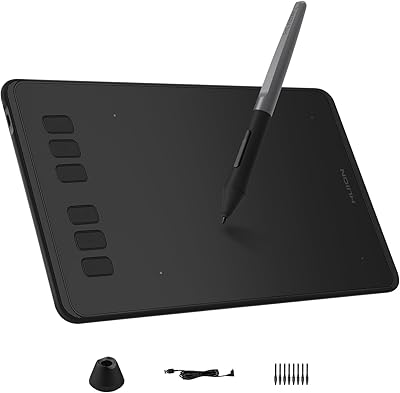
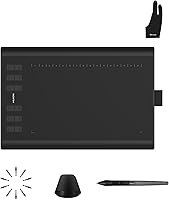
  • Replacement Nibs: The tablet comes with 8 replacement nibs for the stylus, ensuring long-term usability without immediate wear.
  • Android Compatibility: While compatible with Android 6.0+ devices, it may have limited functionality with certain Android models, such as the Samsung Galaxy S.
  • Warranty: The tablet comes with a standard warranty, offering peace of mind for users in case of manufacturer defects.
  • Portability: The lightweight design of the tablet makes it ideal for portable use, suitable for freelancers or on-the-go artists.
  • Software Support: The tablet is compatible with a wide range of design software, including Photoshop, Illustrator, and CorelDRAW.

Related Reviews

HUION Inspiroy H1161 Graphics Drawing Tablet
86%
88%
Performance
91%
Pressure Sensitivity
86%
Ease of Use
90%
Portability
84%
Build Quality
More
HUION Inspiroy Q11K Wireless Graphic Drawing Tablet
86%
94%
Pen Pressure Sensitivity
88%
Battery Life
90%
Wireless Connectivity
85%
Ergonomics and Comfort
78%
Setup and Installation
More
HUION Inspiroy Dial 2 Graphics Drawing Tablet 10.5″ x 6.56″
86%
88%
Performance
90%
Usability / Ergonomics
91%
Pressure Sensitivity
85%
Battery Life
89%
Portability / Size / Weight
More
HUION Inspiroy H430P Drawing Tablet
83%
91%
Value for Money
88%
Pressure Sensitivity
93%
Portability
90%
Stylus Performance
85%
Compatibility with Software
More
HUION Inspiroy H640P Drawing Tablet
86%
91%
Value for Money
88%
Pressure Sensitivity
83%
Build Quality
94%
Portability
92%
Ease of Setup
More
HUION Inspiroy 2 Small Drawing Tablet
87%
94%
Portability & Size
91%
Precision & Performance
88%
Customization Options
92%
Compatibility with Devices
85%
Ease of Setup & Use
More
HUION Inspiroy 2 Medium Drawing Tablet
86%
95%
Pressure Sensitivity
89%
Portability
85%
Build Quality
90%
Ergonomics
87%
Customization Options
More
Huion WH1409 Wireless Graphic Drawing Tablet
85%
91%
Wireless Functionality
93%
Pressure Sensitivity
89%
Battery Life
65%
Setup Process
87%
Drawing Surface Size
More
HUION Inspiroy Giano G930L Wireless Graphics Tablet
84%
92%
Pressure Sensitivity
90%
Drawing Area Size
88%
Battery Life
75%
Bluetooth Connectivity
85%
Stylus Comfort
More
HUION Inspiroy Frego Small Wireless Drawing Tablet
87%
90%
Battery Life
93%
Portability
88%
Pressure Sensitivity
85%
Ergonomics
92%
Connectivity
More

FAQ

The Huion Inspiroy H1060P has a 10 x 6.25-inch active drawing area, offering plenty of space for detailed work and smooth strokes.

Yes, this drawing tablet is compatible with Windows (7+), macOS (10.12+), and Android devices running version 6.0 or higher.

No, the PW100 stylus is battery-free, meaning you never need to charge it, which eliminates downtime and maintenance.

The Huion Inspiroy H1060P features 16 customizable soft keys and 12 press keys. These can be programmed for quick access to common shortcuts, enhancing your workflow.

Yes, it is compatible with Android devices running version 6.0 or higher. However, some users have reported limited compatibility with specific models, such as the Samsung Galaxy S.

This tablet works with a wide range of creative software, including Photoshop, Illustrator, CorelDRAW, and even apps for mobile platforms like Procreate on Android and iOS.

Yes, this tablet is easy to use for both professionals and beginners. Its customizable keys and straightforward setup make it accessible to users at all skill levels.

The ±60° tilt support allows for more natural, nuanced strokes, making it ideal for shading and detailed work. This feature helps replicate the feel of drawing with real brushes or pencils.

The tablet is lightweight and compact, making it easy to carry around for artists and designers on the go. Its portable design is perfect for freelancers or hobbyists who need to work in different locations.

Users generally praise the tablet’s responsive pen, precise pressure sensitivity, and ease of use. However, some mention occasional connectivity issues with certain Android devices.