
Overview

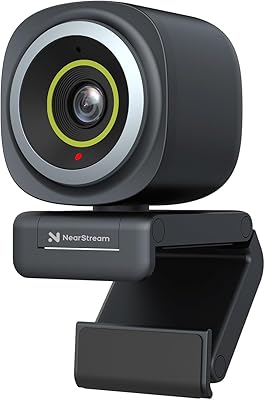
The NearStream V02AF is a compact USB-A webcam that arrived in mid-2024 and has already climbed to #193 in Amazon's Webcams category — a respectable early showing for a newer brand. At $35.99, it competes head-to-head with entry-level offerings from bigger names, but it brings a few features that typically cost more. It runs plug-and-play out of the box — no drivers, no setup headaches — and the optional NearSync software is there when you want deeper control. The physical unit is genuinely small and light, making it easy to pack away or reposition without fuss.

Features & Benefits

The V02AF's most practical trait is its true autofocus — at this price, many webcams use fixed focus, which can leave you blurry if you lean back or shift in your chair. The CMOS sensor adjusts in real time, keeping you sharp. FOV is selectable between 60°, 75°, and 95° through the NearSync app, which is useful when you need to frame a wider room for group calls. The built-in microphone handles light background noise reasonably well for everyday conversations. The base also includes a 1/4-inch mount, so you are not limited to the monitor clip if you prefer a tripod or boom arm setup.

Best For

This webcam is a strong fit for remote workers and students who want solid video quality on calls without spending significantly more. If you are on Mac or Linux, the driver-free setup is a genuine advantage — plug it in and it just works. Entry-level streamers on Twitch or YouTube will appreciate the adjustable FOV for controlling how much of a room appears on camera. That said, if you need AI auto-framing or plan to produce broadcast-quality content, this NearStream camera is not built for that. It excels at dependable, everyday use rather than high-end production demands.

User Feedback

With a 4.5-star rating on Amazon, early reception is positive — but the V02AF only launched in May 2024, so the review pool is still growing and worth keeping in perspective. Buyers consistently highlight image sharpness and autofocus responsiveness as standout qualities at this price. Mic feedback is more measured: moderate background noise is handled well, but heavy keyboard clatter or reverb-heavy rooms can still bleed through. Some buyers question whether the 2K spec delivers a noticeable visual upgrade over 1080p in everyday calls — and the honest answer is that it depends on your monitor and lighting conditions. No widespread compatibility issues have surfaced yet.

Pros

  • Autofocus keeps you sharp even when you shift or lean back mid-call — rare at this price.
  • Adjustable FOV lets you switch between solo and group framing without touching the camera.
  • Plug-and-play setup works immediately on Windows, Mac, Linux, and Chrome OS.
  • The NearStream V02AF includes a 1/4-inch tripod mount, giving you real flexibility in desk setup.
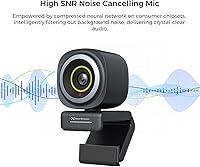
  • Built-in mic handles light background noise well enough for everyday calls and online classes.
  • NearSync software unlocks manual image tuning and 1080p at 60FPS for smoother motion.
  • Compact and light enough to carry between home and office setups without a second thought.
  • Works natively with every major call and streaming platform without any configuration.
  • Strong value — autofocus, adjustable FOV, and a functional mic together under $40 is genuinely competitive.

Cons

  • Low-light image quality degrades quickly without supplemental desk or ring lighting.
  • The 2K resolution label can mislead — most call platforms compress video well below that ceiling anyway.
  • NearSync software feels unpolished and has shown instability after some system updates.
  • FOV adjustment is locked behind the app, leaving Linux users with a fixed field of view.
  • The non-detachable USB cable means a cable fault requires replacing the entire unit.
  • USB-A only — modern MacBook and thin laptop users will need a dongle to connect.
  • The microphone noticeably struggles with mechanical keyboards and reverberant room acoustics.
  • Review volume is still relatively limited given the May 2024 launch date, so long-term reliability data is thin.
  • No auto-framing feature, which competing webcams at slightly higher prices now include as standard.

Ratings

The NearStream V02AF scores are generated by AI after analyzing verified global user reviews, with spam, bot-submitted, and incentivized feedback actively filtered out. This webcam has accumulated a strong early reputation since its May 2024 launch, and the ratings below reflect both the genuine strengths buyers celebrate and the real friction points that show up repeatedly in honest feedback.

Image Clarity
83%
For a sub-$40 webcam, the picture quality regularly surprises buyers. Faces come through sharp and well-defined on Zoom calls, and the CMOS sensor handles decent indoor lighting without washing out skin tones or blowing out bright windows behind the subject.
In low-light rooms, the image degrades noticeably — grain creeps in and fine detail softens. The 2K label also creates expectations that everyday call software may not fully honor, since most platforms still compress streams to 1080p or below.
Autofocus Performance
81%
19%
Autofocus is one of the clearest advantages this webcam has over fixed-focus competitors at the same price. When you lean back, gesture, or shift position mid-call, the camera reacquires focus quickly rather than leaving you blurry for several seconds as budget fixed-lens models often do.
In some lighting transitions — like when a window behind you brightens or dims — the autofocus can briefly hunt before settling. It is not disruptive enough to ruin a call, but attentive viewers may catch the momentary soft focus.
Microphone Quality
67%
33%
The built-in mic is genuinely usable for daily calls and online classes, handling conversational voice clearly enough that many buyers skip purchasing a separate microphone altogether. Light ambient noise like a fan or air conditioning gets attenuated reasonably well.
Mechanical keyboard users and those in reverb-heavy rooms will notice the mic's limits — it struggles to fully suppress sharp, repetitive sounds at close range. For streaming or recording where audio quality matters, a dedicated USB mic is still the smarter path.
Adjustable Field of View
88%
The ability to switch between 60°, 75°, and 95° FOV through software is a feature that typically costs more elsewhere. Buyers who alternate between solo calls and small group meetings particularly value this — no repositioning, just a quick setting change that meaningfully alters what appears on screen.
FOV adjustment requires the NearSync app to be running, so the flexibility is not available to Linux users or those who prefer not to install additional software. The 95° wide mode also introduces mild barrel distortion at screen edges, which is expected but worth knowing.
NearSync Software Usability
71%
29%
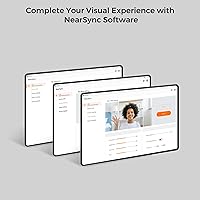
NearSync unlocks image controls — brightness, contrast, saturation, hue — that most webcams at this price lock away or do not offer at all. The ability to push to 1080p at 60FPS through software is a nice extra for buyers who want smoother motion on calls or streams.
The software has a learning curve and some buyers report it feeling unpolished compared to Logitech's G HUB or similar tools. Occasional stability hiccups after system updates have been flagged in reviews, and official support documentation is thin, making troubleshooting harder than it should be.
Plug-and-Play Setup
93%
Out-of-the-box setup is genuinely effortless. Plug into any USB-A port on Windows, Mac, Linux, or Chrome OS and the operating system recognizes it immediately — no driver downloads, no configuration screens, no restarts. This matters especially for less technical users or anyone setting up quickly before a call.
There is very little to criticize here. The only minor nuance is that some advanced features, like custom FOV and 1080p at 60FPS, require NearSync, so pure plug-and-play users are working with a slightly reduced feature set compared to what the full spec sheet suggests.
Build Quality & Materials
72%
28%
The V02AF feels reasonably solid given its compact size and price bracket. The plastic housing does not creak or flex under normal handling, and the monitor clip grips firmly without wobbling during typing sessions — something cheaper webcams often fail at.
It is clearly plastic construction throughout, and the finish shows fingerprints easily. A few buyers noted the clip adjustment feels stiff initially and requires some break-in before it adjusts smoothly. Nothing breaks, but it does not carry the premium feel of pricier models.
Mounting Versatility
84%
Including a 1/4-inch tripod mount on a $35 webcam is a smart choice. Buyers who prefer a dedicated desk stand, a side-mounted boom arm, or even a floor tripod for unusual angles can use standard photography accessories they likely already own rather than buying proprietary mounts.
The bundled monitor clip works well on standard thin-bezel monitors but can feel precarious on thicker-framed older displays. No desk stand is included in the box, so buyers who want anything other than a monitor clip will need to source their own mounting hardware.
Cross-Platform Compatibility
91%
Reliable performance across Windows, Mac, Linux, and Chrome OS sets this NearStream camera apart from several rivals that have recurring issues on non-Windows systems. It registers correctly in Zoom, Teams, Google Meet, and OBS without any manual configuration in every OS tested by buyers.
NearSync software is only officially supported on Windows and Mac, meaning Linux and Chrome OS users get full camera functionality but no access to FOV adjustment or advanced image tuning. That is a real limitation for power users on those platforms.
Low-Light Performance
58%
42%
With decent room lighting or a ring light, the webcam produces clean, accurate images with natural color reproduction. Buyers who work near a window or invest in basic desk lighting tend to be happy with what they see on screen.
Without supplemental lighting, low-light performance is below average for the category. Evening calls in dimly lit rooms produce visibly noisy, flat images. There is no hardware light correction or HDR to compensate, which is not unusual at this price but is a real constraint.
Value for Money
87%
At $35.99 with autofocus, adjustable FOV, and a functional noise-canceling mic included, the value proposition is strong for the target audience. Buyers frequently note that getting all three of those features together at this price would have cost significantly more just two years ago.
Buyers expecting Logitech Brio-tier performance for the price will be disappointed — the comparison is not realistic. The value equation also weakens slightly for anyone who needs strong low-light performance or reliable software support, as those use cases expose the product's limits quickly.
Frame Rate Smoothness
76%
24%
The 1080p at 60FPS mode, accessible through NearSync, delivers noticeably smoother motion than the standard 30FPS mode — useful for anyone streaming gameplay reactions or fast-paced content where choppy motion is distracting. For standard video calls, 30FPS at 2K is more than adequate.
Switching between 2K at 30FPS and 1080p at 60FPS requires going into the NearSync app, which is not something you can do instantly mid-call. Some buyers also noted that 60FPS mode increases USB bandwidth demand, which caused minor stutter on older laptops with shared USB controllers.
Cable & Connectivity
74%
26%
The USB-A connection is universally compatible and the cable length is practical for most desk setups, reaching a tower PC on the floor or a laptop on a desk without forcing awkward routing. No hub or adapter is needed on standard setups.
USB-A only means USB-C users on modern MacBooks or thin laptops will need a dongle. The cable is not detachable, so if it develops a fault down the line, it complicates repairs. A braided or reinforced cable would have been a welcome upgrade at this price.
Portability & Form Factor
89%
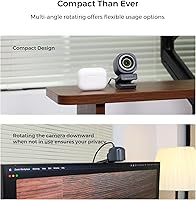
At under 5 ounces with dimensions barely larger than a golf ball, this webcam slips into a laptop bag without adding meaningful bulk. Hybrid workers who carry it between home and office setups consistently mention the size as a practical everyday advantage over larger models.
The compact size does come with a trade-off: the lens and sensor are smaller than those in larger webcams, which contributes to the low-light limitations noted elsewhere. Portability and optical performance are in tension at this price point, and the V02AF leans firmly toward the former.

Suitable for:

The NearStream V02AF is a smart pick for remote workers and hybrid employees who spend significant time on video calls and want noticeably better image quality without committing to a $100-plus upgrade. Students in online classes will find the built-in microphone capable enough to cover daily lectures and study group sessions without needing a separate audio device. If you switch regularly between solo calls and small group meetings, the adjustable field of view is a practical feature that saves you from physically repositioning the camera every time. The plug-and-play setup also makes it an ideal choice for anyone on Mac or Linux who has been burned before by webcams that require Windows-only drivers or proprietary software to function. Entry-level streamers on a tight budget who want autofocus and some manual image control — without spending what established brands charge for comparable specs — will find this webcam punches above its price category.

Not suitable for:

Buyers who work regularly in dim or poorly lit environments should look elsewhere, as the V02AF struggles in low-light conditions and lacks any hardware compensation to recover detail in challenging rooms. The NearStream V02AF is also not the right tool for professional content creators or broadcasters who need clean, broadcast-quality footage — the sensor and optics are built for communication, not production. Anyone who relies on AI auto-framing to stay centered during dynamic presentations or standing desk transitions will find that feature entirely absent here. The NearSync software, while genuinely useful, is only fully supported on Windows and Mac, so Linux users looking for FOV control or fine-tuned image settings will hit a wall. If you type heavily on a mechanical keyboard during calls, the microphone will struggle to fully isolate your voice, making a dedicated USB microphone the more reliable path for audio-critical situations.

Specifications

  • Resolution: Captures video at 2K (2560×1440) at 30FPS or 1080p (1920×1080) at 60FPS, selectable via NearSync software.
  • Sensor: Uses a 2-megapixel CMOS image sensor designed for clear, color-accurate video in well-lit environments.
  • Autofocus: Continuous autofocus adjusts in real time to keep subjects sharp during movement without manual intervention.
  • Field of View: Software-selectable FOV of 60°, 75°, or 95°, adjustable through the NearSync application on Windows and Mac.
  • Microphone: Single HNR noise-canceling microphone with a rated pickup range of up to 10 feet for voice capture during calls.
  • Connection: Connects via a fixed USB-A cable; plug-and-play compatible with no driver installation required on any supported OS.
  • Dimensions: Measures 2.4 × 1.7 × 1.7 inches, making it one of the more compact options in its category.
  • Weight: Weighs 4.6 oz, light enough to carry daily between a home office and a workplace without adding meaningful bag bulk.
  • Mounting: Includes an adjustable monitor clip and a 1/4″ threaded mount on the base for compatibility with standard tripods, desk stands, and boom arms.
  • OS Compatibility: Works natively with Windows, macOS, Linux, and Chrome OS without requiring additional drivers or configuration.
  • Software: Optional NearSync software is available for Windows and Mac, enabling FOV selection, image parameter tuning, and 1080p at 60FPS mode.
  • Platform Support: Compatible with Zoom, Microsoft Teams, Google Meet, Skype, Webex, Slack, OBS, YouTube Live, TikTok, Twitch, and Facebook Live.
  • Auto-Framing: Does not include an auto-framing or subject-tracking feature; framing must be set manually through FOV selection.
  • Image Controls: NearSync software allows manual adjustment of saturation, brightness, contrast, and hue for customized visual output.
  • Video Format: Records and streams in MP4 format with AAC audio encoding when used in recording-capable applications.
  • Aperture: Fixed aperture of f/2.0 (5mm maximum aperture), which influences low-light light intake and depth of field characteristics.
  • Availability: First listed on Amazon on May 28, 2024, ranked #193 in the Webcams category as of its review period.
  • Price at Launch: Launched at $35.99, positioning it as a budget-to-mid-range option within the competitive USB webcam market.

Related Reviews
NearStream V08AF 4K Webcam
78%
86%
Image Clarity
58%
Low-Light Performance
83%
Autofocus Performance
88%
Field of View Flexibility
74%
AI Auto-Framing
More
NearStream CCD10 HDMI Capture Card
89%
96%
Setup Simplicity
92%
Passthrough Performance
89%
Input Latency
93%
Value for Money
84%
Audio Integration
More

FAQ

No, the NearStream V02AF works completely plug-and-play — just connect it via USB and your operating system handles the rest. The NearSync software is entirely optional, but if you want to adjust the field of view, fine-tune image settings, or unlock 1080p at 60FPS, you will need to install it on a Windows or Mac machine.

That depends on your MacBook model. The webcam uses a USB-A connector, so if your MacBook only has USB-C ports — which is common on models from 2017 onward — you will need a USB-C to USB-A adapter or hub. The camera itself is fully Mac-compatible once connected, but the adapter is not included.

Honestly, it depends on the platform. Most video conferencing apps like Zoom and Teams cap or compress streams well below 2K, so the resolution advantage may not be visible to the person on the other end. Where 2K does make a difference is in local recordings or streams where you control the output quality, and on your own preview feed where fine facial detail is more apparent.

It performs reasonably well against steady ambient sounds like fans, air conditioning, or light street noise. However, it is not a studio-grade solution — heavy mechanical keyboard use, echo-prone rooms, or close-range TV noise can bleed through. For everyday calls and online classes it is more than adequate, but dedicated streamers or podcasters should budget for a separate USB microphone.

Yes, the webcam itself works natively on both Linux and Chrome OS without any drivers. The limitation is that NearSync software is not supported on those platforms, so you will not have access to FOV adjustment or advanced image controls. You get a solid plug-and-play camera, just without the extra customization layer.

In stable lighting it locks on quickly and holds focus well, even when you shift position or gesture. The main scenario where it can briefly hunt is during significant lighting changes — for example, if a window behind you suddenly brightens or dims. It settles within a second or two in most cases, which is not disruptive during a normal call.

Yes, there is a standard 1/4-inch threaded hole on the base, which is the same mount used by most cameras and accessories in photography. Any standard mini tripod, desk stand, or boom arm with a 1/4-inch screw will work. This is a genuinely useful feature that many webcams at this price skip entirely.

The widest setting is 95°, which is broad enough to capture two or three people sitting side by side at a desk. At that setting there is some barrel distortion at the edges — straight lines near the frame perimeter bow slightly outward. It is typical for wide-angle webcam lenses and not severe, but worth knowing if a clean, undistorted background matters to you.

Most users find it functional, but it is not as polished as software from larger brands. A handful of reviewers have reported occasional crashes or settings not saving correctly after system updates. It does what it needs to do for adjusting FOV and image parameters, but if you are expecting a refined, well-documented app experience, it can feel rough around the edges.

The V02AF has a few meaningful advantages — adjustable FOV and autofocus are things the C920 does not offer in the same way at comparable street prices. The C920 has a longer track record and more polished software support, which matters if reliability over years of heavy use is your priority. For new buyers who want more flexibility out of the box at today's pricing, this NearStream camera is a genuinely competitive alternative rather than a clear step down.