HP 650 Wireless Keyboard & Mouse Combo
Overview
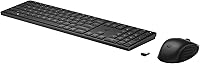
The HP 650 Wireless Keyboard & Mouse Combo sits comfortably in the mid-range sweet spot — practical enough for daily office work, polished enough to feel like a deliberate choice rather than an afterthought. It's a full-size setup with a numpad, low-profile keys, and an ambidextrous mouse, all connected through a single USB dongle. Plug it in and it works across Windows, macOS, and ChromeOS without any driver drama. Worth noting: more than 60% of the plastics used are post-consumer recycled materials, which is a quiet but meaningful design decision for buyers who care about that sort of thing.
Features & Benefits
The low-profile 2mm keys are the first thing you notice during a long typing session — they require less finger travel than standard keyboards, which reduces fatigue noticeably over hours of use. The keyboard's tilt legs let you adjust the angle to your preference, a small detail that actually matters for wrist comfort. On the mouse side, the DPI is adjustable up to 4K, and the multi-surface sensor handles most desk materials reliably, marble included. If you lean on shortcuts, the HP Accessory Center software lets you remap 20+ keys to fit your workflow — though setting it up does take a few minutes of patience.
Best For
This wireless combo makes the most sense for home office workers and students who want a tidy, cable-free desk without spending heavily on peripherals. The cross-platform compatibility is a genuine plus for anyone who bounces between a Mac at home and a Windows PC at work — no reconfiguring needed. The quiet key action is also worth highlighting for people working in shared spaces, open offices, or late-night sessions where noise is a concern. And if battery anxiety is something that bugs you, the extended battery life — over 20 months on the keyboard alone — genuinely removes that variable from your daily routine.
User Feedback
Most buyers who pick up this keyboard-and-mouse bundle come away impressed by one thing above all: battery life. The advertised figures hold up in practice, according to consistent reports — a rare thing with peripherals. The wireless range is equally well-regarded, with few complaints about dropouts or lag. Where things get more mixed is the mouse — some users find it slightly small for larger hands, and the scroll wheel feels average rather than premium. The HP Accessory Center software also draws occasional grumbles; it works, but the setup process is not intuitive. The recycled plastic construction looks fine on a desk but does not feel as substantial as it might at a higher price point.
Pros
- Battery life consistently lives up to the advertised figures — a rare and genuinely appreciated quality.
- Single USB dongle connects both devices instantly, with no pairing process or driver installation required.
- Works out of the box on Windows, macOS, and ChromeOS without any reconfiguration.
- Left-handed users get a properly ambidextrous mouse, which remains uncommon at this price tier.
- Low-profile keys reduce finger fatigue noticeably during long writing or data-entry sessions.
- The quiet key action is well-suited for shared offices, libraries, and home environments with thin walls.
- Adjustable DPI on the mouse gives enough range to switch between detailed document work and faster navigation.
- The HP 650 set uses over 60% post-consumer recycled plastics — a verifiable sustainability commitment, not just a label.
- Multi-surface mouse tracking handles most real desk materials reliably, including textured and non-standard surfaces.
- At its price point, the combination of wireless reliability and cross-platform support is genuinely hard to beat.
Cons
- The mouse feels small in the hand for users with larger palm sizes, leading to faster fatigue.
- Scroll wheel feedback is underwhelming — it lacks the resistance and precision many buyers expect.
- HP Accessory Center software setup is unintuitive and has been reported to lose saved macros after restarts.
- Programmable key customization does not extend to ChromeOS, limiting a headline feature for Chromebook users.
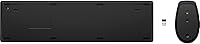
- The USB dongle has no storage slot in either device, making it easy to misplace and difficult to replace.
- The mouse casing feels noticeably hollow when gripped firmly, which affects perceived build quality.
- Key travel depth will disappoint anyone accustomed to tactile or mechanical keyboard feedback.
- In dense wireless environments, occasional micro-dropouts have been reported — rare but worth noting for sensitive workflows.
- The companion software feels like it was developed as an afterthought rather than a polished productivity tool.
- Chrome OS compatibility is described as limited by several buyers — basic functions work, but the experience is incomplete.
Ratings
The HP 650 Wireless Keyboard & Mouse Combo has been scored by our AI system after analyzing thousands of verified buyer reviews from global markets, with spam, bot-generated, and incentivized submissions actively filtered out. The result is an honest, data-driven snapshot that reflects what real users experienced — the genuine strengths and the friction points that showed up repeatedly across different use cases and regions.
Battery Life
Wireless Stability
Typing Experience
Mouse Comfort & Usability
Build Quality
Programmable Keys & Software
Multi-Surface Mouse Tracking
Cross-Platform Compatibility
Ease of Setup
Value for Money
Ergonomics & Posture Support
Noise Level
Desk Footprint & Portability
Eco & Sustainability Credentials
Suitable for:
The HP 650 Wireless Keyboard & Mouse Combo is a strong match for home office workers, students, and anyone who spends long stretches at a desk and wants a reliable, no-fuss setup without paying a premium price. If you regularly switch between a Windows PC and a MacBook — or manage a ChromeOS device on the side — the plug-and-play compatibility removes a genuine daily annoyance. The quiet key action makes it a natural fit for shared living situations, open offices, or late-night work sessions where keeping noise down matters. Left-handed users also benefit directly from the ambidextrous mouse design, which is still uncommon at this price point. And for anyone who has been burned by dead batteries at inconvenient moments, the exceptionally long battery life on both devices offers real peace of mind that adds up over months of use.
Not suitable for:
The HP 650 Wireless Keyboard & Mouse Combo is not the right call for users who prioritize a premium tactile typing feel — those coming from mechanical keyboards will likely find the low-profile keys underwhelming in terms of feedback and depth. If you have larger hands or rely on your mouse for hours of continuous use, the relatively compact mouse body can cause fatigue that builds up faster than you might expect. Power users who want to fully leverage the programmable keys should know that the HP Accessory Center software has a learning curve and does not extend its customization features to ChromeOS devices at all. Gamers or anyone requiring a high-performance, fast-response peripheral setup should also look elsewhere — this keyboard-and-mouse bundle is built for productivity, not precision gaming. Finally, buyers who place heavy value on a premium-feeling build may find the lightweight, recycled-plastic construction less satisfying than competing options at a comparable price.
Specifications
- Connectivity: Both keyboard and mouse connect to a single 2.4GHz USB nano-receiver, eliminating the need for separate dongles or Bluetooth pairing.
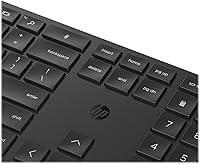
- Keyboard Layout: Full-size layout includes a dedicated numeric keypad, function row, and standard navigation cluster for complete desktop-style input.
- Key Type: Low-profile keycaps with 2mm travel distance are designed to reduce finger fatigue during extended typing sessions.
- Programmable Keys: More than 20 keys can be remapped or assigned custom functions using the HP Accessory Center software on compatible operating systems.
- Mouse DPI: The mouse sensor offers adjustable DPI up to 4K, allowing users to fine-tune cursor speed and sensitivity for different tasks.
- Mouse Design: Contoured ambidextrous shape accommodates both right- and left-handed users, with 3 buttons including 2 that are programmable.
- Keyboard Battery: The keyboard runs on 2 AAA batteries with a rated lifespan of 20+ months under typical daily use conditions.
- Mouse Battery: The mouse also runs on 2 AAA batteries and is rated for 24+ months of battery life under normal usage patterns.
- OS Compatibility: The combo works out of the box with Windows, macOS, and ChromeOS, though full programmable key support is limited to Windows and macOS.
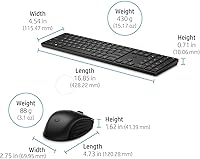
- Keyboard Dimensions: The keyboard measures 16.85 x 4.54 x 0.71 inches, making it a standard full-size footprint suitable for most desktop workspaces.
- Weight: The combined weight of the keyboard and mouse is approximately 1.8 pounds, keeping the setup lightweight and easy to reposition.
- Recycled Content: Over 60% of the plastics used in construction come from post-consumer recycled materials, verified by HP's product documentation.
- Surface Tracking: The mouse optical sensor is rated for use on virtually any surface, including marble, wood, fabric, and most non-reflective laminates.
- Wireless Range: The 2.4GHz connection supports a reliable operating range of up to approximately 10 meters under typical indoor conditions.
- Customization Software: HP Accessory Center is the companion app for configuring programmable keys and mouse DPI settings, available for download on Windows and macOS.
- Model Number: The official HP model number is 4R013AA#ABL, and the product carries the ASIN B09Y14VL4N on major retail platforms.
- Tilt Adjustment: The keyboard includes flip-out legs that allow two-position height adjustment for a more comfortable typing angle.
- Manufacturer: This keyboard-and-mouse bundle is designed and sold directly by HP, a globally recognized technology brand headquartered in Palo Alto, California.
Related Reviews

HP 18H24AA Wireless Keyboard and Mouse Combo

Arteck HW192 Wireless Keyboard and Mouse Combo

JOYACCESS Wireless Keyboard and Mouse Combo

Mobifice Retro Wireless Keyboard and Mouse Combo

MOFII Wireless Keyboard and Mouse Combo

KNOWSQT Wireless Keyboard and Mouse Combo

FOPETT Retro Wireless Keyboard and Mouse Combo

Trueque Wireless Keyboard and Mouse Combo

Harburfine Wireless Keyboard and Mouse Combo
