
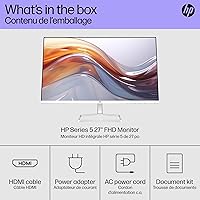



Overview

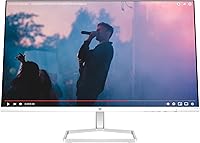
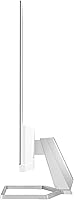
The HP Series 5 27-inch FHD Monitor landed in 2024 as HP's answer to the growing demand for a clean, capable everyday screen that doesn't cost a fortune. What sets this HP monitor apart visually is its white finish and slim profile — a refreshing departure from the sea of black-bezeled displays cluttering most desks. At its mid-range price point, it targets home office workers and casual users, not video editors or competitive gamers. One honest caveat worth stating upfront: running 1080p across a 27-inch panel means pixel density is modest. Text and images look fine, but if you're coming from a higher-resolution screen, you may notice the difference.

Features & Benefits

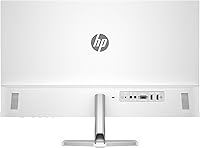
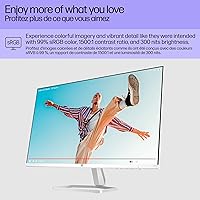
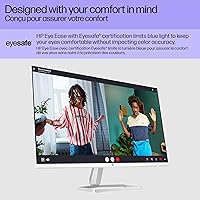
The IPS panel is the right choice here — 178-degree viewing angles keep colors consistent whether you're sitting straight on or glancing from across the room, which matters in shared workspaces. The 99% sRGB coverage handles casual color work well; photo browsing and light editing look accurate without manual calibration. The 1500:1 contrast ratio is a genuine surprise for an IPS display at this tier, delivering noticeably deeper blacks and better shadow detail during movies or dark content. For anyone logging six-plus hours daily, the Eyesafe certification pays off in reduced eye fatigue — a practical comfort feature, not just a marketing badge. The 100 Hz refresh adds smooth scrolling to everyday use. Cable management is handled tidily at the back — modest, but worth having.

Best For

This screen fits comfortably into a few specific setups. Remote workers who spend long days writing, video conferencing, or managing spreadsheets will get solid value here — the IPS accuracy and eye care features make the workday easier. Students looking for a good-looking, reliable display without stretching their budget will find this HP monitor hard to beat at its size. The thin bezel and white design also make it a natural fit for dual-monitor configurations, where visual consistency between screens actually matters. Casual streamers and media watchers will appreciate the color accuracy on Netflix or YouTube. That said, anyone moving from a QHD or 4K display may find the sharpness underwhelming — it's better suited to those upgrading from older or lower-quality panels.

User Feedback

With over 700 ratings and a 4.6-star average, the Series 5 27-inch has earned its score through real volume, not a handful of early reviews. Buyers frequently praise the out-of-the-box color accuracy, the clean white aesthetic, and how quickly it gets up and running. The Eyesafe feature draws consistent positive mentions from users who work long hours and notice less end-of-day eye strain. On the flip side, two complaints surface regularly: the stand offers tilt adjustment only — no height raise, no swivel — which limits ergonomic flexibility. Users coming from sharper QHD screens also flag that 1080p at 27 inches can look slightly soft up close. Neither issue is a dealbreaker for the target audience, but both are worth knowing before you buy.

Pros

  • IPS panel delivers consistent, accurate colors from virtually any angle — a genuine everyday advantage.
  • 99% sRGB coverage means colors look natural and well-balanced right out of the box.
  • The 1500:1 contrast ratio is unusually strong for an IPS display, giving darker scenes real depth.
  • Eyesafe certification provides meaningful eye comfort for users putting in long hours at the desk.
  • The white finish and slim bezel stand out in a category dominated by generic black monitors.
  • 100 Hz refresh rate adds noticeably smoother motion during scrolling and general desktop use.
  • Setup is straightforward — most buyers report being up and running in minutes.
  • Integrated cable management keeps the back of the desk tidy without requiring extra accessories.
  • A 4.6-star average across 700-plus reviews signals consistent real-world satisfaction.
  • The matte anti-glare coating handles ambient light well, reducing distracting reflections.

Cons

  • At 1080p on a 27-inch screen, pixel density is low enough that sharpness-conscious users will notice.
  • The stand only tilts — no height, swivel, or pivot adjustment, which limits ergonomic flexibility.
  • Users upgrading from QHD or 4K displays may find the step down in clarity harder to accept than expected.
  • 300 nits of brightness can feel limiting in very bright rooms or near sun-facing windows.
  • No USB-C input, which increasingly matters as more laptops drop traditional ports.
  • The white finish, while attractive, can show smudges and dust more readily than darker alternatives.
  • Not a strong fit for creative professionals who need wide color gamut coverage beyond sRGB.
  • The 100 Hz refresh rate offers only a marginal bump over standard 60 Hz panels for most users.

Ratings

The scores below reflect AI analysis of verified global buyer reviews for the HP Series 5 27-inch FHD Monitor, with spam, incentivized, and bot-flagged submissions actively filtered out to ensure accuracy. Each category is scored to transparently capture what real users love and where frustrations emerge — no category is inflated to flatter the product. Both standout strengths and genuine pain points are represented exactly as buyers describe them.

Image Quality
78%
22%
Colors look natural and well-balanced straight out of the box, with the IPS panel and 99% sRGB coverage earning consistent praise from users doing photo browsing, video calls, and everyday document work. The 1500:1 contrast ratio adds visible depth to darker scenes in a way most IPS panels at this price simply do not deliver.
The 1080p resolution across a 27-inch panel is a recurring complaint from buyers who previously owned QHD or higher-resolution screens — fine text can look slightly soft, particularly at normal desk distances. Users who sit close to their monitor tend to notice this more acutely than those farther back.
Pixel Density
61%
39%
For users coming from older 1080p displays or budget TN panels, the image still represents a clear step up in color accuracy and viewing angle consistency. Casual media consumption — streaming shows, browsing, video conferencing — remains comfortable at this resolution for the majority of buyers.
At roughly 82 PPI, sharpness-sensitive users will notice the limitation, especially when reading small fonts or viewing detailed graphics up close. This is the single most frequently mentioned concern across reviews, and buyers who have used QHD or 4K displays in the past are the most likely to find it disappointing.
Eye Comfort
88%
The Eyesafe certification and low blue light output draw some of the most enthusiastic feedback in the review pool, particularly from users who log six or more hours daily in front of a screen. Many report noticeably less eye fatigue and headache frequency after switching to this HP monitor — concrete, practical improvements that matter to its target audience.
A small number of users note that the default color temperature can feel slightly cool at first, and adjusting settings to personal preference takes some initial trial and error. Those who prefer a warmer display right out of the box may need to spend time in the OSD menu dialing it in.
Design & Aesthetics
86%
The white finish and slim profile consistently receive compliments in reviews — buyers frequently note how different it looks compared to the generic black monitors crowding most desks, and how well it fits minimalist or coordinated home office setups. The thin bezel is a recurring positive mention for users building dual-monitor configurations.
The white surface attracts dust and smudges more visibly than darker finishes, which some users find requires more frequent cleaning to maintain the clean look they bought it for. A handful of reviewers also note that the white plastic can feel slightly less premium to the touch than the visual impression it creates from a distance.
Ergonomics & Stand
53%
47%
The stand is straightforward to attach and the monitor ships assembled enough that most users are up and running quickly without frustration. Tilt adjustment covers the basics for users who sit at a consistent desk height and don't share the screen with others.
The lack of height adjustment is the most recurring ergonomic complaint in user reviews — buyers who care about posture or who share the display across household members find it a genuine daily inconvenience. There is no swivel or pivot either, which limits flexibility significantly compared to competing monitors in the same price bracket.
Refresh Rate & Motion
74%
26%
The 100 Hz refresh rate delivers a tangible improvement over standard 60 Hz panels for everyday use — scrolling through web pages and documents feels noticeably smoother, and video playback benefits from the added fluidity. Users who multitask across several windows throughout the workday tend to appreciate this more than they expect.
For anyone hoping this translates to a competitive gaming experience, the improvement is modest at best. The monitor lacks adaptive sync support and the ultra-low input lag that dedicated gaming screens provide, so while it handles casual play adequately, it falls short for fast-paced titles where split-second response times matter.
Brightness & Glare
69%
31%
The matte anti-glare coating handles office lighting and overhead fluorescents well, which is genuinely useful in typical home and workplace environments. Users in rooms with controlled lighting report no significant issues with visibility or screen wash-out during normal use.
At 300 nits, the display can struggle in very bright environments — users who work near windows during the day, or in sunlit rooms, occasionally report the image looking washed out. Boosting brightness to compensate also slightly impacts the richness of the contrast, which is noticeable in darker content.
Color Accuracy
83%
Out-of-the-box color calibration is consistently praised, with buyers noting that images and videos look natural without any immediate need for manual adjustments. The 99% sRGB coverage makes this screen a reliable choice for casual photo editing, social media content viewing, and any task where believable color matters.
While 99% sRGB is solid, it does not cover wider gamuts like DCI-P3 or Adobe RGB, which limits its usefulness for professional color-grading or print-oriented design work. Users expecting accurate color outside the sRGB space will find this screen falls short of their requirements.
Viewing Angles
84%
The 178-degree horizontal and vertical viewing angles live up to what the IPS specification promises — colors and contrast hold up well when viewed from the sides, which is genuinely useful in collaborative setups or when colleagues or family members are watching alongside. Users frequently note this as a step up from older TN panels they replaced.
At extreme off-axis angles, there is a subtle brightness drop that is typical of IPS technology — it does not degrade dramatically, but it is noticeable if you are deliberately viewing from a steep position. This is unlikely to matter for most buyers but is worth acknowledging for completeness.
Setup & Installation
91%
Ease of setup is among the most consistently praised aspects across verified reviews — buyers describe the unboxing and assembly process as fast and intuitive, with most going from box to functional display in under ten minutes. The included documentation is clear enough that even less tech-savvy users feel confident during installation.
A small number of users report minor confusion with cable routing through the integrated containment system, particularly if they are connecting multiple cables simultaneously. It is a minor friction point that does not affect the final result but can add a few extra minutes for first-time users.
Build Quality
76%
24%
The monitor feels sturdy enough for everyday desktop use, and the slim chassis does not flex or creak under normal handling. Users report that the overall build feels appropriate and reliable for a mid-range display, with no widespread reports of structural issues or defects over time.
The plastic construction, while acceptable, does not feel premium when touched — the back panel and stand in particular remind buyers that this is a mid-range product rather than a high-end one. A few users also note that the white plastic shows minor scuff marks more readily than expected after a few months of use.
Cable Management
79%
21%
The integrated cable containment system at the back of the stand is a quiet but appreciated feature — users who care about desk organization mention it positively as a small but meaningful convenience that keeps things tidy without requiring separate cable clips or ties.
The routing channel accommodates a limited number of cables comfortably, and users with multiple connections — power, HDMI, and audio simultaneously — sometimes find the space tight. It functions as intended for basic setups but is less practical for users with more complex cable configurations.
Value for Money
82%
18%
For home office workers and students who need a reliable everyday display with strong color and genuine eye comfort features, the Series 5 27-inch delivers a compelling package relative to its mid-range price. The Eyesafe certification, IPS panel, and above-average contrast ratio together represent a meaningful set of features for the asking price.
Buyers who prioritize sharpness or ergonomic flexibility may find the value proposition weaker — the pixel density limitation and fixed-height stand are real compromises that competing monitors in the same price range sometimes handle better. It is strong value for its intended audience, but less so for buyers whose needs fall outside that group.

Suitable for:

The HP Series 5 27-inch FHD Monitor is built for the kind of buyer who wants a dependable, good-looking screen for daily use without overcomplicating the decision. Remote workers and home office setups will find it a strong fit — the IPS panel keeps colors consistent across wide angles, and the Eyesafe certification genuinely helps reduce fatigue during long, back-to-back screen days. Students furnishing a dorm or first apartment get a lot of desk presence and clean aesthetics without a painful price tag. It also works well as a second display in a dual-monitor setup, where the slim white profile and thin bezel create a cohesive, polished look. Casual streamers and anyone who enjoys watching movies or shows on a larger screen will appreciate the accurate color reproduction and the better-than-average contrast for an IPS panel at this tier.

Not suitable for:

The HP Series 5 27-inch FHD Monitor is not the right pick for buyers who prioritize sharpness above everything else. At 1080p across a 27-inch panel, the pixel density sits around 82 PPI — noticeable to anyone already accustomed to a QHD or 4K display, especially for fine text or detailed image work. Graphic designers, photographers, or video editors who need high color fidelity beyond casual sRGB coverage should look at panels with wider gamuts or higher native resolutions. The stand is a real ergonomic limitation too — it tilts but offers no height adjustment, which matters if you're particular about your posture setup or share the monitor across users of different heights. Competitive gamers should also look elsewhere: 100 Hz is a modest improvement over 60 Hz, but the monitor lacks the low input lag and high refresh rates that dedicated gaming displays offer.

Specifications

  • Screen Size: The display measures 27 inches diagonally, offering a generous workspace footprint for multitasking and media consumption.
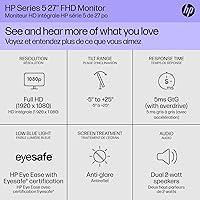
  • Resolution: Native resolution is 1920 x 1080 (Full HD), delivering standard 1080p image clarity across the full panel.
  • Panel Type: Uses an IPS (In-Plane Switching) panel, which provides consistent color reproduction and wide viewing angles compared to TN alternatives.
  • Refresh Rate: Supports a 100 Hz refresh rate, offering moderately smoother motion than standard 60 Hz displays during scrolling and video playback.
  • Brightness: Peak brightness is rated at 300 nits, suitable for indoor environments with controlled ambient lighting.
  • Contrast Ratio: Static contrast ratio is 1500:1, which is notably above average for IPS panels and improves perceived depth in darker content.
  • Color Gamut: Covers 99% of the sRGB color space, making it appropriate for general-purpose color work and accurate everyday content viewing.
  • Viewing Angles: Rated at 178 degrees both horizontally and vertically, meaning image quality remains consistent from nearly any position in front of the screen.
  • Screen Surface: Matte anti-glare coating reduces reflections from ambient light sources, improving usability in typical office or home environments.
  • Eye Care: Carries Eyesafe certification and features low blue light output, designed to reduce eye strain during extended daily use sessions.
  • Aspect Ratio: Standard 16:9 widescreen aspect ratio, compatible with the vast majority of video content, applications, and operating systems.
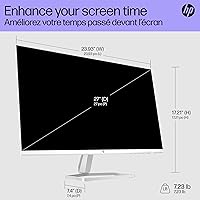
  • Dimensions: Physical dimensions without the stand measure approximately 23.93 x 14.01 x 1.35 inches, reflecting a slim and space-efficient profile.
  • Weight: The unit weighs 7.23 pounds, making it manageable for a single person to position or reposition on a desk without assistance.
  • Stand Adjustment: The included stand supports tilt adjustment only; it does not offer height, swivel, or pivot movement.
  • Cable Management: An integrated cable containment system is built into the stand to route and conceal cables, keeping the desk area tidier.
  • Color Finish: Available in white, which distinguishes it from most monitors in this category and suits minimalist or coordinated desk setups.
  • Power Source: Powered via a standard AC connection; no external power brick is required for most regional configurations.
  • Model Number: Official model identifier is 94F48AA#ABA, also referenced under the product line designation 527sa.
  • Release Year: This monitor was released in 2024 as part of HP's Series 5 lineup, positioned as a mid-range everyday display.
  • VESA Mounting: The monitor is compatible with standard VESA mounting patterns, allowing use with third-party arms or wall mounts if the included stand is insufficient.

Related Reviews
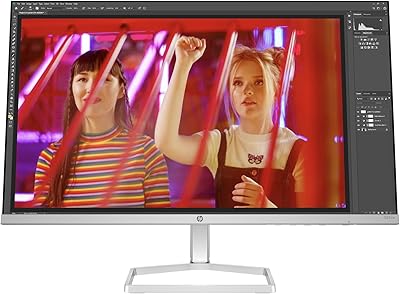
HP Series 5 524sw 23.8-inch FHD Monitor
76%
88%
Image Clarity
91%
Eye Comfort
79%
Color Accuracy
67%
Brightness & Visibility
83%
Refresh Rate & Motion
More
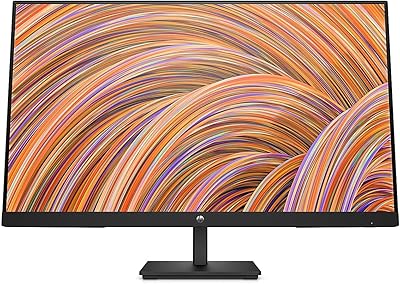
HP V27i 27-inch FHD Monitor
85%
92%
Display Quality
89%
Eye Comfort
91%
Value for Money
85%
Build Quality
78%
Ergonomics
More
AOC 27B3HA2 27-Inch FHD Monitor
82%
92%
Value for Money
88%
Display Quality
85%
Matte Finish Performance
90%
Ease of Setup
84%
Build Quality
More
HP EliteDisplay E273 27-Inch Monitor
86%
88%
Display Quality
91%
Ergonomics & Adjustability
84%
Connectivity Options
86%
Build Quality
89%
Energy Efficiency
More
Samsung SR35 27-Inch FHD Monitor
86%
89%
Display Quality
92%
Eye Comfort Features
80%
Build Quality
94%
Ease of Setup
91%
Value for Money
More
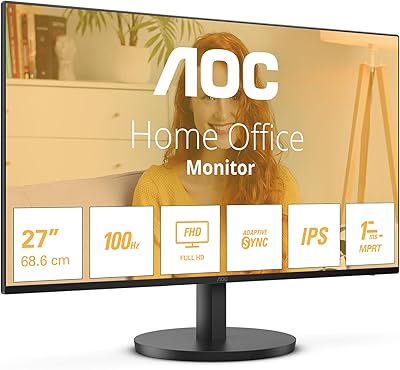
Dell SE2722HX 27-inch FHD Monitor
84%
91%
Value for Money
87%
Display Quality
83%
Build Quality
88%
Ease of Setup
85%
Ergonomics & Comfort
More
BenQ GW2791 27-inch FHD IPS Monitor
84%
89%
Display Quality
91%
Eye-Care Features
85%
Design & Build
88%
Ease of Setup
90%
Color Accuracy
More
Samsung 27-Inch 4K Monitor S8 Series
85%
91%
Display Quality
88%
Ergonomics and Comfort
92%
Color Accuracy
89%
USB-C Connectivity
65%
Brightness in Bright Rooms
More
HP V241ib 23.8-inch FHD Monitor
85%
91%
Display Clarity & Color Accuracy
88%
Ergonomics & Adjustability
92%
Value for Money
70%
Setup & Installation
90%
Viewing Angles
More
Samsung FT45 24-Inch FHD IPS Monitor
80%
91%
Ergonomics & Stand
84%
Image Clarity
72%
Color Accuracy
86%
Eye Comfort
83%
Connectivity
More

FAQ

This is probably the most important question to ask before buying. At 27 inches, 1080p works out to around 82 pixels per inch, which is noticeably lower than what you'd get on a 24-inch 1080p screen or a 27-inch QHD panel. For everyday tasks like browsing, documents, and video calls, most people find it perfectly acceptable. But if you're coming from a sharper display or you sit very close to your monitor, you may find text looks slightly soft. It's worth being honest with yourself about how sensitive you are to pixel density before committing.

The included stand only tilts — there's no height adjustment, swivel, or pivot. For some users that's fine, but if you're particular about ergonomics or you share the monitor with someone of a different height, it can feel limiting. The good news is the monitor is VESA-compatible, so you can swap in a third-party monitor arm if you need more flexibility without much hassle.

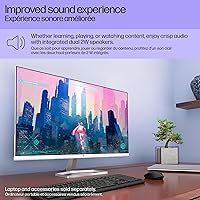
Yes, this model includes built-in speakers. They're adequate for casual use like video calls or background audio, but don't expect strong bass or high volume — for music or immersive movie sound, external speakers or headphones will serve you much better.

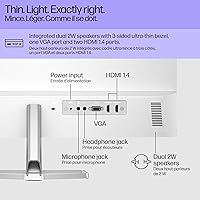
The Series 5 27-inch includes HDMI and DisplayPort inputs for video connections. There is no USB-C port, which is worth noting if your laptop relies on USB-C as its primary output — you may need an adapter or a dock. Always double-check your device's available outputs before assuming it will connect directly.

It's fine for casual gaming — the 100 Hz refresh rate keeps motion reasonably smooth, and the IPS panel provides good color. However, this screen was not designed with competitive gaming in mind. It lacks features like a very low input lag rating, adaptive sync (G-Sync or FreeSync), or the high refresh rates that dedicated gaming monitors offer. If gaming is your primary use case, there are better-suited options in a similar price range.

Eyesafe certification means the display has been independently tested and verified to reduce high-energy blue light emissions without making colors look unnatural or overly warm. In practical terms, users who spend six or more hours a day in front of this screen tend to report less end-of-day eye fatigue compared to uncertified displays. It's not magic, but it's a genuinely useful feature for anyone with a demanding screen-heavy work schedule.

White finishes do tend to show dust and fingerprints more visibly than black surfaces, particularly on the stand and back panel. A quick wipe with a microfiber cloth keeps it looking clean, but if you're in a dusty environment or tend not to clean your desk setup often, just be aware that the white will require a bit more maintenance to stay looking sharp.

It actually works quite well in that role. The thin bezel keeps the gap between screens minimal, and the white finish creates a cohesive look if you pair two of them side by side. The IPS panel ensures both screens will display colors consistently from your normal sitting position, which matters when you're comparing content across two displays.

Yes, the monitor supports standard VESA mounting, which means you can remove the included stand and attach a compatible wall mount or desk arm. This is a practical upgrade if you want height or swivel adjustment that the original stand doesn't offer. Just confirm the VESA pattern size (75x75mm or 100x100mm) with HP's official spec sheet before purchasing a mount.

The anti-glare matte coating does a solid job of diffusing reflections from windows and overhead lighting, which is one area where this HP monitor performs better than glossy-screened alternatives. That said, at 300 nits of brightness, very bright rooms or direct sunlight behind you can still wash out the image somewhat. It's best suited for indoor environments with reasonable control over ambient light.

Where to Buy