Overview

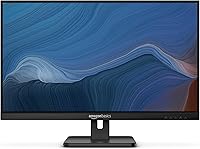
The Amazon Basics 27E2UA 27-inch IPS Monitor is Amazon's entry into the budget display market, built on AOC panel technology and priced for everyday home and office computing. It ships complete with a stand, HDMI cable, and power cord — no scrambling for extras on setup day. This is a straightforward screen competing on reliability and value rather than headline specs. If you need a large display for documents, video calls, and general browsing without overspending, it covers the essentials well. Creative professionals and serious gamers will want to look at more specialized options.
Features & Benefits

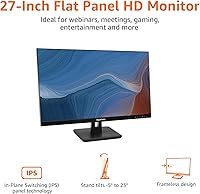
The IPS panel is the real selling point here. At this price tier, most budget displays use TN panels, which look washed out from any angle that isn't dead-center. This IPS display holds color accuracy whether you're viewing from the side, above, or below — a genuine advantage for shared workspaces. The 75Hz refresh rate is a modest bump over standard 60Hz, making scrolling and cursor movement feel slightly smoother; don't expect it to replace a proper gaming monitor, but it's a welcome addition. HDMI, DisplayPort, and VGA inputs cover virtually every device type, including older machines. VESA compatibility means you can swap the included stand for a monitor arm later.

Best For

This 27-inch Amazon Basics monitor is a strong fit for remote workers who need screen space without a big outlay. Students setting up a dorm desk or home study area will get real mileage from the 27-inch size for multitasking between browser tabs, notes, and video lectures. It's also a practical upgrade for anyone still running a 21- or 22-inch panel — the extra screen room makes a noticeable difference in daily workflow. The VGA port is a thoughtful inclusion for people connecting older desktops or laptops that lack modern outputs. Setup is simple enough to be genuinely plug-and-play for most configurations.

User Feedback

With a 4.6-star rating across nearly 1,500 reviews, the 27E2UA has clearly landed well with buyers. The most consistent praise is for image clarity and the sheer amount of screen space for the cost — people repeatedly mention that colors look better than expected at this price point. That said, the stand draws regular complaints: it only tilts, no height adjustment, and some buyers find it less sturdy than they'd like. The built-in speakers handle a video call or light background audio fine, but they're thin-sounding and lack bass. Encouragingly, a number of longer-term owners report that build quality holds up solidly with regular use.

Pros

  • IPS panel delivers noticeably better color and viewing angles than most TN displays at this price range.
  • 27-inch screen size offers generous workspace for multitasking, video calls, and everyday computing.
  • HDMI, DisplayPort, and VGA inputs cover both modern and legacy devices without needing an adapter.
  • VESA 100x100mm compatibility makes upgrading to a monitor arm straightforward and inexpensive.
  • Setup is genuinely fast — stand, cable, and power cord are all included in the box.
  • 75Hz refresh rate makes scrolling and general navigation feel smoother than a standard 60Hz screen.
  • Energy Star certification keeps power draw low during long all-day work sessions.
  • AOC-sourced panel technology provides a credible reliability foundation behind the Amazon Basics label.
  • Long-term owners consistently report stable performance with no dead pixels or panel degradation after extended use.
  • Flat matte surface reduces glare from overhead office lighting during daytime use.

Cons

  • Stand only tilts — no height, swivel, or pivot adjustment of any kind.
  • No USB hub means the 27E2UA adds zero port expansion to your desk setup.
  • Built-in speakers lack bass and volume, making them poor for anything beyond low-volume background audio.
  • 1080p resolution on a 27-inch panel results in lower pixel density than smaller screens at the same resolution.
  • No DisplayPort cable is included despite the port being present, which surprises buyers on setup day.
  • On-screen menu is sparse with limited preset modes and no clearly labeled low-blue-light setting.
  • Motion blur in fast-paced games is noticeable, and there is no adaptive sync to address tearing.
  • Stand base feels lightweight and slightly unstable when nudged, particularly on vibration-prone desks.
  • Backlight consistency varies between units — some buyers report mild corner bleed or IPS glow in dark content.
  • Maximum brightness falls short in rooms with strong ambient light or direct sunlight nearby.

Ratings

The Amazon Basics 27E2UA 27-inch IPS Monitor earned its scores through AI analysis of thousands of verified global buyer reviews, with spam, bot-submitted, and incentivized feedback actively filtered out before scoring. Ratings reflect both the genuine strengths that keep buyers satisfied long after unboxing and the recurring frustrations that surface in honest, long-term use. The result is a transparent picture of where this IPS display genuinely delivers and where it asks for compromise.
Value for Money
92%
Buyers consistently flag this as one of the strongest budget IPS monitors available at its price point, especially given the 27-inch size and AOC-sourced panel. Most reviewers say they expected less and were pleasantly surprised by what arrived in the box.
A small segment of buyers feel the lack of height adjustment and USB hub slightly undermines the overall value calculation, particularly when compared to similarly priced competitors that include at least one of those features.
Image & Color Quality
84%
The IPS panel produces noticeably better color accuracy than the TN displays many buyers were upgrading from, with whites looking clean and colors staying consistent whether viewed straight-on or from a side angle at a shared desk.
A portion of buyers note that out-of-box calibration skews slightly cool, requiring manual adjustment for warmer or more natural tones. It is not a display for color-critical work like photo editing or print design.
Viewing Angles
88%
Wide viewing angles are one of the most praised aspects of this IPS display, with buyers in multi-person home offices noting that colleagues or family members can view the screen from the side without color shifting or washout.
At extreme off-axis angles beyond roughly 45 degrees, slight brightness falloff is noticeable, though this is typical across budget IPS panels and is unlikely to affect most real-world desk setups.
Ergonomics & Stand
51%
49%
The included stand assembles without tools and holds the monitor firmly in place for tilt-only adjustments, which is adequate for a single fixed workstation where the viewing height is already comfortable.
This is the most common complaint across reviews. The stand offers only tilt adjustment — no height, swivel, or pivot — which frustrates buyers who sit at non-standard desk heights or prefer a standing desk setup. Several reviewers note the stand feels plasticky under lateral pressure.
Connectivity & Port Selection
87%
Having HDMI, DisplayPort, and VGA on a budget monitor is a genuine differentiator. Buyers with older towers connect via VGA while newer laptops or desktops use HDMI or DisplayPort, making the 27E2UA flexible across mixed hardware environments.
There is no USB hub of any kind, which buyers using it as a central desk hub find frustrating. In a world where most competing monitors at higher price tiers offer at least two USB-A passthrough ports, this omission feels noticeable.
Setup & Ease of Use
91%
Nearly every reviewer mentions how fast and painless initial setup is — stand clicks together, cable is included, and the monitor is recognized immediately by Windows and macOS without driver installation. Great for less tech-savvy buyers.
The on-screen display menu is functional but sparse, with limited preset modes and no dedicated reading or low-blue-light mode labeled clearly. Finding brightness and contrast controls takes a few button presses to figure out initially.
Refresh Rate & Motion Smoothness
69%
31%
The 75Hz refresh rate gives everyday scrolling, document navigation, and video streaming a slightly smoother feel compared to a standard 60Hz panel — a small but real improvement that general users appreciate during long work sessions.
Buyers who expected gaming-grade smoothness were disappointed. Fast-paced games reveal motion blur, and with no adaptive sync technology mentioned, screen tearing can occur in games. This is not a display designed with gaming performance in mind.
Built-in Speakers
47%
53%
For video calls, brief YouTube clips, or background audio at low volume, the built-in speakers are functional enough to avoid needing a separate speaker for basic use cases. Buyers appreciate having the option even if they rarely rely on it.
Audio quality is thin, bass is almost entirely absent, and volume headroom is limited. Most buyers using this as a primary work monitor ended up using headphones or a separate speaker within a few weeks of setup.
Build Quality & Materials
73%
27%
The monitor chassis itself feels reasonably solid, with no significant flex in the panel bezel during adjustment. Long-term owners report that units remain free of dead pixels and backlight issues after a year or more of daily use.
The plastic finish attracts fingerprints and dust visibly, and the stand base feels noticeably lightweight compared to the panel itself. It does not feel like a premium desk object, though it functions reliably within its class.
Brightness & Glare Handling
74%
26%
In typical indoor office lighting, the display gets bright enough to remain comfortable throughout the workday. The flat matte panel surface reduces glare from overhead lights compared to glossy alternatives.
In rooms with strong natural side lighting or direct sunlight nearby, the panel can look dim and washed out at its maximum brightness setting. It is not ideal for bright sunroom or south-facing window setups.
Wall Mount & VESA Compatibility
83%
The standard 100x100mm VESA pattern makes it compatible with a wide range of third-party monitor arms and wall mounts, which is a practical upgrade path for buyers who want to reclaim desk space or improve ergonomics later.
The included stand must be fully removed before mounting, and some buyers report the rear VESA plate area has limited clearance for certain arm attachment mechanisms, requiring a quick compatibility check before purchasing an arm.
Energy Efficiency
86%
Energy Star certification means this display draws meaningfully less power than non-certified alternatives, which adds up over the course of a full work-from-home week. Buyers running multiple monitors especially appreciate the lower energy footprint.
There is no automatic brightness adjustment based on ambient light, so buyers who forget to manually dim the display during idle periods may not realize all available energy savings without forming a manual habit.
Packaging & Included Accessories
79%
21%
The box includes an HDMI cable, power cord, and adjustable stand — meaning most buyers can be up and running without an extra trip to buy cables. Reviewers found the packaging protective and the unboxing experience tidy.
No DisplayPort cable is included despite the port being present, which surprises buyers who specifically chose this monitor for its DisplayPort connectivity. A minor but recurring point of friction in first-day setup.
Long-term Reliability
81%
19%
A solid share of reviewers who have owned the 27E2UA for over a year report no dead pixels, backlight bleed issues, or panel degradation, which builds confidence in the AOC-sourced panel’s durability for everyday office use.
A smaller but consistent subset of buyers report unit variance — occasional backlight bleed at corners or mild IPS glow in dark scenes — suggesting quality control is not perfectly uniform across the production run.

Suitable for:

The Amazon Basics 27E2UA 27-inch IPS Monitor is a well-matched pick for remote workers and home office users who need a large, reliable screen without committing to a high-end budget. If you spend most of your day in spreadsheets, documents, video calls, or browser tabs, the 27-inch IPS panel gives you the screen real estate and color consistency to work comfortably for long stretches. Students setting up a first proper desk will find it covers everything from research and writing to streaming lectures, and the plug-and-play setup means no technical headaches on day one. Buyers upgrading from a smaller or aging display will notice an immediate and meaningful improvement in workspace comfort. The inclusion of VGA alongside HDMI and DisplayPort also makes it a practical choice for anyone connecting older hardware that lacks modern outputs, a detail most budget monitors at this size skip entirely.

Not suitable for:

The Amazon Basics 27E2UA 27-inch IPS Monitor is not the right tool for anyone who needs ergonomic flexibility at their desk — the stand tilts and nothing else, so if your chair height or desk surface puts the screen at an uncomfortable level, you are either buying a separate arm or living with neck strain. Graphic designers, photographers, and video editors should look elsewhere, as the 1080p resolution and factory calibration do not meet the color accuracy standards that color-critical work demands. Competitive or enthusiast gamers will also find this display limiting — 75Hz with no adaptive sync and noticeable motion blur in fast scenes is a step below what dedicated gaming monitors at comparable prices now offer. If you are hoping to reduce cable and device clutter through a USB hub built into the monitor, that feature is absent here entirely. Buyers who prioritize a premium-feeling desk setup may find the lightweight plastic stand and budget finish underwhelming compared to similarly sized panels from more established display brands.

Specifications

  • Screen Size: 27-inch flat panel display measured diagonally.
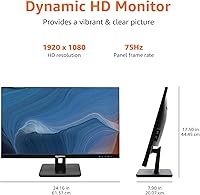
  • Resolution: Full HD 1920x1080 pixel resolution at a 16:9 aspect ratio.
  • Panel Type: In-Plane Switching (IPS) panel sourced from AOC technology for wide-angle color consistency.
  • Refresh Rate: 75Hz maximum refresh rate, providing modest motion smoothness above standard 60Hz panels.
  • Panel Surface: Flat matte screen surface reduces reflections and glare from ambient indoor lighting.
  • Video Inputs: One HDMI port, one DisplayPort, and one VGA port for broad device compatibility.
  • VESA Mount: Standard 100x100mm VESA hole pattern supports most third-party wall mounts and monitor arms.
  • Stand Tilt: Included stand adjusts tilt from -5 degrees (forward) to +20 degrees (backward) only.
  • Built-in Audio: Two integrated speakers provide basic audio output without requiring external peripherals.
  • Energy Rating: Energy Star certified, meeting established efficiency standards to minimize power consumption during extended use.
  • Dimensions: Measures 24.16″ wide, 17.5″ tall, and 7.09″ deep with stand attached.
  • Weight: Complete unit with stand weighs 9.94 pounds.
  • Color & Finish: Matte black plastic housing and stand base throughout.
  • In the Box: Package includes the monitor, adjustable stand, power cord, one HDMI cable, and a printed user manual.
  • Model Number: Manufacturer model designation is 27E2UA, also used as the Amazon Basics series identifier.
  • Panel Brand: Underlying panel and display technology is sourced from AOC, a recognized global display manufacturer.
  • Availability Date: First made available for purchase in November 2021.

Related Reviews
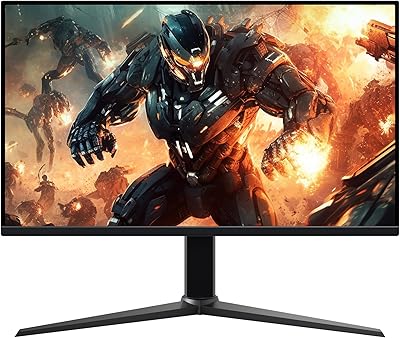
Amazon Basics 27-inch 1080p Gaming Monitor

76%
88%
Value for Money
79%
Display Quality
91%
Refresh Rate Performance
86%
Response Time
67%
Build Quality
More
Gigastone 27-inch IPS Monitor
84%
91%
Display Quality
88%
Ergonomics and Adjustability
92%
Value for Money
85%
Connectivity Options
89%
Setup and Installation
More
Dell P2714H 27-Inch IPS Monitor
84%
92%
Display Quality
88%
Color Accuracy
85%
Ergonomics/Adjustability
90%
Connectivity Options
80%
Build Quality
More
Amazon Basics 24-inch FHD 1080p Monitor

76%
83%
Image Quality
91%
Value for Money
78%
Refresh Rate & Smoothness
94%
Ease of Setup
52%
Stand & Ergonomics
More
GIGABYTE GS27QA 27-inch QHD Gaming Monitor
78%
88%
Gaming Performance
91%
Image Clarity
79%
Color Accuracy
54%
HDR Experience
89%
Refresh Rate & Smoothness
More
Acer SB272 27-Inch FHD IPS Monitor
84%
92%
Value for Money
88%
Display Quality
86%
Gaming Performance (FreeSync)
84%
Ergonomics & Tilt Adjustability
85%
Design & Build Quality
More
BenQ GW2791 27-inch FHD IPS Monitor
84%
89%
Display Quality
91%
Eye-Care Features
85%
Design & Build
88%
Ease of Setup
90%
Color Accuracy
More
LG 27MS550-B 27-inch IPS Monitor
85%
91%
Display Quality
87%
Ergonomics
92%
Value for Money
80%
Gaming Performance
85%
Build Quality
More
Cunpu 27-inch 1440p 120Hz IPS Monitor
81%
89%
Display Quality
91%
Gaming Performance
88%
Color Accuracy
73%
Build Quality
85%
Eye-Care Features
More
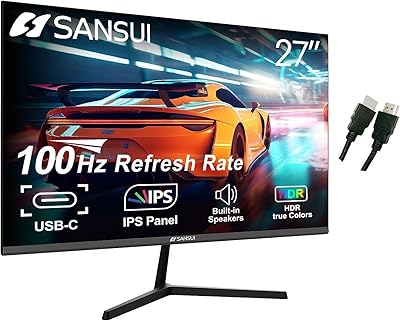
SANSUI ES-27X3 27-inch 100Hz IPS Monitor
84%
89%
Display Quality
92%
Value for Money
85%
Ease of Setup
88%
Gaming Performance
86%
Color Accuracy
More

FAQ

Yes, an HDMI cable is included in the box along with the power cord, so most buyers can connect and power on without any additional purchases. If you plan to use the DisplayPort input, you will need to supply your own cable, as that is not included.

Absolutely. The back of the panel has a standard 100x100mm VESA hole pattern, which is compatible with the vast majority of monitor arms and wall mounts available today. You will need to remove the included stand first, but the mounting hardware is straightforward to work with.

It handles casual gaming well enough, but it is not built with gaming as a priority. The 75Hz refresh rate is a step up from 60Hz and makes general movement feel smoother, but there is no adaptive sync technology and motion blur becomes noticeable in fast-paced games. If gaming is your primary use case, a dedicated gaming monitor will serve you better.

The stand only supports tilt adjustment, ranging from -5 to +20 degrees. There is no height, swivel, or pivot adjustment built in. If you need to raise the screen, you would either need to place the monitor on a riser or replace the stand with a height-adjustable third-party arm using the VESA mount.

Yes, and this is one of the stronger arguments for choosing an IPS panel over a budget TN display. Colors and brightness remain consistent when viewed from wide horizontal or vertical angles, which is useful if you share your screen during calls or work at a desk where others occasionally glance at your monitor.

Yes, the 27E2UA includes a VGA input alongside HDMI and DisplayPort, which is increasingly rare on modern budget monitors of this size. You will need a VGA cable, which is not included, but standard VGA cables are inexpensive and widely available.

They are functional for low-demand situations like video calls, short clips, or quiet background audio. That said, most buyers end up using headphones or a separate speaker for anything beyond occasional use — the speakers lack bass and do not get particularly loud before the sound becomes strained.

It depends on your viewing distance and expectations. At a typical desk distance of around 2 to 3 feet, 1080p on a 27-inch display is noticeably less sharp than 1440p at the same size. Individual pixels can be visible if you sit close or look carefully at fine text. For documents, web browsing, and video calls it is perfectly usable, but buyers coming from a 1440p display may find the drop in sharpness difficult to ignore.

Most buyers report being up and running in under 10 minutes. The stand attaches to the monitor without tools, the HDMI cable is included, and modern operating systems recognize the display immediately without requiring driver installation. It is about as uncomplicated as monitor setup gets.

No, there is no USB hub of any kind on this display. If you were hoping to connect a keyboard, mouse, or USB drive through the monitor, you will need to plug those directly into your computer or use a separate USB hub. This is a notable omission that some buyers only discover after purchase.

Where to Buy