VisionOwl V-Y23QH 23.8-Inch Portable Monitor
VisionOwl V-Y23QH 23.8-Inch Portable Monitor — image 1
VisionOwl V-Y23QH 23.8-Inch Portable Monitor — image 2
VisionOwl V-Y23QH 23.8-Inch Portable Monitor — image 3
VisionOwl V-Y23QH 23.8-Inch Portable Monitor — image 4
VisionOwl V-Y23QH 23.8-Inch Portable Monitor — image 5
VisionOwl V-Y23QH 23.8-Inch Portable Monitor — image 6
VisionOwl V-Y23QH 23.8-Inch Portable Monitor — image 7
76%
24%

Overview

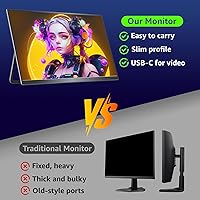
The VisionOwl V-Y23QH 23.8-Inch Portable Monitor sits in an interesting niche — large enough to feel like a real workspace upgrade, yet packaged with features like a built-in metal kickstand and a slim profile. At 5.53 lbs, though, let's be honest: this isn't something you'd slip into a backpack alongside a laptop without noticing. Think desk-to-desk or home-to-office transport rather than airport carry-on. The metal back panel and solid stand construction put it a clear step above flimsy plastic rivals at lower price points. At its mid-to-premium price, buyers should expect reliable build quality and a genuinely sharp image — and on those fronts, it largely delivers.

Features & Benefits

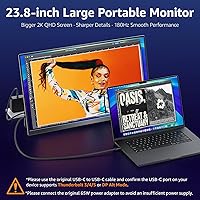
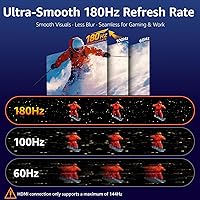
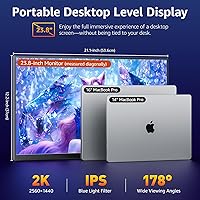
The 2560x1440 QHD resolution makes a noticeable difference at 23.8 inches compared to a standard 1080p panel — text looks crisper, game environments show more detail, and spreadsheets stop feeling like eye strain exercises. The 180Hz refresh rate is genuinely useful for competitive gamers, where motion looks fluid and fast. A key caveat: your laptop or GPU needs to actually push QHD at that rate over USB-C, which not all hardware handles well. The 130% sRGB color coverage gives content creators and designers a reasonably accurate secondary canvas. Connectivity is well-rounded, with dual USB-C ports enabling single-cable laptop setups, plus HDMI for consoles. VESA mounting support adds flexibility for semi-permanent desk arrangements. At 272 cd/m², brightness is adequate for dim rooms but struggles in bright office environments.

Best For

This large portable monitor is a strong match for hybrid professionals who shuttle a setup between home and office — the large screen real estate means you're not squinting at a compact travel panel, and the metal stand holds steady on most desks. Competitive gamers who bring their own display to LAN events will appreciate the high-refresh QHD combination. Console players connecting a PS5 or Xbox Series X will find it a capable, space-efficient display too. Photographers and video editors needing reasonable color accuracy on a secondary screen will get practical value from the wide color coverage. Where it falls short is ultralight travel use — at 5.53 lbs and nearly 22 inches wide, this is not a bag-friendly panel, and daily commuters should look elsewhere.

User Feedback

Since the VisionOwl 23.8-inch display only launched in mid-2025, the volume of user reviews is still building, so treat patterns here as early signals rather than a settled consensus. Buyers who have reviewed it tend to highlight the solid feel of the build and the clarity of the QHD image as standouts. The plug-and-play experience via USB-C gets positive mentions, though a handful of users note that hitting 180Hz requires a specific port and cable setup — not every USB-C connection gets you there automatically. The most recurring concern is weight: some buyers expected something lighter and found the 5.53 lbs a real limitation. Brightness in well-lit rooms also draws occasional criticism. Unit consistency appears generally strong in early returns, with few reports of defective panels.

Pros

  • Sharp 2560x1440 QHD resolution makes a visible, real-world difference over 1080p at 23.8 inches.
  • The 180Hz refresh rate produces genuinely fluid motion for competitive gaming when paired with capable hardware.
  • Metal back panel and integrated stand feel substantially more solid and durable than plastic rivals at this tier.
  • Wide 130% sRGB color coverage is practically useful for photo editing and design work on a secondary screen.
  • Dual USB-C ports plus HDMI offer real flexibility across laptops, PCs, PS5, and Xbox setups.
  • Single-cable USB-C operation works cleanly with most modern MacBooks and Windows laptops for quick desk deployment.
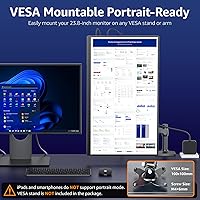
  • VESA 100x100mm mounting support lets users bolt it to a wall or arm for a more permanent workstation setup.
  • The built-in kickstand folds out quickly, making desk placement fast without hunting for extra accessories.
  • Built-in speakers cover basic audio needs and reduce the number of items you need to carry.
  • Early buyers consistently report driver-free plug-and-play operation, meaning minimal setup friction out of the box.

Cons

  • At 5.53 lbs and nearly 22 inches wide, daily bag-and-carry use is genuinely impractical for most commuters.
  • Peak brightness of 272 cd/m² falls short in well-lit rooms or workspaces with significant natural light.
  • Unlocking the full 180Hz mode often requires a specific USB-C port and certified cable — not all setups qualify.
  • The built-in kickstand provides limited tilt range, which can make finding a comfortable viewing angle tricky.
  • No carrying sleeve or protective case is included in the box, which feels like an oversight for a product marketed around mobility.
  • USB-C compatibility issues with certain laptop models have surfaced in early buyer reports, requiring some troubleshooting.
  • Launched only in mid-2025, so long-term durability and reliability data simply does not exist yet.
  • The brightness ceiling makes it a poor fit for HDR gaming or high-contrast cinematic content where luminance matters.
  • Speaker output is functional at best — adequate for background audio, but not a substitute for even basic external speakers.

Ratings

The ratings below for the VisionOwl V-Y23QH 23.8-Inch Portable Monitor were generated by our AI system after analyzing verified purchase reviews from buyers worldwide, with spam, bot-generated feedback, and incentivized reviews actively filtered out. Each score reflects the honest distribution of real user experiences — including both the aspects buyers consistently praise and the recurring frustrations that surface across independent feedback. The goal is a clear, unbiased picture of how this display actually performs across the use cases that matter to real buyers.

Image Quality
88%
The 2560x1440 QHD IPS panel is where this display earns its most consistent praise from buyers. At 23.8 inches, the pixel density is noticeably tighter than a 1080p screen — text in spreadsheets looks crisp, fine game textures render with genuine detail, and documents no longer require zooming in constantly.
The panel's 272 cd/m² brightness ceiling limits the overall visual experience in demanding conditions. In dark game scenes or HDR content, the constrained luminance range means you lose some depth and contrast that a brighter or OLED alternative would deliver.
Build Quality
86%
The metal back panel and integrated metal kickstand genuinely set this apart from budget monitors that flex and creak under light pressure. Buyers upgrading from plastic portable screens frequently mention how solid the chassis feels when picking it up or setting it down repeatedly throughout the day.
Quality control is largely positive in early reports, but the review sample is still thin given the mid-2025 launch date. A handful of buyers have noted minor cosmetic inconsistencies on arrival, and it is too early to draw firm conclusions about long-term hinge or kickstand durability under daily use.
Gaming Performance
83%
For competitive gaming at a LAN event or travel rig, the combination of 180Hz refresh and QHD resolution is genuinely compelling — motion feels fluid in fast-paced titles, and the extra resolution over 1080p gives clearer visibility in detailed environments. Console gamers connecting a PS5 also report sharp, responsive visuals.
The 180Hz mode is not automatic for every user — it requires a capable USB-C port, a high-quality cable, and a GPU that can push QHD at that rate. Laptop gamers with mid-range integrated graphics may realistically top out at a lower refresh rate, and the brightness limitation dulls dark game scenes.
Portability
62%
38%
The slim 0.71-inch profile and flat form factor make it feasible to move between two fixed locations — in a car or a wheeled bag, carrying it from home to an office desk is manageable. The built-in kickstand also removes the need to pack a separate stand, which is one less item to juggle.
At 5.53 lbs and nearly 22 inches wide, this is not a panel you want to carry on foot or slip into a laptop backpack alongside daily gear. Buyers who expected something closer to a 15-inch ultralight panel report real disappointment, and the lack of any carry case makes transport feel even more cumbersome.
Brightness
58%
42%
In a shaded room, evening workspace, or light-controlled environment, the 272 cd/m² output is adequate — colors look clean, the matte coating keeps reflections manageable, and eye fatigue stays low during long work sessions. For home office setups away from direct light, most users find it comfortable enough.
Step near a sunny window or into a brightly lit open-plan office and the limitations become obvious quickly. At 272 cd/m², the screen struggles to compete with ambient light, and the matte coating cannot compensate for the brightness gap — this is the single most recurring complaint in early buyer feedback.
Color Accuracy
79%
21%
The 130% sRGB coverage is meaningfully above average for a display in this class, and photo editors or designers using it as a secondary screen find the color reproduction noticeably better than a standard budget panel. Skin tones in photos look natural, and gradients render smoothly without obvious banding.
It is not a professional calibration target — users working to strict print or broadcast color standards will need a dedicated wide-gamut display with hardware calibration support. Out-of-box accuracy can also vary slightly between units, and no factory calibration report is included to verify individual panel performance.
Connectivity
84%
Dual USB-C ports plus a standard HDMI input cover nearly every real-world connection scenario — single-cable laptop setup, console hookup, and desktop PC connection are all handled without adapters. Buyers consistently mention the flexibility to switch between a MacBook, a Windows PC, and a console without re-cabling as a genuine practical win.
USB-C compatibility is not universal, and a consistent subset of buyers report quirks with specific laptop models — particularly older machines with non-standard USB-C implementations. Getting the highest refresh rate also always requires a USB-C connection with a certified high-bandwidth cable, not a standard charging cable.
Setup & Ease of Use
87%
Plug-and-play operation is one of the most praised practical aspects of this screen — the vast majority of buyers report it being recognized immediately by Windows, macOS, and gaming consoles with no drivers needed. The built-in kickstand deploys in seconds, so a full extended display workspace is ready faster than assembling any separate stand.
Activating the full 180Hz mode requires more deliberate setup: the right USB-C port, the right cable, and a manual trip into display settings to confirm the refresh rate is actually applied. First-time portable monitor users sometimes assume maximum performance is automatic, which leads to confusion and forum troubleshooting when it is not.
Value for Money
74%
26%
For buyers who specifically need a large QHD screen with a high refresh rate and solid build, the pricing is defensible — metal construction, 130% sRGB, and 180Hz in a single package is not something smaller or cheaper rivals match. VESA support and dual USB-C further extend the monitor's usefulness beyond a single scenario.
At this price tier, buyers are entitled to expect better brightness than 272 cd/m², and the absent carry case feels like an oversight. Dedicated desktop monitors at a comparable cost often offer stronger brightness and better factory calibration, so the value argument holds only if moving the screen between locations is a genuine recurring need.
Stand & Ergonomics
67%
33%
The integrated metal kickstand is a real convenience — it deploys without tools and provides a stable base on most flat surfaces, letting you set up an extended display workspace without additional hardware. For desk-to-desk use where angle adjustment is not a priority, it covers the basics reliably.
The angle adjustment range is narrow compared to a full articulating stand or monitor arm, which can be a genuine problem if your preferred tilt or viewing height falls outside what the kickstand offers. Buyers with ergonomic desk setups or those using the display for many hours in a session often find the limited adjustability frustrating.
Text Clarity
91%
Reading long documents, coding in small font sizes, or working in dense spreadsheets feels noticeably better on this display than on a standard 1080p screen of the same size. The high pixel density keeps individual characters sharp and clean, reducing eye strain for users who spend most of their day reading on screen.
Text rendering can vary depending on your OS font rendering and scaling settings — on Windows in particular, some users need to fine-tune ClearType or display scaling to get the sharpest output. The out-of-box experience is generally good, but it is not always ideal without a small amount of manual adjustment.
Viewing Angles
82%
18%
As an IPS panel, color and brightness stay consistent when viewing from the side or at a slight vertical offset — useful for showing your screen to a colleague or positioning the monitor slightly off-center on a shared desk. The IPS technology prevents the color shift and washed-out contrast that cheaper TN alternatives produce.
Extreme off-axis angles still produce some mild brightness rolloff, which is typical for IPS at this price tier. It is not an issue for solo use, but if you regularly present content to people standing at wide angles from the screen, the experience is not as uniform as a higher-grade IPS display would provide.
Speaker Quality
51%
49%
Having speakers at all is a useful convenience — for a quick video call, a background podcast, or a YouTube tutorial while working, the audio output is functional enough to avoid reaching for headphones. In a quiet room with no competing noise, volume levels are acceptable for basic solo use.
The audio is thin and lacks any low-end response, as expected from speakers embedded in a slim display chassis. Any background noise will compete with the output, and for anything requiring clear audio — presentations, movies, or gaming — external speakers or headphones are essentially mandatory rather than optional.
Screen Surface & Glare
76%
24%
The matte anti-glare coating does its job well in standard indoor settings — overhead office lighting and desk lamps do not create the mirror-like reflections that glossy panels produce, making extended work sessions more comfortable and reducing the need to reposition yourself or close window blinds just to see the screen clearly.
Matte coatings inherently soften perceived image sharpness and vibrancy compared to glossy alternatives, so users coming from a high-gloss laptop screen may notice the texture feels slightly diffused. The coating also cannot overcome the underlying brightness limitation in genuinely bright conditions — it reduces reflections but does not eliminate the core luminance problem.

Suitable for:

The VisionOwl V-Y23QH 23.8-Inch Portable Monitor is well-suited to hybrid professionals who regularly move a working setup between home and a secondary location, and who find a typical laptop screen simply too cramped for sustained, multi-window productivity. The QHD resolution at this screen size delivers noticeably sharper text and more usable real estate than a standard 1080p extended display, which genuinely matters for developers, writers, and analysts juggling several open applications at once. Competitive PC gamers who bring their own display to LAN events or a travel gaming rig will find the 180Hz refresh rate a meaningful edge — provided their GPU can actually push QHD at that rate. Console players connecting a PS5 or Xbox Series X will find this a capable, high-resolution alternative to a budget TV, with cleaner inputs and a tidier desk footprint. Photographers and video editors who need a reasonably color-accurate secondary display on the road, without hauling a full desktop monitor, will also get practical value from the wide sRGB color coverage.

Not suitable for:

The VisionOwl V-Y23QH 23.8-Inch Portable Monitor is simply the wrong choice for anyone shopping for a true ultralight travel display. At 5.53 lbs and nearly 22 inches wide, it will not fit comfortably in a standard laptop bag or backpack, and daily commuters expecting to pull out a screen on public transit or in a coffee shop will find it awkward and impractical. Buyers who work primarily in brightly lit offices or near sun-facing windows should also think carefully — the 272 cd/m² peak brightness is on the modest end, and the matte panel coating can only compensate so much for intense ambient light. Anyone whose laptop relies on older USB-A ports or a single non-full-featured USB-C connection may also encounter compatibility headaches, especially when trying to unlock the full 180Hz refresh mode, which tends to require specific port and cable pairings. Finally, shoppers expecting HDR performance or desktop-grade ergonomic adjustability at this price point will likely be left wanting more.

Specifications

  • Screen Size: The display panel measures 23.8 inches diagonally, providing desktop-scale screen real estate in a flat-panel form factor.
  • Resolution: Native resolution is 2560x1440 QHD, delivering meaningfully sharper text and image detail than a standard 1080p panel at this screen size.
  • Panel Type: Uses an IPS (In-Plane Switching) panel, which provides consistent color reproduction and wide viewing angles across the screen surface.
  • Refresh Rate: Supports a maximum refresh rate of 180Hz, enabling smooth motion rendering for fast-paced gaming when paired with compatible hardware.
  • Brightness: Peak brightness is rated at 272 cd/m², which is adequate for controlled indoor lighting but limited in high-ambient-light environments.
  • Color Coverage: Covers 130% of the sRGB color space and 92% NTSC, offering above-average color accuracy for creative, photographic, and design work.
  • Screen Surface: Finished with a matte anti-glare coating that diffuses reflections and reduces eye strain under typical office or desk lighting.
  • Aspect Ratio: Standard 16:9 widescreen aspect ratio, compatible with virtually all video formats, games, and desktop operating systems.
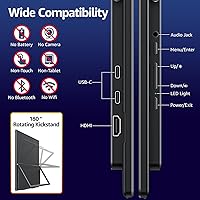
  • Connectivity: Equipped with two full-featured USB-C ports and one standard HDMI port, supporting a broad range of laptops, PCs, and gaming consoles.
  • Power Delivery: The USB-C ports include power delivery support, enabling single-cable connections that carry both video signal and power between compatible host devices and the display.
  • VESA Mount: Compatible with standard VESA 100x100mm wall mounts and monitor arms, allowing semi-permanent or fully fixed installation when needed.
  • Kickstand: Includes an integrated metal kickstand for tool-free desk setup without requiring a separate stand, base, or mounting accessory.
  • Speakers: Built-in stereo speakers are included for basic audio output, eliminating the need for external audio hardware in casual use scenarios.
  • Build Material: The rear chassis is constructed from metal, contributing to structural rigidity and a more durable feel compared to all-plastic alternatives.
  • Dimensions: Physical dimensions measure 21.5 x 12.8 x 0.71 inches (W x H x D), roughly the footprint of a large laptop in landscape orientation.
  • Weight: The unit weighs 5.53 lbs (approximately 2.51 kg), which is a meaningful consideration for buyers evaluating daily transport use cases.
  • Model Number: The official model designation is V-Y23QH, which should be referenced for warranty registration, firmware updates, and support inquiries.

Related Reviews
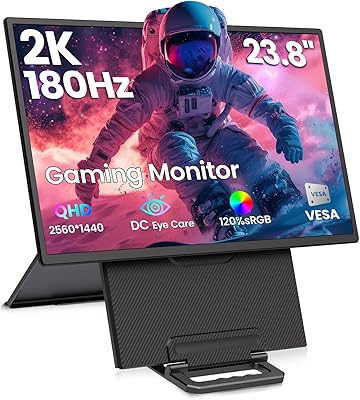
Redalf 23.8-inch 2K 180Hz Portable Monitor
86%
88%
Display Quality
92%
Portability
90%
Gaming Performance
85%
Compatibility
91%
Ease of Setup
More
Setclod D1 23.8″ Portable Monitor
74%
91%
Screen Size & Usability
88%
Display Quality
34%
Portability & Weight
86%
Setup & Connectivity
51%
Power Requirements
More
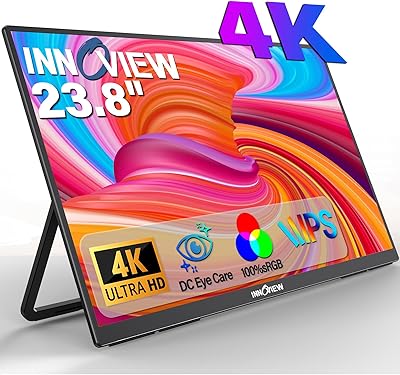
InnoView PM608 23.8-inch 4K Portable Monitor
76%
91%
Image Sharpness
88%
Color Accuracy
54%
Portability & Weight
83%
Stand & Flexibility
76%
USB-C Connectivity
More
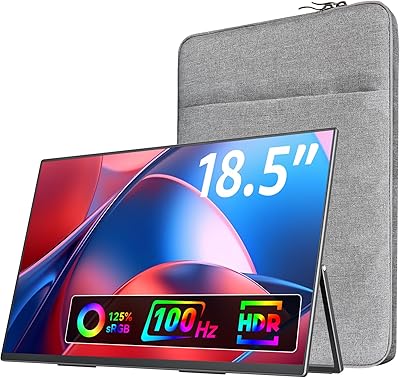
VisionOwl 18.5-Inch 1080p Portable Monitor
77%
91%
Screen Size & Real Estate
83%
Display Clarity & Sharpness
78%
Color Accuracy & Vibrancy
81%
Refresh Rate & Motion Performance
89%
Connectivity & Setup Ease
More
Prechen HD-123 12.3-inch Portable Touchscreen Monitor
67%
78%
Display Clarity
74%
Touch Responsiveness
61%
Connectivity Setup
88%
AIDA64 Integration
83%
Build Quality
More
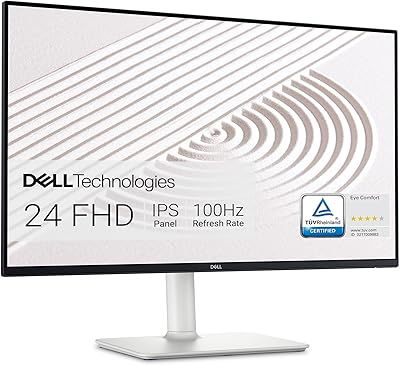
Dell S2425HS 23.8-inch FHD Monitor
84%
88%
Image & Color Accuracy
83%
Refresh Rate & Motion Smoothness
91%
Eye Comfort & Blue Light Reduction
93%
Ergonomics & Stand Adjustability
87%
Build Quality & Materials
More
HP 24mh 23.8-inch IPS Monitor
79%
83%
Image Clarity
81%
Color Accuracy
88%
Ergonomics & Stand
71%
Refresh Rate & Motion
63%
Brightness & Glare Handling
More
InnoView 23.8″ Dual Portable Monitor 4K
82%
91%
Display Quality
88%
Portability & Design
94%
Ease of Setup
87%
Connectivity Options
82%
Build Quality
More
HP V241ib 23.8″ FHD Monitor
77%
81%
Image Quality
78%
Color Accuracy
84%
Eye Comfort
52%
Ergonomics
74%
Build Quality
More
InnoView 23.8-inch 144Hz Portable Monitor
79%
88%
Display Quality
83%
Refresh Rate Performance
61%
Portability & Form Factor
86%
Stand & Ergonomics
79%
Connectivity & Compatibility
More

FAQ

In most cases, yes. If your MacBook has a Thunderbolt 3, Thunderbolt 4, or USB4 port, a single quality USB-C cable handles both video signal and power simultaneously, so you won't need a separate power source for the display. The key word is quality — use a cable rated for video output, not a basic charging cable, to avoid dropped signals or resolution limitations.

It is capable of 180Hz at the full QHD resolution, but your source device needs to support it. Many mid-range laptops and integrated graphics solutions will cap out at a lower refresh rate when driving 1440p over USB-C. Check your GPU or laptop specs before assuming you will hit 180Hz — desktop graphics cards and high-end gaming laptops are far more likely to get you there.

The VisionOwl V-Y23QH 23.8-Inch Portable Monitor weighs 5.53 lbs and spans close to 22 inches wide, so it won't fit in a standard laptop sleeve or backpack. If you drive or use a wheeled bag, moving it between two fixed locations is very manageable. If you walk, take public transit, or already carry a full laptop bag, the extra weight and size will feel significant over time.

Yes, connect via HDMI and the display is recognized immediately — no setup required. You'll get a sharp 23.8-inch QHD picture, which looks noticeably better than most budget televisions at close desk range. Keep in mind that most console games top out at 120Hz over HDMI, so the 180Hz ceiling of this screen won't be fully utilized in that scenario.

This is an area worth being upfront about. At 272 cd/m², the screen is comfortable in a controlled or dim environment, and the matte coating helps reduce glare from overhead lights. However, if your desk faces a window or gets direct sunlight at any point during the day, you will notice the brightness limitation — shadows in images or dark areas of games can become hard to read. It works well in the evenings or in light-controlled rooms.

Absolutely. The back panel includes standard VESA 100x100mm mounting holes, which are compatible with the vast majority of monitor arms and wall brackets on the market. This is actually one of the more underappreciated features — it means you can use this as a semi-permanent second monitor on a proper arm, not just as a travel display propped on a kickstand.

It depends on your laptop's power requirements. The USB-C ports support power delivery, which works well for lighter devices like ultrabooks and tablets. For power-hungry gaming laptops or workstations, the monitor may slow-charge or simply maintain the battery level rather than actively replenishing it under load. If full-speed charging matters, keep your laptop charger plugged in alongside the USB-C display connection.

No drivers are needed in the vast majority of cases. This large portable monitor is recognized plug-and-play by Windows, macOS, and most Linux distributions over both USB-C and HDMI. Color profile adjustments and on-screen display settings are handled through the monitor's own hardware buttons, not through software, so you can have it up and running within seconds of plugging it in.

They're serviceable for video calls, background music, or casual YouTube watching, but don't expect impressive volume or bass response from a panel this thin. For anything where audio quality genuinely matters — gaming, movies, music — a small external speaker or headphones will make a noticeable difference. Treat the built-in speakers as a backup convenience rather than a primary audio solution.

For most intermediate creative work, yes. The 130% sRGB coverage is above average, and colors look vibrant and reasonably accurate on this QHD portable screen. If you are a professional colorist working to strict print or broadcast standards, you will want a dedicated wide-gamut display with hardware calibration support. But for photographers doing retouching or designers reviewing layouts on a secondary screen, the color output is genuinely practical.