Overview

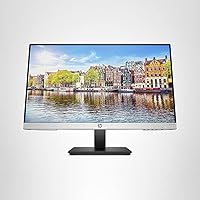
The HP 24mh 23.8-inch IPS Monitor sits in a comfortable spot in the market — capable enough for real daily use, priced to attract home office workers and everyday desktop users who don't need a specialist display. It's not chasing professional color graders or competitive gamers. What it offers is a reliable, eye-friendly screen that handles spreadsheets, video calls, and casual browsing without complaint. With over 25,000 ratings and a position near the top of its category, it has clearly earned the trust of a wide audience. Set your expectations accordingly and this HP monitor is hard to fault.
Features & Benefits

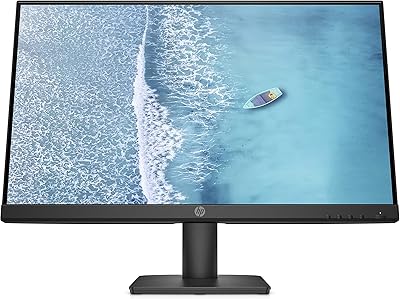
The IPS panel here delivers what IPS panels do best — wide, consistent color from nearly any angle, thanks to 178-degree horizontal and vertical viewing coverage. Running at 1920x1080 and 75Hz, it's a small but noticeable improvement over the 60Hz displays that still dominate this price tier. The stand offers both height and tilt adjustment, which matters far more than people realize until they've spent a day hunched over a fixed-height screen. Connectivity is flexible too: HDMI, DisplayPort, and VGA are all present, so linking older and newer hardware is straightforward. The micro-edge bezel keeps things tidy and makes this IPS screen a natural fit for a dual-monitor arrangement.

Best For

This HP monitor is a strong match for people who spend long hours in front of a screen — remote employees, students, and anyone building a functional home office without overspending. The ergonomic stand gives it a practical edge over similarly priced competitors that lock you into a fixed position. If you're planning a dual-monitor setup, the slim bezel and VESA mount compatibility make the 24mh display easy to integrate without a jarring visual gap between panels. Casual gamers stepping up from a basic 60Hz screen will notice the smoother feel. The built-in speakers also mean one fewer cable on the desk for light daily use.

User Feedback

Across tens of thousands of verified purchases, the picture that emerges is mostly positive. Color accuracy and clarity are the most frequently praised qualities, and the adjustable stand gets repeated mentions from buyers who've tried cheaper fixed-height alternatives. That said, the feedback isn't uniformly glowing. A noticeable group of users feels that 1080p spread across nearly 24 inches can look slightly soft at close range — not a dealbreaker, but worth knowing before buying. The built-in speakers are adequate for calls and background audio; anyone expecting real listening quality will want external speakers. Brightness in sunlit rooms draws occasional complaints too. Overall, the rating volume suggests most buyers are genuinely satisfied.

Pros

  • IPS panel delivers consistent, natural color from wide angles — no color shift when viewing off-center.
  • Height and tilt adjustment on the stand puts this HP monitor ahead of most fixed-height competitors at this price.
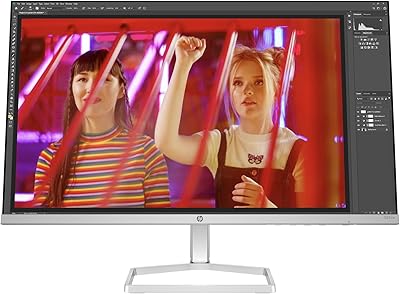
  • Micro-edge bezel on three sides makes side-by-side dual-monitor setups look genuinely clean.
  • VESA mount support gives you the freedom to switch to a monitor arm and reclaim valuable desk space.
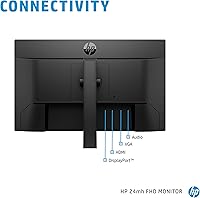
  • HDMI, DisplayPort, and VGA ports together handle both modern and older hardware without needing adapters.
  • 75Hz refresh rate makes everyday scrolling and casual gaming noticeably smoother than a standard 60Hz display.
  • Low Blue Light mode reduces eye strain during long evening work sessions in a practical, usable way.
  • Built-in speakers handle video calls and background audio without requiring any extra cables or devices.
  • Setup is fast and tool-free — most buyers are up and running in under ten minutes.
  • Strong long-term buyer satisfaction across a very large verified review base suggests consistent real-world reliability.

Cons

  • 1080p resolution across nearly 24 inches can look noticeably soft for users sitting close to the screen.
  • At 250 cd/m², brightness struggles in rooms with direct sunlight or strong overhead lighting.
  • The built-in 2W speakers sound thin at higher volumes and are genuinely inadequate for music or focused media.
  • No USB-C port makes connectivity awkward for modern thin-and-light laptops that rely on it for video output.
  • No adaptive sync support limits the usefulness of the 75Hz panel for anything beyond casual gaming.
  • The stand offers height and tilt but no swivel or pivot, restricting flexibility for shared or rotated setups.
  • No USB hub functionality means peripheral management stays entirely separate from the display.
  • The bottom bezel is visibly thicker than the other three sides, which looks inconsistent in a vertically stacked dual setup.
  • Low Blue Light mode introduces a warm color tint that makes it impractical for color-sensitive work while active.
  • No factory calibration report is included, so out-of-box accuracy varies and relies on user adjustment.

Ratings

The HP 24mh 23.8-inch IPS Monitor has accumulated one of the largest verified review pools in its category, and our AI rating engine has processed that feedback globally — filtering out incentivized submissions, duplicate accounts, and outlier noise — to surface what real daily users actually experience. Scores reflect both the genuine strengths that keep buyers satisfied and the friction points that surface after extended use. Nothing has been smoothed over.
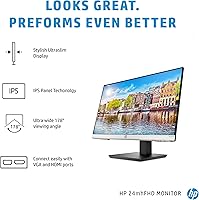
Image Clarity
83%
For a 1080p IPS panel at this price tier, everyday sharpness holds up well across typical tasks — text rendering in documents and browsers looks clean, and colors stay consistent without the washed-out look common on cheaper TN alternatives. Users working with spreadsheets and web content consistently report the image feels crisp during long sessions.
At close seating distances — typical for desk setups — some buyers notice the pixel density is not quite as sharp as they expected on a nearly 24-inch screen. Those coming from a smaller high-res laptop display often feel the step down in perceived detail.
Color Accuracy
81%
19%
The IPS technology here genuinely delivers on its promise of consistent, natural color reproduction without the color shift you get when viewing from off-center angles. Casual photo editing and media consumption both benefit, and most users report that skin tones and gradients look realistic without any calibration.
This is not a panel for serious color-critical work — no factory calibration report is included, and coverage of wide color gamuts is limited. Designers or photographers who need precise accuracy will find it falls short of purpose-built creative monitors.
Ergonomics & Stand
88%
The height and tilt adjustable stand is consistently one of the most praised aspects of this HP monitor, especially when compared to fixed-height stands common at this price point. Being able to dial in the exact screen height after a long day of calls and typing makes a tangible difference in neck and shoulder comfort.
There is no pivot or swivel adjustment, which limits flexibility for users who prefer a portrait orientation or want to rotate the display to face a colleague. The stand feels sturdy but some buyers find the height range slightly narrower than they hoped.
Refresh Rate & Motion
71%
29%
Running at 75Hz rather than the standard 60Hz gives everyday scrolling and casual gaming a noticeably smoother feel without requiring a premium panel investment. For spreadsheet navigation, video calls, and light gaming, the difference over a standard display is subtle but real.
Competitive or fast-paced gamers will find 75Hz limiting almost immediately — there is no adaptive sync support, and fast motion still exhibits visible blur. This is a practical everyday panel, not one designed for gaming performance.
Brightness & Glare Handling
63%
37%
In a controlled or moderately lit home office environment, the 250 cd/m² brightness is adequate for comfortable viewing throughout the day. The Low Blue Light mode is a practical addition for evening work sessions, and most users in typical indoor conditions find it sufficient.
In bright rooms with windows or overhead lighting, the panel can feel noticeably dim and reflective. A meaningful subset of buyers reported having to reposition their entire setup to reduce glare, which is a real limitation for anyone without control over their lighting environment.
Built-in Speakers
58%
42%
Having two built-in 2W speakers is genuinely convenient for video calls, background podcasts, and casual YouTube watching — it removes the need for a separate audio device in a minimal desk setup. Users who primarily use the display for work communication find them perfectly adequate.
Anyone expecting real listening quality will be disappointed quickly. The speakers lack bass almost entirely, volume headroom is limited, and audio sounds thin at higher levels. For music, movies, or any focused media consumption, external speakers or headphones are essentially necessary.
Connectivity
86%
Having HDMI, DisplayPort, and VGA all available on one panel gives this IPS screen unusual flexibility — it can connect to a modern laptop, a gaming console, and an older desktop tower without needing adapters. Buyers with mixed-age equipment particularly appreciate not being forced into a dongle situation.
There is no USB hub functionality and no USB-C port, which is an increasingly common expectation even at this price point. Users with modern thin-and-light laptops that rely on USB-C for video output may need an adapter.
Bezel & Multi-Monitor Setup
84%
The micro-edge three-sided bezel keeps the visual gap between paired displays genuinely minimal, making dual-monitor arrangements feel cohesive rather than segmented. Users who have built side-by-side setups consistently mention that the thin borders hold up well in practice, not just in product photography.
The bottom bezel remains thicker than the other three sides, which is visible and slightly inconsistent in a dual-monitor arrangement if the displays are stacked vertically. It is a minor cosmetic point but one that detail-oriented users notice.
VESA & Mounting Flexibility
82%
18%
VESA mount compatibility opens up a meaningful range of aftermarket arms and wall brackets, giving buyers the freedom to reclaim desk space or achieve precise positioning that the stock stand cannot offer. Users who switched to a monitor arm reported the installation process was straightforward.
The VESA pattern and mounting hardware are standard but the monitor's own stand must be fully removed before mounting, and some buyers found the disassembly process slightly fiddly. No monitor arm or wall bracket is included, so that is an additional cost to factor in.
Build Quality & Aesthetics
77%
23%
The overall construction feels solid for a monitor in this category — the stand has no noticeable wobble, and the chassis does not flex under normal adjustment use. The slim profile and matte finish give it a clean, understated look that blends into most desk environments without drawing attention.
The plastic used throughout feels functional rather than premium, and the back panel in particular has a slightly hollow feel when pressed. It is not a concern for everyday use, but buyers accustomed to higher-end build standards will notice the material quality difference.
Setup & Out-of-Box Experience
89%
Most buyers report the unboxing and assembly process takes under ten minutes with no tools required. The stand clicks into the monitor body securely, and the included documentation is clear enough that setup proceeds without confusion even for less technical users.
The included cable selection is basic — not all connection types come in the box, so depending on your hardware, you may need to source a DisplayPort or VGA cable separately. The on-screen menu navigation buttons are located on the underside of the bezel, which takes some adjustment to find by feel.
Eye Comfort & Low Blue Light
80%
20%
The Low Blue Light mode shifts the color temperature in a way that genuinely reduces eye fatigue during extended evening sessions. Users who spend six or more hours daily in front of this HP monitor frequently credit this feature with reducing the headache and strain they experienced with previous displays.
Enabling Low Blue Light mode introduces a warm yellow tint that makes color-accurate work impractical while active. It is an either-or trade-off — comfort or accuracy — and there is no middle-ground preset that satisfies both needs simultaneously.
Value for Money
87%
Measured against what you actually get — an IPS panel, height-adjustable stand, triple port connectivity, and VESA support — this 24mh display punches above its price bracket in a way that is hard to dismiss. Buyers consistently describe it as feeling like more monitor than the cost suggests.
As the market continues to evolve, higher-resolution alternatives are becoming available at similar prices, which puts pressure on the value case for a 1080p panel. Buyers who anticipate keeping a monitor for five or more years may want to weigh that trajectory before committing.

Suitable for:

The HP 24mh 23.8-inch IPS Monitor is built for people who spend serious time at a desk and want a dependable, comfortable display without overcomplicating the decision. Remote workers and home office regulars will appreciate the height-adjustable stand, which makes a genuine ergonomic difference during long video calls and document-heavy days. Students setting up their first proper workstation get a lot of practical capability here — solid image quality, flexible connectivity for different devices, and a slim bezel that makes a dual-monitor expansion down the road straightforward. The VESA mount support is a quiet but meaningful bonus for anyone planning to free up desk space with a monitor arm. Casual gamers who want a smoother visual experience over a standard 60Hz screen without spending significantly more will find the 75Hz panel a reasonable step up. Anyone who works in a reasonably controlled lighting environment and needs a no-fuss, reliable IPS screen for everyday computing will feel well served by this HP monitor.
Not suitable for:

The HP 24mh 23.8-inch IPS Monitor has real limitations that make it the wrong choice for specific buyers, and it is worth being direct about them. If you do competitive or fast-paced gaming — anything where response time and high refresh rates actually matter — this panel will frustrate you quickly; 75Hz with no adaptive sync is firmly in the casual tier. Photographers, video editors, or anyone whose work depends on color precision should look elsewhere, as this screen offers no factory calibration and limited wide-gamut coverage. Buyers who work in bright, sunlit rooms may find the 250 cd/m² brightness underwhelming against glare, requiring inconvenient desk repositioning. If you are coming from a high-resolution laptop screen and plan to sit close to the display, the pixel density of a 1080p panel at nearly 24 inches may feel like a visible downgrade in sharpness. Those who need USB-C video input or a built-in USB hub for a cleaner modern setup will also find this IPS screen lacking, as neither feature is present.
Specifications

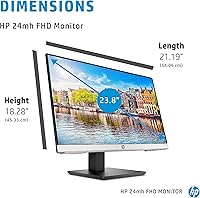
  • Screen Size: The display measures 23.8 inches diagonally, providing a practical working area without demanding excessive desk space.
  • Panel Type: An IPS (In-Plane Switching) panel is used, which delivers consistent color reproduction and wide viewing angles compared to TN alternatives.
  • Resolution: Native resolution is 1920x1080 (Full HD), rendered at a standard 16:9 aspect ratio across the full display area.
  • Refresh Rate: The panel runs at a maximum refresh rate of 75Hz, a step above the 60Hz standard common at this price tier.
  • Brightness: Maximum rated brightness is 250 cd/m², which is adequate for typical indoor environments with controlled ambient lighting.
  • Viewing Angles: IPS technology enables 178-degree horizontal and vertical viewing angles, maintaining color and contrast accuracy from nearly any position.
  • Connectivity: Available video inputs include one HDMI port, one DisplayPort, and one VGA port, covering both modern and legacy source devices.
  • Built-in Audio: Two integrated 2W speakers are built into the monitor chassis, providing basic audio output without requiring external devices.
  • Stand Adjustment: The included stand supports both height adjustment and tilt adjustment, allowing the screen position to be customized for ergonomic comfort.
  • VESA Mounting: The monitor is VESA mount compatible, enabling use with third-party monitor arms and wall brackets using a standard mounting pattern.
  • Bezel Design: A micro-edge bezel frames three sides of the display — top and both sides — minimizing visual borders for a cleaner multi-monitor appearance.
  • Low Blue Light: A dedicated Low Blue Light mode is included, shifting the display to a warmer color temperature to reduce eye strain during extended use.
  • Weight: The monitor weighs approximately 9.94 pounds (4.51 kg) as a complete unit with stand attached.
  • Power Input: The monitor accepts up to 240 volts AC input, making it compatible with both North American and international power standards.
  • Aspect Ratio: The display uses a standard 16:9 widescreen aspect ratio, matching the native format of most modern video content and operating system interfaces.

Related Reviews

HP V241ib 23.8-inch FHD Monitor
85%
91%
Display Clarity & Color Accuracy
88%
Ergonomics & Adjustability
92%
Value for Money
70%
Setup & Installation
90%
Viewing Angles
More
Futuzen 23.8-inch 1080p 100Hz IPS Monitor
85%
92%
Value for Money
88%
Display Quality
89%
Ease of Setup
84%
Build Quality
80%
Performance for Gaming
More
HP Series 5 524sw 23.8-inch FHD Monitor
76%
88%
Image Clarity
91%
Eye Comfort
79%
Color Accuracy
67%
Brightness & Visibility
83%
Refresh Rate & Motion
More
Dell S2425HS 23.8-inch FHD Monitor
84%
88%
Image & Color Accuracy
83%
Refresh Rate & Motion Smoothness
91%
Eye Comfort & Blue Light Reduction
93%
Ergonomics & Stand Adjustability
87%
Build Quality & Materials
More
HP 524sf 24-inch FHD IPS Monitor
85%
88%
Display Quality
91%
Value for Money
85%
Build Quality
94%
Ease of Setup
87%
Eye Care Features
More
VisionOwl 23.8-Inch 2K Portable Monitor
87%
94%
Gaming Performance
92%
Display Quality
88%
Portability
90%
Build Quality
81%
Setup & Installation
More
Dell 24 SE2425H Monitor 23.8-inch FHD
83%
92%
Value for Money
88%
Display Quality
91%
Eye Comfort
60%
Ergonomics
85%
Color Accuracy
More
ASUS ProArt Display PA247CV 23.8-inch Monitor
86%
94%
Color Accuracy
89%
Display Quality
91%
Ergonomics and Comfort
87%
Connectivity Options
63%
Brightness in Well-Lit Environments
More
Redalf 23.8-inch 2K 180Hz Portable Monitor
86%
88%
Display Quality
92%
Portability
90%
Gaming Performance
85%
Compatibility
91%
Ease of Setup
More
BenQ GW2491 23.8″ 1080p FHD IPS Monitor
87%
94%
Display Quality
88%
Eye Care Features
91%
Color Accuracy
86%
Design & Build
92%
Value for Money
More

FAQ

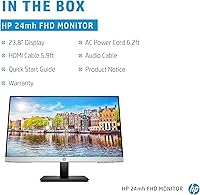
Not all three. The HP 24mh 23.8-inch IPS Monitor typically ships with a limited cable selection, and the exact contents can vary by retailer. It is worth checking what is included with your specific purchase and having your preferred cable on hand before setup day, rather than assuming all ports come stocked.
The stand provides a meaningful range of height movement — enough to raise or lower the screen to suit most seated desk positions. It is not an infinite range, but for the majority of users at a standard desk with a standard chair, the adjustment window covers comfortable eye-level viewing without needing an aftermarket arm.

There is no USB-C port on this display, so a direct connection is not possible without an adapter. If your laptop has a USB-C port with DisplayPort Alt Mode, a USB-C to DisplayPort adapter will work cleanly. HDMI adapters are another option and widely available at low cost.

For most everyday tasks — scrolling through documents, browsing, and general desktop work — yes, it does feel slightly smoother than a 60Hz display, though the difference is subtle. Where it becomes less relevant is for fast-paced gaming, where 75Hz is far from what dedicated gaming monitors offer. Think of it as a comfort upgrade for daily computing rather than a gaming feature.

Honestly, they are better suited to video calls, YouTube clips, and background podcasts than to music listening. The two 2W drivers produce thin audio with very little bass, and at higher volumes the sound quality degrades noticeably. If audio quality matters to you at all, a basic external speaker or headphones will be a significant improvement.

It is actually one of the better choices at this price for exactly that purpose. The micro-edge bezel on three sides keeps the gap between paired screens minimal, and VESA mount support means you can put both monitors on an arm for a really clean, symmetrical arrangement. The consistent IPS color also helps both screens look matched when placed side by side.

In a moderately lit office environment it holds up fine, but if your desk faces a window or sits in a room with strong overhead lighting, 250 cd/m² can start to feel dim and the matte screen surface may not fully eliminate reflections. If your workspace is very bright, you may need to reposition the monitor or manage your blinds more carefully.

It is straightforward. The stand attaches to the monitor body with a simple click mechanism and no tools are needed. Most buyers report being fully set up and connected within ten minutes. The on-screen display menu buttons are located on the underside of the lower bezel, which takes a moment to locate by feel the first time you use them.

It handles long working days reasonably well, particularly because of the adjustable stand and Low Blue Light mode — both of which matter more than most people realize over an eight-hour session. Color fatigue is also less of an issue with an IPS panel than cheaper alternatives. If eye comfort during extended use is a priority, this IPS screen is a solid practical choice.

Yes, the stand can be removed and the monitor mounted on any compatible VESA arm or wall bracket. This is a popular upgrade for buyers who want to reclaim desk surface area or achieve a more precise screen position than the stock stand allows. Just confirm the VESA pattern of your chosen arm matches before purchasing.

Where to Buy