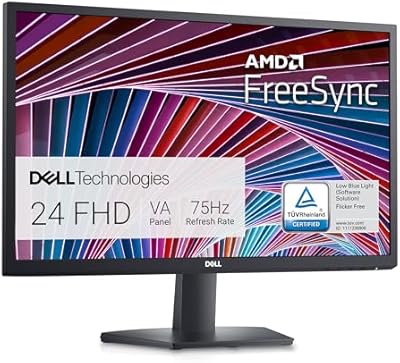
Dell S2425HS 23.8-inch FHD Monitor




Overview
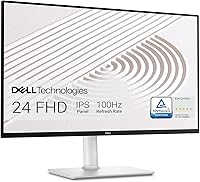
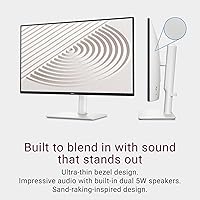
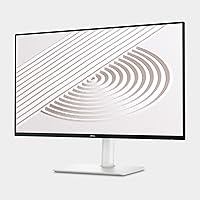
The Dell S2425HS 23.8-inch FHD Monitor is Dell's answer to the growing demand for monitors that look as good on a modern desk as they perform during a long workday. With its ultrathin bezels and ash white finish, this home office display stands apart from the sea of black plastic rectangles that dominate this price tier. Dell has long earned trust for consistent build quality, and the S2425HS keeps that reputation intact. The IPS panel underneath that tidy exterior means you get reliable color accuracy and wide viewing angles — practical advantages that matter whether you're reviewing spreadsheets, editing photos casually, or watching something after hours.
Features & Benefits
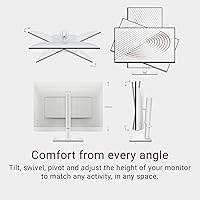
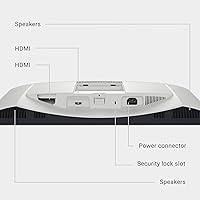
The IPS panel here covers 99% of the sRGB color space, which translates to consistent, accurate-looking colors without the calibration fuss that cheaper TN panels often demand. The 100Hz refresh rate isn't aimed at competitive gaming — it's the kind of smoothness that makes everyday scrolling and casual play noticeably more comfortable, and most mid-range GPUs handle it without breaking a sweat. Eye comfort is where Dell puts genuine effort: the TÜV Rheinland 4-star certification requires passing real measurements for flicker, blue light, and luminance uniformity — it's not just a sticker. The stand offers height, tilt, swivel, and pivot adjustments, a real rarity at this price. Dual HDMI ports and side-accessible connections keep multi-device setups practical and cables manageable.
Best For
This home office display is a natural fit for remote workers who spend long stretches in front of a screen — the eye comfort features and matte anti-glare surface make extended sessions noticeably less punishing. Casual gamers get a smooth 100Hz experience without needing to invest in a pricier gaming-focused panel. Students and bedroom users will appreciate the integrated dual speakers, which save desk space even if they won't replace a proper audio setup. Anyone decorating a minimal or modern workspace will find the ash white build genuinely attractive. And if you regularly switch between a laptop, a console, and a desktop, dual HDMI ports make the S2425HS a practical choice without needing extra adapters or a docking station.
User Feedback
With a 4.6-star average across more than 1,800 ratings, buyer sentiment for this Dell 24-inch monitor is broadly positive. Color accuracy out of the box and the versatile stand earn consistent praise — people specifically mention setting up the pivot and height adjustments without frustration, which says something about real-world build quality. On the critical side, some users note that 1080p can look softer than expected at this screen size, particularly for fine text or detailed image editing. The built-in speakers draw honest reactions: adequate for background audio or video calls, but buyers who care about sound won't rely on them. Eye strain reduction gets consistent mentions as a genuine benefit rather than just a marketing claim, especially from users logging long daily hours.
Pros
- IPS panel delivers consistent, accurate colors straight out of the box with no calibration needed.
- Full ergonomic stand — height, tilt, swivel, and pivot — is genuinely rare at this price point.
- TÜV Rheinland 4-star eye comfort certification reflects real, tested standards rather than a self-applied label.
- 100Hz refresh rate makes everyday use and casual gaming noticeably smoother than standard 60Hz panels.
- Dual HDMI ports let you keep two devices connected simultaneously without swapping cables.
- The ash white design stands out from the sea of black plastic monitors and suits modern desk aesthetics.
- Matte anti-glare coating handles office and home lighting conditions reliably without washing out colors.
- Setup is quick and tool-free, with sensible default settings that look good immediately.
- Built-in speakers handle video calls and casual audio without requiring extra desk gear.
- Dell's build consistency gives buyers confidence that what arrives will match what reviewers describe.
Cons
- 1080p resolution on a 24-inch screen looks noticeably soft for pixel-dense work like coding or photo editing.
- No DisplayPort input limits compatibility with users who need it for daisy-chaining or high-refresh PC use.
- USB-C connectivity is absent, which is an increasingly expected feature for modern laptop users.
- The 5W integrated speakers hit their limits quickly — music and movie audio sound thin at higher volumes.
- The white finish shows fingerprints and grime faster than a dark-bodied monitor would.
- Pivot rotation stiffness has been noted by some users when first rotating the stand into portrait orientation.
- OSD menu navigation requires working through several layers to reach specific settings, with no front-panel labels.
- The included cable bundle covers only one HDMI connection, leaving buyers to source a second cable separately.
- Contrast ratio of 1500:1 produces blacks that look gray in darker room environments compared to VA panel alternatives.
- ComfortView Plus warm color shift may frustrate color-sensitive users who leave it permanently enabled.
Ratings
The Dell S2425HS 23.8-inch FHD Monitor scores below are produced by our AI system after analyzing thousands of verified global buyer reviews, with spam, bot activity, and incentivized submissions actively filtered out. The result is an honest picture of where this home office display genuinely excels and where real users have run into limitations. Both the consistent praise and the recurring frustrations are reflected in every score.
Image & Color Accuracy
Refresh Rate & Motion Smoothness
Eye Comfort & Blue Light Reduction
Ergonomics & Stand Adjustability
Build Quality & Materials
Connectivity & Port Selection
Built-in Speaker Quality
Design & Aesthetics
Cable Management
OSD & Menu Navigation
Matte Display Surface
Setup & Out-of-Box Experience
Value for Money
Suitable for:
The Dell S2425HS 23.8-inch FHD Monitor is a strong pick for remote workers and home office users who spend the bulk of their day in front of a screen and want genuine eye comfort without paying a premium for it — the TÜV-certified blue light control and flicker reduction are measurably real, not just marketing language. Casual gamers who want a smoother experience than a 60Hz panel provides, but do not need the spec sheet of a dedicated gaming monitor, will find the 100Hz IPS display hits a practical sweet spot. Students setting up a first desk will appreciate the integrated speakers, which eliminate one purchase from the list and keep things simple. The full ergonomic stand — height, tilt, swivel, and pivot — makes this a particularly good fit for anyone who shares a workspace or alternates between sitting and standing throughout the day. Design-conscious buyers furnishing a light-toned or minimal home office will also find the ash white finish genuinely hard to match at this price tier.
Not suitable for:
The Dell S2425HS 23.8-inch FHD Monitor is not the right call for professionals whose work demands pixel-level sharpness — graphic designers, photographers, or developers who work with dense code for hours will notice that 1080p stretched across a 24-inch panel is softer than what a 1440p display at the same size would deliver. Competitive gamers chasing high frame rates will outgrow 100Hz quickly and would be better served looking at 144Hz or 165Hz gaming-focused panels. Anyone prioritizing audio quality as part of their desk setup should budget for separate speakers — the integrated 5W drivers handle calls and background audio, but they are not a substitute for even an entry-level speaker pair. Power users who rely on DisplayPort for daisy-chaining monitors or need USB-C connectivity for single-cable laptop use will find the port selection limiting. Finally, buyers working in very bright, sun-lit rooms may find that even the matte coating does not fully eliminate the diffused glare that wide windows introduce.
Specifications
- Screen Size: The display measures 23.8 inches diagonally, offering a practical workspace footprint suited to most standard desks.
- Resolution: Native resolution is 1920×1080 (Full HD 1080p), delivering a standard desktop experience across a 16:9 aspect ratio.
- Panel Type: An IPS (In-Plane Switching) panel provides wide viewing angles and consistent color representation from nearly any seated position.
- Refresh Rate: The display runs at a native 100Hz refresh rate, producing smoother motion than standard 60Hz panels during everyday use and casual gaming.
- Contrast Ratio: Static contrast ratio is rated at 1500:1, which is adequate for office use but will show its limits in dark-room viewing compared to VA panels.
- Color Coverage: The panel covers 99% of the sRGB color space, making it well suited to web content, general design work, and everyday media consumption.
- Display Surface: A matte anti-glare coating reduces reflections from ambient light sources, improving readability in typical office and home environments.
- Blue Light Control: ComfortView Plus is a hardware-level feature that permanently reduces blue light emission to below 35% without requiring a software filter or color shift toggle.
- Eye Comfort Rating: The monitor holds a TÜV Rheinland 4-star Eye Comfort certification, covering tested criteria including flicker control, blue light reduction, and luminance uniformity.
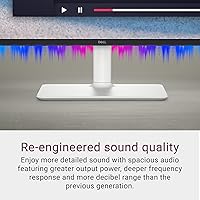
- Speakers: Two integrated 5W speakers are built into the chassis, with five preset audio profiles and one user-customizable profile accessible through the OSD menu.
- Ergonomic Range: The stand supports height adjustment, tilt, swivel, and 90-degree pivot rotation, allowing the screen to be used in both landscape and portrait orientations.
- Video Inputs: Connectivity includes two HDMI ports, allowing two source devices to remain connected simultaneously without the need to swap cables.
- Aspect Ratio: The screen uses a standard 16:9 widescreen aspect ratio, compatible with all modern operating systems and media formats without letterboxing.
- Dimensions: With the stand attached, the monitor measures approximately 21.17 inches wide, 18.78 inches tall, and 7.41 inches deep.
- Weight: The complete unit including stand weighs 7.03 pounds, making it manageable for single-person desk assembly and repositioning.
- Color Finish: The chassis is finished in Ash White, a warm off-white tone that suits minimal and light-toned desk environments.
- OSD Controls: The on-screen display is navigated via a rear-mounted joystick and dedicated shortcut buttons, replacing the multi-button arrays found on older Dell generations.
- Cable Management: An integrated cable routing channel runs through the stand column, helping to keep power and video cables organized and out of sight from the front.
- Power Input: The monitor operates on AC power up to 240 volts, with compatibility confirmed for international voltage ranges through an appropriate adapter.
- Availability Date: The S2425HS was first made available in March 2024, placing it within Dell's current active product generation.
Related Reviews
Dell SE2425H 24-Inch Full HD Monitor
HP 24mh 23.8-inch IPS Monitor
HP Series 5 524sw 23.8-inch FHD Monitor
Dell Inspiron 24 5430 All-in-One (Core 5-120U, 8GB, 512GB)
Dell ec24250 23.8-inch All-in-One Desktop
Dell Inspiron 24 5420 All-in-One (i5-1335U, 16GB, 1TB SSD)
Dell P2319H 23″ FHD Monitor
Dell SE2722HX 27-inch FHD Monitor